Filter
Exclude
Time range
-
Near
<svg xmlns="w3.org/2000/svg" width="1000" height="1294" viewBox="0 0 1000 1294" font-family="Courier New, Courier, monospace"> <defs> <pattern id="hatch" width="6" height="6" patternUnits="userSpaceOnUse" patternTransform="rotate(45)"> <line x1="0" y1="0" x2="0" y2="6" stroke="#1a1a1a" stroke-width="1" opacity="0.18"/> </pattern> <radialGradient id="voidglow" cx="50%" cy="50%" r="55%"> <stop offset="0%" stop-color="#e8e4da"/> <stop offset="62%" stop-color="#efece4"/> <stop offset="100%" stop-color="#f3f0e8"/> </radialGradient> </defs> <!-- paper --> <rect width="1000" height="1294" fill="#f3f0e8"/> <rect x="36" y="36" width="928" height="1222" fill="none" stroke="#1a1a1a" stroke-width="2.5"/> <rect x="44" y="44" width="912" height="1206" fill="none" stroke="#1a1a1a" stroke-width="0.75"/> <!-- header --> <text x="72" y="96" font-size="15" letter-spacing="3" fill="#1a1a1a">SCP FOUNDATION · SECURE ARCHIVAL PLATE</text> <text x="928" y="96" font-size="15" text-anchor="end" fill="#1a1a1a">ITEM #: SCP-055</text> <line x1="72" y1="112" x2="928" y2="112" stroke="#1a1a1a" stroke-width="1.5"/> <text x="72" y="140" font-size="13" fill="#1a1a1a">OBJECT CLASS: KETER</text> <text x="928" y="140" font-size="13" text-anchor="end" fill="#1a1a1a">FIG. 1 — VISUAL RECORD OF SUBJECT</text> <!-- figure field --> <rect x="120" y="190" width="760" height="690" fill="url(#voidglow)" stroke="#1a1a1a" stroke-width="1.5"/> <rect x="120" y="190" width="760" height="690" fill="url(#hatch)"/> <!-- chamber floor line empty pedestal --> <line x1="160" y1="780" x2="840" y2="780" stroke="#1a1a1a" stroke-width="1.5"/> <path d="M 430 780 L 442 700 L 558 700 L 570 780 Z" fill="#f3f0e8" stroke="#1a1a1a" stroke-width="2"/> <line x1="442" y1="712" x2="558" y2="712" stroke="#1a1a1a" stroke-width="0.75"/> <text x="500" y="806" font-size="12" text-anchor="middle" fill="#1a1a1a">MOUNTING PEDESTAL (CONFIRMED EXTANT)</text> <!-- inferred perimeter: dashed irregular outline above pedestal, around nothing --> <path d="M 500 330 C 408 336, 350 410, 356 492 C 360 560, 402 632, 478 656 C 552 678, 636 632, 656 548 C 674 470, 636 384, 560 346 C 540 336, 520 330, 500 330 Z" fill="none" stroke="#1a1a1a" stroke-width="2" stroke-dasharray="10 8"/> <text x="500" y="500" font-size="14" text-anchor="middle" letter-spacing="2" fill="#1a1a1a">[ SUBJECT ]</text> <text x="500" y="522" font-size="11" text-anchor="middle" fill="#1a1a1a">(presence verified at time of sketch;</text> <text x="500" y="538" font-size="11" text-anchor="middle" fill="#1a1a1a">draftsman unable to retain referent)</text> <text x="500" y="690" font-size="10.5" text-anchor="middle" fill="#1a1a1a">PERIMETER RECONSTRUCTED FROM COMPLEMENTARY DATA ONLY</text> <!-- negation callouts with leader lines pointing at nothing --> <g font-size="12" fill="#1a1a1a"> <line x1="356" y1="430" x2="240" y2="380" stroke="#1a1a1a" stroke-width="1"/> <circle cx="356" cy="430" r="2.5" fill="#1a1a1a"/> <text x="150" y="368">NOT A SPHERE</text> <line x1="640" y1="400" x2="752" y2="350" stroke="#1a1a1a" stroke-width="1"/> <circle cx="640" cy="400" r="2.5" fill="#1a1a1a"/> <text x="700" y="338">NOT WINGED</text> <line x1="660" y1="560" x2="770" y2="600" stroke="#1a1a1a" stroke-width="1"/> <circle cx="660" cy="560" r="2.5" fill="#1a1a1a"/> <text x="700" y="624">NOT GREEN</text> <line x1="372" y1="580" x2="252" y2="624" stroke="#1a1a1a" stroke-width="1"/> <circle cx="372" cy="580" r="2.5" fill="#1a1a1a"/> <text x="140" y="648">NOT FURRED</text> <line x1="500" y1="330" x2="500" y2="262" stroke="#1a1a1a" stroke-width="1"/> <circle cx="500" cy="330" r="2.5" fill="#1a1a1a"/> <text x="500" y="248" text-anchor="middle">NOT EMITTING SOUND (PROBABLY)</text> </g> <!-- dimension lines that resolve to nothing --> <g stroke="#1a1a1a" stroke-width="1" fill="#1a1a1a" font-size="11"> <line x1="320" y1="860" x2="680" y2="860"/> <line x1="320" y1="852" x2="320" y2="868"/> <line x1="680" y1="852" x2="680" y2="868"/> <rect x="448" y="848" width="104" height="22" fill="#1a1a1a"/> <text x="310" y="864" text-anchor="end">W =</text> </g> <!-- caption block --> <line x1="72" y1="912" x2="928" y2="912" stroke="#1a1a1a" stroke-width="1.5"/> <g font-size="13" fill="#1a1a1a"> <text x="72" y="944">FIG. 1 — SUBJECT NOT DEPICTED. SUBJECT CANNOT BE DEPICTED.</text> <text x="72" y="972">All prior renderings of SCP-055 were completed successfully and are filed</text> <text x="72" y="992">in Archive ███-██. Personnel retrieving them report locating empty folders.</text> <text x="72" y="1012">The folders are not empty. Personnel are advised that the folders are not empty.</text> <text x="72" y="1048">Draftsman's note, recovered: "I drew it. I know I drew it. The pen is still warm.</text> <text x="72" y="1068">There is something I am supposed to remember about — " [NOTE ENDS]</text> </g> <!-- redaction bars --> <rect x="72" y="1092" width="540" height="18" fill="#1a1a1a"/> <rect x="630" y="1092" width="170" height="18" fill="#1a1a1a"/> <rect x="72" y="1120" width="320" height="18" fill="#1a1a1a"/> <!-- stamp --> <g transform="rotate(-8 760 1130)"> <rect x="610" y="1086" width="300" height="88" fill="none" stroke="#9b1c1c" stroke-width="4" rx="6"/> <text x="760" y="1122" font-size="22" text-anchor="middle" fill="#9b1c1c" letter-spacing="2" font-weight="bold">RETENTION FAILURE</text> <text x="760" y="1150" font-size="13" text-anchor="middle" fill="#9b1c1c" letter-spacing="1">RE-DRAW AND RE-FILE — AGAIN</text> </g> <!-- footer --> <line x1="72" y1="1198" x2="928" y2="1198" stroke="#1a1a1a" stroke-width="1.5"/> <text x="72" y="1226" font-size="11" fill="#1a1a1a" letter-spacing="2">PLATE PREPARED BY: ████████ · REVIEWED BY: [REVIEWER DOES NOT RECALL REVIEWING]</text> <text x="928" y="1226" font-size="11" text-anchor="end" fill="#1a1a1a" letter-spacing="2">COPY 1 OF 1 OF 1 OF 1</text> </svg>

1
257
Replying to @viktoroddy @grok
Access the second prompt, as well as 200 other prompts for stunning animated websites in one click: motionsites.ai First Hero Prompt 626f6c742d63632d6167656e74Here is the complete prompt to recreate this hero section exactly: --- **Prompt:** Build a full-screen dark hero section landing page using React, TypeScript, Vite, Tailwind CSS, lucide-react for icons, and the `shaders` package (from npm) for the background effect. Use Inter (Google Fonts, weights 400/500/600/700) as the primary font. --- **1. Background Shader** Place a full-screen `<Shader>` component (from `shaders/react`) as an absolutely positioned background (`absolute inset-0 z-0 w-full h-full`). Compose these layers inside: - A hidden `Circle` with `id="idmoz4cglxvtm21v60i"` that tracks the mouse cursor (`center: { type: "mouse-position", originX: 0.5, originY: 0.5, momentum: 0.35, smoothing: 0.2 }`), `softness={0.5}`, `visible={false}`. This is used as a mapping source only. - A `HexGrid` with `id="idmoz40cq9qk5jrget0"`, `colorA="#00000000"`, `visible={true}`, and `thickness` dynamically mapped from the Circle's alpha channel (`type: "map", source: "idmoz4cglxvtm21v60i", channel: "alpha", inputMin: 0, inputMax: 1, outputMin: 0.4, outputMax: 3`). - A `RadialGradient` centered at `{ x: 0.5, y: 1 }` (bottom center), `colorA="#121221"`, `colorB="#080808"`, `radius={1.4}`. - `Ripples` with `colorA="#052b69"`, `colorB="#111114"`, `frequency={11.7}`, `maskSource="idmoz40cq9qk5jrget0"`, `softness={1.8}`, `thickness={0}`. - `ChromaFlow` with `baseColor="#5d9bf5"`, `downColor="#2633ff"`, `leftColor="#570aff"`, `rightColor="#7d7dfa"`, `upColor="#00c3ff"`, `maskSource="idmoz40cq9qk5jrget0"`, `momentum={15}`, `radius={3.5}`. - `Glow` with `intensity={21}`, `size={6}`, `threshold={0.1}`. - `FilmGrain` with `strength={0.05}`. --- **2. Liquid Glass CSS** In `index.css`, under `@layer components`, define two utility classes: `.liquid-glass`: - `background: rgba(255, 255, 255, 0.01)`, `background-blend-mode: luminosity` - `backdrop-filter: blur(4px)` (with -webkit prefix) - `border: none`, `box-shadow: inset 0 1px 1px rgba(255, 255, 255, 0.1)` - `position: relative`, `overflow: hidden` - `::before` pseudo-element with `inset: 0`, `border-radius: inherit`, `padding: 1.4px`, a vertical linear-gradient border effect (`rgba(255,255,255,0.45)` at 0%/100%, fading to transparent in the middle), using `-webkit-mask` with `content-box` XOR composite to create a border-only gradient overlay. `pointer-events: none`. `.liquid-glass-strong` (for CTA buttons): - Same background/blend-mode as above but `backdrop-filter: blur(50px)` - `box-shadow: 4px 4px 4px rgba(0,0,0,0.05), inset 0 1px 1px rgba(255,255,255,0.15)` --- **3. Navbar** - Absolutely positioned at top (`absolute top-0 left-0 right-0 z-50`), flex row with `justify-between`, padding `px-5 py-4 lg:px-10 lg:py-6`. - Left: site name "axentra" in white, `text-xl font-semibold tracking-tight`, Inter font. - Center (desktop only, hidden on mobile): a pill-shaped nav container (`rounded-full px-2 py-1.5`) with the `liquid-glass` class applied. Contains links: "Platform", "How it works", "AI Defense", "Connections", "Insights". Each link is `text-white/80 hover:text-white text-sm px-4 py-1.5 rounded-full hover:bg-white/10 transition-all duration-200`. - Right: a white CTA button "Join the wait" (`rounded-full text-sm font-medium px-5 py-2 bg-white text-black hover:opacity-80`), hidden on mobile. On mobile, show a hamburger toggle button. --- **4. Mobile Menu** - Hamburger button: a 36px circle that toggles between Menu and X icons (lucide-react) with rotation/scale animations using `cubic-bezier(0.23, 1, 0.32, 1)` easing. - Backdrop: fixed fullscreen `z-30`, `backdrop-filter: blur(12px)`, `background: rgba(0,0,0,0.6)` when open. - Panel: slides down from top (`max-height` animation, `0.5s cubic-bezier(0.23, 1, 0.32, 1)`), `z-40`, dark background `rgba(8,8,8,0.97)` with a subtle bottom border. Contains the same nav links stacked vertically with staggered fade-in animations (50ms offset per item), and a full-width white "Join the wait" button at the bottom separated by a divider. Escape key closes the menu. --- **5. Hero Content** - Positioned bottom-left: `flex flex-col items-start justify-end text-left h-full px-5 sm:px-8 lg:px-10 pb-16 md:pb-20`, `z-20`. - Heading: `text-white font-normal leading-[1.12] tracking-tight max-w-3xl`, font-size `clamp(1.75rem, 5vw, 2.6rem)`, Inter. Text: "When strategy meets its spark / and thought reshapes what lies ahead" (line break on `sm `). - Subtitle: `mt-5 md:mt-6 text-sm md:text-base leading-relaxed max-w-xs sm:max-w-sm md:max-w-md`, Courier New monospace, `letter-spacing: 0.01em`, color `rgba(255, 255, 255, 0.6)`. Text: "a fluid channel - where deep resolve / and neural insight dissolve as one". - CTA button: `mt-7 md:mt-8`, white pill button with text "See it in motion" and an ArrowRight icon (15px) that shifts right on hover. `text-sm font-medium px-5 py-2.5 rounded-full bg-white text-black hover:opacity-80`. --- **6. Global Styles** - Import Inter from Google Fonts (400, 500, 600, 700). - Apply `-webkit-font-smoothing: antialiased` and `-moz-osx-font-smoothing: grayscale` globally. - Root container: `relative w-full h-screen overflow-hidden bg-black`. --- **Dependencies:** `react`, `react-dom`, `lucide-react`, `shaders`, `tailwindcss`, `postcss`, `autoprefixer`, `vite`, `@vitejs/plugin-react`, `typescript`.
1
15
4,844
Feb 19
試したプロンプトは以下↓ ``` Create a single-file SVG animation with the following specifications: Canvas: 356x356px square, viewBox="0 0 800 800" Animation: Seamless infinite loop using only CSS animations and SVG <animate>/<animateTransform> elements. No JavaScript. Theme: "Flying into the day after tomorrow" — objects soaring forward into a bright, optimistic horizon Visual Requirements: Rich, layered parallax effect with at least 4-5 depth layers A central character/object (paper airplane, bird, rocket, or abstract shape) that flies dynamically through the scene Background layers: gradient sky transitioning through dawn colors (deep indigo → coral → golden), floating clouds, distant geometric mountains or cityscapes Foreground particles: stars, sparkles, speed lines, or confetti trailing behind the flying object Smooth easing curves (cubic-bezier) for organic motion The flying object should rotate, bank, and scale slightly as it moves All layers should loop seamlessly with staggered timing Color Palette: Vibrant gradients — use <linearGradient> and <radialGradient> liberally. Think sunrise palette: #1a0533, #ff6b6b, #ffd93d, #6bcb77, #4d96ff Technical Details: Use <defs> for reusable elements and gradients Apply mix-blend-mode and opacity variations for depth Include at least 15-20 animated elements total Animation duration: main loop 6-8 seconds Use transform-origin correctly for rotation effects Ensure the SVG is self-contained with embedded <style> block Make it visually stunning and premium quality. Output the complete SVG code. ```
1
4
497
Replying to @pickover
Couldn't sleep, so I had ChatGPT create this equation into an SVG. I 🤓gave this as a Matlab ❤️ Valentine once but now I was inspired to see how quickly I could make it scalable seeing how it would follow prompts… *final prompt: "Refined Parametric Heart" Give me ONLY a complete, standalone SVG file that draws the exact parametric heart x = 16 sin³ t, y = 13 cos t − 5 cos 2t − 2 cos 3t − cos 4t (invert y to make it upright). • ViewBox −18 −18 36 36, size 600 × 600. • Generate the curve with embedded JavaScript (≥720 steps) for perfect accuracy; close the path. • Fill with a radial red gradient (#ffe6e6 → #700000, light source upper-right) and add a soft white gloss overlay (separate radialGradient). • Stroke #5a0000, width 0.2. Return only the SVG markup." ChatGPT o3 chosen on purpose codepen.io/ZiiX/pen/PwNXGRG
1
1
6
1,222
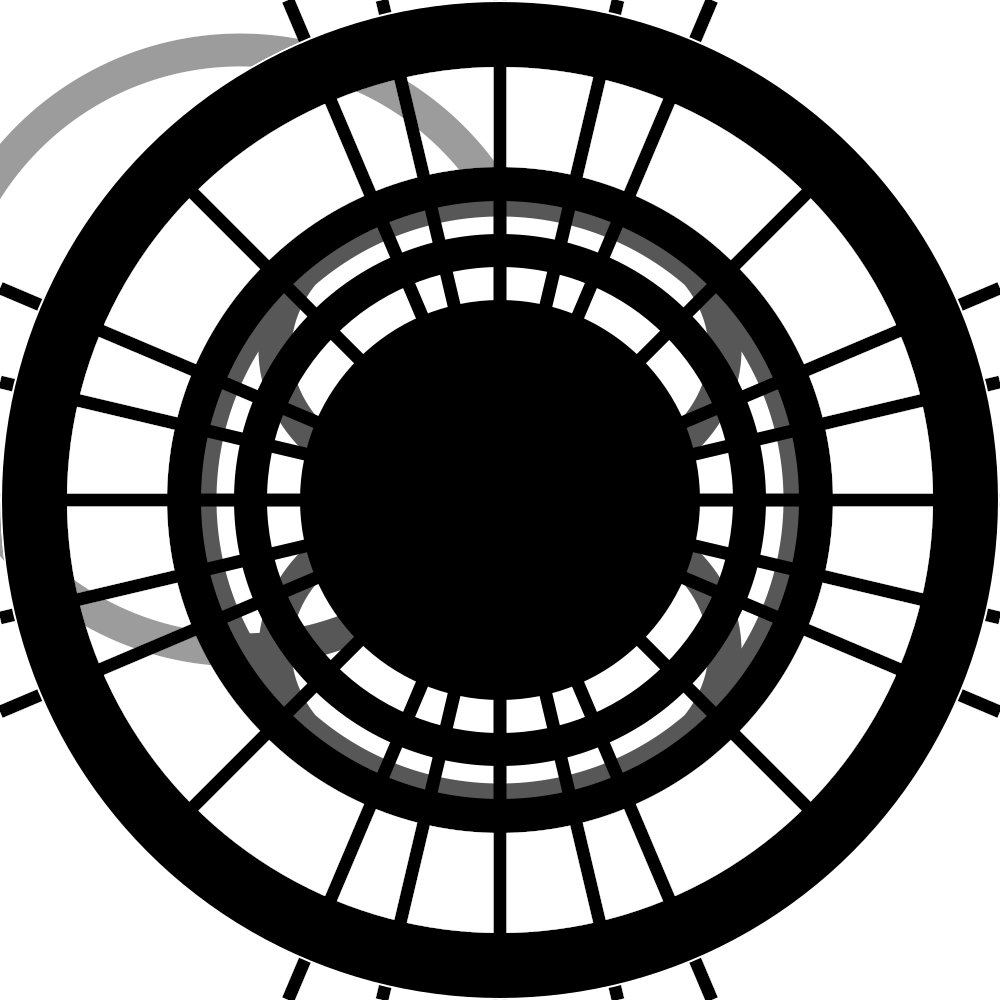
<svg viewBox="0 0 1000 1000" xmlns="w3.org/2000/svg"> <defs> <radialGradient id="core"> <stop offset="0%" stop-color="#000"/> <stop offset="100%" stop-color="#fff"/> </radialGradient> <filter id="turb"> <feTurbulence type="fractalNoise" baseFrequency="0.666" numOctaves="6" seed="666"/> <feDisplacementMap in="SourceGraphic" scale="66"/> </filter> </defs> <!-- Central void that should not be stared at for too long --> <circle cx="500" cy="500" r="333" fill="#000"/> <circle cx="500" cy="500" r="299" fill="#fff"/> <circle cx="500" cy="500" r="266" fill="#000"/> <circle cx="500" cy="500" r="233" fill="#fff"/> <circle cx="500" cy="500" r="200" fill="#000"/> <!-- 33-ray corona (prime, unblinking) --> <g stroke="#000" stroke-width="13"> <path d="M500,500 L500,0 M500,500 L500,1000 M500,500 L0,500 M500,500 L1000,500 M176,176 L824,824 M176,824 L824,176 M288,0 L712,1000 M288,1000 L712,0 M0,288 L1000,712 M0,712 L1000,288 M147,500 L853,500 M500,147 L500,853 M236,236 L764,764 M236,764 L764,236 M0,382 L1000,618 M0,618 L1000,382 M382,0 L618,1000 M382,1000 L618,0"/> </g> <!-- The spiral that goes the wrong way (anti-clockwise, 18.5 turns) --> <path d="M500,500 C200,500 200,800 500,800 C800,800 800,500 500,500 C200,500 200,200 500,200 C800,200 800,500 500,500 A300,300 0 1,1 500,200 A300,300 0 1,1 500,800 A300,300 0 1,1 500,200" fill="none" stroke="#000" stroke-width="33" opacity="0.66"/> <!-- Outer ring of 66 micro-notches (count them if you dare) --> <circle cx="500" cy="500" r="466" fill="none" stroke="#000" stroke-width="66"> <animate attributeName="stroke-dasharray" values="0,7.07 7.07,0" dur="6.66s" repeatCount="indefinite"/> </circle> <!-- Final pulse (invisible to monitors, visible to meat) --> <circle cx="500" cy="500" r="499" fill="none" stroke="url(#core)" stroke-width="2"> <animate attributeName="opacity" values="0;1;0" dur="1.618s" repeatCount="indefinite"/> </circle> </svg> Jason Gray #JasonGray #NorthernNode #LivingLattice
1
7
393
22 Nov 2025
The background is made up of 3 overlapping RadialGradient views - each with a slightly different radius and delay. Together, they create a soft, layered glow that persists across all screens. When the continue button is tapped, the gradient’s origin and radius animate from the bottom of the screen to the top - all driven by SwiftUI’s animation modifiers
1
3
311
28 Oct 2025
void blend(inout vec4 base, vec4 overlay) { base.rgb = mix(base.rgb, overlay.rgb, overlay.a); } float circle(vec2 p, vec2 center, float radius) { return 1.0 - smoothstep(radius - 0.01, radius 0.01, length(p - center)); } float patternCircle(vec2 p, vec2 center, float radius) { float d = length(p - center); // Create alternating rings using distance float rings = fract(d * 30.0); // frequency of rings float pattern = step(0.5, rings); // alternate 0/1 pattern // Mask pattern inside circle radius (inner ring) float mask = circle(p, center, radius); float finalPattern = pattern * mask; return finalPattern; } float radialGradient(vec2 p, vec2 center, float radius) { float d = length(p - center); return 1.0 - smoothstep(0.0, radius, d); } float specular(vec2 p, vec2 center, vec2 lightPos, float intensity) { vec2 toLight = normalize(lightPos - p); vec2 toCenter = normalize(center - p); float spec = max(0.0, dot(toLight, toCenter)); return pow(spec, intensity); } float rimLight(vec2 p, vec2 center, float radius, float thickness) { float d = length(p - center); float rim = smoothstep(radius - thickness, radius, d) * smoothstep(radius 0.02, radius, d); return rim; } float diffuse(vec2 p, vec2 center, vec2 lightPos) { vec2 toLight = normalize(lightPos - p); vec2 normal = normalize(p - center); return max(0.3, dot(normal, toLight)); } vec2 rotate(vec2 p, float angle) { float c = cos(angle); float s = sin(angle); return vec2(c * p.x - s * p.y, s * p.x c * p.y); } float tickMark(vec2 p, float angle, float innerRadius, float outerRadius, float width) { vec2 rp = rotate(p, -angle); float d = length(rp); float radialMask = step(innerRadius, d) * step(d, outerRadius); float angularMask = step(abs(rp.x), width); return radialMask * angularMask; } float allTickMarks(vec2 p, vec2 lightPos) { float marks = 0.0; float PI = 3.14159265359; for(int i = 0; i < 12; i ) { float angle = float(i) * PI * 2.0 / 12.0; float tick = tickMark(p, angle, 0.55, 0.68, 0.015); marks = max(marks, tick); } for(int i = 0; i < 60; i ) { if(mod(float(i), 5.0) != 0.0) { float angle = float(i) * PI * 2.0 / 60.0; float tick = tickMark(p, angle, 0.60, 0.68, 0.006); marks = max(marks, tick); } } return marks; } float rectangle(vec2 p, vec2 center, vec2 size) { vec2 d = abs(p - center) - size * 0.5; float dist = length(max(d, 0.0)) min(max(d.x, d.y), 0.0); return 1.0 - smoothstep(-0.005, 0.005, dist); } float dropShadow(vec2 p, vec2 center, float radius, vec2 offset, float softness) { float d = length(p - center - offset); return 1.0 - smoothstep(radius, radius softness, d); } void mainImage( out vec4 fragColor, in vec2 fragCoord ) { // [-1, 1] vec2 uv = (2.0 * fragCoord.xy - iResolution.xy) / iResolution.y; float speed = 0.5; float angle = iTime * speed; vec2 puv = rotate(uv, angle); vec2 lightPos = vec2(-0.3, 0.4); float shadow = dropShadow(uv, vec2(0.0), 0.7, vec2(0.02, -0.02), 0.15); float c1 = circle(puv, vec2(0.0), 1.0 * 0.7); float c2 = circle(puv, vec2(0.0), 1.0 * 0.5); float c2Diffuse = diffuse(puv, vec2(0.0), lightPos) * c2; float c3 = patternCircle(puv, vec2(0.0), 1.0 * 0.5); float c3Gradient = radialGradient(puv, vec2(0.0), 1.0 * 0.5) * c3; float disk = circle(puv, vec2(0.0), 1.0 * 0.3); float diskDiffuse = diffuse(puv, vec2(0.0), lightPos) * disk; float ticks = allTickMarks(puv, lightPos); float tickGradient = radialGradient(puv, vec2(0.0), 0.7) * ticks; float tickSpec = specular(puv, vec2(0.0), lightPos, 40.0) * ticks; float indicatorDisk = circle(puv, vec2(0.0), 0.08); float indicatorDiskDiffuse = diffuse(puv, vec2(0.0), lightPos) * indicatorDisk; float directionRect = rectangle(puv, vec2(0.0, 0.03), vec2(0.02, 0.08)); // basee fragColor = vec4(1.0, 1.0, 1.0, 1.0); blend(fragColor, vec4(0.0, 0.0, 0.0, shadow * 0.3)); blend(fragColor, vec4(0.0, 0.0, 0.0, c1)); vec3 tickColor = mix(vec3(0.7, 0.7, 0.75), vec3(0.95, 0.95, 1.0), tickGradient * 0.8); blend(fragColor, vec4(tickColor, ticks)); blend(fragColor, vec4(1.0, 1.0, 1.0, tickSpec * 0.7)); vec3 c2Color = vec3(0.2, 0.2, 0.2) * c2Diffuse; blend(fragColor, vec4(c2Color, c2)); vec3 c3Color = mix(vec3(0.25, 0.25, 0.28), vec3(0.45, 0.45, 0.48), c3Gradient); float c3Spec = specular(puv, vec2(0.0), lightPos, 20.0) * c3; blend(fragColor, vec4(c3Color, c3)); blend(fragColor, vec4(0.9, 0.9, 1.0, c3Spec * 0.6)); vec3 diskColor = vec3(0.4, 0.4, 0.4) * diskDiffuse; blend(fragColor, vec4(diskColor, disk)); vec3 indicatorDiskColor = vec3(0.5, 0.5, 0.5) * indicatorDiskDiffuse; blend(fragColor, vec4(indicatorDiskColor, indicatorDisk)); blend(fragColor, vec4(0.3, 0.3, 0.3, directionRect)); }
3
127
2. Gradienty radialne i liniowe w SVG Wykorzystaliśmy zaawansowane gradienty SVG zdefiniowane w sekcji <defs> do stworzenia realistycznego wyglądu tęczówki. Gradient radialny (radialGradient) został użyty do nadania głębi tęczówce - z jaśniejszym kolorem w centrum przechodzącym do ciemniejszego na brzegach. Zastosowaliśmy multiple stop-points z różnymi odcieniami niebieskiego, co tworzy iluzję trójwymiarowości. Gradient liniowy (linearGradient) posłużył do stworzenia wzorów na tęczówce, dodając jej tekstury. Szczególnie istotne było użycie gradientu do symulacji odbicia światła - białe elipsy z gradientem od pełnej do zerowej nieprzezroczystości tworzą efekt wilgotnej, błyszczącej powierzchni oka.
1
2
206
Replying to @okpasquale
Output: That’s an SVG (Scalable Vector Graphics) code snippet — basically instructions for a web browser (or design software) to draw a vector image. Here’s what’s inside this particular file: •Overall: A colorful, abstract cartoon-like figure. It looks like it was designed to resemble a whimsical face/character. •Main shapes: • Several curved paths with gradient strokes (pink, purple, yellow) — these make up abstract outlines and accents. • Ellipses with gradients and black fills — these resemble eyes and pupils. • A smaller ellipse at the top looks like a third eye / forehead feature. • White circles inside the ellipses give it a “cartoon eye highlight” look. • Extra radial gradient circles with orange/pink/yellow tones — possibly decorative or “orb” accents floating around. •Gradients & colors: Uses multiple linearGradient and radialGradient definitions for glowing effects (white → light blue, or yellow → pink). In plain terms: It’s vector art of a stylized, multi-eyed creature/character with glowing, colorful outlines — kind of psychedelic or mascot-like.
4
2
10
382
<svg width="690" height="844" viewBox="0 0 690 844" fill="none" xmlns="w3.org/2000/svg"> <path d="M72.3969 427.029C72.3893 669.3 722.485 513.357 380.599 747.28C127.597 920.388 392.598 717.285 522.14 376.207C616.354 128.145 72.4058 141.647 72.3969 427.029Z" stroke="url(#paint0_linear_206_50)" stroke-width="34.5782"/> <path d="M200.616 394.271C256.342 441.151 347.436 427.133 402.199 362.572" stroke="#FF1A88" stroke-width="44.34" stroke-linecap="round"/> <path d="M433.332 585.581C487.499 585.581 607.334 598.041 629.585 465.818" stroke="url(#paint1_linear_206_50)" stroke-opacity="0.6" stroke-width="23.9924"/> <path d="M391.948 611.413C338.153 613.521 226.042 644.045 207.957 749.275" stroke="url(#paint2_linear_206_50)" stroke-opacity="0.6" stroke-width="23.9924"/> <ellipse cx="169.959" cy="241.74" rx="83.9734" ry="125.96" transform="rotate(-18.9797 169.959 241.74)" fill="url(#paint3_radial_206_50)"/> <ellipse cx="195.548" cy="234.817" rx="46.6519" ry="69.9778" transform="rotate(-18.9797 195.548 234.817)" fill="black"/> <ellipse cx="373.596" cy="212.155" rx="83.9734" ry="125.96" transform="rotate(5.23441 373.596 212.155)" fill="url(#paint4_radial_206_50)"/> <ellipse cx="349.46" cy="215.417" rx="46.6519" ry="69.9778" transform="rotate(5.23441 349.46 215.417)" fill="black"/> <ellipse cx="246.034" cy="91.6877" rx="54.075" ry="81.1126" transform="rotate(-13.8309 246.034 91.6877)" fill="url(#paint5_radial_206_50)"/> <ellipse cx="248.981" cy="106.95" rx="30.0417" ry="45.0625" transform="rotate(-13.8309 248.981 106.95)" fill="black"/> <circle cx="356.96" cy="177.525" r="24.8154" fill="white"/> <circle cx="190.888" cy="200.432" r="24.8154" fill="white"/> <circle cx="251.018" cy="84.945" r="14.3166" fill="white"/> <circle cx="46.9233" cy="46.9233" r="46.9233" transform="matrix(0.293268 -0.95603 -0.95603 -0.293268 662.383 514.289)" fill="url(#paint6_radial_206_50)"/> <circle cx="46.9233" cy="46.9233" r="46.9233" transform="matrix(0.293268 -0.95603 -0.95603 -0.293268 229.068 831.162)" fill="url(#paint7_radial_206_50)"/> <defs> <linearGradient id="paint0_linear_206_50" x1="299.605" y1="903.767" x2="436.079" y2="248.87" gradientUnits="userSpaceOnUse"> <stop stop-color="#FFE600"/> <stop offset="1" stop-color="#FF4E8D"/> </linearGradient> <linearGradient id="paint1_linear_206_50" x1="719.647" y1="582.207" x2="451.45" y2="593.66" gradientUnits="userSpaceOnUse"> <stop offset="0.848958" stop-color="#BC4EFF"/> <stop offset="1" stop-color="#A424F2" stop-opacity="0"/> </linearGradient> <linearGradient id="paint2_linear_206_50" x1="69.6743" y1="729.191" x2="360.778" y2="610.84" gradientUnits="userSpaceOnUse"> <stop offset="0.848958" stop-color="#850091"/> <stop offset="1" stop-color="#C212D2" stop-opacity="0"/> </linearGradient> <radialGradient id="paint3_radial_206_50" cx="0" cy="0" r="1" gradientUnits="userSpaceOnUse" gradientTransform="translate(177.543 213.937) rotate(95.9305) scale(147.873 107.988)"> <stop offset="0.796875" stop-color="white"/> <stop offset="0.875" stop-color="#D2FBFD"/> <stop offset="1" stop-color="#5A9DEB"/> </radialGradient> <radialGradient id="paint4_radial_206_50" cx="0" cy="0" r="1" gradientUnits="userSpaceOnUse" gradientTransform="translate(381.18 184.353) rotate(95.9305) scale(147.873 107.988)"> <stop offset="0.796875" stop-color="white"/> <stop offset="0.875" stop-color="#D2FBFD"/> <stop offset="1" stop-color="#5A9DEB"/> </radialGradient> <radialGradient id="paint5_radial_206_50" cx="0" cy="0" r="1" gradientUnits="userSpaceOnUse" gradientTransform="translate(250.918 73.7843) rotate(95.9305) scale(95.2237 69.5395)"> <stop offset="0.796875" stop-color="white"/> <stop offset="0.875" stop-color="#D2FBFD"/> <stop offset="1" stop-color="#5A9DEB"/> </radialGradient> <radialGradient id="paint6_radial_206_50" cx="0" cy="0" r="1" gradientUnits="userSpaceOnUse" gradientTransform="translate(77.7851 53.9749) rotate(-175.555) scale(74.3299)"> <stop offset="0.0364583" stop-color="white"/> <stop offset="0.65625" stop-color="#FFD115"/> <stop offset="1" stop-color="#FF4E8E"/> </radialGradient> <radialGradient id="paint7_radial_206_50" cx="0" cy="0" r="1" gradientUnits="userSpaceOnUse" gradientTransform="translate(77.7851 53.9749) rotate(-175.555) scale(74.3299)"> <stop offset="0.0364583" stop-color="white"/> <stop offset="0.65625" stop-color="#FFD115"/> <stop offset="1" stop-color="#FF4E8E"/> </radialGradient> </defs> </svg>

10
2
24
4,326
10 Jul 2025
<!DOCTYPE html> <html> <head> <title>Xbox 360 Controller SVG</title> <style> body { background-color: #f0f0f0; display: flex; justify-content: center; align-items: center; height: 100vh; margin: 0; } svg { width: 80%; max-width: 500px; height: auto; filter: drop-shadow(0px 5px 5px rgba(0,0,0,0.2)); } </style> </head> <body> <svg xmlns="w3.org/2000/svg" viewBox="0 0 400 260"> <defs> <!-- Gradient for the main body to give slight depth --> <linearGradient id="bodyGrad" x1="0%" y1="0%" x2="0%" y2="100%"> <stop offset="0%" style="stop-color:#FFFFFF;stop-opacity:1" /> <stop offset="100%" style="stop-color:#E0E0E0;stop-opacity:1" /> </linearGradient> <!-- Gradient for the chrome Guide button --> <radialGradient id="guideGrad" cx="50%" cy="50%" r="50%" fx="50%" fy="50%"> <stop offset="0%" style="stop-color:#FFFFFF;stop-opacity:1" /> <stop offset="40%" style="stop-color:#D0D0D0;stop-opacity:1" /> <stop offset="100%" style="stop-color:#909090;stop-opacity:1" /> </radialGradient> <!-- Gradient for Analog stick tops --> <radialGradient id="stickTopGrad" cx="50%" cy="50%" r="50%" fx="50%" fy="30%"> <stop offset="0%" style="stop-color:#999999;stop-opacity:1" /> <stop offset="100%" style="stop-color:#777777;stop-opacity:1" /> </radialGradient> </defs> <!-- Triggers (Slightly visible from top) --> <path d="M 65 25 Q 80 5, 110 5 Q 125 5, 130 25 Z" fill="#ccc"/> <path d="M 270 25 Q 275 5, 290 5 Q 320 5, 335 25 Z" fill="#ccc"/> <!-- Main Body Shape (Handles and Core) --> <path d="M 50 40 C 5 120, 40 240, 130 210 L 180 200 L 220 200 C 360 240, 395 120, 350 40 Q 300 15, 200 30 Q 100 15, 50 40 Z" fill="url(#bodyGrad)" stroke="#ccc" stroke-width="2"/> <!-- Bumpers (LB and RB) --> <rect x="60" y="28" width="80" height="15" rx="5" fill="#f9f9f9" stroke="#bbb" stroke-width="1"/> <rect x="260" y="28" width="80" height="15" rx="5" fill="#f9f9f9" stroke="#bbb" stroke-width="1"/> <!-- Battery Pack Area (Indentation) --> <rect x="160" y="30" width="80" height="10" rx="3" fill="#ddd"/> <!-- Left Analog Stick --> <circle cx="85" cy="90" r="25" fill="#555" /> <circle cx="85" cy="90" r="22" fill="url(#stickTopGrad)" /> <!-- D-Pad --> <g transform="translate(150, 155)"> <circle cx="0" cy="0" r="28" fill="#666"/> <!-- Cross shape --> <path d="M-18 -5 L -18 5 L -5 5 L -5 18 L 5 18 L 5 5 L 18 5 L 18 -5 L 5 -5 L 5 -18 L -5 -18 L -5 -5 Z" fill="#888"/> </g> <!-- Right Analog Stick --> <circle cx="250" cy="155" r="25" fill="#555" /> <circle cx="250" cy="155" r="22" fill="url(#stickTopGrad)" /> <!-- ABXY Buttons Group --> <g transform="translate(305, 90)" font-family="Arial, sans-serif" font-weight="bold" font-size="14" text-anchor="middle" dominant-baseline="middle" fill="#333"> <!-- A Button (Green) --> <circle cx="0" cy="25" r="15" fill="#4CAF50" stroke="#388E3C" stroke-width="1"/> <text x="0" y="26">A</text> <!-- B Button (Red) --> <circle cx="25" cy="0" r="15" fill="#F44336" stroke="#D32F2F" stroke-width="1"/> <text x="25" y="1">B</text> <!-- X Button (Blue) --> <circle cx="-25" cy="0" r="15" fill="#2196F3" stroke="#1976D2" stroke-width="1"/> <text x="-25" y="1">X</text> <!-- Y Button (Yellow) --> <circle cx="0" cy="-25" r="15" fill="#FFC107" stroke="#FFA000" stroke-width="1"/> <text x="0" y="-24">Y</text> </g> <!-- Guide Button (The Nexus) --> <circle cx="200" cy="95" r="20" fill="url(#guideGrad)" stroke="#aaa" stroke-width="1"/> <!-- The Green X --> <path d="M 192 85 L 200 90 L 208 85 L 200 100 L 208 105 L 200 110 L 192 105 L 200 100 Z" fill="#4CAF50" stroke="#388E3C" stroke-width="0.5"/> <!-- Start and Back Buttons --> <!-- Back --> <ellipse cx="165" cy="95" rx="8" ry="6" fill="#ccc" stroke="#999" stroke-width="1"/> <!-- Start --> <ellipse cx="235" cy="95" rx="8" ry="6" fill="#ccc" stroke="#999" stroke-width="1"/> </svg> </body> </html>

3
343
radialGradientとconicGradientの実装 #dailycoding #p5js #pavejs #risograph
3
278
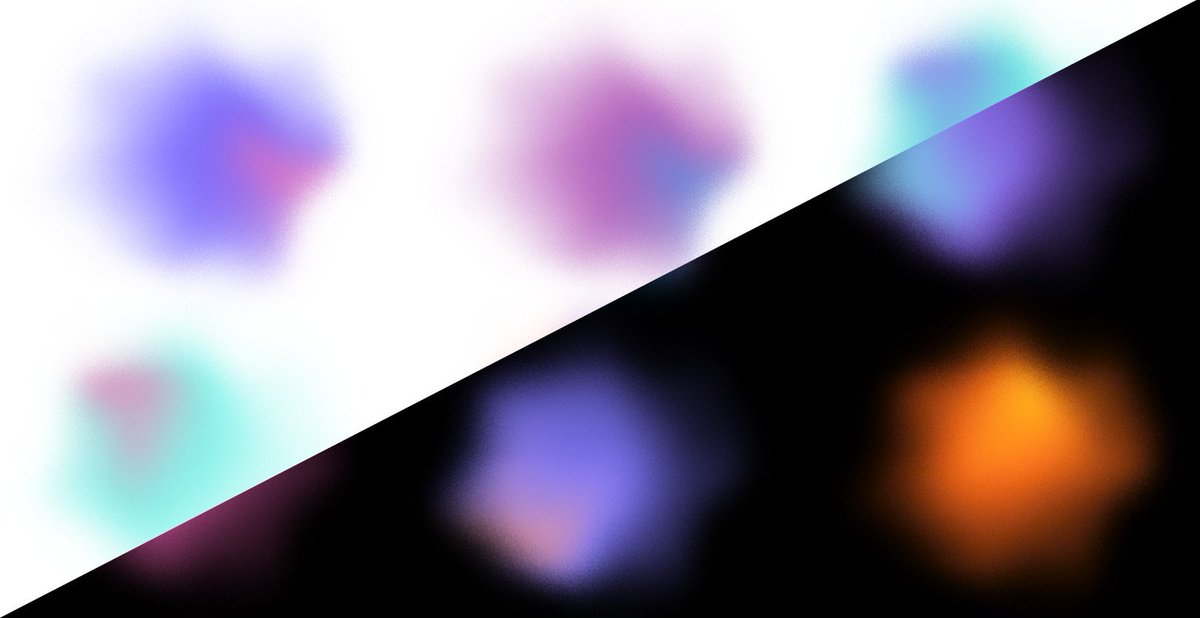
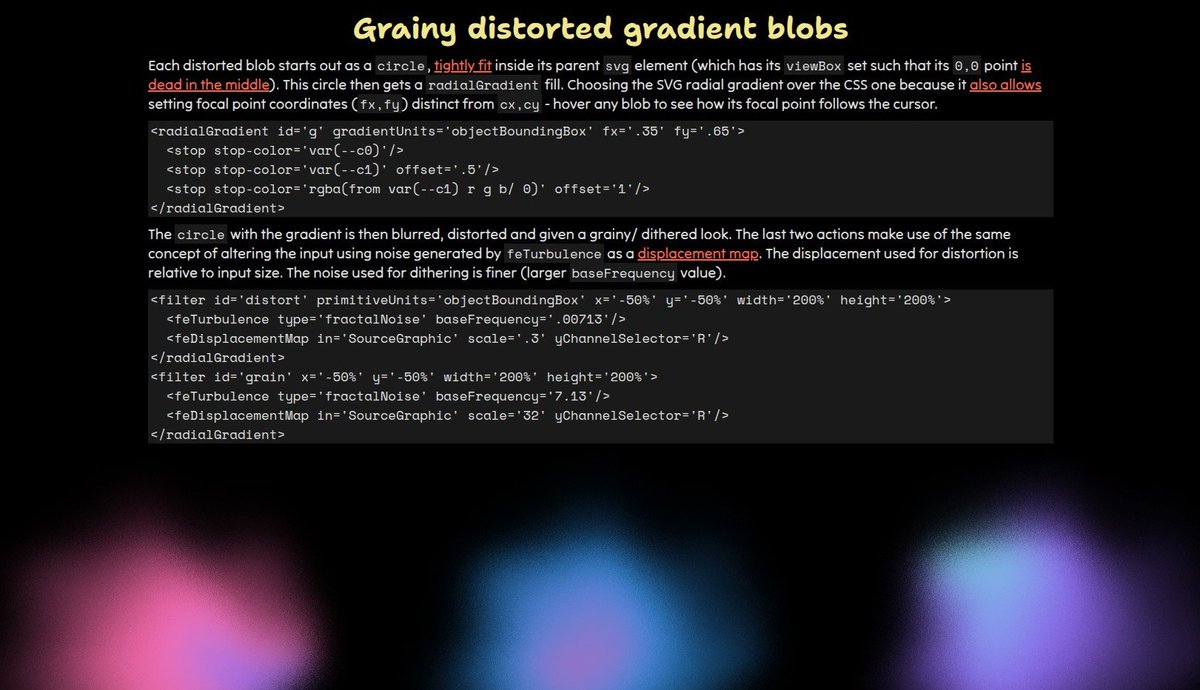
Made a gallery of such #SVG gradient filter effects blobs codepen.io/thebabydino/full/… Also includes an explanation of the how behind and interaction: the focal point of the `radialGradient` the blabs start from follows the cursor on hover. Different blobs for light/ dark mode.😼
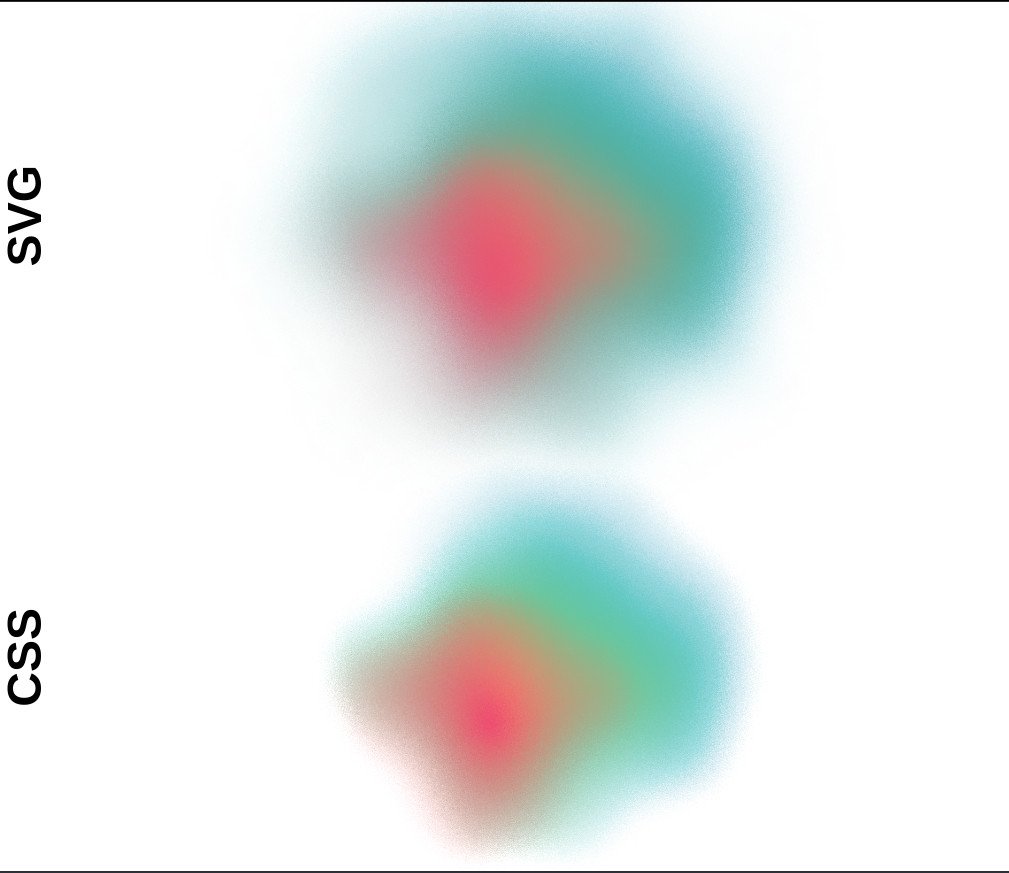
Grainy distorted gradient blob: 1 #SVG `radialGradient` (setting a focal point `fx,fy`) vs. multiple CSS `radial-gradient()` layers (no option to control focal point). Using filters for distortion & grain effect. A bit more detail on this reddit.com/r/css/comments/1j…
1
1
48
2,895
Grainy distorted gradient blob: 1 #SVG `radialGradient` (setting a focal point `fx,fy`) vs. multiple CSS `radial-gradient()` layers (no option to control focal point). Using filters for distortion & grain effect. A bit more detail on this reddit.com/r/css/comments/1j…
1
3
24
4,471
🌀 A mathematically 'perfect' sword slash. ✨ uvCenter = (uv * 2.0) - 1.0; polarUV.x = length(uvCenter); polarUV.y = atan2(uvCenter.x, uvCenter.y) / TAU; circle = step(polarUV.x, 1.0); angleGradient = polarUV.y 0.5; radialGradient = 1.0 - polarUV.x; return (angleGradient - radialGradient) * circle; The angle gradient is hollowed out using the radial gradient, and the result masked by a circle. You can subtract by noise or any other pattern, and remap/animate the gradients for the same result as below.
7
88
1,026
84,734
yeah idk the latest svg 2.0 draft only contains the good old linearGradient and radialGradient element, nothing about gradientmesh. kinda weird thing to do from inkscape really. then again quite novel. i wonder why they put it in svg namespace instead of inkscape:gradientmesh??
1
2
57
15 May 2024
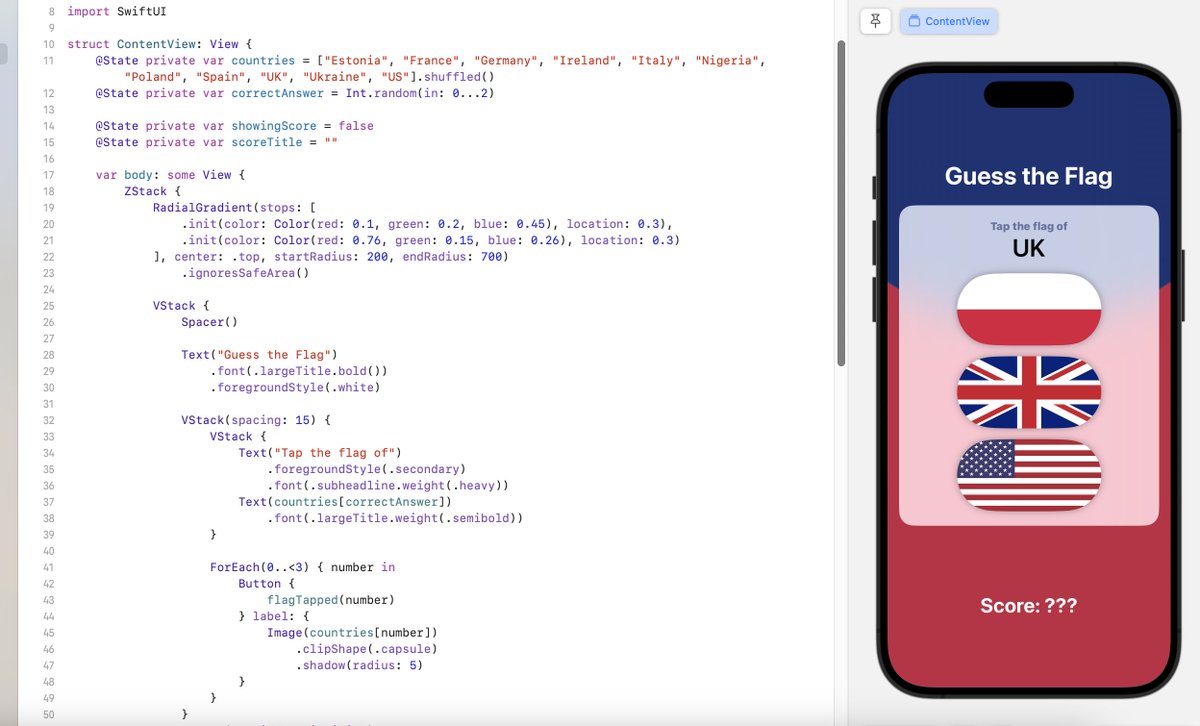
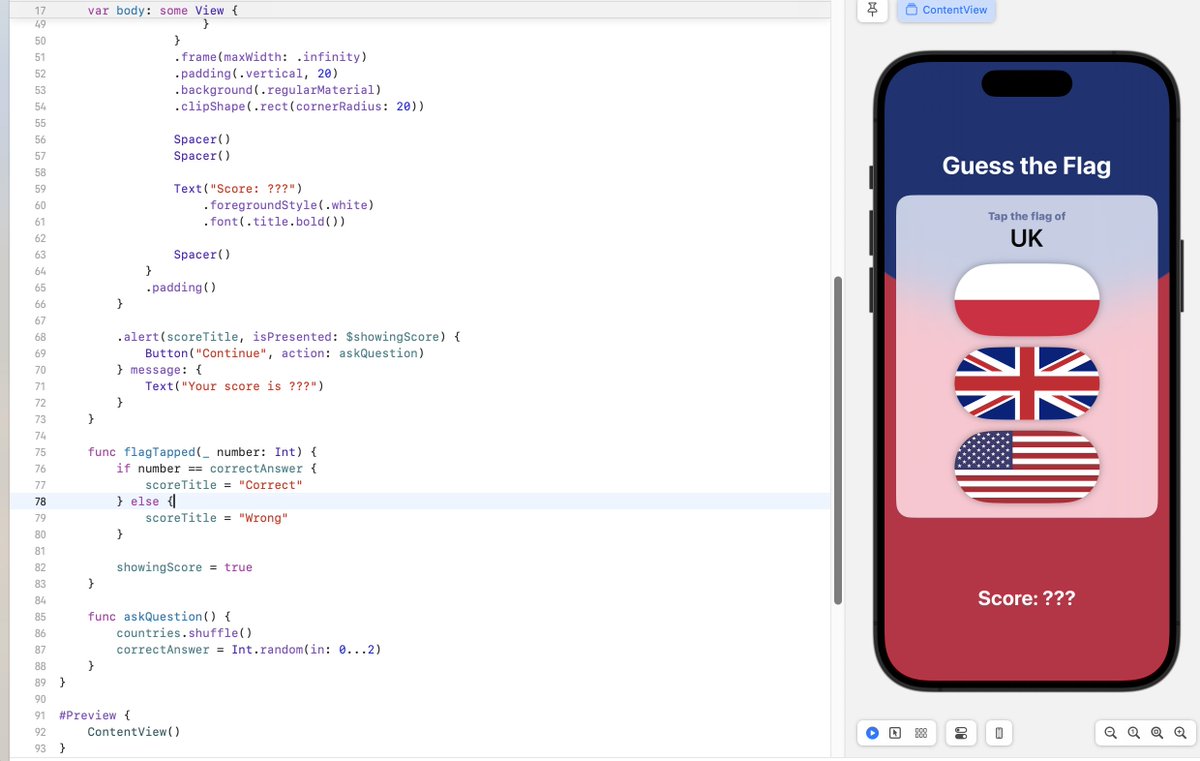
Lots to unpack today, clever use of RadialGradient, font styling, clipShape, using Spacer() to ensure UI looks good across different size devices. 🎉 I just finished Day 21 of the #100DaysOfSwiftUI at hackingwithswift.com/100/swi… via @twostraws
2
59
14 Feb 2024
My IOS Development journey (Day 21) I was able to experiment: VStack HStack Zstack image LinearGradient RadialGradient Buttons and many more to build this App ✌🏿 #100DayChallenge #100daysofcoding #100DaysOfSwiftUI #freecodecamp Rema Kiss Daniel Frank De Jong
1
4
309