
Jun 2
"Facebook ads don't work for me my audience is too small"
find your target customers linkedin pofiles
then use the tool like salesql API to find their personal emails
you can do a customer match list with those emails in Facebook ads and it's going to be way higher than their business emails for match percentage
run ads directly to your target customers
everybody that touches the site, pixel them and remarket to them
and you can also do the same thing for Google Ads, same emails get imported there as well
if you're having trouble with targeting all of Facebook, this is a really easy way to get around this
you can also cold email these people as well by using their LinkedIn profiles to find their business emails or cold DM them on LI
be everywhere they are
7
5
91
11,665

Apr 21
Everyone's posting "I connected Claude to LinkedIn via MCP" like they cracked some code.
Without drowning you in technical jargon, let me tell you what’s really going on under the hood:
LinkedIn has no official API for outreach. Never has.
That's why every automation tool exists. They're all workarounds for the same problem.
MCP (Model Context Protocol) adds a new layer.
It lets AI models (Claude, specifically) talk to external tools and databases. One conversation. No tab switching.
If you wanted to automate personalized cold outreach messages, here’s what you’re probably dealing with:
- Open Sales Navigator, pull a list (all via LinkedIn UI)
- Export to CSV (using a third party chrome extension like SalesQL)
- Open Claude in another tab
- Paste CSV, ask for personalized openers
- Copy openers back into your outreach tool
- Repeat per segment
Now, here’s the same process with the MCP workflow:
- Connect your outreach tool's MCP server to Claude
- "Find people who commented on [post], personalize an opener referencing their comment, add them to a LinkedIn campaign"
- One prompt. Done.
But what most "MCP LinkedIn" content conveniently leaves out:
Claude is only the brains behind your LinkedIn outreach. Research prospects. Write messages. Segment your list.
Claude can’t safely send LinkedIn connection requests. In fact, it’s the complete opposite. Trying to automate your LinkedIn activity with Claude Cowork is guaranteed to get your account restricted.
It doesn't have residential IPs. It doesn't randomize send times. It doesn't manage daily limits. It doesn't run cloud sessions that keep your account from getting flagged.
MCP connects the brain (Claude) to the hands (your outreach tool). Without the hands, you have a very smart assistant writing messages that never get sent.
So while SalesRobot does not have a native MCP server (yet), it does have an API that you can feed into Claude Code.
It pulls all API endpoints and runs the campaigns on SalesRobot for you (Safely, like 4,000 users do today)
Comment “MCP” and I’ll show you a complete demo on how you can get it to work for you.
1
2
4
92
Apr 20
"Facebook ads don't work for me my audience is too small"
the solution
find your target customers linkedin pofiles
then use the tool like salesql API to find their personal emails
you can do a customer match list with those emails in Facebook ads and it's going to be way higher than their business emails for match percentage
run ads directly to your target customers
everybody that touches the site, pixel them and remarket to them
track this whole campaign and analyze the data using Graphed .com
and you can also do the same thing for Google Ads, same emails get imported there as well
if you're having trouble with targeting all of Facebook, this is a really easy way to get around this
you can also cold email these people as well by using their LinkedIn profiles to find their business emails or cold DM them on LI
be everywhere they are
give this to your hermes agent and say "build this"
deploy your hermes agent for marketing on graphed .com
8
3
96
9,903

Apr 12
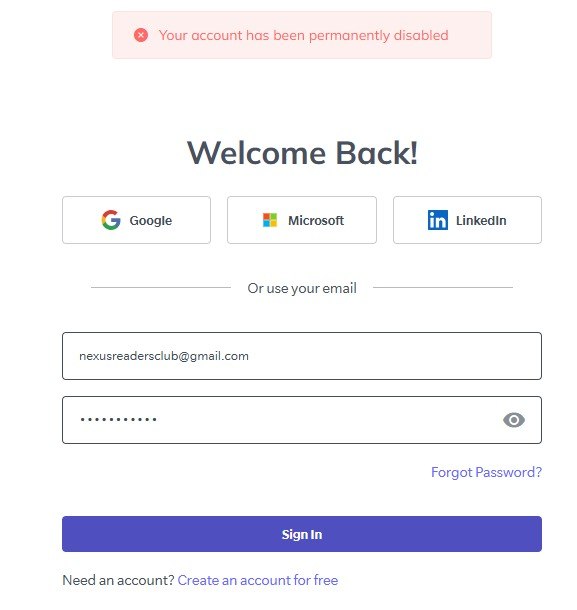
Paid for a @salesql subscription with my own money… only to have my account disabled shortly after with no explanation.
No warning. No clear reason. No response from support.
3
2
3
97
Mar 19
how to send 100,000 cold emails per month for about $1000
hypertide io for inboxes
connect to instantly for warming
source leads from apollo io api and leadmagic and salesql
cascade enrichment waterfall
1% turn into customers
remarket to them across all channels with a VSL to build deeper trust
startup, cash in, sell out, bro down
15
3
133
11,525
Mar 12
"Facebook ads don't work for me my audience is too small"
find your target customers linkedin pofiles
then use the tool like salesql API to find their personal emails
you can do a customer match list with those emails in Facebook ads and it's going to be way higher than their business emails for match percentage
run ads directly to your target customers
everybody that touches the site, pixel them and remarket to them
track this whole campaign and analyze the data using Graphed .com
and you can also do the same thing for Google Ads, same emails get imported there as well
if you're having trouble with targeting all of Facebook, this is a really easy way to get around this
you can also cold email these people as well by using their LinkedIn profiles to find their business emails or cold DM them on LI
be everywhere they are
13
8
150
13,494
Feb 10
Everybody's saying you should just target all Facebook and I think this can be wrong
a customer match can still perform better
but if you do their business emails, the match rate will be extremely low
the way around this is to use the salesQL API
it's very good at finding their personal email addresses
you'll get a way higher match rate when you do a customer match list
this is also a very cheap way to do something like a contact level
4
7
1,630


10 Sep 2025
You can use salesQL to get their mails on LinkedIn
15
1,050
6 Aug 2025
so you can scrape target ICP business emails and linkedin profiles and do a customer match in FB of the emails
but the business emails don't have a direct 1 to 1 match
we see about 30%
so what you can do is take those linkedin profiles of the people and use something like SalesQL to find personal emails/all emails those people ever had
do that import
way better match rate
2
21
3,923

20 May 2025
Install an chrome extension called Salesql. Navigate to their linkedin profile. Click on the extension. Boom! You have their emails.
2
136

6 May 2025
👏 Huge thanks to @prospeo_io, @SalesQL, and @smartreachio for building outstanding LinkedIn email finder tools!
We’ve added you to our 2025 list alongside other top solutions. Your innovation keeps outreach smart, fast, and effective.
#B2BMarketingTools
2
2
42
28 Apr 2025
Big thanks to @SalesQL for creating such a great product! 🙌
We've proudly added you to our Best Email Finder 2025 selection.
Your contribution to smarter lead generation truly stands out. 🚀
Keep up the amazing work!
#FindEmails
2
2
33

27 Mar 2025
🔥 #100DaysOfSales – Day 2 Recap 🔥
Focused on smaller chemical plants today—and it made fully sense!
Identified 63 promising small chemical production plants (target: 60 ✅)
Completed 45 cold calls from yesterday’s list; connected with 5 decision makers 📞
Sent 150 personalized follow-up emails to the remaining contacts from yesterday’s outreach and new contacts (2 answers saying that they use their own solution!)
Added 204 new decision makers to the pipeline using LinkedIn Sales Navigator and SalesQL.
Small win: Secured one demo meeting scheduled for next week—momentum starts here!
Insight: Smaller companies seem more receptive and open-minded toward ready-to-use AI solutions.
3
46

28 Nov 2024
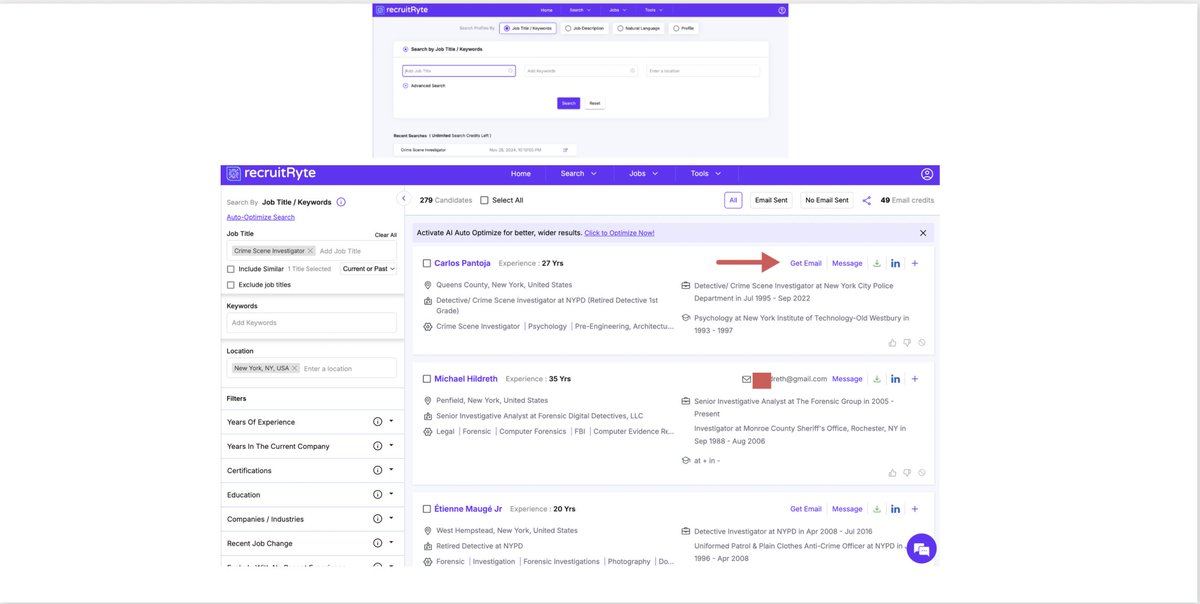
How to find the email of the Linkedin profile owner without a Linkedin account?
Use various third-party databases (Amazing Hiring, Prospeo, SalesQL etc). Today I also found out aboutapp.recruitryte.com (50 emails free).
@RishabhIndia18, you asked me about this problem
2
42
150
16,097

3 Nov 2024
Try cold emailing the recruiter, hiring manager, engineer for big companies and CEO and founders of small startups.Use tools like getprospect and salesql to get contacts from linkedin profiles.Also build network and connections on Linkedin and Twitter.(9/13)
1
1
27
4,019

30 Sep 2024
TRICK TO GET 10,000 TARGETED LEADS EASILY :
Use a mixture of
- LinkedIn sales navigator
- Apify scraper to get your LinkedIn leads
- SalesQL to enirch these leads and get their phone/emails
- SMTP verify the emails
- profit
DM me for a full detailed guide 🫡
4
191

24 Sep 2024
cut salesql add @findymail trust
findymail.com/sales-navigato… read my testimonial haha salesql got my LI banned for 2 yrs
1
4
393