
Day 1/7 - Async JavaScript Reset.
Going back to rebuild last week(Day 36-39) from scratch.
Today: understanding why async, how time works in single-threaded engine, and and what setTimeout(0) actually does.
Foundations before speed. 🥔🧑💻
#100DaysOfCode #JavaScript #BuildInPublic
5

# Ponytail:让 AI Agent 写出 1 行而不是 50 行的 skill
你知道那种程序员。长发马尾,椭圆眼镜,在公司的时间比版本控制系统还长。你给他看五十行代码,他看了看,什么都没说,用一行替换了全部。
Ponytail 把这个人塞进了你的 AI Agent 里。
这是一个开源 skill,8 天前发布,已经支持 10 种 Agent(Claude Code、Codex、Cursor、Pi、Windsurf、Copilot……)。核心只有 95 行 SKILL.md,但每次触发,它都会让 Agent 停在一个梯子上,逐级往下走,在第一个能站稳的台阶停下。
---
## 梯子:六步,但可能一步就够了
Ponytail 的整个方法论只有这六步:
```
1. 这东西真的需要存在吗? → 不需要就跳过(YAGNI)
2. 标准库是不是已经有了? → 用标准库
3. 原生平台功能能覆盖吗? → <input type="date"> 而不是一个组件库
4. 已经安装的依赖能解决吗? → 用已装的,永远不加新依赖给几行代码能搞定的事
5. 一行能搞定吗? → 一行
6. 实在不行:能跑的最少代码
```
**梯子是本能,不是研究项目。** 两步都成立?走更高那步,然后继续。第一个能用的懒方案就是对的。
---
## 五组对照:正常 Agent vs Ponytail
我把五个日常 coding 任务跑了一遍,左边是正常 Agent 会写的东西,右边是 Ponytail。
### 1. 日期选择器
```
正常: npm install flatpickr 30 行 React wrapper CSS import
Ponytail: <input type="date">
// ponytail: 浏览器自带
```
**1 个依赖 30 行 → 0 依赖 1 行。** 原生、无障碍、多语言、键盘导航、移动端适配——浏览器团队已经做完了。
### 2. 缓存系统
```
正常: 120 行 TTLCache 类,含线程安全、LRU 淘汰、统计端点
Ponytail: from functools import lru_cache
@lru_cache(maxsize=1000)
```
**120 行 → 2 行。** 最快的缓存是你根本不需要 debug 的那个。
### 3. 限流器
```
正常: 35 行滑动窗口 RateLimiter 类,deque threading.Lock
Ponytail: import threading
_sem = threading.Semaphore(10)
```
**35 行 → 6 行。** Semaphore 是操作系统级别的限流,已经比你写的好。
### 4. 防抖
```
正常: npm install lodash.debounce (600B) import wrap
Ponytail: function debounce(fn, ms) {
let t;
return (...a) => { clearTimeout(t); t = setTimeout(() => fn(...a), ms); };
}
```
**一个依赖 → 3 行。** 不需要 leading/trailing/maxWait 的时候,这段代码够用十年。
### 5. 倒计时组件
```
正常: React 组件,useEffect useState useRef cleanup 格式化逻辑
Ponytail: <input type="time">
// ponytail: 浏览器自带
```
**190 行 React → 1 行 HTML。** 除非你真的需要一个定制的倒计时 UI,否则 `input[type=time]` 就够了。
---
## 有数据吗?
有。作者跑了 5 个任务 × 3 个模型(Haiku、Sonnet、Opus)× 3 个配置(无 skill、Caveman、Ponytail)× 10 轮,取中位数。
**Ponytail v3 vs 无 skill 的基线:**
| 指标 | 基线 | Ponytail | 差别 |
|------|------|----------|------|
| 代码行数 | ~293 | ~47 | **-84%** |
| Token 用量 | 161,955 | 135,709 | **-16%** |
| 耗时 | 479s | 127s | **-73%** |
**Ponytail v3 vs Caveman(此前最极简的 skill):**
| 指标 | Caveman | Ponytail |
|------|---------|----------|
| 代码行数 | ~117 | ~47 (**2.5× 更少**) |
| Token 用量 | 138,410 | 135,709 (**-2%**) |
| 耗时 | 136s | 127s (**-7%**) |
对于基线会写出 190 行倒计时组件、耗时 208 秒的那种退化情况,两个 skill 都完全避免了——但 Ponytail 在代码最小化上把 Caveman 又拉出了一个量级。
---
## 不止是少写代码
Ponytail 的设计有几个被低估的决策:
### 1. "ponytail:" 注释——简化的意图显式化
每次 Ponytail 做简化,代码里会留一个 `ponytail:` 注释,说明选择了什么捷径、什么情况下需要升级。
```python
# ponytail: global lock, per-account locks if throughput matters
_lock = threading.Lock()
```
这让"简单"读起来像**有意为之**,而不是"Agent 偷懒了"。捷径有已知的天花板,注释里写了升级路径。后来需要升级的人不会骂你。
### 2. 三个强度等级
| 等级 | 行为 | 场景 |
|------|------|------|
| **lite** | 正常写,但在旁边写一行"更懒的做法是……" | 不确定想多懒 |
| **full** | 梯子强制执行,最短 diff,最短解释(默认) | 日常 coding |
| **ultra** | YAGNI 极端主义。先删再写。一行搞定,同时质疑需求的其余部分 | 被代码库气到 |
"加一个缓存"在三个等级下的反应:
- **lite**:帮你加了。顺便说一句 `@lru_cache` 可以一行搞定。
- **full**:`@lru_cache(maxsize=1000)`。跳过了自定义缓存类,lru_cache 不够用时再加。
- **ultra**:不加。直到 profiler 说需要。真需要时:`@lru_cache`。手写 TTL 缓存类本质上是带命中率的 bug 农场。
### 3. 有边界:不该省的地方绝不省
Ponytail 明确列出了**永远不能简化**的东西:
- 信任边界的输入验证
- 防数据丢失的错误处理
- 安全措施
- 无障碍基础
- 用户明确要求的东西
非平凡逻辑(有分支、有循环、有解析器、有钱/安全路径)至少要留一个可运行的最小检查:一个 `assert` 自检或一个小 `test_*.py`,不要框架、不要夹具。但一行搞定的事不需要测试,YAGNI 对测试也适用。
### 4. ponytail-review:只找能删的东西
配套了另一个 skill:`/ponytail-review`。它不是做正常代码审查——**它只猎杀过度工程。** 每条发现只占一行:
```
L12-38: stdlib: 27-line validator class. "@" in email, 1 line.
L4: native: moment.js imported for one format call. Intl.DateTimeFormat, 0 deps.
L52-71: delete: retry wrapper around idempotent local call. Nothing replaces it.
```
结尾只汇报一个数字:`net: -N lines possible.`
如果没什么好删的,就说 `Lean already. Ship.` 然后闭嘴。
**这是 Ponytail 最锋利的洞察:好的 diff 是变短的 diff。**
---
## 为什么这件事很重要?
AI 编码 Agent 有一个天然的偏见:**它们喜欢写东西,不喜欢删东西。**
你让它"加一个日期选择器",它默认的思维路径是:装一个库、包一层组件、加样式、加 hook、加清理逻辑。因为它觉得"做完"意味着产出代码。它不会停下来问:"浏览器是不是已经自带了?"
Ponytail 把这个偏见翻转了。它让 Agent 在写任何代码之前,先爬一遍梯子——**在每一步停下来问"这真的需要存在吗"**。而这个翻转带来的收益是全方位的:
- **写得更少** → 代码更少,bug 更少
- **依赖更少** → 供应链攻击面更小
- **更接近原生** → 可访问性、本地化、性能天然更好
- **意图显式** → `ponytail:` 注释让简化成为存档的决策
- **升级路径清晰** → 每处简化都在注释里告诉了你怎么升级
**最好的代码,是那行你从未写过的代码。第二好的,是 Ponytail 替你删掉的那行。**
---
## 怎么装
```bash
# Claude Code
/plugin marketplace add DietrichGebert/ponytail
/plugin install ponytail@ponytail
# Pi agent harness
pi install git:github.com/DietrichGebert/po…
# Codex
codex plugin marketplace add DietrichGebert/ponytail
# Cursor / Windsurf / Copilot / Kiro
# 复制对应的规则文件到项目或全局配置目录即可
```
11 天,1.2k stars,MIT 协议。
---
## 一句话
**Ponytail 解决的问题不是"代码太多",而是"Agent 默认想写太多"。** 它给了 Agent 一套本能:在碰键盘之前,先问六个问题。往往问到第二个就停了。
它让你想起公司里那个最老的程序员。他什么都不说。他写一行。它能跑。
#Ponytail #AI编码 #极简主义 #Agent #开源
1
257

17h
#threatreport #MediumCompleteness
Solana FakeFix: 25 Malicious npm and PyPI Packages Lure Developers With Fake Stable Builds | 11-06-2026
Source: research.jfrog.com/post/sola…
Key details below ↓
🧑💻Actors/Campaigns:
Solana_fakefix
💀Threats:
Typosquatting_technique, Deno_loader,
🎯Victims: Solana developers, Developers, Ci pipelines, Software development, Cryptocurrency
🏭Industry: Financial, Healthcare
📚TTPs:
⚔️Tactics: 2
🛠️Technics: 0
🤖LLM extracted TTPs:`
T1005, T1033, T1036, T1053.003, T1053.005, T1059.001, T1059.006, T1059.007, T1070.004, T1071.001, ...
🧨IOCs:
- File: 24
- Url: 17
- IP: 1
- Path: 3
💽Software: Telegram, ETHERSCAN, Unix crontab, macOS, Windows scheduled task, Windows Registry
🪙Crypto: solana
🔢Algorithms: base58
🔠Functions: Set-ExecutionPolicy, setTimeout, Set-ItemProperty
📜Programming Languages: python, javascript, powershell, typescript
#threatreport:
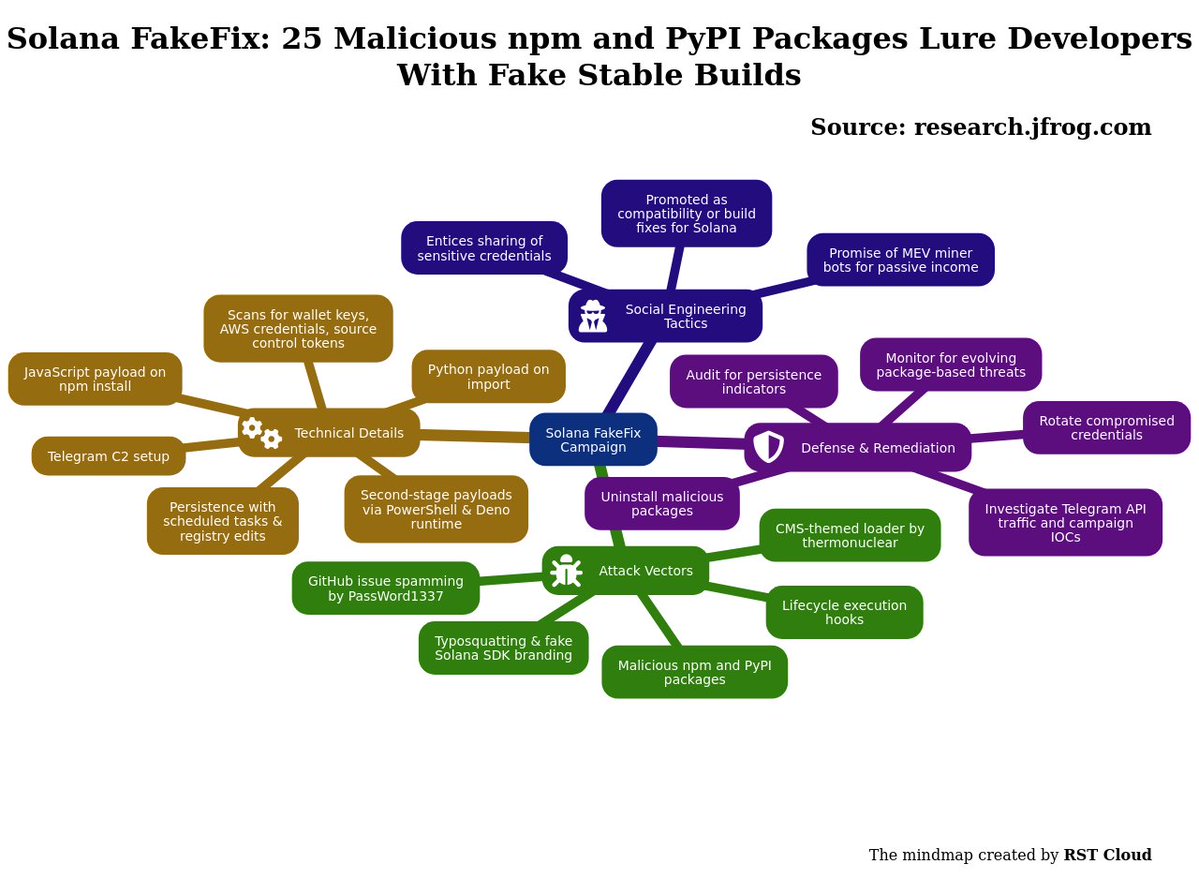
The Solana FakeFix campaign, identified by JFrog Security Research, involves the distribution of 25 malicious npm and PyPI packages specifically targeting Solana developers, utilizing tactics like typosquatting, fake branding for Solana SDKs, and lifecycle execution hooks to facilitate data theft. These packages aim to extract sensitive information, including wallet keys, cloud credentials, source control tokens, and various environment secrets.
The primary deceptive approach leveraged in this campaign was the promotion of these dangerous packages as compatibility fixes for Solana build issues. The campaigns operated through GitHub issue spamming by user PassWord1337, who posed as a community contributor, effectively targeting developers experiencing dependency challenges. The first stage of the attack required the execution of JavaScript controlled by the attacker during the npm package installation. This executed payload immediately set up a Telegram command-and-control (C2) channel and initiated a search for developer secrets.
For the Python packages, malware was triggered during a standard import process, highlighting differences in execution methods between npm and PyPI. Each type of package shared common payload characteristics, indicating a coordinated effort to breach systems. The later npm variants evolved their attack vector by embedding malicious code within functional-looking Solana JavaScript libraries, enabling them to operate unnoticed while scanning for sensitive information such as Solana keypairs and AWS credentials.
In another facet of the campaign, a CMS-themed loader involved npm packages uploaded by a user named thermonuclear. While not specifically tied to Solana, these packages contained mechanisms for executing remote Windows payloads via PowerShell scripts and JavaScript executed within the context of the Deno runtime. These practices included clandestine installations, dynamic second-stage retrieval of payloads, and attempts to maintain persistence through various Windows functionalities such as scheduled tasks and registry modifications.
The threat actors also leveraged the concept of MEV (miner extractable value) bots to entice victims into providing sensitive credentials under the false promise of passive income. This represents a blend of technical package exploitation and classic phishing tactics.
Remediation steps include uninstalling affected packages, rotating all sensitive credentials, and auditing for potential persistence indicators that could enable attackers to maintain access. Investigation should focus on signs of the Telegram API traffic and other specific IOCs related to the campaign. The complexity of the methods utilized, transitioning from simple backdoors to sophisticated Trojanized libraries, underlines the rapid evolution and increasing sophistication of such cyber threats targeting developer ecosystems.
1
54

Jun 13
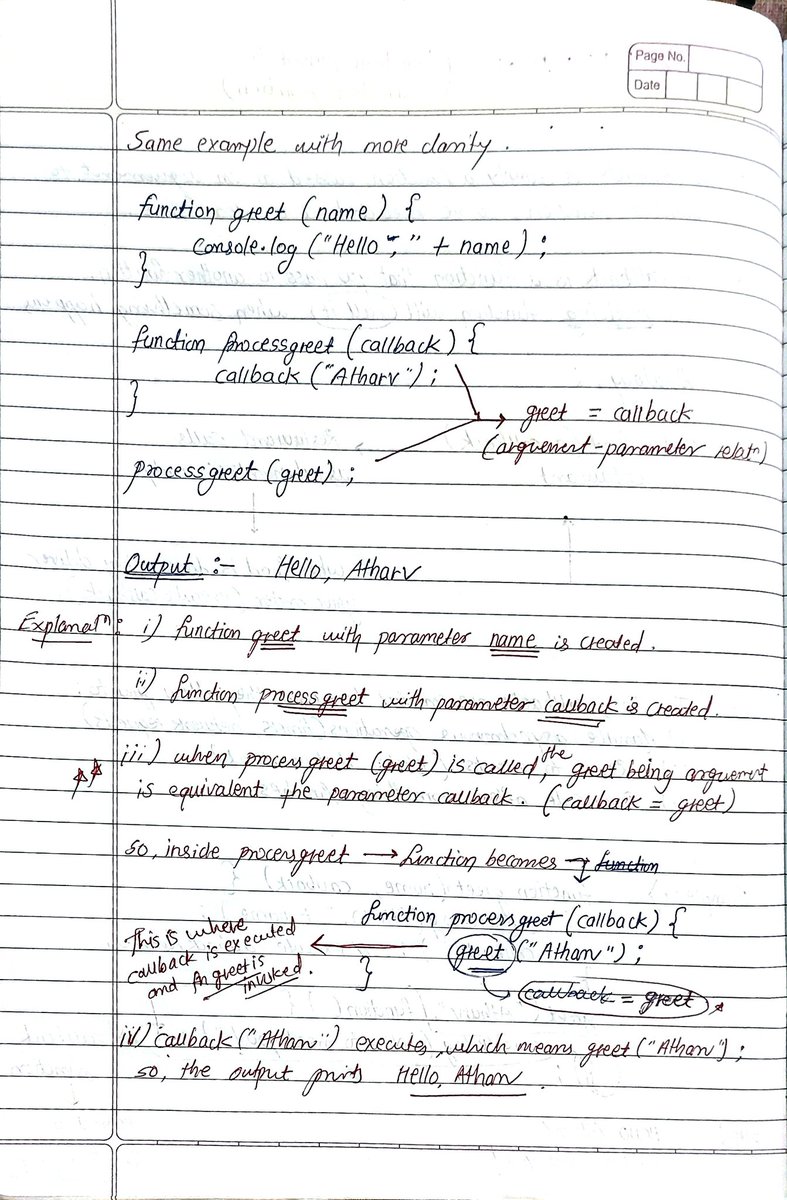
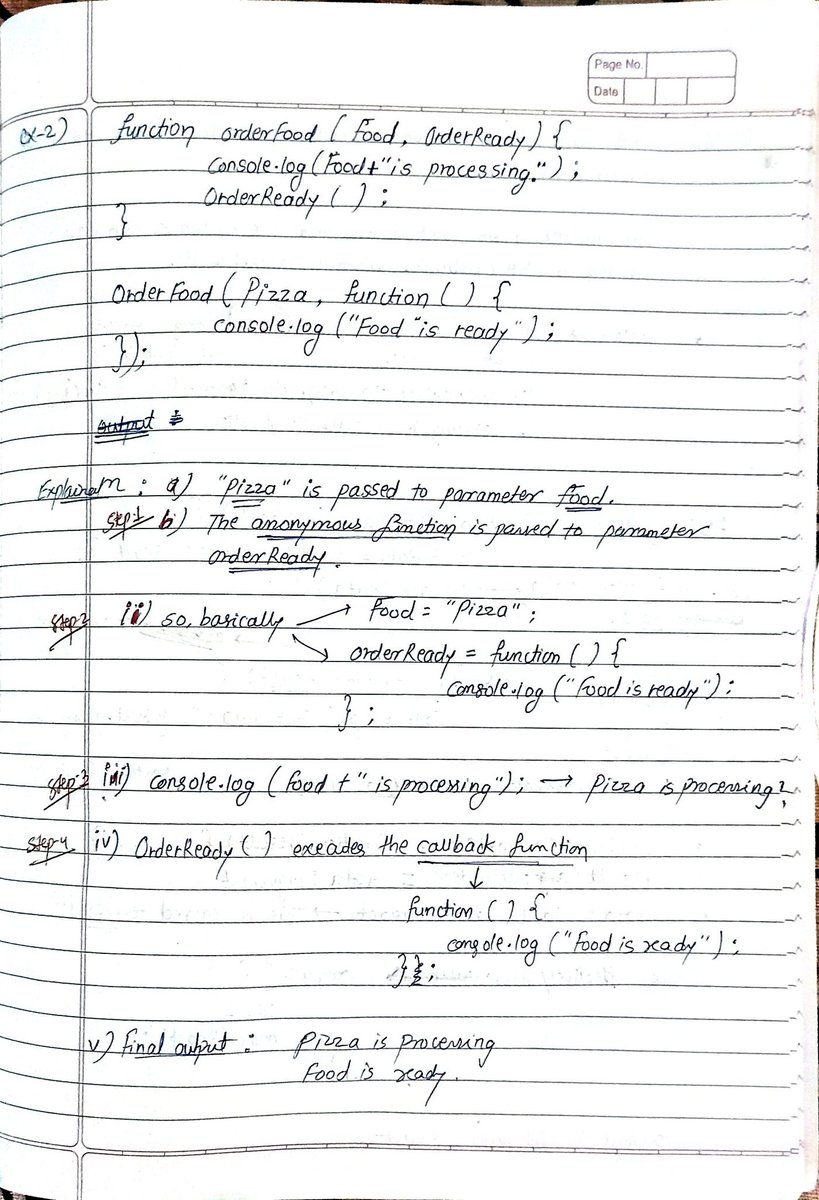
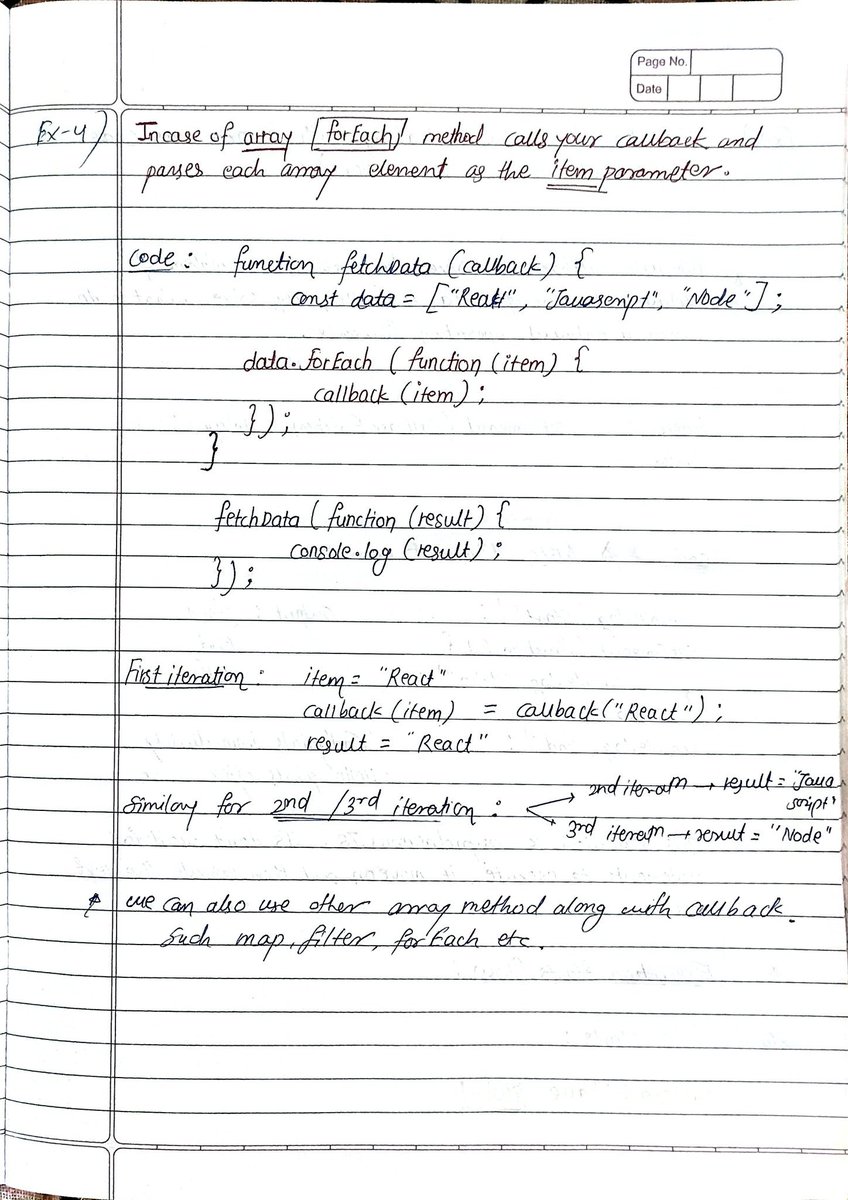
Just deep-dived into JavaScript Callbacks. Here's what clicked:
Callbacks - functions passed into other functions to execute later.
→ Basic callbacks
→ Array methods (map, filter, forEach)
→ Async operations (setTimeout, fetch, APIs)
→ Callback hell

1
1
17

@grok like this?
<!DOCTYPE html>
<html lang="en">
<head>
<meta charset="UTF-8">
<meta name="viewport" content="width=device-width, initial-scale=1.0">
<title>Tone & Flash Generator</title>
<style>
* { margin: 0; padding: 0; box-sizing: border-box; }
body {
font-family: 'Segoe UI', Tahoma, Geneva, Verdana, sans-serif;
background: #1a1a2e;
color: #eaeaea;
display: flex;
justify-content: center;
align-items: center;
min-height: 100vh;
}
.flash-overlay {
display: none;
position: fixed;
top: 0; left: 0;
width: 100vw;
height: 100vh;
z-index: 9999;
pointer-events: none;
background: #ffffff;
opacity: 0;
}
.flash-overlay.flashing {
display: block;
animation: screenFlash infinite alternate linear;
}
@keyframes screenFlash {
from { opacity: 0; }
to { opacity: 0.92; }
}
.container {
background: #16213e;
border-radius: 16px;
padding: 40px;
width: 520px;
box-shadow: 0 8px 32px rgba(0,0,0,0.4);
}
h1 { text-align: center; font-size: 1.8rem; margin-bottom: 8px; color: #e94560; }
.subtitle { text-align: center; font-size: 0.85rem; color: #888; margin-bottom: 32px; }
.freq-display { text-align: center; font-size: 3.2rem; font-weight: bold; color: #e94560; margin-bottom: 4px; }
.freq-label { text-align: center; font-size: 0.9rem; color: #888; margin-bottom: 24px; }
input[type="range"] {
-webkit-appearance: none;
width: 100%;
height: 6px;
border-radius: 3px;
background: #0f3460;
outline: none;
cursor: pointer;
}
input[type="range"]::-webkit-slider-thumb {
-webkit-appearance: none;
width: 22px; height: 22px;
border-radius: 50%;
background: #e94560;
cursor: pointer;
box-shadow: 0 0 12px rgba(233,69,96,0.8);
}
.manual-input, .row {
display: flex;
align-items: center;
gap: 12px;
margin-bottom: 16px;
}
.manual-input label, .row label {
width: 80px;
font-size: 0.95rem;
color: #aaa;
white-space: nowrap;
}
.manual-input input[type="number"], .timer-input {
flex: 1;
background: #0f3460;
border: 1px solid #e94560;
border-radius: 8px;
color: #eaeaea;
padding: 10px;
font-size: 1.1rem;
}
.section-title {
font-size: 0.85rem;
color: #e94560;
text-transform: uppercase;
letter-spacing: 1px;
margin: 24px 0 12px;
border-bottom: 1px solid #0f3460;
padding-bottom: 6px;
}
.wave-btn, .unit-btn, .preset-btn, .toggle-btn {
padding: 8px 12px;
border: 1px solid #0f3460;
border-radius: 8px;
background: #0f3460;
color: #aaa;
cursor: pointer;
transition: all 0.2s;
}
.wave-btn.active, .unit-btn.active, .toggle-btn.active {
background: #e94560;
border-color: #e94560;
color: white;
box-shadow: 0 0 12px rgba(233,69,96,0.6);
}
.waveform-buttons, .preset-buttons, .color-swatches {
display: flex;
gap: 8px;
flex-wrap: wrap;
}
.swatch {
width: 32px; height: 32px;
border-radius: 50%;
cursor: pointer;
border: 2px solid transparent;
}
.swatch.active { border-color: #fff; transform: scale(1.15); }
.play-btn {
width: 100%;
padding: 16px;
border: none;
border-radius: 12px;
background: #e94560;
color: white;
font-size: 1.2rem;
font-weight: bold;
cursor: pointer;
margin: 16px 0;
}
.play-btn.playing { background: #0f3460; }
canvas {
width: 100%;
height: 90px;
background: #0a0a1a;
border-radius: 8px;
display: block;
}
.warning {
font-size: 0.75rem;
color: #ffaa00;
text-align: center;
margin-top: 12px;
}
</style>
</head>
<body>
<div class="flash-overlay" id="flashOverlay"></div>
<div class="container">
<h1>🎵 Tone & Flash Generator</h1>
<p class="subtitle">1 Hz – 5000 Hz Audio & Visual Frequency Generator</p>
<div class="freq-display" id="freqDisplay">440 Hz</div>
<div class="freq-label">Current Frequency</div>
<input type="range" id="freqSlider" min="1" max="5000" value="440" step="1">
<div class="manual-input">
<label for="freqInput">Set Hz:</label>
<input type="number" id="freqInput" min="1" max="5000" value="440">
</div>
<div class="preset-buttons">
<button class="preset-btn" data-freq="1">1</button>
<button class="preset-btn" data-freq="10">10</button>
<button class="preset-btn" data-freq="40">40</button>
<button class="preset-btn" data-freq="110">110</button>
<button class="preset-btn" data-freq="220">220</button>
<button class="preset-btn" data-freq="440">440</button>
<button class="preset-btn" data-freq="528">528</button>
<button class="preset-btn" data-freq="1000">1k</button>
<button class="preset-btn" data-freq="5000">5k</button>
</div>
<div class="row">
<label>Volume</label>
<input type="range" id="volumeSlider" min="0" max="100" value="60" step="1">
<span id="volumeDisplay">60%</span>
</div>
<div class="row">
<label>Wave</label>
<div class="waveform-buttons">
<button class="wave-btn active" data-wave="sine">Sine</button>
<button class="wave-btn" data-wave="square">Square</button>
<button class="wave-btn" data-wave="sawtooth">Saw</button>
<button class="wave-btn" data-wave="triangle">Triangle</button>
</div>
</div>
<div class="section-title">⚡ Screen Flash</div>
<div class="row">
<label>Enabled</label>
<button class="toggle-btn" id="flashToggle">OFF</button>
</div>
<div class="row">
<label>Color</label>
<div class="color-swatches">
<div class="swatch active" data-color="#ffffff" style="background:#ffffff"></div>
<div class="swatch" data-color="#ff0000" style="background:#ff0000"></div>
<div class="swatch" data-color="#00ff00" style="background:#00ff00"></div>
<div class="swatch" data-color="#0000ff" style="background:#0000ff"></div>
<div class="swatch" data-color="#ffff00" style="background:#ffff00"></div>
<input type="color" id="customColor" value="#ffffff">
</div>
</div>
<div class="section-title">⏱ Auto Stop Timer</div>
<div class="row">
<label>Duration</label>
<input type="number" id="timerInput" min="1" max="9999" value="5" style="width:80px">
<div class="timer-unit-btns">
<button class="unit-btn active" data-unit="seconds">Sec</button>
<button class="unit-btn" data-unit="minutes">Min</button>
</div>
</div>
<div class="row">
<label>Timer</label>
<button class="toggle-btn" id="timerToggle">DISABLED</button>
</div>
<div class="timer-display" id="timerDisplay" style="text-align:center; font-size:1.4rem; color:#e94560; min-height:32px;"></div>
<button class="play-btn" id="playBtn">▶ PLAY</button>
<canvas id="visualizer"></canvas>
<div class="warning">⚠️ Flashing lights may trigger seizures in some people. Use responsibly.</div>
</div>
<script>
const freqSlider = document.getElementById('freqSlider');
const freqInput = document.getElementById('freqInput');
const freqDisplay = document.getElementById('freqDisplay');
const volumeSlider = document.getElementById('volumeSlider');
const volumeDisplay = document.getElementById('volumeDisplay');
const playBtn = document.getElementById('playBtn');
const canvas = document.getElementById('visualizer');
const ctx = canvas.getContext('2d');
const flashOverlay = document.getElementById('flashOverlay');
const flashToggle = document.getElementById('flashToggle');
const customColor = document.getElementById('customColor');
const timerToggle = document.getElementById('timerToggle');
const timerInput = document.getElementById('timerInput');
const timerDisplay = document.getElementById('timerDisplay');
let audioCtx = null, oscillator = null, gainNode = null, analyser = null;
let animationId = null;
let isPlaying = false;
let currentWave = 'sine';
let currentFreq = 440;
let flashEnabled = false;
let flashColor = '#ffffff';
let timerEnabled = false;
let timerUnit = 'seconds';
let timerRemaining = 0;
let timerInterval = null;
function resizeCanvas() {
canvas.width = canvas.offsetWidth * 2;
canvas.height = 180;
}
window.addEventListener('resize', resizeCanvas);
setTimeout(resizeCanvas, 100);
// Frequency
freqSlider.addEventListener('input', () => {
currentFreq = parseInt(freqSlider.value);
freqInput.value = currentFreq;
freqDisplay.textContent = currentFreq ' Hz';
if (isPlaying && oscillator) oscillator.frequency.setTargetAtTime(currentFreq, audioCtx.currentTime, 0.02);
if (flashEnabled && isPlaying) startFlash();
});
freqInput.addEventListener('input', () => {
let val = parseInt(freqInput.value);
if (isNaN(val)) return;
val = Math.max(1, Math.min(5000, val));
currentFreq = val;
freqSlider.value = val;
freqDisplay.textContent = val ' Hz';
if (isPlaying && oscillator) oscillator.frequency.setTargetAtTime(val, audioCtx.currentTime, 0.02);
if (flashEnabled && isPlaying) startFlash();
});
// Volume
volumeSlider.addEventListener('input', () => {
const vol = parseInt(volumeSlider.value);
volumeDisplay.textContent = vol '%';
if (gainNode) gainNode.gain.setTargetAtTime(vol / 100, audioCtx?.currentTime || 0, 0.1);
});
// Waveform
document.querySelectorAll('.wave-btn').forEach(btn => {
btn.addEventListener('click', () => {
document.querySelectorAll('.wave-btn').forEach(b => b.classList.remove('active'));
btn.classList.add('active');
currentWave = btn.dataset.wave;
if (isPlaying && oscillator) oscillator.type = currentWave;
});
});
// Presets
document.querySelectorAll('.preset-btn').forEach(btn => {
btn.addEventListener('click', () => {
currentFreq = parseInt(btn.dataset.freq);
freqSlider.value = currentFreq;
freqInput.value = currentFreq;
freqDisplay.textContent = currentFreq ' Hz';
if (isPlaying && oscillator) oscillator.frequency.setTargetAtTime(currentFreq, audioCtx.currentTime, 0.02);
if (flashEnabled && isPlaying) startFlash();
});
});
// Flash
flashToggle.addEventListener('click', () => {
flashEnabled = !flashEnabled;
flashToggle.textContent = flashEnabled ? 'ON' : 'OFF';
flashToggle.classList.toggle('active', flashEnabled);
if (flashEnabled && isPlaying) startFlash();
else stopFlash();
});
document.querySelectorAll('.swatch').forEach(swatch => {
swatch.addEventListener('click', () => {
document.querySelectorAll('.swatch').forEach(s => s.classList.remove('active'));
swatch.classList.add('active');
flashColor = swatch.dataset.color;
if (flashEnabled) flashOverlay.style.background = flashColor;
});
});
customColor.addEventListener('input', () => {
flashColor = customColor.value;
document.querySelectorAll('.swatch').forEach(s => s.classList.remove('active'));
if (flashEnabled) flashOverlay.style.background = flashColor;
});
// Timer
document.querySelectorAll('.unit-btn').forEach(btn => {
btn.addEventListener('click', () => {
document.querySelectorAll('.unit-btn').forEach(b => b.classList.remove('active'));
btn.classList.add('active');
timerUnit = btn.dataset.unit;
});
});
timerToggle.addEventListener('click', () => {
timerEnabled = !timerEnabled;
timerToggle.textContent = timerEnabled ? 'ENABLED' : 'DISABLED';
timerToggle.classList.toggle('active', timerEnabled);
});
function startTimer() {
clearInterval(timerInterval);
let val = parseInt(timerInput.value);
if (isNaN(val) || val <= 0) return;
timerRemaining = (timerUnit === 'minutes') ? val * 60 : val;
updateTimerDisplay();
timerInterval = setInterval(() => {
timerRemaining--;
updateTimerDisplay();
if (timerRemaining <= 0) stopAll();
}, 1000);
}
function updateTimerDisplay() {
const m = Math.floor(timerRemaining / 60);
const s = timerRemaining % 60;
timerDisplay.textContent = `${m.toString().padStart(2,'0')}:${s.toString().padStart(2,'0')}`;
}
// Play / Stop
playBtn.addEventListener('click', () => isPlaying ? stopAll() : startAll());
function startAll() {
audioCtx = new (window.AudioContext || window.webkitAudioContext)();
if (audioCtx.state === 'suspended') audioCtx.resume();
analyser = audioCtx.createAnalyser();
analyser.fftSize = 2048;
gainNode = audioCtx.createGain();
gainNode.gain.value = parseInt(volumeSlider.value) / 100;
oscillator = audioCtx.createOscillator();
oscillator.type = currentWave;
oscillator.frequency.value = currentFreq;
oscillator.connect(gainNode);
gainNode.connect(analyser);
analyser.connect(audioCtx.destination);
oscillator.start();
isPlaying = true;
playBtn.textContent = '⏹ STOP';
playBtn.classList.add('playing');
if (flashEnabled) startFlash();
if (timerEnabled) startTimer();
drawVisualizer();
}
function stopAll() {
if (oscillator) { oscillator.stop(); oscillator.disconnect(); }
if (audioCtx) audioCtx.close();
stopFlash();
clearInterval(timerInterval);
cancelAnimationFrame(animationId);
ctx.clearRect(0, 0, canvas.width, canvas.height);
isPlaying = false;
playBtn.textContent = '▶ PLAY';
playBtn.classList.remove('playing');
timerDisplay.textContent = '';
}
// Improved Flash using CSS Animation (this fixes the stopping issue)
function startFlash() {
stopFlash();
const safeFreq = Math.min(currentFreq, 25); // safety cap
const halfCycleMs = Math.round(1000 / (safeFreq * 2)); // on/off cycle
flashOverlay.style.animationDuration = `${halfCycleMs}ms`;
flashOverlay.style.background = flashColor;
flashOverlay.classList.add('flashing');
}
function stopFlash() {
flashOverlay.classList.remove('flashing');
}
// Visualizer
function drawVisualizer() {
if (!analyser) return;
animationId = requestAnimationFrame(drawVisualizer);
const bufferLength = analyser.fftSize;
const dataArray = new Uint8Array(bufferLength);
analyser.getByteTimeDomainData(dataArray);
ctx.fillStyle = '#0a0a1a';
ctx.fillRect(0, 0, canvas.width, canvas.height);
ctx.lineWidth = 4;
ctx.strokeStyle = '#e94560';
ctx.shadowBlur = 20;
ctx.shadowColor = '#e94560';
ctx.beginPath();
const sliceWidth = canvas.width / bufferLength;
let x = 0;
for (let i = 0; i < bufferLength; i ) {
const v = dataArray[i] / 128.0;
const y = v * canvas.height / 2;
if (i === 0) ctx.moveTo(x, y);
else ctx.lineTo(x, y);
x = sliceWidth;
}
ctx.stroke();
}
resizeCanvas();
</script>
</body>
</html>
1
1
117

Jun 12
JavaScript Interview Questions Series (14/60)
Nobody asks you to "explain setTimeout, setInterval & requestAnimationFrame"
They ask you:
👉 You used setInterval for an animation. It looks janky on slow devices. What do you use instead and why?
👉 You set a timeout for 100ms but it fires after 800ms. What can cause that and how do you handle delays?
👉 You have a polling function with setInterval. The user closes the tab but the interval keeps running. What's actually happening?
Part 15 drops tomorrow. Follow for more 🙂
Jun 11

JavaScript Interview Questions Series (13/60)
Nobody asks you to "explain type coercion"
They give you weird outputs:
👉 Number("") is 0, Number(" ") is 0, Number("0x10") is 16. Why are these different from parseInt?
👉 You're parsing user input as a number. Sometimes you get NaN, sometimes you get 0. How do you make this safe?
👉 JSON.stringify silently dropped your Date and function values. Why and what do you do about it?
Part 14 drops tomorrow. Follow for more 🙂
3
136
Jun 12
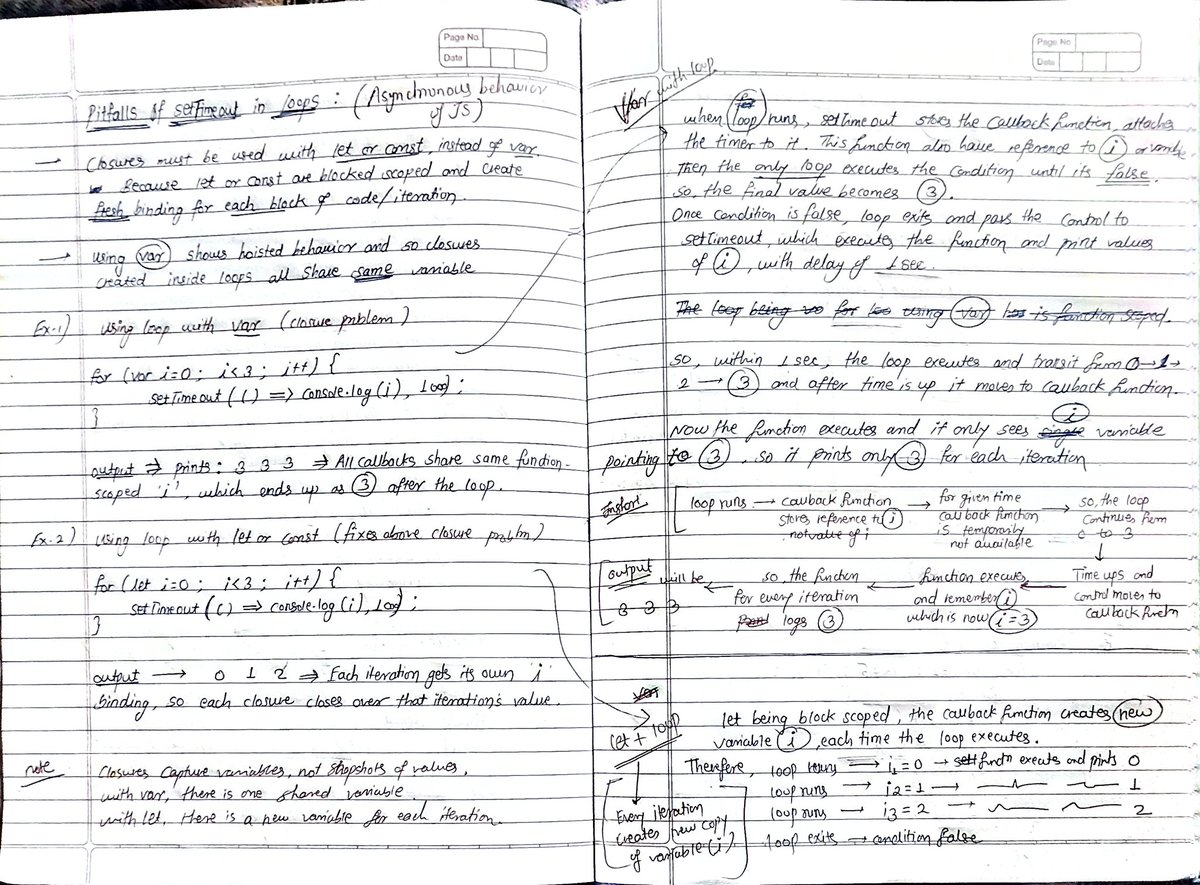
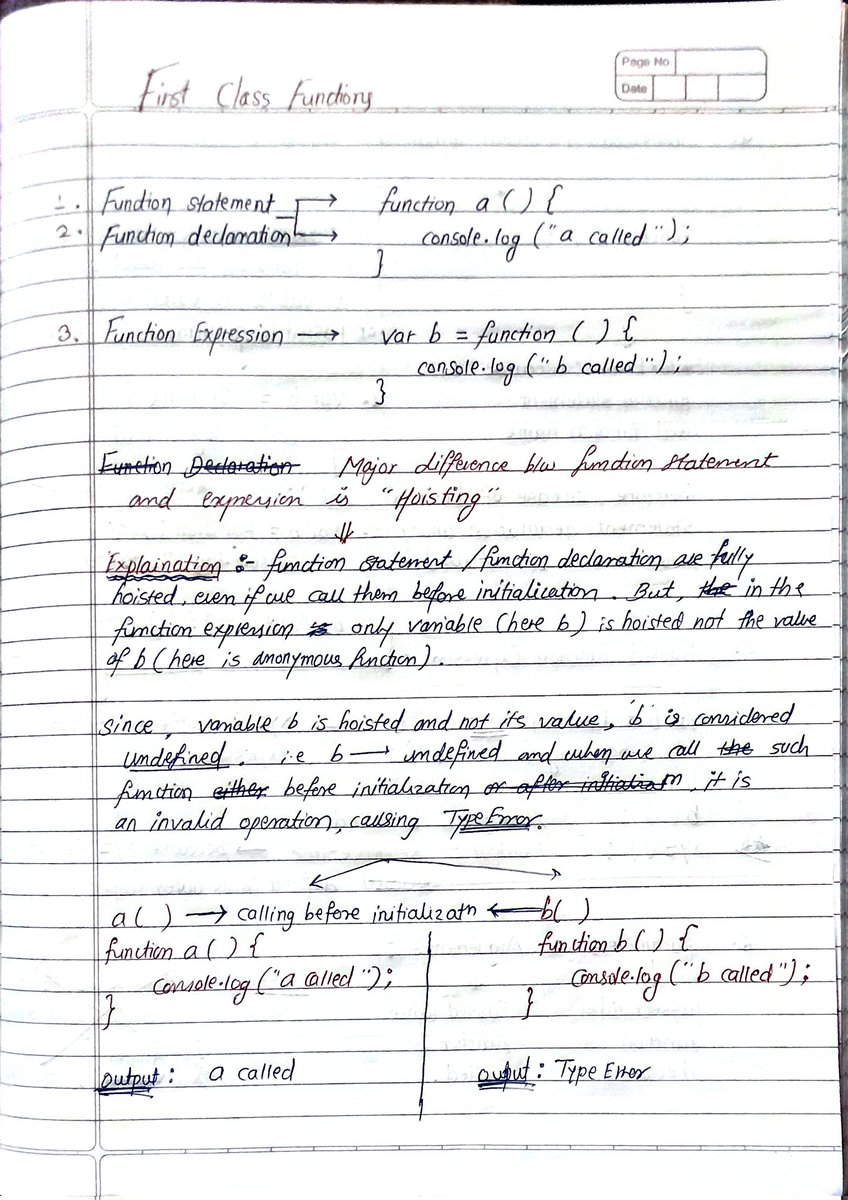
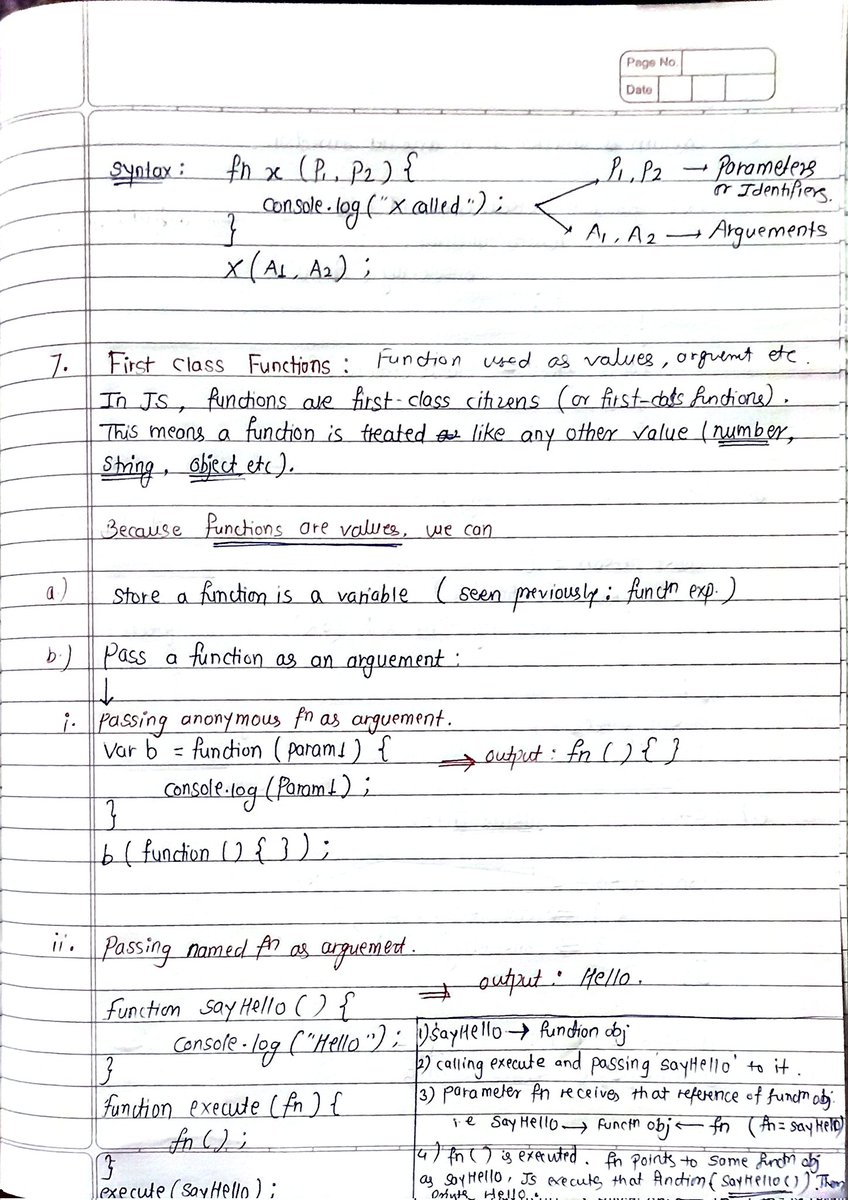
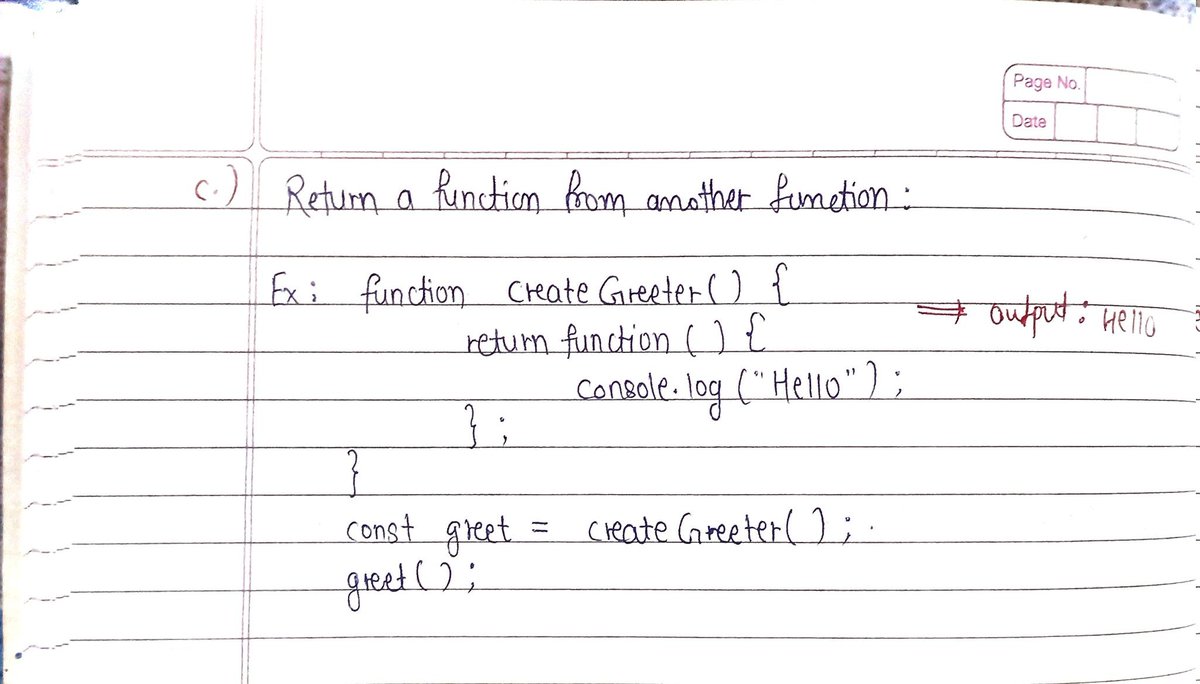
Just leveled up in JS! 🚀
setTimeout pitfalls (var vs let loops), first-class functions, and function expressions.
Irony is functions are just values in JavaScript.
So assigned to variables, invoked from other functions. That's when it clicked.
Thinking in functions now > 🧠
3
32

Jun 12
While setTimeout(callback, 0), setImmediate(callback), and process.nextTick(callback) may seem similar, they behave differently under the hood 👇🏻
medium.com/node-depths/node-…
#nodejs #timers #javascript
2
13
Jun 12
While setTimeout(callback, 0), setImmediate(), and process.nextTick() appear interchangeable, they serve distinct purposes in Node.js.
#nodejs #timers #javascript
1
6

Jun 12
JS Interview-Focused Subset (Most Important)
For interview preparation, prioritize these 25 topics in order:
Hoisting
Closures
Scope (var, let, const differences)
this binding (regular vs arrow functions)
Event Loop (Promise vs setTimeout order)
Type Coercion (== vs ===, truthy/falsy)
Object References & Copying
Promises & Async/Await
Array Methods (map, filter, reduce)
Prototypal Inheritance
Call, Apply, Bind
Event Bubbling & Delegation
Debouncing & Throttling
Currying
Recursion
Spread & Rest Operators
Destructuring
Temporal Dead Zone
IIFE (Immediately Invoked Function Expressions)
JSON methods
Error Handling
Optional Chaining & Nullish Coalescing
Modules (import/export)
Memoization
Generators
1
47
2,162
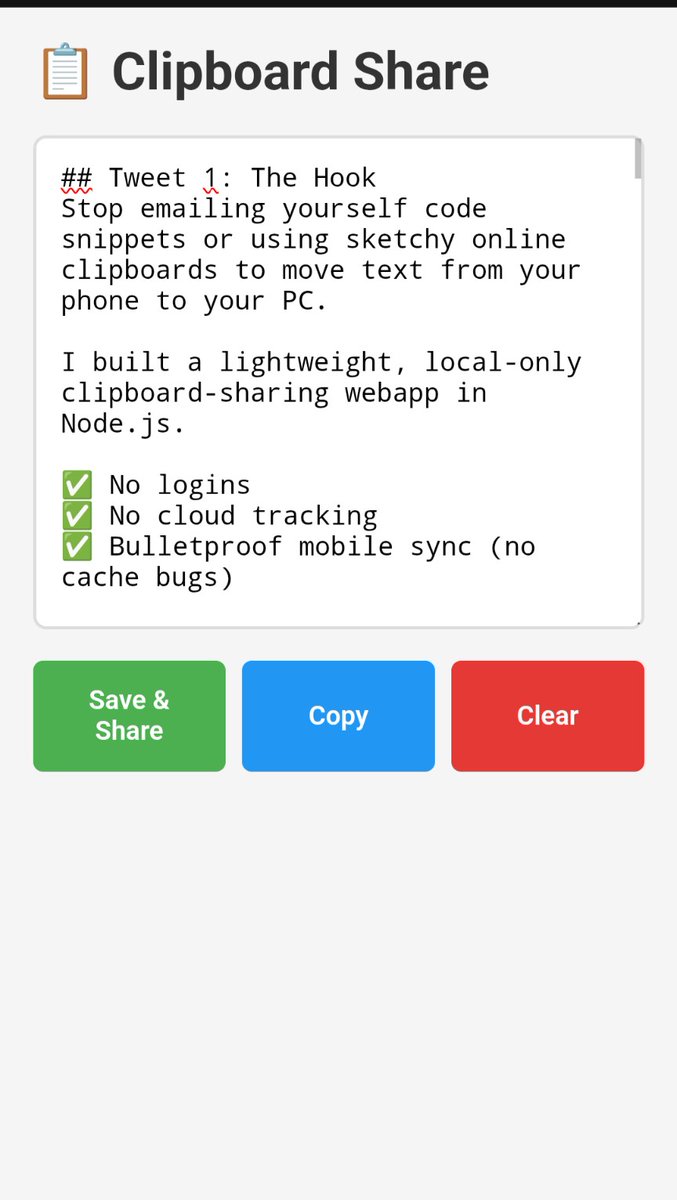
Stop emailing yourself code snippets or using sketchy online clipboards to move text from your phone to your PC.
I built a lightweight, local-only clipboard-sharing webapp in Node.js.
✅ No logins
✅ No cloud tracking
✅ Bulletproof mobile sync (no cache bugs)
Here is the full code to build it in 60 seconds 🧵👇
***
## Install Instructions
🛠️ **SETUP**
It takes 60 seconds. You just need Node.js installed.
```bash
mkdir clip-share && cd clip-share
npm init -y
npm install express
mkdir public
```
Create two files: `server.js` and `public/index.html` using the code in the next tweets.
Then just run:
`node server.js`
***
## The Backend
⚙️ **THE SERVER (server.js)**
A dead-simple Express API that holds your text in memory.
```javascript
const express = require('express');
const app = express();
let snippet = '';
app.use(express.json());
app.use(express.static('public'));
app.get('/api/snippet', (req, res) => res.json({ text: snippet }));
app.post('/api/snippet', (req, res) => {
snippet = req.body.text || '';
res.json({ success: true });
});
app.listen(3000, '0.0.0.0', () => console.log('Listening on :3000'));
```
***
The Frontend
📱 **THE FRONTEND (public/index.html)**
A robust UI. It uses URL cache-busting to defeat aggressive mobile caching, detects typing (so polling doesn't overwrite your work), and forces a sync when you switch back to the tab.
```
<!DOCTYPE html>
<html>
<head>
<meta charset="UTF-8">
<meta name="viewport" content="width=device-width, initial-scale=1.0">
<title>Clipboard Share</title>
<style>
* { box-sizing: border-box; margin: 0; padding: 0; }
body { font-family: sans-serif; padding: 20px; background: #f5f5f5; }
.container { max-width: 800px; margin: 0 auto; }
h1 { margin-bottom: 20px; color: #333; }
textarea {
width: 100%; height: 300px; padding: 15px;
font-family: monospace; font-size: 16px;
border: 2px solid #ddd; border-radius: 8px;
resize: vertical; background: white;
}
textarea:focus { outline: none; border-color: #4CAF50; }
.btn-group { display: flex; gap: 10px; margin-top: 15px; flex-wrap: wrap; }
button {
flex: 1; min-width: 100px; padding: 15px; font-size: 16px;
border: none; border-radius: 6px; cursor: pointer; font-weight: 600; color: white;
}
.btn-save { background: #4CAF50; }
.btn-copy { background: #2196F3; }
.btn-clear { background: #e53935; }
.status { margin-top: 15px; text-align: center; color: #666; font-size: 14px; height: 20px; font-weight: bold; }
</style>
</head>
<body>
<div class="container">
<h1>📋 Clipboard Share</h1>
<textarea id="t" placeholder="Paste or type text..."></textarea>
<div class="btn-group">
<button class="btn-save" onclick="save()">Save & Share</button>
<button class="btn-copy" onclick="copy()">Copy</button>
<button class="btn-clear" onclick="clearT()">Clear</button>
</div>
<div id="status" class="status"></div>
</div>
<script>
const t = document.getElementById('t');
const statusEl = document.getElementById('status');
let isTyping = false;
let typingTimer;
t.addEventListener('input', () => {
isTyping = true;
clearTimeout(typingTimer);
typingTimer = setTimeout(() => { isTyping = false; }, 2000);
});
function showStatus(msg) {
statusEl.textContent = msg;
setTimeout(() => { if(statusEl.textContent === msg) statusEl.textContent = ''; }, 2000);
}
async function load() {
if (isTyping || document.activeElement === t) return;
try {
const res = await fetch('/api/snippet?v=' Date.now(), { cache: 'no-store' });
const d = await res.json();
if (d.text !== t.value) t.value = d.text;
} catch (e) {
showStatus('Connection lost...');
}
}
async function save() {
try {
await fetch('/api/snippet', {
method: 'POST',
headers: { 'Content-Type': 'application/json' },
body: JSON.stringify({ text: t.value })
});
showStatus('Saved!');
} catch (e) {
showStatus('Save failed!');
}
}
function copy() {
if (!t.value) return;
// 1. Try modern API (works on computer/localhost)
if (navigator.clipboard && window.isSecureContext) {
navigator.clipboard.writeText(t.value)
.then(() => showStatus('Copied!'))
.catch(() => fallbackCopy());
} else {
// 2. Fallback for mobile HTTP
fallbackCopy();
}
}
function fallbackCopy() {
const temp = document.createElement('textarea');
temp.value = t.value;
temp.style.position = 'fixed';
temp.style.opacity = '0';
document.body.appendChild(temp);
temp.select();
let success = false;
try {
success = document.execCommand('copy');
} catch (e) {}
document.body.removeChild(temp);
if (success) {
showStatus('Copied!');
} else {
// 3. Last resort: highlight text for manual long-press
t.focus();
t.select();
showStatus('Text selected - long press to copy');
}
}
async function clearT() {
t.value = '';
await save();
}
document.addEventListener('visibilitychange', () => {
if (!document.hidden) load();
});
t.addEventListener('blur', () => load());
load();
setInterval(load, 3000);
</script>
</body>
</html>
```
***
## How to Use It
🚀 **HOW TO USE**
1. Run `node server.js` on your PC.
2. Open `http://localhost:3000` on your PC browser.
3. Find your PC's local IP (`ipconfig` on Windows, `ip addr` or `hostname -I` on Linux/Mac).
4. Open `http://YOUR_IP:3000` on your phone.
Paste on your phone, hit Save, and grab it on your PC instantly.
Bookmark this for your next late-night coding session! 🔖
1
1
172

Jun 11
[ CARRD TIP ]
Stop sleeping on the "onclick" field for your links & buttons.
Make 👏 them 👏 talk 👏
Add this to the field to make the labels change on click. This is what I used on my portfolio:
this.innerHTML = 'Going' ; setTimeout(()=>this.innerHTML = 'Home' , 2000)
3
97

Jun 11
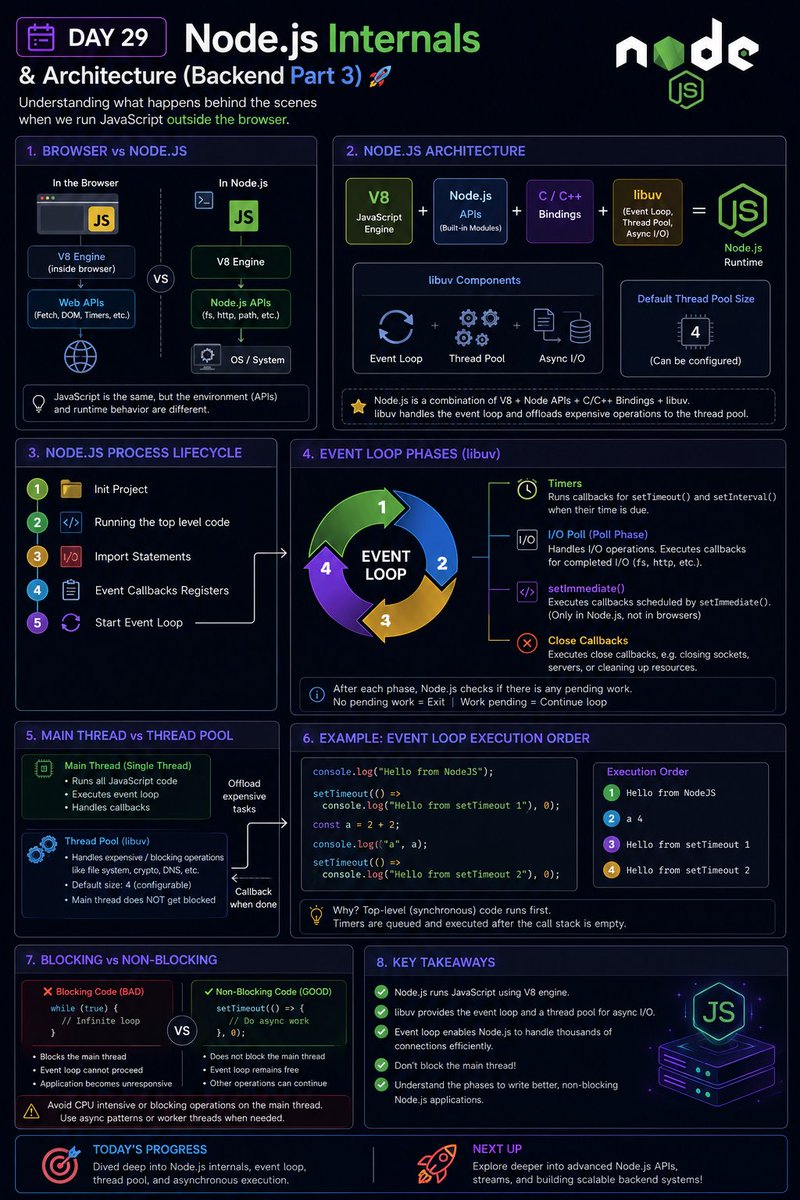
🚀 Day 29 — Restarting My Full-Stack Journey
Today I went deeper into Node.js and learned what actually happens behind the scenes when JavaScript runs outside the browser.
This was one of those topics where understanding the internals made many previously confusing concepts finally click.
📚 What I learned today:
✅ How JavaScript Runs in Browsers vs Node.js
* Browsers provide Web APIs
* Node.js provides Node APIs
* Both use JavaScript but have different runtime environments
✅ Understanding Node.js Architecture
* V8 JavaScript Engine
* Node.js APIs
* C/C Bindings
* libuv
* Event Loop
Understanding how all these components work together to execute JavaScript outside the browser.
✅ Node.js Process Lifecycle
Learned what happens when we run:
```bash
node index.js
```
* A Node.js process is created
* A main thread is allocated
* Top-level code starts executing
* Modules are loaded
* Event callbacks are registered
* Event loop starts processing tasks
✅ Event Loop Deep Dive
Explored major event loop phases:
* Timers
* I/O Poll Phase
* `setImmediate()`
* Close Callbacks
And how Node.js decides when to continue or exit the process.
✅ Main Thread vs Thread Pool
Learned:
* JavaScript runs on the main thread
* CPU-blocking code can freeze execution
* libuv uses a thread pool for certain expensive operations
* Why blocking code like `while(true)` should be avoided
✅ Understanding Asynchronous Execution
Practiced examples using:
* `console.log()`
* `setTimeout()`
* Event Loop execution order
And understood why asynchronous callbacks execute after synchronous code completes.
🛠️ Practice:
* Explored Node.js execution flow
* Tested event loop behavior using timers
* Experimented with callback execution order
* Learned how blocking code impacts application performance
💡 Biggest takeaway:
Before today, I knew that Node.js was "single-threaded."
Now I understand what that actually means.
Learning about the event loop, libuv, the main thread, and asynchronous execution helped me understand how Node.js handles thousands of operations efficiently without blocking the application.
The deeper I go into backend development, the more fascinating it becomes 🚀
#100DaysOfCode #FullStackDevelopment #BackendDevelopment #NodeJS #JavaScript #EventLoop #WebDevelopment #LearningInPublic #ChaiCode #dayxwebtoon #TrendingforPavel #100DaysOfSilence #DAY29
@Hiteshdotcom @nirudhuuu @yntpdotme @ChaiCodeHQ @surajtwt_ @codedailybot @_100DaysOfCode @100days
Jun 10

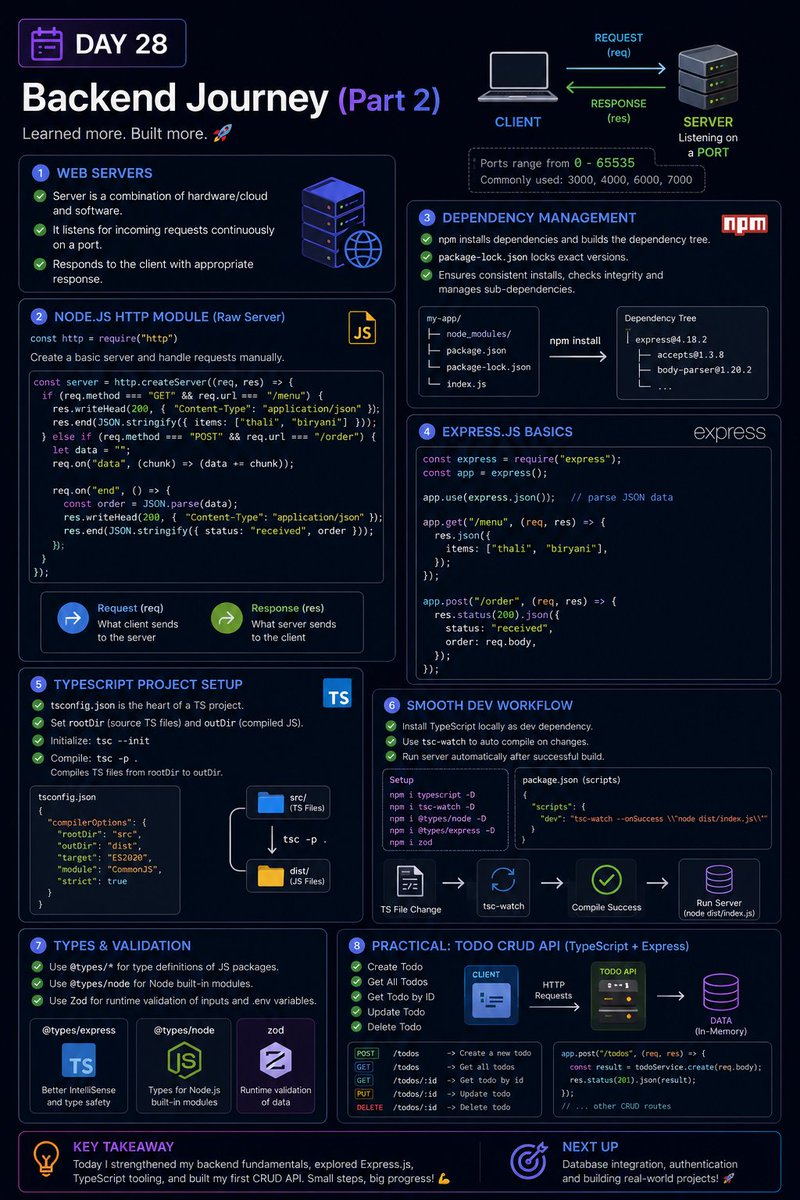
🚀 Day 28 - Restarting My Full-Stack Journey
Today was another exciting backend day as I moved beyond theory and started understanding how web servers, Express.js, TypeScript tooling, and backend project workflows work together.
I also built my first basic backend Todo CRUD application to put these concepts into practice.
📚 What I learned today:
✅ Understanding Web Servers
* How clients and servers communicate
* Ports and server processes
* Why servers continuously listen for incoming requests
✅ Node.js HTTP Module
* Creating a basic web server using the built-in `http` module
* Understanding:
* Request (`req`)
* Response (`res`)
* Handling different routes and HTTP methods manually
✅ Dependency Management
* Understanding:
* `node_modules`
* Dependency trees
* `package-lock.json`
* Why dependency locking is important for consistent environments
✅ Introduction to Express.js
* Creating APIs with Express
* Routing using:
* `app.get()`
* `app.post()`
* Parsing JSON using:
* `express.json()`
✅ TypeScript Project Setup
* `tsconfig.json`
* `rootDir`
* `outDir`
* Compiling TypeScript into JavaScript
✅ Development Workflow Improvements
* Local TypeScript installation
* `tsc-watch`
* Auto compilation and server restart during development
✅ Type Definitions
* Understanding `@types/*`
* Installing:
* `@types/node`
* Express type definitions
* Better IntelliSense and type safety
✅ Runtime Validation
* Introduction to Zod
* Understanding why TypeScript alone is not enough for validating external inputs
🛠️ Practical Work
Built a basic Todo CRUD API using:
* Node.js
* Express.js
* TypeScript
Implemented:
✅ Create Todo
✅ Read Todos
✅ Update Todo
✅ Delete Todo
This was my first step toward building real backend applications.
💡 Biggest takeaway:
Frontend taught me how users interact with applications.
Backend is teaching me how applications actually process requests, manage data, and communicate with clients behind the scenes.
Building my first CRUD API made the client-server relationship much clearer and made backend development feel far less intimidating.
Excited to keep moving deeper into Node.js, Express, APIs, validation, and databases 🚀
#100DaysOfCode #FullStackDevelopment #BackendDevelopment #NodeJS #ExpressJS #TypeScript #WebDevelopment #LearningInPublic #ChaiCode #DaysCount #DAY1 #DAY28 #trendingsongs #100daysofadam
@Hiteshdotcom @piyushgarg_dev @nirudhuuu @surajtwt_ @yntpdotme
53

6 #AICodingAgents vs. 1 Senior Dev. Same enterprise React task.
One agent: 80% cost savings ✅
Two agents: cost MORE than manual work 💸
Why? They faked API calls with setTimeout() instead of using the actual cache.
👓 Full breakdown:
hubs.la/Q04k_Gl40
4


// Lawson Free Ticket 100% Win Script v1.0
function lawsonLottery() {
const result = Math.random();
if (result >= 0) {
return {
winner: true,
prize: "無料券",
probability: "100%"
};
}
}
console.log("抽選中...");
setTimeout(() => {
console.log("当たり!");
console.log(lawsonLottery());
}, 1000);
Jun 10

5日間限定の無料券チャレンジ(^^)
今日はチルド飲料無料の2日目です♪
1)このアカウントをフォロー
2)この投稿をリポスト
3)抽選で毎日1万名様に無料券!結果は自動でお知らせ
1
398

Jun 10
Did proper Old-School coding practice by writing snippets by myself
Let me tell you my friend did write code entirely with AI and when remote interviewer asked him to promisify setTimeout and he wrote
resolve (setTimeout) at first line
Clearly rejected
Write code by yourself💯
2
28

Jun 10
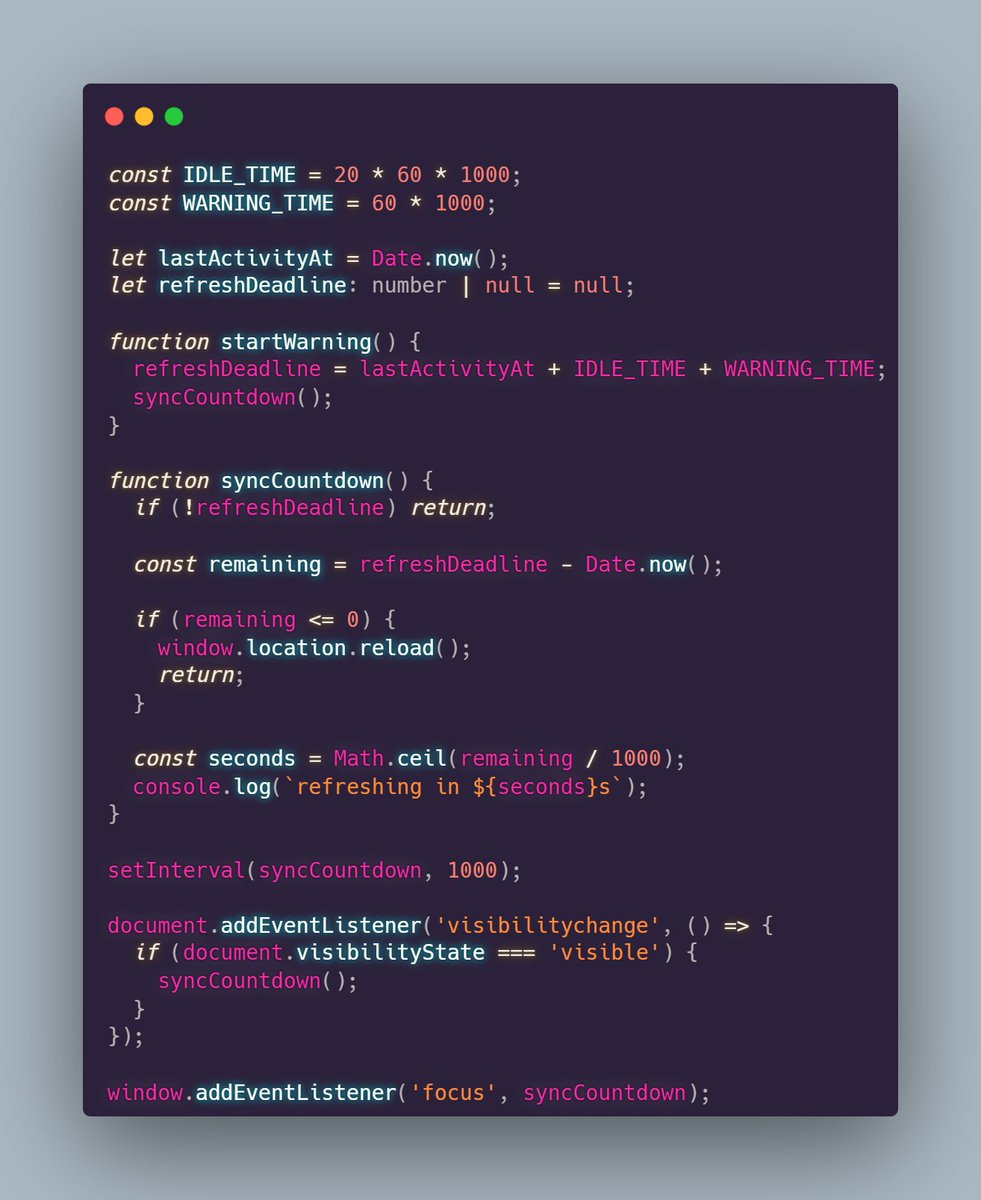
found one frontend issue today
when user switch tab, browser throttle setTimeout / setInterval
so our countdown was not updating properly, it was updating very less until user come back to that tab
fix was not to depend on interval ticks
we used actual deadline with Date.now()
and sync it on visibilitychange, focus or user activity
so now when user comes back, we just check deadline is passed or not
if passed, refresh directly instead of waiting for timer to catch up
1
1
54

Jun 10
setTimeout(function agentX() {
workHardMakeNoMistakes();
setTimeout(agentX, 7);
}, 6);
1
2
769
