
A listicle of useful sites. an endless feed of tools you should know
scrolled to ssemble. paste a youtube link, hit get shorts, done. up top a pro monthly plan and a counter, 29 of 30. a cap. a subscription. caption translation behind an upgrade
here is the trick with these lists
every other useful website is a wrapper over the same open source. ssemble, opus clip, crayo, submagic. all of them are yt-dlp downloads, whisper transcribes, an llm cuts, ffmpeg renders. one engine, five landing pages, five subscriptions
they show you site after site and not one of them tells you there are four free repos under the hood
that 29 of 30 limit only exists because you did not open a terminal
i built my own ssemble on free repos. no minute cap, no pro plan, translation into two languages out of the box. cents per output

2
1
27
1,170
yt-dlp, OpenAI, FFmpeg, n8n, ggml
everyone is paying 30 dollars a month for opus clip and submagic. the entire pipeline those tools wrap is open source and free. here are 5 repos that replace them, one for each step
1. ingest, yt-dlp/yt-dlp
github.com/yt-dlp/yt-dlp
170k stars, updated daily. pulls audio and video from almost any platform with one command. this is the front door of every content pipeline. opus clip charges you to drop a link, this does the same for free
2. transcribe, m-bain/whisperX
github.com/m-bain/whisperX
22k stars. whisper with word-level timestamps and speaker diarization. the word-level part is the whole game, it is why your clips start clean instead of mid-sentence. this is the layer the paid tools never let you tune
3. render, FFmpeg/FFmpeg
github.com/FFmpeg/FFmpeg
61k stars, updated today. the engine behind every video tool that has ever existed. cut, crop to 9:16, burn subtitles, all from the command line. submagic is a skin on top of this. you can just use the thing directly
4. orchestrate, n8n-io/n8n
github.com/n8n-io/n8n
192k stars. fair code automation that wires the whole pipeline together. trigger, transcribe, cut, post, on a schedule, no cron daemon by hand. this is the autopilot the subscriptions sell as a feature
5. run it local, ggml-org/whisper.cpp
github.com/ggml-org/whisper.…
50k stars. whisper rewritten in c to run on your own machine, no gpu bill, no data leaving the box. transcribe a hundred hours for the cost of electricity. this is how you take the per minute meter off entirely
the tools are not selling you technology. they wrapped five free repos, put a meter on it, and bet you would never look under the hood
bookmarked it
1
4
29
1,280

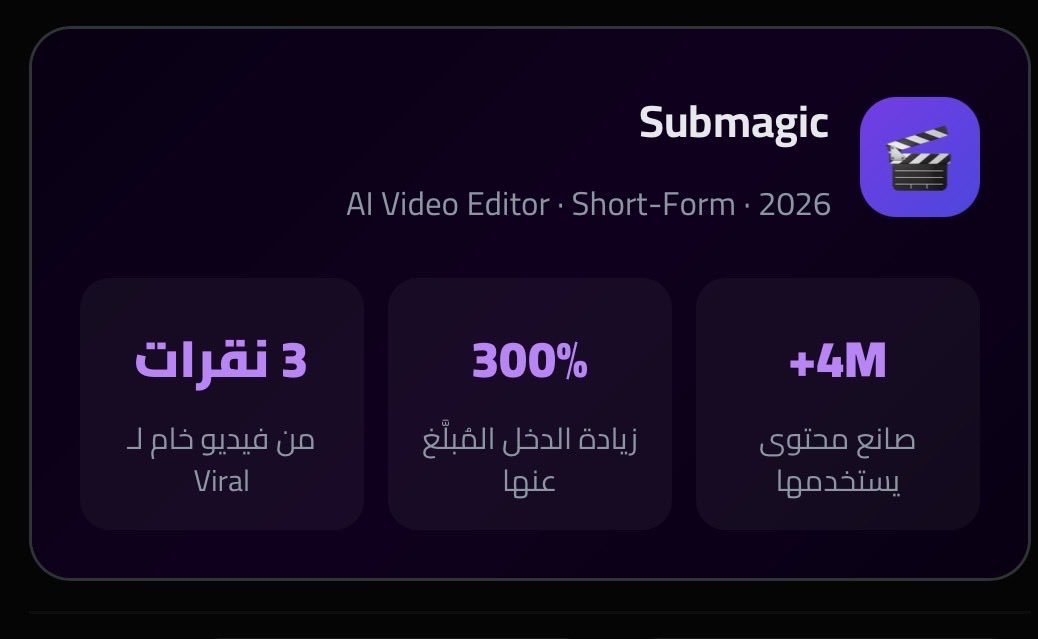

I've heard good things about Reels Farm. Submagic is solid for AI captions and quick edits. You can also use OpusClip to automatically turn your long-form YouTube videos into Shorts/Reels by finding the best moments. CapCut is great too if you want more control.
1
16
the video compares clipping tools at 300 a month. the tool is open source
watched a breakdown today. opus clip vs chop ai vs submagic. which paid clipper makes you the most money
every option was a subscription. 15 to 300 dollars a month, capped on minutes, watermarked on the free tier
here is what the affiliate links do not tell you
every one of those tools is the same four pieces. whisper transcribes, an llm finds the hooks, ffmpeg crops to 9:16 and burns subtitles, a scheduler posts it. that is the entire product
it is open source. it is free. there is a public repo that does exactly what opus clip charges you for, no credits, no watermark
the tools are not selling you technology
they are selling you the fact that you did not know it was four api calls
i wrote the full build. one source, ten formats, two languages, on autopilot
4
24
895

Jun 12
you too man, you're doing a great job over on TikTok.
still using Submagic to edit your videos ?
35


The video clipping market breaks into four lanes:
• Marketplaces that fund campaigns and pay per view (Whop, Vyro)
• AI tools that cut the clips (OpusClip, Submagic)
• Agencies that run it for you (Clipping Culture)
• Verification and payout plumbing, which barely exists at the moment.
This is from our upcoming report on Video Clipping Businesses. Free at Trends.vc.
1
2
220

opus clip and submagic for the auto-clip flow, descript if you want to actually edit. nothing solid for the "raw video → meme/gif" cut though, that's still a build-it-yourself gap
2
2
21

Jun 9
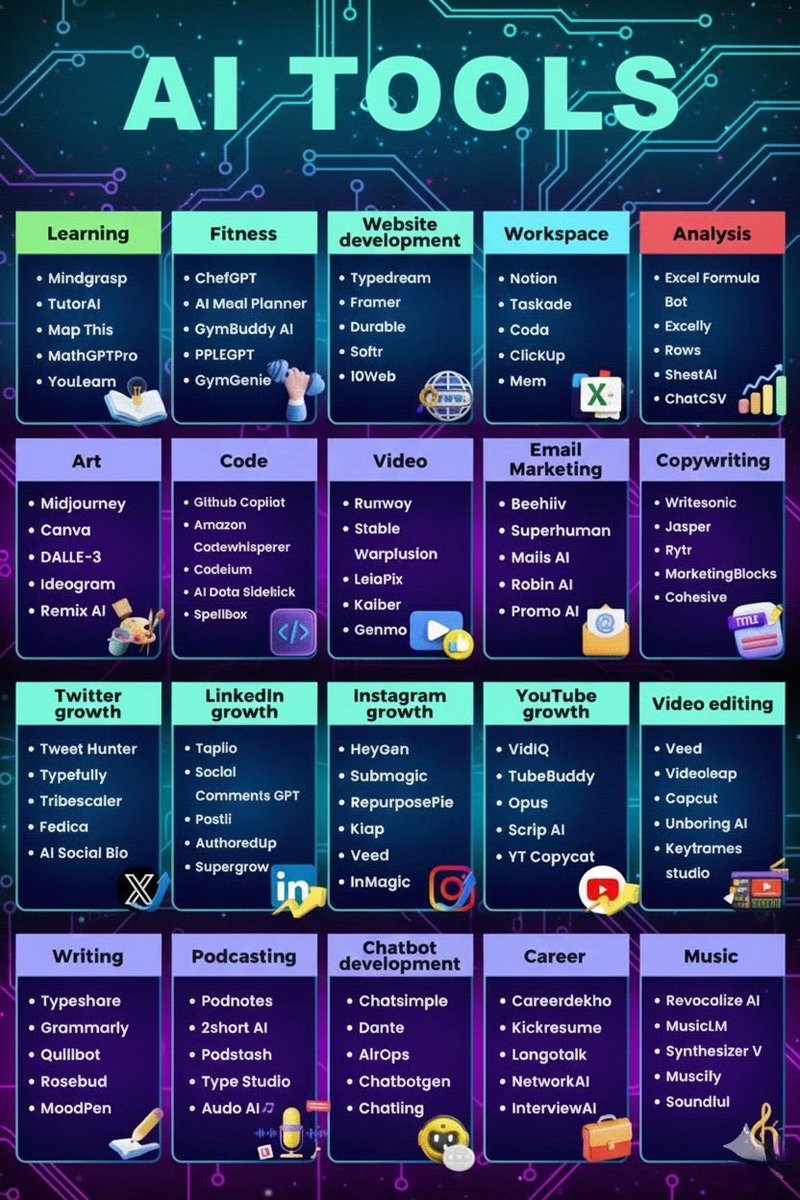
Ultimate List of 100 Best AI Tools 🔥
1. Learning
• Mindgrasp
• TutorAI
• Map This
• MathGPTPro
• YouLearn
2. Fitness
• ChefGPT
• AI Meal Planner
• GymBuddy AI
• PPLE GPT
• GymGenie
3. Website Development
• Typedream
• Framer
• Durable
• Softr
• 10Web
4. Workspace
• Notion
• Taskade
• Coda
• ClickUp
• Mem
5. Analysis
• Excel Formula Bot
• Excelly
• Rows
• SheetAI
• ChatCSV
6. Art & Design
• Midjourney
• Canva
• DALLE-3
• Ideogram
• Remix AI
7. Coding
• GitHub Copilot
• Amazon Code Whisperer
• Codeium
• AI Data Sidekick
• SpellBox
8. Video Creation
• Runway
• Stable WarpFusion
• LeiaPix
• Kaiber
• Genmo
9. Email Marketing
• Beehiiv
• Superhuman
• Mails AI
• Robin AI
• Promo AI
10. Copywriting
• Writesonic
• Jasper
• Rytr
• Marketing Blocks
• Cohesive
11. Twitter (X) Growth
• Tweet Hunter
• Typefully
• Tribescaler
• Fedica
• AI Social Bio
12. LinkedIn Growth
• Taplio
• Social Comments GPT
• Postli
• Authored Up
• Super grow
13. Instagram Growth
• HeyGen
• Submagic
• RepurposePie
• Klap
• InMagic
14. YouTube Growth
• VidIQ
• TubeBuddy
• Opus
• Scrip AI
• YT Copycat
15. Video Editing
• Veed
• Videoleap
• CapCut
• Unboring AI
• Keyframes Studio
16. Writing
• Typeshare
• Grammarly
• QuillBot
• Rosebud
• MoodPen
17. Podcasting
• Podnotes
• 2Short AI
• Podstash
• Type Studio
• Audo AI
18. Chatbot Development
• Chatsimple
• Dante
• AirOps
• ChatbotGen
• Chatling
19. Career
• CareerDekho
• Kickresume
• Langotalk
• NetworkAI
• InterviewAI
20. Music
• Revocalize AI
• MusicLM
• Synthesizer V
• Muscify
• Soundful
---
Follow @wisdomdaily75 for more 🚀
18
15
34
1,507

Jun 8
we took many of the best-in-class papers and methods from Meta, Adobe, ByteDance, etc around agentic editing and implemented them but couldn’t get anything to work really well (evaluation metric = where edited outputs were loved EVERY SINGLE time...or in this case, even 50% of the time)
The truth is -- timing, cuts, and pacing are still very hard to nail, especially when the media is contextual and not just someone talking
Podcast clipping is much easier because the transcript gives you the structure to edit over…you can cut on the start and end of a sentence, trim the silences, find the most interesting soundbites, and end up with interesting / great videos. That’s what opus clip, submagic, and the similar apps have done really well- i imagine a lot of these apps get commoditized over time (as we’re already seeing), but they nailed a very important wedge early
clips without speech are a totally different problem
you have to understand what is actually happening in the footage, whether the action is relevant, when the moment starts, when it peaks, when enough is enough, and when you should move on to the next clip. There isn’t a transcript / inherent structure telling you / the agent where to make the next cut
This is why it’s ironically easier to make full videos using AI-generated media than it is to take existing media and edit it. If you’re generating the scenes on demand, the scenes / structure / editing pace are already defined before they’re made. The agent knows what it’s supposed to create (has a predefined base to evaluate off of) and knows how to tie it together from its well-structured context
Editing existing media is entirely different. You’re trying to get an agent to understand what already happened (using a VLM like Gemini models) and turn it into something compelling…requires an insane amount of processing over media great multimodal embeddings. I’m short-term bullish on agents being able to take a stab at the first pass -- but i feel the output must be an editable project within Premiere Pro / CapCut to clean up the edges
when this gets solved, I think we’ll see a renaissance of old content getting recycled -- especially long-form--niche content that was never really watched because it was too long, too dense, or too hard to process. A lot of that content probably has great moments buried inside it, but they’re not obvious bc they don’t have transcripts
If anyone’s working on this, would love to help shed some light on the scars I got and what to avoid
1
6
373

Jun 8
Cheap tools, clean workflow. CapCut, Submagic, ElevenLabs, Canva prove you don't need a studio to win.
14

Jun 8
Simple tools like CapCut Submagic ElevenLabs and Canva can still produce clean professional videos
17


Jun 6
🚀 12 AI Tools Every Creator Should Know
If you're creating content in 2025, these tools can help you work faster, create better content, and save hours every week:
✅ Submagic – Captions that boost retention
✅ Castmagic – Turn podcasts into multiple content pieces
✅ Taplio – Generate LinkedIn content ideas
✅ Typefully – Write and schedule X posts
✅ Kittl – Easy AI-powered design creation
✅ InVideo – Generate videos from text prompts
✅ Synthesia – Create AI avatar videos
✅ Repurpose – Publish across platforms automatically
✅ Metricool – Manage all social media accounts
✅ BuzzSumo – Discover proven content ideas
✅ AnswerThePublic – Find audience questions
✅ Flick – Improve Instagram hashtag strategy
The creators who learn to leverage AI won't replace creativity—they'll amplify it.
Which of these tools have you tried, and which one is your favorite? 👇
1
2
147

Jun 5
Tools to get started with clipping and their uses:
1. Video Editing Tools
Capcut
- Cut and trim clips fast
- Auto captions (very important for viral clips)
- Zoom-in effects templates
- Easy TikTok/Reels export
Adobe Premiere Pro
- Full control over editing
- Better quality exports
- Keyframing, motion graphics
- Industry standard for creators & agencies
DaVinci Resolve
2. AI Clipping Tools (Fast automation)
Opus Clip
- Automatically turns long videos into short viral clips
- Detects “best moments”
- Adds captions reframes for TikTok/Shorts
- Great for podcasts & interviews
link: opus.pro/
Submagic
- Stylish animated captions
- Auto emojis highlights
- Makes clips look “viral-ready” instantly
- Used heavily for short-form content
link: submagic.co/
3. Design Tools (Thumbnails visuals)
Canva
- Thumbnails for YouTube Shorts
- Simple text overlays
- Social media graphics
- Branding for clips
link: canva.com/
4. Audio Tools (optional but powerful)
Audacity
Clean background noise
Improve voice quality
Remove hiss/echo
Lightweight and free
link: audacityteam.org/
4
4
53
3,852

2. Opus Clip (o Submagic)
El formato corto (Reels, TikTok, Shorts) es el rey, pero editar quita horas. Esta herramienta toma un vídeo tuyo largo (de YouTube o una reunión) y lo corta automáticamente en 10 virales con subtítulos magnéticos, ganchos y emojis.
1
2
139