
Joining late for the party but I've had success with TestDisk when recovering deleted partitions etc. It's free and can be found on Google
1
1
33

Jun 13
So, the tale of John O.
Years and years ago when I was a tiny Tet out in Washington, I was doing my own freelance computer repair service. It was going pretty good, except for the part where I was having a ton of vehicle problems. At the time, I had a shitty work van that I bought from an automotive audio shop, like mobile music but more generic. Was having issues with the engine, was sucking coolant into the engine, shit sucked.
One evening I got a call to come out and do data recovery from a mac drive. Shit, I can do that in my sleep. I load up my kit, grab my book of disks and my hard drive toaster, and head out to his address. Coming up to the house, the first thing I notice is the dogs, three smaller spaniels of some sort. As I get to the house, I knock on the door and he lets me in, and the first thing I notice when I get in there is the smell. The entire house smelled like an ashtray, there was a thick crust of ash and tobacco residue on everything. I try to breathe thru my mouth to avoid smelling it but thats a mistake, I can taste it in the air. Looking around, (and looking back now) it seems that the place I'm in is a place I should not be. On the door, various photographs of people from around town. not candid shots, but almost like he was keeping photos of friends. Behind the door on the right hand wall, floor to ceiling carvings and sculptures and glass spheres and snow globes, all of dragons. Many are actually rather pretty and cool, but from wall to wall, multiple shelves, down to the floor in places. In many places, they couldn't reach to the floor, because the floor was stacked waist high with porn magazines. Playboys. Hustlers. all sorts, in stacks on stacks lining the wall in the room, out of the room, down the hall and into the other room, and probably more. I didn't dare look. On the other wall across from the wall of dragons was two tables end to end and shelves on the wall, all covered with empty and partially empty bottles of alcohol. There were binders full of papers on one of the tables, and under the tables hundreds and thousands of porn DVDs. On a small card table next to the door, he had the laptop and printer and the nasty keyboard, covered in who knows what. A lotion bottle sits next to the ash tray to the right. Yes, I wore gloves. I've learned that lesson years ago.
John was a dirty old man in every sense of the phrase. Short, unshaven, a fat stomach that pushed past his shirt, thin grey hair, and absolutely zero filter. Smoked like a chimney and drank like a fish, and loved to brag about shit he's done in his life.
He has a hard drive, and says he needs files off it. Cool. Plug it in to his new nasty laptop, it spins, and just craps out. Ended up putting it in a towel in the fridge to get the info off it, recovered via testdisk so didn't see what it was. don't wanna. during the service we talk about stuff and he learns about my vehicle issues. He gives me a loan to fix it. I spend the next couple of years in contact with him to pay off this loan. During this time I also meet a friend of his, jim, who needs my computer services too. Jim ends up having me fix stuff for him regularly, and we get to know each other. after a few years, the loan is paid, and I don't hear from john for a while. Time goes by and I get a call from jim. he tells me that john has died and he wants me to help him clean out his house since I knew them both. I reluctantly agree.
It turns out john had gotten a big head and withdrew thousands of dollars and went to the casino, and lost everything in twenty minutes. It broke him, and he drank himself stupid, had a heart attack and died. we cleared out the house and sent the wall of dragons to the local thrift shops, jim had to go through the house because john's got weapons all over the damn place, and a loaded crossbow on the wall. we pulled bags of bottles out of there and crates of nudie mags. Jim took a hammer to the computer, he had found that john had cheese pizza and apparently john thought that if you paid for it it's legal.
Not sure where I'm going with this, but witnessing someone turn from a disgusting motormoth braggart and into a complete implosion, a smouldering crater with his skeletons out in the open stuck with me.
4
1
17
650

いろいろコマンド打ってみたけどダメで…
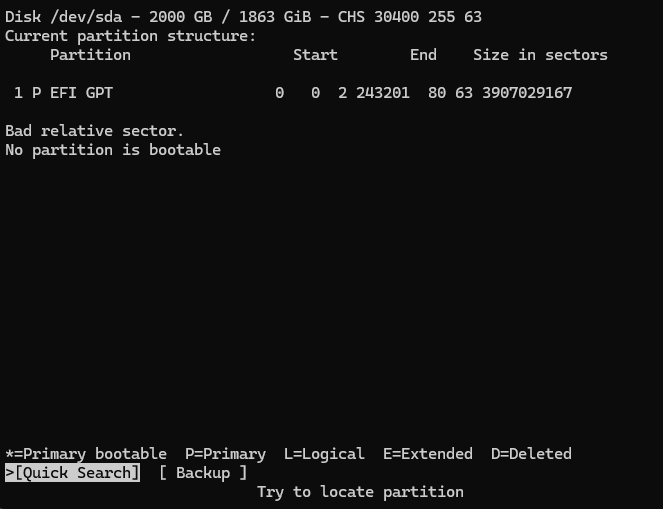
testdiskというツールを使用して参照も試してみたけどダメだった…
10-15年前のNASは独自方言が強すぎてあきらめましょうってGeminiに言われた…
最近のNASはGPT(GUID Partition Table)という規格で統一されたものが多いからラズパイでも読めるって。そっか…🥲
1
30

Jun 9
SDカード自体は強い構造ですが静電気やスロットの接触不良で意外とこうなります🫠
復旧、データ取り出しが出来たら初期化した後、カメラ側の接点も確認かなと思います🥹
PhotoRecはtestdiskって古いけど作りはしっかりしてるものをベースっぽいので見込みありますね◎
1
81

Jun 6
testdisk & photo_rec 다운로드 주소 : cgsecurity.org/wiki/TestDisk…
중요) 복구되는 파일은 해당 SD 카드가 아닌, 다른 저장장치에 저장해야합니다.
"아직 복구가 시도되지 않은 영역"에 복구 결과물이 저장된다면, 해당 영역은 복구할 수 없기 때문입니다.
(6/6)
2
73

ive had a few sd cards corrupt on me so i had to format them but i recovered the photo thru testdisk n photorec on pc
2
158

USBのUbuntsuとかいうのを用意・起動して、SSDのパーティションが読み込めないことを確認。Testdiskをインストールし、中身を見てみるとちゃんとゲームデータなどが見えた、凄い…データのサルベージを開始
2
100

May 27
When you format a drive, your operating system doesn't really erase your files. It only deletes the index, which is like the table of contents that tells the system where your files are. The files themselves are still on the drive, untouched and waiting.
It's like tearing the table of contents out of a book. The chapters are still there. You've just made them harder to find, but not impossible.
That's why IT professionals can often recover everything so easily. Tools like Recuva, TestDisk, or even basic forensic software scan the raw storage and rebuild what the index used to point to. In many cases, they recover 90 to 100 percent of your data in just minutes.
Your deleted photos. Your tax documents. Saved passwords. Old work files with client data.
All of it.

You format a 16 GB USB drive.
Open it again.
Looks completely empty.
Then you take it to an IT guy…
and somehow all 16 GB of files get restored.
So where were those files actually stored?
7
13
170
14,623

They never left the drive. You just told the file system to forget where they were.
When you delete files or perform a quick format, the operating system does not touch the actual data. It wipes the index. Think of it like a library where someone removed the card catalog. Every book is still on the shelf exactly where it was. You just have no map to find them anymore. The OS looks at the drive, sees no index entries, reports it as empty, and moves on.
The data physically remains on the flash memory chips until something new gets written over those sectors. Until that happens the original files are completely intact and recoverable.
This is what the IT guy did. He ran a recovery tool. Software like Recuva, TestDisk, or PhotoRec scans the raw storage sector by sector ignoring the file system index entirely. It looks for file headers and known data signatures directly in the raw bytes. Finds them. Reconstructs them. Hands them back to you like nothing happened.
The difference between a quick format and a full format matters here. Quick format wipes the index only. Full format actually writes zeros across the entire drive. That is why full formats take significantly longer and why recovery after one is much harder or impossible depending on the drive.
Secure erase tools exist specifically because people learned this lesson the hard way. Selling an old laptop or drive with a standard format leaves every file you ever saved fully recoverable by anyone with a free tool and fifteen minutes.
The files were there the entire time. The drive just stopped advertising them.
You format a 16 GB USB drive.
Open it again.
Looks completely empty.
Then you take it to an IT guy…
and somehow all 16 GB of files get restored.
So where were those files actually stored?
1
1
13
1,190

May 27
Formatting a USB usually does NOT erase your files instantly.
When you format a drive, the OS mostly deletes the map to the files, not the files themselves.
Think of it like this:
Your USB is a library.
The files are the books.
The file system is the catalog telling the OS where every book is stored.
Quick format:
“Throw away the catalog.”
Full overwrite:
“Burn the books.”
So after a normal format, the data is often still physically sitting on the NAND flash chips untouched.
That’s why recovery tools work.
The OS marks those sectors as “free space,” but until new files overwrite them, recovery software can scan the raw disk, rebuild file headers, signatures, fragments, metadata, and reconstruct the files.
That’s also why:
“Don’t use the drive after accidental deletion.”
Because every new write increases the chance of overwriting old data permanently.
On Linux, recovery is surprisingly simple.
First identify the drive:
sudo fdisk -l
Then create a raw image of the USB before touching it further:
sudo dd if=/dev/sdb of=usb_backup.img bs=4M status=progress
(Replace /dev/sdb with your actual USB device. Getting this wrong is how people accidentally clone their regrets.)
Then recover files using tools like:
photorec
testdisk
foremost
Example:
sudo photorec usb_backup.img
These tools scan the raw bytes directly and look for known file signatures like JPG, PDF, ZIP, MP4, DOCX, etc.
Even if the filesystem metadata is destroyed.
Sometimes recovery is nearly perfect.
Sometimes filenames/folders are gone but contents survive.
Sometimes TRIM or secure erase already wiped everything.
SSDs and modern flash drives complicate this because TRIM can tell the controller:
“these blocks are no longer needed.”
At that point the controller may actually erase them internally.
Which is why SSD recovery is often much harder than old HDD recovery.
So the files were never “stored somewhere else.”
They were still right there on the USB.
You format a 16 GB USB drive.
Open it again.
Looks completely empty.
Then you take it to an IT guy…
and somehow all 16 GB of files get restored.
So where were those files actually stored?
1
2
13
1,260

May 22
Well for whoever fell for this,
If you only ran diskpart -> select disk 0 -> clean, your files may still be recoverable.
Connect the drive to another PC if possible
Use TestDisk to restore the lost partitions
Guide:
cgsecurity.org/wiki/TestDisk…
1
3
674


May 20
hi harry i dm'd this on instagram too but idk i'll try here also in the hopes you'll see it! have u tried testdisk it's a real lifesaver
2
309

May 18
𝗧𝗼𝗽 𝟭𝟬𝟬 𝗗𝗶𝗴𝗶𝘁𝗮𝗹 𝗙𝗼𝗿𝗲𝗻𝘀𝗶𝗰𝘀 & 𝗖𝘆𝗯𝗲𝗿𝘀𝗲𝗰𝘂𝗿𝗶𝘁𝘆 𝗧𝗼𝗼𝗹𝘀 💀🔥
1.🧩Autopsy
2.⚖️EnCase
3.💾AccessData FTK
4.🛠️X-Ways Forensics
5.📂Sleuth Kit
6.🧠Volatility
7.🌐Wireshark
8.📱Cellebrite UFED
9.📧Email Collector
10.🔎DFF
11.🧲Magnet AXIOM
12.🕵️Oxygen Detective
13.🖥️OSForensics
14.📡NetworkMiner
15.📑RegRipper
16.📦Bulk Extractor
17.🖼️Ghiro
18.✂️Scalpel
19.🧮HxD
20.💽TestDisk
21.📸PhotoRec
22.🐧CAINE
23.🔬Axiom Cyber
24.🛡️Belkasoft Evidence
25.📊Fibratus
26.🌍Autopsy Browser
27.🐉Kali Linux
28.🧪DEFT
29.🧠Volatility Framework
30.🐍PyFlag
31.📜Plaso (log2timeline)
32.📂TSK (The Sleuth Kit)
33.🚨Redline
34.🚦Snort
35.📡Tcpdump
36.🔍Ngrep
37.💾dcfldd
38.🌐Wireshark
39.🧪SIFT (SANS)
40.🛡️Paladin
41.🐧CAINE Live
42.📱XRY (XAMN)
43.🌑BlackLight
44.🧮WinHex
45.💿Access FTK Imager
46.💽DC3DD
47.🦖Raptor
48.💾EnCase Imager
49.🧰Guymager
50.✂️Scalpel
51.♻️Extundelete
52.🌐Xplico
53.📂Foremost
54.🐪Hunchback
55.🛠️Autopsy Tools
56.💿OSForensics Imager
57.🔐Dislocker
58.📦Bulk Extractor
59.🧪SANS SIFT
60.🖥️Live View
61.📁LRR
62.💽NTFS-3G
63.🪟WindowsSCOPE
64.🦊Volafox
65.📑Amcache Parser
66.🐝The Hive
67.🚀GRR Rapid Response
68.🧠Rekall
69.🔎DFF
70.🔑SSDeep
71.🧰KAPE
72.🔒USB Write Blocker
73.🤖AIL
74.🗑️Rifiuti2
75.🧠VolDiff
76.📋WinAudit
77.🔍hfind
78.🧬YARA
79.📱Checkm8
80.📦Olefile
81.🐍Pyew
82.💾E01 Examiner
83.🔌USBDeview
84.📱Autopsy iPhone
85.🧪DC3-MWCP
86.💿X-Ways Imager
87.🧠Memoryze
88.📜EVTExtract
89.⚡Speedit
90.🔐SniffPass
91.🌐Nmap
92.🕵️OSINT Framework
93.🔍Recon-ng
94.🛰️OSINT-SPY
95.🌍Shodan
96.🧠Maltego
97.🕷️SpiderFoot
98.📂Metagoofil
99.🔎theHarvester
100.👁️Creepy
#DFIR #DigitalForensics #CyberSecurity #ThreatHunting #BlueTeam
2
25
117
3,206


May 11
Si no tienes un Respaldo de Datos y falla tu disco duro, puedes intentar recuperar tus datos o fotos con TestDisk o PhotoRec, software libre para varias plataformas.
Obvio, mejor mantener tu Respaldo actualizado y olvidarte de problemas 😉
#BackupMonday
cgsecurity.org/
6
207
𝗧𝗼𝗽 𝟭𝟬𝟬 𝗗𝗶𝗴𝗶𝘁𝗮𝗹 𝗙𝗼𝗿𝗲𝗻𝘀𝗶𝗰 𝗧𝗼𝗼𝗹𝘀 𝗘𝘃𝗲𝗿𝘆 𝗖𝘆𝗯𝗲𝗿𝘀𝗲𝗰𝘂𝗿𝗶𝘁𝘆 𝗦𝘁𝘂𝗱𝗲𝗻𝘁 𝗦𝗵𝗼𝘂𝗹𝗱 𝗞𝗻𝗼𝘄 🕵️♂️💻
1.🛠️ Autopsy
2.🧩 EnCase
3.📂 AccessData FTK
4.🔬 X-Ways Forensics
5.⚡ Magnet AXIOM
6.🧠 Oxygen Detective
7.💻 OSForensics
8.🧾 Belkasoft Evidence
9.🚨 Magnet AXIOM Cyber
10.🌑 BlackLight
11.📀 FTK Imager
12.🧰 Guymager
13.⚙️ DC3DD
14.🔄 DC3MWCP
15.📦 EnCase Imager
16.🛰️ X-Ways Imager
17.💾 OSForensics Imager
18.🖥️ WinHex
19.✏️ HxD
20.🔒 USB Write Blocker
21.🦖 Raptor
22.🛡️ Paladin
23.🌪️ Volatility
24.🔎 Rekall
25.🚩 Redline
26.🪟 WindowsSCOPE
27.🧬 Memoryze
28.🐧 LiME
29.🦈 Wireshark
30.📡 Tcpdump
31.🔍 Ngrep
32.🛰️ NetworkMiner
33.📜 Xplico
34.🔑 SniffPass
35.🌍 Nmap
36.🚨 Snort
37.🐪 Hunchback
38.💽 NTFS-3G
39.📲 Cellebrite UFED
40.🔬 XRY (XAMN)
41.🍏 Autopsy iPhone
42.🛠️ Andriller
43.🔌 USBDeview
44.🗑️ Rifiuti2
45.✂️ Scalpel
46.📦 Foremost
47.📸 PhotoRec
48.🧪 TestDisk
49.🐧 Extundelete
50.🧲 Bulk Extractor
51.🚩 PyFlag
52.🔐 Dislocker
53.🔄 VolDiff
54.📜 EVTXtract
55.🧩 Sleuth Kit
56.🛠️ RegRipper
57.⏳ Plaso
58.📧 Email Collector
59.📊 Fibratus
60.📜 Amcache Parser
61.📂 Olefile
62.🎯 Yara
63.🐍 Pyew
64.📀 E01 Examiner
65.🔎 hfind
66.🧬 SSDeep
67.📱 Checkm8
68.📋 WinAudit
69.🦊 Volafox
70.⚡ GRR Rapid Response
71.🐝 The Hive
72.🧠 Cyber Triage
73.📂 LRR
74.👁️ Live View
75.🚀 Speedit
76.🛠️ Autopsy Tools
77.🔬 DFF
78.🧪 AIL Framework
79.⚔️ KAPE
80.🐉 Kali Linux
81.💻 CAINE
82.📀 CAINE Live
83.🧰 DEFT
84.🛡️ SIFT SANS
85.⚔️ Tsurugi Linux
86.🌐 Maltego
87.🔍 Shodan
88.🛰️ Recon-ng
89.🕷️ SpiderFoot
90.📂 Metagoofil
91.🧠 TheHarvester
92.📍 Creepy
93.🛠️ OSINT Framework
94.🎯 OSINT-SPY
95.🔐 VeraCrypt
96.📡 Binwalk
97.🧬 CyberChef
98.📜 Chainsaw
99.🕵️ Velociraptor
100.⚡ Hayabusa
#DFIR #DigitalForensics #OSINT #CyberSecurity #BlueTeam
3
46
192
6,455


May 1
اذا عندك مشاكل بالفلاشة USB؟ هذي أهم الأدوات
المجانية اللي تحتاجها
Rufus
أفضل أداة فورمات إصلاح حرق أنظمة
(تهيئة الفلاش إصلاح مشاكل كثيرة)
github.com/pbatard/rufus
• USBDeview
يعرض كل أجهزة USB ويحذف التعريفات التالفة (حل مشاكل التعرف والتعارض)
sourceforge.net/projects/usb…
• TestDisk PhotoRec
أقوى أدوات استرجاع وإصلاح
(استرجاع ملفات إصلاح البارتشن)
cgsecurity.org/wiki/TestDisk
• USBDDFixer
ينقذ الفلاش بعد ما يخرب من الحرق !
(يرجع الفلاشة لوضعه الطبيعي)
github.com/SimulatedRealityS…
احفظها عندك... بتنقذك وقت الأزمات
5
163
647
27,153