

UNIQUE、FILTER、SORT辺りは組み合わせてなんぼですよね。
私もVSTACKはあまり使わないかな。
TEXTJOINは正直衝撃でしたね。
空白セルの扱いを選べるのは神。
Sequenceは開始値と増分選べるのは超便利ですよね!
1
22
きらりん☆さかな🐟🌟 🗡️💕/❄️🐰/🤖🦀/🐺🗡️🪄/🍐😺/🦊🌸🦝❄️ retweeted
XLOOUPに埋もれて目立たないけど
FILTER
UNIQUE
SORT
TEXTJOIN
VSTACK
なんかもめちゃくちゃ便利だと思ってます。
これ全部分かる人どのくらいいるんだろう。
2
1
12
495

Jun 14
Googleスプレッドシートで
=AI("都道府県別にグループ化して、それに該当する行の氏名を横に展開する集計表を作成して",A1:F11)
こんな式入れたら、
=ARRAYFORMULA(SPLIT(BYROW(UNIQUE(E2:E11), LAMBDA(p, p & "," & TEXTJOIN(",", TRUE, FILTER(B2:B11, E2:E11=p)))), ","))
こんな式になる
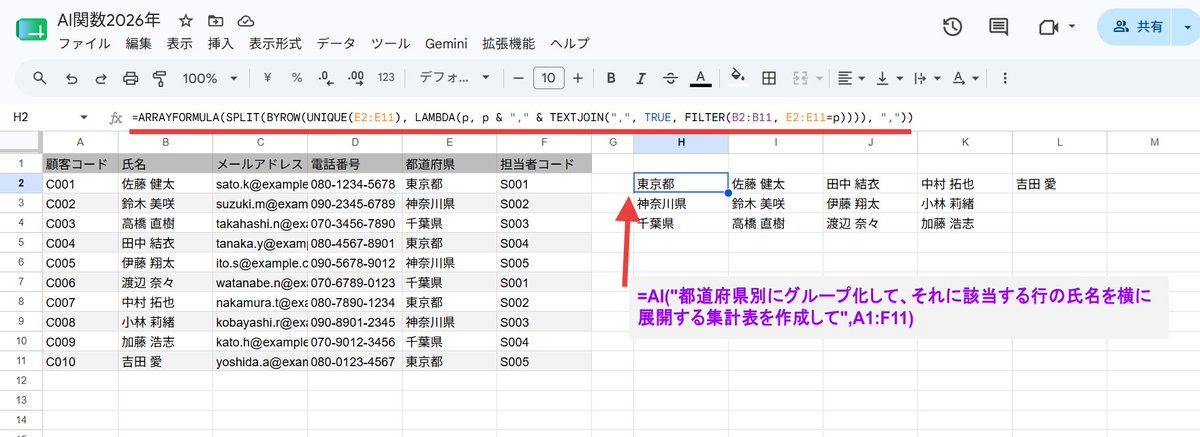
Jun 14

シート関数でやるべき処理に AI関数使うと自動で適切な式に置き換わるんですね。たまげた!200回記念のつもりで記事書いたけど199回目でしたw 週末のnote更新
【2026年6月版】Googleスプレッドシート AI関数 & Geminiで補完(Fill with Gemin)徹底解説|mir @mir_for_note note.com/mir4545/n/nbc8e7ec4…
2
15
2,686

Jun 12
If you want to copy the formula or VBA code used in the video, here it is 👇
Formula:
=LAMBDA(n, LET(units, {"","One","Two","Three","Four","Five","Six","Seven","Eight","Nine"}, teens, {"Ten","Eleven","Twelve","Thirteen","Fourteen","Fifteen","Sixteen","Seventeen","Eighteen","Nineteen"}, tens, {"","","Twenty","Thirty","Forty","Fifty","Sixty","Seventy","Eighty","Ninety"}, num, INT(n), paise, ROUND((n - INT(n)) * 100, 0), ConvertTwo, LAMBDA(x, IF(x<10, INDEX(units, x 1), IF(x<20, INDEX(teens, x-9), INDEX(tens, INT(x/10) 1) & IF(MOD(x,10)>0, " " & INDEX(units, MOD(x,10) 1), "")))), ConvertThree, LAMBDA(x, IF(x=0, "", IF(x<100, ConvertTwo(x), INDEX(units, INT(x/100) 1) & " Hundred" & IF(MOD(x,100)>0, " " & ConvertTwo(MOD(x,100)), "")))), words, IF(num=0, "Zero", TEXTJOIN(" ", TRUE, IF(INT(num/10000000)>0, ConvertTwo(INT(num/10000000)) & " Crore", ""), IF(MOD(INT(num/100000),100)>0, ConvertTwo(INT(MOD(num,10000000)/100000)) & " Lakh", ""), IF(MOD(INT(num/1000),100)>0, ConvertTwo(INT(MOD(num,100000)/1000)) & " Thousand", ""), IF(MOD(INT(num/100),10)>0, INDEX(units, INT(MOD(num,1000)/100) 1) & " Hundred", ""), IF(MOD(num,100)>0, ConvertTwo(MOD(num,100)), ""))), result, "Rupees " & words & IF(paise>0, " and " & ConvertTwo(paise) & " Paise", "") & " Only", result))
1
111
Ebie Data & AI Girl 🌸 retweeted

Jun 11
Today at TS Academy, I explored Excel Text Functions: CONCATENATE, CONCAT, TEXTJOIN, LEFT, RIGHT, MID, TEXT, SUBSTITUTE, LEN, UPPER, LOWER, PROPER, UNIQUE & TRIM.
Big thanks to my tutor, @ezekiel_aleke, for the guidance and knowledge shared. 🚀
#DataAnalytics #Excel #TSAcademy
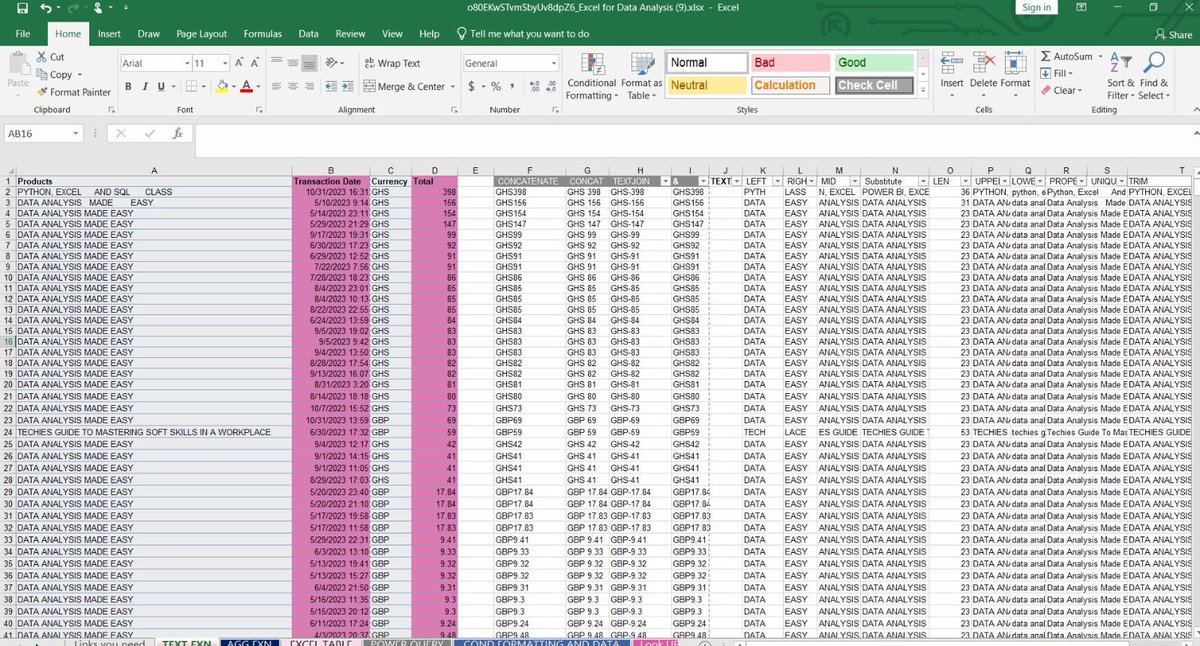
1
2
9
2,547


Concatenate itu udah usang loo.
Bisa digantiin pake & atau CONCAT atau TEXTJOIN
1
1
109


Excel road map for Data Analysis beginners
Essential Formulas:
Math: SUM, AVERAGE, COUNT, COUNTA, MIN, MAX
Logic: IF, AND, OR, IFS
Text: TRIM, CONCAT/TEXTJOIN, PROPER, LEFT/RIGHT/MID
Lookups 🧵
2
4
601

Jun 8
Do you actually need to memorize these, or understand the patterns?
Most string functions fall into 3 buckets: extract, transform, validate.
I’d add CONCAT, TEXTJOIN, FIND, SEARCH, CLEAN, plus TEXTSPLIT/TEXTAFTER/TEXTBEFORE in modern Excel.
Which one do you use most often?
1
1
48
Eniola alebiosu retweeted

COUNTA()
TEXTJOIN()
SUMIF()
SUMIFS()
1
1
4
118

Jun 7
Excel2021からSEQUENCE/XLOOKUP/XMATCH/LETなんかが消えてしまった
TEXTJOIN/CONCAT/IFSなんかもない
……ということはExcel2016デフォルト状態に戻ってるな
しばらくすれば直るでしょう #Excel #Excel2021

1
2
82

Jun 7
TEXTJOINは最近はREGEXEXTRACTの第三引数が2のやつの結果を編集するのに使いますね。
Jun 7

エクセルで文字列操作関数の
・TEXTSPLIT関数は分割
・TEXTJOIN関数は結合
です。画像のように
TEXTSPLIT関数で「わけた」データが
TEXTJOIN関数の「くっつける」のに
最適な練習データになるのでセット
で覚えるのが効率的だと思います!
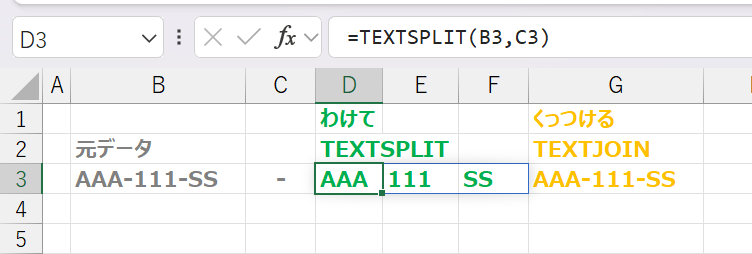
1
1
3
1,350

Jun 7
エクセルで文字列操作関数の
・TEXTSPLIT関数は分割
・TEXTJOIN関数は結合
です。画像のように
TEXTSPLIT関数で「わけた」データが
TEXTJOIN関数の「くっつける」のに
最適な練習データになるのでセット
で覚えるのが効率的だと思います!
1
12
1,786
Bisaa, itu materi dasar nanti kalau bertahun² bisa segini:
1. ✅ ABS
2. ✅ ADDRESS
3. ✅ AGGREGATE
4. ✅ AND
5. ✅ ARABIC
6. ✅ AREAS
7. ✅ ARRAYTOTEXT
8. ✅ AVERAGE
9. ✅ AVERAGEA
10. ✅ AVERAGEIF
11. ✅ AVERAGEIFS
12. ✅ BAHTTEXT
13. ✅ BIN2DEC
14. ✅ BIN2HEX
15. ✅ BIN2OCT
16. ✅ BYCOL
17. ✅ BYROW
18. ✅ CEILING
19. ✅ CEILING.MATH
20. ✅ CELL
21. ✅ CHAR
22. ✅ CHOOSE
23. ✅ CHOOSECOLS
24. ✅ CHOOSEROWS
25. ✅ CLEAN
26. ✅ CODE
27. ✅ COLUMN
28. ✅ COLUMNS
29. ✅ COMBIN
30. ✅ COMBINA
31. ✅ CONCAT
32. ✅ CONCATENATE
33. ✅ CONVERT
34. ✅ COS
35. ✅ COSH
36. ✅ COT
37. ✅ COTH
38. ✅ COUNT
39. ✅ COUNTA
40. ✅ COUNTBLANK
41. ✅ COUNTIF
42. ✅ COUNTIFS
43. ✅ DATE
44. ✅ DATEDIF
45. ✅ DATEVALUE
46. ✅ DAVERAGE
47. ✅ DAY
48. ✅ DAYS
49. ✅ DAYS360
50. ✅ DCOUNT
51. ✅ DCOUNTA
52. ✅ DEC2BIN
53. ✅ DEC2HEX
54. ✅ DEC2OCT
55. ✅ DECIMAL
56. ✅ DEGREES
57. ✅ DGET
58. ✅ DMAX
59. ✅ DMIN
60. ✅ DOLLAR
61. ✅ DPRODUCT
62. ✅ DROP
63. ✅ DSUM
64. ✅ EDATE
65. ✅ ENCODEURL
66. ✅ EOMONTH
67. ✅ ERROR.TYPE
68. ✅ EVEN
69. ✅ EXACT
70. ✅ EXPAND
71. ✅ FALSE
72. ✅ FILTER
73. ✅ FILTERXML
74. ✅ FIND, FINDB
75. ✅ FIXED
76. ✅ FLOOR
77. ✅ FLOOR.MATH
78. ✅ FORMULATEXT
79. ✅ FREQUENCY
80. ✅ GETPIVOTDATA
81. ✅ GROUPBY
82. ✅ HLOOKUP
83. ✅ HOUR
84. ✅ HSTACK
85. ✅ HYPERLINK
86. ✅ IF
87. ✅ IFERROR
88. ✅ IFNA
89. ✅ IFS
90. ✅ IMAGE
91. ✅ IMAGINARY
92. ✅ IMSUM
93. ✅ INDEX
94. ✅ INDIRECT
95. ✅ INFO
96. ✅ INT
97. ✅ IPMT
98. ✅ ISBLANK
99. ✅ ISERR
100. ✅ ISERROR
101. ✅ ISEVEN
102. ✅ ISFORMULA
103. ✅ ISLOGICAL
104. ✅ ISNA
105. ✅ ISNONTEXT
106. ✅ ISNUMBER
107. ✅ ISODD
108. ✅ ISOMITTED
109. ✅ ISOWEEKNUM
110. ✅ ISREF
111. ✅ ISTEXT
112. ✅ LAMBDA
113. ✅ LARGE
114. ✅ LEFT, LEFTB
115. ✅ LEN, LENB
116. ✅ LET
117. ✅ LN
118. ✅ LOG
119. ✅ LOG10
120. ✅ LOOKUP
121. ✅ LOWER
122. ✅ MAKEARRAY
123. ✅ MAP
124. ✅ MATCH
125. ✅ MAX
126. ✅ MAXA
127. ✅ MAXIFS
128. ✅ MEDIAN
129. ✅ MID, MIDB
130. ✅ MIN
131. ✅ MINA
132. ✅ MINIFS
133. ✅ MINUTE
134. ✅ MMULT
135. ✅ MOD
136. ✅ MODE
137. ✅ MODE.MULT
138. ✅ MODE.SNGL
139. ✅ MONTH
140. ✅ MROUND
141. ✅ N
142. ✅ NA
143. ✅ NETWORKDAYS
144. ✅ NETWORKDAYS.INTL
145. ✅ NOT
146. ✅ NOW
147. ✅ NUMBERVALUE
148. ✅ ODD
149. ✅ OFFSET
150. ✅ OR
151. ✅ PERCENTILE
152. ✅ PERCENTILE.EXC
153. ✅ PERCENTILE.INC
154. ✅ PERCENTOF
155. ✅ PERMUT
156. ✅ PERMUTATIONA
157. ✅ PHI
158. ✅ PIVOTBY
159. ✅ POWER
160. ✅ PRICE
161. ✅ PRODUCT
162. ✅ PROPER
163. ✅ QUARTILE
164. ✅ QUARTILE.EXC
165. ✅ QUARTILE.INC
166. ✅ QUOTIENT
167. ✅ RADIANS
168. ✅ RAND
169. ✅ RANDARRAY
170. ✅ RANDBETWEEN
171. ✅ RANK
172. ✅ RANK.AVG
173. ✅ RANK.EQ
174. ✅ REDUCE
175. ✅ REGEXEXTRACT
176. ✅ REGEXREPLACE
177. ✅ REGEXTEST
178. ✅ REPLACE, REPLACEB
179. ✅ REPT
180. ✅ RIGHT, RIGHTB
181. ✅ ROMAN
182. ✅ ROUND
183. ✅ ROUNDDOWN
184. ✅ ROUNDUP
185. ✅ ROW
186. ✅ ROWS
187. ✅ SCAN
188. ✅ SEARCH, SEARCHB
189. ✅ SEC
190. ✅ SECH
191. ✅ SECOND
192. ✅ SEQUENCE
193. ✅ SHEET
194. ✅ SHEETS
195. ✅ SIN
196. ✅ SINH
197. ✅ SMALL
198. ✅ SORT
199. ✅ SORTBY
200. ✅ SQRT
201. ✅ STOCKHISTORY
202. ✅ SUBSTITUTE
203. ✅ SUBTOTAL
204. ✅ SUM
205. ✅ SUMIF
206. ✅ SUMIFS
207. ✅ SUMPRODUCT
208. ✅ SUMSQ
209. ✅ SUMX2MY2
210. ✅ SUMX2PY2
211. ✅ SUMXMY2
212. ✅ SWITCH
213. ✅ T
214. ✅ TAKE
215. ✅ TAN
216. ✅ TANH
217. ✅ TEXT
218. ✅ TEXTAFTER
219. ✅ TEXTBEFORE
220. ✅ TEXTJOIN
221. ✅ TEXTSPLIT
222. ✅ TIME
223. ✅ TIMEVALUE
224. ✅ TOCOL
225. ✅ TODAY
226. ✅ TOROW
227. ✅ TRANSLATE
228. ✅ TRANSPOSE
229. ✅ TRIM
230. ✅ TRIMRANGE
231. ✅ TRUE
232. ✅ TRUNC
233. ✅ TYPE
234. ✅ UNICHAR
235. ✅ UNICODE
236. ✅ UNIQUE
237. ✅ UPPER
238. ✅ VALUE
239. ✅ VALUETOTEXT
240. ✅ VLOOKUP
241. ✅ VSTACK
242. ✅ WEEKDAY
243. ✅ WEEKNUM
244. ✅ WORKDAY
245. ✅ WORKDAY.INTL
246. ✅ WRAPCOLS
247. ✅ WRAPROWS
248. ✅ XLOOKUP
249. ✅ XMATCH
250. ✅ XOR
251. ✅ YEAR
252. ✅ YEARFRAC
253. ✅GET.WORKBOOK
254. ✅ FILES
255. ✅ EVALUATE
Jun 7

💚 kalian belajar excel (IF, PIVOT, VLOOKUP, dan HLOOKUP) berapa lama? bisa ga 4 materi itu digarap sebulan? (Ga usah sampe pro bgt, seenggaknya bisa dikit-dikit gitu)?
24
79
414
19,968
Jun 6
おはようございます!
「セットで覚えるSPLIT & JOIN」
と題して約20秒程度の動画を作って
みました。エクセルで特定の記号で
分割や結合をしたいと思ったときは
◆TEXTSPLIT関数
→記号で分割
◆TEXTJOIN関数
→記号で結合
を使うと便利です。個人的に思うの
は動画のように「TEXTSPLIT」で分割
したデータを「TEXTJOIN」で結合す
ると、まとめて覚えられるので効率
が良いと思います。興味を持って頂
けたら一度試してみて下さい😆
2
5
28
4,643