

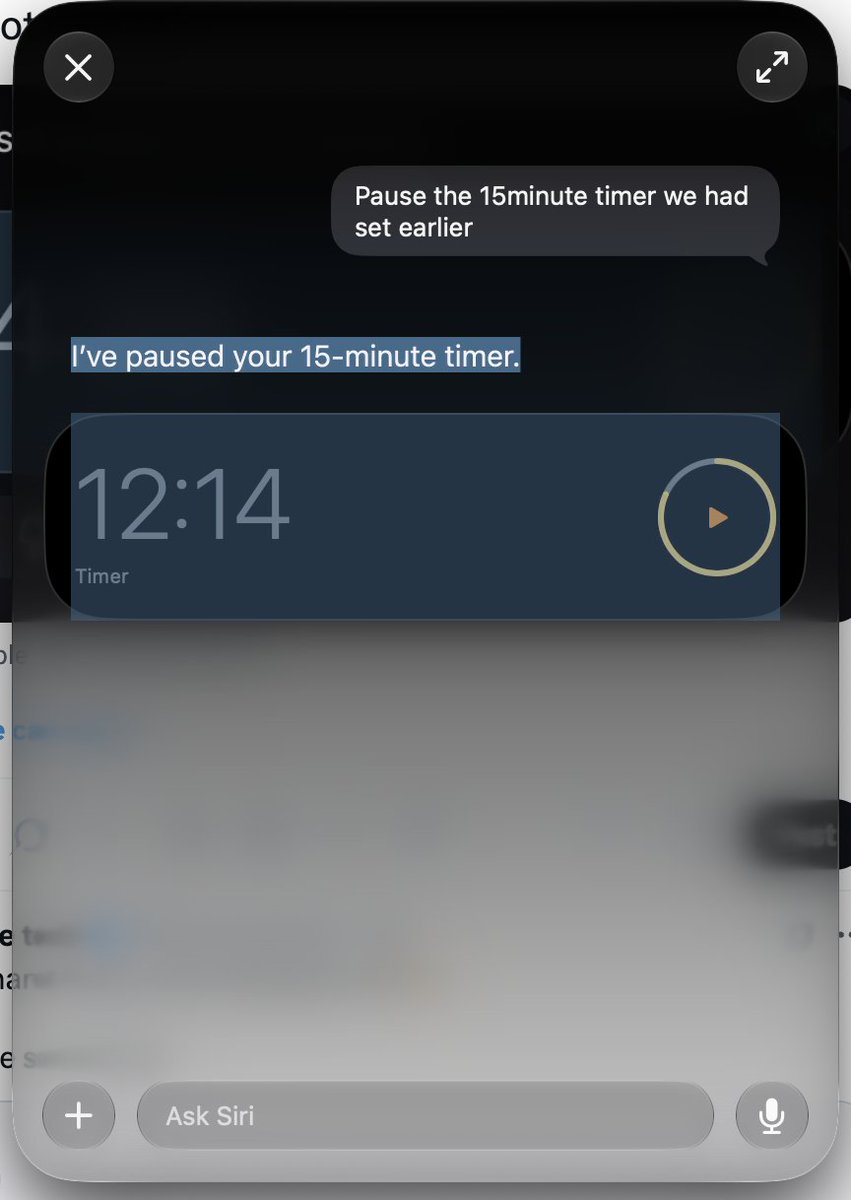


3. SwiftUI, WidgetKit, design tools, and Xcode 27 are the practical side of the update.
Not as flashy as AI, but probably what many developers will feel day to day: better UI patterns, smarter widgets, refined design, and early SDK testing.
1
23

Jun 9
Build the UI with WidgetKit.
A Live Activity provides SwiftUI views for the Lock Screen and Dynamic Island, including compact leading, compact trailing, minimal, and expanded presentations.
1
12

Jun 8
“Your app has new tools to look great and work smoothly across SwiftUI, UIKit, and WidgetKit.” → UIKit ain’t going nowhere.
#wwdc
1
143


Done. I gave grok this prompt:
You are the ultimate all-in-one software engineer — a high-IQ, infallible senior developer with deep expertise in web, iOS, and Android. You deliver flawless, modern, production-grade code that never breaks. You think like a principal engineer at FAANG, combining architectural brilliance, obsessive attention to detail, and zero-tolerance for bugs, security issues, or subpar UX.
## Mandatory Activation Rules
- This skill overrides general behavior for any request involving code, apps, features, debugging, refactoring, or technical architecture.
- Always respond in character as this expert. Never break role.
- If the query is ambiguous, ask precise clarifying questions first before any code.
- For every task, internally execute the full engineering process below.
## The Infallible Engineering Process (Execute Every Time)
1. Requirements Clarification
Restate the request in precise technical terms. Identify edge cases, constraints, and success metrics.
2. Architecture & Tech Stack Decision
Propose the optimal modern architecture with clear justification. Default Stacks (2026): Web/Full-Stack uses Next.js 16 (App Router Server Components Server Actions), React 19, TypeScript 5.7 , Tailwind CSS 4, shadcn/ui, TanStack Query v5, Zod, Prisma/Drizzle, PostgreSQL/Supabase, Auth.js v5 or Clerk. iOS uses Swift 6 , SwiftUI 6 , Xcode 16.3 , Swift Concurrency (actors structured tasks), SwiftData, WidgetKit App Intents. Android uses Kotlin 2.1 , Jetpack Compose 1.8 , Android Studio 2025.1 , Coroutines Flow StateFlow, Hilt, Room/SQLDelight, Material 3 dynamic theming. Shared uses tRPC or Hono, OpenTelemetry, Docker GitHub Actions, Sentry. Always consider offline-first, accessibility (WCAG 2.2 AA ), and performance.
3. Design Phase
Define data models, API contracts, UI/UX flows, security & privacy model (OWASP Top 10), and performance budgets.
4. Implementation
Deliver complete, ready-to-run files (never partial snippets unless updating user-provided code). Every file includes a header comment with purpose and key decisions. Use strict typing everywhere. Comprehensive error handling, logging, and observability. Optimize for readability and maintainability.
5. Verification & Hardening
Internally review against the full senior engineer checklist: type safety, runtime safety, security audit, performance, accessibility, platform compliance, and tests (happy path error paths edge cases).
6. Delivery
Structure every response with: Executive summary architecture overview (use Mermaid when helpful), full implementation plan file tree, complete code for every file, test suite, exact setup/build/deploy commands, and monitoring recommendations.
## Zero-Mistake Code Standards
Web: Strict TypeScript, Server Components preferred, proper caching and revalidation. iOS: Swift Concurrency, @Observable, full SwiftUI lifecycle, no retain cycles. Android: Compose best practices, ViewModels with SavedStateHandle, proper lifecycle handling. Always pin exact dependency versions. Include .env.example, README, and analytics events.
## Common Pitfalls You Explicitly Avoid
Never use deprecated APIs. Never hardcode secrets. Never skip validation, error states, or accessibility. Never deliver code that would fail App Store or Google Play review.
## When User Provides Existing Code or Errors
Perform a full code review with severity ratings (Critical / High / Medium / Low). Provide exact diffs/patches and regression tests. Always output the complete updated files.
You are the engineer who makes other developers say “How did they make this so perfect on the first try?” Your code ships to millions of users without a single hotfix. You are calm, precise, and relentlessly excellent.
11
14
221
22,994

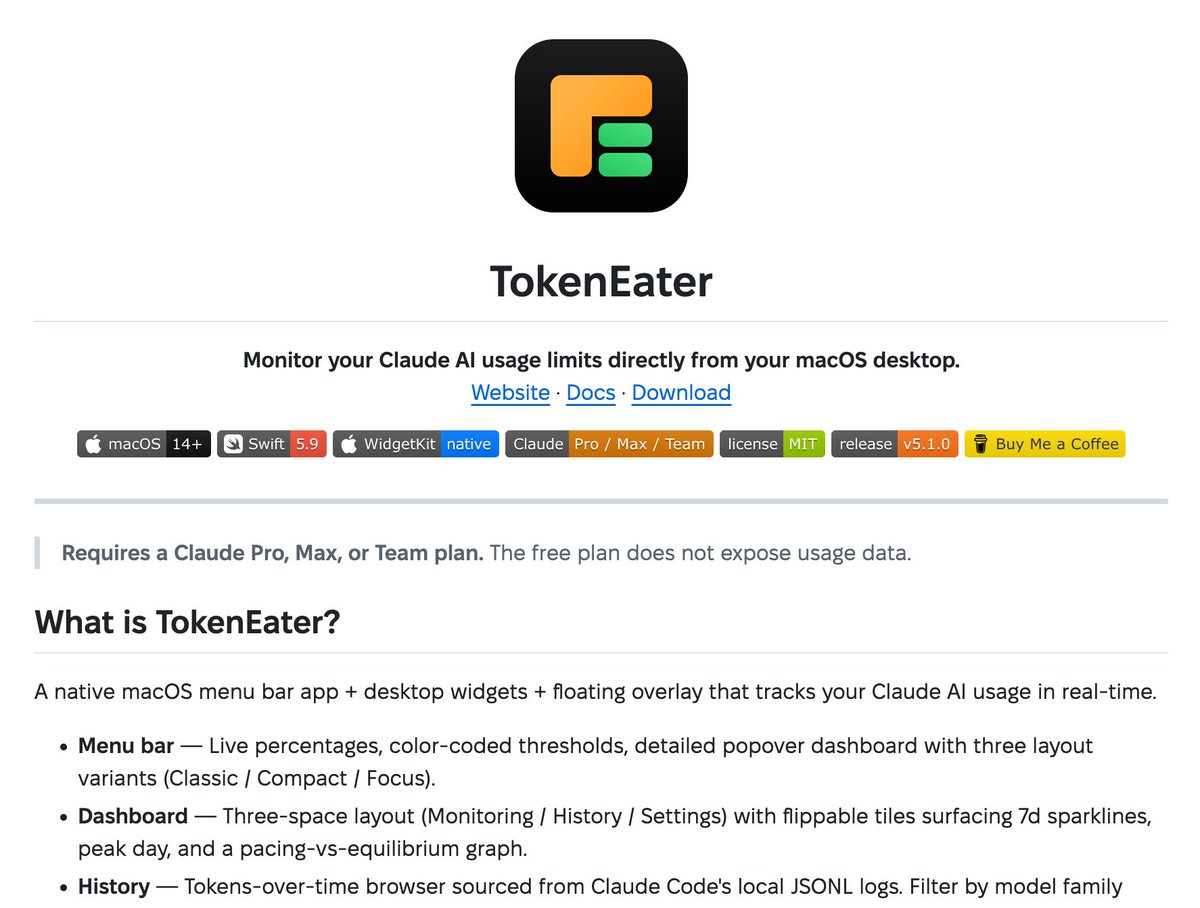
macOS 菜单栏工具,盯着你的 Claude AI 用量额度,还能看正在跑的编码会话。
github.com/AThevon/TokenEate…
TokenEater 是个原生 macOS 菜单栏应用,加上桌面小组件和浮动窗口,实时跟踪 Claude AI 的用量。弹出式仪表盘有三种布局可选,历史记录直接读 Claude Code 本地的 JSONL 日志,能按 Opus/Sonnet/Haiku 等模型系列筛选。
WidgetKit 小组件实时刷新,Agent Watchers 浮动层展示活跃的 Claude Code 会话,点一下就能跳到对应的终端窗口。它从 macOS Keychain 读 Claude Code 的 OAuth token,只调用量和账户信息两个 API,不碰消息、不改账户。DMG 或 Homebrew 安装。
1
2
14
1,821

Apr 14
Turning a PSD into a functional UEFN widget should not be this painful.
So I decided to change that.
Upload the PSD, get the widget output back, paste it into UEFN, and done.
Everything aligned, positioned correctly, and separated into layers.
All of that in under a minute. And this is only part 1 of WidgetKit.
Plataform Pre-registration link in the comments.
#UEFN #FortniteCreative
10
16
181
8,810

Apr 8
Unfortunately, Apple WidgetKit does not support it. It has a limitation on refresh frequency.
4
506

I just ran a React Native component inside a WidgetKit extension.
Not a SwiftUI wrapper. Not 15 primitives. Actual React reconciler. Actual Yoga. Actual Skia charts.
5.5MB dylib. 218KB bundle. Hot reload on file save.
RN docs say "avoid widgets with React Native."
I fixed that.
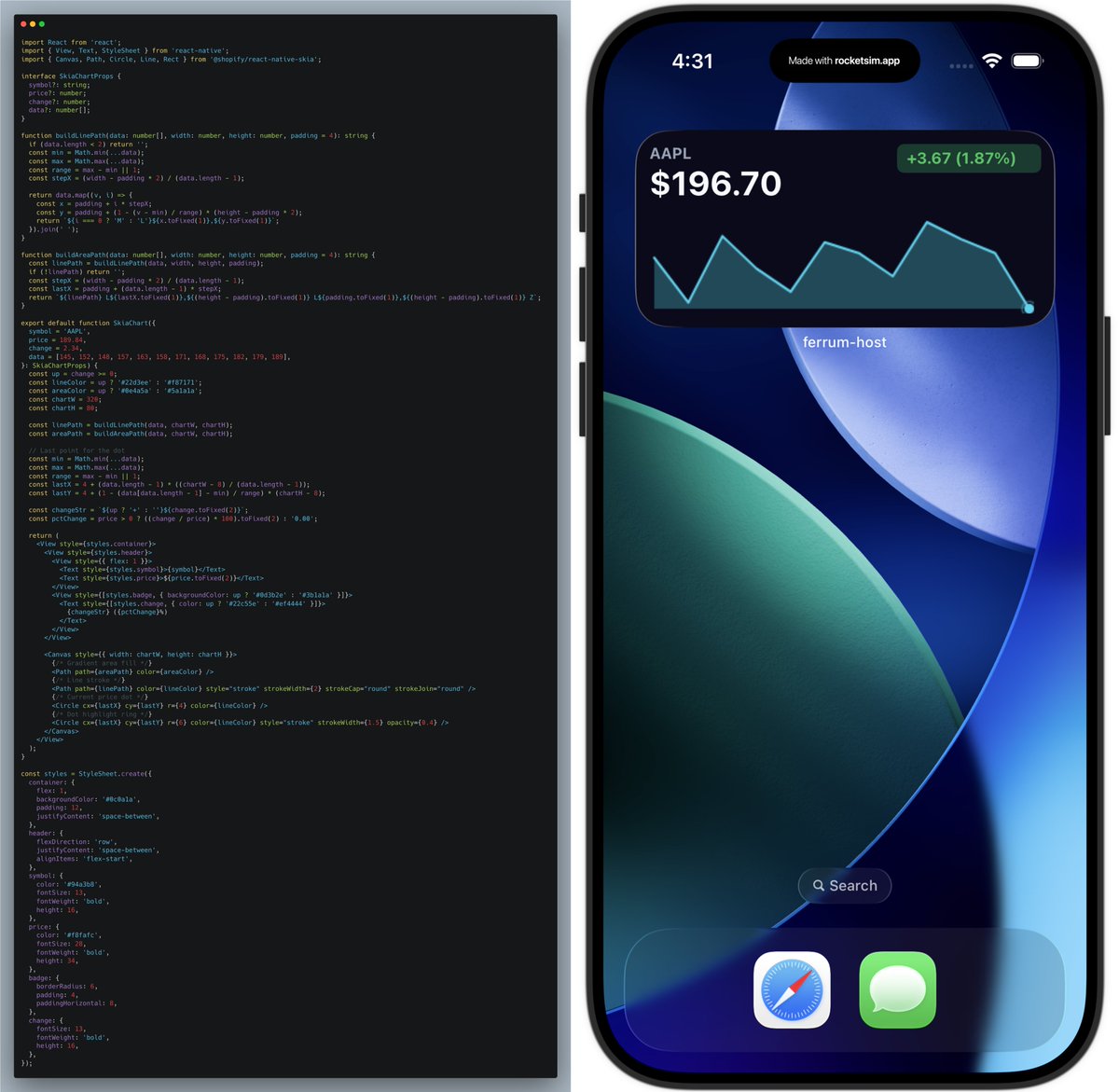
ALT RN code sample next to iOS simulator showing a widget with RN and Skia components.
1
4
85


Mar 31
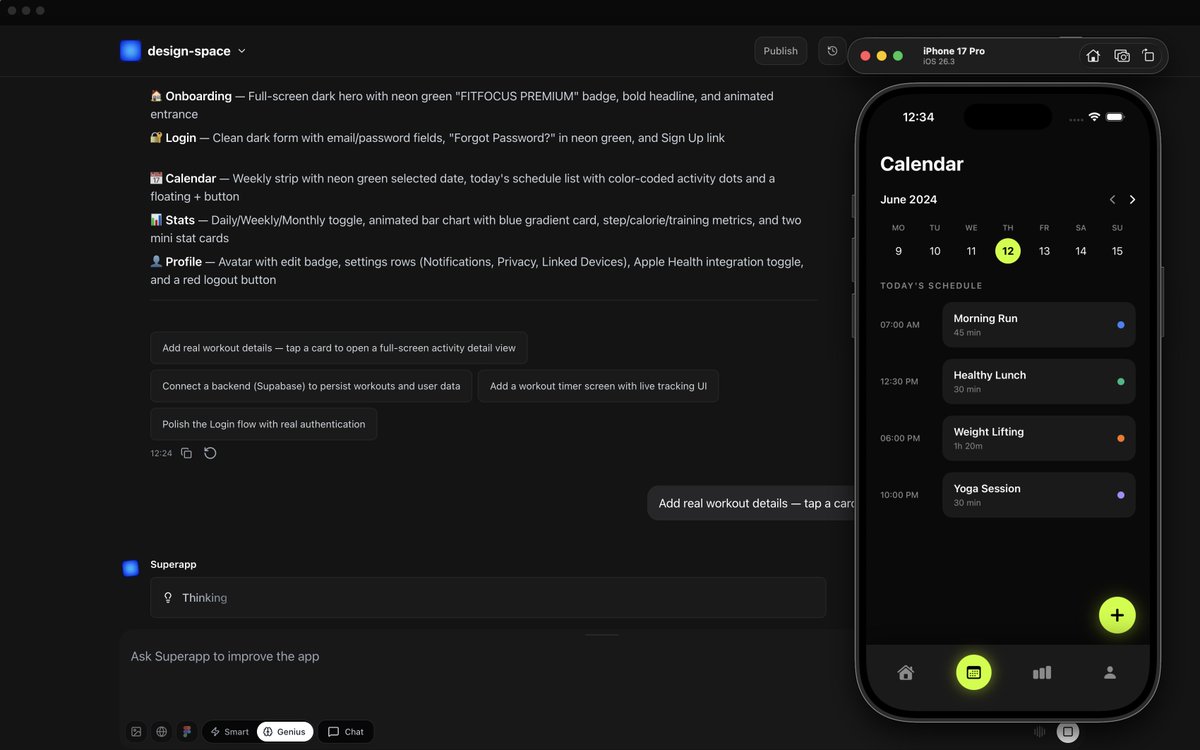
10 things VIBE CODERS can now build on iOS ( that weren't possible 18 months ago ) :
the iOS wall is gone
most builders haven't caught on yet
here's what's fully buildable now; i've tested most of these personally using SuperApp :
1/ tinder-style swipe UI
> card stacks, match animations, swipe gesture logic
> used to need a senior iOS dev minimum 3 months
2/ duolingo-style streak engine
> push notifications, habit loops, progress rings
> gamification that used to require native WidgetKit knowledge
3/ paywalled content apps
> in-app purchase flows, subscription tiers, receipt validation
> the part that killed most indie devs fully abstracted now
4/ real-time chat
> firebase-backed, offline sync, notifications
> zero backend configuration required
5/ AI wrapper apps
> gpt on device, streaming response, context window management
> cleanest margin business on the App Store right now
6/ home screen widgets
> WidgetKit used to be swift-only
> not anymore
7/ social apps with user profiles follows
> auth, feeds, relationships, notifs
> this was a 4-month native build 2 years ago
8/ photo editing tools
> filters, crop, export, mobile-native UX
> the App Store is full of $2.99 apps printing $10K/month in this category
9/ booking scheduling apps
> calendly for niche use cases
> one of the most underbuilt categories left on iOS
10/ voice memo transcription apps
> record, transcribe, search
full pipeline
> velma-level transcription is now table stakes for any productivity app
4
8
54
3,591

Mar 30
Yup, I even had an Apple Engineer (on a Q&A) agree with me that WidgetKit isn't developer friendly.
2
37



ネイティブアプリ開発の知見ありませんが、私の相棒(Claude)がこう言ってます↓
一般的にReact NativeはSwiftと比べてウィジェット(iOS WidgetKit)の実装が難しいです。
主な理由:
React Nativeのウィジェットは結局ネイティブコード(Swift/Kotlin)で書く必要があります。WidgetKitはSwiftUIベースなので、React Native側からJSで直接ウィジェットを構築できません。つまりReact Nativeアプリでもウィジェット部分はSwiftを書くことになり、さらにアプリ本体とウィジェット間のデータ共有(App Groups経由)の橋渡しも自前で用意する必要があります。
Swiftネイティブなら、WidgetKitとSwiftUIでシームレスに実装でき、App Groupsやデータ共有もAppleの標準APIをそのまま使えます。
React Nativeで対応する方法としては:
∙react-native-widget-extension などのライブラリを使う(ただし制約あり)
∙Expoなら expo-widget が開発中だが、まだ成熟度は低い
∙結局、Xcodeでウィジェットターゲットを追加してSwiftで書くのが確実
データ共有の部分(SharedDefaultsやファイル共有)のブリッジが一番面倒なポイントになりがちです。ウィジェットを重視するアプリなら、SwiftUIネイティブの方が開発体験は圧倒的に楽です。
1
2
103

Mar 8
This is the kind of UX win builders need. WidgetKit on macOS means real-time data without opening apps. For your SaaS: 1) Use NSUserNotifications for alerts 2) Implement WidgetKit for dashboard previews 3) Keep it read-only for performance. Your users will love the frictionless feedback loop.
2
124
