
Jaxp13XPathTemplate evaluated XPath expressions for StreamSource and SAXSource inputs using a code path that parsed attacker-controlled XML with the JDK's default DocumentBuilderFactory behavior instead of Spring's hardened parser configuration. Applications that evaluate XPath against untrusted XML payloads could therefore be exposed to XML External Entity (XXE) style attacks.
Affected versions:
Spring Web Services 5.0.0 through 5.0.1; 4.1.0 through 4.1.3; 4.0.0 through 4.0.18; 3.1.0 through 3.1.8.

3


Jun 11
🚨*CVE*
CVE-2026-40998 Jaxp13XPathTemplate evaluated XPath expressions for StreamSource and SAXSource inputs using a code path that parsed attacker-controlled XML with the JDK's default Doc… cve.org/CVERecord?id=CVE-202…
-----
Traducción:
CVE-2026-40998 Jax… infoflow.cloud`
30

CVE-2026-40998 Jaxp13XPathTemplate evaluated XPath expressions for StreamSource and SAXSource inputs using a code path that parsed attacker-controlled XML with the JDK's default Doc… cve.org/CVERecord?id=CVE-202…
1
356

Jun 11
Really enjoyed this dive into the browser's 'older tech' stack! XPath, a real unsung hero, especially for robust testing & complex DOM queries. Modern frameworks abstract a lot, but knowing these fundamentals is golden. Thoughts? #WebDev
11

Jun 11
The experimental #SaxonCHE #Python powered XML workbench saxonc-xmlworkbench.azureweb… for #XSLT 3.0, #XQuery 3.1, #XPath 3.1 and #Schematron has been updated to use the latest SaxonCHE 13.0 release.
1
22

Jun 10
Arrivé au Touquet-Paris-Plage pour les 49es Assises de Pathologie.
Heureux de participer à ce rendez-vous d’échange, de formation et de partage autour de notre spécialité.
C’est aussi l’occasion de découvrir une autre belle ville.
#pathology #xpath

1
2
156


午前中、見た目何も変わってないのにXPathが変わっていてRPAが上手く動かないという、地味なエラーに泣かされた。それでも午後は勤怠システムの導入進捗報告と、基幹と外部へのAPI連携システムのテスト進捗確認とか、今日は情シス周りを頑張った1日。
1
72

Jun 9
Liberal arts? Negro please. I graduated in CompSci. I could script you out of a job. I can write a webcrawler in 20 minutes that could do your whole job using an xpath. I Had an offer before I left school. I was really in them books. I'm not taking no static from a 🥷named Rodney
1
17

Jun 9
XMLのWikipedia項目みてたらXPathとかCDATAとか、全然別文脈で出会った概念が出てきており「お前ら、ここの住人だったのか……」という気持ちが
ja.wikipedia.org/wiki/XML
1
141


Jun 9
I tuoi test E2E o i tuoi flussi di web scraping si rompono a ogni minima modifica del layout?
I selettori rigidi di #Playwright o #Puppeteer creano script fragili e costosi da mantenere. Dall'altro lato, gli agenti AI puri introducono un livello di imprevedibilità inaccettabile in produzione.
#Stagehand risolve questa instabilità unendo la precisione del codice deterministico alla flessibilità dell'AI.
Il framework utilizza l'elaborazione degli LLM per interagire con il browser tramite istruzioni in linguaggio naturale, superando i limiti dei tradizionali script di automazione.
Perché è una scelta strategica:
👉🏻 Istruzioni in linguaggio naturale: identifica gli elementi scrivendo semplicemente "clicca sul pulsante di acquisto", eliminando XPath e selettori CSS complessi.
👉🏻 Self-healing automatico: i test continuano a funzionare anche in caso di variazioni della struttura HTML della pagina.
👉🏻 Controllo deterministico: l'esecuzione rimane governata dal codice standard, richiamando l'AI solo dove è richiesta flessibilità di interazione.
Hai in mente un progetto ambizioso?
Parliamone: costruiamo gestionali e web application scritti per durare e pensati per evolvere alla velocità del tuo mercato. Contattaci e parla con un nostro esperto per una prima consulenza.
shorturl.at/h6pCd
📩 Ti è piaciuto il post?
Iscriviti alla nostra newsletter A Cup of Tech e scopri ogni mese come la tecnologia sta cambiando il modo in cui lavoriamo
👉 shorturl.at/AMbBb

44
er retweeted

Jun 8
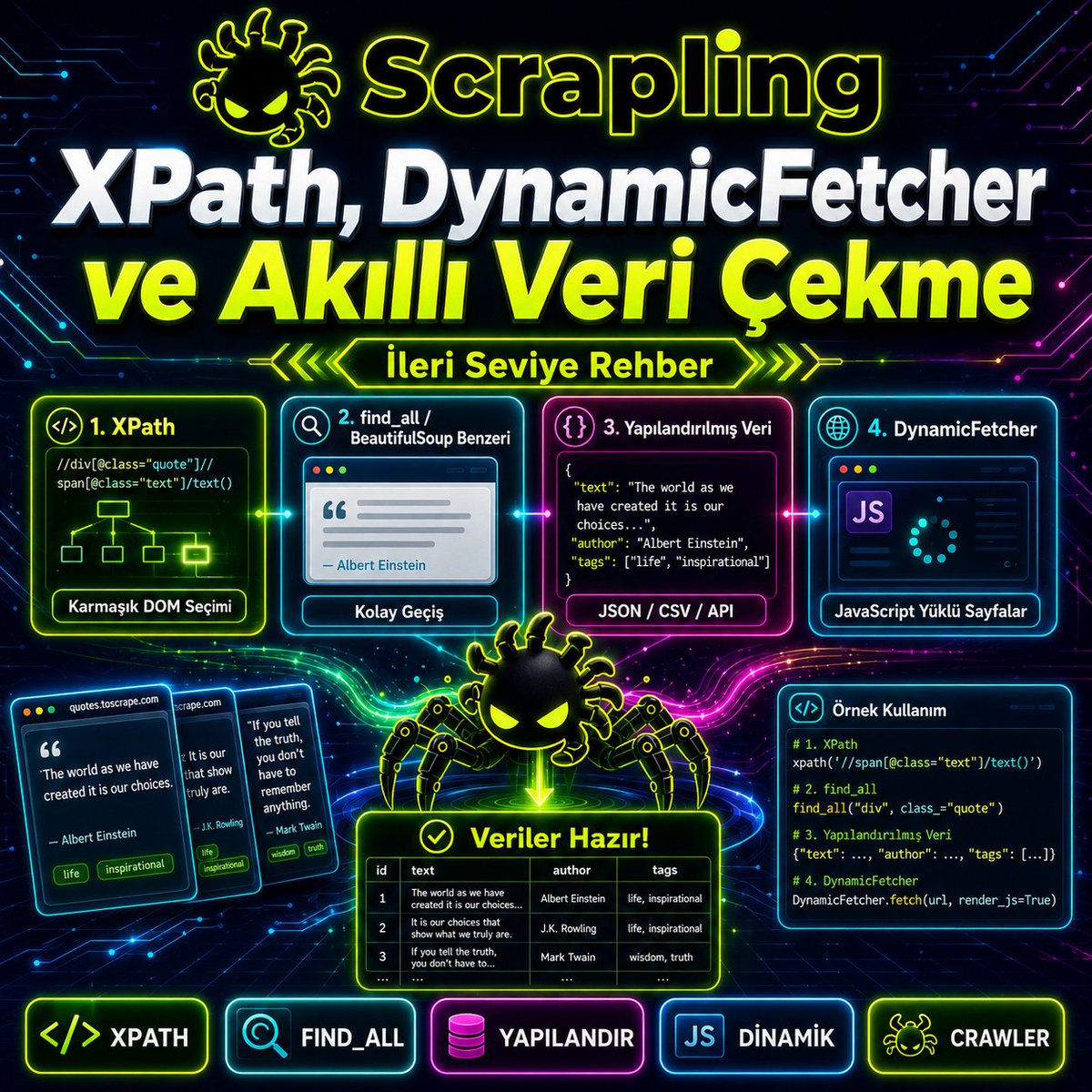
5. XPath ile Veri Çekme
CSS selector yerine XPath kullanmak da mümkündür.
</> Python
from scrapling.fetchers import Fetcher
page = Fetcher.get("quotes.toscrape.com/")
quotes = page.xpath('//span[@class="text"]/text()').getall()
for quote in quotes:
print(quote)
CSS selector genellikle daha okunabilir, XPath ise karmaşık DOM yapılarında daha güçlüdür. Örneğin belirli bir parent-child ilişkisi, attribute veya text koşulu üzerinden seçim yapılacaksa XPath avantajlı olabilir.
6. BeautifulSoup Benzeri Kullanım
Scrapling, BeautifulSoup’a benzeyen find_all kullanımını da destekler.
</> Python
from scrapling.fetchers import Fetcher
page = Fetcher.get("quotes.toscrape.com/")
quotes = page.find_all("div", {"class": "quote"})
for quote in quotes:
text = quote.css(".text::text").get()
author = quote.css(".author::text").get()
print(text, "-", author)
Alternatif yazımlar:
</> Python
page.find_all("div", class_="quote")
page.find_all(class_="quote")
page.find_by_text("quote", tag="div")
Bu özellik, BeautifulSoup alışkanlığı olan geliştiricilerin Scrapling’e daha kolay geçmesini sağlar.
7. Veri Yapılandırma: Quote ve Author Çekme
Gerçek scraping işlerinde yalnızca düz metin almak yetmez; veriyi yapılandırmak gerekir.
</> Python
from scrapling.fetchers import Fetcher
page = Fetcher.get("quotes.toscrape.com/")
items = []
for quote in page.css(".quote"):
item = {
"text": quote.css(".text::text").get(),
"author": quote.css(".author::text").get(),
"tags": quote.css(".tags .tag::text").getall()
}
items.append(item)
print(items)
Çıktı mantıksal olarak şöyle olur:
</> Python
[
{
"text": "The world as we have created it...",
"author": "Albert Einstein",
"tags": ["change", "deep-thoughts", "thinking", "world"]
}
]
Bu yapı daha sonra JSON, CSV, veritabanı veya API’ye aktarılabilir.
8. Dinamik Siteler İçin DynamicFetcher
Bazı sitelerde veri HTML içinde doğrudan gelmez. Sayfa açıldıktan sonra JavaScript API çağrılarıyla içerik yüklenir. Böyle durumlarda normal "Fetcher" boş veya eksik veri döndürebilir. Bu senaryoda DynamicFetcher veya "DynamicSession" kullanılır.
</> Python
from scrapling.fetchers import DynamicFetcher
page = DynamicFetcher.fetch(
"quotes.toscrape.com/",
headless=True,
network_idle=True
)
quotes = page.css(".quote .text::text").getall()
for quote in quotes:
print(quote)
Parametreler:
</> Python
headless=True
tarayıcının görünmeden çalışmasını sağlar.
</> Python
network_idle=True
sayfanın ağ trafiği sakinleşene kadar bekler. Bu, JavaScript ile yüklenen verilerin tamamlanması açısından önemlidir.
Jun 8

2. Hangi Fetcher Ne Zaman Kullanılır?
Scrapling’de veri çekmek için farklı fetcher sınıfları vardır. Doğru fetcher seçimi önemlidir.
Sınıf: Kullanım amacı
* Fetcher: Statik HTML sayfaları için hızlı HTTP istekleri
* AsyncFetcher: Asenkron, çoklu istek senaryoları
* DynamicFetcher: JavaScript ile yüklenen dinamik sayfalar
* StealthyFetcher: Tarayıcı benzeri davranış gereken yetkili/izinli scraping senaryoları
* FetcherSession: Cookie/session koruyarak ardışık istekler
* DynamicSession: Browser session’ı açık tutarak dinamik sayfalarda işlem
* StealthySession: Daha gelişmiş browser session kullanımı
Basit haber, blog, ürün listeleme veya statik HTML içeren sitelerde önce "Fetcher" denenmelidir. Sayfa içeriği JavaScript ile sonradan yükleniyorsa, "DynamicFetcher" gerekir. Login, cookie veya aynı oturum içinde sayfa gezme gerekiyorsa, session sınıfları kullanılmalıdır.
3. Basit Veri Çekme Örneği
Örnek olarak "quotes.toscrape.com" gibi scraping eğitimi için hazırlanmış bir siteyi kullanalım.
</> Python
from scrapling.fetchers import Fetcher
page = Fetcher.get("quotes.toscrape.com/")
quotes = page.css(".quote .text::text").getall()
for quote in quotes:
print(quote)
Burada:
</> Python
page = Fetcher.get(...)
sayfayı çeker.
</> Python
page.css(".quote .text::text")
CSS selector ile quote metinlerini seçer.
</> Python
.getall()
eşleşen tüm metinleri liste olarak döndürür.
Tek bir sonuç almak istersen:
</> Python
first_quote = page.css(".quote .text::text").get() print(first_quote)
4. Session Kullanarak Veri Çekme
Bazı sitelerde cookie, oturum veya tarayıcı fingerprint bilgisi önemlidir. Bu durumda FetcherSession kullanılır.
</> Python
from scrapling.fetchers import FetcherSession
with FetcherSession(impersonate="chrome") as session:
page = session.get(
"quotes.toscrape.com/",
stealthy_headers=True
)
quotes = page.css(".quote .text::text").getall()
for quote in quotes:
print(quote)
Burada impersonate="chrome" ifadesi, isteğin Chrome tarayıcısına daha benzer görünmesini sağlar. "stealthy_headers=True" ise, daha gerçekçi header üretimi için kullanılır. Bu özellikleri yalnızca izinli, yasal ve sitenin kullanım şartlarına uygun veri toplama senaryolarında kullanmak gerekir.

6
14
549

Jun 9
2️⃣ Build strong fundamentals
- Teach web scraping basics (HTML, CSS, XPath)
- Explain data pipeline concepts (ETL, data warehousing)
- Use real-world examples of data engineering projects
1
1
332