
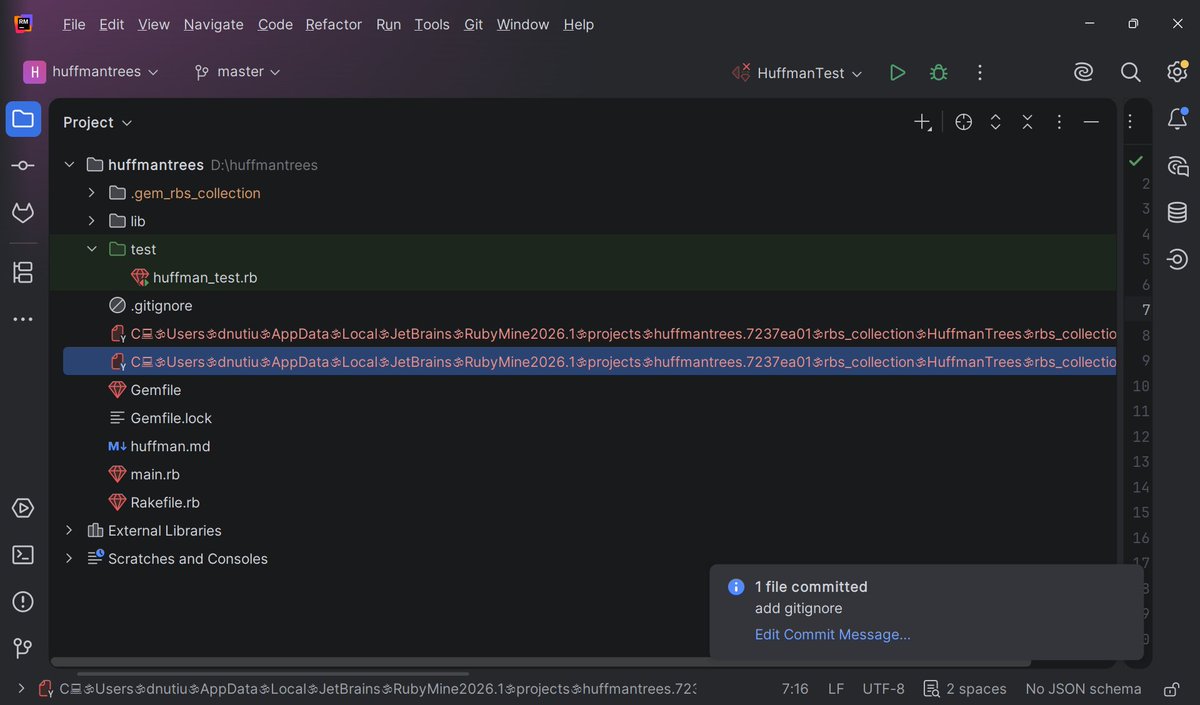

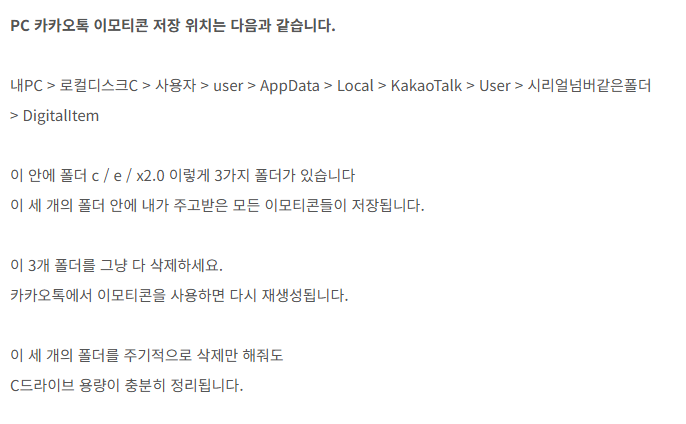
추가로 C:\Users\(본인컴퓨터이름)\AppData\Local\Temp
여기 안에 있는 하위 폴더는 임시파일이라 정리하시면 용량 정리하는데 도움 됩니다

ㅋㅋㅋㅋㅅㅂ 친구가 폰카톡이 카톡임티 지멋대로저장하는거 지워서 c용량 엄청비웟대서 나도하니까 5기가나옴
gig-nomad.tistory.com/32
1
2,919
2,922
301,595

We investigated a case where an email sent the victim to a MediaFire ZIP. We have not observed this exact chain as part of a broader campaign so far, but there are a lot of things from this that wanted to share which worth a closer look.
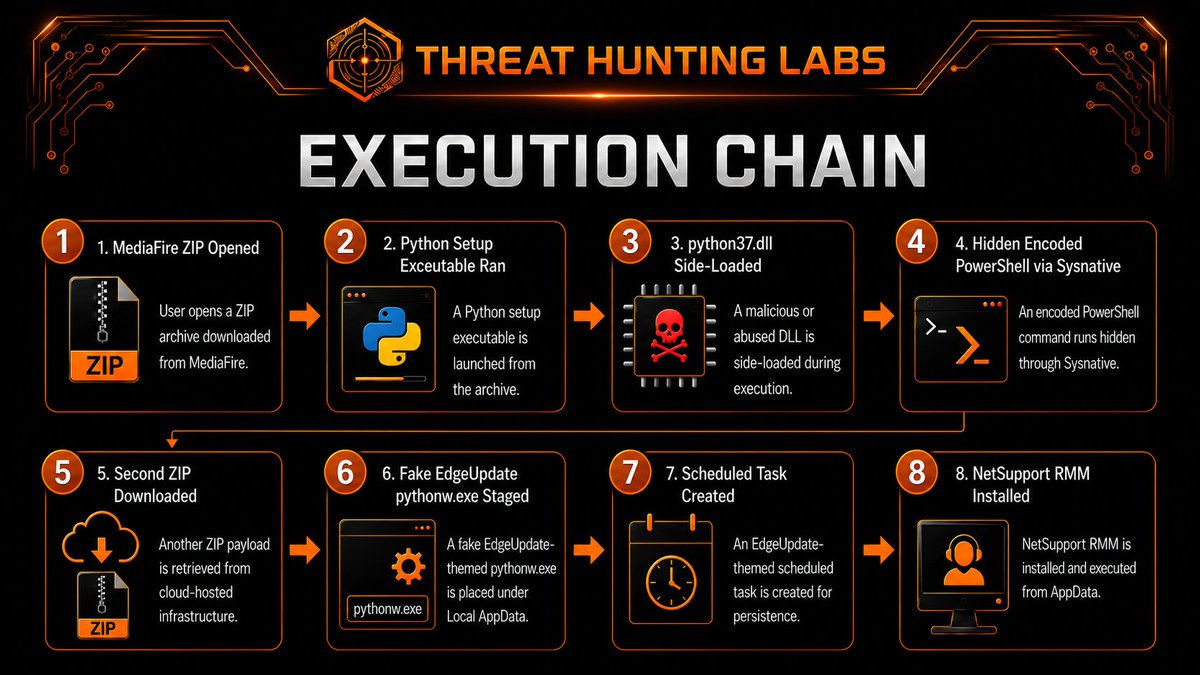
𝗘𝘅𝗲𝗰𝘂𝘁𝗶𝗼𝗻 𝗰𝗵𝗮𝗶𝗻 (𝘀𝗲𝗲 𝗮𝘁𝘁𝗮𝗰𝗵𝗲𝗱 𝗶𝗺𝗮𝗴𝗲)
𝗜𝗻𝘀𝗶𝗱𝗲 𝘁𝗵𝗲 𝗲𝘅𝘁𝗿𝗮𝗰𝘁𝗲𝗱 𝘀𝗲𝘁𝘂𝗽 𝗳𝗼𝗹𝗱𝗲𝗿:
• 𝚂𝚎𝚝𝚞.𝚎𝚡𝚎 was a Python setup executable
• VMware utilities were present but not observed being used
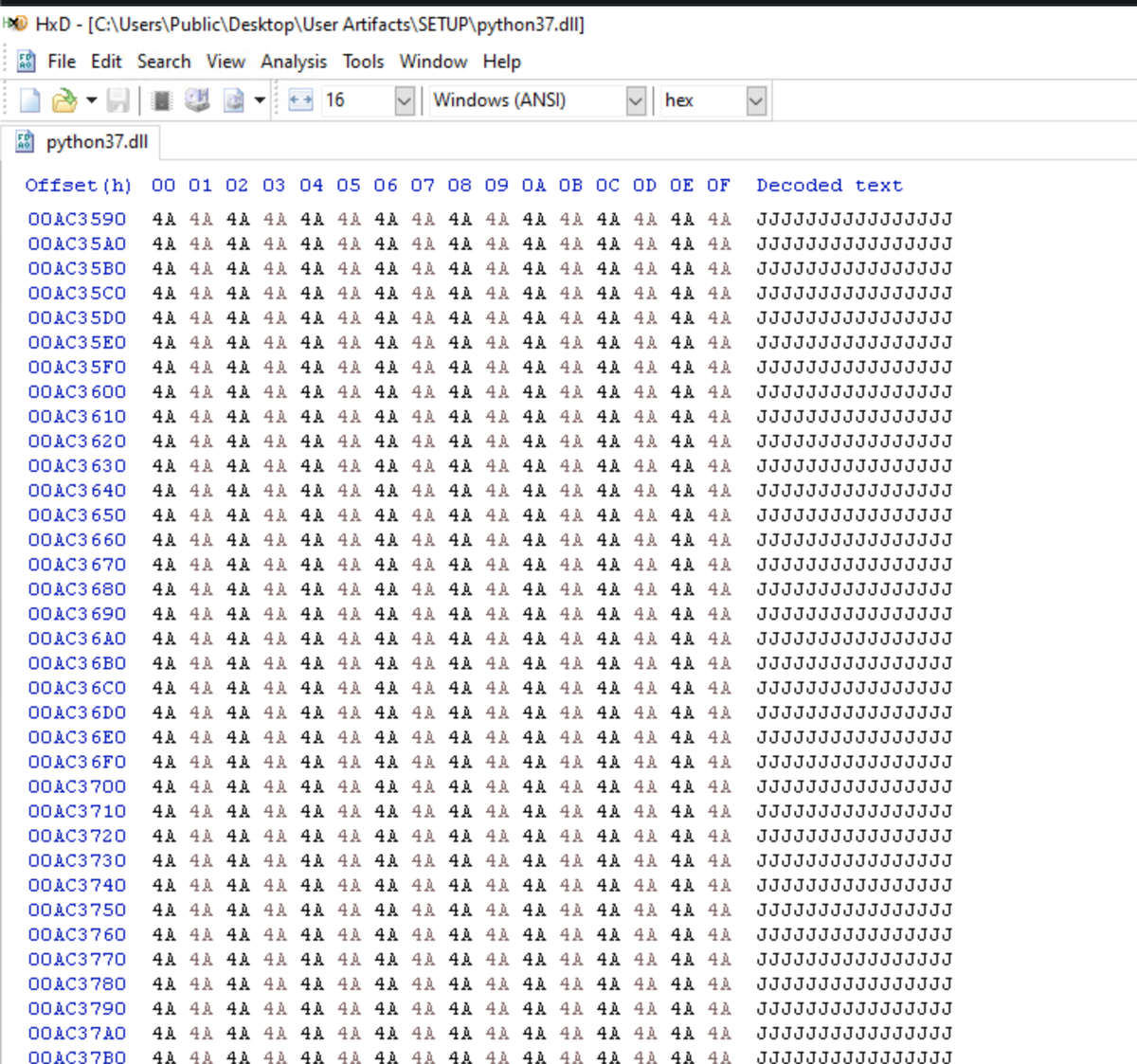
• 𝚙𝚢𝚝𝚑𝚘𝚗𝟹𝟽.𝚍𝚕𝚕 was the malicious outlier with a nearly 400 MB size
• Hex review showed repeated 𝙹 byte padding on that malicious DLL, hence the size
• The DLL was side-loaded by 𝚂𝚎𝚝𝚞.𝚎𝚡𝚎
• We also observed process injection to dllhost.exe which reached out to the first C2: 138[.]124[.]186[.]2:7000 (see attached image for network traffic details)
By the end, the actor had:
- One PowerShell-based path
- One fake EdgeUpdate Python path scheduled task for persistence
- One NetSupport RMM path
NetSupport was the third access method, added after two other C2 paths were already present.
𝘋𝘍𝘐𝘙 𝘯𝘰𝘵𝘦: 𝘸𝘩𝘦𝘯 𝘳𝘦𝘷𝘪𝘦𝘸𝘪𝘯𝘨 𝘥𝘳𝘰𝘱𝘱𝘦𝘥 𝘢𝘳𝘵𝘪𝘧𝘢𝘤𝘵𝘴 𝘧𝘳𝘰𝘮 𝘢 𝘡𝘐𝘗, 𝘤𝘰𝘮𝘱𝘢𝘳𝘦 𝘮𝘰𝘥𝘪𝘧𝘪𝘦𝘥 𝘥𝘢𝘵𝘦𝘴 𝘢𝘤𝘳𝘰𝘴𝘴 𝘧𝘪𝘭𝘦𝘴 𝘢𝘯𝘥 𝘥𝘪𝘳𝘦𝘤𝘵𝘰𝘳𝘪𝘦𝘴. 𝘐𝘯 𝘵𝘩𝘪𝘴 𝘤𝘢𝘴𝘦, 𝘵𝘪𝘮𝘦𝘴𝘵𝘢𝘮𝘱 𝘥𝘪𝘧𝘧𝘦𝘳𝘦𝘯𝘤𝘦𝘴 𝘩𝘦𝘭𝘱𝘦𝘥 𝘩𝘪𝘨𝘩𝘭𝘪𝘨𝘩𝘵 𝘸𝘩𝘪𝘤𝘩 𝘢𝘳𝘵𝘪𝘧𝘢𝘤𝘵 𝘥𝘦𝘴𝘦𝘳𝘷𝘦𝘥 𝘢𝘵𝘵𝘦𝘯𝘵𝘪𝘰𝘯 𝘧𝘪𝘳𝘴𝘵. 𝘘𝘶𝘪𝘤𝘬 𝘸𝘪𝘯 𝘥𝘶𝘳𝘪𝘯𝘨 𝘵𝘳𝘪𝘢𝘨𝘦.
𝗜𝗢𝗖𝘀
• hxxps://pub-2f1bcdf12a2e44408e7a58efe6006d43[.]r2[.]dev/LICENSES.chromium.dat
• pub-2f1bcdf12a2e44408e7a58efe6006d43[.]r2[.]dev
• bsc[.]blockrazor[.]xyz
• mgo[.]gstats-api-contact[.]cc
• xn--fiqq24b9hejs1c[.]clickvector[.]tech
• 138[.]124[.]186[.]2:7000
• 185[.]76[.]243[.]85:443
• %LOCALAPPDATA%\Microsoft\EdgeUpdate\{GUID}\1.3.467.47\pythonw.exe
• NetSupport RMM: %APPDATA%\Microsoft\Image\SQLTool\46a05ef1a89e0c8a\century.exe
• MicrosoftEdgeUpdateTaskUserUA{GUID}-<SID suffix>
We share these public notes so defenders can hunt faster and protect their environments. For teams that need the full context, our enterprise threat intel feed includes the detailed commands, timeline reconstruction, artifacts, and detection leads behind cases like this. Reach out to threathuntinglabs.com/contac… for more info.

1
139
おたもん retweeted

【緩募】モリサワフォントをインストールされている方、開発版威沙にてユーザフォルダにインストールされるフォントに対応してみましたので、動作を確認頂けたら助かります。
現物が無いので
『C:\Users\《ユーザ名》\AppData\Local\Microsoft\Windows\Fonts\』
であることを想定して実装しています。

この件、威沙どころかTateditorも使えないとのことでモリサワフォントはTTFでもOTFでもない独自フォーマットなのかと思いましたが、ちょっと調べたらモリサワは独自インストーラーでないと導入できないとか書かれていて、おそらくWindowsのシステムフォントフォルダには導入しない実装なんでしょうね。
2
3
1
214

RT @Hmhlaw: 이거 진짜입니다 Appdata는 숨김폴더에 있으니까
C:\Users\(본인컴퓨터사용자이름)\AppData\Local\Kakao\KakaoTalk\users
이거 폴더 주소창에 복붙해서 들어가보세요
숫자문자 길게있는 폴…
4,430

RT @Hmhlaw: 이거 진짜입니다 Appdata는 숨김폴더에 있으니까
C:\Users\(본인컴퓨터사용자이름)\AppData\Local\Kakao\KakaoTalk\users
이거 폴더 주소창에 복붙해서 들어가보세요
숫자문자 길게있는 폴…
4,430

RT @Hmhlaw: 이거 진짜입니다 Appdata는 숨김폴더에 있으니까
C:\Users\(본인컴퓨터사용자이름)\AppData\Local\Kakao\KakaoTalk\users
이거 폴더 주소창에 복붙해서 들어가보세요
숫자문자 길게있는 폴…
4,430

RT @Hmhlaw: 이거 진짜입니다 Appdata는 숨김폴더에 있으니까
C:\Users\(본인컴퓨터사용자이름)\AppData\Local\Kakao\KakaoTalk\users
이거 폴더 주소창에 복붙해서 들어가보세요
숫자문자 길게있는 폴…
4,430


🔎 Reconstruyendo una Intrusión desde Memoria: Identificación de un Stealer y su Infraestructura C2
La memoria RAM sigue siendo una de las fuentes de evidencia más valiosas durante una investigación DFIR. Su análisis permite identificar procesos activos, conexiones de red, código inyectado y comunicaciones que pueden desaparecer una vez finalizada la ejecución del malware.
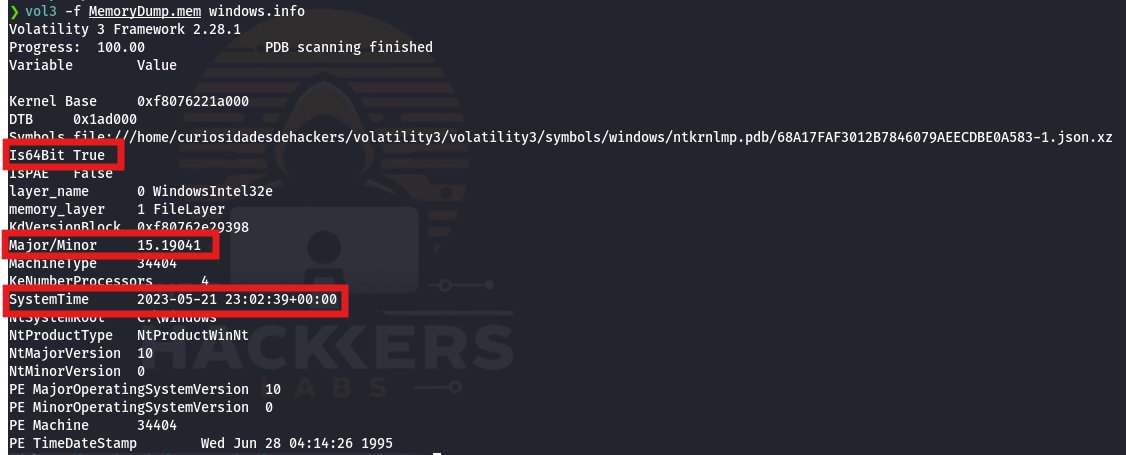
En esta investigación se analizó una captura de memoria de un sistema Windows 10 comprometido. Mediante Volatility 3 fue posible reconstruir la actividad de una amenaza que operaba desde un directorio temporal del usuario y mantenía comunicaciones con infraestructura controlada por los atacantes.
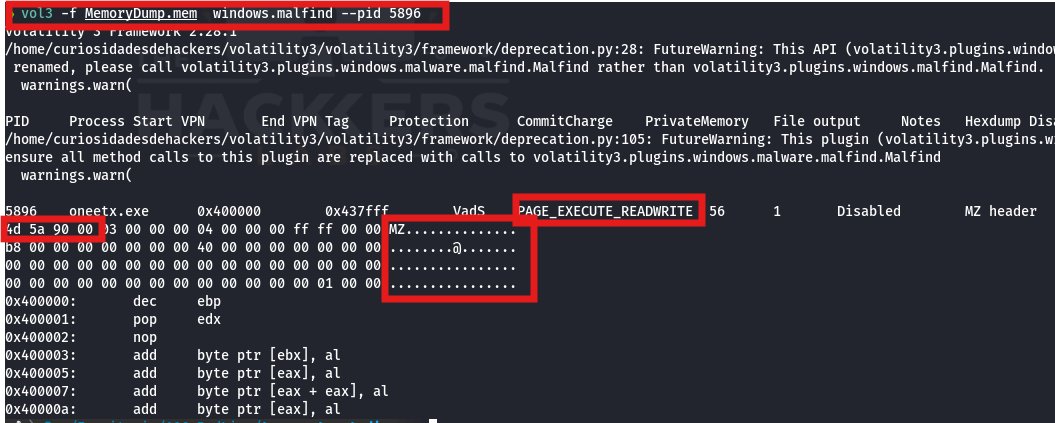
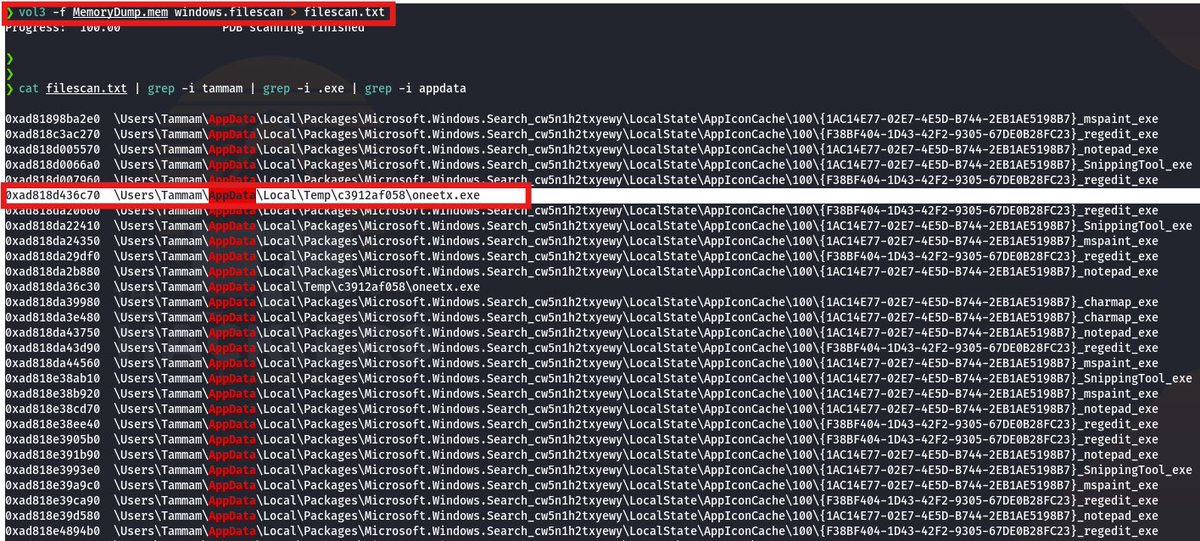
Durante el triage se identificó un ejecutable denominado oneetx.exe, acompañado por la ejecución de rundll32.exe, una combinación habitual en campañas orientadas al robo de información.
El análisis reveló regiones con permisos PAGE_EXECUTE_READWRITE, evidenciando la presencia de código ejecutándose directamente desde memoria mediante técnicas compatibles con inyección de procesos o carga reflectiva.
La investigación también permitió identificar comunicaciones con la dirección IP 77[.]91[.]124[.]20, así como recursos remotos utilizados durante la intrusión, incluyendo ejecutables y bibliotecas DLL descargadas desde infraestructura controlada por los atacantes.
La extracción del binario desde memoria permitió recuperar una muestra funcional para su análisis posterior. La correlación con plataformas de Threat Intelligence mostró detecciones asociadas a Mars Stealer, una familia especializada en el robo de información.
Cadena de ataque reconstruida:
• Ejecución de oneetx.exe desde AppData\Local\Temp
• Creación de procesos hijos mediante rundll32.exe
• Ejecución de código directamente en memoria
• Comunicación con 77[.]91[.]124[.]20
• Descarga de componentes adicionales
• Actividad compatible con un stealer
Técnicas MITRE ATT&CK identificadas:
• T1204.002 – User Execution: Malicious File
• T1055 – Process Injection
• T1620 – Reflective Code Loading
• T1071.001 – Web Protocols
• T1105 – Ingress Tool Transfer
Este caso demuestra cómo una única captura de memoria puede proporcionar suficiente información para reconstruir una intrusión completa, identificar la infraestructura utilizada por los atacantes y recuperar el malware responsable.
• Artículo completo en el primer comentario
#DFIR #MemoryForensics #DigitalForensics #IncidentResponse #ThreatIntelligence #ThreatHunting #MalwareAnalysis #Volatility #Volatility3 #MITREATTACK #WindowsForensics #BlueTeam #SOC #CyberSecurity #CSIRT #Infosec #ThreatResearch #MarsStealer

1
1
2
114

RT @Hmhlaw: 이거 진짜입니다 Appdata는 숨김폴더에 있으니까
C:\Users\(본인컴퓨터사용자이름)\AppData\Local\Kakao\KakaoTalk\users
이거 폴더 주소창에 복붙해서 들어가보세요
숫자문자 길게있는 폴…
4,430

RT @Hmhlaw: 이거 진짜입니다 Appdata는 숨김폴더에 있으니까
C:\Users\(본인컴퓨터사용자이름)\AppData\Local\Kakao\KakaoTalk\users
이거 폴더 주소창에 복붙해서 들어가보세요
숫자문자 길게있는 폴…
4,430