

Managers shouldn't have to reinvent training every time.
Different explanations.
Different instructions.
Different outcomes.
ContentBuilder turns your knowledge into one standardized training system.
#AI #Training #Onboarding #HR #SaaS
8
Ask 3 employees how something works.
Get 3 different answers 😩
That's not onboarding.
That's inconsistency.
ContentBuilder turns scattered knowledge into one structured learning system.
#AI #Onboarding #Training #SaaS #HR
6
My coaching revenue was capped by my calendar.
40 client hours a week.
That was the limit.
So I turned my flagship program into a self-paced course with ContentBuilder.
80 enrollments last quarter.
Same hours.
3x the revenue.
#AI #Coaching #CourseCreator #EdTech #CreatorEconomy
6
Customers said our product was "too hard to use."
The real problem?
They never learned how to use it.
We built a Customer Academy with ContentBuilder.
📈 Retention up
📉 Support tickets down
#AI #CustomerSuccess #SaaS #ProductTraining #EdTech
1
1
26
Training used to mean translators, voice actors, and huge localization costs.
Now one course becomes multiple languages with ContentBuilder.
Same content.
Same quality.
Global scale.
#AI #LnD #Training #GlobalTeams #SaaS
19
Most managers aren't trained.
They're promoted and expected to figure it out.
So they learn through mistakes, random advice, and trial and error 😩
ContentBuilder turns leadership knowledge into structured manager training.
#AI #Leadership #Management #HR #Training
5

Jun 12
Because ContentBuilder does nothing at runtime, it doesn't exist. It's only used at compile time for optimizations and it might very well produce different code that knows how to handle the older runtimes and the newer one
1

Jun 12
What’s new in SwiftUI after WWDC26?
Discover key updates, from Liquid Glass and resizable iPhone apps to smarter toolbars, AsyncImage caching, and ContentBuilder!
🔗appcircle.io/blog/wwdc26-wha…
#WWDC26 #SwiftUI #iOSDev #MobileDev
4
80
Our sales ramp used to take 90 days.
Every new AE needed months before becoming productive.
We rebuilt onboarding with ContentBuilder using real sales calls, objections, and closed-won data.
Ramp is now 21 days.
#AI #SalesEnablement #SalesTraining #SaaS #Revenue
6
Answering questions.
Repeating processes.
Explaining the same things over and over.
That's not scaling.
ContentBuilder turns company knowledge into structured training, so your best people can get back to their actual work.
#AI #Onboarding #Training #SaaS #Productivity
6
このいとしき(子ノ糸志貴 ♂ この愛しき)| INTP-T retweeted

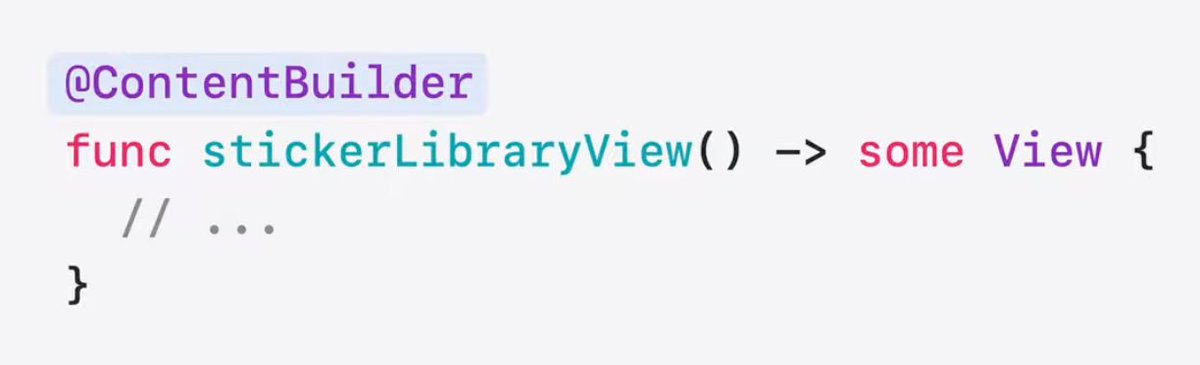
Use the @.ContentBuilder instead of ToolbarContentBuilder and ViewBuilder.
ContentBuilder makes type-checking during compilation of your Views *MUCH* faster.
This does NOT need an iOS 27 target. It works in every version.
3
14
156
8,804

Jun 11
The SwiftUI session at WWDC26 is one of those rare ones where every single update is immediately usable no "coming in a future release," no vague promises. Let me break down what actually matters.
Liquid Glass, zero code changes
The refined Liquid Glass better blur diffusion, darker edges, brighter specular highlights, and the new user-controlled tint slider lands in your app the moment you rebuild. You don't touch a single line. On iPad, windows now visually dim when inactive, giving multi-window workflows the clarity they always needed. The new appearsActive environment value lets you hook into that behavior for custom UI elements too. And once you recompile with Xcode 27, the old design is gone. There's no opt-out. Apple closed that door.
Toolbar APIs that actually respect your intent
The resizable iPhone app story is huge, but it creates a real problem: toolbars get crushed. The three new APIs address this surgically. visibilityPriority(.high) tells the system which items must stay visible as space shrinks. ToolbarOverflowMenu lets you explicitly declare which actions belong in the overflow menu instead of the system deciding for you. topBarPinnedTrailing anchors a specific item (like Share) to the trailing edge regardless of how the toolbar reflows. And toolbarMinimizeBehavior(.onScrollDown) auto-hides the nav bar while scrolling one modifier, free real estate. These aren't workarounds; they're a proper prioritization contract between developer and OS.
The Document API overhaul
This is the most underrated announcement in the session. The new WritableDocument and ReadableDocument protocols, paired with DocumentWriter and DocumentReader, give you Xcode/Pages-level document infrastructure: keyboard shortcuts, edited indicator, autosave, direct URL access all out of the box. The write method is nonisolated async, so disk operations happen in the background without blocking the UI. You only write the parts of the document that actually changed by diffing snapshots. You get Foundation Subprogress for reporting write progress. And adding a new export format say PNG alongside your custom format is as simple as adding a content type to a list and handling it in the write method. Previously getting this right in SwiftUI required fighting the framework. Now the framework fights for you.
Interactions everywhere
Reorderable containers now work on any container not just List. Same .reorderable .reorderContainer modifiers, whether you're in a LazyVGrid, a LazyVStack, or anything else. WatchOS gets drag-to-reorder for the first time. Swipe actions escape List jail and work on any view inside a scroll container via the new swipeActionsContainer modifier. Confirmation dialogs finally support the same item-binding pattern sheets use, so your "are you sure?" flow is one binding, not a tangle of booleans.
@State is now a macro and it fixes a silent performance bug
This one has been quietly wasting memory since forever. When a parent view reinitializes a child, @State holding an @Observable class was creating a brand new instance of that class on every reinitialization immediately discarding it while keeping the original. Silently. Every time. In the 2027 releases, @State becomes a macro and class initialization becomes lazy: the class is created once and only once. And this is backported to iOS 17 and macOS 14, so you get the fix across your entire supported range. The one gotcha: if you set a default value and assign in init, Xcode 27 will error. Just remove the redundant default.
ContentBuilder kills the type-checking timeout
"The compiler is unable to type-check this expression in reasonable time" is one of the most infuriating errors in SwiftUI development, especially in deeply nested views. The root cause: Section, Group, and ForEach each had multiple builder overloads, and the compiler had to exhaustively explore every combination to resolve types. The fix is ContentBuilder a unified single builder that replaces all those ambiguous paths with one. The compiler now has a straight line instead of a decision tree. This works with any minimum deployment target because ContentBuilder is built on top of ViewBuilder under the hood. You don't change your code. You just stop seeing that error.
The throughline across all of this is that Apple is systematically removing the gap between "what SwiftUI can do" and "what Xcode and Pages can do." The Document API brings Xcode-level file handling to indie apps. The toolbar APIs bring App Store-quality adaptability to anyone. And the agent skills SwiftUI Specialist and What's New In SwiftUI shipping inside Xcode 27's Coding Assistant mean you can ask the IDE itself to migrate your code to these new patterns. It's the first time the "how do I adopt this?" question has a built-in answer at the framework level. #WWDC26

114
Three new hires quit in their first week.
All three gave the same reason:
“Onboarding was a mess.”
We rebuilt onboarding with ContentBuilder and turned scattered knowledge into one structured learning path.
Last quarter: zero first-week quits.
#AI #Onboarding #HR #SaaS #Training
11
You spent weeks creating onboarding docs.
New hires stop reading after a few pages 😩
The problem isn't the content.
It's the format.
ContentBuilder turns docs into lessons, quizzes, and structured learning.
#AI #Onboarding #Training #SaaS #HR
1
13
mirza 🌧 retweeted

Jun 9
SwiftUI’s new type-checking enhancements (`@ContentBuilder`) and lazy `@State` are the culmination of literally years of careful effort behind the scenes to solve some of the biggest everyday pain points in SwiftUI development.
At this point, there are millions of lines of SwiftUI result builder and state code shipping in production. With these changes, every one of those lines of code will suddenly compile differently, improving both compilation and runtime performance, and most developers *will never even notice*.
That doesn’t normally happen. Maintaining binary, source, and backwards compatibility across releases imposes strict limitations on how SDK APIs can evolve. If you think of a better way to compile some library DSL syntax after shipping it publicly, you’re usually out of luck.
These enhancements were only possible because of dedicated engineers on the Swift and SwiftUI teams working closely together, sweating the subtlest of details, and persevering through countless dead-end experiments and fraught internal deployments.
Their reward? That future developers will *not* see some type-check error or performance hitch, and will *never* have to know that it ever worked any differently.
But that’s wonderful. We love it. The joy is in the doing.
Thank you @slazaruseth, @daniel_duan, @hollyborla, Pavel Yaskevich, and others from the Swift and SwiftUI teams for getting these enhancements over the finish line! (I’m no longer at Apple but can’t help but brag about these talented people 👏🏻)
3
19
164
12,466

Jun 10
as a swift engineer since swift 2 and swiftUI since the beginning, this is certainly welcome and awesome! I was just watching the dubdub video about it! Really impressive work.
1
52