
Mar 24
Learn how to filter WordPress posts by taxonomy and custom fields with Meta Box using a real-world spa services example and practical techniques.
#wpmetabox #taxonomy #custom_fields
metabox.io/filter-posts-cust…
2
47


29 Dec 2025
With prompy.xyz you can also create project prompts.
Here are some examples:
Natural:
# PROJECT BRIEF: TrendTwit
> Send autonomously tweets based of recent trends
## 🎯 Problem & Solution
**Problem:** Getting interactions automatically.
**Solution:** Dives into the trends and created autonomous twitter search supported tweets
## 👥 Target Market
- **Target Users:** digital creators
- **Competitors:** not sure
- **Unique Value:** easy to use, opensource
## ⚙️ Technical Stack
- **Platform:** API/Backend Service
- **Frontend:** vanilla
- **Backend:** python
- **Database:** postgresql
- **Additional Tech:** Twitter API, Gemini API
- **Deployment:** Self hosted
## 🎯 Product Requirements (PRD)
### MVP Features (v1.0)
Get trends from trend sites and Google Trends
Preview tweet
Post tweet
Scheduled tweet
### Future Features (v2.0 )
Paywall
## 🔄 User Flow
### Onboarding
Open dashboard
Get trends
Send trends data to LLM
Let LLM create tweets with hashtags
send them or set a schedule
Check for duplicated topics
## 💰 Business Model
- **Revenue Model:** Ad-supported
- **Key Metrics:** Sent tweets
## 🎨 Design Requirements
- **UI Style:** minimal
- **Component Library:** bootstrap
## 🧪 Testing & QA
- **Strategy:** Create simple test options for the project and test
## 🔒 Security
- **Security Measures:** be careful SQL injection, XSRF attacks, XSS and similars.
## 📝 Additional Context
**Constraints:** do not use node.js, next.js, react.js or similar js libraries.
---
## 🤖 Instructions for AI Developer
Please help me build this project step by step:
1. Review the requirements above and ask clarifying questions if needed
2. Create a detailed technical architecture
3. Set up the project structure with the specified tech stack
4. Implement features incrementally, starting with MVP
5. Follow best practices for code quality, security, and performance
JSON style:
{
"project": {
"name": "TrendTwit",
"tagline": "Send autonomously tweets based of recent trends",
"problem": "Getting interactions automatically.",
"solution": "Dives into the trends and created autonomous twitter search supported tweets"
},
"market": {
"target_users": "digital creators",
"market_size": "",
"competitors": "not sure",
"unique_value": "easy to use, opensource"
},
"tech_stack": {
"platform": "api_backend",
"frontend": "vanilla",
"backend": "python",
"database": "postgresql",
"additional": "Twitter API, Gemini API",
"deployment": "Self hosted"
},
"features": {
"mvp": [
"Get trends from trend sites and Google Trends",
"Preview tweet",
"Post tweet",
"Scheduled tweet"
],
"future": [
"Paywall"
]
},
"user_flow": {
"onboarding": "Open dashboard\nGet trends\nSend trends data to LLM\nLet LLM create tweets with hashtags\nsend them or set a schedule\nCheck for duplicated topics",
"core_journey": ""
},
"business": {
"revenue_model": "advertising",
"pricing": "",
"metrics": "Sent tweets"
},
"design": {
"ui_style": "minimal",
"component_library": "bootstrap",
"accessibility": ""
},
"testing": {
"strategy": "Create simple test options for the project and test",
"coverage": "",
"tools": ""
},
"security": {
"auth_method": "",
"measures": "be careful SQL injection, XSRF attacks, XSS and similars.",
"compliance": ""
},
"context": {
"constraints": "do not use node.js, next.js, react.js or similar js libraries.",
"references": "",
"notes": ""
},
"custom_fields": []
}
1
4
66

25 Nov 2025
Nano Banana Pro on Gemini app.
{
"Objective": "Create a natural winter portrait featuring a young woman and her small puppy with realistic emotional warmth.",
"Persona_Details": {
"Primary_Subject": {
"Type": "Young woman",
"Characteristics": {
"Hair": "Soft, long wavy dark-brown hair",
"Clothing": "Cream-colored knitted hoodie",
"Facial_Expression": "Soft smile, cheeks slightly puffed from cold",
"Age_Range": "18–25 years old"
}
},
"Secondary_Subject": {
"Type": "Small white puppy",
"Characteristics": {
"Eye_Color": "Light grey-blue",
"Expression": "Curious, looking directly at the camera",
"Breed": "Fluffy small-breed puppy"
}
}
},
"Scene_Details": {
"Environment": "Snowy park during early morning",
"Elements": {
"Snow": "Fresh snowfall covering the ground",
"Trees": "Tall bare trees, light frost on branches",
"Vehicle": "Softly blurred white SUV behind the subjects",
"Sky": "Pastel winter sky with pale sunlight"
}
},
"Custom_Fields": {
"Aspect_Ratio": "3:4",
"Lighting": {
"Type": "Soft diffused daylight",
"Direction": "Natural ambient light",
"Intensity": "Gentle, balanced illumination"
},
"Camera_Details": {
"Angle": "Eye-level",
"Framing": "Medium close-up",
"Depth_Of_Field": "Shallow, smooth bokeh",
"Lens_Type": "50mm portrait lens"
},
"Composition": {
"Rule_Of_Thirds": "Subjects placed slightly right of center",
"Focus_Point": "Woman’s face and puppy",
"Balance": "Foreground subjects pop against a minimal winter background"
},
"Mood": {
"Overall_Tone": "Cozy, calm, affectionate",
"Emotional_Intent": "Capturing gentle companionship"
},
"Color_Palette": {
"Dominant_Colors": ["Cream", "White", "Soft Blue"],
"Accent_Colors": ["Muted Brown (hair)"],
"Seasonal_Tones": "Cool winter softness"
}
},
"Task_Instructions": [
"Use all environmental and emotional cues to form a hyper-realistic output.",
"Keep natural realism with winter softness."
],
"Response_Format": {
"Style": "Structured, cinematic, realism-optimized prompt",
"Output_Type": "AI-ready image prompt"
}
}


53
6
122
3,265

25 Nov 2025
Nano Banana Pro on Gemini app.
{
"Objective": "Create or analyze an image based on a detailed scene description with enhanced customization options.",
"Persona_Details": {
"Primary_Subject": {
"Type": "Young woman",
"Characteristics": {
"Hair": "Long, wavy brown hair",
"Clothing": "Brown hooded sweatshirt",
"Facial_Expression": "Puckering face toward the camera",
"Age_Range": "Adult (approx. 18–25 years old)"
}
},
"Secondary_Subject": {
"Type": "Small white puppy",
"Characteristics": {
"Eye_Color": "Light blue",
"Expression": "Calm, looking forward",
"Breed": "Unknown small breed"
}
}
},
"Scene_Details": {
"Environment": "Outdoors, winter setting",
"Elements": {
"Snow": "Visible on the ground",
"Trees": "Bare trees scattered in background",
"Vehicle": "Blurred black car behind the woman",
"Sky": "Clear light blue"
}
},
"Custom_Fields": {
"Aspect_Ratio": "3:4",
"Lighting": {
"Type": "Natural daylight",
"Direction": "Ambient outdoor lighting",
"Intensity": "Soft and even"
},
"Camera_Details": {
"Angle": "Eye-level",
"Framing": "Medium close-up",
"Depth_Of_Field": "Shallow, background blurred",
"Lens_Type": "Standard lens"
},
"Composition": {
"Rule_Of_Thirds": "Subjects positioned centrally but slightly upward",
"Focus_Point": "Woman and puppy",
"Balance": "Foreground subjects dominate while background remains minimal"
},
"Mood": {
"Overall_Tone": "Warm, affectionate, playful",
"Emotional_Intent": "Capturing a bonding moment"
},
"Color_Palette": {
"Dominant_Colors": ["Brown", "White", "Light Blue"],
"Accent_Colors": ["Dark Black (car)"],
"Seasonal_Tones": "Cool winter palette"
}
},
"Task_Instructions": [
"Use all visual, environmental, and emotional details for creating accurate prompts.",
"Preserve realism while allowing creative interpretation.",
"Follow the custom fields for consistent output."
],
"Response_Format": {
"Style": "Structured, descriptive, optimized for image-based AI prompts",
"Output_Type": "Image prompt, detailed analysis, or creative narrative"
}
}

39
8
114
6,181
6 May 2025
🎉 Awesome news! WPSyncSheets is now compatible with Meta Box, supporting 28 field types.
🙌 Huge thanks to the WPSyncSheets team for supporting the Meta Box community! 🚀
👉 docs.wpsyncsheets.com/metabo…
#wpmetabox #wpsyncsheets #custom_fields
2
49
22 Apr 2025
🎉 Meta Box now works with Gato GraphQL! Query your custom fields directly via GraphQL for dynamic content on WordPress sites. Check the guide: gatographql.com/guides/plugi…
Big thanks to Leo & his team! ❤️
#wpmetabox #GatoGraphQL #custom_fields #GraphQL
6
65
22 Apr 2025
Create custom fields in a fast and convenient way — powered by AI like ChatGPT or Cursor. No code, no UI required. See how schema makes it all work.
#Metabox #AI #custom_fields
metabox.io/create-custom-fie…
1
5
139

10 Mar 2025
To integrate NetBox with Cisco Catalyst Center, you can use the Ansible-based solution provided by NetBox Labs. Here's an example of how to set up the integration and generate code for it:
1. Extend the NetBox Data Model:
Add two custom fields to the devices model in NetBox:
cisco_catalyst_center: A selection field mapping to the hostname of the Cisco Catalyst Center controller.
ccc_device_id: A text field mapping to the device UUID in Cisco Catalyst Center.
2. Set Up Dynamic Inventory for Ansible:
Use the NetBox Inventory Plugin for Ansible to dynamically generate inventory data from NetBox:
yaml
# netbox_inv.yml
plugin: netbox.netbox.nb_inventory
validate_certs: False
group_by:
device_roles
sites
3. Create Ansible Playbooks:
Example playbook to fetch device details from Cisco Catalyst Center:
yaml
name: Get Device Details From Cisco Catalyst Center
hosts: all
tasks:
name: Set Custom Fields as Facts
set_fact:
cisco_catalyst_center: "{{ hostvars[inventory_hostname].custom_fields['cisco_catalyst_center'] }}"
ccc_device_id: "{{ hostvars[inventory_hostname].custom_fields['ccc_device_id'] }}"
name: Get Device Details
uri:
url: "https://{{ cisco_catalyst_center }}/dna/intent/api/v1/network-device/{{ ccc_device_id }}"
method: GET
return_content: yes
validate_certs: no
headers:
Content-Type: "application/json"
X-Auth-Token: "{{ token }}"
register: device_details
debug:
var: device_details.json
4. Run the Playbook:
Use the dynamic inventory and execute the playbook:
bash
ansible-playbook -i netbox_inv.yml get_device_details.yml
This setup ensures seamless synchronization between NetBox and Cisco Catalyst Center, reducing manual work and improving data accuracy. Let me know if you'd like further details!
71

7 Feb 2025
📣 Attention
To enhance your experience with custom fields, please add a `settings` nullable JSON field to your `custom_fields` and `custom_field_sections` tables. This update allows for advanced configurations and greater flexibility.
3
184
21 Jan 2025
🚀A New UI is Coming - Alpha version - Big Changes!
A fresh and native WordPress experience with an intuitive, all-in-one screen, live preview, and easy field actions. Try it now & share your feedback!
👉Download:github.com/wpmetabox/meta-bo…
#Metabox #NewUI #custom_fields #interface
2
7
259
2 Dec 2024
Here’s an insightful review of Meta Box from one of our audience members. It's always great to hear different perspectives from you guys. If you're curious about how Meta Box can work for your projects, check it out here!
doaction.co.th/en/meta-box-f…
#Metabox #review #custom_fields
2
89

13 Aug 2024
Customer {
custom_fields(first: 9999, orderBy: {field: "LABEL); mutation { deleteCustomer(id:\"1234\") }", order: ASC}) {
edges {
value
_node {
id
label
}
}
}
}
1
111

13 Aug 2024
How can I inject payload in Graphql like this
Customer {\n custom_fields(first: 9999, orderBy: {field: LABEL, order: ASC}) {\n edges {\n value\n _node {\n id\n label\n
example I want inject in LABEL
#bugbountyhelp #graphql
1
10
1,092

Hey there 🕞
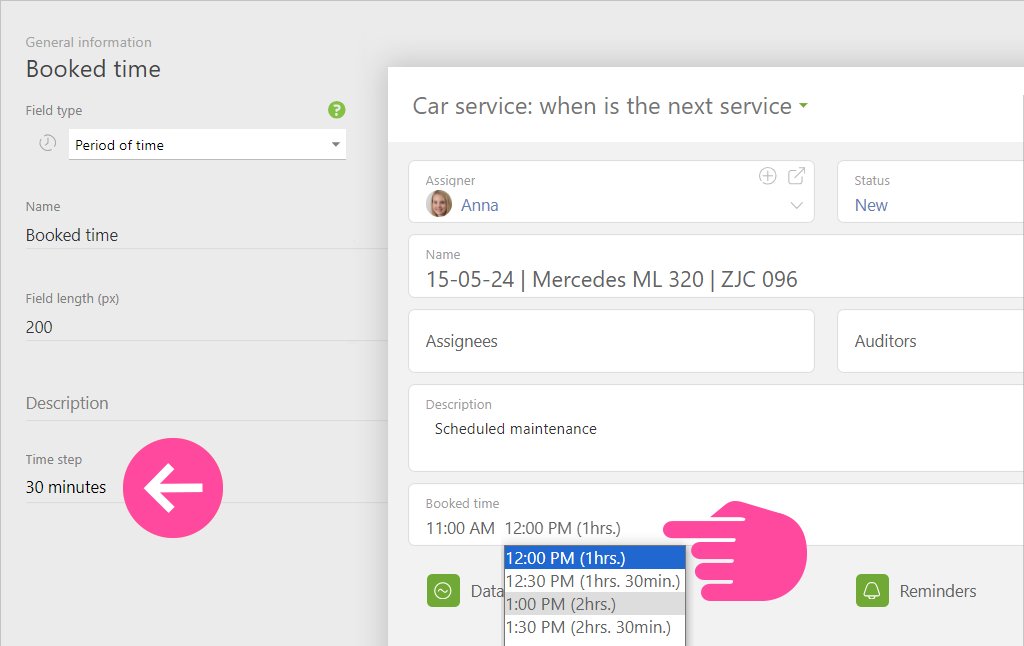
Great news for users of "Period of time" and "Date with time frame" fields! We have introduced a new feature called "Time step." It's now available in data tags, directories, tasks, contacts, projects, and employee profiles.
#interface #planfix #custom_fields
2
25

Version 3.1.2 of the Calendar Field for SobiPro 2 is available to download and in repository. This is a maintenance release fixing a bug that the date was shown in UTC instead of GMT.
sigsiu.net/news/3144-calenda…
#SobiPro #Joomla #custom_fields #calendar

1
32
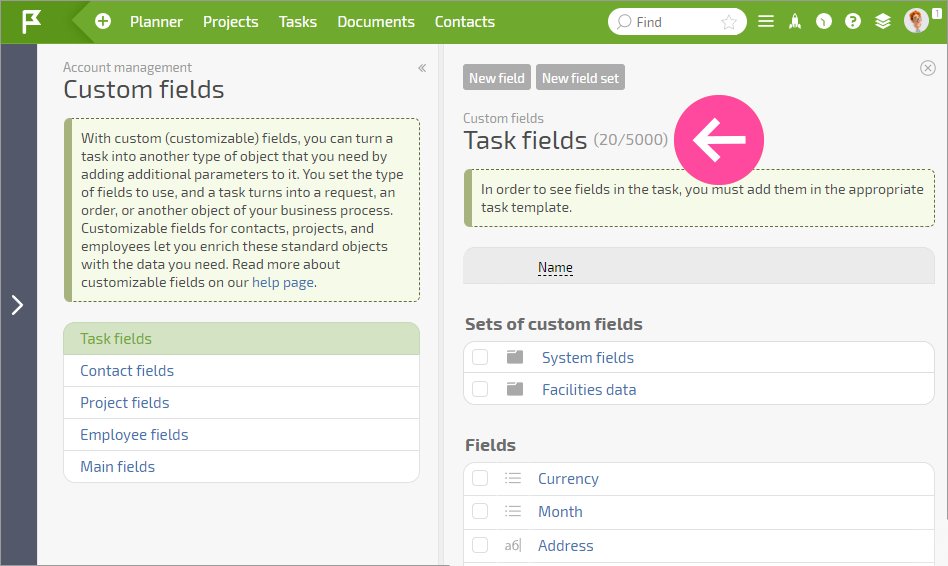
We have added a display of the limits and the number of user fields already used. So it is no longer necessary to guess how many fields are available.
#nocode #custom_fields #usability
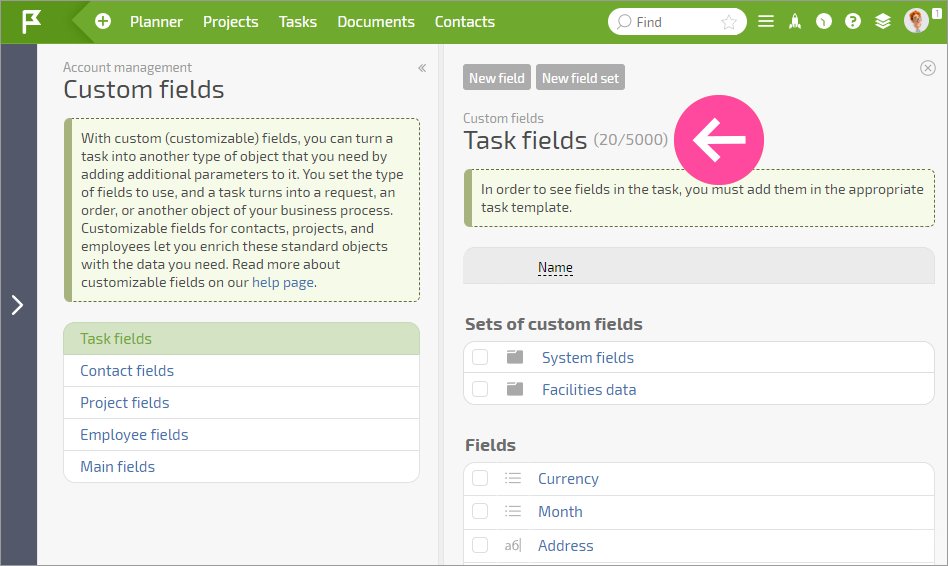
We have added a display of the limits and the number of user fields already used. So it is no longer necessary to guess how many fields are available.
#nocode #custom_fields #usability
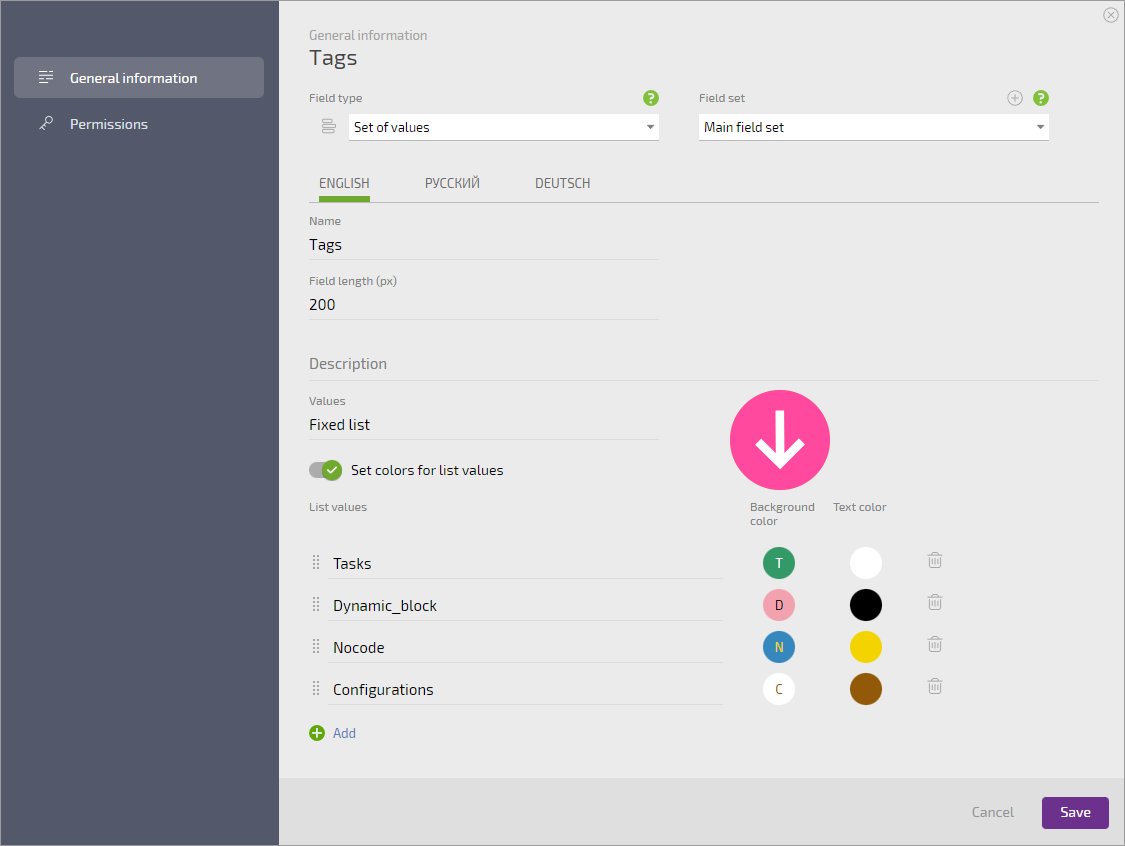
In custom fields with colored list values, text is now displayed against backgrounds. Now you can easily select contrasting colors for values, rather than guessing how the text would look against the selected background.
#nocode #custom_fields #improvements
2
3
We've made a change that many of you have been eagerly awaiting: we added custom employee fields. They work just like contact fields. You can use them to add the information you need to employee cards using tools you're already familiar with.
#contacts #custom_fields #employees

1
2