

YOU CAN'T CALL YOURSELF A BACKEND DEVELOPER IF YOU DON'T KNOW THESE CONCEPTS
Here are 9 concepts all elite backend developers know:
Server-Side Programming:
Proficiency in one or more backend programming languages e.g Python, Node.js or Go.
Databases:
Relational Databases: Understanding of relational database management systems like MySQL, PostgreSQL..
NoSQL Databases: Familiarity with NoSQL databases like MongoDB or Redis.
APIs (Application Programming Interfaces):
Knowledge of RESTful API design principles.
Understanding of GraphQL for efficient data querying.
Server Deployment and Scaling:
Experience with containerization and orchestration tools like Docker and Kubernetes.
Understanding of load balancing and auto-scaling.
Security:
Knowledge of common security vulnerabilities (e.g., SQL injection, XSS, CSRF) and how to mitigate them.
Authentication and authorization techniques (e.g., JWT, OAuth).
Caching:
Implementation of caching strategies to improve application performance.
Asynchronous Processing:
Familiarity with message queuing systems like Apache Kafka or AWS SQS.
Experience with background job processing.
Version Control:
Proficiency with Git and Git workflows (e.g., Gitflow, GitHub Flow).
Testing:
Unit testing, integration testing, and test-driven development (TDD) practices.
Alright, that's a wrap. Follow me @mysticwillz for more tips like this
2
15
1,204


Jun 5
gitの管理について今話題になっているので軽く纏めてみました。個人開発なら漢気main一本勝負派閥の人達は嫌いではない。むしろ好き。
#Git #Gitflow #GitHubflow #バージョン管理 #開発フロー

10
1,377

Jun 5
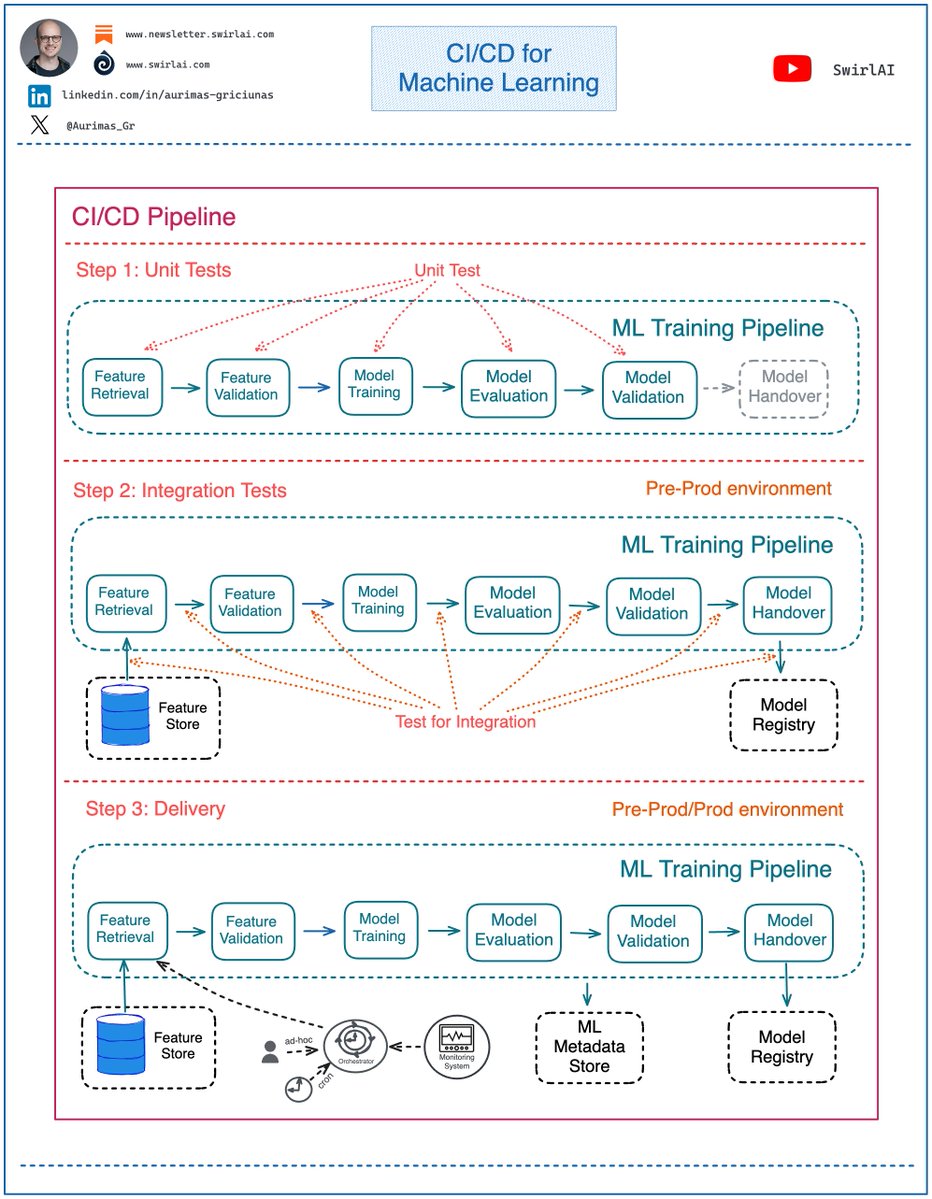
As an 𝗔𝗜 𝗘𝗻𝗴𝗶𝗻𝗲𝗲𝗿 you should also care about regular, non LLM-based ML models, productionising them comes with its own challenges. For example, 𝗖𝗜/𝗖𝗗 process is 𝗱𝗶𝗳𝗳𝗲𝗿𝗲𝗻𝘁 𝗳𝗼𝗿 𝗠𝗮𝗰𝗵𝗶𝗻𝗲 𝗟𝗲𝗮𝗿𝗻𝗶𝗻𝗴 𝗣𝗿𝗼𝗷𝗲𝗰𝘁𝘀 compared to regular software.
The important difference that the Machine Learning aspect of the projects brings to the CI/CD process is the treatment of the Machine Learning Training pipeline as a first class citizen of the software world.
➡️ CI/CD pipeline is a separate entity from Machine Learning Training pipeline. There are frameworks and tools that provide capabilities specific to Machine Learning pipelining needs (e.g. KubeFlow Pipelines, Sagemaker Pipelines etc.).
➡️ ML Training pipeline is an artifact produced by Machine Learning project and should be treated in the CI/CD pipelines as such.
What does it mean? Let’s take a closer look:
Regular CI/CD pipelines will usually be composed of at-least three main steps. These are:
𝗦𝘁𝗲𝗽 𝟭: Unit Tests - you test your code so that the functions and methods produce desired results for a set of predefined inputs.
𝗦𝘁𝗲𝗽 𝟮: Integration Tests - you test specific pieces of the code for ability to integrate with systems outside the boundaries of your code (e.g. databases) and between the pieces of the code itself.
𝗦𝘁𝗲𝗽 𝟯: Delivery - you deliver the produced artifact to a pre-prod or prod environment depending on which stage of GitFlow you are in.
What does it look like when ML Training pipelines are involved?
𝗦𝘁𝗲𝗽 𝟭: Unit Tests - in mature MLOps setup the steps in ML Training pipeline should be contained in their own environments and Unit Testable separately as these are just pieces of code composed of methods and functions.
𝗦𝘁𝗲𝗽 𝟮: Integration Tests - you test if ML Training pipeline can successfully integrate with outside systems, this includes connecting to a Feature Store and extracting data from it, ability to hand over the ML Model artifact to the Model Registry, ability to log metadata to ML Metadata Store etc. This CI/CD step also includes testing the integration between each of the Machine Learning Training pipeline steps, e.g. does it succeed in passing validation data from training step to evaluation step.
𝗦𝘁𝗲𝗽 𝟯: Delivery - the pipeline is delivered to a pre-prod or prod environment depending on which stage of GitFlow you are in. If it is a production environment, the pipeline is ready to be used for Continuous Training. You can trigger the training or retraining of your ML Model ad-hoc, periodically or if the deployed model starts showing signs of Feature/Concept Drift.
Let me know your thoughts. 👇
15
37
202
7,423

gitflowみたいなブランチ運用をしたらしたなんですが、厳密にやらなくとも個人でやってるとそんなに問題にはならないというのはありますね
Jun 4
個人開発してるみんなはgitの管理どれくらいしてる?ぶっちゃけ一人ならmainとdev分けるくらいでよくねと思っているんだけど細かくブランチ切ってしっかりやったりするものなんだろうか?
1
1
3
1,649

May 31
skill化、いい運用ですね。issue→gitflow→TDD→PRをひと続きで型にできると安定しそう。skillとハーネスの境界って、横展開できる流れはskill、プロジェクト固有のルールはハーネスみたいな切り分けですか?
1
3
88

元々ブランチ戦略としてgitflowでやってるので、issue読んでgitflowに沿ってTDDで実装してPR出す一連の流れをskill化してますね。それ以外にプロジェクトごとのルールがあればハーネスに書くって感じでやってますー。
1
3
561


May 28
Hiring for an unpaid intern frontend developer
Must haves skills :
Python
C
C
Java
HTML
CSS
JavaScript
TypeScript
React
Next.js
Vue
Angular
Svelte
Node.js
Express
Django
Flask
FastAPI
Spring Boot
PHP
Laravel
Ruby
Ruby on Rails
Go
Rust
Kotlin
Swift
C#
.NET
SQL
MySQL
PostgreSQL
MongoDB
Redis
Firebase
Supabase
Prisma
Docker
Kubernetes
Nginx
Linux
Git
GitHub
Gitflow
VS Code
IntelliJ
Cloud Computing
AWS
Azure
GCP
DevOps
CI/CD
Jest
PyTest
Selenium
REST APIs
GraphQL
WebSockets
JWT
OAuth
Microservices
System Design
Data Structures & Algorithms
Operating Systems
DBMS
Computer Networks
Compilers
Computer Architecture
Machine Learning
Deep Learning
NLP
Computer Vision
Artificial Intelligence
PyTorch
TensorFlow
Scikit-learn
Hugging Face
LLMs
OpenAI APIs
RAG
Data Engineering
ETL
Hadoop
Spark
Snowflake
Pandas
NumPy
Matplotlib
Power BI
Tableau
Cybersecurity
Ethical Hacking
Penetration Testing
Cryptography
Blockchain
Solidity
Web3
UI/UX
Figma
Tailwind CSS
Bootstrap
Three.js
WebGL
Android Development (Java/Kotlin)
iOS Development (Swift)
Flutter
React Native
Unity
Unreal Engine
Game Development
AR / VR
Agile
Scrum
Jira
13
1
31
2,104

May 12
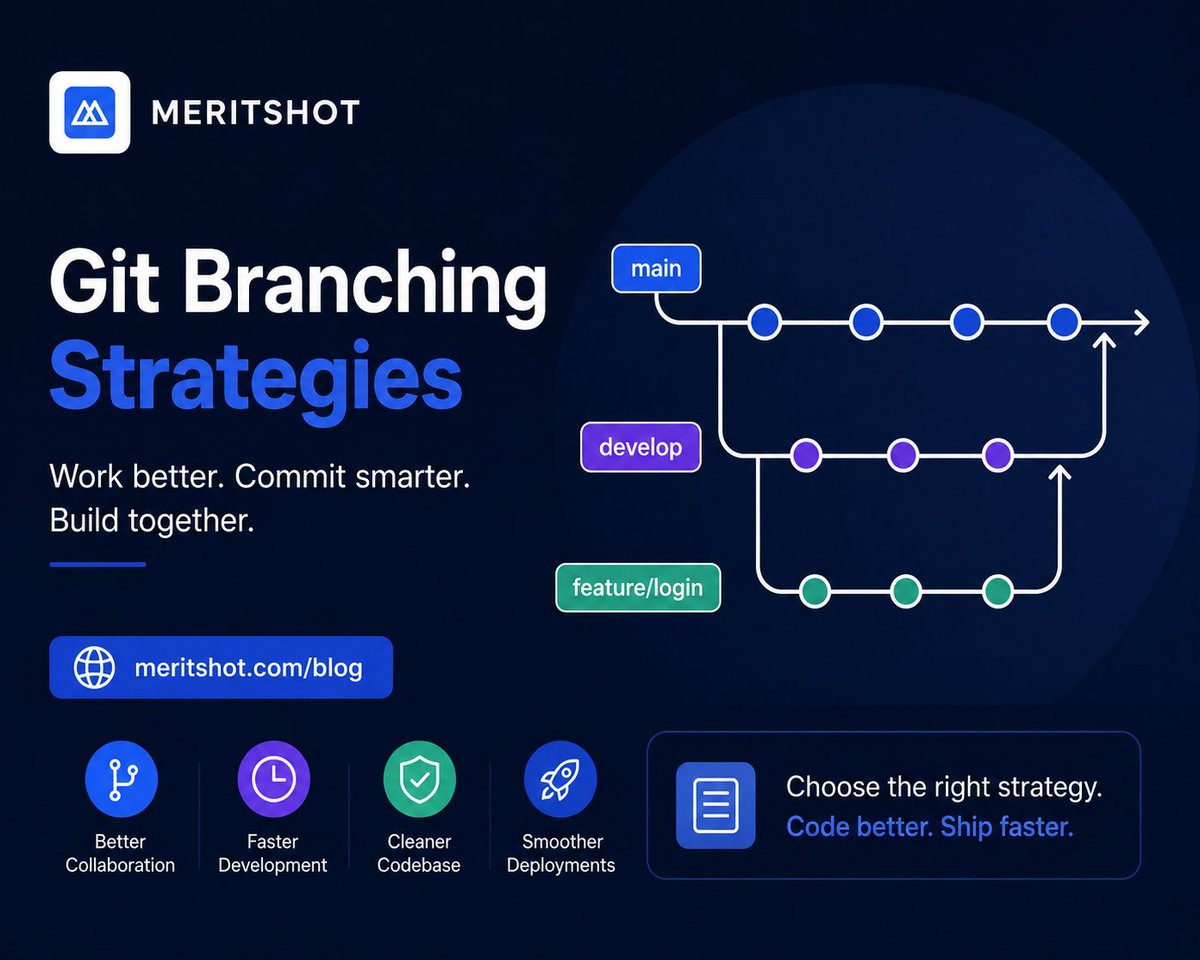
Good code isn’t just about features — it’s about collaboration without chaos. 🌿
From GitFlow to feature branching, the right strategy can make development faster and cleaner. 👨💻
Read more: (meritshot.com/blog/git-branc…)
#Git #Programming #Coding #Developers #Tech
6
1
8
30

May 12
Git Branching Strategies
(explained in under 2 mins):
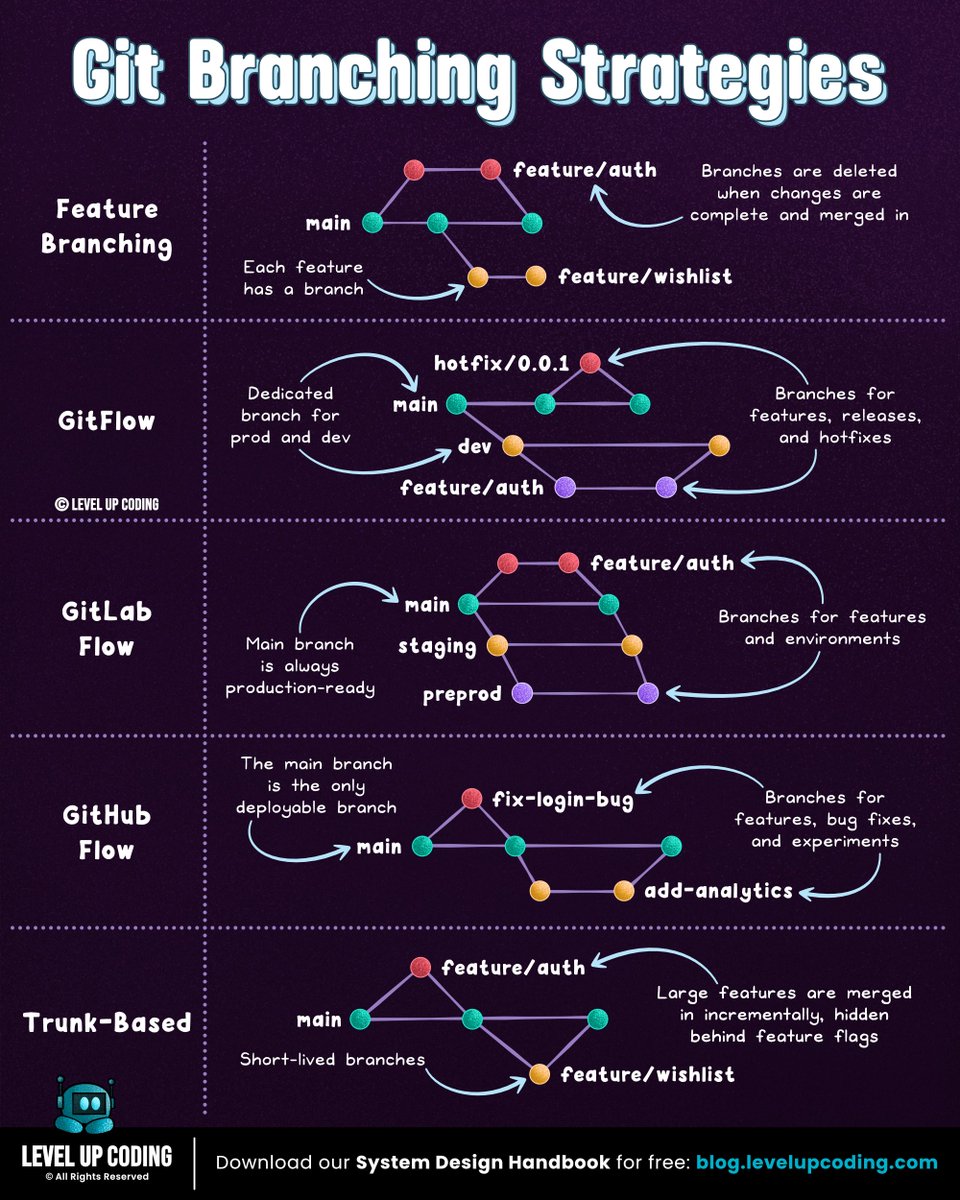
𝗙𝗲𝗮𝘁𝘂𝗿𝗲 𝗯𝗿𝗮𝗻𝗰𝗵𝗶𝗻𝗴 keeps each feature in its own branch, isolated from the main branch; making pull requests easier to review. Once complete, the feature is merged back into main.
𝗚𝗶𝘁𝗳𝗹𝗼𝘄 uses two long-lived branches: dev for development and main for production. Features are built in separate branches, then merged into dev. Releases are prepared in dedicated branches before merging into production.
𝗚𝗶𝘁𝗟𝗮𝗯 𝗳𝗹𝗼𝘄 combines feature branching with environment-based deployment workflows. Changes move through environments like staging before reaching production, making it well-suited for CI/CD and staged releases.
𝗚𝗶𝘁𝗛𝘂𝗯 𝗳𝗹𝗼𝘄 simplifies things. The main branch is always deployable. Developers create short-lived branches, open pull requests, and merge once approved, often triggering deployment.
𝗧𝗿𝘂𝗻𝗸-𝗯𝗮𝘀𝗲𝗱 𝗱𝗲𝘃𝗲𝗹𝗼𝗽𝗺𝗲𝗻𝘁 minimizes branching. Changes are merged into main frequently, supported by strong automated testing, CI pipelines, and feature flags to maintain stability.
Each strategy solves the same core problem: How do teams move fast without breaking the system?
But most issues don’t come from the branching model, they come from inside the branches: unclear changes, weak reviews, missing context.
That’s what CodeRabbit Agent helps solve.
A single agent inside your workflow that follows work end-to-end. It pulls your org’s context into one place and helps teams investigate, plan, and execute work directly from Slack.
So instead of losing context between branches, your work stays connected as it evolves.
𝗧𝗿𝘆 𝗖𝗼𝗱𝗲𝗥𝗮𝗯𝗯𝗶𝘁 𝗔𝗴𝗲𝗻𝘁 𝗳𝗼𝗿 𝗳𝗿𝗲𝗲 → lucode.co/coderabbit-agent-z…
What else would you add?
——
♻️ Repost to help others learn and grow.
🙏 Thanks to @coderabbitai for sponsoring this post.
May 11

Git branching strategies: Do you know the differences?
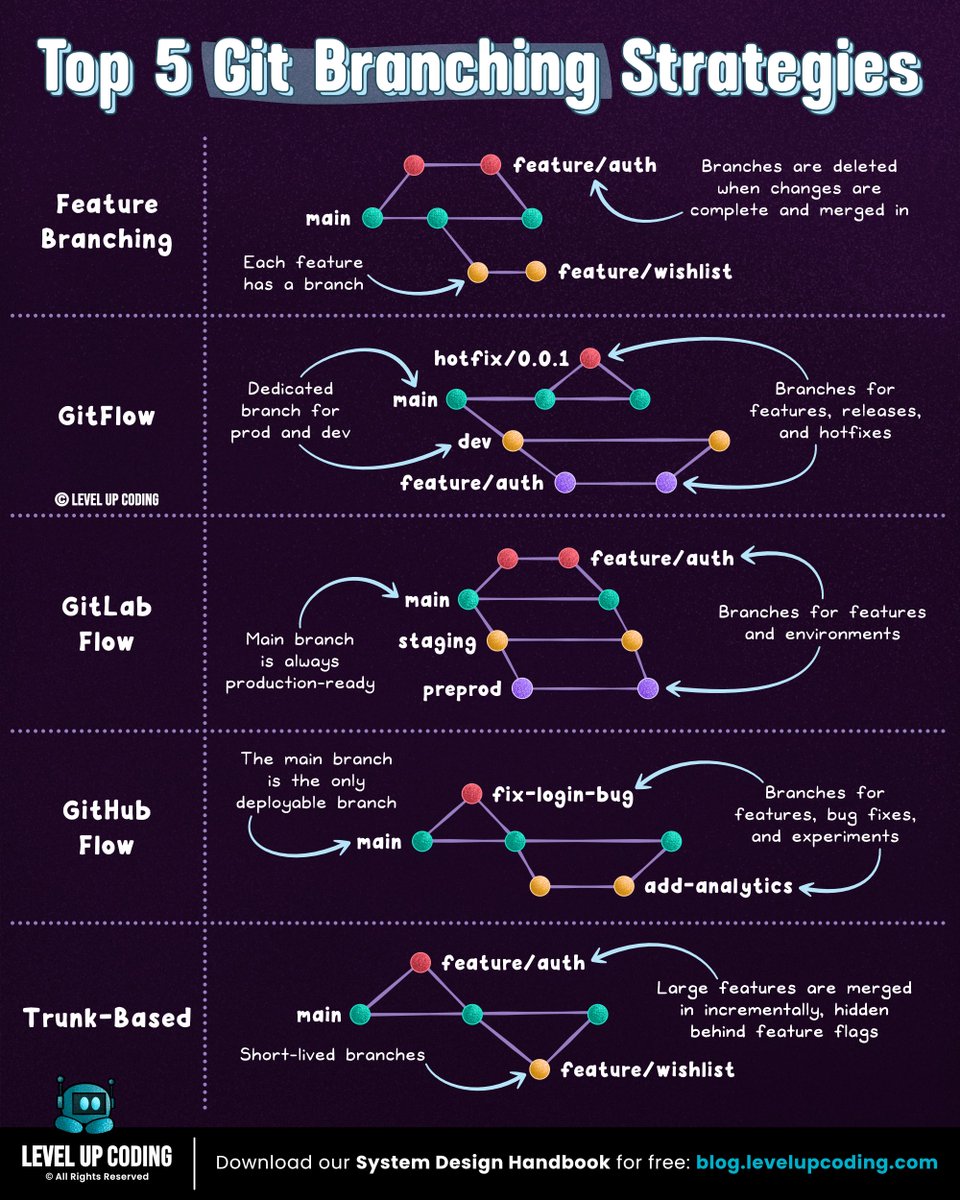
𝗙𝗲𝗮𝘁𝘂𝗿𝗲 𝗯𝗿𝗮𝗻𝗰𝗵𝗶𝗻𝗴 keeps each feature in its own branch, isolated from the main branch; making pull requests easier to review. Once complete, the feature is merged back into main.
𝗚𝗶𝘁𝗳𝗹𝗼𝘄 uses two long-lived branches: dev for development and main for production. Features are built in separate branches, then merged into dev. Releases are prepared in dedicated branches before merging into production.
𝗚𝗶𝘁𝗟𝗮𝗯 𝗳𝗹𝗼𝘄 combines feature branching with environment-based deployment workflows. Changes move through environments like staging before reaching production, making it well-suited for CI/CD and staged releases.
𝗚𝗶𝘁𝗛𝘂𝗯 𝗳𝗹𝗼𝘄 simplifies things. The main branch is always deployable. Developers create short-lived branches, open pull requests, and merge once approved, often triggering deployment.
𝗧𝗿𝘂𝗻𝗸-𝗯𝗮𝘀𝗲𝗱 𝗱𝗲𝘃𝗲𝗹𝗼𝗽𝗺𝗲𝗻𝘁 minimizes branching. Changes are merged into main frequently, supported by strong automated testing, CI pipelines, and feature flags to maintain stability.
Each strategy solves the same core problem: How do teams move fast without breaking the system?
But most issues don’t come from the branching model, they come from inside the branches: unclear changes, weak reviews, missing context.
That’s what CodeRabbit Agent helps solve.
A single agent inside your workflow that follows work end-to-end. It pulls your org’s context into one place and helps teams investigate, plan, and execute work directly from Slack.
So instead of losing context between branches, your work stays connected as it evolves.
𝗧𝗿𝘆 𝗖𝗼𝗱𝗲𝗥𝗮𝗯𝗯𝗶𝘁 𝗔𝗴𝗲𝗻𝘁 𝗳𝗼𝗿 𝗳𝗿𝗲𝗲 → lucode.co/coderabbit-agent-z…
What else would you add?
——
♻️ Repost to help others learn and grow.
🙏 Thanks to @coderabbitai for sponsoring this post.
➕ Follow me ( Nikki Siapno ) to improve at system design.
2
10
46
3,937

May 11
I use Gitflow on most projects and it fits well when you have a dedicated QA or staging environment. The dev branch continuously receives feature and fix merges. We have some overhead: more branches, more merges, but this is the way to make correct core reviews.
2
150

May 11
Git branching strategies: Do you know the differences?
𝗙𝗲𝗮𝘁𝘂𝗿𝗲 𝗯𝗿𝗮𝗻𝗰𝗵𝗶𝗻𝗴 keeps each feature in its own branch, isolated from the main branch; making pull requests easier to review. Once complete, the feature is merged back into main.
𝗚𝗶𝘁𝗳𝗹𝗼𝘄 uses two long-lived branches: dev for development and main for production. Features are built in separate branches, then merged into dev. Releases are prepared in dedicated branches before merging into production.
𝗚𝗶𝘁𝗟𝗮𝗯 𝗳𝗹𝗼𝘄 combines feature branching with environment-based deployment workflows. Changes move through environments like staging before reaching production, making it well-suited for CI/CD and staged releases.
𝗚𝗶𝘁𝗛𝘂𝗯 𝗳𝗹𝗼𝘄 simplifies things. The main branch is always deployable. Developers create short-lived branches, open pull requests, and merge once approved, often triggering deployment.
𝗧𝗿𝘂𝗻𝗸-𝗯𝗮𝘀𝗲𝗱 𝗱𝗲𝘃𝗲𝗹𝗼𝗽𝗺𝗲𝗻𝘁 minimizes branching. Changes are merged into main frequently, supported by strong automated testing, CI pipelines, and feature flags to maintain stability.
Each strategy solves the same core problem: How do teams move fast without breaking the system?
But most issues don’t come from the branching model, they come from inside the branches: unclear changes, weak reviews, missing context.
That’s what CodeRabbit Agent helps solve.
A single agent inside your workflow that follows work end-to-end. It pulls your org’s context into one place and helps teams investigate, plan, and execute work directly from Slack.
So instead of losing context between branches, your work stays connected as it evolves.
𝗧𝗿𝘆 𝗖𝗼𝗱𝗲𝗥𝗮𝗯𝗯𝗶𝘁 𝗔𝗴𝗲𝗻𝘁 𝗳𝗼𝗿 𝗳𝗿𝗲𝗲 → lucode.co/coderabbit-agent-z…
What else would you add?
——
♻️ Repost to help others learn and grow.
🙏 Thanks to @coderabbitai for sponsoring this post.
➕ Follow me ( Nikki Siapno ) to improve at system design.
7
49
198
28,966

May 10
Be honest is this true :
Hiring for an unpaid intern fullstack developer
Must haves skills :
React
Next.js
Vue
Angular
Svelte
Python
C
Node.js
C#
.NET
SQL
C
Java
HTML
CSS
JavaScript
TypeScript
MySQL
Docker
Kubernetes
Nginx
PostgreSQL
MongoDB
Redis
Firebase
Supabase
Prisma
Linux
Express
Django
Flask
FastAPI
Spring Boot
PHP
Laravel
Ruby
Ruby on Rails
Go
Rust
Kotlin
Swift
Git
GitHub
Gitflow
VS Code
IntelliJ
Cloud Computing
AWS
Azure
GCP
DevOps
CI/CD
Jest
PyTest
Selenium
REST APIs
GraphQL
WebSockets
JWT
OAuth
Microservices
System Design
Data Structures & Algorithms
Operating Systems
DBMS
Computer Networks
Compilers
Computer Architecture
Machine Learning
Deep Learning
NLP
Computer Vision
Artificial Intelligence
PyTorch
TensorFlow
Scikit-learn
Hugging Face
LLMs
OpenAI APIs
RAG
Data Engineering
ETL
Hadoop
Spark
Snowflake
Pandas
NumPy
Matplotlib
Power BI
Tableau
1
1
4
413

May 10
agentic gitflow?maybe!
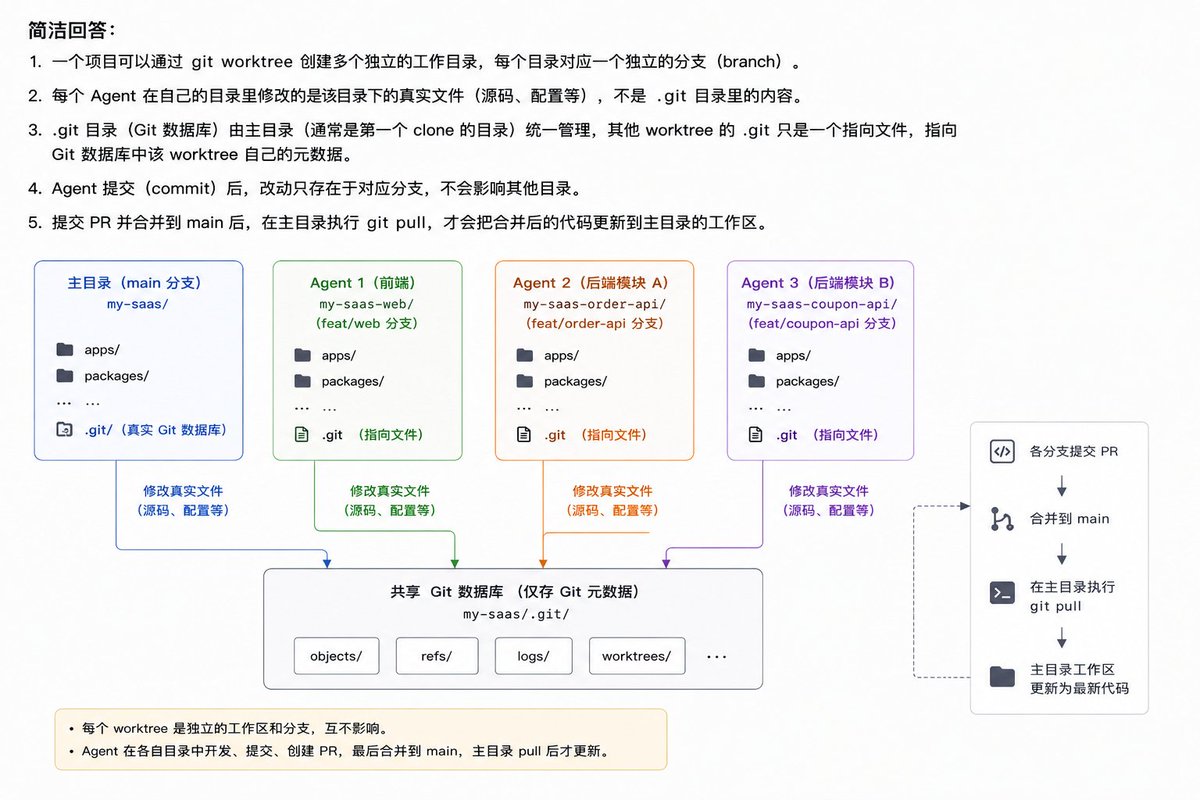
worktree 确实是个不错的并行coding的方案,用来隔离不同 agent/provider 并行开发同一个项目的情况。
不过这里面确实有不少问题。
本身 worktree 是给人类程序员设计和使用的,每次合并 PR 和解决冲突都是耗费很大的精力。
Agent 作为独立 coder 并行工作后,冲突的风险陡增。所以需要在各自的 agent.md 中严格限制边界,不要越雷池半步。
公共模板不允许业务 agent 擅自改动,要有单独 agent/skill 去单独做维护和 PR。
然后本地似乎还需要有个类似共享上下文的记录机制,让开发过程中各个 agent 知道彼此的状态,类似人类 team 不定时的状态同步。
如果真的要做 20 并发的 agent 这种级别的超大项目,想想还是挺复杂,不过这里面孕育了巨大的机会。
agentic gitflow, 有木有?

3
6
678

May 9
1年目エンジニアあるあるなんだけど、Gitをコマンドだけ覚えて終わりにしてる人が多い。
それだと現場で詰まる。
GitHub FlowやGitFlowのブランチ運用まで理解しておくと、入ってすぐ動けるし「こいつ優秀だな」って印象を与えられる。
こういうのは研修が終わってから焦っても遅いんだよな。
12
562
May 7
Be honest is this true :
Hiring for an unpaid intern frontend developer
Must haves skills :
C
Java
HTML
CSS
JavaScript
TypeScript
React
Next.js
Vue
Angular
Svelte
Python
C
Node.js
C#
.NET
SQL
MySQL
Docker
Kubernetes
Nginx
PostgreSQL
MongoDB
Redis
Firebase
Supabase
Prisma
Linux
Express
Django
Flask
FastAPI
Spring Boot
PHP
Laravel
Ruby
Ruby on Rails
Go
Rust
Kotlin
Swift
Git
GitHub
Gitflow
VS Code
IntelliJ
Cloud Computing
AWS
Azure
GCP
DevOps
CI/CD
Jest
PyTest
Selenium
REST APIs
GraphQL
WebSockets
JWT
OAuth
Microservices
System Design
Data Structures & Algorithms
Operating Systems
DBMS
Computer Networks
Compilers
Computer Architecture
Machine Learning
Deep Learning
NLP
Computer Vision
Artificial Intelligence
PyTorch
TensorFlow
Scikit-learn
Hugging Face
LLMs
OpenAI APIs
RAG
Data Engineering
ETL
Hadoop
Spark
Snowflake
Pandas
NumPy
Matplotlib
Power BI
Tableau
1
1
3
472
May 4
Be honest is this true :
Hiring for an unpaid intern frontend developer
Must haves skills :
Python
C
C
Java
HTML
CSS
JavaScript
TypeScript
React
Next.js
Vue
Angular
Svelte
Node.js
C#
.NET
SQL
MySQL
PostgreSQL
MongoDB
Redis
Firebase
Supabase
Prisma
Docker
Kubernetes
Nginx
Linux
Express
Django
Flask
FastAPI
Spring Boot
PHP
Laravel
Ruby
Ruby on Rails
Go
Rust
Kotlin
Swift
Git
GitHub
Gitflow
VS Code
IntelliJ
Cloud Computing
AWS
Azure
GCP
DevOps
CI/CD
Jest
PyTest
Selenium
REST APIs
GraphQL
WebSockets
JWT
OAuth
Microservices
System Design
Data Structures & Algorithms
Operating Systems
DBMS
Computer Networks
Compilers
Computer Architecture
Machine Learning
Deep Learning
NLP
Computer Vision
Artificial Intelligence
PyTorch
TensorFlow
Scikit-learn
Hugging Face
LLMs
OpenAI APIs
RAG
Data Engineering
ETL
Hadoop
Spark
Snowflake
Pandas
NumPy
Matplotlib
Power BI
Tableau
1
3
494

May 4
How the job market be :
Hiring for an unpaid intern frontend developer
Must haves skills :
Python
C
C
Java
HTML
CSS
JavaScript
TypeScript
React
Next.js
Vue
Angular
Svelte
Node.js
Express
Django
Flask
FastAPI
Spring Boot
PHP
Laravel
Ruby
Ruby on Rails
Go
Rust
Kotlin
Swift
C#
.NET
SQL
MySQL
PostgreSQL
MongoDB
Redis
Firebase
Supabase
Prisma
Docker
Kubernetes
Nginx
Linux
Git
GitHub
Gitflow
VS Code
IntelliJ
Cloud Computing
AWS
Azure
GCP
DevOps
CI/CD
Jest
PyTest
Selenium
REST APIs
GraphQL
WebSockets
JWT
OAuth
Microservices
System Design
Data Structures & Algorithms
Operating Systems
DBMS
Computer Networks
Compilers
Computer Architecture
Machine Learning
Deep Learning
NLP
Computer Vision
Artificial Intelligence
PyTorch
TensorFlow
Scikit-learn
Hugging Face
LLMs
OpenAI APIs
RAG
Data Engineering
ETL
Hadoop
Spark
Snowflake
Pandas
NumPy
Matplotlib
Power BI
Tableau
Cybersecurity
Ethical Hacking
Penetration Testing
Cryptography
Blockchain
Solidity
Web3
UI/UX
Figma
Tailwind CSS
Bootstrap
Three.js
WebGL
Android Development (Java/Kotlin)
iOS Development (Swift)
Flutter
React Native
Unity
Unreal Engine
Game Development
AR / VR
Agile
Scrum
Jira
Elixir
Zig
Assembly
16
1
66
4,141