
Jan 3
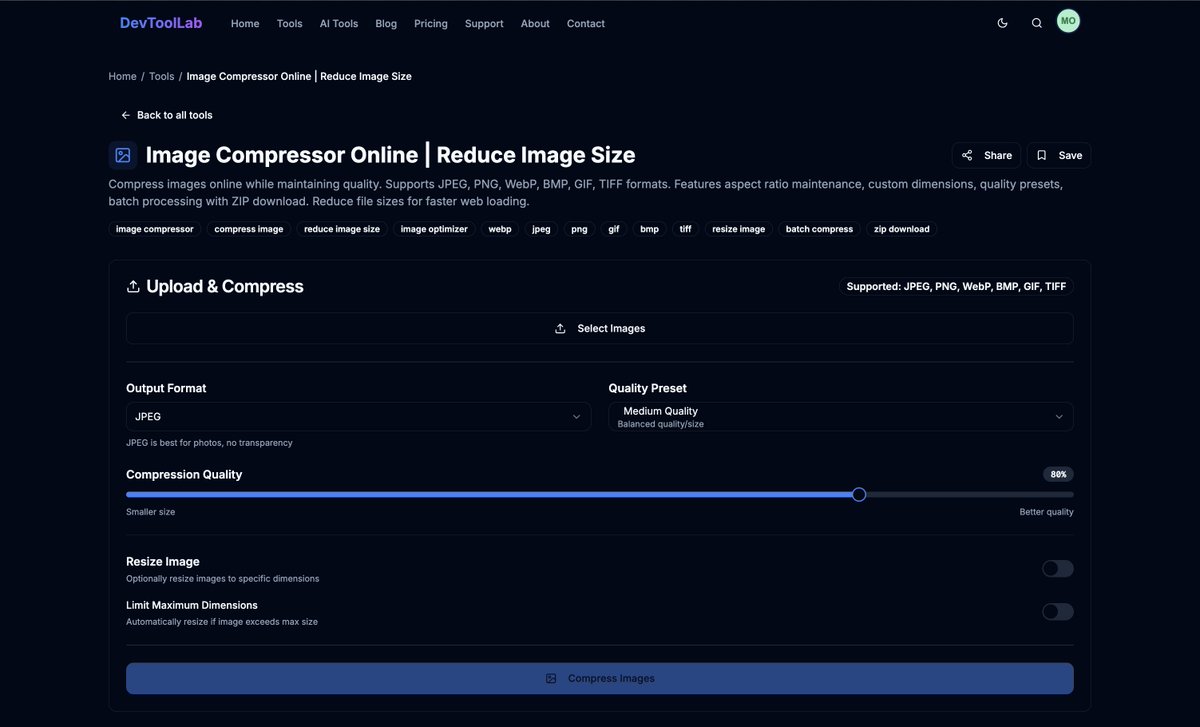
🚀 New tool drop by DevToolLab!
Compress images online without losing quality 📸⚡
Supports batch upload, multiple formats & custom quality all in your browser.
Try it 👉 devtoollab.com/tools/image-c…
#DevToolLab #ImageCompressor #WebDev #DesignTools #Performance #free
1
2
26

3 Dec 2025
Helped my clients do >$40,000,000 in the last 365 days with all-image emails.
Here’s why they didn’t go to spam (and how yours won’t either):
↳Segmentation on lock: 14, 30, 60, and 90-day engaged lists used religiously
↳3-4 emails per week only to engaged profiles (90-day max)
↳Compressed images every time (imagecompressor .com m is your best friend)
↳Alt text added to all images
↳Footer includes live HTML (brand info, unsubscribe, invisible text trick)
↳Mobile-optimized layouts (designed in Figma)
↳Dark-mode friendly designs (easy with image-based emails)
↳10-25% of emails sent were pure plain-text (from the founder)
↳"Gradual Send Over Several Hours" used on new or cold accounts
↳Smart Sending turned off in flows
↳Deliverability warmup strategy followed to the T: start with 14-day, then expand
At the end of the day... Gymshark, Kylie Cosmetics, Skims, MVMT, Dr. Squatch, Brooklinen, Hydro Flask, Ridge, Casper, and thousands more wouldn’t be sending image-based emails if they went straight to spam.

7
819

18 Jul 2025
🧠During my internship, we kept hitting a real problem
we had to upload 4–5MB course banners, and it made the dashboard & frontend painfully slow.
Lecture banners load slow
Users wasted bandwidth.
So I built a solution.
Here's what I made 👇
#learnInPublic #ImageCompressor #js
1
2
125

28 Mar 2025
How to Install Mazanoke on Your Synology NAS
mariushosting.com/how-to-ins… #Synology #NAS #Docker #Portainer #Mazanoke #Converter #ImageConverter #ImageCompressor #selfhost #selfhosted #selfhosting #DSM #DSM7 #DSM71 #DSM72 #DSM721 #DSM722 #mariushosting
6
356

2 Jan 2025
#デイトラWeb制作 #チームチャレンジ
累計123日目 5/455h
中級編最終課題46日目 5/174h
課題提出前チェック
✅ボタンにホバーしても反応しない件
他の要素が重なっていてホバーできなかった。
検証ツールでの確認をもう少し視野を広く行なってれば、重なっている要素を早く見つけられたはず🧐
✅課題提出前チェックについて
昨日に引き続き、デイトラのチェック項目にのっとり確認。
📚見出し構造
📚タイトル、ディスクリプション
📚OGP
ファビコンは用意がないので必要ないとのこと
閉じタグのチェック、構文チェックは元々Chromeの拡張機能が入っていたので、問題なし。
💡画像の圧縮について💡
ファイルによって500MBを超える画像が何箇所かあった。
WebpExporterというFigmaの拡張機能で画像ファイルをWebpで書き出ししていたが、おそらく私の書き出しミスか確認ミスでファイル容量が大きくなりすぎていた。
imageCompressorというツールでさらに1/10ほどにファイル容量を圧縮できたが、次回からは圧縮し直しがないようにしたい
色々ありましたが、なんとか課題を提出できました!!
今日は私用のためちょっと早いですが本日の学習は終わります。
9
237

30 Jun 2024
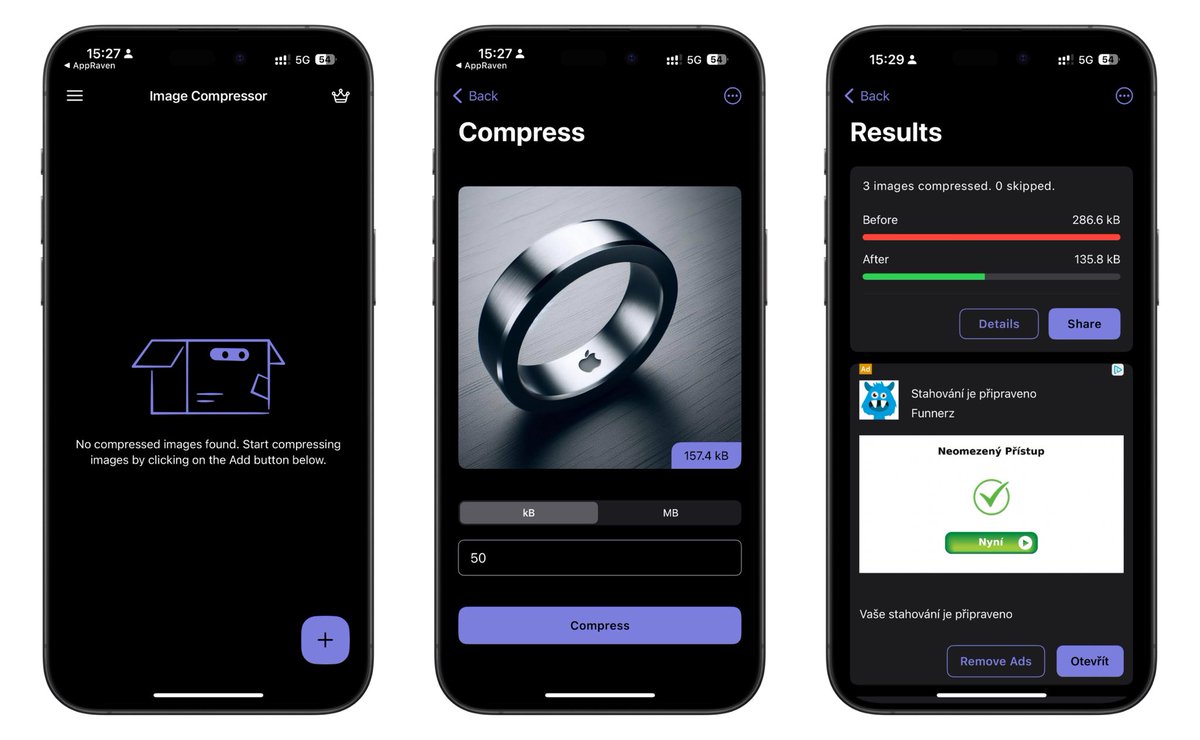
Jak rychle zmenšit velikost obrázku? Vyzkoušejte aplikaci Image Compressor, je zdarma!👇 #ImageCompressor #tip #fotky #zdarma
apps.apple.com/cz/app/image-…
1
5
457

3 Jan 2024
Damn!
I actually own a "imagecompressor" domain, maybe I should use it.
4
303
67,049
6 Nov 2023
10 ways ensure your Ecom emails NEVER hit the spam folder:
1 — Keep emails lightweight, compress your images (we use imagecompressor .com), add HTML text sections to balance image-heavy emails for better deliverability, and avoid excessive use of highlighting, colored text, clickable buttons, and varied font sizes to keep the email size reasonable.
2 — Ask people to reply to your emails, especially after they made a purchase. Shocked how many people actually respond - especially if they know the founder reads and replies to all the emails.
3 — Alt Text - Add this to your images!
4 — Don't blast your entire list. Send to subscribers who've been active in the last 30-90 days. Once your metrics look good, then you can start sending to a bigger audience.
5 — Clean your list every month or quarter. Very simple process- Just export a CSV and suppress those inactive emails.
6 — Plain text emails. Send these every now and then - especially around your biggest sales. It stands out in the inbox and looks super personalized - especially if it's a message from the founder.
7 — Resends to non-openers. Don't overuse this strategy. Don't resend emails, besides on big holidays like BFCM. It's a good tactic to use sparingly.
8 — Don't send to people who haven't opted in. Even though you technically can in Klaviyo, you don't want to send to these people.
9 — Dedicated sending domain. We've had mixed results with this. You got to be diligent and warm it up correctly. But it's worth looking into if you're not going to get results already with typical Klaviyo sending domain.
10 — Keep a consistent campaign schedule. This trains your audience to look for your emails on a certain day. Generally we do Tuesdays and Thursdays, to start.
4
4
24
2,706
3 Nov 2023
Ecom Email Deliverability 101:
Keep emails lightweight.
Compress your images (we use imagecompressor .com) and add more HTML text sections if necessary.
^ Adding on to this.
Don't use a ton of highlighting, color text, clickable buttons, and different font sizes in Klaviyo. This will make your email massive.
Ask people to reply to your emails.
Especially after they made a purchase. Shocked how many people actually respond - especially if they know the founder reads and replies to all the emails.
Alt Text — add this to your images!
Don't blast your entire list.
Send to subscribers who've been active in the last 30-90 days. Once your metrics look good, then you can start sending to a bigger audience
Clean your list every month or quarter.
Very simple process- Just export a CSV and suppress those inactive emails.
Plain text emails.
Send these every now and then - especially around your biggest sales. It stands out in the inbox and looks super personalized - especially if it's a message from the founder.
Take it easy on the resends to non-openers.
Don't resend emails, besides on big holidays like BFCM. It's a good tactic to use sparingly.
Don't send to people who haven't opted in.
Dedicated sending domain.
We've had mixed results with this. But it's worth looking into if you're not going to get results already with typical Klaviyo sending domain.
Keep a consistent campaign schedule.
This trains your audience to look for your emails on a certain day. Generally we do Tuesdays and Thursdays, to start.
1
9
1,117
18 Oct 2023
Tiny mistakes w email marketing are SUPER easy to make. It’s ALL about the details.
Here's a few common mistakes— based on my own experience:
Wrong / broken links
(CTAs and links don’t work OR don’t match. Aka, they don’t go to the specific product that’s in the email)
Wrong send time
(generally, we like to send in the recipient’s timezone)
Wrong smart sending setting
(generally, OFF for flows & ON for some campaigns)
Product issues
(either sold out / wrong product)
Duplicated flows
(for example— you’ll want to check if the client is already sending generic Shopify abandoned cart emails & turn them off after implementing the flow in Klaviyo)
Subject line & preview text are incongruent.
Doesn’t read well, present the offer, and prime the reader before the email. Also isn’t scroll-stopping/ open a loop in their mind.
Not having a default value with your merge tags.
Don’t just use {{ first_name }} . Use something like {{ first_name|title|default:'friend' }}
Not optimized for mobile
(buttons too small, text is only readable on desktop)
Incorrect segmentation
Not optimizing your PNG images for quick load times
(we use imagecompressor .com)
Not optimized for dark-mode in Gmail
Not adding alt-text to images
(for minor deliverability improvements).
Not using Klaviyo text for at least 1x of the coupon codes in the email, so the user can copy and paste it.
Not changing the Shopify hero section banner to show the current promotion
Poor communication with client
(not being 100% clear on send time/dates and when the promo starts/ ends)
Not updating flows to reflect product changes (price changes, out of stock, new evergreen offers like “Free Shipping above XYZ dollars, etc)
2
1
8
666
6 Sep 2023
From what we’ve seen: it’s super easy (!) to make mistakes with your email campaigns.
Here are a few common technical mistakes:
• Not having a default value with your merge tags. Don’t just use {{ first_name }} . Use {{ first_name|default:'friend' }}
• Wrong / broken links
• Not optimized for mobile
• Incorrect segmentation
• Subject line & preview text are incongruent
• Not optimizing your PNG images for quick load times (we use imagecompressor .com)
• Product issues (either sold out / wrong product)
• Not optimized for dark-mode in Gmail
• Not using Klaviyo text for at least 1x of the coupon codes in the email, so the user can copy and paste it.
• Not showing the current promotion on the Shopify hero section banner
Always gotta check the pre-send checklist for all these.
2
315

23 Jun 2023
This article presents a list of the ten best free image compressor websites, along with their descriptions and key features. Utilizing these to boost site speed. wpinlearn.com/best-free-imag…
#WordPress #imagecompressor #wpinlearn
2
24

11 May 2023
Exciting news! 🎉 Introducing our new Figma plugin: ImageCompressor! Easily export your designs in compressed formats like JPG, PNG, SVG, WebP, and PDF without compromising quality. Say goodbye to large file sizes! #FigmaPlugin #DesignTools #figma
figma.com/community/plugin/1…
6
11
1,090

25 Feb 2023
Imagecompressor
> imagecompressor.com/fr/
Sert à diminuer la taille de vos fichiers comme par exemple une miniature sans grosse perte de qualité voire pas du tout.
1
4
627

22 Jan 2023
Mengecilkan ukuran foto atau kompres foto bisa dilakukan melalui beberapa website, seperti iloveimg, compressjpeg, dan imagecompressor. dlvr.it/ShFtd0
2
2,028

23 Dec 2022
FREE Online Image Optimization Tools 🖼️
→ ezgif .com
→ kraken .io
→ tinypng .com
→ compressor .io
→ compressjpeg .com
→ online-convert .com
→ imagecompressor .com
6
18
82
8,803

29 Oct 2022
Jpeg Compress is a tool that reduces the size of picture files while preserving the original quality of numerous image formats, including JPG, SVG, PNG, WEBP, Heic, and GIF.
jpegcompress.com
#imagecompressor #jpegcompress
2

28 Jul 2022
👇👇👇 Switchboard Canvas Best Image and Video Creation Platform👇👇👇
mzuraja.com/switchboard-canv…
#canvaeditor #imagecreation #videoeditor #automationsoftware #imagecompressor #imagecompressoronline #bestphotoeditingappsfree
#photoeditoronlinehd #canva #canvas

1

9 Jun 2022
Just know I found website called jpegcompress.com
I found it very useful. #imagecompressor
#pngcompresd
1
2

8 May 2022
FREE Image Optimization Tools
🐼 tinypng .com
🦎 compressor .io
🦍 online-convert .com
🔶 kraken .io
🐊 imagecompressor .com
🐘 compressjpeg .com
1
41
124