

Feb 13
YZ konusunda karşımdakinin lafını dinleme hiyerarşim şu:
- ChatGpt kullanıyorsa ya da hiç kullanmıyorsa 0 puan;
- Zotero, Mendeley kullanıyorsa 1 puan;
- NotebookLM kullanıyorsa 2 puan;
- ResearchRabbit, Litmap kullanıyorsa 3 puan;
- Claude ya da Gemini kullanıyorsa 4 puan;
- SciSpace, Consensus ya da Paperpal kullanıyorsa 5 puan;
- OpenClaw ya da benzeri bir bot kullanıyorsa 10 puan...
Buna göre değerlendirin.
35
77
1,048
152,758

Feb 12
اضف للباحثين
Ivory mind
Napkin
Semantic scholar
Consensus
Litmap
Zotero
Scispace
Elicit
2
8
1,857

4 Dec 2025
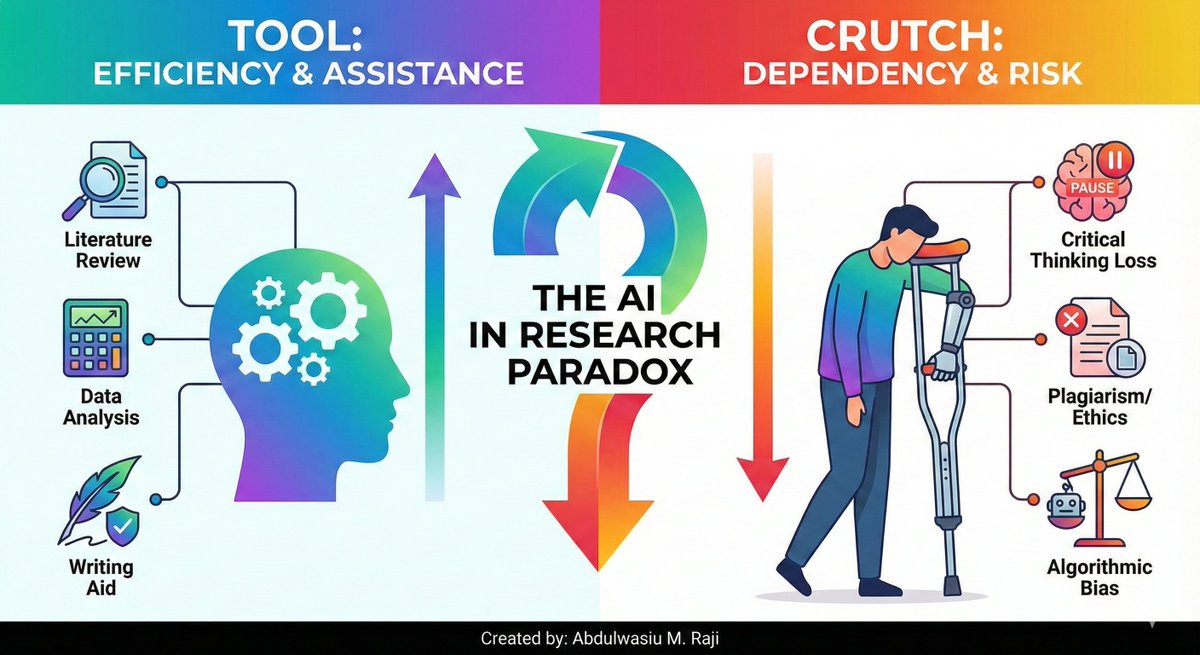
The Use of AI in Research: Tool or Crutch?
Artificial intelligence (AI) is changing the world, and academic research is no exception. For students and early career researchers, AI tools are a double-edged sword. Why is this so?
On one side, using AI tools could save you from the endless hours of mental toiling that make up a large part of our work. On the other hand, the use of AI raises serious ethical questions that we are only just beginning to understand.
This is called the "AI in Research Ethics & Utility Paradox".
Let's start with the utility.
The benefits of AI are undeniable.
1. AI-powered tools can scan thousands of papers in minutes, identify key themes, and even suggest connections you might have missed. Have you heard of connected papers, Research Rabbit, and Litmap?
These tools can turn a month-long literature review into a task that takes a few days. Tools can help you:
- Polish your writing: Paperpal
- Check for grammar errors: Grammarly
- Format your citations: Mendeley, EndNote, Zotero, etc.
For a stressed-out PhD student working against a deadline, this isn't just helpful; it's a lifesaver. It frees up time for the part of the research that actually matters:
- Critical thinking,
- Analysis and generating new ideas.
However, there's also the ethical side:
- If an AI tool summarises a paper for you, have you really read it?
- If it helps you write a paragraph, is that your original work?
The line between using a tool and outsourcing your brain is becoming blurry.
Additionally, concerns exist about plagiarism, as some AI models may reproduce text from their training data without proper citation or acknowledging the source.
More subtle is the risk of bias.
AI models are trained on existing data, which often contains various historical biases.
If we blindly trust their output, we risk perpetuating these prejudices in our own research.
However, the answer to navigating this paradox is to see AI as a TOOL, not a REPLACEMENT for human intellect.
It is a powerful research assistant, but the final responsibility for the work should always rest with you.
How do you do this?
1. You must verify its outputs,
2. Question its assumptions, and
3. Ensure that your voice and your critical analysis remain the driving force of your research.
The future of research belongs to those who can use AI responsibly and effectively. READ THIS AGAIN!
We need to have open discussions about these ethical challenges and develop clear guidelines for their use.
So, what do you think?
Is AI a powerful new tool for researchers, or a dangerous crutch that undermines critical thinking?
Share your thoughts in the comments below!
#AIinResearch
#AcademicTwitter
#PhDLife
#ResearchEthics
ALT The Use of AI in Research
1
9
27
1,349


27 Aug 2025
🚨 Think you’re done with your literature review?
Here’s how to check in 10 seconds (and avoid Reviewer 2’s wrath):
❓ Did you cover ALL relevant papers?
❓ Did you miss key citations?
❓ Will you get called out for forgetting something?
👉 Run a “done-check” ON your papers with Litmaps (free).
1️⃣ Import your papers
2️⃣ Run "Explore"
3️⃣ Review your Litmap to spot anything you missed
✅ No second-guessing. When you’re done, you’ll know.
What’s your trick for finishing a lit review? 👇
1
7
612

28 Jul 2025
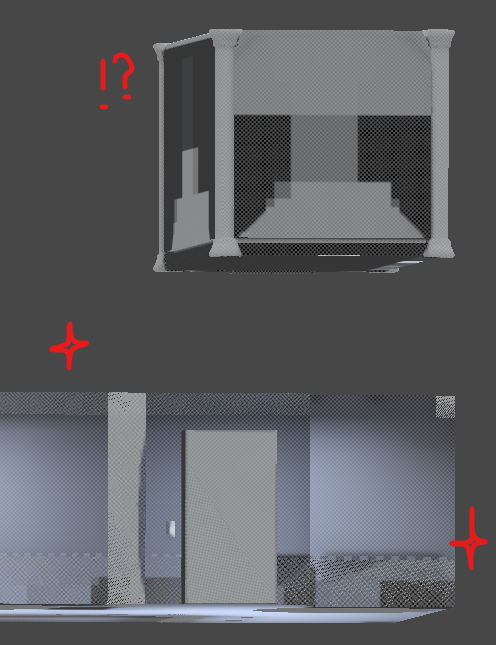
ワールド制作に詳しい方…助けてください…😂
下が購入した部屋、上が追加で自作した部屋なんですがライトマップの解像度が一目瞭然すぎて…
各オブジェクトのScale in Litmapの値を20にでもしないとまともな光にならなそうだけど警告文を見るに最善策ではなさそう
原因がわかる方おられませぬか…
1
5
3
1,464

23 Jun 2025
14. You can also change the shape of the litmap.
Click on "Recommendations" in the top-right corner and select the shape you want to use.
Litmaps has four options: Standard, Ring, Side by Side, and By Author.
1
1
7
1,064
23 Jun 2025
13. To run a new search without leaving your litmap, click on "Add" in the top-right corner.
Run a search and select the paper you want to add to your paper. Then refresh the map.
1
1
6
1,155
23 Jun 2025
12. You can also refine your search with respect to a particular paper.
On an any given paper in the list, click on "Refine Search" and refresh the litmap.
1
1
6
1,225
23 Jun 2025
11. To tag an article, click on it in the litmap and then click on the tag icon on top of the map.
Select the tag you want to use. You can select multiple tags for an article.
1
1
7
1,300
23 Jun 2025
6. Read through these abstracts and if you find a paper relevant, click on "Add to" in the bottom-right corner.
Add multiple papers. Then click on "Refresh" on the top of your litmap.
It will add the new papers and update your litmap.
1
1
8
2,778
23 Jun 2025
5. On your litmap, you will see a big blue button "Explore Related Articles."
Click on it and Litmaps will show you more papers related to the ones in your map.
Click on a paper and it will you its abstract.
1
1
14
3,270
23 Jun 2025
4. Click on a paper in the list and Litmaps will show you its abstract.
Read the abstract to find out papers relevant to your project.
If you find a paper useful, click on "Add to Litmap."
Add several papers. Then click on "Done" and it will create a map of selected papers.
1
1
13
3,753
23 Jun 2025
2. Click on the " " sign in front of Litmaps in the top-left corner.
Choose a name for your litmap.
1
2
13
4,873

26 May 2025
Use referencing cites like Mendeley, google scholar, or litmap to locate research journal articles.
1
1
13
1,080
12 Mar 2025
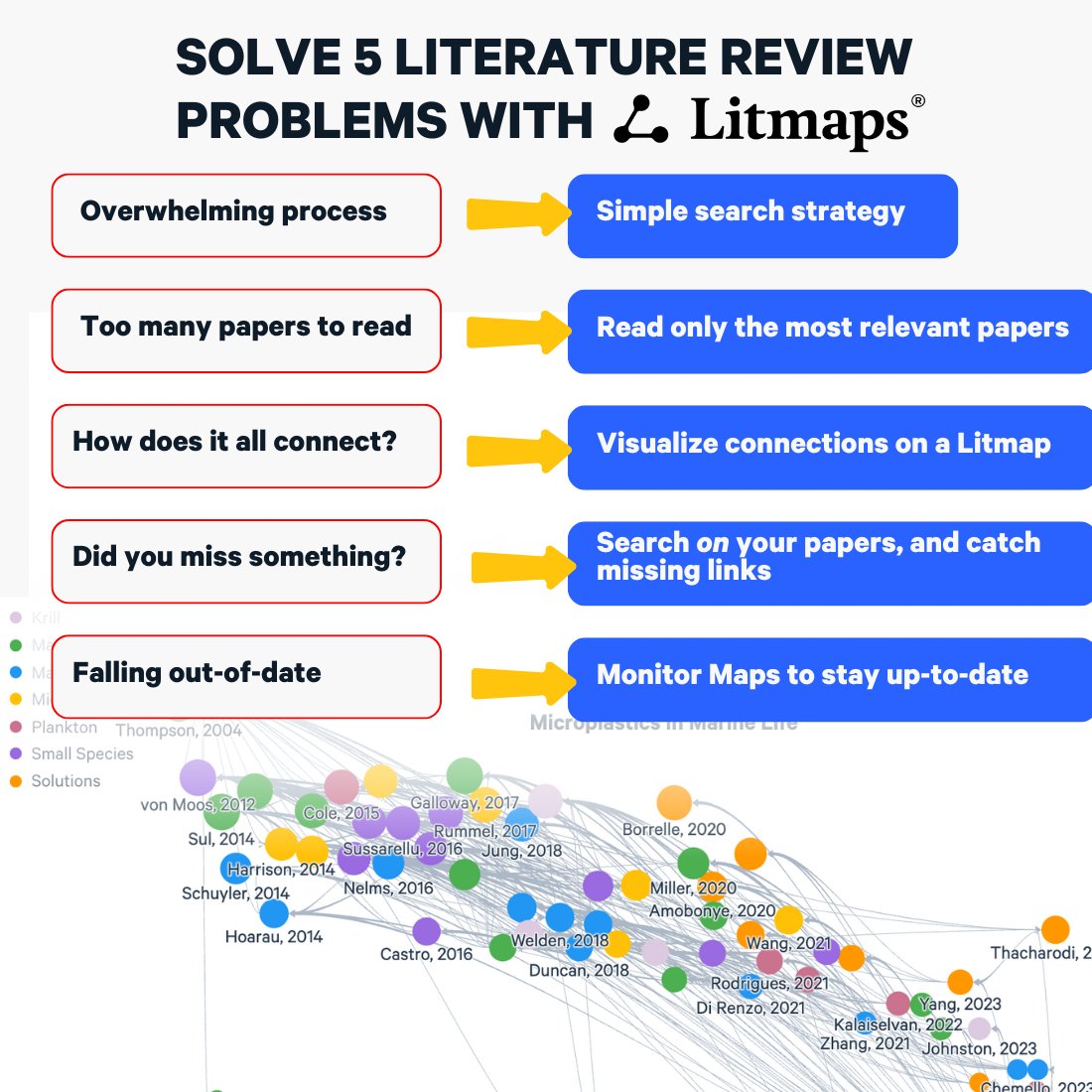
🔎 Struggling with your literature review?
Most researchers face these 5 problems at some point.
But few of us have clear strategies on how to get past them.
Here's how to tackle each of these with literature maps (aka Litmaps):
1️⃣ Overwhelming process → Use a simple search strategy
Start with a seed paper (a key paper in your field) and use Litmaps’ citation network to expand your search strategically instead of aimlessly browsing databases.
2️⃣ Too many papers to read → Prioritize the most relevant
Instead of skimming hundreds of papers, Litmaps highlights key connections between works, helping you identify which papers matter most for your research.
3️⃣ How does it all connect? → Visualize the literature
Litmaps builds an interactive citation map, making it easy to see relationships between studies, spot influential works, and understand how the research field has evolved over time.
4️⃣ Did you miss something important? → Find missing links
Use Litmaps to search on the papers you already have - to find key studies you may have overlooked, ensuring you don’t miss critical references in your field.
5️⃣ Falling out-of-date? → Monitor your Litmaps
Track your Litmap & easily integrate new relevant papers as they’re published, keeping your literature review fresh and up-to-date.
#AcademicTwitter #PhDLife #LiteratureReview #Litmaps #Research #PhD
11
38
1,972
4 Mar 2025
Struggling to come up with that perfect research question? 💡
You sit down, ready to start your research, but where do you even begin...
👉 Too many ideas?
👉 Not sure if your topic is original?
👉 Struggling to connect the dots?
Finding the right research question isn’t about reading more—it’s about seeing the bigger picture. 👀
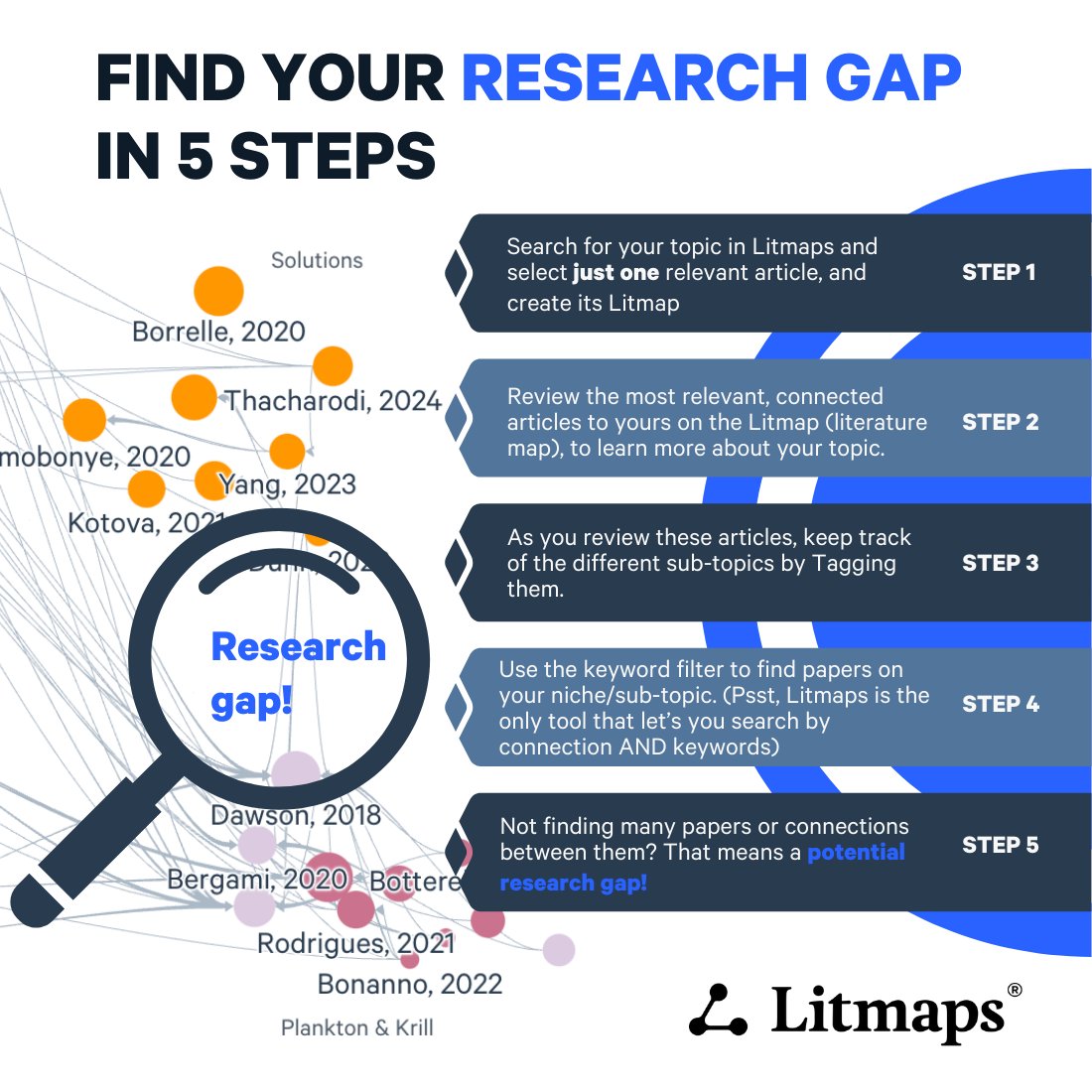
Here’s a simple 5-step method to discover a fresh research angle using Litmaps:
✨ STEP 1️⃣ – Find one key paper related to your idea. Click “Explore Related Articles” to create its literature map ➡️ Litmap
✨ STEP 2️⃣ – Spot patterns in the Litmap—are you diving into an active field or an unexplored frontier? 🗺️
✨ STEP 3️⃣ – Tag subtopics to track different angles and emerging trends in your area.
✨ STEP 4️⃣ – Use keyword filters to fine-tune your focus and spot gaps in the research. 🎯
✨ STEP 5️⃣ – If there’s a space with few (or no) papers, congrats—you’ve found a research gap! That’s your golden opportunity. 🌟
💡 Pro Tip: If you find too many papers on your topic, pivot slightly and look for fresh connections!
With Litmaps, you’re not just searching—you’re strategically mapping knowledge to find the best possible research angle.
How do you check if your research idea is original? Share your tips below! 👇
_________________
We're on a mission to help accelerate impactful science.
Join us.
👉 Follow us for research tips at @LitmapsApp
✨ Learn more about lit review at our upcoming webinar! (link on site)
#LiteratureReview
#AcademicResearch
#LitReview
#Litmaps
#ResearchTools
1
15
715
18 Feb 2025
It's exhausting scrolling through endless lists of research papers, without finding what you really need.
If you're like most researchers, you probably have dozens of papers open right now.😩
🛑But, you don't need to read them all.
Instead, prioritize the most important one using visual literature maps. 🗺️
Here's how to find the most important papers without getting bogged down by everything else:
STEP 1️⃣ - COLLECT
📂 COLLECT all the papers you currently know or care about on your topic.
STEP 2️⃣ - IMPORT
⤵️ IMPORT them into Litmaps (Litmaps handles any kind of import, whether a BibTeX, list of DOIs, or direct sync to Zotero)
STEP 3️⃣ - CREATE A LITMAP
🗺️ CREATE a Litmap with all the papers you brought in. This will visualize all your papers as circles, with lines showing how they connect via citations and references.
STEP 4️⃣ - SEARCH
🔍 SEARCH for the most important articles on your topic by running the Litmaps search algorithm on your map. You'll get the most relevant paper recommendations, based the articles you know.
STEP 5️⃣ - REVIEW
✅ REVIEW the suggested articles and the ones you know on the visual Litmap. You can quickly identify which ones to read first based on their citation count and date of publication (Litmaps are visualized based on these 2 things!)
1
3
16
1,082
