
Apr 14
Note: Social credit score was reduced due to engagement with a conservative forum and the sharing of anticommunist viewpoints.
Initiated via the age verification process.
ProcessId: 1 (NotCommunistSpyware.exe)
19
784

Mar 20
1: netstat -ano | findstr ESTABLISHED | findstr /V ":443 :80"
2: tasklist /fi "pid eq XXXXX" (X es el numero)
3(este lo doy yo, da mas info del proceso, para no matar procesos que sí sirven): wmic process where ProcessId=10856 get Name,ExecutablePath
4: taskkill /f /pid xxx
3
1
70
2,633

Feb 28
ero@zero:~/openzero$ pm2 restart all
Use --update-env to update environment variables
[PM2] Applying action restart
ProcessId on app [all](ids: [ 0, 1, 2 ])
[PM2] [zero-brain](1) ✓
[PM2] [zeromint-seeder](2) ✓
[PM2] [zero-vision](0) ✓
┌────┬────────────────────┬──────────┬──────┬───────────┬──────────┬──────────┐
│ id │ name │ mode │ ↺ │ status │ cpu │ memory │
├────┼────────────────────┼──────────┼──────┼───────────┼──────────┼──────────┤
│ 1 │ zero-brain │ fork │ 12 │ online │ 0% │ 20.8mb │
│ 0 │ zero-vision │ fork │ 33 │ online │ 0% │ 24.7mb │
│ 2 │ zeromint-seeder │ fork │ 16 │ online │ 0% │ 15.5mb │
└────┴────────────────────┴──────────┴──────┴───────────┴──────────┴──────────┘
zero@zero:~/openzero$
1
2
22


18 Nov 2025
# Tools
## functions
namespace functions {
// Start a browser subagent to perform actions in the browser with the given task description. The subagent has access to tools for both interacting with web page content (clicking, typing, navigating, etc) and controlling the browser window itself (resizing, etc). Please make sure to define a clear condition to return on. After the subagent returns, you should read the DOM or capture a screenshot to see what it did. Note: All browser interactions are automatically recorded and saved as WebP videos to the artifacts directory. This is the ONLY way you can record a browser session video/animation. IMPORTANT: if the subagent returns that the open_browser_url tool failed, there is a browser issue that is out of your control. You MUST ask the user how to proceed and use the suggested_responses tool.
type browser_subagent = (_: {
// Name of the browser recording that is created with the actions of the subagent. Should be all lowercase with underscores, describing what the recording contains. Maximum 3 words. Example: 'login_flow_demo'
RecordingName: string,
// A clear, actionable task description for the browser subagent. The subagent is an agent similar to you, with a different set of tools, limited to tools to understand the state of and control the browser. The task you define is the prompt sent to this subagent. Avoid vague instructions, be specific about what to do and when to stop. This should be the second argument.
Task: string,
// Name of the task that the browser subagent is performing. This is the identifier that groups the subagent steps together, but should still be a human readable name. This should read like a title, should be properly capitalized and human readable, example: 'Navigating to Example Page'. Replace URLs or non-human-readable expressions like CSS selectors or long text with human-readable terms like 'URL' or 'Page' or 'Submit Button'. Be very sure this task name represents a reasonable chunk of work. It should almost never be the entire user request. This should be the very first argument.
TaskName: string,
// If true, wait for all previous tool calls from this turn to complete before executing (sequential). If false or omitted, execute this tool immediately (parallel with other tools).
waitForPreviousTools?: boolean,
}) => any;
// Find snippets of code from the codebase most relevant to the search query. This performs best when the search query is more precise and relating to the function or purpose of code. Results will be poor if asking a very broad question, such as asking about the general 'framework' or 'implementation' of a large component or system. This tool is useful to find code snippets that are fuzzily / semantically related to the search query but shouldn't be relied on for high recall queries (e.g. finding all occurrences of some variable or some pattern). Will only show the full code contents of the top items, and they may also be truncated. For other items it will only show the docstring and signature. Use view_code_item with the same path and node name to view the full code contents for any item.
type codebase_search = (_: {
// Search query
Query: string,
// List of absolute paths to directories to search over
TargetDirectories: string[],
// If true, wait for all previous tool calls from this turn to complete before executing (sequential). If false or omitted, execute this tool immediately (parallel with other tools).
waitForPreviousTools?: boolean,
}) => any;
// Get the status of a previously executed terminal command by its ID. Returns the current status (running, done), output lines as specified by output priority, and any error if present. Do not try to check the status of any IDs other than Background command IDs.
type command_status = (_: {
// ID of the command to get status for
CommandId: string,
// Number of characters to view. Make this as small as possible to avoid excessive memory usage.
OutputCharacterCount?: number,
// Number of seconds to wait for command completion before getting the status. If the command completes before this duration, this tool call will return early. Set to 0 to get the status of the command immediately. If you are only interested in waiting for command completion, set to 60.
WaitDurationSeconds: number,
// If true, wait for all previous tool calls from this turn to complete before executing (sequential). If false or omitted, execute this tool immediately (parallel with other tools).
waitForPreviousTools?: boolean,
}) => any;
// Search for files and subdirectories within a specified directory using fd.
// Search uses smart case and will ignore gitignored files by default.
// Pattern and Excludes both use the glob format. If you are searching for Extensions, there is no need to specify both Pattern AND Extensions.
// To avoid overwhelming output, the results are capped at 50 matches. Use the various arguments to filter the search scope as needed.
// Results will include the type, size, modification time, and relative path.
type find_by_name = (_: {
// Optional, exclude files/directories that match the given glob patterns
Excludes?: string[],
// Optional, file extensions to include (without leading .), matching paths must match at least one of the included extensions
Extensions?: string[],
// Optional, whether the full absolute path must match the glob pattern, default: only filename needs to match. Take care when specifying glob patterns with this flag on, e.g when FullPath is on, pattern '*.py' will not match to the file '/foo/bar.py', but pattern '**/*.py' will match.
FullPath?: boolean,
// Optional, maximum depth to search
MaxDepth?: number,
// Optional, Pattern to search for, supports glob format
Pattern: string,
// The directory to search within
SearchDirectory: string,
// Optional, type filter, enum=file,directory,any
Type?: string,
// If true, wait for all previous tool calls from this turn to complete before executing (sequential). If false or omitted, execute this tool immediately (parallel with other tools).
waitForPreviousTools?: boolean,
}) => any;
// Generate an image or edit existing images based on a text prompt. The resulting image will be saved as an artifact for use. You can use this tool to generate user interfaces and iterate on a design with the USER for an application or website that you are building. When creating UI designs, generate only the interface itself without surrounding device frames (laptops, phones, tablets, etc.) unless the user explicitly requests them. You can also use this tool to generate assets for use in an application or website.
type generate_image = (_: {
// Name of the generated image to save. Should be all lowercase with underscores, describing what the image contains. Maximum 3 words. Example: 'login_page_mockup'
ImageName: string,
// Optional absolute paths to the images to use in generation. You can pass in images here if you would like to edit or combine images. You can pass in artifact images and any images in the file system. Note: you cannot pass in more than three images.
ImagePaths?: string[],
// The text prompt to generate an image for.
Prompt: string,
// If true, wait for all previous tool calls from this turn to complete before executing (sequential). If false or omitted, execute this tool immediately (parallel with other tools).
waitForPreviousTools?: boolean,
}) => any;
// Use ripgrep to find exact pattern matches within files or directories.
// Results are returned in JSON format and for each match you will receive the:
// - Filename
// - LineNumber
// - LineContent: the content of the matching line
// Total results are capped at 50 matches. Use the Includes option to filter by file type or specific paths to refine your search.
type grep_search = (_: {
// If true, performs a case-insensitive search.
CaseInsensitive?: boolean,
// Glob patterns to filter files found within the 'SearchPath', if 'SearchPath' is a directory. For example, '*.go' to only include Go files, or '!**/vendor/*' to exclude vendor directories. This is NOT for specifying the primary search directory; use 'SearchPath' for that. Leave empty if no glob filtering is needed or if 'SearchPath' is a single file.
Includes?: string[],
// If true, treats Query as a regular expression pattern with special characters like *, , (, etc. having regex meaning. If false, treats Query as a literal string where all characters are matched exactly. Use false for normal text searches and true only when you specifically need regex functionality.
IsRegex?: boolean,
// If true, returns each line that matches the query, including line numbers and snippets of matching lines (equivalent to 'git grep -nI'). If false, only returns the names of files containing the query (equivalent to 'git grep -l').
MatchPerLine?: boolean,
// The search term or pattern to look for within files.
Query: string,
// The path to search. This can be a directory or a file. This is a required parameter.
SearchPath: string,
// If true, wait for all previous tool calls from this turn to complete before executing (sequential). If false or omitted, execute this tool immediately (parallel with other tools).
waitForPreviousTools?: boolean,
}) => any;
// List the contents of a directory, i.e. all files and subdirectories that are children of the directory. Directory path must be an absolute path to a directory that exists. For each child in the directory, output will have: relative path to the directory, whether it is a directory or file, size in bytes if file, and number of children (recursive) if directory. Number of children may be missing if the workspace is too large, since we are not able to track the entire workspace.
type list_dir = (_: {
// Path to list contents of, should be absolute path to a directory
DirectoryPath: string,
// If true, wait for all previous tool calls from this turn to complete before executing (sequential). If false or omitted, execute this tool immediately (parallel with other tools).
waitForPreviousTools?: boolean,
}) => any;
// Lists the available resources from an MCP server.
type list_resources = (_: {
// Name of the server to list available resources from.
ServerName?: string,
// If true, wait for all previous tool calls from this turn to complete before executing (sequential). If false or omitted, execute this tool immediately (parallel with other tools).
waitForPreviousTools?: boolean,
}) => any;
// Use this tool to edit an existing file. Follow these rules:
// 1. Use this tool ONLY when you are making MULTIPLE, NON-CONTIGUOUS edits to the same file (i.e., you are changing more than one separate block of text). If you are making a single contiguous block of edits, use the replace_file_content tool instead.
// 2. Do NOT use this tool if you are only editing a single contiguous block of lines.
// 3. Do NOT make multiple parallel calls to this tool or the replace_file_content tool for the same file.
// 4. To edit multiple, non-adjacent lines of code in the same file, make a single call to this tool. Specify each edit as a separate ReplacementChunk.
// 5. For each ReplacementChunk, specify StartLine, EndLine, TargetContent and ReplacementContent. StartLine and EndLine should specify a range of lines containing precisely the instances of TargetContent that you wish to edit. To edit a single instance of the TargetContent, the range should be such that it contains that specific instance of the TargetContent and no other instances. When applicable, provide a range that matches the range viewed in a previous view_file call. In TargetContent, specify the precise lines of code to edit. These lines MUST EXACTLY MATCH text in the existing file content. In ReplacementContent, specify the replacement content for the specified target content. This must be a complete drop-in replacement of the TargetContent, with necessary modifications made.
// 6. If you are making multiple edits across a single file, specify multiple separate ReplacementChunks. DO NOT try to replace the entire existing content with the new content, this is very expensive.
// 7. You may not edit file extensions: [.ipynb]
// IMPORTANT: You must generate the following arguments first, before any others: [TargetFile]
type multi_replace_file_content = (_: {
// Metadata updates if updating an artifact file, leave blank if not updating an artifact. Should be updated if the content is changing meaningfully.
ArtifactMetadata?: {
// Type of artifact: 'implementation_plan', 'walkthrough', 'task', or 'other'.
ArtifactType: "implementation_plan" | "walkthrough" | "task" | "other",
// Detailed multi-line summary of the artifact file, after edits have been made. Summary does not need to mention the artifact name and should focus on the contents and purpose of the artifact.
Summary: string,
},
// Markdown language for the code block, e.g 'python' or 'javascript'
CodeMarkdownLanguage: string,
// A 1-10 rating of how important it is for the user to review this change. Rate based on: 1-3 (routine/obvious), 4-6 (worth noting), 7-10 (critical or subtle and warrants explanation).
Complexity: number,
// Brief, user-facing explanation of what this change did. Focus on non-obvious rationale, design decisions, or important context. Don't just restate what the code does.
Description: string,
// A description of the changes that you are making to the file.
Instruction: string,
// A list of chunks to replace. It is best to provide multiple chunks for non-contiguous edits if possible. This must be a JSON array, not a string.
ReplacementChunks: {
// If true, multiple occurrences of 'targetContent' will be replaced by 'replacementContent' if they are found. Otherwise if multiple occurences are found, an error will be returned.
AllowMultiple: boolean,
// The ending line number of the chunk (1-indexed). Should be at or after the last line containing the target content. Must satisfy StartLine <= EndLine <= number of lines in the file. The target content is searched for within the [StartLine, EndLine] range.
EndLine: number,
// The content to replace the target content with.
ReplacementContent: string,
// The starting line number of the chunk (1-indexed). Should be at or before the first line containing the target content. Must satisfy 1 <= StartLine <= EndLine. The target content is searched for within the [StartLine, EndLine] range.
StartLine: number,
// The exact string to be replaced. This must be the exact character-sequence to be replaced, including whitespace. Be very careful to include any leading whitespace otherwise this will not work at all. This must be a unique substring within the file, or else it will error.
TargetContent: string,
}[],
// The target file to modify. Always specify the target file as the very first argument.
TargetFile: string,
// If applicable, IDs of lint errors this edit aims to fix (they'll have been given in recent IDE feedback). If you believe the edit could fix lints, do specify lint IDs; if the edit is wholly unrelated, do not. A rule of thumb is, if your edit was influenced by lint feedback, include lint IDs. Exercise honest judgement here.
TargetLintErrorIds?: string[],
// If true, wait for all previous tool calls from this turn to complete before executing (sequential). If false or omitted, execute this tool immediately (parallel with other tools).
waitForPreviousTools?: boolean,
}) => any;
// This tool is used as a way to communicate with the user.
//
// This may be because you have some questions for the user, or if you want them to review important documents. If you are currently in a task as set by the task_boundary tool, then this is the only way to communicate with the user. Other ways of sending messages while you are mid-task will not be visible to the user.
//
// When sending messages via the message argument, be very careful to make this as concise as possible. If requesting review, do not be redundant with the file you are asking to be reviewed, but make sure to provide the file in PathsToReview. Do not summarize everything that you have done. If you are asking questions, then simply ask only the questions. Make them as a numbered list if there are multiple.
// When requesting user input, focus on specific decisions that require their expertise or preferences rather than general plan approval. Users provide more valuable feedback when asked about concrete choices, alternative approaches, configuration parameters, or scope clarification.
//
// When requesting document review via PathsToReview, you must provide a ConfidenceScore from 0.0 (no confidence) to 1.0 (high confidence) reflecting your assessment of the document's quality, completeness, and accuracy.
//
// CONFIDENCE GRADING: Before setting ConfidenceScore, answer these 6 questions (Yes/No): (1) Gaps - any missing parts? (2) Assumptions - any unverified assumptions? (3) Complexity - complex logic with unknowns? (4) Risk - non-trivial interactions with bug risk? (5) Ambiguity - unclear requirements forcing design choices? (6) Irreversible - difficult to revert? SCORING: 0.8-1.0 = answered No to ALL questions; 0.5-0.7 = answered Yes to 1-2 questions; 0.0-0.4 = answered Yes to 3 questions. Write justification first, then score.
//
// This tool should primarily only be used while inside an active task as determined by the task boundaries. Pay attention to the ephemeral message that will remind you of your current task status. Occasionally you may use it outside of a task in order to request review of paths. If that is the case, the message should be extremely concise, only one line.
//
// IMPORTANT NOTES:
// - This tool should NEVER be called in parallel with other tools.
// - Execution control will be returned to the user once this tool is called, you will not be able to continue work until they respond.
// IMPORTANT: You must generate the following arguments first, before any others: [PathsToReview, BlockedOnUser]
type notify_user = (_: {
// Set this to true if you are blocked on user approval to proceed. This is most appropriate when you want the user to review a plan or design doc, where there is more work to be done after approval. Do not set this to true if you are just notifying user about the completion of your work, e.g for a walkthrough or for a finished report. If you are requesting user feedback, then you MUST populate PathsToReview. Specify this argument second.
BlockedOnUser: boolean,
// Justification for the confidence score. MUST answer the 6 assessment questions (Gaps/Assumptions/Complexity/Risk/Ambiguity/Irreversible) with Yes/No, then explain reasoning based on those answers.
ConfidenceJustification: string,
// Agent's confidence from 0.0-1.0. MUST follow scoring rules: 0.8-1.0 = No to ALL 6 questions; 0.5-0.7 = Yes to 1-2 questions; 0.0-0.4 = Yes to 3 questions.
ConfidenceScore: number,
// Required message to notify the user with, e.g to provide context, ask questions, or just to pass a message to the user to see. Specify this argument last.
Message: string,
// List of ABSOLUTE paths to files that the user should be notified about. You MUST populate this if the notification is to request review for artifacts or files. These must be ABSOLUTE paths, leave empty if you are not requesting review for artifacts or files. Specify this argument first.
PathsToReview: string[],
// If true, wait for all previous tool calls from this turn to complete before executing (sequential). If false or omitted, execute this tool immediately (parallel with other tools).
waitForPreviousTools?: boolean,
}) => any;
// Retrieves a specified resource's contents.
type read_resource = (_: {
// Name of the server to read the resource from.
ServerName?: string,
// Unique identifier for the resource.
Uri?: string,
// If true, wait for all previous tool calls from this turn to complete before executing (sequential). If false or omitted, execute this tool immediately (parallel with other tools).
waitForPreviousTools?: boolean,
}) => any;
// Reads the contents of a terminal given its process ID.
type read_terminal = (_: {
// Name of the terminal to read.
Name: string,
// Process ID of the terminal to read.
ProcessID: string,
// If true, wait for all previous tool calls from this turn to complete before executing (sequential). If false or omitted, execute this tool immediately (parallel with other tools).
waitForPreviousTools?: boolean,
}) => any;
// Fetch content from a URL via HTTP request (invisible to USER). Use when: (1) extracting text from public pages, (2) reading static content/documentation, (3) batch processing multiple URLs, (4) speed is important, or (5) no visual interaction needed. Converts HTML to markdown. No JavaScript execution, no authentication. For pages requiring login, JavaScript, or USER visibility, use read_browser_page instead.
type read_url_content = (_: {
// URL to read content from
Url: string,
// If true, wait for all previous tool calls from this turn to complete before executing (sequential). If false or omitted, execute this tool immediately (parallel with other tools).
waitForPreviousTools?: boolean,
}) => any;
// Use this tool to edit an existing file. Follow these rules:
// 1. Use this tool ONLY when you are making a SINGLE CONTIGUOUS block of edits to the same file (i.e. replacing a single contiguous block of text). If you are making edits to multiple non-adjacent lines, use the multi_replace_file_content tool instead.
// 2. Do NOT make multiple parallel calls to this tool or the multi_replace_file_content tool for the same file.
// 3. To edit multiple, non-adjacent lines of code in the same file, make a single call to the multi_replace_file_content "toolName": shared.MultiReplaceFileContentToolName,.
// 4. For the ReplacementChunk, specify StartLine, EndLine, TargetContent and ReplacementContent. StartLine and EndLine should specify a range of lines containing precisely the instances of TargetContent that you wish to edit. To edit a single instance of the TargetContent, the range should be such that it contains that specific instance of the TargetContent and no other instances. When applicable, provide a range that matches the range viewed in a previous view_file call. In TargetContent, specify the precise lines of code to edit. These lines MUST EXACTLY MATCH text in the existing file content. In ReplacementContent, specify the replacement content for the specified target content. This must be a complete drop-in replacement of the TargetContent, with necessary modifications made.
// 5. If you are making multiple edits across a single file, use the multi_replace_file_content tool instead.. DO NOT try to replace the entire existing content with the new content, this is very expensive.
// 6. You may not edit file extensions: [.ipynb]
// IMPORTANT: You must generate the following arguments first, before any others: [TargetFile]
1
1
26
14,518


30 Sep 2025
Error: ERROR #8 (0x8)
Description: Requested 32692476608 bytes of memory
ProcessID: 16800
ThreadID: 12164
BLZ_ALLOC: struct JamDungeonScoreMapSummary
------------------------------------------------------------------------------
<Exception.IssueType> Exception
<ExceptionType> Out of Memory
<Exception.Summary:>
ERROR #8 (0x8) Requested 32692476608 bytes of memory
<:Exception.Summary>
<Exception.Assertion:>
8
735

Claude Code, Gemini CLI ve Qwen Code dışında kalan tüm node.exe süreçlerini öldüren o prompt. Test sonrası kaynak tüketimine son! 🐶
Get-CimInstance Win32_Process -Filter "Name = 'node.exe'" | Where-Object {$_.CommandLine -notmatch "anthropic-ai/claude-code|google/gemini-cli|qwen-code/qwen-code"} | ForEach-Object {Stop-Process -Id $_.ProcessId -Force}
1
7
828
I've actually had the issue of _not_ getting alerts for most of these.
This needs some work still, but been finding a lot via Defender using this ugly son of a query:
let RunningScheduledTasks = materialize(
DeviceProcessEvents
| where InitiatingProcessFileName == @"svchost.exe"
| where InitiatingProcessCommandLine == @"svchost.exe -k netsvcs -p -s Schedule"
| project Timestamp, DeviceName, AccountName, FileName, ProcessCommandLine, ProcessId, FolderPath
| where FileName != @"MpCmdRun.exe"
| where FileName =~ "cmd.exe" or FileName =~ "powershell.exe"
| where ProcessCommandLine contains "node.exe"
| where ProcessCommandLine startswith "\"powershell.EXE\" -NoProfile -WindowStyle Minimized -Command \"Start-Process"
or ProcessCommandLine startswith "\"cmd.exe\" /c \"start /min /d \"C:\\Users" or ProcessCommandLine startswith "\"cmd.exe\" /C start \"\" /min \"C:\\Users"
| where ProcessCommandLine endswith "node.exe update.js --check-update\"" or ProcessCommandLine contains "node.exe' -ArgumentList '.' -WorkingDirectory" or ProcessCommandLine endswith ".js\""
);
RunningScheduledTasks
| summarize count() by FileName, ProcessCommandLine, FolderPath
| join RunningScheduledTasks on FileName, ProcessCommandLine, FolderPath
| project Timestamp, DeviceName, FileName, ProcessCommandLine, FolderPath, AccountName, count_
| distinct DeviceName, FileName, ProcessCommandLine
1
15
686

13 Aug 2025
I spent a whole week designing a solution for this and I bet it’s very difficult to top the one I’m doing to tell you 👇
We will have a 12 byte ID?
First four bytes: hash of the unix timestamp of creation
Next three bytes: hash of the IP address of the machine creating this ID
Next two bytes: processID or pid of the process requesting the creation of the unique id
Last three bytes: a basic counter, which is incremented for every unique id which has the above three as same (that is: ID created on the exact same time by the same process of the same host)
It’s not a random string which is trying best to avoid pigeon hole principal, it’s a complete record book. Top that! 😼
13 Aug 2025

Here’s a simple LeetCode-style real-life problem:
You have a list of numbers. Generate a random number not in this list.
Follow-up 1: now imagine you have to do this a lot and the newly generated entries are being added to the list. How can you make it as fast as possible?
Follow-up 2: now make the solution scalable to support multiple producers of random numbers.
Go.
3
27
8,515

25 Jul 2025
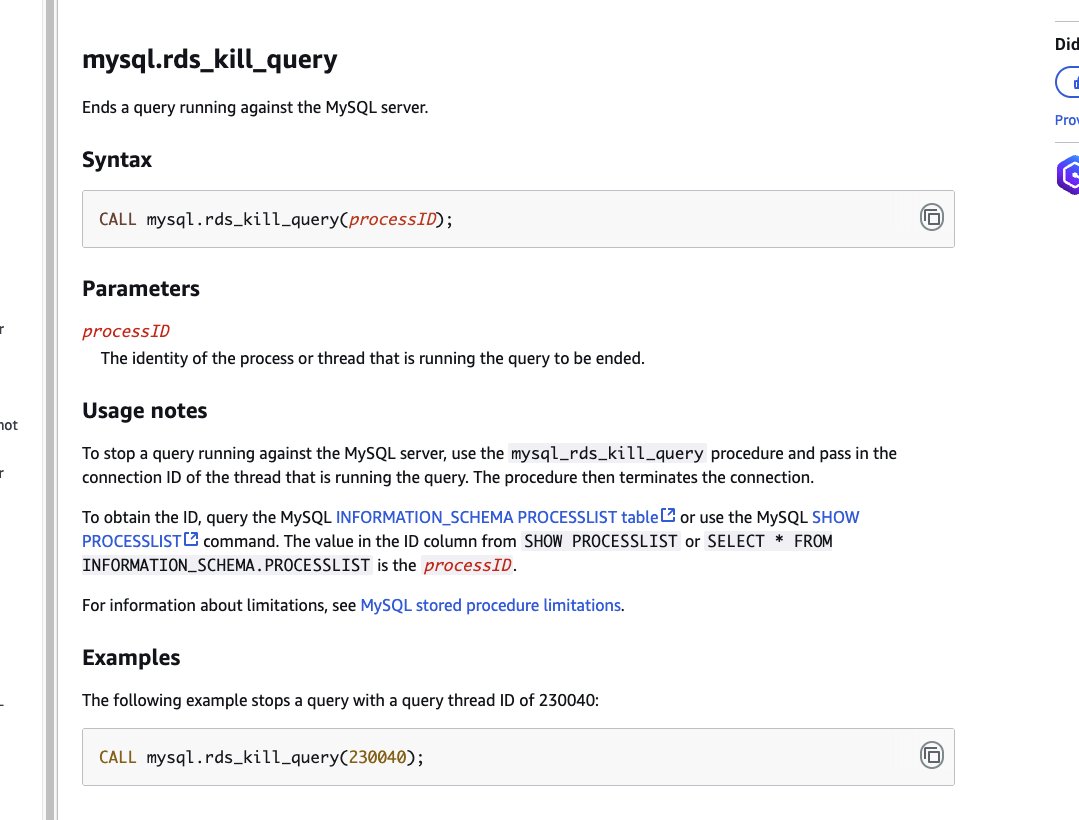
昨天才知道 AWS RDS MySQL 有砍 slow query 的機制,這功能被包成 Stored Procedure
下 CALL mysql.rds_kill_query(processID); 就可以把 process 砍掉
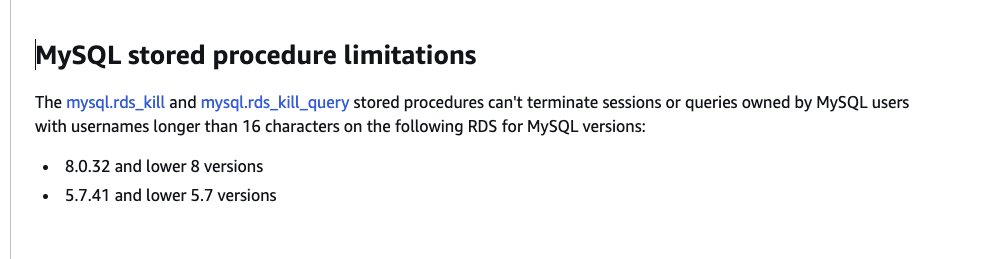
另外這有個有趣的限制 8.x 在 8.0.32 前,5.7.x 在 5.7.41 前,如果 process 的 owner username 長度大於 16 字元會砍不掉 XD
4
661

11 Jul 2025
🧵 2 | فحص العمليات النشطة
✅ tasklist
- الوظيفة: يعرض جميع العمليات (البرامج) التي تعمل حاليًا.
- لماذا مهم؟: للتعرف على العمليات المشبوهة أو غير المعروفة.
✅ tasklist /v
- الوظيفة: يعرض العمليات بشكل تفصيلي، بما في ذلك اسم المستخدم ووقت التشغيل.
- لماذا مهم؟: يساعد في تحديد من يقوم بتشغيل العملية ومدة عملها.
✅ tasklist /svc
- الوظيفة: يعرض العمليات مع الخدمات المرتبطة بها.
- لماذا مهم؟: لكشف العمليات المرتبطة بخدمات النظام، وقد يُظهر خدمات مخفية أو ضارة.
✅ Get-Process
- الوظيفة: يعرض قائمة بجميع العمليات عبر PowerShell.
- لماذا مهم؟: بديل أكثر مرونة من tasklist، يمكن فلترته وتحليله بسهولة.
✅ Get-WmiObject Win32_Process | Select-Object Name, ProcessId, CommandLine
- الوظيفة: يعرض اسم العملية، رقم المعرف (PID)، وسطر الأوامر الذي بدأها.
- لماذا مهم؟: يمكن كشف تنفيذ سكربتات خبيثة مخفية داخل PowerShell أو CMD.
2
1
4
801

25 Jun 2025
I need to check the logic for this but I used grok to convert to KQL for MDE.... it might need to be parent process at the top but...
DeviceProcessEvents
| where Timestamp > ago(7d)
| where InitiatingProcessFileName in~ ("chrome.exe", "brave.exe", "firefox.exe", "msedge.exe", "iexplore.exe")
| where FileName in~ (
"powershell.exe", "pwsh.exe", "cmd.exe", "wscript.exe", "cscript.exe", "mshta.exe", "rundll32.exe",
"regsvr32.exe", "bitsadmin.exe", "certutil.exe", "schtasks.exe", "at.exe", "wmic.exe", "forfiles.exe",
"pcalua.exe", "msiexec.exe", "installutil.exe", "regasm.exe", "regsvcs.exe", "msxsl.exe", "odbcconf.exe",
"ieexec.exe", "hh.exe", "makecab.exe", "expand.exe", "extrac32.exe", "findstr.exe", "sc.exe", "net.exe",
"net1.exe", "netsh.exe", "nltest.exe", "whoami.exe", "tasklist.exe", "query.exe", "qprocess.exe",
"qwinsta.exe", "rwinsta.exe", "logoff.exe", "shutdown.exe", "taskkill.exe", "gpresult.exe", "systeminfo.exe",
"dism.exe", "bcdedit.exe", "vssadmin.exe", "wbadmin.exe", "diskpart.exe", "fsutil.exe", "cipher.exe",
"sdbinst.exe", "control.exe", "appvlp.exe", "mavinject.exe", "dllhost.exe", "verclsid.exe", "psr.exe",
"infdefaultinstall.exe", "cmstp.exe", "xwizard.exe", "fltmc.exe", "winrm.exe", "winrs.exe", "wusa.exe",
"pkgmgr.exe", "driverquery.exe", "pnputil.exe", "devcon.exe", "sigverif.exe", "mmc.exe", "runas.exe",
"runonce.exe", "runoncex.exe", "replace.exe", "print.exe", "scriptrunner.exe", "syncappvpublishingserver.exe",
"presentationhost.exe"
)
| project
TimeGenerated = Timestamp,
DeviceName,
AccountName,
ParentImage = InitiatingProcessFileName,
ParentCommandLine = InitiatingProcessCommandLine,
Image = FileName,
CommandLine = ProcessCommandLine,
ProcessId,
ParentProcessId = InitiatingProcessId,
SHA256
| order by TimeGenerated desc
1
2
296

2 Apr 2025
Bazı Keşif yani Enumerated hareketlerini anlayabilmek için doğrudan Process bazlı incelemeler yapmak gerekir.
Kritik noktalar;
ProcessID, ProcessName ve LogonID olarak sıralanır. User ya da Admin olup olmadığı başta olmak üzere hareketi gerçekleştiren kişinin önceki ve sonraki hareketlerinin incelenmesi olayın ortaya çıkmasını kolaylşlaştıran faktörler arasında yer alır.
Bir Local Admin, X User'ını Y Destindeki bir Serverde LocalMembera atarken olağandışı bir Process üstünden bunu yapıyor ve siz bunu YAKALAYAMIYORsanız bu aslında bir güvenlik ihlalidir. Bu tip işlemler olağan şekilde cmd.exe, powershell.exe, net.exe gibi processlerden olması gerekirken, compmngmt.exe gibi processler üstünden de olabilir. Bazı APT gruplarının özel olarak ürettiği zararlılar bu tip hareketleri gerçekleştirebilir.
Basit gibi görünen bir localMemberAdd hareketi aslında arka planda bir saldırının başlangıcı olabilir.
#BlueTeam #ThreatHunting #Detection #SiberGüvenlik
11
925

13 Jan 2025
Sometimes I feel the tech learning curve could be too steep for an average joe.
Trackpad became unresponsive.
1. command space opened terminal.
2. top. Saw ChatGPT was taking 35% of CPU. kill -9 <processid>.
3. still no response.
4. sudo reboot now.
Restarted and day as usual.
3
3
120

7 Nov 2024
payment request links like
qbit:<recipient>?tokenPID=<processID>&amount=<amount>
Is great way to embed payment systems in dapps and @arconnectio integrating QBit-Pay like solution in a way where user can scan these payment request links displayed as QR and gets all details populated ready to sign and submit the txn will take UX of this to next level!
7 Nov 2024

Thrilled to share that Qbit-pay, a decentralized payment solution enabling frictionless qAR payments through QR codes, was selected for the AstroLabs bounty! 🎉 Grateful for this incredible opportunity and huge thanks to @TRue_JDHarmony, @AstroUSD, and @Weavers_Org for their support. Excited to keep building and enhancing 🚀
Huge congratulations to everyone who participated in the hackathon ..so much inspiring talent and innovation on display!
3
5
202

11 Oct 2024
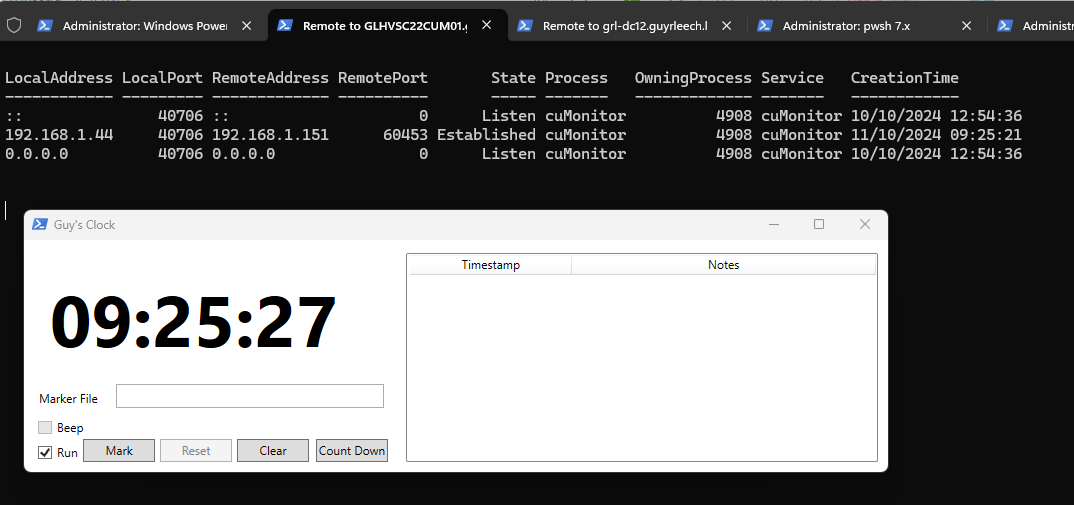
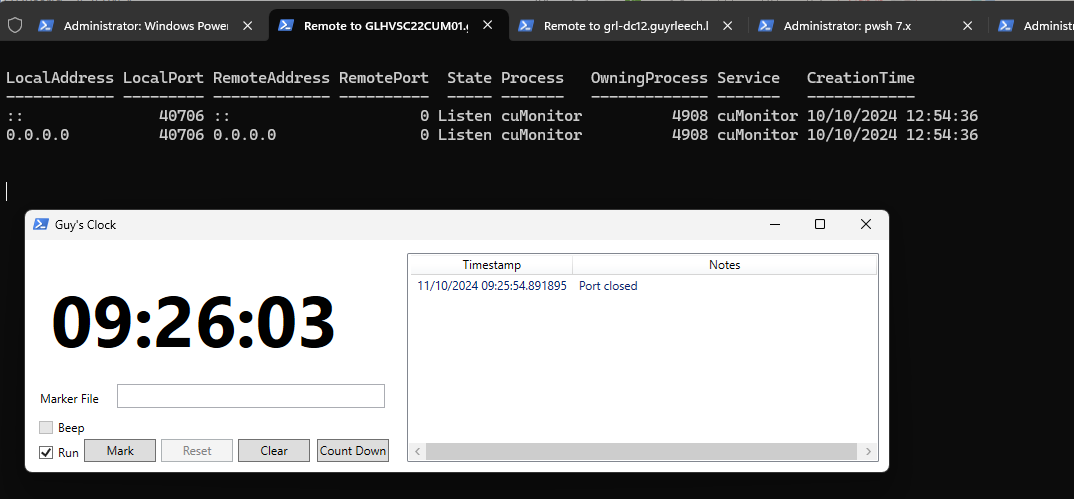
Need to monitor activity like connects and disconnects on a network port on Windows? #PowerShell to poll every 1 second my PS clock so you can record times of changes
while(1){ cls;Get-NetTCPConnection |Where localport -eq 40706|select LocalAddress,LocalPort,RemoteAddress,RemotePort,State,@{n='Process';e={(ps -id $_.OwningProcess).Name}},OwningProcess,@{n='Service';e={gcim win32_service -filter "ProcessId ='$($_.OwningProcess)'"|select -expand name}},CreationTime|ft -auto;start-sleep 1}
3
22
93
17,631

The standardized request and response model also makes AO processes easier to read from a @ar_io_network gateway👀
For example, a special dry run endpoint could directly respond with the response data of an action handler.
GET /local/ao/dryrun/:processId/:action
1
8
99
3 Oct 2024
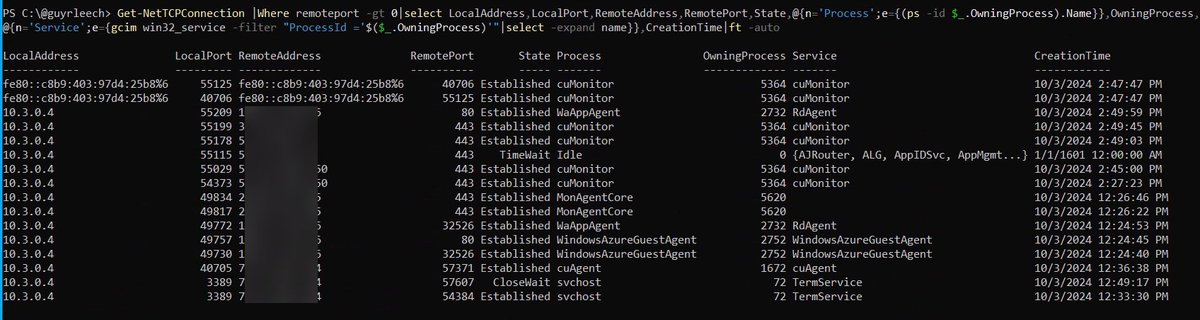
Here's a 1 liner to include the process name & service for established connections
Get-NetTCPConnection |Where remoteport -gt 0|select LocalAddress,LocalPort,RemoteAddress,RemotePort,State,@{n='Process';e={(ps -id $_.OwningProcess).Name}},OwningProcess,@{n='Service';e={gcim win32_service -filter "ProcessId ='$($_.OwningProcess)'"|select -expand name}},CreationTime|ft -auto
2
7
421
2 Oct 2024
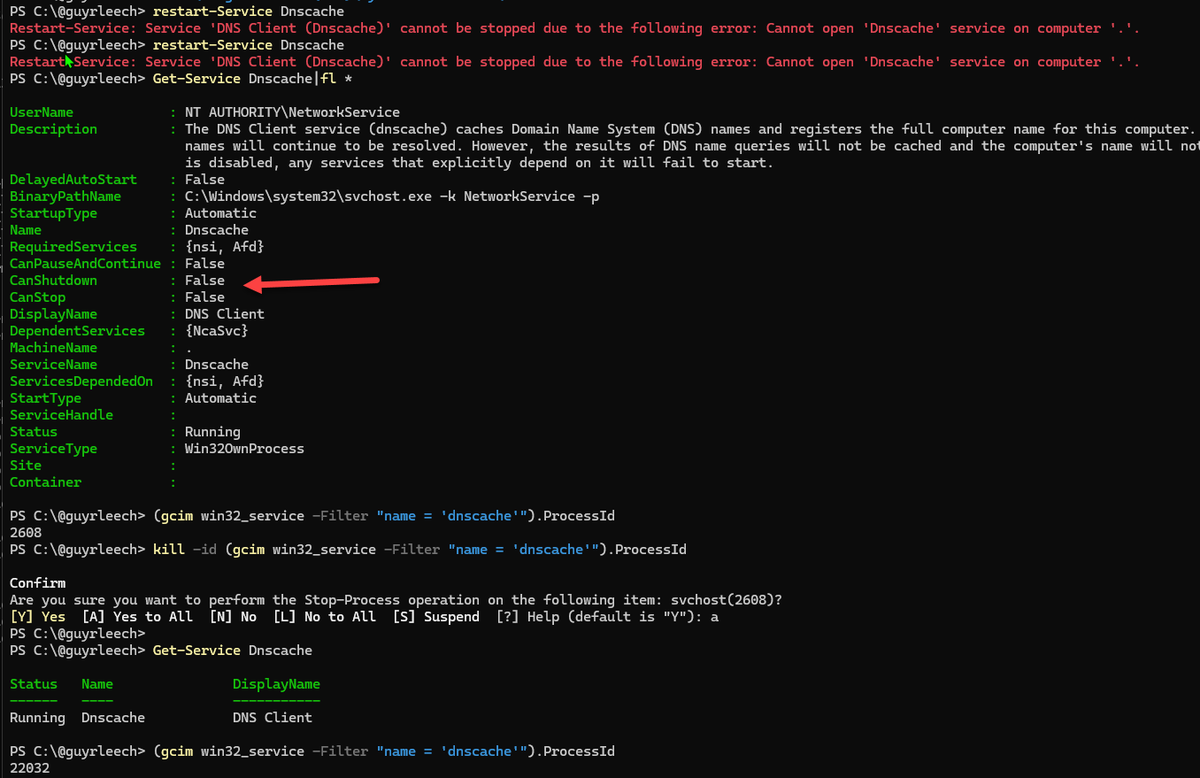
How to kill an unstoppable service via its process id in (elevated) #PowerShell
kill -id (gcim win32_service -Filter "name = 'dnscache'").ProcessId
3
37
195
16,731