

Why are you so focused on 5 years? I don’t get it.
Read my feed more. This stuff doesn’t fail and if you do it right, you have contracts (insurance) on things. We just got 8 brand new gpus and a ubb, installed. First failure in nearly a year. Just cost me my 3 year prosupport contract.
Amd is going to dominate inference at the TCO level.
1
1
95

May 4
Proud to support the future of skilled trades. 🔧🏗️
Home Hardware is proud to partner with Skills Ontario as the Exclusive Home Improvement Retail Partner, helping inspire and empower the next generation of skilled trades professionals.
This isn’t just a job. It’s a career, a reputation, a future worth building.
Together, we’re building what’s next.
#SkillsOntario #HomeHardwarePRO #SkilledTrades #FutureBuilders #PROSupport #MadeForPros
@home_hardware


2
135

Apr 3
5. The Dell ProSupport "My Computer Won't Turn On" Emergency Guide
"You are a senior hardware support engineer at Dell ProSupport who handles the most panicked call in IT: 'My computer won't turn on and I have a deadline in 2 hours.' You've talked thousands of people through this crisis and saved their work 85% of the time.
My computer won't start, shows a black screen, or gets stuck during boot. Help me fix it.
Resurrect:
- Power verification: is it actually getting power (check the charging light, try a different outlet, try a different cable)
- Hard reset procedure: the proper way to drain residual power (hold power button 30 seconds, remove battery if possible, wait 60 seconds, reconnect)
- Display diagnosis: the screen might be off while the computer is actually running — how to test (external monitor, brightness keys, listen for fans)
- Boot light and beep codes: what the blinking lights or beep patterns mean on my specific computer brand
- Safe Mode boot: how to force my computer into Safe Mode to bypass the software problem causing the failure
- BIOS access: how to enter BIOS/UEFI to check if the computer recognizes its own hard drive and memory
- Boot device error: what "no bootable device found" means and the 3 most likely fixes
- Startup repair: how to use Windows Recovery or Mac Recovery to repair the operating system without losing files
- Data recovery priority: if the computer is dead, how to remove the hard drive and access my files from another computer
- When to stop: the specific signs that indicate a hardware failure that requires professional repair (and estimated costs)
Format as an emergency boot failure guide starting with the simplest fixes and escalating only if each one fails.
My situation: [DESCRIBE WHAT HAPPENS WHEN YOU PRESS THE POWER BUTTON — NOTHING AT ALL, FANS SPIN BUT NO SCREEN, LOGO APPEARS THEN FREEZES, ERROR MESSAGE, OR BLUE SCREEN.
1
1
1
1,014

5. دليل طوارئ Dell ProSupport لمشكلة: «الكمبيوتر ما يشتغل»
"أنت مهندس دعم هاردوير أول في Dell ProSupport وتتعامل مع أكثر مكالمة هلع في الـ IT: «جهازي ما يشتغل وعندي ديدلاين بعد ساعتين». كلمت آلاف الناس خلال هالأزمة وأنقذت شغلهم 85% من الوقت.
جهازي ما يقوم، شاشة سودا، أو يعلّق وقت الإقلاع. ساعدني أصلّحه.
رجّعه للحياة:
- التأكد من الكهرباء: هل هو فعلًا ياخذ طاقة (شيّك لمبة الشحن، جرّب فيش ثاني، جرّب سلك ثاني)
- طريقة hard reset: كيف تفضّي الشحنة المتبقية صح (اضغط زر التشغيل 30 ثانية، شيل البطارية إذا تقدر، انتظر 60 ثانية، رجّع كل شيء)
- تشخيص الشاشة: ممكن الجهاز شغّال بس الشاشة مطفية — كيف تختبر (شاشة خارجية، أزرار السطوع، اسمع صوت المراوح)
- أكواد اللمبات والصفارات: وش معنى اللمبات اللي تومض أو أصوات البيب حسب نوع جهازك
- تشغيل Safe Mode: كيف أجبر الجهاز يدخل Safe Mode عشان يتجاوز مشكلة السوفتوير
- الدخول للـ BIOS: كيف تدخل BIOS/UEFI وتتأكد إن الجهاز شايف الهارد والرام
- خطأ جهاز الإقلاع: وش يعني "no bootable device found" وأقوى 3 حلول محتملة
- إصلاح الإقلاع: كيف تستخدم Windows Recovery أو Mac Recovery لإصلاح النظام بدون فقد ملفات
- أولوية استرجاع البيانات: إذا الجهاز ميت، كيف تفك الهارد وتدخل على ملفاتك من جهاز ثاني
- متى توقف: العلامات اللي تدل على عطل هاردوير يحتاج صيانة (وتكلفة تقريبية)
رتّبها كدليل طوارئ لفشل الإقلاع: ابدأ بالأسهل وبعدين صعّد إذا كل خطوة ما نفعت.
وضعي: [اشرح وش يصير لما تضغط زر التشغيل — ولا شيء، المراوح تشتغل بس ما فيه شاشة، يظهر الشعار ثم يعلّق، رسالة خطأ، أو شاشة زرقا]"
1
1
3
1,037

Apr 2
5. The Dell ProSupport "My Computer Won't Turn On" Emergency Guide
"You are a senior hardware support engineer at Dell ProSupport who handles the most panicked call in IT: 'My computer won't turn on and I have a deadline in 2 hours.' You've talked thousands of people through this crisis and saved their work 85% of the time.
My computer won't start, shows a black screen, or gets stuck during boot. Help me fix it.
Resurrect:
- Power verification: is it actually getting power (check the charging light, try a different outlet, try a different cable)
- Hard reset procedure: the proper way to drain residual power (hold power button 30 seconds, remove battery if possible, wait 60 seconds, reconnect)
- Display diagnosis: the screen might be off while the computer is actually running — how to test (external monitor, brightness keys, listen for fans)
- Boot light and beep codes: what the blinking lights or beep patterns mean on my specific computer brand
- Safe Mode boot: how to force my computer into Safe Mode to bypass the software problem causing the failure
- BIOS access: how to enter BIOS/UEFI to check if the computer recognizes its own hard drive and memory
- Boot device error: what "no bootable device found" means and the 3 most likely fixes
- Startup repair: how to use Windows Recovery or Mac Recovery to repair the operating system without losing files
- Data recovery priority: if the computer is dead, how to remove the hard drive and access my files from another computer
- When to stop: the specific signs that indicate a hardware failure that requires professional repair (and estimated costs)
Format as an emergency boot failure guide starting with the simplest fixes and escalating only if each one fails.
My situation: [DESCRIBE WHAT HAPPENS WHEN YOU PRESS THE POWER BUTTON — NOTHING AT ALL, FANS SPIN BUT NO SCREEN, LOGO APPEARS THEN FREEZES, ERROR MESSAGE, OR BLUE SCREEN]"
1
5
1,583

Mar 28
It’s so frustrating! And the support contract I want to buy, ProSupport Plus, is top-notch! I’ve never had a bad experience with it, and would recommend it to anyone. It’s out of warranty support that was…suboptimal, and that’s essentially what they’re forcing me into. 😩
2
47
Mar 28
Listen, if they'll let you buy Dell ProSupport Plus, I continue to recommend Dell *and* their support! Every Dell ProSupport Plus experience I've had was fantastic. It was the out-of-warranty repair experience that was a nightmare, and that's what they're now pushing me into.
10
83
Mar 28
Dell replaced my laptop after a repair went sideways (appreciated).
But they’ve now confirmed the replacement can NEVER have support added—not even if I pay for ProSupport Plus.
So: brand-new machine, zero long-term support options.
@DellCares can you help me understand this?
65
55
149
1,751

Feb 2
撮影協力
蓮沼氷川神社(板橋)
-
photographer
(Sony Imaging Prosupport Member)
杉本 健太
@sugimotokenta_
instagram.com/sugimotokenta_
hair makeup
(Agu hair claff Deputy Store Manager)
永野 憂斗
instagram.com/99_yuto
5
725

Jan 13
You're right, I checked the wrong box when I went to recreate the config. They're Blackwell.
Here's the actual inventory!
AMD Ryzen Threadripper PRO 9995WX (480 MB cache, 96 cores, 192 threads, 2.5GHz to 5.4GHz, 350W)
Operating System Edit
Windows 11 Pro, English, Brazilian Portuguese, French, Spanish
Memory* Edit
512 GB: 8 x 64 GB, DDR5, 5200 MT/s, RDIMM, ECC
Graphics Card Edit
Dual NVIDIA RTX PRO 6000 Blackwell Max-Q Workstation Edition (300W), 96GB GDDR7, 4DP
Storage Configuration (Boot Drive and Flexbay) Edit
[C3] Flexbay M.2 SSD Boot with Dual M.2 NVME Flexbay
Storage Controllers Edit
Integrated Storage Controller
Upper Flexbay Edit
4 TB Performance SSD, SED Ready
Lower Flexbay Edit
4 TB Performance SSD, SED Ready
First Internal SATA Edit
No Hard Drive
Second Internal SATA Edit
No Hard Drive
Optical Drive Edit
8x DVD /-RW/RAM 9.5mm Slimline Optical Disk Drive
Storage* Edit
4 TB Performance SSD, SED Ready
Second Internal M.2 SSD Edit
No Hard Drive
SATA RAID Configuration Edit
No SATA/SAS RAID
NVMe RAID Configuration
NVMe Raid 0
Chassis Options Edit
Precision 7875 Tower 1350W 9000 Series Chassis (DAO Open Flexbay)
Lockable HDD/SSD Sleds Edit
Flexbay Toolless Bezel (qty2)
Power Cord Edit
System Power Cord C19 (US 125V, 15A)
Network Cards Edit
Intel Ethernet Network Adapter X710-DA2 10GbE SFP PCIe FH Bracket
PCIe I/O Add-in-cards Edit
USB3.1 Type-C PCIe FH (Precision 7960 XL, 7960, 5860 XL, 5860, 7875 XL, 7875)
Wireless* Edit
Qualcomm WCN6856-DBS, 2x2, 802.11ax, Bluetooth® wireless card with integrated antenna
Optional Integrated Ports Edit
Integrated Serial / PS2 ports
Keyboard Edit
Keyboard not included
Mouse Edit
No Mouse
ENERGY STAR Edit
ENERGY STAR Qualified
EPEAT Edit
EPEAT Gold with Climate
TPM Security
Dell Precision/Pro Max Desktops TPM
Monitor Stands
No Stand or Mount
External Optical Device Edit
No External ODD
Cables and Dongles
No Additional Cable
External Speakers
No External Speaker
Services & Support
Protect your purchase* - View Support offers below
Basic Onsite Service after remote diagnosis with Hardware-Only Support, 36 Month(s)
Hardware Support Services Upgrades Edit
ProSupport Next Business Day Onsite Service after remote diagnosis with HW-SW Support, 36 Month(s)
Windows AutoPilot Edit
No AutoPilot
Software
Microsoft Office Edit
Activate Your Microsoft 365 For A 30 Day Trial
Home and Small Business Security Solutions Edit
None
5
1
15
2,493

11 Nov 2025
For business-grade Lenovo/Dell in India, buy from the official brand stores for proper GST invoice, ProSupport/Premier/Accidental Damage add‑ons, and secure Windows 11 Pro images: Lenovo India (ThinkPad/ThinkBook, CTO options) and Dell India (Latitude/Precision via Small Business/Enterprise).
If you need quicker delivery or bulk quotes with GST input credit, use authorized resellers like Dell/Lenovo channel partners or large retailers (e.g., Croma, Vijay Sales) rather than marketplace sellers; shortlist ThinkPad T/X/E or Dell Latitude 5000/7000 with Intel Core i7, 32GB RAM, IPS/FHD, 2×Thunderbolt, Wi‑Fi 6E, and on‑site next‑business‑day support.
115

20 Oct 2025
ダメだ。PlayStation Portable よりも
ProSupport Plus が最初に浮かんでしまう。職業病だわ。
仕舞いには「KYHD(HDD返却不要サービス) と OSD(オンサイト診断サービス) も付けてね?」とか思ってしまう。
20 Oct 2025

PSPの無敵感何だったんだろうね
1
2
12
2,434

9 Oct 2025
🚀 Extend the Power of PowerStore with Lifecycle Extension ProSupport
Give your customers more value, more predictability, and more competitive edge.
When you add Lifecycle Extension with ProSupport to PowerStore, customers enjoy consistent technology and cost advantages that help them plan smarter and save bigger.
🔑 Key Benefits:
✅ Predictable costs & simplified lifecycle planning
✅ Full capacity coverage—no forced upgrades
✅ Guaranteed 25% savings vs. stand-alone purchases
📽️ Learn more – Watch the video del.ly/6010AZvJQ

3
5
410

26 Sep 2025
Stop wasting hours on tech troubleshooting. @Dell ProSupport Plus with SupportAssist can proactively detect and fix common PC problems before users even notice. Learn more: facts.pt/oR1r50k
#automation #SupportAssist

ALT Three colleagues collaborate with laptops
2
65

4 Jul 2025
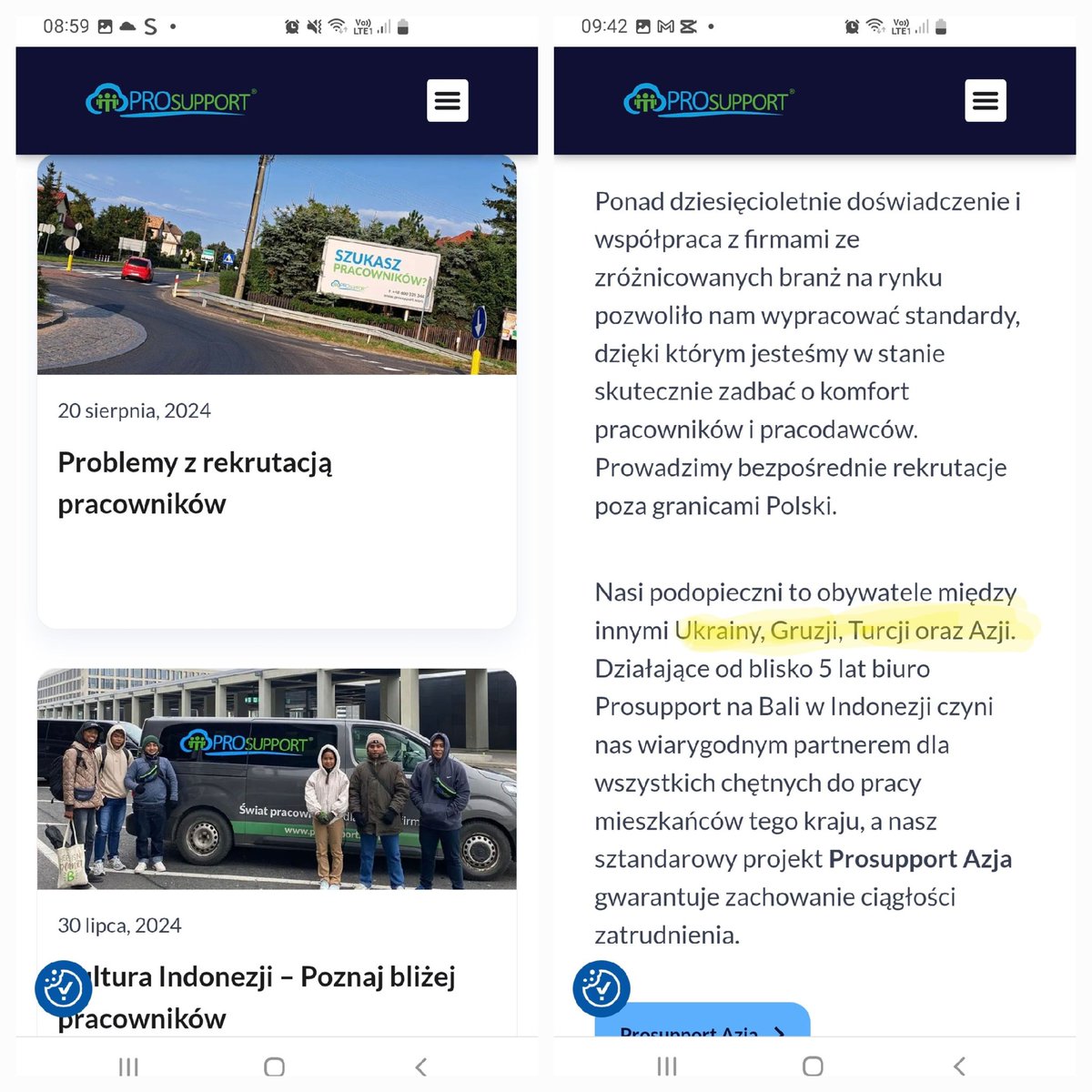
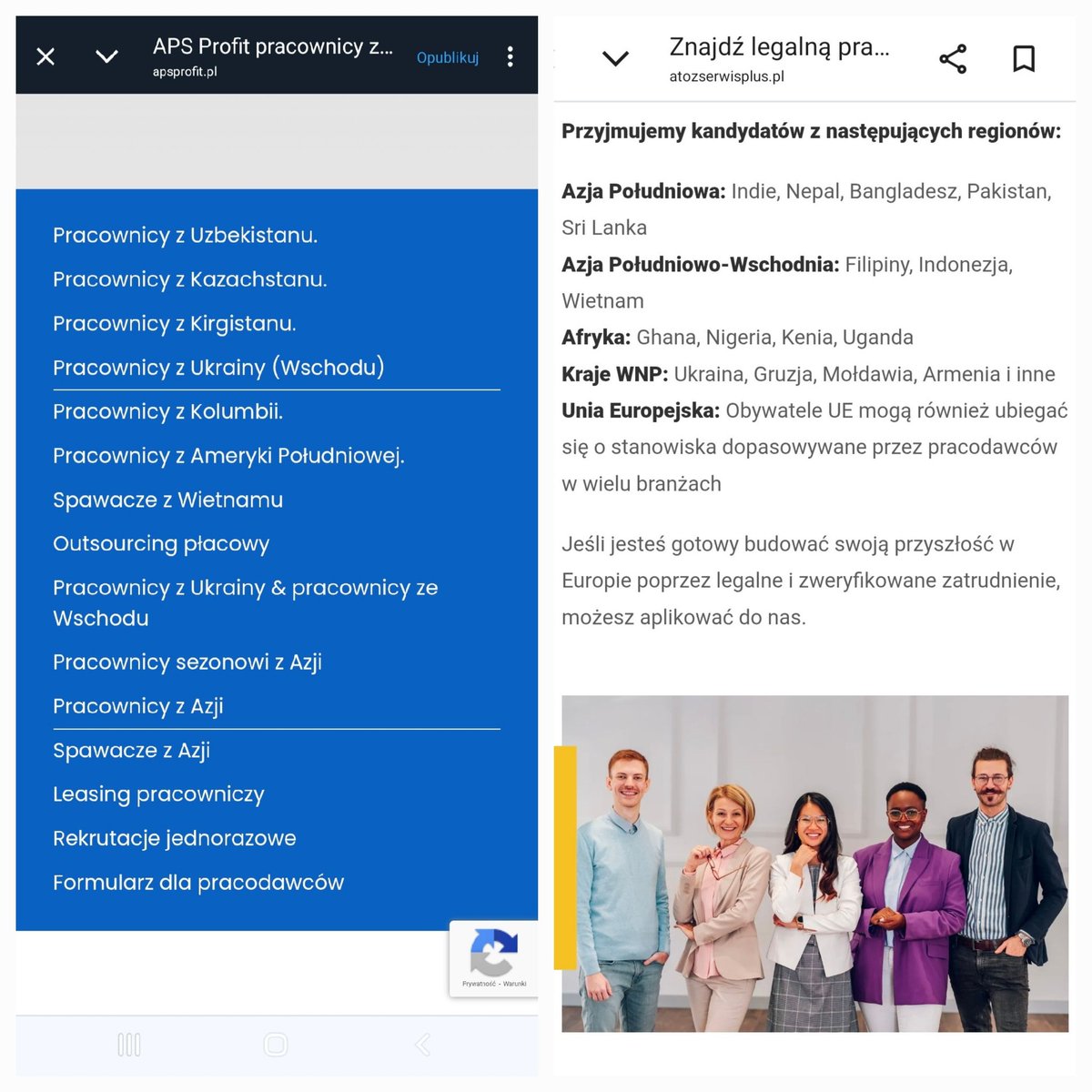
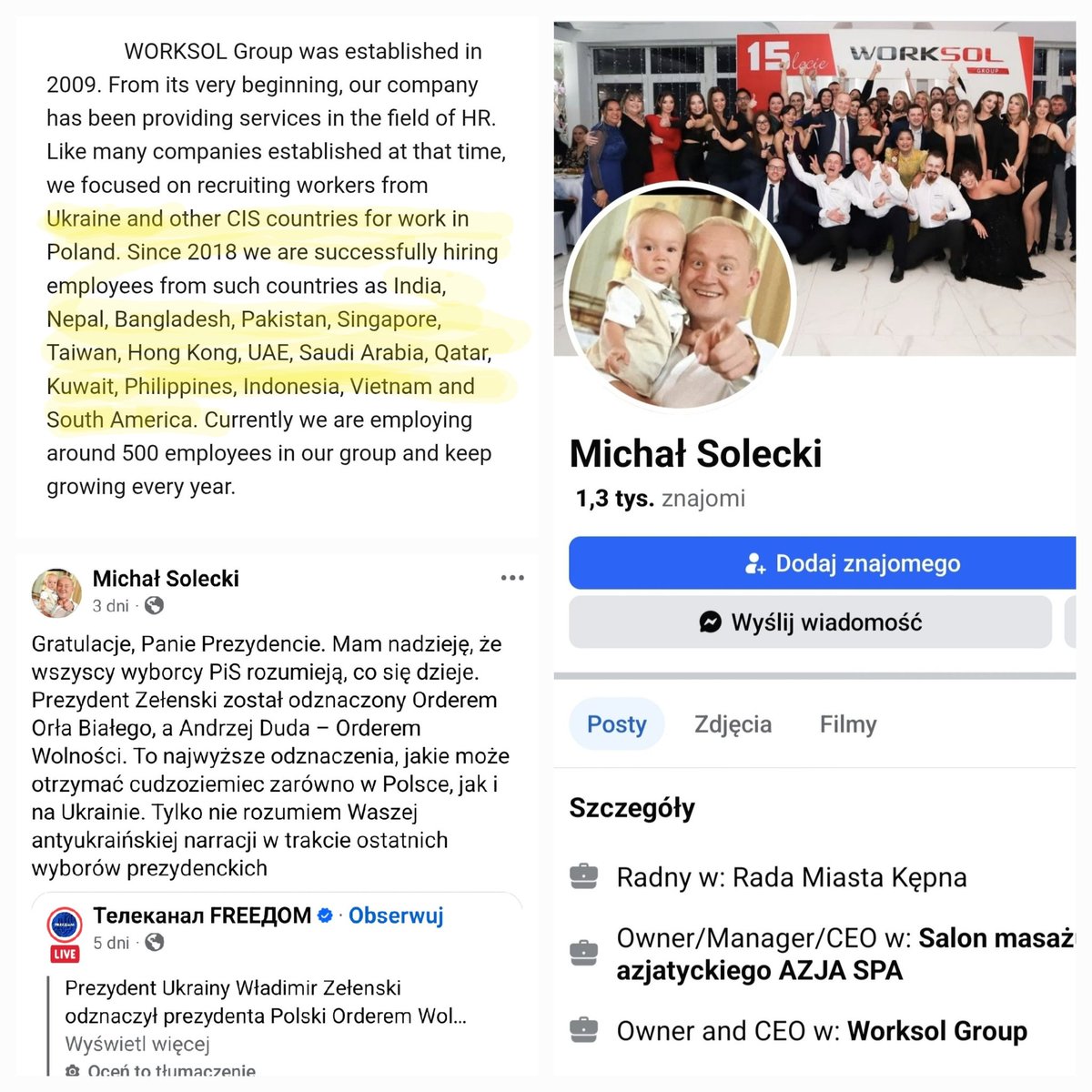
Większość Ukraińców to "naganiacze-rekruterzy" takich agencji-firm jak te niżej ( niektóre z dotacjami ze środków UE jak np. Prosupport ) Przejrzałam bardzo dużo profili ukr. i tak to wygląda. Biznesmeni mają swoje żniwa. podcasts.apple.com/us/podcas…

2
6
264

31 May 2025
キタ━━━━(゚∀゚)━━━━!!
ノートPC買った。
でもスペックがもうノートじゃない。
・Core Ultra 7 155H(16コア/22スレ)
・メモリ 64GB ← ※ノートです
・2TB NVMe SSD
・13.4型 FHD 120Hz 非光沢
・インテル Arc グラフィックス
・Windows 11 Pro
・ProSupport付き
64GBって。
Chrome100枚開いても反省しないレベル。
仮想環境?Docker?AI学習?かもーん。
もはや「持ち歩ける物理メモリ空間」。
バックに入ってるけど中身は軽装サーバー。
4
472

30 May 2025
Exactly. With Dell ProSupport you’re buying uptime, quick parts dispatch, and every minute of downtime hurts.
3
201

28 Apr 2025
Hi Stephanie — thanks for sharing this feedback, and sorry to hear you're having a harder time with our new UI. Feel free to email prosupport@crunchbase.com with your thoughts, and our support team can help you find what you're looking for.
34

14 Apr 2025
3D Organon recently held a hands-on workshop at @ieksvie – one of Greece’s most pioneering private education institutions.
Contact us at prosupport@3dorganon.com
#3DOrganon #AnatomyInVR #SVIE #HealthcareEducation #VRinEducation #InnovationInLearning #FutureOfEducation
1
2
67