
May 16
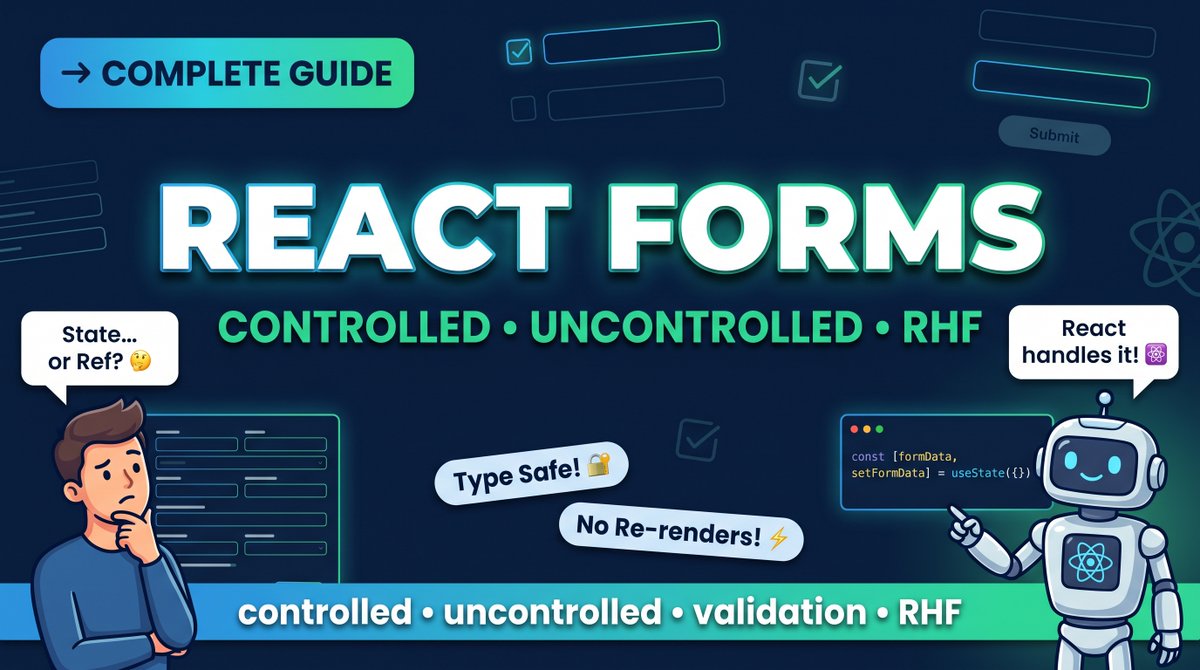
Forms in React got you confused? 🤯
Controlled vs Uncontrolled?
useState vs useRef?
React Hook Form vs everything else?
Here's the truth 👇
coding.7scribes.com/react-fo…
Pick your weapon and build better forms today!
#ReactJS #ReactForms #WebDev #CodingTips #FrontendDeveloper
1
2
7

29 Apr 2025
When submitting an #html form in #reactjs, developers usually use local states for “pending”, “success” and “error” status.
#reactjs #react #nextjs #next #jsx #javascript #typescript #html #css #reactactions #reactjsactions #reactform #reactforms
2
2
614

11 Mar 2025
After Reactjs learn Nextjs with TS.
After ContextAPI and Reducer, learn Redux.
After styled components and CssModules, master Tailwindcss.
ReactRouter, ReactQuery, ReactForms.
ReactGraphs.
SupaBase for backend.
Daraja for payments.
What's next, devs? This journey isn't easy.
2
1
9
313

27 Nov 2024
🌤 Weather Update:
🚧 MinutesForm with MUI: WIP!
🎯 Next up: Tailwind CSS Headless UI integration
📝 Planned: form templates
#React #Forms #ReactForms #TailwindCSS #MUI #FrontendDevelopment #DevTools #IndieDev #BuildInPublic #WebDevelopment #ReactJS #JavaScript #DevCommunity
2
1
81

4 Oct 2024
Formik is a widely-used library for handling forms in React applications.
💡Explore our full blog for a complete guide on "Creating Forms in React with Formik"
Visit Us :- ignek.com/blog/creating-reac…
#ReactJS #Formik #TypeScript #FormHandling #WebDevelopment #ReactForms

2
4

19 Nov 2023
🌅 Good morning, React Devs! Let’s start today with Forms in #ReactJS. Forms are pivotal for interactive websites, collecting user input, from login details to user preferences. 📝
React treats forms a bit differently from plain HTML. Here’s a quick guide to mastering forms in React:
1. Controlled Components: In HTML, form elements like <input>, <textarea>, and <select> typically maintain their own state. In React, form data is usually handled by the state within components.
<input type="text" value={this.state.value} onChange={this.handleChange} />
2. Handling Form Submission: Prevent the default form submission behavior with preventDefault(). Then, handle the form submission using React state.
handleSubmit(event) {
alert('A name was submitted: ' this.state.value);
event.preventDefault();
}
3. Using Multiple Inputs: When you need to handle multiple controlled input elements, add a name attribute to each element and let the handler function choose what to do based on the value of event.target.name.
handleChange(event) {
this.setState({[event.target.name]: event.target.value});
}
4. Value Propagation: The value attribute on form elements can bind the state, making it easy to update the UI based on user input.
5. Form Validation: React’s state-based approach makes it straightforward to implement validation logic.
👩💻 Understanding and effectively using forms is essential for creating interactive and user-friendly web applications.
Stay tuned for more on advanced forms, handling arrays of inputs, and dynamic form generation!
#ReactForms #UserInputHandling #WebDevelopment
3
10
461

28 Aug 2023
⏸️The proper way of using React Forms [Continuation]🎯
👇🏼
#reactforms #react #reactjs #reactjsdevelopment
![The proper way of using React Forms [Continuation]](https://venexa.site/media/F4nW9hNaYAAPFkZ.jpg)
ALT The proper way of using React Forms [Continuation]
4
69
25 Aug 2023
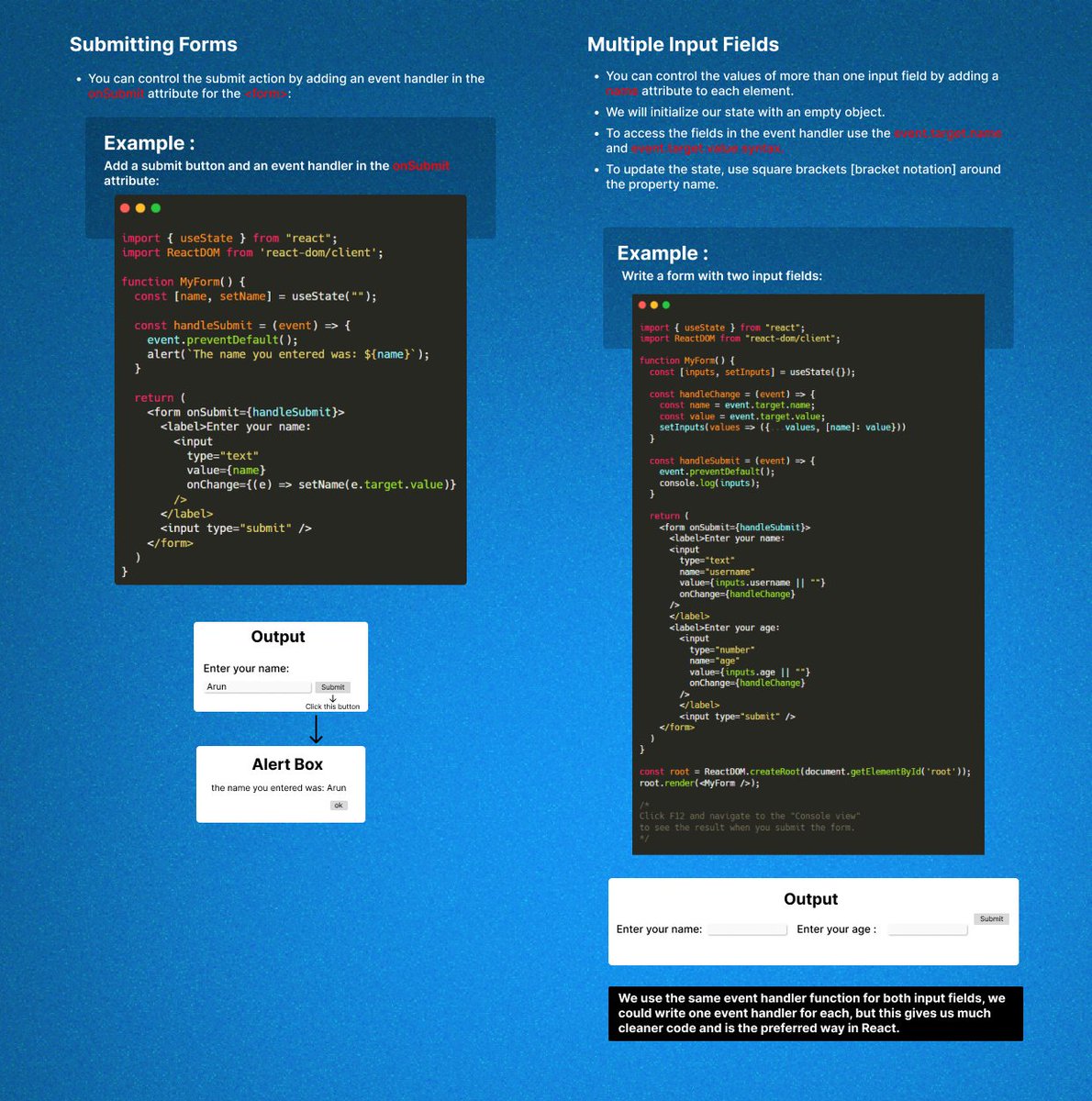
ALT The proper way of using React Forms
2
59
24 Aug 2023
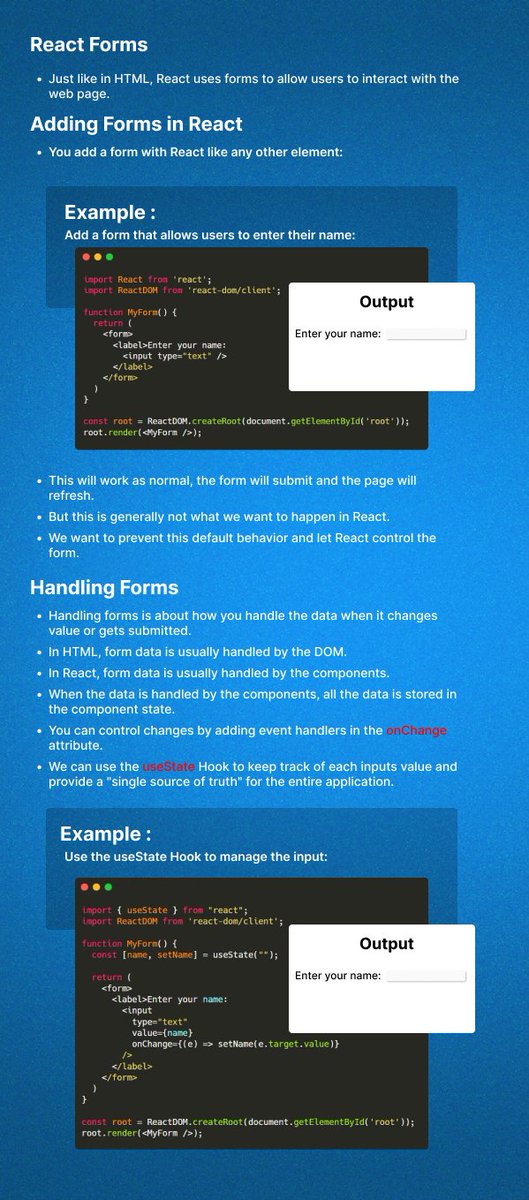
ALT Introduction of React Forms
3
36

6 Apr 2023
I'm proud to have partnered with @EducativeInc to bring this course to life, and I'm excited to share my knowledge with the React community. Stay tuned for the release date and get ready to take your React form-building skills to the next level.
#ReactForms #Formik
1
5
173

6 Apr 2023
Creating a React Form Generator via @gitconnected
#javascript #react #reactforms #formgenerator #reactformvalidation #100daysofcode #webdev #webdevelopment
levelup.gitconnected.com/cre…
2
4
317

Congratulations on reaching Day 20 of #100DaysOfCode! It can be confusing to figure out React forms - but utilizing a separate library can make it easier. #100DaysOfCode #ReactForms
Try this: vascript.plainenglish.io/3-b…
1
2
24

React Hook Form is a powerful and easy-to-use library for building user-friendly forms in React. With its built-in support for validation, error messages, and accessibility, it makes form handling in React a breeze.
#react #reactforms #frontend #frontenddeveloper
1
1
3
55

22 Nov 2022
{
"reactforms": {
"difficulty": "effortless",
"type": "magical",
"result" : "awesome",
“configtime”: “lessthantimetotweet”
}
}
Go build 🚀
21 Nov 2022

NEW: Build React forms for any API with Amplify Studio form builder
📥JSON in, React form code out
🤓Inferred inputs and labels
🖱Drag and drop editor
🕵🏽♀️Visually add validations
👩🏼💻Extensible in code
☁️(Optionally) Cloud-connected form submission
👉 go.aws/3Xm49QH
2
11

29 Sep 2022
I just published in @inPlainEngHQ Build a Multistep Form With React Hook Form javascript.plainenglish.io/b…
#ReactJS #ReactHookForm #javascript #ReactForms
1

19 Jul 2021
#100daysofcode day 83 of 100
* Today the focus was about PropTypes,ReactForms and Uncontrolled components
* we made a breakthrough on PropTypes why we need them yipeeeee
* mini Practical project before we start first big Project using React
2
6

31 May 2021
28 May 2021

Improve the Performance of your React Forms
Forms can get slow pretty fast. Let's explore how state colocation can keep our React forms fast. ⚡
epicreact.dev/improve-the-pe…
1
2
24 Mar 2021
React Forms via @frontendweekly1
#javascript #forms #reactforms #react #100daysofcode #webdev #webdevelopment
medium.com/front-end-weekly/…
6
2

4 Feb 2021
~ @leeerob will demonstrate how to build a performant, accessible form with #Nextjs while teaching the best practices for #HTML & #React forms along the way.
nextjs.org/blog/forms #JavaScript #ReactForms #Fullstack
2
2

11 Nov 2020
Really happy with how much boilerplate #Formik and #YupJS removed from a code base. Much nicer to handle than home grown form abstractions and validations!
#ReactJS #ReactForms #JavaScript #JS
1
2
6