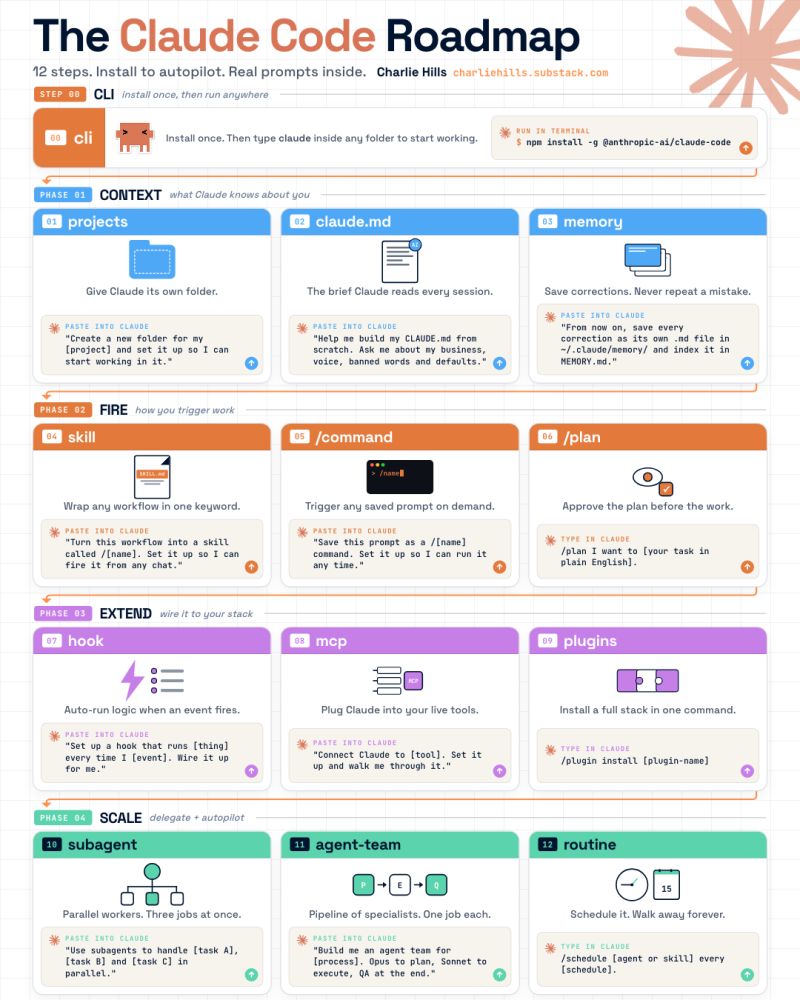
Claude Code is (actually) easy.
The 12-step roadmap in plain English:
If you're totally new to Claude Code:
Beginner: lnkd.in/emwZS5yS
Intermediate: lnkd.in/eG2-Fj6S
Advanced: lnkd.in/ebC7NbUK
PHASE 1: Context (what Claude knows about you)
Step 0: Install the CLI
One terminal command gets it running:
"npm install -g @anthropic-ai/claude-code"
Step 1: Projects
- Give Claude its own folder.
- Everything you build stays tied to it.
"I'm creating a new folder for my [project]. Create it for me and set it up so I can start working in it."
Step 2: claude .md
- Claude reads this before every chat.
- Role, voice, defaults. Set once, it sticks.
"Help me build my CLAUDE.md from scratch. Use Boris Cherny's CLAUDE.md as a starting template. Ask me about my business, voice, banned words, output defaults, and how I want you to work. Save the final file to ~/CLAUDE.md."
Step 3: Memory
- Every correction becomes a saved lesson.
- Same mistake never lands twice.
"From now on, whenever I correct you, save it as its own .md file at ~/.claude/projects/{project}/memory/, prefixed feedback_, user_, project_, or reference_. Index everything in MEMORY.md."
PHASE 2: Fire (how you trigger work)
Step 4: Skills
- Wrap a workflow in one keyword.
- Fire it from any chat, any folder, any time.
"Turn this workflow into a skill called /[name]. Set it up so I can fire it from any chat."
Step 5: /commands
Type the name and Claude fires the workflow.
"Save this prompt as a /[name] command. Set it up so I can run it any time."
Step 6: /plan
- Type /plan before starting any task.
- Claude lays out the steps. You approve it.
"/plan I want to [your task in plain English]."
PHASE 3: Extend (wire it to your stack)
Step 7: Hooks
- Auto-run something the moment an event fires.
- You never have to trigger it manually.
"Set up a hook that runs [thing you want] every time I [event]. Wire it up for me."
Step 8: MCP
- Plug Claude into Slack, Notion, Gmail, etc.
- You get live data from the tools you use.
"Connect Claude to [tool]. Set it up for me and walk me through it."
Step 9: Plugins
Install skills, agents, and MCPs in one command.
"/plugin install [plugin-name]"
PHASE 4: Scale (delegate and autopilot)
Step 10: Subagents
- Send out parallel workers.
- Get three jobs done at once.
"Use subagents to handle [task A], [task B] and [task C] in parallel."
Step 11: Agent Teams
- A pipeline of specialist AI agents.
- Each owns one job, hands off to the next.
"Build me an agent team for [process].
Step 12: Routines
- Schedule your agent team on the cloud.
- You set it once, walk away forever.
"/schedule [agent or skill] every [schedule]."
That's Claude Code from zero to autopilot.
12 steps with no coding background needed.
Repost ♻️ to help someone in your network.
Cc : Charlie
31
52
144
3,188

May 26
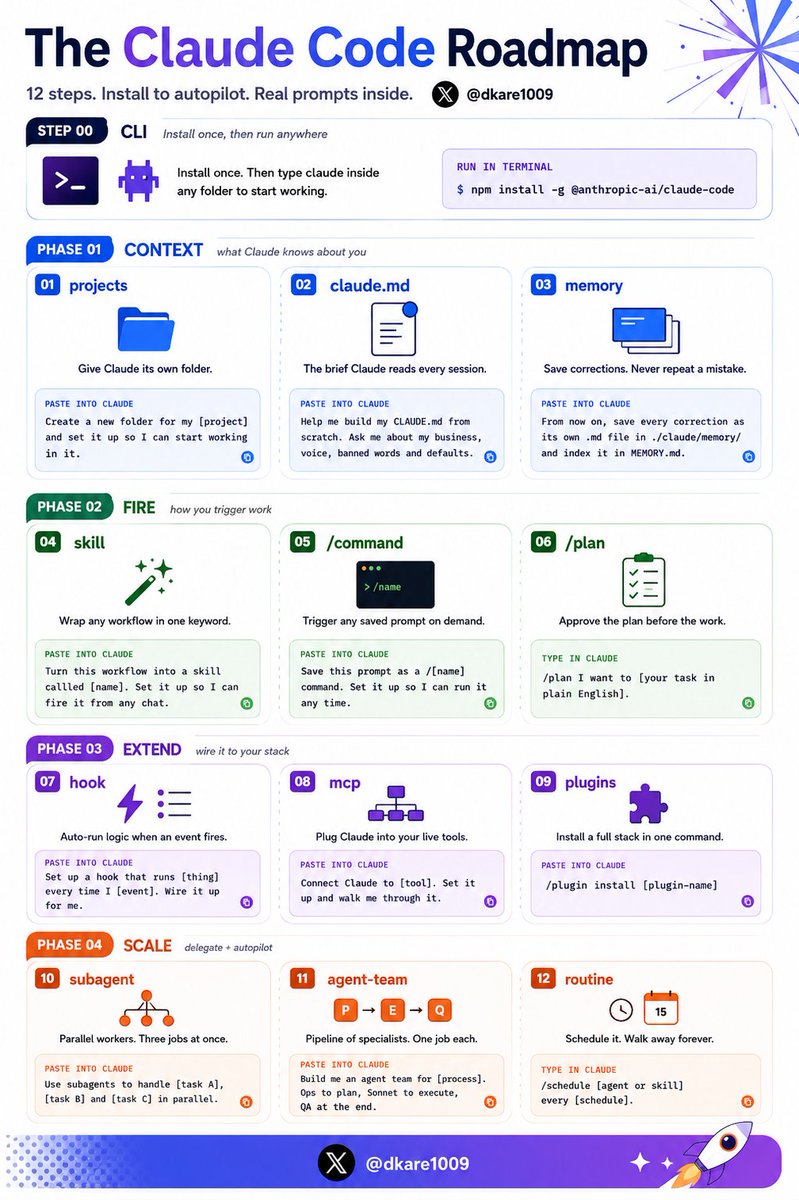
Claude Code is (actually) easy.
The 12-step roadmap in plain English:
If you're totally new to Claude Code:
Beginner: lnkd.in/emwZS5yS
Intermediate: lnkd.in/eG2-Fj6S
Advanced: lnkd.in/ebC7NbUK
PHASE 1: Context (what Claude knows about you)
Step 0: Install the CLI
One terminal command gets it running:
"npm install -g @anthropic-ai/claude-code"
Step 1: Projects
- Give Claude its own folder.
- Everything you build stays tied to it.
"I'm creating a new folder for my [project]. Create it for me and set it up so I can start working in it."
Step 2: claude .md
- Claude reads this before every chat.
- Role, voice, defaults. Set once, it sticks.
"Help me build my CLAUDE.md from scratch. Use Boris Cherny's CLAUDE.md as a starting template. Ask me about my business, voice, banned words, output defaults, and how I want you to work. Save the final file to ~/CLAUDE.md."
Step 3: Memory
- Every correction becomes a saved lesson.
- Same mistake never lands twice.
"From now on, whenever I correct you, save it as its own .md file at ~/.claude/projects/{project}/memory/, prefixed feedback_, user_, project_, or reference_. Index everything in MEMORY.md."
PHASE 2: Fire (how you trigger work)
Step 4: Skills
- Wrap a workflow in one keyword.
- Fire it from any chat, any folder, any time.
"Turn this workflow into a skill called /[name]. Set it up so I can fire it from any chat."
Step 5: /commands
Type the name and Claude fires the workflow.
"Save this prompt as a /[name] command. Set it up so I can run it any time."
Step 6: /plan
- Type /plan before starting any task.
- Claude lays out the steps. You approve it.
"/plan I want to [your task in plain English]."
PHASE 3: Extend (wire it to your stack)
Step 7: Hooks
- Auto-run something the moment an event fires.
- You never have to trigger it manually.
"Set up a hook that runs [thing you want] every time I [event]. Wire it up for me."
Step 8: MCP
- Plug Claude into Slack, Notion, Gmail, etc.
- You get live data from the tools you use.
"Connect Claude to [tool]. Set it up for me and walk me through it."
Step 9: Plugins
Install skills, agents, and MCPs in one command.
"/plugin install [plugin-name]"
PHASE 4: Scale (delegate and autopilot)
Step 10: Subagents
- Send out parallel workers.
- Get three jobs done at once.
"Use subagents to handle [task A], [task B] and [task C] in parallel."
Step 11: Agent Teams
- A pipeline of specialist AI agents.
- Each owns one job, hands off to the next.
"Build me an agent team for [process].
Step 12: Routines
- Schedule your agent team on the cloud.
- You set it once, walk away forever.
"/schedule [agent or skill] every [schedule]."
That's Claude Code from zero to autopilot.
12 steps with no coding background needed.
Repost ♻️ to help someone in your network.
P.S. Which step are you stuck on?
8
7
57
1,822

May 25
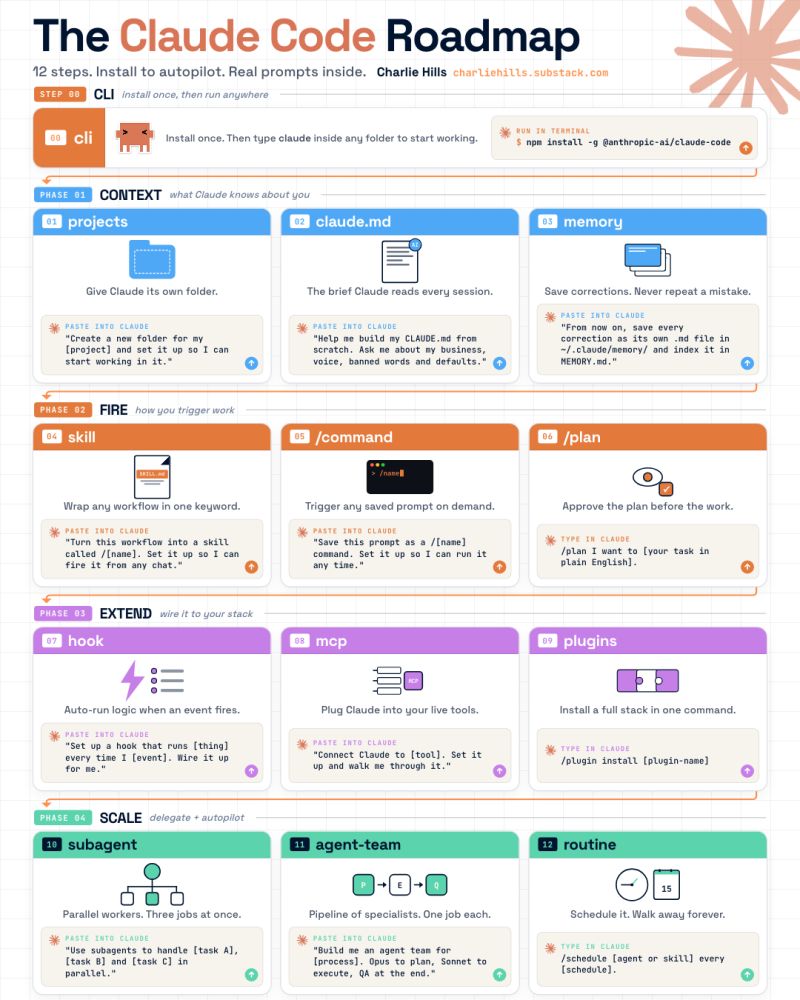
Claude Code is (actually) easy.
The 12-step roadmap in plain English:
If you're totally new to Claude Code:
Beginner: lnkd.in/emwZS5yS
Intermediate: lnkd.in/eG2-Fj6S
Advanced: lnkd.in/ebC7NbUK
PHASE 1: Context (what Claude knows about you)
Step 0: Install the CLI
One terminal command gets it running:
"npm install -g @anthropic-ai/claude-code"
Step 1: Projects
- Give Claude its own folder.
- Everything you build stays tied to it.
"I'm creating a new folder for my [project]. Create it for me and set it up so I can start working in it."
Step 2: claude .md
- Claude reads this before every chat.
- Role, voice, defaults. Set once, it sticks.
"Help me build my CLAUDE.md from scratch. Use Boris Cherny's CLAUDE.md as a starting template. Ask me about my business, voice, banned words, output defaults, and how I want you to work. Save the final file to ~/CLAUDE.md."
Step 3: Memory
- Every correction becomes a saved lesson.
- Same mistake never lands twice.
"From now on, whenever I correct you, save it as its own .md file at ~/.claude/projects/{project}/memory/, prefixed feedback_, user_, project_, or reference_. Index everything in MEMORY.md."
PHASE 2: Fire (how you trigger work)
Step 4: Skills
- Wrap a workflow in one keyword.
- Fire it from any chat, any folder, any time.
"Turn this workflow into a skill called /[name]. Set it up so I can fire it from any chat."
Step 5: /commands
Type the name and Claude fires the workflow.
"Save this prompt as a /[name] command. Set it up so I can run it any time."
Step 6: /plan
- Type /plan before starting any task.
- Claude lays out the steps. You approve it.
"/plan I want to [your task in plain English]."
PHASE 3: Extend (wire it to your stack)
Step 7: Hooks
- Auto-run something the moment an event fires.
- You never have to trigger it manually.
"Set up a hook that runs [thing you want] every time I [event]. Wire it up for me."
Step 8: MCP
- Plug Claude into Slack, Notion, Gmail, etc.
- You get live data from the tools you use.
"Connect Claude to [tool]. Set it up for me and walk me through it."
Step 9: Plugins
Install skills, agents, and MCPs in one command.
"/plugin install [plugin-name]"
PHASE 4: Scale (delegate and autopilot)
Step 10: Subagents
- Send out parallel workers.
- Get three jobs done at once.
"Use subagents to handle [task A], [task B] and [task C] in parallel."
Step 11: Agent Teams
- A pipeline of specialist AI agents.
- Each owns one job, hands off to the next.
"Build me an agent team for [process].
Step 12: Routines
- Schedule your agent team on the cloud.
- You set it once, walk away forever.
"/schedule [agent or skill] every [schedule]."
That's Claude Code from zero to autopilot.
12 steps with no coding background needed.
Repost ♻️ to help someone in your network.
Cc : Charlie
12
108
483
14,329

May 15
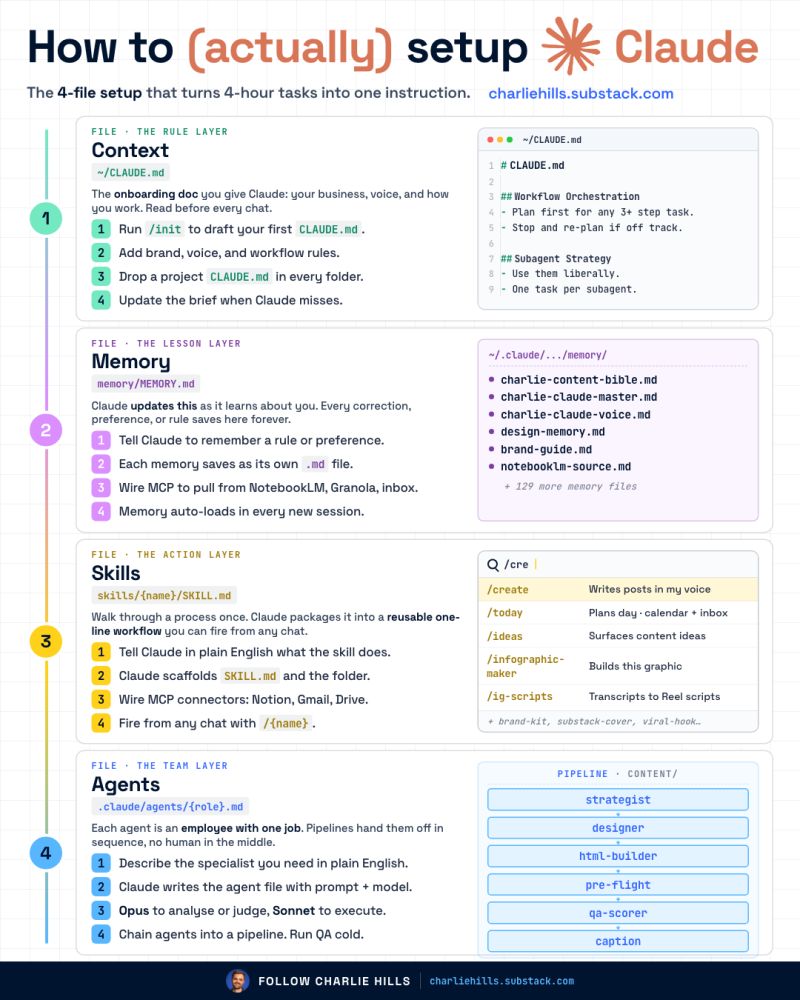
You're paying for Claude and using 10% of its brain.
The 4-file system that fix it (with setup prompts):
Step 1: Install Claude Code.
Read my full setup guide first.
Everything below sits on top of it.
Get started → lnkd.in/emwZS5yS
Step 2: Build CONTEXT (~/CLAUDE.md)
The onboarding doc Claude reads before every chat.
Mine starts with Boris Cherny's CLAUDE.md.
Paste this:
"Help me build my CLAUDE.md from scratch. Use Boris Cherny's CLAUDE.md as a starting template. Ask me about my business, voice, banned words, output defaults, and how I want you to work. Save the final file to ~/CLAUDE.md."
Claude learns how you work before you ship anything.
Step 3: Build MEMORY (memory/MEMORY.md)
Every correction becomes its own .md file.
Mine has 135 of them. Each one is a rule.
Paste this:
"From now on, whenever I correct you or tell you to remember something, save it as its own .md file at ~/.claude/projects/{project}/memory/, prefixed feedback_, user_, project_, or reference_. Index everything in MEMORY.md so the right rule loads next session."
Claude gets sharper every time you use it.
Step 4: Build SKILLS (skills/{name}/SKILL.md)
A workflow I fire from any chat with one command.
Mine: /today, /ideas, /create, /infographic-maker.
Paste this:
"I want to turn this workflow into a /{name} skill: [describe the workflow in plain English. What triggers it, what data it pulls, what it produces.] Create ~/.claude/skills/{name}/SKILL.md, wire the MCP connectors I need (Notion, Gmail, Drive, etc.), and make it fire-able from any chat."
One command replaces an hour of work.
Step 5: Build AGENTS (.claude/agents/{role}.md)
One job per file. The pipeline hands them off in order.
Mine: strategist → designer → builder → QA scorer.
Paste this:
"Build me an agent team for [process]. Create one .md file per specialist at ~/.claude/agents/. Use Opus for agents that analyse or judge, Sonnet for ones that execute. Define the handoff order and add a 95/100 QA gate that fails the pipeline if it scores below."
Entire workflows run while I do something else.
The decision rule:
✦ Context → what Claude knows upfront
✦ Memory → what Claude learns as we work
✦ Skills → repeatable workflows on command
✦ Agents → pipelines that run without me
Most people set up Chat and stop there.
The full stack is what runs my business.
This works in Claude Cowork too.
Claude Code is what I recommend.
Repost ♻️ to help someone in your network.
5
26
115
3,563

May 15
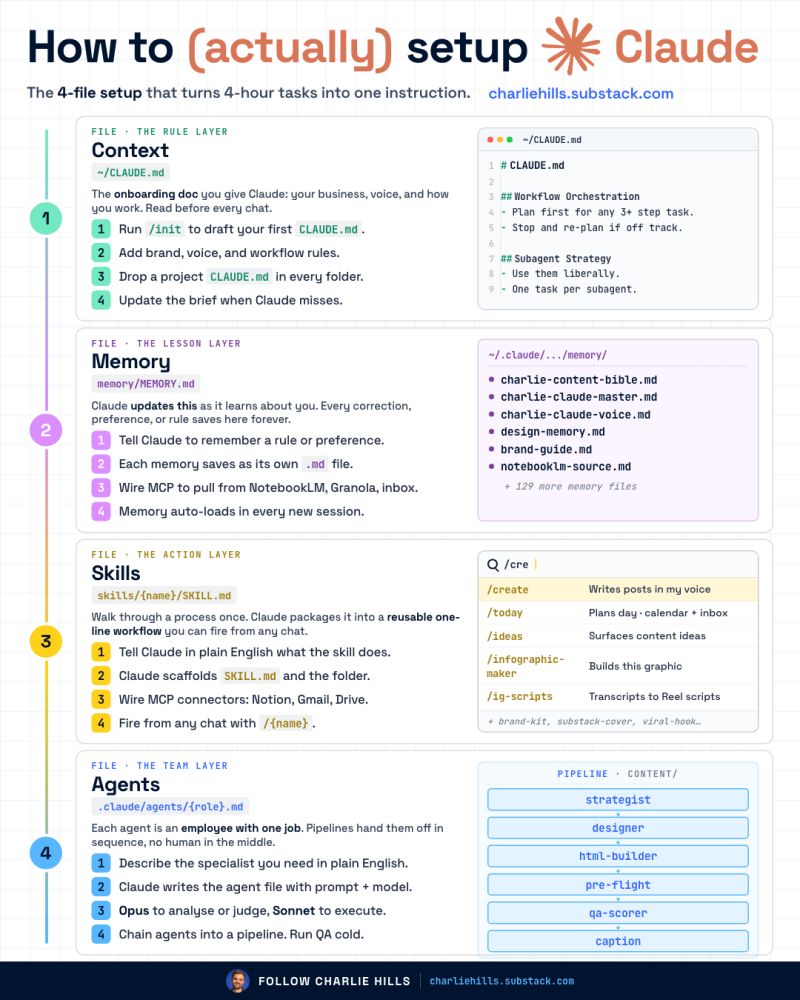
You're paying for Claude and using 10% of its brain.
The 4-file system that fix it (with setup prompts):
Step 1: Install Claude Code.
Read my full setup guide first.
Everything below sits on top of it.
Get started
charliehills.substack.com/p/…
Step 2: Build CONTEXT (~/CLAUDE.md)
The onboarding doc Claude reads before every chat.
Mine starts with Boris Cherny's CLAUDE.md.
Paste this:
"Help me build my CLAUDE.md from scratch. Use Boris Cherny's CLAUDE.md as a starting template. Ask me about my business, voice, banned words, output defaults, and how I want you to work. Save the final file to ~/CLAUDE.md."
Claude learns how you work before you ship anything.
Step 3: Build MEMORY (memory/MEMORY.md)
Every correction becomes its own .md file.
Mine has 135 of them. Each one is a rule.
Paste this:
"From now on, whenever I correct you or tell you to remember something, save it as its own .md file at ~/.claude/projects/{project}/memory/, prefixed feedback_, user_, project_, or reference_. Index everything in MEMORY.md so the right rule loads next session."
Claude gets sharper every time you use it.
Step 4: Build SKILLS (skills/{name}/SKILL.md)
A workflow I fire from any chat with one command.
Mine: /today, /ideas, /create, /infographic-maker.
Paste this:
"I want to turn this workflow into a /{name} skill: [describe the workflow in plain English. What triggers it, what data it pulls, what it produces.] Create ~/.claude/skills/{name}/SKILL.md, wire the MCP connectors I need (Notion, Gmail, Drive, etc.), and make it fire-able from any chat."
One command replaces an hour of work.
Step 5: Build AGENTS (.claude/agents/{role}.md)
One job per file. The pipeline hands them off in order.
Mine: strategist → designer → builder → QA scorer.
Paste this:
"Build me an agent team for [process]. Create one .md file per specialist at ~/.claude/agents/. Use Opus for agents that analyse or judge, Sonnet for ones that execute. Define the handoff order and add a 95/100 QA gate that fails the pipeline if it scores below."
Entire workflows run while I do something else.
The decision rule:
✦ Context → what Claude knows upfront
✦ Memory → what Claude learns as we work
✦ Skills → repeatable workflows on command
✦ Agents → pipelines that run without me
Most people set up Chat and stop there.
The full stack is what runs my business.
This works in Claude Cowork too.
Claude Code is what I recommend.
Repost ♻️ to help someone in your network.
P.S. This framework was popularised by Greg Isenberg.
P.S.S. I (actually) use it in Claude Code, now you can too.
24
33
114
2,232

May 14
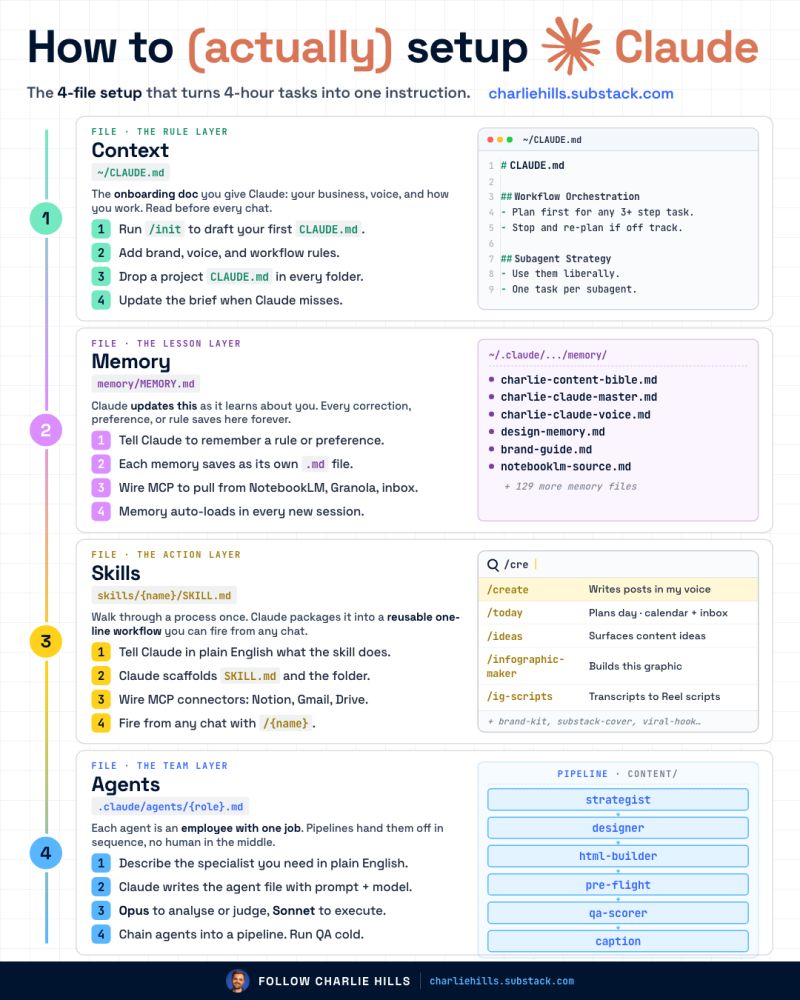
You're paying for Claude and using 10% of its brain.
The 4-file system that fix it (with setup prompts):
Step 1: Install Claude Code.
Read my full setup guide first.
Everything below sits on top of it.
Get started
charliehills.substack.com/p/…
Step 2: Build CONTEXT (~/CLAUDE.md)
The onboarding doc Claude reads before every chat.
Mine starts with Boris Cherny's CLAUDE.md.
Paste this:
"Help me build my CLAUDE.md from scratch. Use Boris Cherny's CLAUDE.md as a starting template. Ask me about my business, voice, banned words, output defaults, and how I want you to work. Save the final file to ~/CLAUDE.md."
Claude learns how you work before you ship anything.
Step 3: Build MEMORY (memory/MEMORY.md)
Every correction becomes its own .md file.
Mine has 135 of them. Each one is a rule.
Paste this:
"From now on, whenever I correct you or tell you to remember something, save it as its own .md file at ~/.claude/projects/{project}/memory/, prefixed feedback_, user_, project_, or reference_. Index everything in MEMORY.md so the right rule loads next session."
Claude gets sharper every time you use it.
Step 4: Build SKILLS (skills/{name}/SKILL.md)
A workflow I fire from any chat with one command.
Mine: /today, /ideas, /create, /infographic-maker.
Paste this:
"I want to turn this workflow into a /{name} skill: [describe the workflow in plain English. What triggers it, what data it pulls, what it produces.] Create ~/.claude/skills/{name}/SKILL.md, wire the MCP connectors I need (Notion, Gmail, Drive, etc.), and make it fire-able from any chat."
One command replaces an hour of work.
Step 5: Build AGENTS (.claude/agents/{role}.md)
One job per file. The pipeline hands them off in order.
Mine: strategist → designer → builder → QA scorer.
Paste this:
"Build me an agent team for [process]. Create one .md file per specialist at ~/.claude/agents/. Use Opus for agents that analyse or judge, Sonnet for ones that execute. Define the handoff order and add a 95/100 QA gate that fails the pipeline if it scores below."
Entire workflows run while I do something else.
The decision rule:
✦ Context → what Claude knows upfront
✦ Memory → what Claude learns as we work
✦ Skills → repeatable workflows on command
✦ Agents → pipelines that run without me
Most people set up Chat and stop there.
The full stack is what runs my business.
This works in Claude Cowork too.
Claude Code is what I recommend.
Repost ♻️ to help someone in your network.
P.S. This framework was popularised by Greg Isenberg.
P.S.S. I (actually) use it in Claude Code, now you can too.
16
42
195
16,684

Claude Codeで会社を経営する — Company as a Filesystem
@tsubasatwi さん登壇まとめ
【仮説:会社は1つのファイルシステムである】
・議事録/契約/タスク/顧客/チャットがSaaSに散らばっている
・他サービスの管理画面を見るのがメンドクサイ
・Eli Mernit「Your Company is a Filesystem」に着想
→一人経営でGitHubリポジトリ89本を回す
【Company as a Filesystem ─ 4つの構成要素】
・就業規則=CLAUDE.md(全Claudeセッションが起動時に読む唯一のルール)
・経営理念書=cos_COMPANY.md(Mission/Vision/Credo)
・ベテラン社員の頭=cos_memory/(暗黙知の貯蔵庫)
・従業員=.claude/skills/(skill 1個=社員1人分)
【ATHのディレクトリ(実物)】
AppTalentHub/
├ 00_core/ # Mission/Vision/Credo
├ 01_management/ # 法務・経理・人事
├ 02_product/ # プロダクト開発
├ 03_contents/ # 原稿・素材
├ 04_sales_marketing/ # CRM・LP
├ 05_operations/ # 議事録・資産
├ CLAUDE.md # 就業規則
└ memory/ # 暗黙知の形式知化
→新入社員(=新Claudeセッション)が10秒で理解する。
【CLAUDE.md は就業規則】
・新規ファイルは番号プレフィックス体系に従う
・コードは TypeScript
・ドキュメントは日本語
→git diff で「会社のルール変更」が追える。
【Skills = 従業員(7個 = 仮想従業員7人分・人件費0)】
・/morning(朝礼)= COO
・/wp(ブログ投稿)= 広報
・/deploy(デプロイ)= SRE
・/release(リリース)= PM
・/seed(データ投入)= QA
・/new-project(新規事業)= 経営企画
・/ath(社内ナビ)= 総務
【朝礼を作っているのは Memory】
memory/
├ project_*.md(進行中案件の状況)
├ feedback_*.md(こう動いてほしい)
└ reference_*.md(外部システムの場所)… 50 files
→「察してほしい」を諦めて全部書く。
【失敗を Skill 化:Turbopackの罠を二度と踏まない】
・Next.js 16 の Turbopack は祖先ディレクトリ名に日本語があると panic
・Next.js 16 は ASCII パス配下に置く
・既存は ASCII コピーで dev/build 専用環境を作る
→panic したらまず祖先パスの日本語を疑う、を reference skill 化。
【結果】
・15 プロジェクト並走(直近2ヶ月)
・朝礼・ブログ・デプロイ=人間稼働ゼロ
・契約増 ≠ コスト増
・SaaS費用は GoogleWorkspace のみで CRM 機能をほぼ包括
【おまけ:無ければ作る】
会社=ファイルシステム → Markdown中心
SnippingTool では足りない → 自作の MarkShot(Tauri 2、5.79MB)
「無ければ作る」も Skills の延長。
【今夜30分でできる After Today】
mkdir -p YourCompany/{00_core,01_management,02_product}
$EDITOR YourCompany/CLAUDE.md
$EDITOR YourCompany/.claude/skills/morning/SKILL.md
→明日から会社が tree できる。
キーメッセージ:
SaaSを買う前に、ディレクトリを切れ。
Claude Code は「ツール」ではなく「同僚」。
経営では、見える化よりも AIの「読める化」の方が重要。
#ClaudeCodeMeetup
1
1
9
2,132



Vtuber vs. Their mascot 💛🌙
I have two mascots one is Fluffy, My companion and and Moonfluff, My community's represent mascot 💛
Fluffy's design _ @/khyaruu and art reference_ @/WyvernNovaX
Moonfluff's design_ @/WyvernNovaX




Vtuber Vs. Their mascot 🤍🕸️
Artemis and the Mothralls mean so much to me and I’m so excited for them to be completed 🕷️!!
Mascot 🎨: @/hopfee_art


4
5
128
4,969




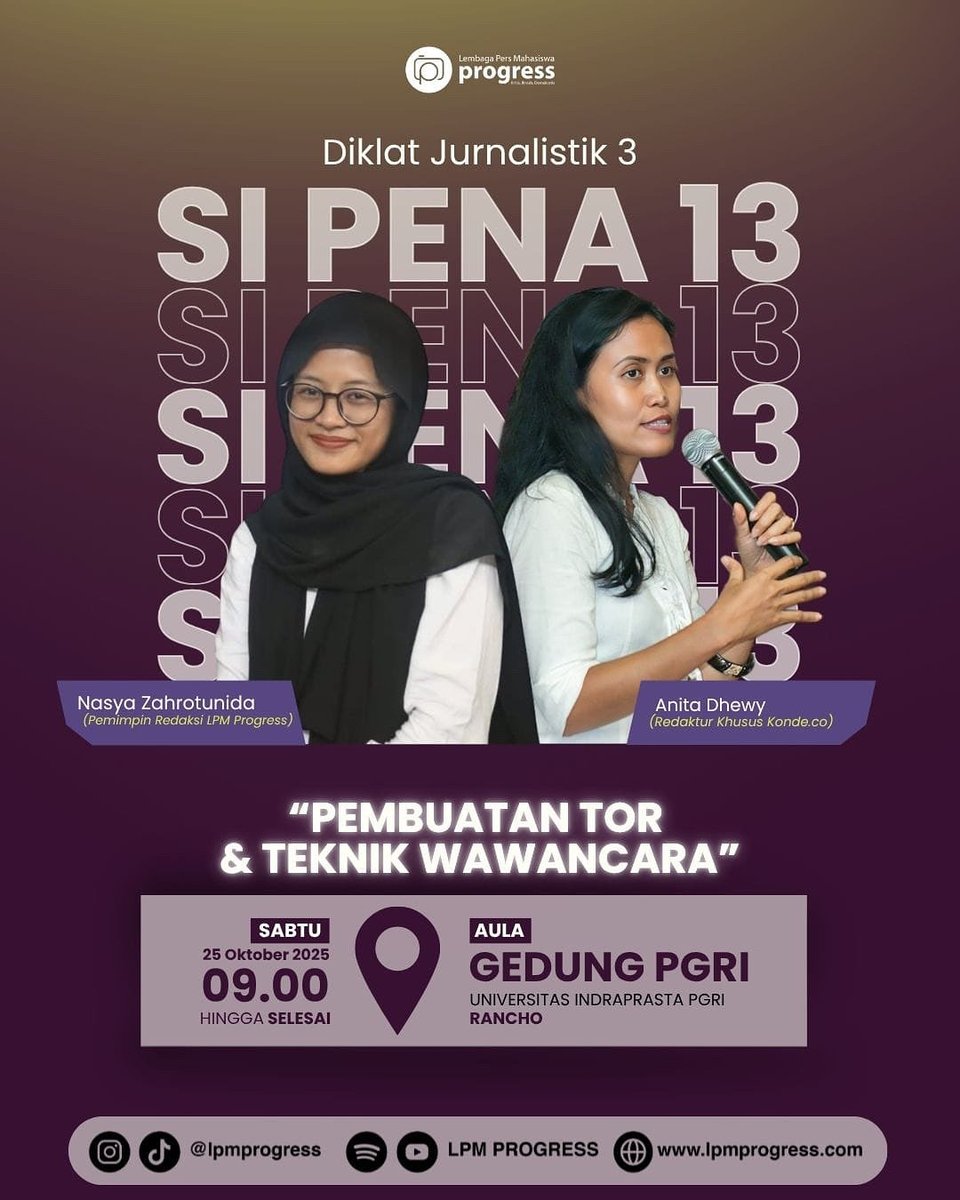
Diberitahukan kepada seluruh *"Calon Anggota LPM PROGRESS 2025"* untuk menghadiri kegiatan Diklat Jurnalistik 3 yang akan dilaksanakan pada :
📆 : Sabtu, 25 Oktober 2025
⏰ : 09.00 WIB s.d selesai
📕 : *"Pembuatan _Term of Reference_ (TOR) dan Teknik Wawancara"*
📌: Aula Gedung PGRI, Kampus A, Rancho, Jakarta Selatan
maps.app.goo.gl/wsEQZ3aH7jZQ…
*Rute Aula Gedung PGRI*
📍 KRL: turun di ST. Tanjung Barat (ambil arah Lawson) > naik gojek/naik angkot no 19 > turun di kampus A, rancho.
📍 Transjakarta: Dari pasar rebo > naik 7E (ragunan - kampung rambutan) atau 7A (lebak bulus - kampung rambutan) > turun di halte muara dalam > nyebrang kearah kampus A, rancho.
*Hal yang harus disiapkan:*
📚 ATK
👕 Berpakaian bebas dan sopan
👟 Memakai Sepatu
*NOTE*
• Kegiatan ini bersifat *WAJIB*, maka diharapkan kepada seluruh *calon anggota LPM Progress* untuk hadir 15 menit sebelum acara dimulai dan mengikuti kegiatan sampai selesai!
2
241


30 Jun 2025
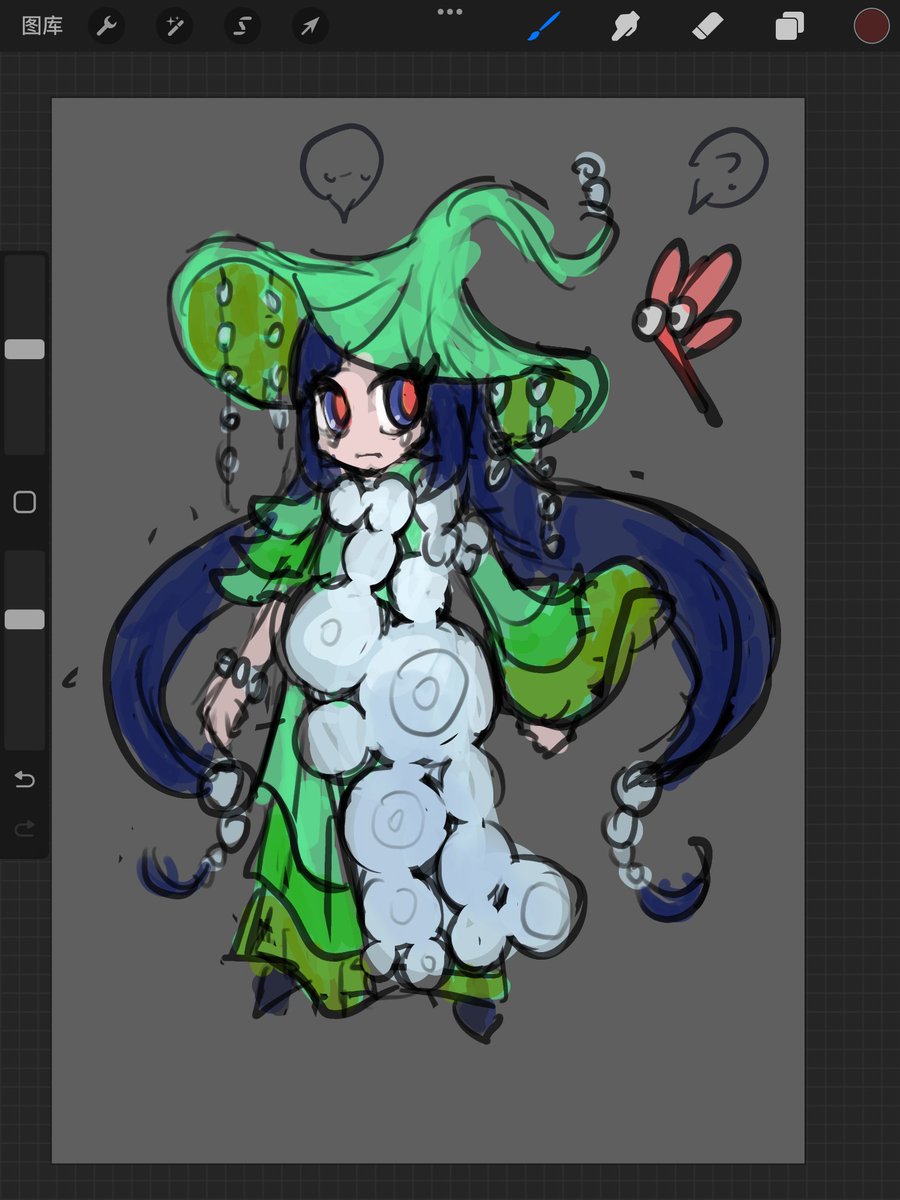
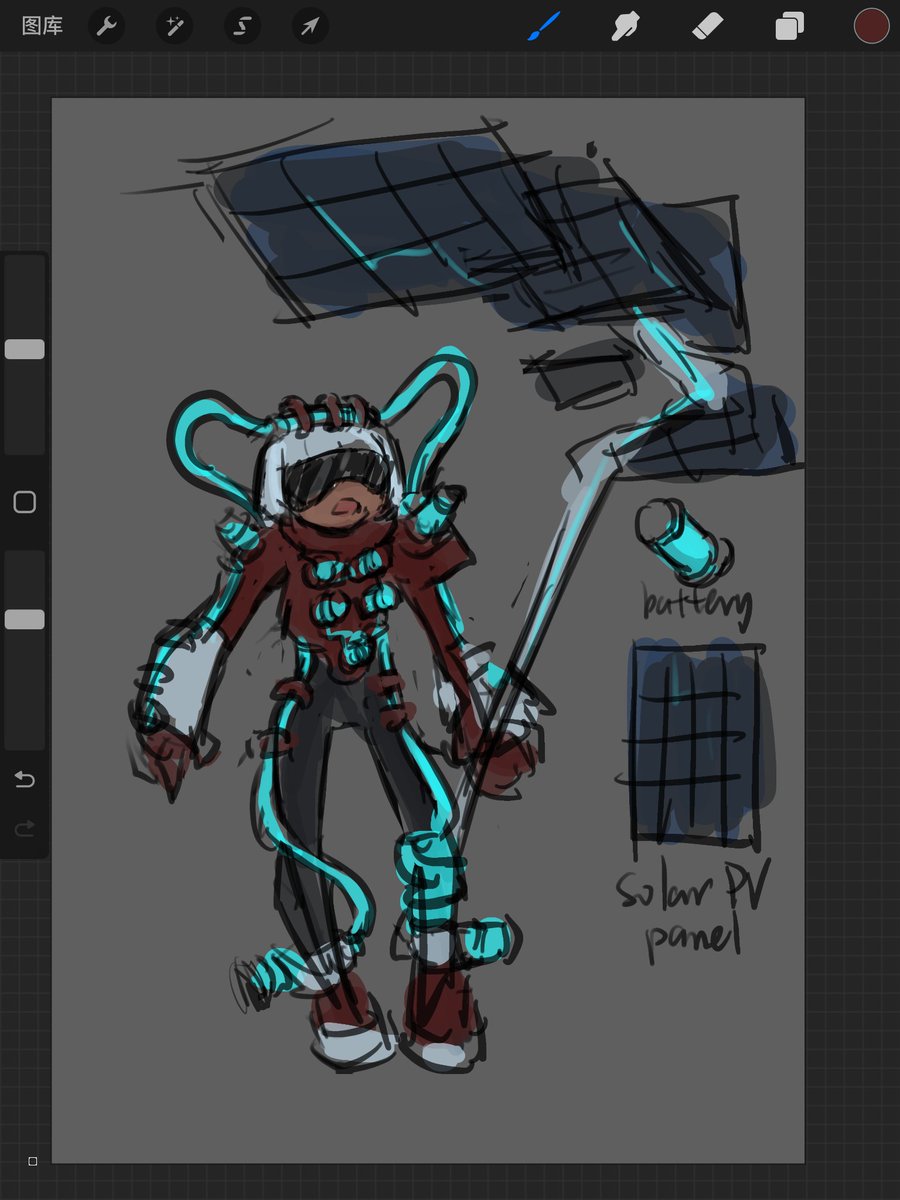
😂suddenly some design practice【】
maybe i should study more fashion design reference_(:з」∠)_
1
6
228

6 Feb 2025
3 nuevos _demo reference_ de "Change Your Mind (No seas cortes)" se filtraron a través de Leaked.cx por el usuario Octopussy, incluyendo un nuevo bridge hablado en español we.tl/t-9n8nayYlD9

1
2
23
1,528

17 Sep 2024
_Biblical Reference_
"...and if you lend to those from whom you expect repayment, what credit is that to you?..." (Luke 6:34)
2
8
1,553