
6 Nov 2024
Pattern matching is such an important part of data analytics and it is very easy to use in SQL.
𝗟𝗲𝘁'𝘀 𝘂𝗻𝗱𝗲𝗿𝘀𝘁𝗮𝗻𝗱 𝗵𝗼𝘄 𝘆𝗼𝘂 𝗰𝗮𝗻 𝗽𝗲𝗿𝗳𝗼𝗿𝗺 𝗽𝗮𝘁𝘁𝗲𝗿𝗻 𝗺𝗮𝘁𝗰𝗵𝗶𝗻𝗴 𝗶𝗻 𝗦𝗤𝗟 𝗮𝘀 𝗮 𝗱𝗮𝘁𝗮 𝗮𝗻𝗮𝗹𝘆𝘀𝘁:
You can use the 'LIKE' keyword in SQL for pattern matching.
Also, you have wildcards in SQL that can be used in combination with the 'LIKE' keyword.
𝗟𝗲𝘁'𝘀 𝘀𝗲𝗲 𝘁𝗵𝗲 𝘄𝗶𝗹𝗱𝗰𝗮𝗿𝗱𝘀 𝗮𝗻𝗱 𝘁𝗵𝗲𝗻 𝗜 𝘄𝗶𝗹𝗹 𝗽𝗿𝗼𝘃𝗶𝗱𝗲 𝘆𝗼𝘂 𝘀𝗼𝗺𝗲 𝗲𝘅𝗮𝗺𝗽𝗹𝗲𝘀 𝗮𝘀 𝘄𝗲𝗹𝗹:
'%' - It is used to represent n number of characters after/before or between desired text.
𝗘𝘅𝗮𝗺𝗽𝗹𝗲:
• 𝗪𝗛𝗘𝗥𝗘 𝗰𝗼𝗹𝘂𝗺𝗻_𝗻𝗮𝗺𝗲 𝗟𝗜𝗞𝗘 '𝗦%' (finds values that start with S with n number of characters.)
• 𝗪𝗛𝗘𝗥𝗘 𝗰𝗼𝗹𝘂𝗺𝗻_𝗻𝗮𝗺𝗲 𝗟𝗜𝗞𝗘 '%𝘀' (finds values that end with 's' with n number of characters.)
• 𝗪𝗛𝗘𝗥𝗘 𝗰𝗼𝗹𝘂𝗺𝗻_𝗻𝗮𝗺𝗲 𝗟𝗜𝗞𝗘 '%𝘀%' (finds values that have 's' in between with n number of characters.)
'_' -> It represents a single character.
𝗘𝘅𝗮𝗺𝗽𝗹𝗲:
• 𝗪𝗛𝗘𝗥𝗘 𝗰𝗼𝗹𝘂𝗺𝗻_𝗻𝗮𝗺𝗲 𝗟𝗜𝗞𝗘 '𝗦_' (find values that have only 2 characters starting with 'S')
So, this is how you can perform pattern matching in SQL as a data analyst.
Enjoy. Follow for more!
#DataAnalysis #SQLPatternMatching #SQLTips #DataAnalyst #PatternMatching #DataScience #DataAnalystLife #SQLSkills #DataCleaning #DatabaseManagement #DataAnalytics #DataJobsUSA #SQLUSA #AnalyticsCareersUSA #DataAnalystUK #SQLUK #AnalyticsUK #DataAnalystEurope #SQLEurope #AnalyticsEurope #GlobalDataJobs #SQLWorldwide #DataScienceGlobal #AnalyticsCareersGlobal

2
20

19 Sep 2024
21/
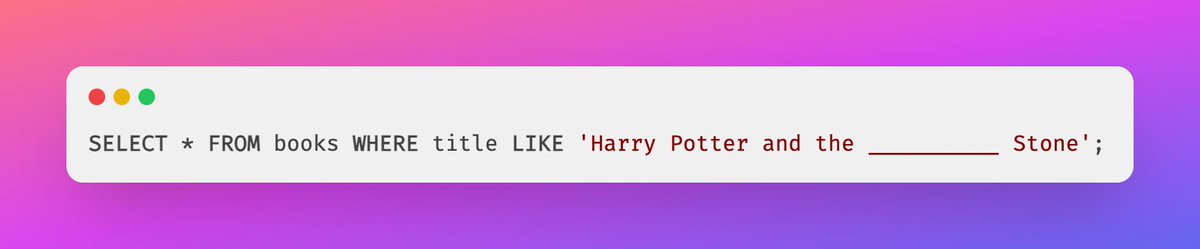
You can also use underscore (_) as a wildcard for a single character. For example:
This would match "Harry Potter and the Sorcerer's Stone" or "Harry Potter and the Magician's Stone". Neat, right? #SQLPatternMatching
1
16