15 Mar 2025
finally documenting my actually-no-complaints MacOS window management solution. I came from Linux 2y ago and was pissed af for awhile until I hacked together the following:
1. keyboard maestro to have special hotkeys to open each common app: [hotkey is pressed] ➔ [activate App]. depending on the app, I may or may not have "if already at the front" set to "leave it" or "hide it"
( karabiner to map capslock to "hyper" — for the keyboard maestro open-each-common-app system. hyper-S for spotify, hyper-C for cursor, etc. obvs they don't all have their first letter. hyper is cmd ctrl alt shift all at once. I have both alt A for "switch to last-used Brave window" and alt B for "open new Brave window"). I don't use karabiner for much else except mapping the keys for a foot pedal keyboard, but it's worth it just for the hyper set-up. maybe there's a simpler way to do caps➔hyper idk)
( note that this requires doing a lot of things in desktop apps so each app can have its own hotkey etc... which was very counter to my previous lifestyle that wanted everything in the browser. but I kinda like it. still fuck desktop slack though—I do NOT want to be logged into multiple workspaces at once. but aside from that, yeah, use progressive-web-apps / "Install Sitename" aggressively, or Create Shortcut or tools like TinyWeb where you can't)
2. AltTab for Mac to have sane alt-tab behavior (I want to switch to a WINDOW, not ALL windows of an application! 🤬). it supports multiple configs, so I can use cmd opt 1 for "switch between windows of the SAME application" which is super useful esp when I can activate that application consistently using its hyper-hotkey as described above
3. the combination of 1 & 2 means I can actually organize things on MacOS's spaces, because if you switch spaces by switching to *an open window* on the space, it actually happens instantly! whereas any keyboard or mouse event that switches "to the space" runs a slow-ass animation that you have to wait-til-it-finishes, in order to fire keystrokes on the destination app—until it does, they fire on whatever you had open on the previous space. this is moronic. I turn off "displays have separate spaces", so eg when I activate Cursor (or then jump to a different project) I also get the appropriate Terminal windows open on my other screen consistently.
4. finally, can't live without... some tiny tool that works so perfectly in the background that I had to double-check the name—it's Rectangle Pro—to handle hotkeys for putting a window on the left half of the screen (it supports many fractions but I only use a few) and moving windows between screens
the result here is ACTUALLY GOOD. I can very rapidly and consistently navigate to exactly where I want to go, and where I can't it's usually due to limitations with some specific app. there are many tweaks I would love to make to Spaces, to let me actually keep them organized, but that's my only complaint.
I forget who my inspirations were for this approach, but you exist and I am deeply grateful to you, and I am at least hoping to pay your kindness forward by sharing my own set-up.
1
1
7
981

13 May 2024
TinyWeb Build 40 and TablePlus Beta 6.0.1 have been released.
TinyWeb:
- Fixed a bug where the app is unresponsive when using Facebook, Twitter, Messenger, and other social networks.
- Fixed a bug where Command Arrow keys sometimes do not work... and many other fixes.
TablePlus:
- Optimized for macOS Sonoma.
- Fixed many potential crash bugs.
- Restoring closed workspace after closing the app is now enabled by default, and many other minor updates.
3
1
58
14,640
10 May 2024
- TinyWeb is the only app that use WebKit and able to use the right click menu "Download image"
3
914

8 May 2024
vamos a probar la nueva app del equipo de @TablePlus, TinyWeb
btw que icon tan cool :))

7 May 2024

Boomm!
You can pack any website into a mini app lightweight
Will be released soooon
Download tinyweb.so
1
3
688

7 May 2024
@TablePlus for tinyweb, could you add a premium feature explanation? I'm having trouble finding it on the site and on the GitHub.
1
17

6 May 2024
I just tried tinyweb by @TablePlus, and it's incredibly useful for taking screenshots and testing responsive design.
tinyweb.so/
3
5
1,966
5 May 2024
Download the TinyWeb - The Tiniest HTTP Request Client 🤏 make by TablePlus Team😂
Please give us feedback!
tinyweb.so
23
33
323
46,843

14 Jan 2024
Yeah, let’s use the dying of twitter to connect the dots. I know so many wonderful people who need to know each other. I think both of you are candidates for tinyweb @erocdrahs @_mattmuir ??
2
45

11 Oct 2023
because i miss the days of the tinyweb where boutique homeservers could compete
ad-supported megacorps are a market distortion
1
1
52

9 May 2023
i have found my spirit animal
it's PHALACROCORAX ARISTOTELIS aka "the shag"
(photo via the tinyweb)

1
7
382
6 Jul 2022
Baby steps with the Pico W (and @pimoroni Pico Inky) but making progress! Shown here running a TinyWeb server
1
5
120

3 Jul 2022
We use Microdot, but it was basically a coin-toss; both Microdot and tinyweb are excellent choices for a lightweight MicroPython web server framework.
github.com/miguelgrinberg/mi…
1

16 Jun 2021
On this mercurial summer day, I want to tweetsay
I ❤️❤️❤️❤️❤️❤️❤️
@MarcusJHBrown @BetaRish @Matt_Muir @paulsq @inthecompanyof @erocdrahs @atomoil
#tinyweb
2

2 Dec 2020
tinyweb is an awesome #MicroPython web framework: small, clean, Flask-style decorators, memory efficient, and all in a single file.
Just created a PR to add compatibility with latest MicroPython 1.13 (uasyncio v3): github.com/belyalov/tinyweb/…
3
13 May 2020
had a virtual AGM and LOTS of sherry.
IRL love to @purplesime @erocdrahs @inthecompanyof @MarcusJHBrown @atomoil
and @paulsq @Matt_Muir @BetaRish xx
#tinyweb #webcurios
1
4

23 Mar 2018
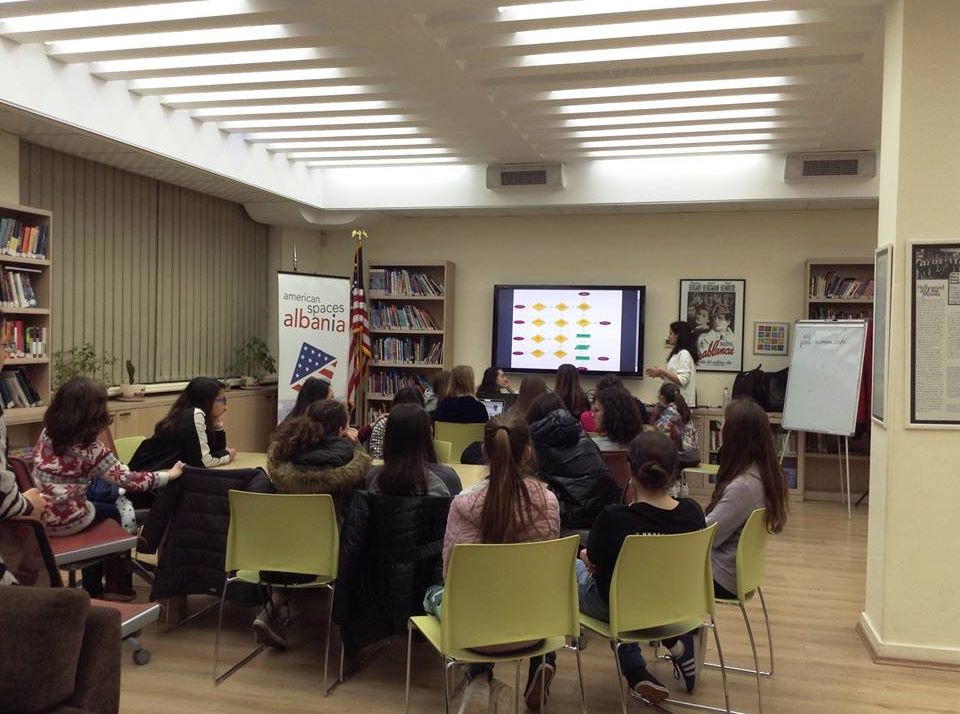
Today at Technovation Club, Dea explained the flow chart of her team's app. Some of the girls started working on setting up the TinyWeb Database and some others worked on logos and sign in & sign up forms
2
3