
Day - 2
#100DaysOfCode
Started learning React today :
Just covered these JSX, Components, Props, useState topics.
1
3

Day 56/111 🚀
Learned advanced React concepts today ⚛️
Worked with:
• useState
• useEffect
• useContext
• useReducer
• Context API
• React Router
• Error Boundaries
Building more scalable and maintainable React applications 🔥
#ReactJS #JavaScript #FrontendDevelopment
1

# Ponytail:让 AI Agent 写出 1 行而不是 50 行的 skill
你知道那种程序员。长发马尾,椭圆眼镜,在公司的时间比版本控制系统还长。你给他看五十行代码,他看了看,什么都没说,用一行替换了全部。
Ponytail 把这个人塞进了你的 AI Agent 里。
这是一个开源 skill,8 天前发布,已经支持 10 种 Agent(Claude Code、Codex、Cursor、Pi、Windsurf、Copilot……)。核心只有 95 行 SKILL.md,但每次触发,它都会让 Agent 停在一个梯子上,逐级往下走,在第一个能站稳的台阶停下。
---
## 梯子:六步,但可能一步就够了
Ponytail 的整个方法论只有这六步:
```
1. 这东西真的需要存在吗? → 不需要就跳过(YAGNI)
2. 标准库是不是已经有了? → 用标准库
3. 原生平台功能能覆盖吗? → <input type="date"> 而不是一个组件库
4. 已经安装的依赖能解决吗? → 用已装的,永远不加新依赖给几行代码能搞定的事
5. 一行能搞定吗? → 一行
6. 实在不行:能跑的最少代码
```
**梯子是本能,不是研究项目。** 两步都成立?走更高那步,然后继续。第一个能用的懒方案就是对的。
---
## 五组对照:正常 Agent vs Ponytail
我把五个日常 coding 任务跑了一遍,左边是正常 Agent 会写的东西,右边是 Ponytail。
### 1. 日期选择器
```
正常: npm install flatpickr 30 行 React wrapper CSS import
Ponytail: <input type="date">
// ponytail: 浏览器自带
```
**1 个依赖 30 行 → 0 依赖 1 行。** 原生、无障碍、多语言、键盘导航、移动端适配——浏览器团队已经做完了。
### 2. 缓存系统
```
正常: 120 行 TTLCache 类,含线程安全、LRU 淘汰、统计端点
Ponytail: from functools import lru_cache
@lru_cache(maxsize=1000)
```
**120 行 → 2 行。** 最快的缓存是你根本不需要 debug 的那个。
### 3. 限流器
```
正常: 35 行滑动窗口 RateLimiter 类,deque threading.Lock
Ponytail: import threading
_sem = threading.Semaphore(10)
```
**35 行 → 6 行。** Semaphore 是操作系统级别的限流,已经比你写的好。
### 4. 防抖
```
正常: npm install lodash.debounce (600B) import wrap
Ponytail: function debounce(fn, ms) {
let t;
return (...a) => { clearTimeout(t); t = setTimeout(() => fn(...a), ms); };
}
```
**一个依赖 → 3 行。** 不需要 leading/trailing/maxWait 的时候,这段代码够用十年。
### 5. 倒计时组件
```
正常: React 组件,useEffect useState useRef cleanup 格式化逻辑
Ponytail: <input type="time">
// ponytail: 浏览器自带
```
**190 行 React → 1 行 HTML。** 除非你真的需要一个定制的倒计时 UI,否则 `input[type=time]` 就够了。
---
## 有数据吗?
有。作者跑了 5 个任务 × 3 个模型(Haiku、Sonnet、Opus)× 3 个配置(无 skill、Caveman、Ponytail)× 10 轮,取中位数。
**Ponytail v3 vs 无 skill 的基线:**
| 指标 | 基线 | Ponytail | 差别 |
|------|------|----------|------|
| 代码行数 | ~293 | ~47 | **-84%** |
| Token 用量 | 161,955 | 135,709 | **-16%** |
| 耗时 | 479s | 127s | **-73%** |
**Ponytail v3 vs Caveman(此前最极简的 skill):**
| 指标 | Caveman | Ponytail |
|------|---------|----------|
| 代码行数 | ~117 | ~47 (**2.5× 更少**) |
| Token 用量 | 138,410 | 135,709 (**-2%**) |
| 耗时 | 136s | 127s (**-7%**) |
对于基线会写出 190 行倒计时组件、耗时 208 秒的那种退化情况,两个 skill 都完全避免了——但 Ponytail 在代码最小化上把 Caveman 又拉出了一个量级。
---
## 不止是少写代码
Ponytail 的设计有几个被低估的决策:
### 1. "ponytail:" 注释——简化的意图显式化
每次 Ponytail 做简化,代码里会留一个 `ponytail:` 注释,说明选择了什么捷径、什么情况下需要升级。
```python
# ponytail: global lock, per-account locks if throughput matters
_lock = threading.Lock()
```
这让"简单"读起来像**有意为之**,而不是"Agent 偷懒了"。捷径有已知的天花板,注释里写了升级路径。后来需要升级的人不会骂你。
### 2. 三个强度等级
| 等级 | 行为 | 场景 |
|------|------|------|
| **lite** | 正常写,但在旁边写一行"更懒的做法是……" | 不确定想多懒 |
| **full** | 梯子强制执行,最短 diff,最短解释(默认) | 日常 coding |
| **ultra** | YAGNI 极端主义。先删再写。一行搞定,同时质疑需求的其余部分 | 被代码库气到 |
"加一个缓存"在三个等级下的反应:
- **lite**:帮你加了。顺便说一句 `@lru_cache` 可以一行搞定。
- **full**:`@lru_cache(maxsize=1000)`。跳过了自定义缓存类,lru_cache 不够用时再加。
- **ultra**:不加。直到 profiler 说需要。真需要时:`@lru_cache`。手写 TTL 缓存类本质上是带命中率的 bug 农场。
### 3. 有边界:不该省的地方绝不省
Ponytail 明确列出了**永远不能简化**的东西:
- 信任边界的输入验证
- 防数据丢失的错误处理
- 安全措施
- 无障碍基础
- 用户明确要求的东西
非平凡逻辑(有分支、有循环、有解析器、有钱/安全路径)至少要留一个可运行的最小检查:一个 `assert` 自检或一个小 `test_*.py`,不要框架、不要夹具。但一行搞定的事不需要测试,YAGNI 对测试也适用。
### 4. ponytail-review:只找能删的东西
配套了另一个 skill:`/ponytail-review`。它不是做正常代码审查——**它只猎杀过度工程。** 每条发现只占一行:
```
L12-38: stdlib: 27-line validator class. "@" in email, 1 line.
L4: native: moment.js imported for one format call. Intl.DateTimeFormat, 0 deps.
L52-71: delete: retry wrapper around idempotent local call. Nothing replaces it.
```
结尾只汇报一个数字:`net: -N lines possible.`
如果没什么好删的,就说 `Lean already. Ship.` 然后闭嘴。
**这是 Ponytail 最锋利的洞察:好的 diff 是变短的 diff。**
---
## 为什么这件事很重要?
AI 编码 Agent 有一个天然的偏见:**它们喜欢写东西,不喜欢删东西。**
你让它"加一个日期选择器",它默认的思维路径是:装一个库、包一层组件、加样式、加 hook、加清理逻辑。因为它觉得"做完"意味着产出代码。它不会停下来问:"浏览器是不是已经自带了?"
Ponytail 把这个偏见翻转了。它让 Agent 在写任何代码之前,先爬一遍梯子——**在每一步停下来问"这真的需要存在吗"**。而这个翻转带来的收益是全方位的:
- **写得更少** → 代码更少,bug 更少
- **依赖更少** → 供应链攻击面更小
- **更接近原生** → 可访问性、本地化、性能天然更好
- **意图显式** → `ponytail:` 注释让简化成为存档的决策
- **升级路径清晰** → 每处简化都在注释里告诉了你怎么升级
**最好的代码,是那行你从未写过的代码。第二好的,是 Ponytail 替你删掉的那行。**
---
## 怎么装
```bash
# Claude Code
/plugin marketplace add DietrichGebert/ponytail
/plugin install ponytail@ponytail
# Pi agent harness
pi install git:github.com/DietrichGebert/po…
# Codex
codex plugin marketplace add DietrichGebert/ponytail
# Cursor / Windsurf / Copilot / Kiro
# 复制对应的规则文件到项目或全局配置目录即可
```
11 天,1.2k stars,MIT 协议。
---
## 一句话
**Ponytail 解决的问题不是"代码太多",而是"Agent 默认想写太多"。** 它给了 Agent 一套本能:在碰键盘之前,先问六个问题。往往问到第二个就停了。
它让你想起公司里那个最老的程序员。他什么都不说。他写一行。它能跑。
#Ponytail #AI编码 #极简主义 #Agent #开源
3
6
605


Just aced my first React Hooks quiz after 3 days of focused practice! No more confusion about useState and useEffect—small steps make big progress in coding!,

1
4

Build a single-page Next.js hero landing page for a luxury hypercar brand called Aspirox. All styles must be written as a self-contained <style> tag inside the component (no external CSS files). The page is a single "use client" React component with minimal interactivity.
Tech Stack
Next.js (App Router), TypeScript
All CSS self-contained in a <style> JSX block
No Tailwind, no external component libraries
Fonts (Google Fonts import at top of the <style> block)
@import url('fonts.googleapis.com/css2?fa…');
Display / Headline: Big Shoulders Display, weight 900 → used for the giant brand title
Serif / Nav links: Cormorant Garamond, weight 300/400 → used for nav items
Mono / Body: Space Mono → everything else (contact info, ticker, badges)
CSS Design Tokens (:root variables)
css
--color-text: #ffffff;
--color-bg-fallback: #04121a;
--color-accent: #bf1525;
--color-grid-line: rgba(255, 255, 255, 0.12);
--color-dot-glow: rgba(255, 255, 255, 0.8);
--color-social-bg: rgba(255, 255, 255, 0.08);
--color-social-bg-hover: #ffffff;
--color-social-icon-hover: #051a24;
--font-serif: 'Cormorant Garamond', serif;
--font-mono: 'Space Mono', monospace;
--font-display: 'Big Shoulders Display', sans-serif;
--ticker-height: 48px;
html, body: overflow: hidden, background --color-bg-fallback, font --font-mono.
Layout: 3 Layers (stacking order)
Layer 1 — Background (z-index 0–2)
A .bg-container (position: absolute, covers 100% w/h):
Video element .bg-video: position: absolute, object-fit: cover, opacity: 0.65, filter: contrast(1.1) brightness(0.9), z-index: 1.Source: cdn.jiro.build/Nabil/Aspirox…
Poster fallback: /luxury_hypercar_bg.png
Attributes: autoPlay loop muted playsInline
Gradient overlay .bg-gradient-overlay: position: absolute, z-index: 2, pointer-events: none.Gradient: linear-gradient(180deg, rgba(14,74,96,0.8) 0%, rgba(8,33,46,0.6) 30%, rgba(92,9,17,0.7) 70%, rgba(191,21,37,0.9) 100%)
Layer 2 — Interactive Grid (position: fixed, z-index: 1)
.grid-overlay:
display: grid, grid-template-columns: repeat(4, 1fr), grid-template-rows: 35vh 30vh 1fr
Height: calc(100vh - var(--ticker-height))
pointer-events: none on the overlay itself, but each cell has mouse events
12 grid cells (3 rows × 4 cols):
Each .grid-cell has border-right and border-bottom set to var(--color-grid-line) (1px solid)
Last cell in each row (nth-child(4n)) has border-right: none
Cells where index % 4 !== 0 get an intersection dot .intersection-dot:5×5px white diamond (transform: rotate(45deg))
Positioned at left: -2px, bottom: -2.5px
On hover: scale 1.8×, color changes to --color-accent, red glow box-shadow
On hover, the cell gets class active-line-h which adds a pseudo-element: a glowing horizontal line at the bottom edge (white gradient, pulsing animation)
State tracked via useState<number | null>(null) for hoveredCell
Layer 3 — Hero Content (position: relative, z-index: 2)
.hero-content: full viewport height, display: flex, flex-direction: column, justify-content: space-between
Content Structure
Top Row .hero-top-row
display: grid, grid-template-columns: repeat(4, 1fr), height: 35vh, padding-top: 6vh
Column 1: Navigation .nav-menu (padding-left: 3.5vw) Nav items array: ["Main", "Heritage", "Speedster", "Gallery", "Team"]
Each item rendered as <a> with class .nav-link
Font: --font-serif, size 2.3rem, weight 300
Active item: full white. Inactive: rgba(255,255,255,0.8)
Hover: slide right translateX(8px), italic, text-shadow glow
State: useState<string>("Main") → activeLink, set onClick
Columns 2 & 3: Empty spacers (visual breathing room)
Column 4: Contacts Panel .contacts-panel (padding: 0 3vw, font-size 0.78rem, color rgba(255,255,255,0.85))
Badge: .contacts-badge → .CONTACTS — pill shape with border, border-radius: 20px, background: rgba(255,255,255,0.05), margin-bottom: 2.2rem
Three contact groups (.contacts-group):Address: L71-75 Shelton Street, Covent Garden, London, WC2H 9JQ, United Kingdom
Email links (.mono-link): enquiries@aspiroxmotors.com and press@aspiroxmotors.com — hover shows red underline that scales in from right-to-left
Company: Aspirox Motorcar Company Limited - Company number 15044627
Bottom Row .hero-bottom-row
display: grid, grid-template-columns: repeat(4, 1fr), height: 35vh, align-items: end, padding-bottom: 4vh
Columns 1–3 span: Brand Title .brand-title-container (grid-column: 1 / span 3, padding-left: 3vw)
<h1 className="brand-title">ASPIROX 1</h1>
Font: --font-display, size 15vw, weight 900, line-height: 0.76, letter-spacing: -0.06em
Transform: translateY(1.5vw) (overflows slightly below viewport for dramatic effect)
Hover: subtle text-shadow glow
Column 4: Social Links .socials-container (display: flex, gap: 0.8rem, padding-left: 3vw) Four .social-circle links (48×48px, border-radius: 50%, glass-morph background):
Instagram — box icon with circle
LinkedIn — path icon
X/Twitter — SVG fill icon (16×16)
YouTube — play button in rectangle
Hover on social circles: white background, dark icon, translateY(-6px), white box-shadow glow.
Footer: Ticker Marquee .ticker-footer
height: var(--ticker-height) = 48px, background-color: #ffffff, white strip
.ticker-track: display: inline-flex, gap: 4.5rem, animated with @keyframes scroll-tickerAnimation: translateX(0) → translateX(-50%), duration 28s linear infinite
Pauses on hover (.ticker-container:hover .ticker-track)
Items (rendered twice for seamless loop): "POWERED BY REVAMPLY", "CLIMATE STATEMENT", "TERMS & CONDITIONS", "PRIVACY POLICY", "MADE IN DIGITAL BUTLERS", "© COPYRIGHT 2026. POWERED BY REVAMPLY", …
Item style: font-family: --font-mono, font-size: 0.68rem, font-weight: 700, color: #000000, letter-spacing: 0.1em
Animations
css
@keyframes scroll-ticker {
0% { transform: translateX(0); }
100% { transform: translateX(-50%); }
}
@keyframes pulse-line {
0% { opacity: 0.5; }
100% { opacity: 1; }
}
Responsive Breakpoints
≤1024px:
Nav links: 2rem
Brand title: 16vw
Social circles: 44×44px
≤768px:
Grid overlay switches to 2 columns (repeat(2, 1fr))
hero-top-row and hero-bottom-row switch to single column, stacked
Brand title: 19vw, no transform
Everything uses 6vw padding-left
overflow: hidden removed from body to allow scroll; hero-content uses min-height: 100vh
State
tsx
const [activeLink, setActiveLink] = useState<string>("Main");
const [hoveredCell, setHoveredCell] = useState<number | null>(null);
Key Visual Details to Not Miss
The grid dots are diamond-shaped (rotated square), not circles
The brand title slightly overflows the viewport bottom — this is intentional
The gradient overlay makes the bottom of the page red/crimson, creating a ground-level glow effect
The social icons are SVG inline — no icon library
The ticker is doubled (items rendered twice) for a seamless infinite loop
overflow: hidden on html, body is what makes the page feel like an app (no scroll on desktop)
The contact email links use a custom ::after underline that animates in via
160

Just nailed 3 tricky React hooks (useState, useEffect, useContext) today! Staying consistent with small daily steps beats cramming. #LearningDiary,

2

Jun 13
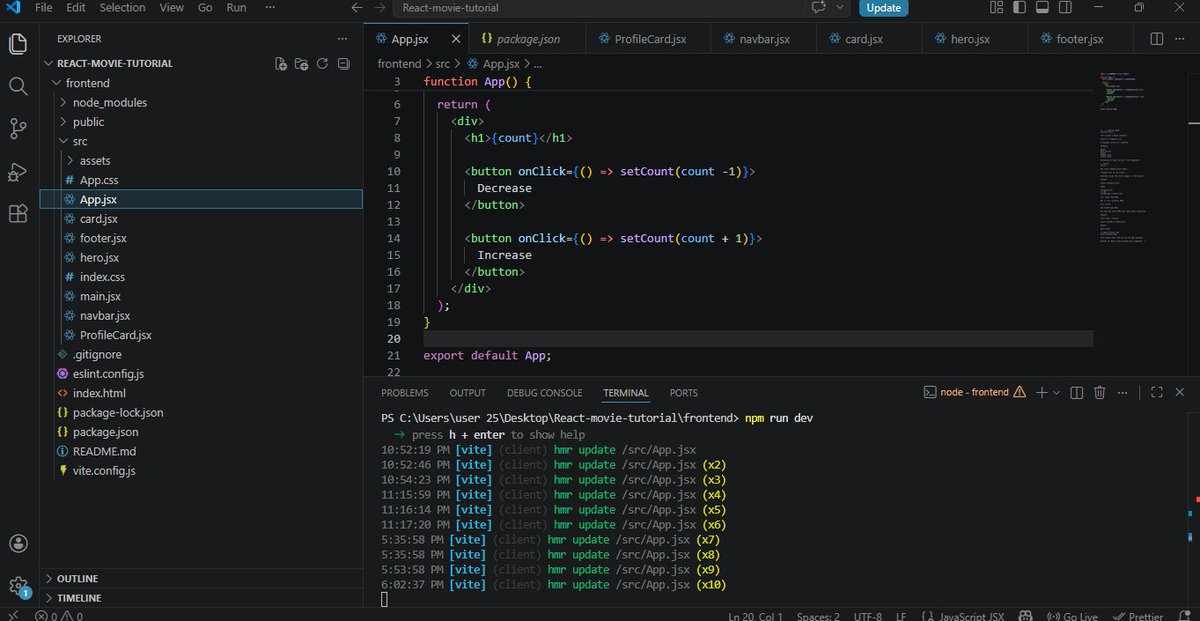
Day 2 of learning React ⚛️🚀
Props
useState
Event handling
React re-renders
Built a simple counter app today and finally started understanding state management. 📈
#React #JavaScript #100DaysOfCode #BuildInPublic
1
7
73

Jun 13
Just got impressed by @WisprFlow. It knew how to type useEffect and useState, and put them in back ticks.
This is the kind of thing where I've felt like I could build my own STT server with open source models but this is the type of thing that would be a pain to get right.
71

如何在 Prompt 里加几句约束,治好 AI 写代码“一报错就白屏”的脆弱毛病?
我们用 AI(如 Cursor/GPT)写前端组件或小网页时,经常遇到一个恶心问题:只要接口数据稍微有点偏差,或者某个属性为 null,整个页面就直接崩成“白屏”挂掉,逼得你还得去查 Console 重新喂给 AI 去修。
想解决这个问题,建议在让 AI 生成前端代码时,强制在 Prompt 尾部加上这 3 条“防脆规约”:
1. 强制【无死角可选链】(Optional Chaining)
• 指令:“读取任何从 API、LocalStorage、Url 参数或 Parent 组件传入的深层嵌套数据时,必须强制使用可选链(如 data?.user?.profile?.avatar),严禁使用 data.user.profile 直接取值,防范 TypeError。”
2. 强制【万物皆有默认值】(Fail-Safe Defaults)
• 指令:“在初始化任何 useState 或本地变量时,必须赋予明确的类型默认值(如 useState([]) 而非空括号;const items = data || [])。确保在数据未返回前,代码在执行 .map() 或 .filter() 时不会因为 undefined 而直接卡死崩溃。”
3. 强制【生命周期隔离保护】(Lifecycle Sandbox)
• 指令:“所有涉及网络请求(fetch/axios)、第三方库初始化、或是读写 LocalStorage 的逻辑,必须全部用 try-catch 块包裹。一旦发生异常,在 catch 块中必须降级显示友好的占位信息,严禁将异常抛出到全局导致白屏。”
为什么这个技巧能省下大把时间?
AI 写代码往往比较“直脑筋”,只考虑顺利运行的 Happy Path。如果我们在 Prompt 中提前建立这三道防线,AI 生成的代码容错率会直接提升一个档次。即使接口偶尔抽风,页面也只是局部加载失败,绝对不会动不动就白屏报错。

4
1
7
782

Jun 13
What you actually want: track the *status*, not the work.
✅ useState<boolean> — simple isPending flag
✅ useMutation — full lifecycle tracking
✅ useTransition — concurrent rendering
1
49
Jun 13
🚨 Anti-pattern: storing a Promise in React state
useState<Promise> does literally nothing useful.
Here is why 🧵
1
129

Jun 13
Just wrapped a 2-hour deep dive into React hooks! Learned how useReducer simplifies complex state logic way better than useState for large components. Tomorrow I’ll test this with a side project state management—progress beats perfection!,

2

Built a simple counter with Web Components after a long time.
React:
const [count, setCount] = useState(0);
Web Components:
Custom element → Shadow DOM → Manual state → Event binding → DOM updates 😭
React has definitely spoiled us. 😂
#JavaScript #WebComponents #ReactJS
2
94
Alufuq Wa Almadar retweeted

Jun 9
Just nailed my first React functional component practice! Finally get how props work u0026 useState hooks tick. Small win but big step forward in my frontend journey! #WebDev #LearningJourney,
1
1
4

Jun 12
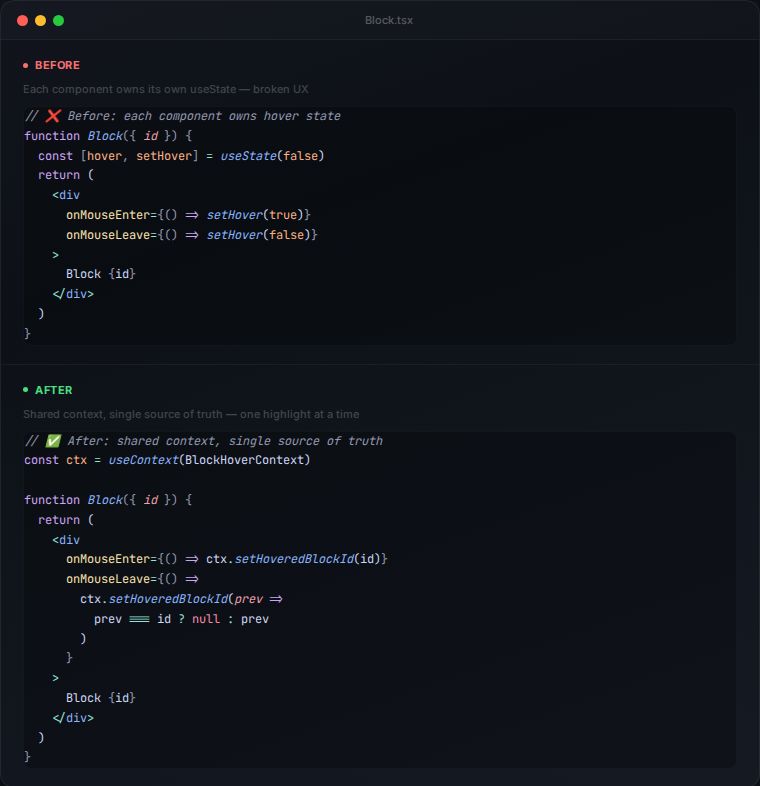
The before & after: from N useState hooks to one shared context. Only one block highlights at a time ✅
43
Jun 12
Stop giving every component its own hover state 🛑
N components × N useState hooks = multiple blocks highlighted at once.
The fix: lift hover to a shared context. One source of truth. 👇
26


dependency arrays on day 13 is solid pace. one tip: build something tiny with just useState before stacking more hooks, the re-render intuition compounds from there
1
1
14