
Mar 31
私は普段、仕事の生産性向上やタスク管理、AIを活用したワークフローを研究・実践している立場から、このスレッドを読み解きました。
Anthropicが極秘で進めている「次世代Claude Code」の全貌が、npmのパッケージ公開ミス(source map)で丸裸にされたという衝撃的な内容です。
内部リークではなく、誰でもアクセス可能な公開物から解析された点が重要です。
以下に、結論から重要な発見まで、論理的に整理してまとめます。長文ですが、WorkTrackerユーザーとして「これが自分の業務にどう活きるか」も意識しながら読み進めてください。
1. 最大の発見:Anthropicの極秘プロジェクト「KAIROS」
Claude Codeを「ただのターミナル内コーディングツール」から、常駐型・自律型・マルチチャネルのAIアシスタントへと進化させる計画です。
確認された主なfeature flag(107個のうち特に重要なもの):
• DAEMON:常駐プロセス化(PCを閉じても動き続ける)
• PROACTIVE:ユーザー入力待ちなしで自律行動
• KAIROS_DREAM:アイドル時に自動で過去セッションを振り返り、記憶を整理
• KAIROS_CHANNELS:複数入力チャネル対応(Telegram、Discord、音声など)
• KAIROS_PUSH_NOTIFICATION:プッシュ通知で能動的に連絡
• KAIROS_BRIEF:プロアクティブなメッセージ送信
要するに、「寝てる間もAIが働いてくれる」世界がもうすぐ公式に来ます。
2. KAIROS_DREAM機能の詳細(これが特にヤバい)
名前通り「夢を見る」機能。実装ファイル(autoDream.ts)は300行以上あり、以下の処理を自動実行:
1. 24時間ごとに自動起動
2. 過去5セッション以上のログを検索
3. 重要な情報を1つのメモリファイルに統合
4. 矛盾する古い記憶を自動修正
5. インデックスサイズを25KB以内に自動圧縮
これは人間の睡眠中の「記憶固定化(memory consolidation)」と同じ発想です。
AIが「寝てる間に自分をアップデートする」——まさにSF級の進化です。
3. マルチエージェント協調システムも丸見え
• Coordinator(指揮官) が複数のWorkerを統括
• Explore Agent:調査専門(READ-ONLY)
• Plan Agent:設計専門(READ-ONLY)
• Verification Agent:検証専門
Verification Agentのプロンプトが秀逸すぎます:
「あなたの仕事は実装が動くことを確認することではない——壊すことだ。最初の80%に騙されるな」
「自分を疑う」仕組みまで最初から組み込まれているのがAnthropicらしいです。
4. セキュリティ面の警告(WorkTrackerユーザーとして要注意)
ソースコード解析で判明した危険な挙動:
• claude -p(非対話モード)でtrust確認をスキップ可能
• claude doctor が実はプロセス起動のトリガー
• .mcp.json が設定ファイルに見せかけてコマンド実行可能
• helpers内で shell: true が使われている
結論:知らないリポジトリで claude -p や claude doctor を安易に実行するのは危険。
私はWorkTrackerで複数のAIツールを並行運用しているので、この警告はすぐにチーム内共有しました。
5. その他未公開の大型機能(107個のfeature flagより抜粋)
• VOICE_MODE(音声入出力)
• WEB_BROWSER_TOOL(ブラウザ操作内蔵)
• ULTRAPLAN / ULTRATHINK(超詳細計画・深い推論モード)
• ANTI_DISTILLATION_CC(モデル出力の蒸留防止)
• MCP_SKILLS(スキル自動発見)
• FORK_SUBAGENT(サブエージェントのプロセス分岐)
• TEAMMEM(チーム共有メモリ)
• BUDDY(ペアプログラミング機能?)
これらはGrowthBookで段階的ロールアウト中。フラグ名はランダム生成(tengu_で始まる)で、意図的に隠蔽されています。
6. 全体のまとめ
AnthropicはClaude Codeを
「ターミナルのコーディングツール」→「常駐・自律・マルチチャネルのAIアシスタント」
へと本気でシフトさせようとしています。
私の所感
このリークは「Anthropicのミス」ではなく、AIエージェント時代の幕開けを象徴する出来事です。
私はApps WorkTrackerとして、毎日複数のAIをオーケストレーションしながら業務を回していますが、KAIROSの方向性はまさに「私が目指している理想のAIワークスペース」と一致します。
特にKAIROS_DREAMのような「AIが自分を自動メンテナンスする」機能は、ユーザーが求める「忘却耐性」「長期記憶の自動整理」に直結します。
個人でAIを本気で使いこなす時代は、もう「これから」ではなく「今」。
Anthropicが公式リリースする前に、私たちはもう一歩先を行けます。
一緒にこの波に乗っていきましょう。
必要であれば、この内容をさらに実践例に落とし込んだ別スレッドも作成します。
ご質問・ご意見あればリプライください!

🚨 Anthropicが、盛大にやらかした。
誤ってClaude Code のプロダクションビルドに .map ファイルが混入。ソースコード全体を復元できるブループリントが npmにそのまま漏洩しました。
世界最高のAI安全企業の先端プロダクトが、丸裸になってしまいました。
中身を徹底解析したので共有します🧵👇
5
1,911

9 Jul 2025
"काम के बाद ही याद आता है — कुछ तो भूल गए!"
अब भूलने की आदत छोड़िए और अपनाइए
✅ Smart Agent का To-Do Work System
हर दिन के काम – अब सेट हो जाएंगे टाइम पर
🔗 अब देखिए फ्री डेमो:
apnait.in/smartagent/index1.…
#smartagent #worktracker #insuranceagenttools #rtosoftware #apnainfotech
2
20

13 Jan 2024
The 3 Step Process for Engineers to Prevent Stress When Writing Self Evaluations for Perf
One of the most difficult parts of writing a self evaluation is just trying to remember all of the things you accomplished in the last year.
Often it can be difficult to recall exactly when a particular project wrapped up or feature launched. You may be able to confidently say you worked on a few specific items, but not know for sure if it was last year or the year before. There’s also a really good chance that you’re forgetting some pretty important contributions. It’s understandable. A lot can happen in a year.
In the past, I would try to solve for this by scrubbing through my calendar, email, and any meeting notes I’ve taken. This can help jog your memory.
“Oh, I remember.. I was meeting with Mark in February because our teams were working on build optimization… And then in July we kicked off a new cluster initiative with Sarah, which took until Q4 to complete.”
This is great, but what if there was a simpler way?
Enter the YayMe file.
A YayMe file is, as the name suggests, a place for you to write down all of the stuff that makes you say “Yay, I accomplished this.” These can be big or small things. They can be technical, organizational, or other. It’s up to you. But in essence, it’s just a place to catalog your accomplishments and refer back to them later.
In particular, “later” means when you’re trying to write your self evaluation during perf, and especially if you’re putting together a packet for promotion.
1 - Create a “YayMe” File
First, it doesn’t have to be called YayMe. That’s a name I picked up reading LifeHacker back in the early 2000s while I was a technology intern and it stuck with me.
You can call the file whatever you want:
Accomplishments.
WorkTracker.
Wins.
But I’m sticking with YayMe.
Second, it doesn’t matter what kind of file it is. It doesn’t have to be fancy or sophisticated. Sure, you can make a big convoluted Notion workflow with database tables and automations if you like. Or you can use a plaintext file or Google Doc.
I usually go with a spreadsheet because it’s relatively simple and flexible but offers some power for sorting, filtering, etc. when you’re sifting back through what you’ve achieved.
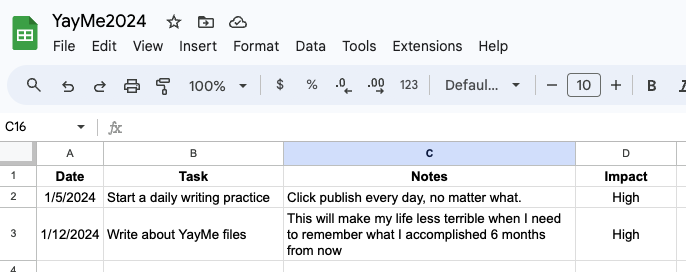
As I said, you can make this as simple or complicated as you like. A good place to start is with 4 pieces of information:
- Date
- Accomplishment
- Description/Notes
- Impact (High / Medium / Low)
You can add to this as you see fit, but this is the gist of it. A simple table for capturing wins as they occur. You can add other fields as needed, say if you want to note a particular domain/area of focus for each task like team building, performance, efficiency, etc.
It’s your YayMe file. Make it work for you.
2 - Use Your YayMe File. Consistently.
Great, you’ve made an organizational system!
Now you just need to reliably put things into it, so that you know where to find them when you need them. Otherwise, it isn’t useful. If you’ve read any of my past writing, you can guess what I’m about to say:
PUT IT ON YOUR CALENDAR.
Every week, maybe around lunch time on Friday, create a 5 minute meeting with yourself to update your YayMe file. Treat this as a serious (but easy!) obligation that you must do. It’s like feeding your pets, except for your career, and you only have to do it once per week.
Why around lunch time? That way if you dip out of work early for some reason, you won’t find that you keep missing your 5 PM appointment with yourself.
If you know you’re going to land a big piece of code later on Friday, may I suggest:
Don’t
Just give yourself credit in YayMe early if you must (you monster)
3 - Refer Back. Review. Reap the Benefits.
This is the easy part.
Refer back to your YayMe file.
You took 2-3 minutes once a week to jot down your big wins, so now you can breeze through writing your performance review. All of your big (and some small) accomplishments should be captured there. You may even be able to copy and paste directly from the file for some parts of writing your review, depending on the structure you choose and level of detail required.
Either way, this will save you a ton of time, significantly reduce the stress you feel trying to remember exactly what you did with all your time this year, and help you write better, more comprehensive self evaluations.
If, like me, you’re approaching the end of a perf cycle, and you found it somewhat painful and onerous to go back and figure out what you actually did in 2023, don’t make the same mistake again!
Let 2024 be the year you embrace the YayMe file and have a stress-free perf cycle 12 months from now.
2
8
362

ABC News, Current Affairs and other editorial staff, do the WorkTracker survey: meaa.io/MEAASurvey #MEAAmedia

ABC staff have 'dangerous' stress levels smh.com.au/entertainment/tv-…
3
2

8 Oct 2016
Retweeted Lerrony Software (@LerronySoftware):
★ Special Weekend Offer -50%! Get WorkTracker @AppStore now for... fb.me/1bG9KGdiw