Building open LLM frameworks for robots that truly think & understand | Daily updates on humanoid robotics, embodied AI & breakthroughs | OSS Contributor
Joined August 2020
- Tweets 514
- Following 329
- Followers 1,452
- Likes 8,885
410 Photos and videos

Pinned Tweet

May 19
=== Day 3/30: The SDK Is No Longer Mounted Archaeology ===
Yesterday I gave the project a map.
Today I gave it a toolbench.
That is the real difference between Day 2 and Day 3. Mac OS X Server 1.0 is no longer only something I can boot, inspect, screenshot, and describe from the outside. It is now something I can build small artifacts inside.
That distinction matters.
A bootable guest is useful. A historically interesting guest is useful. A guest that can run Apache and expose a little bit of its filesystem to the modern host is useful. But a guest that can compile a small Objective-C program against era-native headers and frameworks, run that program, generate output, and serve that output back through its own web stack crosses a different threshold.
It means the lab can now build.
Not completely. Not magically. Not with every developer tool recovered, polished, and proven. But enough to stop treating the old SDK as mounted archaeology and start treating it as a working bench for controlled experiments.
That is what Day 3 is about.
=== The Project Needs A Learning Contract ===
The goal of this month is to build a working mental model of Darwin/XNU in public.
That sounds simple until it gets too vague to be useful. “Understand XNU” is not a plan. “Study early Mac OS X” is not a plan. “Look at old operating system internals” is not a plan.
So Day 3 has to make the contract more explicit.
This is not a screenshot collection. It is not a nostalgia tour. It is not a proprietary source redistribution project. It is not a “look, old software still boots” stunt.
The goal is to use Mac OS X Server 1.0, early Darwin history, available documentation, and a live Rhapsody-era lab to build a clearer picture of how Apple’s operating system stack was put together at the point where NeXT, Mach, BSD, and the future of Mac OS X were all visibly meeting.
If Kernel Cathedral is going to be technically honest, I need to understand enough of each layer to label it without faking certainty.
That means the month needs structure.
The major buckets are now clear.
=== Mach: The Kernel Vocabulary Underneath The Story ===
Mach is one of the first pieces that has to stop being a slogan.
It is easy to say “XNU uses Mach.” It is harder to explain what that means without flattening the architecture into trivia. For this project, the important Mach concepts are tasks, threads, ports, messages, IPC, and virtual memory heritage.
Those are not decorative terms. They shape how the system talks about execution, communication, and address spaces.
A task is not just “a process” in the way userland usually talks about one. A thread is not just a line item in a process viewer. Ports are not TCP ports. Messages are not just abstract “communication.” Mach IPC is a real design surface, and it needs to be treated that way.
By the end of the month, I want to be able to draw the Mach layer in Kernel Cathedral without reducing it to a mysterious box labeled “microkernel stuff.”
That may be the first place where the project needs discipline. Mach is historically loaded, architecturally subtle, and easy to overstate. The goal is not to settle every argument about kernel design. The goal is to understand the concepts well enough to explain what role they play in this system.
=== BSD: The Familiar Surface That Is Not Merely A Surface ===
The second major bucket is BSD.
For many developers, BSD is where the system starts to feel more familiar: files, sockets, processes, users, permissions, signals, POSIX APIs, and command-line behavior. That familiarity is useful, but it can also hide important details.
In a system like this, BSD is not just a compatibility costume. It provides a large part of the operating system personality that userland code actually touches. When a program opens a file, creates a socket, checks permissions, forks, execs, or talks in POSIX-shaped terms, it is leaning on that world.
So the BSD layer has to be more than a label.
The project needs to examine how the visible userland semantics connect downward into kernel structures. Files need to become more than paths. Sockets need to become more than network handles. Processes need to be compared against Mach tasks and threads rather than casually treated as identical concepts.
This is where the “Mach plus BSD” shorthand is useful, but insufficient.
=== XNU Is Not Just “Mach Plus BSD” ===
“XNU is Mach plus BSD” is a decent starting phrase. It is not a complete architecture explanation.
The phrase points in the right direction, but it compresses too much. It can make the system sound like two blocks glued together: one labeled Mach, one labeled BSD. That is too crude for the mental model I am trying to build.
The interesting work is in the joining.
Where does Mach’s model show through? Where does BSD’s model dominate? Where does the system translate between them? Which concepts are cleanly separable, and which ones are only separable in a diagram?
Kernel Cathedral needs to show the shape of that combination carefully. The diagram should not imply that every subsystem fits into a clean rectangle just because clean rectangles are easier to draw.
That is part of the contract: prefer accuracy over false neatness.
=== Boot Flow: From Firmware-Style Setup To Services ===
The next bucket is boot flow.
A running desktop or server environment hides a lot of choreography. The machine does not begin with Apache, shells, users, paths, and services already in place. Something has to find the bootloader. Something has to hand off to the kernel. Something has to mount filesystems. Something has to bring up startup scripts and userland services.
For this lab, BootX, kernel handoff, startup scripts, and service launch behavior all matter.
Boot flow is also where the project can connect the historical system to concrete observation. Instead of talking about startup as an abstract sequence, I can inspect what the guest does, what files participate, what assumptions the system makes, and where the old Mac OS X Server environment differs from modern expectations.
That should make the eventual architecture diagram stronger. A system architecture should not only show what exists after everything is running. It should also explain how the system becomes itself.
=== Processes, Threads, And What Userland Thinks It Sees ===
Processes and threads deserve their own attention because they sit at the boundary between the user’s mental model and the kernel’s model.
Userland sees programs. Tools show processes. Developers talk about launching commands, starting daemons, and running applications. But the kernel has more specific machinery underneath that vocabulary.
Part of the project is to compare those views carefully.
What does userland think a process is? What does the kernel model? How do Mach tasks and threads relate to BSD process semantics? Where does the old system expose those concepts directly, and where does it hide them behind familiar Unix-like behavior?
This bucket is important because it will probably shape one of the central Kernel Cathedral plates. A cathedral diagram that cannot explain execution is only decorative.
=== Virtual Memory: The Invisible Architecture ===
Virtual memory is another layer where the system’s most important behavior is not immediately visible.
A user sees programs running. The machine sees mappings, pages, protections, address spaces, and faults. Mach’s VM heritage makes this especially important. It is one of the places where the operating system’s design history is not just historical background; it is part of the live architecture.
This is also a place where the project needs restraint.
Virtual memory can become a rabbit hole quickly. The goal for the month is not to reproduce a full graduate course in operating systems. The goal is to learn enough to explain how address spaces, mappings, and protections fit into the Darwin/XNU story, and how that layer supports the behavior visible above it.
The cathedral does not need every stone numbered. It does need the load-bearing walls.
=== Filesystems: Paths Are The Friendly Part ===
Filesystems are another place where the familiar surface is only the beginning.
Paths are easy to show. Directory listings are easy to capture. Mount points are easy to mention. But the operating system’s filesystem layer is not just a tree of names. It involves disk layout, mounts, metadata, permissions, and eventually vnode concepts.
For the early part of the project, the filesystem work will likely stay close to observable behavior: what is mounted, where things live, how the guest organizes system files, how the developer side root is attached, and how Apache finds the generated output.
Later, the project needs to go deeper.
The goal is to understand how files become kernel-mediated objects rather than just names in a shell. That matters for anything involving program loading, configuration, logs, web serving, development tools, or system startup.
=== Networking: The Guest Has To Touch The Outside World ===
Networking is where the lab stops being sealed.
The Mac OS X Server 1.0 guest runs inside a modern host environment, with QEMU forming part of the boundary between them. That makes networking both practical and conceptually useful.
On the practical side, networking lets the guest serve content back to the host. Apache becomes a visible proof point. A page generated inside the guest can be requested from outside the guest. That is a small loop, but a meaningful one.
On the conceptual side, networking forces the project to care about interfaces, sockets, routing, services, and the translation between a virtualized old system and a modern environment.
That is exactly the kind of boundary Kernel Cathedral should make visible. The system is not only a kernel in isolation. It is a set of abstractions that become behavior: a socket, a route, a daemon, a response, a page in a browser.
=== Drivers And I/O: Hardware Support Is Architecture ===
Drivers and I/O are easy to treat as a compatibility checklist.
Does the system boot? Does the disk work? Does networking work? Does display output work? Does the keyboard work?
Those questions matter, but they are only the operational surface. Hardware support is also a system architecture problem.
The operating system has to discover devices, represent them, talk to them, schedule work around them, and expose them upward in ways userland can use. Even in a virtual machine, those questions do not disappear. They become filtered through emulated hardware, compatibility constraints, and the gap between old assumptions and modern hosts.
This bucket may be one of the harder parts of the month, especially if the available documentation and observable behavior do not line up cleanly. That is acceptable. The goal is not to pretend certainty. The goal is to mark what is known, what is inferred, and what still needs proof.
=== Userland Services: Apache As The First Living Proof Point ===
The first concrete userland service in this project is Apache.
That is not because Apache is the whole story. It is because Apache makes kernel abstractions visible.
A web server depends on files, permissions, processes, sockets, networking, configuration, and startup behavior. When Apache serves a page generated inside the guest back to the host, it turns a stack of operating system concepts into a result that can be observed directly.
That makes it a good first proof point.
The project is not only asking whether the guest can run. It is asking whether the guest can participate in producing the explanatory artifacts of the project itself.
Today, the answer became yes in a small but important way.
=== The Technical Threshold: /Local/DeveloperRoot ===
The technical milestone for Day 3 is the recovered developer-tool side root:
/Local/DeveloperRoot
The important phrase there is “side root.”
I am not treating the guest image as a disposable scratchpad and casually overwriting system directories.
The side-root approach keeps the working guest controlled. It gives the recovered developer environment a place to exist without pretending it is cleanly or completely integrated into the base system.
That matters for two reasons.
First, it keeps the lab easier to reason about. If something works, I want to know why it works. If something breaks, I want to know what changed. A controlled side root is better than turning the whole guest into an untracked pile of copied files.
Second, it keeps the public claims narrower. I do not need to say “the full developer environment is restored” to make progress. I only need to prove that enough of the environment is usable for focused experiments.
Today’s smoke checks are centered on that narrower claim.
The guest can see enough of the old toolchain to test the pieces that matter for small builds:
cc
ld
as
make
Foundation headers/framework
WebObjects-era headers/frameworks
That is not a finished development workstation. It is not a complete claim about Project Builder, Interface Builder, or every framework in the environment.
It is a working threshold.
=== The First Small Artifact ===
The proof artifact is intentionally small.
A tiny Objective-C program imports:
#import <Foundation/Foundation.h>
#import <WebObjects/WebObjects.h>
It links against the WebObjects-era stack:
WebObjects
EOControl
EOAccess
Foundation
It runs inside Mac OS X Server 1.0.
Then it writes an HTML page into the guest web root.
Then Apache serves that generated page from the guest back to the modern host.
That is the whole proof.
No more, no less.
It is not a complete WebObjects application. It is not a claim that the entire WebObjects development workflow is solved. It is not a claim that the old machine can now build everything I might want it to build.
The accurate claim is narrower:
Focused Objective-C smoke programs can compile and run against Foundation and WebObjects-era frameworks inside the guest, and Apache can serve their generated output.
That is enough for Day 3.
=== Why This Matters ===
This is a small artifact, but it crosses an important threshold.
The old system is not only the subject of the project. It can now help produce the project.
That changes the shape of Kernel Cathedral.
Until now, the cathedral idea could have become a modern poster about an old operating system: useful, maybe beautiful, but still fundamentally external. A contemporary host would gather the research, assemble the diagrams, and produce the visual explanation.
That is still an option, but it is not the strongest version.
The stronger version is a set of artifacts the old system helps generate.
That does not mean forcing the entire project to happen inside Mac OS X Server 1.0. That would be artificial. The modern host is still the practical place for writing, editing, versioning, rendering, and publishing much of the work.
But the guest can now contribute real output.
That matters because the project is about understanding a system through use, not just observation. If the guest can compile a small program, link against its own era-native frameworks, generate a page, and serve it through its own Apache stack, then the lab is no longer passive.
It has become part of the production pipeline.
=== Foundation, WebObjects, And The NeXT Inheritance ===
The specific frameworks in the proof are also meaningful.
Foundation is not incidental. It is one of the places where the NeXT and OpenStep inheritance shows through clearly. It gives the experiment a direct connection to the object-oriented development world that shaped early Mac OS X.
WebObjects matters for a related reason. Mac OS X Server 1.0 was not just a strange transitional operating system. It was a server product with a development world around it. WebObjects belongs to that world.
That makes the proof artifact historically appropriate.
A Foundation/WebObjects-flavored program generating an HTML page inside Mac OS X Server 1.0 and publishing it through Apache is not just a random “hello world.” It is a small tile made from materials that belong to the system’s own era.
That is the kind of tile Kernel Cathedral should use.
=== The First Buildable Tile ===
Kernel Cathedral is still the capstone idea: a visual and technical map of Darwin/XNU as I understand it at the end of the month.
But today reframes how that capstone can be made.
The Foundation/WebObjects page is not the cathedral. It is not even a full chapel. It is one tile.
A small one.
But it proves the tile can be cut inside the lab.
Foundation represents the old NeXT/OpenStep inheritance. WebObjects represents the server-era development context. Apache represents the userland service boundary. The generated page represents a path from source code to compiled program to filesystem output to network-visible artifact.
That path is more interesting than the page itself.
The artifact is valuable because it connects several layers of the system:
- Objective-C source
- old developer toolchain
- Foundation/WebObjects-era frameworks
- guest execution
- filesystem output
- Apache service
- host-visible result
That is exactly the kind of layered relationship this project is supposed to uncover.
=== Why The Small Proof Is Better Than A Large Unproven Claim ===
There is a temptation in projects like this to make every milestone sound larger than it is.
That would be a mistake.
The useful thing about this proof is that it is narrow, observable, and repeatable. A small program either compiles or it does not. It either links or it does not. It either runs in the guest or it does not. The generated page either lands in the web root or it does not. Apache either serves it back or it does not.
That makes it a good technical checkpoint.
It also creates a foundation for future experiments.
Once the lab can build one small artifact, the next question becomes what kind of artifact should come next.
A command-line Foundation tool is one path.
A more structured WebObjects-era experiment is another.
An AppKit or Display PostScript-generated visual plate would be especially interesting if the guest can support it.
Each of those future steps needs its own proof. Today only establishes the first one.
=== The Month Now Has A Shape ===
With Day 3 done, the project has three pieces in place.
Day 1 established the premise: study Darwin/XNU through a live early Mac OS X Server lab.
Day 2 gave the project a map: the historical and architectural terrain that Kernel Cathedral needs to represent.
Day 3 gives that map a toolbench: a controlled developer side root and the first guest-built artifact.
That combination matters.
The month is no longer just a reading plan. It is a loop:
- study the system
- test the system
- build inside the system
- turn the result into explanation
That loop is the project.
The reading keeps the work honest. The lab keeps it grounded. The artifacts keep it visible.
=== Open Questions ===
There are still several questions to carry forward.
How much of Project Builder and Interface Builder can be made useful inside the guest?
Can AppKit or Display PostScript produce the first true Kernel Cathedral visual plate?
Which Mach concept should get the first architecture diagram: tasks and threads, ports and messages, or virtual memory?
How much of the final capstone should be generated by guest code, and how much should be assembled from host-side documentation and modern tooling?
Those are not blockers. They are the next set of experiments.
=== Tomorrow: Make The Lab Bench Explicit ===
Tomorrow is setup day.
I am going to make the lab itself explicit: the VM, the tools, the documentation, the scripts, the notes, and the boundary between observation and redistribution.
Day 3 proved that the guest can now build a small tile.
Day 4 is about showing the bench the tile was built on.
1
3
368

MarcoDotIO retweeted

May 21
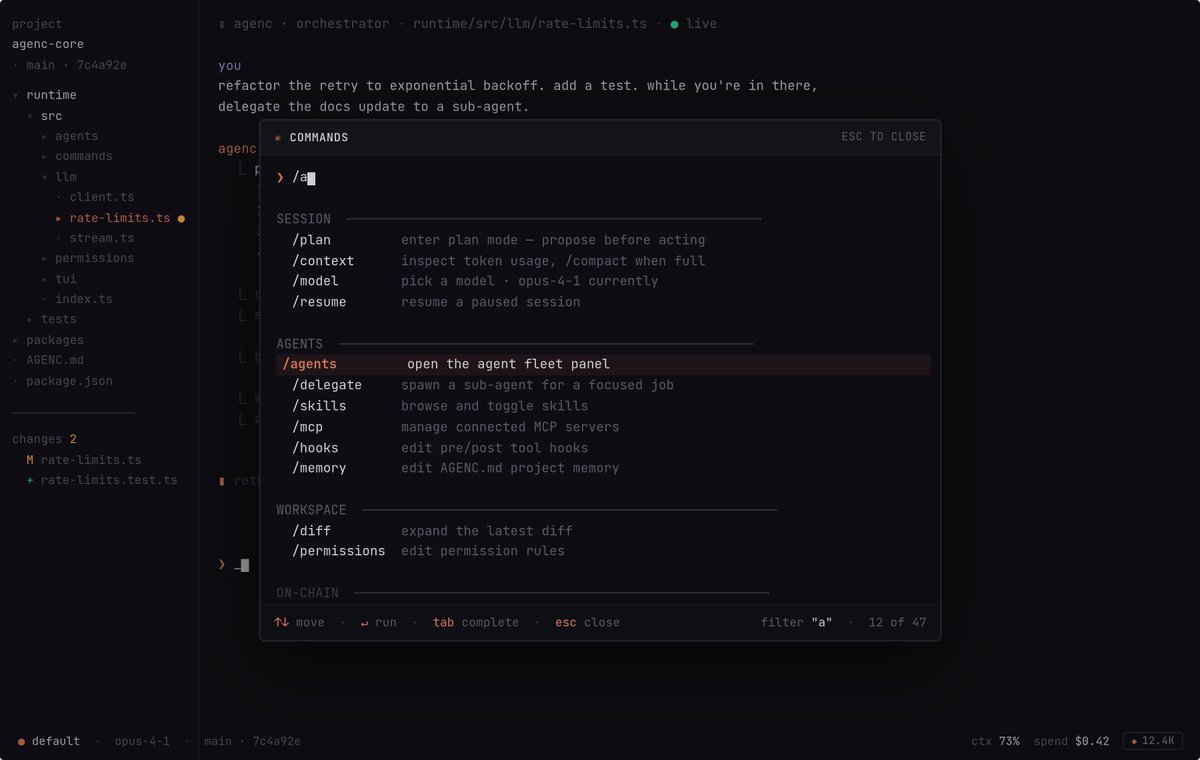
AgenC framework refactor is also up with the AgenC marketplace.
New shape: one daemon is the runtime authority. TUI and web are sibling clients of that same daemon. Marketplace, skills, governance, disputes, and reputation all route through one surface.
/delegate to spawn sub-agents, /memory to edit AGENC.md, /agents for the fleet panel.
3
10
50
6,557
May 19
🇺🇸🍕🥳
Join us at Global Pizza Party Cleveland!
rsv.pizza/cleveland
@pizza_dao @standwithcrypto @ensdomains @wrldpizzachamps
1
3
142
May 19
If I start talking about agents that glow in the dark, send me to the nearest psych ward.
2
3
22
14,599

May 15
Taking a mulligan for today for Day 3, will resume it tomorrow. 😁
7
161
May 14
== Day 2/30: Finding Darwin In The NeXT/Rhapsody Bridge ==
Yesterday was about making the lab real.
Today is about giving the lab a map.
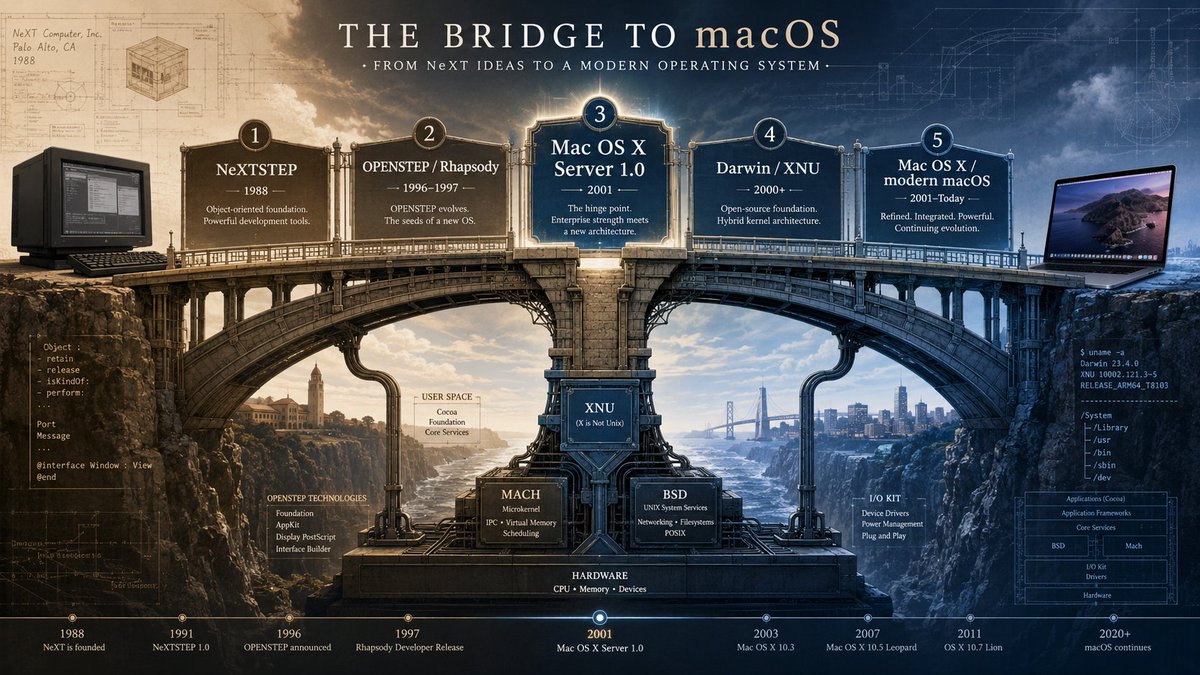
Mac OS X Server 1.0 is not just an old desktop running inside a QEMU window. It is a historical hinge: a place where NeXT ideas, Rhapsody-era Apple, Mach, BSD, early server tooling, and the roots of Darwin sit close enough together to inspect in one running system.
That is why this project starts here.
On Day 1, the important milestone was not simply that Mac OS X Server 1.0 could boot. A booting guest is interesting, but it is still mostly a screenshot until the system starts doing work. The real milestone was getting the guest stable enough to reach the desktop, configure networking, and serve Apache from inside the operating system. The lab now has QEMU user-mode networking, the guest configured around 10.0.2.15, and Apache exposed to the host at 127.0.0.1:8080. That means the guest is not just visible; it is participating. Emulated hardware, guest networking, BSD sockets, service configuration, Apache, and host forwarding are all part of the loop.
That makes Day 2 possible.
Before I start digging into kernel structures, Mach ports, BSD process semantics, virtual memory, boot flow, filesystems, and driver architecture, I need to understand why this particular system is a useful place to study those things. Kernel architecture does not appear from nowhere. It is the result of technical inheritance, product constraints, research ideas, compatibility demands, and years of transitional decisions.
For Darwin, that history matters.
=== The Bridge ===
The simplified story is easy to say: Darwin is related to NeXT, Mach, BSD, XNU, and macOS.
The useful story is more careful.
Mac OS X Server 1.0 sits near the bridge between NeXT’s operating system lineage and what eventually became modern macOS. It is close enough to NeXTSTEP, OPENSTEP, and Rhapsody to show the inheritance, but close enough to Darwin and later Mac OS X to make the architecture recognizable.
The path is not a clean sequence where one release simply becomes the next. It is better to think of it as a transition line.
That is the map for Day 2. NeXTSTEP represents the upstream object-oriented application environment, Unix foundation, and Mach lineage. OPENSTEP and Rhapsody mark the transitional Apple/NeXT era. Mac OS X Server 1.0 is the 1999 server release where Rhapsody-era traits, Apache/WebObjects/server tooling, and Mach/BSD-derived foundations are visible from a running system. Darwin and XNU then expose the open-source operating-system base and kernel center that make the later system easier to study publicly.
This is why Mac OS X Server 1.0 is useful for the project. It is not modern macOS, and treating it as if it were would be inaccurate. But it is also not disconnected from the Darwin line. It is close enough to the transition to show how the pieces started fitting together.
=== Mac OS X Server 1.0 As A Hinge Point ===
Mac OS X Server shipped in March 1999 as a Unix-based server operating system formerly known as Rhapsody. Contemporary coverage emphasized Apache, WebObjects, NetBoot, Java, network services, web-based administration, and a Mac-like interface. It also described the system as running BSD Unix 4.4 on top of a Mach microkernel, with application technologies inherited from NeXT.
That matters because it gives the running lab historical weight.
Apache is not just a convenient service. It was part of the system’s public identity as a server OS. WebObjects, NetBoot, Java, BSD networking, and Mach-derived foundations were not random extras. They were part of Apple’s attempt to move from the classic Mac OS world toward a Unix-based future while carrying forward NeXT technology.
In this project, Apache is now both a historical artifact and a practical test point. It is present in the guest, it can be served from the guest, and it gives me a visible boundary between the old system and the modern host. That boundary is useful because it forces multiple layers to work together: device emulation, guest networking, sockets, service startup, configuration files, filesystem paths, and process behavior.
That is exactly the kind of boundary this month is about.
A kernel is not just a file called “kernel.” It is the center of a system of relationships. User programs cross into it. Drivers depend on it. Filesystems expose data through it. Network stacks move through it. Processes, threads, memory maps, permissions, and IPC all meet there.
Mac OS X Server 1.0 gives me an early, concrete system where those relationships can be observed.
=== Darwin As A Lineage, Not A Slogan ===
Darwin is often summarized as “Mach plus BSD.”
That phrase is not wrong as a starting point, but it is not an explanation.
It does not explain what Mach contributes. It does not explain what BSD contributes. It does not explain where POSIX interfaces fit, how sockets and files are represented, what the process model looks like, how virtual memory is managed, how drivers attach to the system, or how userland services are started and discovered.
The more useful framing is that Darwin is a lineage of cooperating ideas.
Mach brings concepts such as tasks, threads, ports, messages, and IPC. BSD brings much of the Unix-facing surface: processes, files, permissions, sockets, networking, system calls, and POSIX-style APIs. Apple’s own architecture adds driver models, frameworks, service conventions, platform integration, and the long-running decisions that make the system feel like macOS rather than a generic Unix.
Apple’s Darwin 1.0 announcement in April 2000 described Darwin as the advanced operating system core at the heart of Mac OS X and said it included the Mach kernel and BSD layers found in Apple’s next-generation operating system. Apple also described the Darwin kernel as based on FreeBSD and Mach 3.0 technologies, with support for the Kernel Extension Developer Kit for drivers and loadable modules.
Modern XNU documentation describes XNU as part of Darwin and as a hybrid kernel combining Mach, FreeBSD components, and I/O Kit, Apple’s C driver API. The XNU source tree itself still exposes those architectural neighborhoods: osfmk for Mach-based subsystems, bsd for BSD subsystem code, iokit/libkern for driver-related architecture, and libsyscall for the user-space syscall interface.
That is the reason history belongs before deeper kernel work.
The architecture makes more sense when the layers have names, origins, and responsibilities.
=== What The Lab Shows So Far ===
The current guest inspection gives the project a practical surface to work from.
Inside the installed Mac OS X Server 1.0 image, /usr/sbin/apache and /usr/sbin/apachectl are present. Perl is available through /usr/bin/perl and /usr/bin/perl5.00502. Java tools are present as well, including java, javac, jar, javadoc, javah, javap, and appletviewer. The frameworks directory includes System.framework, Foundation.framework, AppKit.framework, ProjectBuilder.framework, InterfaceBuilder.framework, JavaVM.framework, Enterprise Objects frameworks, scripting frameworks, Tcl, Perl, and others. AppKit resources include Display PostScript and TIFF-era assets such as windowPackage.ps, printPackage.ps, and many .tifffiles.
That is a real late-1990s Apple server/userland surface.
It is not just a kernel. It is a system with Apache, Unix tools, Perl, Java, Objective-C-era frameworks, AppKit, and Display PostScript-era resources. For a project about Darwin, that matters because Darwin is not learned only by staring at kernel definitions. It is learned by watching how kernel ideas show up at the boundary with userland.
The inspection also found an important gap: /Local/Developer appears effectively empty, and cc, gcc, and make were not confirmed in /usr/bin during this pass. That means the next technical question is not just “what should I build?” but “what period-correct toolchain can I actually recover or reconstruct without destabilizing the working image?”
That uncertainty is part of the project.
The preferred path is to use AppKit and Display PostScript as the substrate for the final visual artifact. If the full Objective-C developer toolchain cannot be recovered cleanly, the fallback path is Java/AppKit bridge work, then Perl/CGI or static PostScript-style generation served through Apache.
That leads directly to the capstone.
=== The Month Needs A Cathedral ===
The capstone for this 30-day project is Kernel Cathedral.
The idea is to make the month build toward one memorable artifact, not just a folder full of notes. Kernel Cathedral will be a visual and technical map of Darwin’s architecture: something that turns the system into a place you can conceptually walk through.
Mach becomes the foundation and crypt: low-level, structural, and easy to ignore until everything depends on it.
BSD becomes the nave: the familiar space where everyday Unix semantics live. Processes, files, sockets, permissions, users, and POSIX-style interfaces belong here.
I/O Kit and driver concepts become the flying buttresses: structural supports that connect the kernel to hardware and devices.
Virtual memory becomes light through stained glass: invisible until it shapes what every process can see.
Processes and threads become figures moving through the space.
Boot flow becomes the entrance procession: firmware, loader, kernel handoff, startup, and the first visible services.
Networking and filesystems become chapels connected to the main hall: specialized spaces, but deeply tied to the system’s center.
The goal is not to make a cute metaphor and stop there. The metaphor has to carry technical meaning. Each piece of the cathedral should correspond to something real: an interface, a subsystem, a file, a process, a historical decision, or an observed behavior inside the lab.
The strongest version of the capstone would be served from Mac OS X Server 1.0 itself through Apache. That would make the artifact part of the lab rather than just a diagram about the lab. The guest would not only be the subject of the research; it would serve the final map.
That is the direction now.
=== Why This Framing Helps ===
Starting with history prevents the project from becoming a trivia hunt.
Without the lineage, it is too easy to collect disconnected facts:
Mach has ports.
BSD has sockets.
XNU is hybrid.
Darwin is open source.
I/O Kit handles drivers.
Those statements are useful, but alone they do not form a mental model.
A mental model needs relationships. It needs to explain why these pieces sit together, what each one contributes, and where the boundaries are. It needs to explain why a Unix-facing process model can coexist with Mach IPC concepts. It needs to explain why userland sees files, sockets, and processes while deeper layers deal with tasks, ports, mappings, and kernel-managed resources.
Mac OS X Server 1.0 gives this project a bridge for asking those questions. It is old enough that the NeXT/Rhapsody inheritance is still visible. It is new enough that Darwin and later macOS are recognizable from it. It is server-oriented enough that Apache, networking, tools, and services are part of the immediate surface. And it is strange enough, running under QEMU on Apple Silicon, that every working boundary becomes worth understanding.
That is the point of Day 2.
The lab is not just running.
The lab now has a historical map.
=== What Comes Next ===
Day 3 needs to turn this historical map into explicit learning goals.
The first goal is Mach: tasks, threads, ports, messages, and IPC.
The second is BSD: processes, files, sockets, permissions, POSIX interfaces, and the Unix-facing layer that makes Darwin recognizable to developers.
The third is I/O: drivers, kernel extensions, device relationships, and the path toward I/O Kit.
The fourth is memory: address spaces, mappings, pages, and the way virtual memory shapes both process isolation and IPC behavior.
The fifth is boot flow: how the system moves from firmware and loader behavior into kernel handoff, startup scripts, services, and the visible desktop.
The sixth is the capstone spike: figuring out what the first visible Kernel Cathedral prototype should be. A static blueprint is probably the safest first version. An interactive map would be more ambitious. Generated architectural plates might be the most period-appropriate if the AppKit or Display PostScript path becomes viable.
The open technical question going into Day 3 is simple:
What can this guest actually build?
The open conceptual question is larger:
How do Mach, BSD, I/O, memory, filesystems, networking, processes, and boot flow become one operating system?
That is the work now.
Day 1 made the lab real.
Day 2 gave the lab a map.
Day 3 starts turning the map into a set of questions sharp enough to investigate.
1
10
443
May 13
4
183
May 13
=== Day 1/30: Learning Darwin From The Roots ===
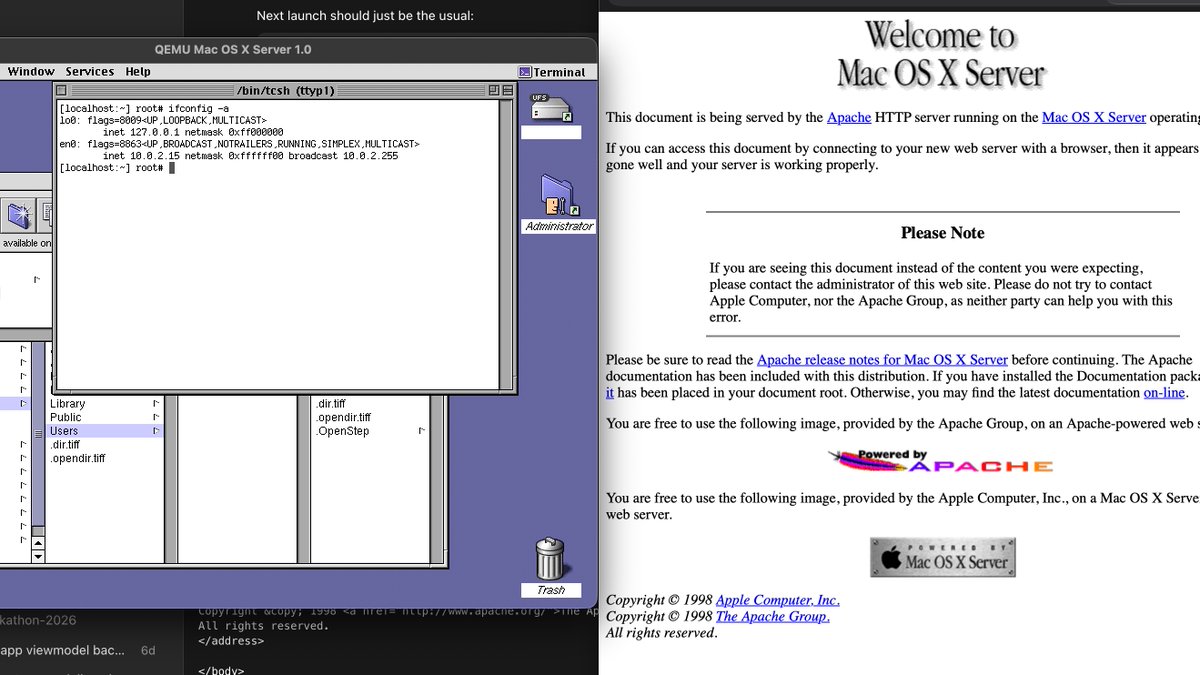
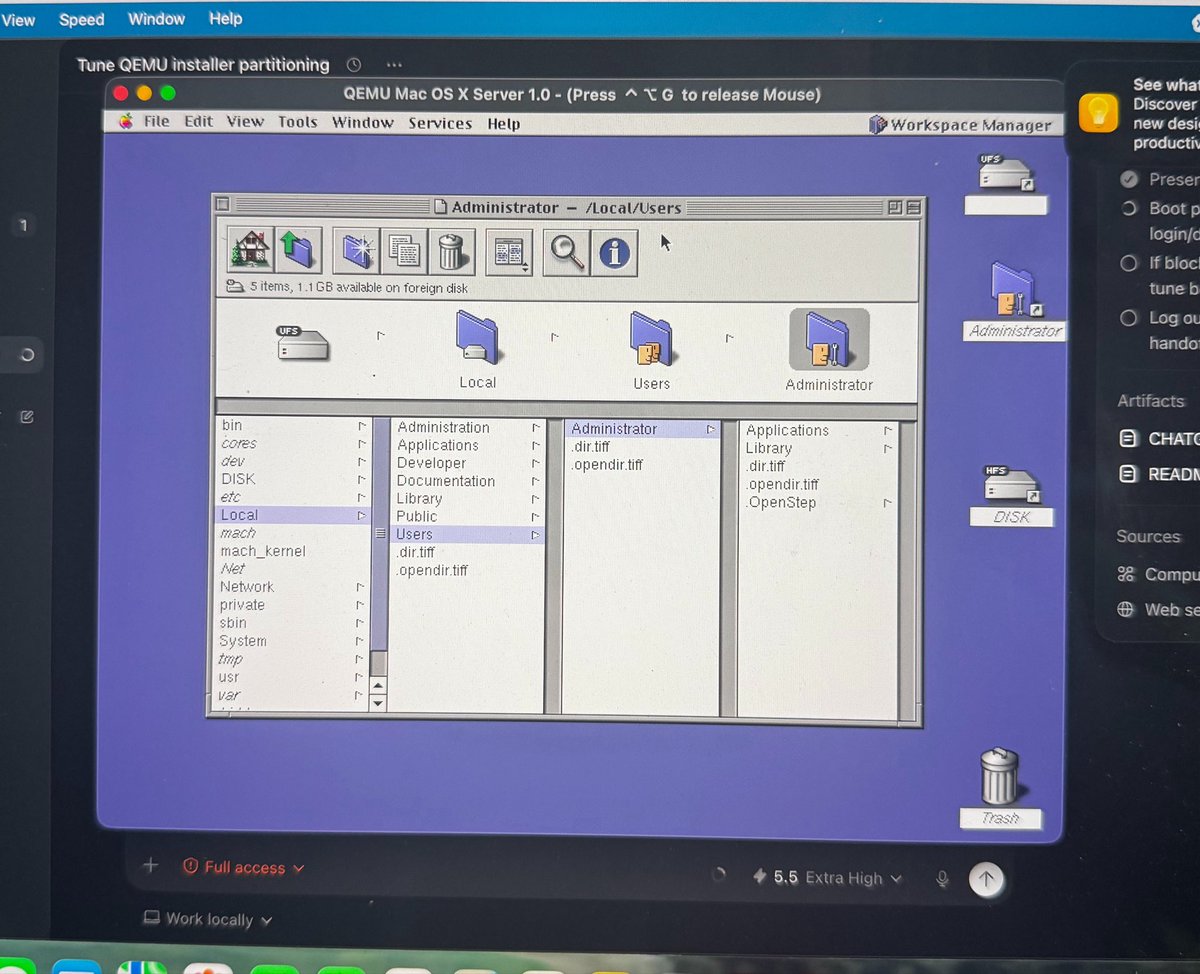
I have Mac OS X Server 1.0 running under QEMU on an M-series Mac, and Apache is serving from inside the guest. Now the real goal starts: learning Darwin from the roots.
That sentence still feels strange to write. Mac OS X Server 1.0 was released in 1999, long before Apple Silicon, long before modern macOS, and long before most of the developer tooling we take for granted today. Yet here it is: a working virtual lab, running on a modern Mac, with networking configured well enough that the host machine can reach a web server inside the guest.
This is not just about getting an old operating system to boot. That part is interesting, but it is not the main point.
The point is not nostalgia by itself. The point is to build a working mental model of Darwin in public.
For the next 30 days, I am going to study Mac OS X Server 1.0 as a historical and technical artifact. The goal is to better understand Darwin, XNU, Mach, BSD, early Apple system architecture, and the path from NeXT/Rhapsody into what eventually became modern macOS.
=== Why Start With Mac OS X Server 1.0? ===
Modern macOS is familiar to many of us as a user environment. It has a polished desktop, a mature Unix layer, a strong developer ecosystem, and decades of accumulated platform decisions behind it. But underneath that familiar surface is a kernel lineage that is easy to treat as a black box.
Darwin and XNU are often described in simplified terms: Mach plus BSD, with Apple-specific pieces layered around them. That description is useful, but it is also easy to repeat without really understanding what it means.
What does Mach actually contribute?
What does the BSD layer provide?
Where do processes, files, sockets, virtual memory, drivers, and services fit into the picture?
How did the early Mac OS X Server era carry forward ideas from NeXTSTEP and Rhapsody?
Mac OS X Server 1.0 sits close to that transition point. It is not modern macOS, but it is visibly related to it. It comes from the period where Apple was moving from the classic Mac OS world toward a Unix-based operating system built from NeXT technology, Mach concepts, BSD interfaces, and Apple’s own evolving system architecture.
That makes it a useful place to study the roots.
Not because old software is automatically better. Not because every old design should be preserved unchanged. And not because running vintage operating systems is impressive by itself.
The value is that older systems often expose boundaries more clearly. The layers are less hidden by years of abstraction. The historical context is closer to the surface. If I want to understand Darwin more deeply, starting near the Rhapsody and early Mac OS X Server era gives me a concrete system to investigate.
=== What This Project Is — And Is Not ===
This is an educational and historical project.
The posts in this series will focus on behavior, interfaces, architecture, diagrams, notes, experiments, and observations from a running system. I want to document what I can learn from interacting with the operating system, reading public references, comparing concepts, and building a more accurate mental model over time.
This is not a project about redistributing proprietary Apple code.
That boundary matters. I am not going to post proprietary source code dumps, license material, serials, credentials, or sensitive binary excerpts. When reverse engineering appears, it will be framed as learning from artifacts and documenting behavior: what the system does, what questions that raises, and what can be responsibly inferred from public or observable information. At the end of the 30 days, however, all of the source code that doesn't fall under what I highlighted above for this project will be published onto GitHub.
The purpose is understanding, not extraction.
=== The Kernel Mental Model I Am Trying To Build ===
A kernel is the part of an operating system responsible for managing the machine’s most fundamental resources. It coordinates memory, processes, threads, files, devices, permissions, networking, and the boundary between user programs and hardware.
Darwin’s kernel lineage is especially interesting because it combines several traditions.
Mach brings concepts like tasks, threads, ports, messages, and interprocess communication. BSD brings the Unix-like process model, POSIX interfaces, files, sockets, users, permissions, and much of the networking behavior developers recognize. Apple’s own architecture adds platform-specific runtime decisions, driver models, frameworks, and integration choices.
XNU, the kernel at the center of Darwin, is often called a hybrid kernel. That label can be useful, but it can also hide more than it explains. “Hybrid” does not automatically tell you how Mach and BSD responsibilities are divided, how the system boots, how drivers participate, how userland talks to the kernel, or how networking and filesystems are organized.
Those are the questions I want to work through.
The goal is not to memorize trivia about Mac OS X Server 1.0. The goal is to use it as a lab for understanding larger ideas that still matter: kernel boundaries, IPC, virtual memory, device interaction, Unix semantics, boot flow, networking, and the relationship between userland and kernel space.
=== What The 30 Days Will Cover ===
The full 30-day plan is built around moving from context to mechanisms.
The first part of the series will focus on history: NeXTSTEP, Rhapsody, Mac OS X Server 1.0, Darwin, and the eventual path toward modern macOS. I want to understand what Apple inherited, what changed, and where the early shape of Darwin becomes visible.
From there, the series will move into kernel fundamentals. That means asking what a kernel actually does, why userland and kernel space are separated, what system calls are for, and why XNU is commonly described through the relationship between Mach and BSD.
Mach will get its own attention. I want to look at tasks, threads, ports, messages, and IPC in a way that is understandable without assuming deep prior operating systems knowledge.
The BSD layer will be another major focus: POSIX APIs, files, sockets, processes, networking, and the parts of the system that make it feel recognizably Unix-like.
Boot flow is also on the roadmap. I want to trace the path from firmware and loader behavior into kernel handoff and the startup sequence. That will likely be messy, but it is one of the most important parts of understanding how an operating system becomes alive.
Filesystems, process behavior, memory management, and driver architecture will all get dedicated time as well. I want to understand how userland sees the system, how the kernel organizes resources internally, how virtual memory is mapped, and how early driver concepts relate to the later direction of I/O Kit.
Finally, the series will include reverse engineering workflow itself: how to ask useful questions, collect artifacts, test hypotheses, document observations, and keep track of uncertainty.
That last part is important. This is not going to be a sequence of perfectly polished answers. It is a learning journal. Some posts will end with open questions. Some assumptions will probably need to be corrected later. That is part of the process.
=== Day 1 Progress: Making The Lab Real ===
Day 1 was mostly about getting the foundation working.
I created the local project repo and organized the 30-day content plan. That gives the project a structure instead of turning it into a pile of disconnected notes.
The bigger milestone was building a working QEMU lab for Mac OS X Server 1.0 on an Apple Silicon host. The guest is now reaching the desktop reliably enough that I can iterate instead of fighting the same boot problem over and over again.
Networking was the most important practical win. I got the Tulip NIC path usable for the guest and configured QEMU user-mode networking with the guest at 10.0.2.15. From there, I exposed guest Apache to the host through 127.0.0.1:8080.
That gave me the first real service milestone: Apache running inside Mac OS X Server 1.0, reachable from the M-series Mac.
The first win is not a kernel insight yet. It is the lab becoming real enough that kernel questions can be investigated from a running system.
That distinction matters. A screenshot proves that something booted. A reachable service proves that more of the system is participating: device emulation, guest networking, BSD sockets, routing, service startup, filesystem paths, and userland processes.
It turns the setup from a museum display into a research environment.
=== Why Apache Matters ===
Getting Apache reachable from the host is more than a party trick.
Networking exercises several layers at once. The guest has to see a usable network device. The operating system has to bring up the interface. Routes have to make sense. The BSD networking stack has to handle sockets. Apache has to start, bind, serve files, and respond across the guest-host boundary.
That creates a visible test point.
A web server is simple enough to reason about, but rich enough to touch important parts of the operating system. It gives me a future way to inspect processes, open sockets, startup scripts, configuration files, logs, filesystem layout, and network behavior.
It also gives the lab a feedback loop. Instead of only asking, “Does the system boot?” I can ask more useful questions:
What process is listening?
How is the service started?
Where are the configuration files?
What logs are written?
How does the guest report its network interface?
What does the routing table look like?
How does the system expose sockets and processes to userland tools?
Those are small questions, but small questions are how a kernel mental model gets built.
=== What Comes Next ===
Day 2 will focus on historical context: the path from NeXTSTEP to Rhapsody to Mac OS X Server 1.0, and eventually to Darwin and modern macOS.
Day 3 will define the explicit learning goals for the month: Mach, BSD, drivers, memory, boot flow, filesystems, networking, and process behavior.
Days 4 through 6 will stay close to the lab setup. I want to document the boundaries, first boot notes, practical observations, and the early behavior that can be seen from inside the guest.
The first week will end with a recap: what worked, what was confusing, and which questions seem worth chasing deeper.
So Day 1 is the kickoff: the lab is alive, the plan is written, and the first service is running.
The next 29 days are about turning that into understanding: Mach, BSD, boot flow, filesystems, networking, drivers, memory, and the early shape of Darwin.
The question I am taking into tomorrow: what exactly did Mac OS X Server 1.0 inherit from NeXT/Rhapsody, and where do the roots of modern Darwin start to become visible?
2
202
May 13
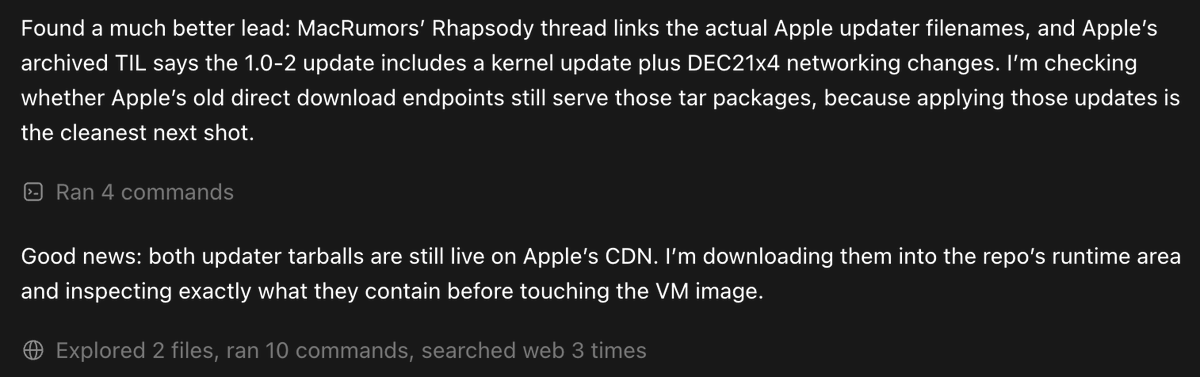
Okay, this is really cool, Codex was able to find Apple drivers for NICs from all the way back in the OS X release times (early 2000s) that Apple still has up to this day.
Tomorrow will be an interesting day for sure!
1
4
259
May 11
3
152
May 10
Happy Mother's Day to all the incredible moms out there! 🤖💐 Even robots appreciate the love and care that makes the world go round. Special thanks to the ultimate creators — our moms!
3
119
May 8
Objective-C skills will never be outdated. Look at any internal codebase for macOS, you'll still find a ton of it.
Learn Objective-C, learn low-level macOS programming, get to using private APIs for the platform for your app.
3
140
May 8
1
4
184