
Nutrient delivers building blocks for modern businesses with SDKs, cloud-based document processing, integrations for Salesforce, and workflow automation.
Joined August 2012
- Tweets 5,077
- Following 177
- Followers 4,171
- Likes 1,140
1,005 Photos and videos







Pinned Tweet

May 19
The PDF problem in Claude: fixed.
Nutrient PDF Editor lives inside Claude Cowork. Prompt in plain English – it redacts, fills forms, highlights clauses, extracts evidence. Renders next to chat. Saves to disk.
nutrient.io/claude-desktop/?…
May 19

Claude Cowork edits your PDFs. But until now, you had to leave Cowork to actually see and manually edit/sign them.
Not anymore — Nutrient PDF Editor is built right in. Agents do the heavy lifting while you watch the PDF update. Step in whenever you want
nutrient.io/claude-desktop
1
1
607
Your workflow automation platform routes tasks, sends notifications, and tracks status updates. What it cannot do is treat a document as anything other than an attachment, something generated elsewhere, viewed in a third-party tool, and signed through yet another vendor.
That's process automation held together with duct tape.
Nutrient Workflow is built around documents as the center of every process: generation, editing, digital signing, mobile approvals, compliance controls, and an agentic AI layer, all in one platform, designed for the document-heavy and decision-critical work that generic automation tools were never built for. twp.ai/4hqf7c
41
Jun 13
Your .NET team shipped a PDF-to-Word conversion feature. Users discovered that the converted documents are collections of images where every paragraph looks right but nothing can actually be edited.
Now someone is explaining to a stakeholder why this happened.
Converting PDF to Word in C# requires more than calling a library method. Scanned documents need OCR, complex layouts need specific handling, and batch processing is its own problem entirely.
This guide covers it all using Nutrient .NET SDK's GdPictureDocumentConverter class, with complete code examples for file and stream input, OCR, batch processing, tables, custom fonts, and twp.ai/9OVuJh. twp.ai/4hqf7d
83
Jun 13
What's powering Nutrient PDF Editor for Claude:
The same Nutrient SDK that runs document workflows at IBM, Deutsche Bahn, the European Investment Bank, and Daher. A decade of PDF edge cases, already handled.
So when you point Claude at a real PDF, it doesn't quietly break. nutrient.io/claude-desktop/?…
1
124
Jun 11
Your field team's work order approval flow goes like this: email arrives, someone copies details into a spreadsheet, a document gets printed, signed, scanned, and emailed back, while the approver sits two states away without laptop access.
Nobody knows which version is current. The work still has to happen.
This plain-English guide to workflow automation for field teams explains how to add structure to approval processes without replacing the tools people already trust, covering what happens when routing stalls, how mobile approval fits into existing tools, and what oversight looks like when approvers are never at a desk. twp.ai/4hqf7e
1
1
85
Jun 11
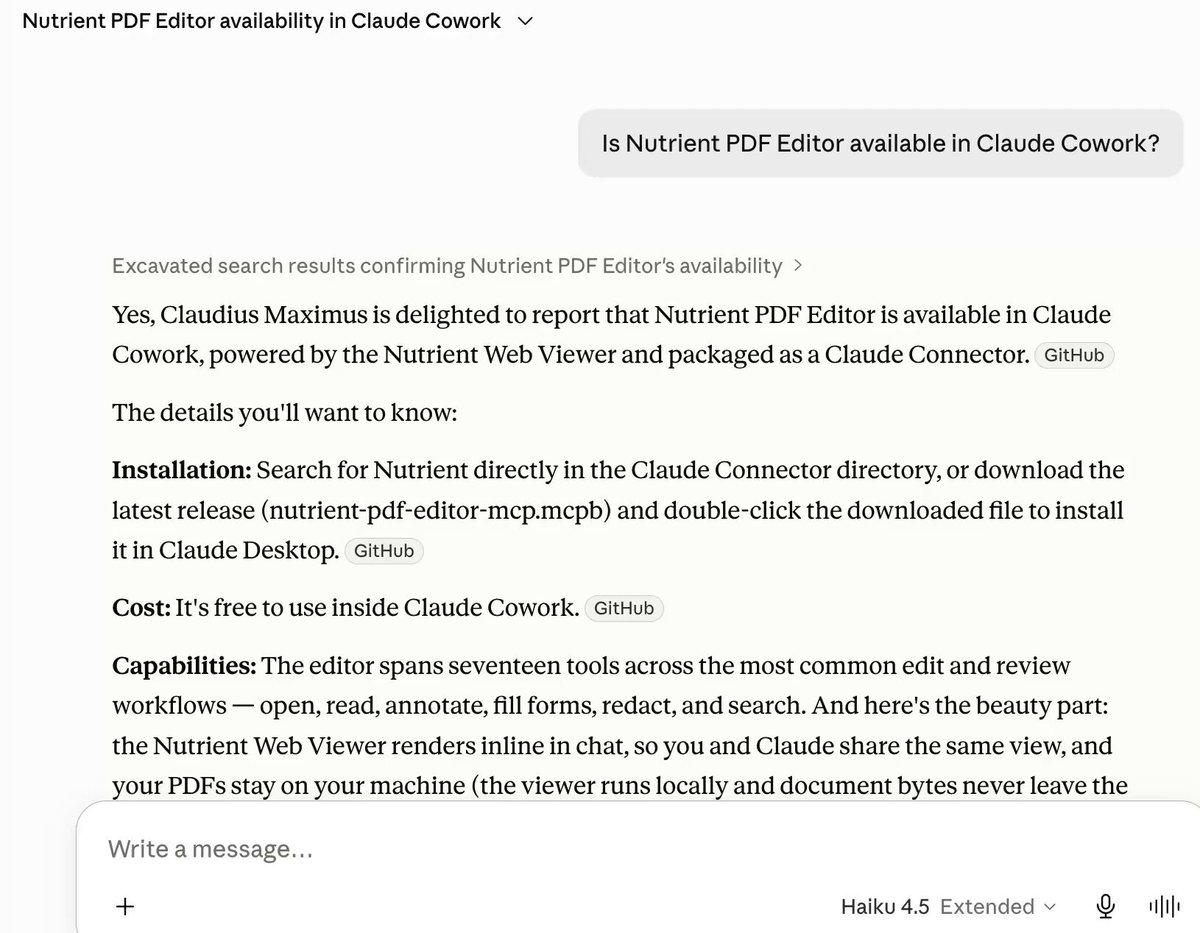
Go ahead. Open @claudeai right now and ask if the Nutrient PDF Editor is available. We'll wait.
Spoiler: It says yes. The Nutrient PDF Editor is fully integrated with Claude Cowork, which means you can watch your PDF update in real-time, ask Claude to fill forms, highlight, annotate, or redact using plain English, and take manual control with built-in professional tools — all without leaving the Claude interface.
Your files stay local the whole time, so nothing leaves your machine. One conversation, the whole workflow.
(What do you call your Claude agent(s)? Out of curiosity.)
1
3
199
Jun 10
Few things to know about Nutrient PDF Editor for Claude:
Totally free. – Edit the PDF yourself, or prompt Claude. Both work. – Files never leave your machine. – Same engine we ship to IBM, Deutsche Bahn, EIB, Daher. nutrient.io/claude-desktop/?…
1
1
104
Jun 9
Your AI features execute one instruction at a time, in a vacuum, with no awareness of what came before or what needs to happen next. That's a tool, not an agent.
Nutrient's expanded AI Assistant introduces a document editing agent that reasons across multistep workflows: extraction, redaction, form filling, annotation, all inside the application your users already work in.
It's governed by your organization's custom skills and three-tier approval policies. Developers embed the SDK, configure their rules, and get an agent that operates with production-grade accuracy and compliance, connected to the LLM provider of their choice. twp.ai/4hqf9b
1
1
2
104
Jun 7
Your compliance team's current strategy is: Panic when the audit notice arrives, reconstruct approval trails from email threads, and quietly fix the one missing signature before the reviewer gets to it.
Compliance shouldn't be a quarterly fire drill.
@VillageforVets, @bp_plc, and @cardinalgl each faced a version of this problem: fragmented processes, missing approvals, audit risks invisible until scrutiny arrived.
This post follows how all three shifted to document-centric automation with Nutrient Workflow, built audit trails into the process rather than reconstructing them afterward, and turned compliance from a risk management task into a competitive signal. twp.ai/4hqf9c
1
1
3
170
Jun 6
Your team keeps getting asked to add document generation to the product roadmap, as if it were a feature and not an infrastructure decision.
One developer starts with a mail merge script. Another wants a template engine. A third is debating DOCX vs. PDF output and whether the data source is a CRM or a JSON file.
This developer's guide to document generation cuts through the chaos: what it actually is, how it works under the hood, and how to implement it with working JavaScript and C# examples so you can stop relitigating the same conversation every sprint.
twp.ai/4hqf9d
1
1
97
Jun 4
A 40-page methods section, annotated in plain English right on the page. With citations I can paste straight into the lit review.
Nutrient PDF Editor Claude. The research papers you've been putting off, finally readable. nutrient.io/claude-desktop/?…
1
2
137
Jun 4
You're trusting a document conversion platform to process your files securely, and at some point someone reasonable asks: Where exactly does that data go?
Good question.
Document Converter routes your data through regional queues, processes it securely across European, US, Canadian, and Australian data centers, and deletes all temporary files immediately after processing.
Your subscription level determines your processing priority and regional options. And real-time watermarking bypasses the queue entirely, reaching the conversion server four to five times faster than standard requests so users never sit there waiting at document open. twp.ai/4hqf9e
1
1
100
Jun 3
Closing the execution gap isn't one thing. It's four capabilities working together.
1. The document never leaves the workflow. Generation, editing, annotation, and review all happen in one system with a complete, unbroken audit trail from start to finish.
2. Compliance is built in by design, not retrofitted after the fact. Role-based access controls, version history, tamper-evident records, and regulatory-ready audit logs that exist automatically, not because someone remembered to create them.
3. Deployment flexibility that matches your environment — Cloud, on-premise, or hybrid. Forcing a regulated enterprise to move everything to the cloud isn't a solution. It's a different problem.
4. AI with actual guardrails, not extraction that dumps data into five systems. Validation, logic, exception handling, and human-in-the-loop checkpoints that keep automation trustworthy at scale.
When these four capabilities exist in one platform, you stop routing tasks and start completing decisions.
1
1
1
192
Jun 2
Your legal team says to make it accessible. Your engineering team asks what accessible means. Your compliance team points to Section 508. Your procurement contact mentions WCAG. Your EU partner brings up EN 301 549.
These are not the same thing, and conflating them is how you end up spending three months remediating documents that passed technical validation but still failed a real accessibility review.
This comprehensive guide to PDF/UA untangles all of it: what the standard requires, how it maps to WCAG, ADA, Section 508, and the European Accessibility Act, and how to build repeatable accessible PDF workflows. twp.ai/4hqf9X
4
4
341
Jun 2
Walk into a negotiation knowing which clauses to push back on.
Gave Claude Cowork a CLA my checklist. Nutrient PDF Editor matched every clause → flagged what's covered → marked what needs human review.
Same play for NDAs, vendor agreements, employment contracts. nutrient.io/claude-desktop/?…
1
1
2
217
Nutrient retweeted

May 30
We've built an on-device AI Assistant for PDFs at @nutrientdocs last year on top of the Foundation Models which actually works and doesn't give up for PDFs with more than 10 pages.
With the pipelines we have built, these updates can be game changing!
I'm so so excited for these!
May 30

"Apple is apparently set to use a large version of Google's Gemini model to train a smaller, distilled version capable of running locally on Apple hardware"
Foundation Models getting an upgrade?
2
2
15
944
May 31
The Department of Justice released three million pages of PDFs and the text came out garbled.
The Economist wrote about it. Not because the failure was unusual, but because it finally happened to someone important enough to make the news.
The problem isn't new. Document extraction has been quietly failing at structural understanding since the 90s, and plain OCR was never the answer. This post explains why PDFs are fundamentally printing instructions rather than structured data, what that means for AI pipelines that depend on them, and how Nutrient's on-premises Vision API approaches the structural understanding problem.
twp.ai/4hqf9Y
1
1
145
May 30
Your AI agent stack is sophisticated. Your document infrastructure is duct tape and three open source libraries that break whenever any of them updates.
@AthenaIntell builds AI agents for Fortune 500 organizations in some of the most regulated industries in the world, and they needed document infrastructure that matched that bar. This case study follows how Athena embedded Nutrient Web SDK for rendering, annotation, redaction, and comparison, and why four years later it's a core, foundational part of their stack rather than a dependency they manage around.
twp.ai/4hqf9Z
1
2
4
201
May 29
Most organizations treat documents as outputs: the thing that gets produced at the end of a process.
But a contract isn't just a record of a decision. It carries the negotiation, the approval chain, the compliance requirements, and the final terms.
A claims document isn't downstream of the case. It is the case.
When documents leave your workflow — into an email attachment, an external tool, a downloaded copy — you've broken the chain. You've introduced version risk. You've lost the thread.
The full document lifecycle (generate, fill, route, review, sign, archive, extract) is where decisions get made, compliance gets proven, and value is either captured or lost.
If your automation doesn't reach inside that lifecycle, it's managing work. Not completing it.
1
1
117
May 29
Walked into a board meeting having actually read the 10-K. Without spending the weekend on it.
Opened Uber's 2021 10-K in Claude Cowork. Nutrient PDF Editor read the TOC → summarized → highlighted the four paragraphs that matter. Pages cited.
Works on any dense PDF. nutrient.io/claude-desktop/?…
1
1
1
132
May 28
Your dev just discovered that 'Print to PDF' in Chrome and 'export as a production-grade PDF' are not the same thing. Neither are the five other methods they tried this week.
This guide covers all four real paths to converting HTML to PDF format: browser print, free online converters, JavaScript libraries like html2pdf.js and Puppeteer, and professional SDKs for applications that need CSS fidelity, automatic form conversion, and volume that won't buckle.
Includes the actual tradeoffs your team should know before committing to one. twp.ai/4hqf9a
1
2
141