
Joined January 2024
- Tweets 257
- Following 14
- Followers 3
- Likes 194
7 Photos and videos

11 Apr 2024
Done with the series....
Planning for something related to it...
Stay tuned
2
46
10 Apr 2024
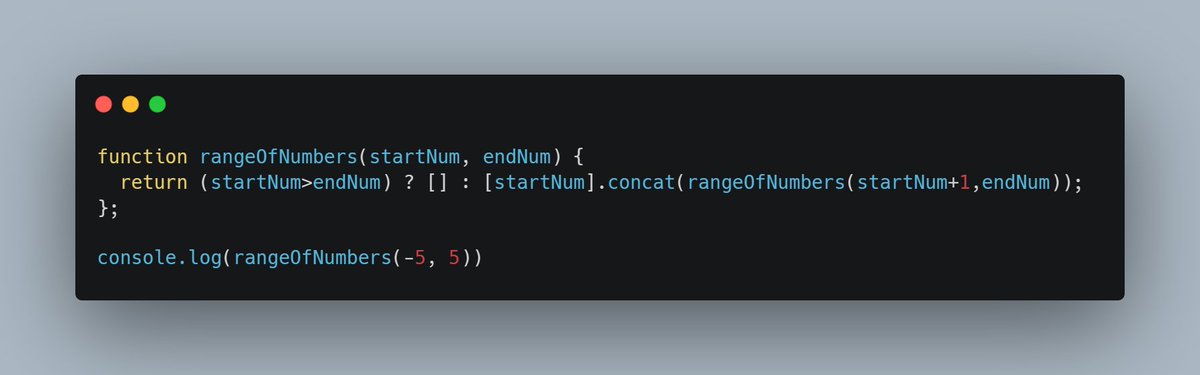
#Day62 of learning #javascript from scratch... click on the tweet to view full content. Today we will learn to Use Recursion to Create a Range of Numbers
1
2
45
10 Apr 2024
Output for the given parameters is: [ -5, -4, -3, -2, -1, 0, 1, 2, 3, 4, 5 ]
2
46
9 Apr 2024
#Day61 of learning #javascript from scratch... click on the tweet to view full content. Today we will learn to Use Recursion to Create a Countdown
1
1
41
9 Apr 2024
The value [1, 2, 3, 4, 5] will be displayed in the console.
At first, this seems counterintuitive since the value of n decreases, but the values in the final array are increasing.
1
1
32
9 Apr 2024
This happens because the push happens last, after the recursive call has returned. At the point where n is pushed into the array, countup(n - 1) has already been evaluated and returned [1, 2, ..., n - 1].
1
12
8 Apr 2024
#Day60 of learning #javascript from scratch... click on the tweet to view full content. Today we will learn to Use Multiple Conditional (Ternary) Operators
1
1
15
8 Apr 2024
It is considered best practice to format multiple conditional operators such that each condition is on a separate line, as shown above. Using multiple conditional operators without proper indentation may make your code hard to read. For example:
1
1
13
8 Apr 2024
function findGreaterOrEqual(a, b) {
return (a === b) ? "a and b are equal" : (a > b) ? "a is greater" : "b is greater";
}
1
11
7 Apr 2024
#Day59 of learning #javascript from scratch... click on the tweet to view full content. Today we will learn to Use the Conditional (Ternary) Operator
1
1
10
7 Apr 2024
The following function uses an if/else statement to check a condition:
function findGreater(a, b) {
if(a > b) {
return "a is greater";
}
else {
return "b is greater or equal";
}
}
1
1
12
7 Apr 2024
This can be re-written using the conditional operator:
function findGreater(a, b) {
return a > b ? "a is greater" : "b is greater or equal";
}
1
7