
Life matters, nature is gorgeous, technology as a friend, teaching is power. Difference between a mountain and a molehill is your perspective. RT ≠ endorsement.
Joined July 2010
- Tweets 78,003
- Following 1,868
- Followers 790
- Likes 21,670
11,791 Photos and videos













Francisco Javier Ferreyra López retweeted

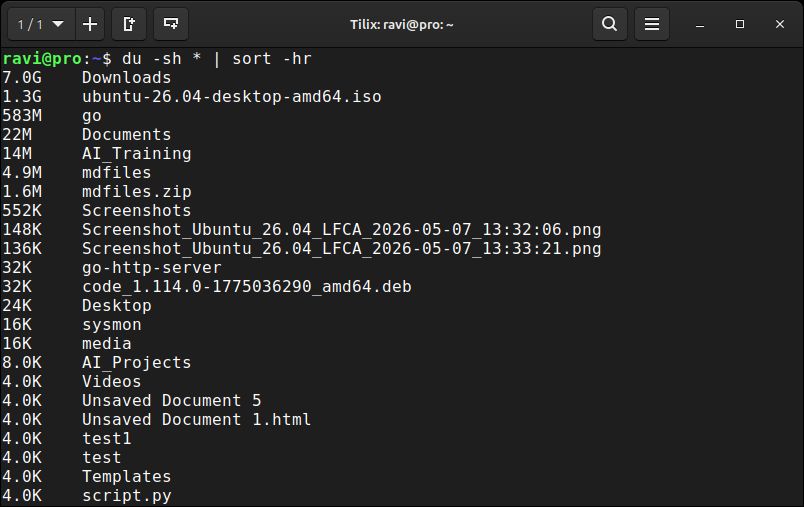
💡 Quick Linux Tip #19
Your disk is almost full, but you can't figure out which folder is taking up all the space.
Here's a quick command:
du -sh * | sort -hr
This shows the size of each folder in your current directory.
Instead of opening folders one by one, Linux sorts them from largest to smallest.
The biggest folders appear at the top, making it easy to spot what's using your storage.
Follow @tecmint for more #Linux tips
2
15
79
2,547

Francisco Javier Ferreyra López retweeted

No importa cuánto tiempo hayas perdido, salva el resto de tu vida.
9
230
1,063
21,048


Nunca he sido de los que publican cosas a favor de un político mexicano…
4
Por qué los políticos arreglan cualquier error con una disculpa, y eso si se les da la gana reconocer el error.
1


The MacBook neo reminds me of the first MacBook I had back in 2006…
58
Francisco Javier Ferreyra López retweeted
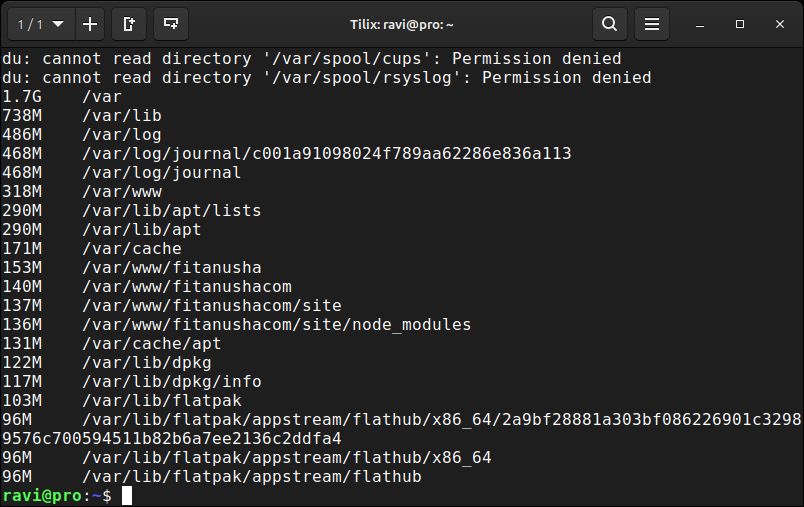
💡Quick Linux Tips #18
Your disk is almost full, but you have no idea what's consuming the space.
Here's a quick way to find the biggest files and folders:
du -ah /var | sort -rh | head -20
This shows the 20 largest files and directories inside /var.
Instead of manually checking every folder, Linux sorts everything from largest to smallest so you can spot storage hogs immediately.
The -a option includes both files and directories, while sort -rh sorts sizes in human-readable format.
Follow @tecmint for more #Linux tips
2
38
169
6,172
Aveces se te presentan ofertas tentadoras, pero no debes dejar que estas te desvíen de tus objetivos.
8