
Joined January 2011
- Tweets 1,271
- Following 819
- Followers 932
- Likes 543
390 Photos and videos












Jun 6
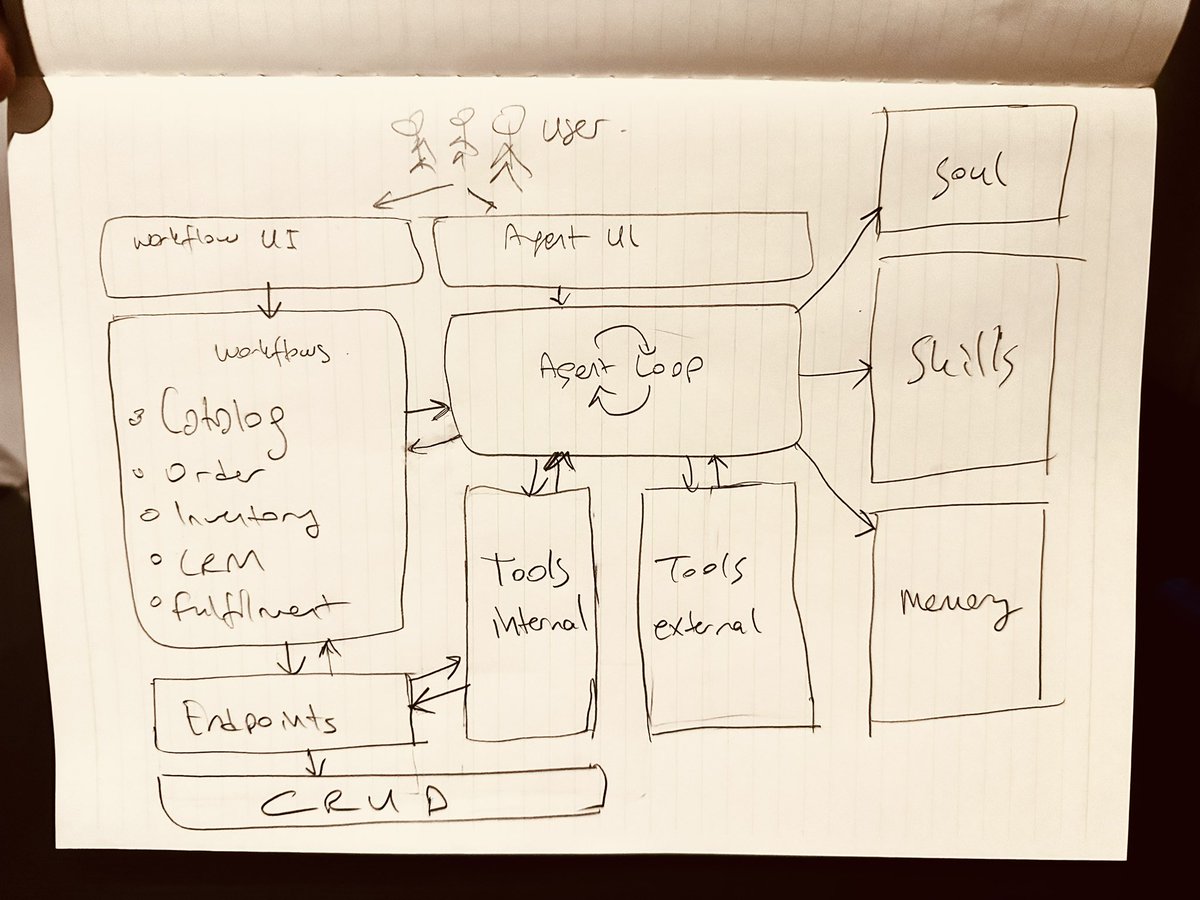
For a long time, I stick to Opus models 4.6 to 4.8, but recently see GPT 5.5 is doing a great job especially while re-architecting the system. I feel it is stronger to abstract the high level system and provide better solutions for an improved architecture.
53
Kemal Erol retweeted

May 30
Mobile Update v3.6.2 – Shipped now.
Small steps towards a great AI harness.
- Smarter image follow-ups: Folio now better understands previous image outputs as editable results. The AI can reason about which image you’re referring to and will ask for clarification when multiple images are present in a conversation.
- Improved agent context: Added additional context during agent runs to help the LLM better understand user intention.
- Orders management: You can now view your orders, update order status, reply to customer messages, and edit products directly in the mobile app.
- Paywall design improvements. New monthly subscription added, alongside existing weekly and yearly plans.
- Better agent visibility: Agent runs now show the agent’s name in your local language in conversation history (instead of a generic message).
- Enhanced analytics: Improved logging for agent usage, tools, and memory.
- Tool calling architecture: Standardized structure for all tool calls, with clear separation between parameters and metadata.
- Image editing & generation: Added summaries for edited and generated images to improve captions.
- Video captions: Added summarizing captions displayed at the bottom of videos.
- 4K parameter: Now managed under the unified tool parameter system.
- Tool pills improvements: Added 4K option and parameter titles for better clarity.
- Better UX for image tools: Tools requiring image uploads (including Style Memory) now show clearer guidance.
- Visual alignment: Tool pills and Style Memory pills now share consistent styling.
- Approval system for agents: When an agent runs and needs to use image or video tools, an approval dialog now appears showing each tool call with its parameters. You can approve or cancel individual jobs — especially useful for multi-asset agents.
- Cancelled jobs handling: Cancelled jobs are now saved to the conversation, shown in the UI, and included in context.
- Auto-approval option: Users can enable auto-approval for future jobs and manage this setting in Account Settings.
- Cleaner homepage: When you have more than three product lists, they are now grouped under a "Product Lists" folder for better organization.

1
34
May 30
Trying claude cowork and codex to apply tech week events in NY next week.
Codex not successful at all.
Claude is doing well, still browser use feels like dialing up to the internet with 56K speed. Taking screenshots should disappear soon replaced with some faster methods.
56
May 30
"Only dull people are brilliant at breakfast"
I liked this statement of Oscar Wilde, which I learnt from this funny article.
thetimes.com/uk/london/artic…
The salesman having same breakfast for 38 years.
47
Kemal Erol retweeted
May 17
Folio AI mobile product update, here's everything that just shipped.
The new Store system is live on iOS:
• Create & edit stores
• Enable ordering
• Pick a price list
• Update, reorder, add or remove lists from any store
Price lists got a big upgrade:
• New Price List cards on My Folio (create lists, edit prices)
• Edit prices directly from product detail pages
We want to hear from you:
• New Feedback section in Account view — sends straight to our inbox
• After 4 conversations, a quick rating prompt appears
Performance & polish:
• Memory images now saved at a smaller size, we realized if reference images are larger sometimes llm gets it as the primary image.
• Loading state after agent runs prevents duplicates, especially helpful on slow networks
• Stop button in Conversation now works as expected
• Fixed an edge case with conversation ID allocation — now serialized per agent/user
Deprecation:
• Catalogs published directly from lists are going away. Old catalog links still available, but recommended to use new store system.

1
1
1
82
May 6
Product updates on Folio mobile.
Swatch agent updated. Users can create studio shot images in the same style from any uploaded swatch. Now users can select the studio shot style from previously-created memories, so they can apply the same studio style across their catalog.
1
132
May 6
Replaced image icon with plus icon in main agent, in bottom input field for attachment. When clicked it opens image, camera and select from products.
1
42
May 6
Xcode version upgraded to 26, now users can see our liquid glass tab menu 🫠
51
May 5
"Models are commoditized. Harnesses are not. We've been building one for months, we just didn't know it was called that."
linkedin.com/pulse/models-co…
3
93

Kemal Erol retweeted

Feb 25
Andreessen is describing an organizational physics problem that most people misread as a leadership platitude.
Every person inside a company who isn’t the CEO is being evaluated on execution against existing commitments. Their incentive is to protect current revenue, hit quarterly targets, and avoid blame for things that go wrong. New products threaten all three simultaneously. They cannibalize existing lines, they pull engineers off shipping commitments, and if they fail, the person who championed them gets punished while the person who said “we should focus” gets promoted.
This creates a specific organizational gravity. In a 10,000 person company, roughly 9,950 people wake up every morning with the rational incentive to prevent new things from happening. Product managers are measured on shipped features for the current product. Sales wants tools that close this quarter’s pipeline. Finance models next year based on this year’s revenue mix. Engineering leads protect their headcount by showing utilization against existing roadmaps.
The CEO is the only person in the entire org chart whose incentive structure rewards creation over maintenance. They’re the only one who can absorb the political cost of pulling 40 engineers off a revenue-generating product to build something with zero customers. They’re the only one who can tell the CFO that Q3 is going to look ugly because they’re funding a bet. They’re the only one who doesn’t get fired for a failed product launch.
This is why “product-led” companies die the moment the founder leaves. Look at Apple post-Jobs 1985-1997. Look at Microsoft from 2000-2014 under Ballmer. Revenues grew. The stock was flat for 14 years. The company shipped zero new product categories. Ballmer optimized the existing machine. Nadella came in and forced Azure, forced the cloud pivot, forced the GitHub acquisition, forced the OpenAI bet. Every one of those moves had internal opposition. Every one required someone with termination-proof conviction.
The “wills them into existence” framing is the accurate part. Will as in overriding the immune system of a large organization that treats new products the way a body treats a foreign organ. The CEO is the only one with enough immunosuppressant authority to keep the transplant alive long enough to take.


31
78
745
104,494
Jan 7
Some good news from Folio AI:
January is tracking at 8x AI usage vs November due to
- Better models backing our agents
- New agents powering more workflows
- Shipping all time - 190 builds so far
Starting to feel like we’re hitting PMF, now it is time to scale.
1
145
31 Dec 2025
For centuries, the share of GDP that goes to paying wages has been 2/3, and the share of GDP that’s been income from owning stuff has been 1/3.
This fact explains why AI has the power to transform the society.
156