
Simplifying WordPress migrations & backups | All-in-One WP Migration 🚀 | Secure, easy, and reliable | Trusted by millions worldwide
Joined October 2013
- Tweets 1,067
- Following 88
- Followers 2,743
- Likes 619
274 Photos and videos









Jun 12
The migration mental model that saves you every time:
WordPress data transfers (database files).
Infrastructure does not: DNS, email auth, TLS certs, nginx rules, server cron, PHP limits, offloaded media.
The tool moves the site. You reconfigure the environment. Checklist both.
1
1
40
Jun 11
AIO vs UpdraftPlus, the honest version:
UpdraftPlus is backup-first and splits a backup into separate component zips, further split at 400MB. A 2GB site can be 7-10 files.
All-in-One WP Migration is migration-first: one .wpress file, whatever the size, restored by drag-and-drop.
1
1
55
Jun 11
Before you migrate a media-heavy WordPress site, ask one question: are the uploads actually on the server?
If a plugin offloads media to S3 or a CDN, your archive may capture nothing while the database still points at the old bucket. Migrate the media supply chain, not just the site.
1
35
Jun 10
If your backup archive contains your full database, it contains your users' data in plain form to anyone who gets the file.
Pro backups can be password-protected and encrypted, so a leaked or stolen archive is not a breach. Worth it before you push backups to third-party cloud storage.
30
Jun 10
Migrating Apache to nginx? Your .htaccess is dead weight on the new server. nginx does not read it.
Every 301 redirect, every security block, every rewrite in that file has to be re-implemented as nginx server block directives by hand. Nothing warns you they are gone.
25
Jun 9
Free migration plugin comparison, honestly:
Duplicator free caps the archive at 500MB and needs FTP plus a manual database setup step.
All-in-One WP Migration free has no archive size cap and restores by drag-and-drop, no FTP, no manual DB. Different workflow entirely.
1
1
54
Jun 9
Two failure modes after a manual WordPress move, two different lines in wp-config.php:
"Error establishing a database connection" means wrong DB_NAME / DB_USER / DB_PASSWORD / DB_HOST for the new server.
Install screen or white screen means table_prefix in the file does not match the imported tables.
1
2
65
Jun 8
A restore you have never tested is a hope, not a backup.
Pro runs scheduled backups (hourly to monthly) straight to 14 cloud destinations, with retention rules and incremental snapshots so you are not re-uploading the whole site every night.
2
14
Jun 8
Migrating hosts this week? Lower your DNS TTL to 300s a day or two BEFORE you flip the records.
Lower it the day of and it does nothing. The old long TTL is still cached worldwide. Prep early, then cutover converges in 5 minutes instead of 24 hours.
3
37
Jun 5
"The free migration plugin won't let me import past 80MB."
The plugin has no import limit. That ceiling is your host's PHP upload_max_filesize and post_max_size. Same free plugin, different host, different ceiling.
Raise the PHP limits, or use Unlimited to bypass the upload pipeline entirely.
24
May 29
After a WordPress migration: "does it load fast?" is the question, but "as fast as before?" is what matters for SEO.
Run Lighthouse on top pages before cutover. Save the median LCP, TTFB, page weight. Re-run after. Any 10% regression needs investigation before declaring cutover complete.
1
20
May 29
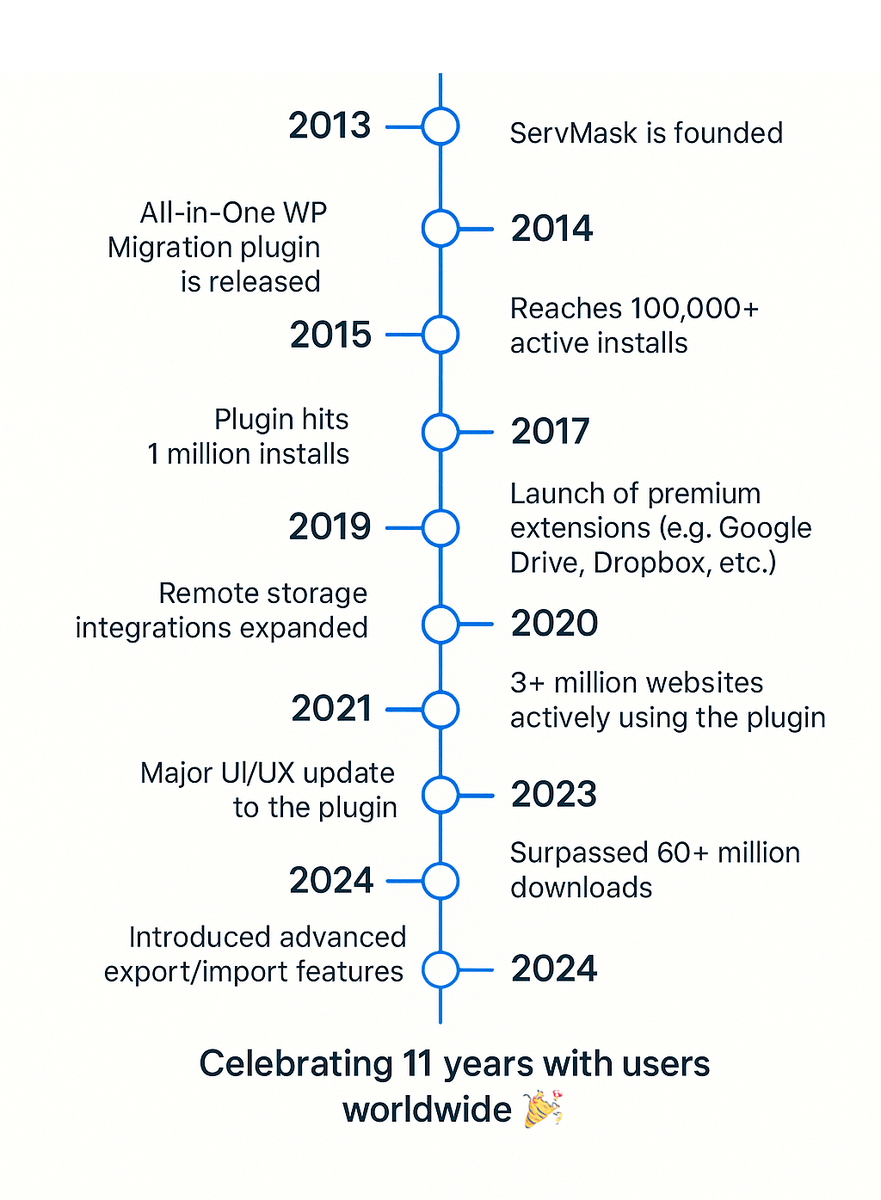
12 years ago today, ServMask shipped its first line of code.
5M active installs. 60M sites moved. Every migration, every backup, every restore still runs because a small team sweats the details no one else sees.
Happy 12th birthday to All-in-One WP Migration. 🎂
3
4
5
79
May 28
Importing a WordPress database from MySQL 5.7 to MySQL 8.0 and getting "Unknown collation: utf8mb4_0900_ai_ci"?
MySQL 8.0 uses utf8mb4_0900_ai_ci by default. MySQL 5.7 does not have it. Reverse migrations break.
Convert collations during export with mysqldump --skip-set-charset, or normalize before import.
1
1
32
May 28
Locked out of WordPress after migration? Email reset not working because SMTP is not configured yet?
WP-CLI bypasses login:
wp user update 1 --user_pass='NewSecure123'
Direct password change, no email needed. Requires shell access to the host.
38
May 27
WP-CLI is the difference between a 20-minute migration cleanup and a 4-hour one.
Search-replace, cache flush, plugin activation, user list, option update, thumbnail regenerate. All scriptable, all faster than admin UI.
Install on the new host before cutover. ssh wp.org/cli.
36
May 27
After WordPress migration, all media URLs return 404 or images load from the wrong domain.
Check wp-config.php for UPLOADS constant. Check wp_options upload_path. Match to actual filesystem on the new host.
S3-offloaded media needs the plugin active and credentials valid on the destination.
32
May 26
After a WordPress migration, you fixed the bug in production. The fix does not appear for some users.
Three cache layers can serve stale data: browser cache, server cache (Redis, page cache plugin), CDN cache.
Purge all three after every cutover. Order matters: CDN, server, then ask users to hard-refresh.
44
May 26
After migration: every WordPress visitor logs as the same IP. Security plugins block admins. Rate limiters lock out single users.
Behind a reverse proxy or CDN, REMOTE_ADDR is the proxy's IP. The visitor's IP is in X-Forwarded-For or CF-Connecting-IP.
Configure trust at the web server, not the app.
32
May 25
After WordPress migration, your custom post type content is in the database but does not appear in admin or on the frontend.
CPTs are registered in code (functions.php or a plugin), not the database. The code did not migrate or the plugin is inactive on the new site.
Activate the plugin or restore the code.
46
May 25
WordPress WP-Cron is not a real cron. It runs on visitor traffic, not on schedule.
Low-traffic site? Scheduled tasks never run. Backups, security scans, email queues silently fail.
Disable WP-Cron in wp-config.php. Add a real cron job to hit wp-cron.php every 5 minutes.
31