
Web consultant and custom developer. Believer in the web. Thou look’st like antichrist, in that lewd hat. He/him. @sil@mastodon.social
Joined March 2007
- Tweets 78,620
- Following 1,447
- Followers 5,518
- Likes 15,619
2,488 Photos and videos













Pinned Tweet

1 Jun 2021
Can I make someone else's tweet my pinned tweet?

Your righteous Cassandra energy right now must be enough to power the country
7
7
18
Stuart Langridge retweeted

18 Jun 2024
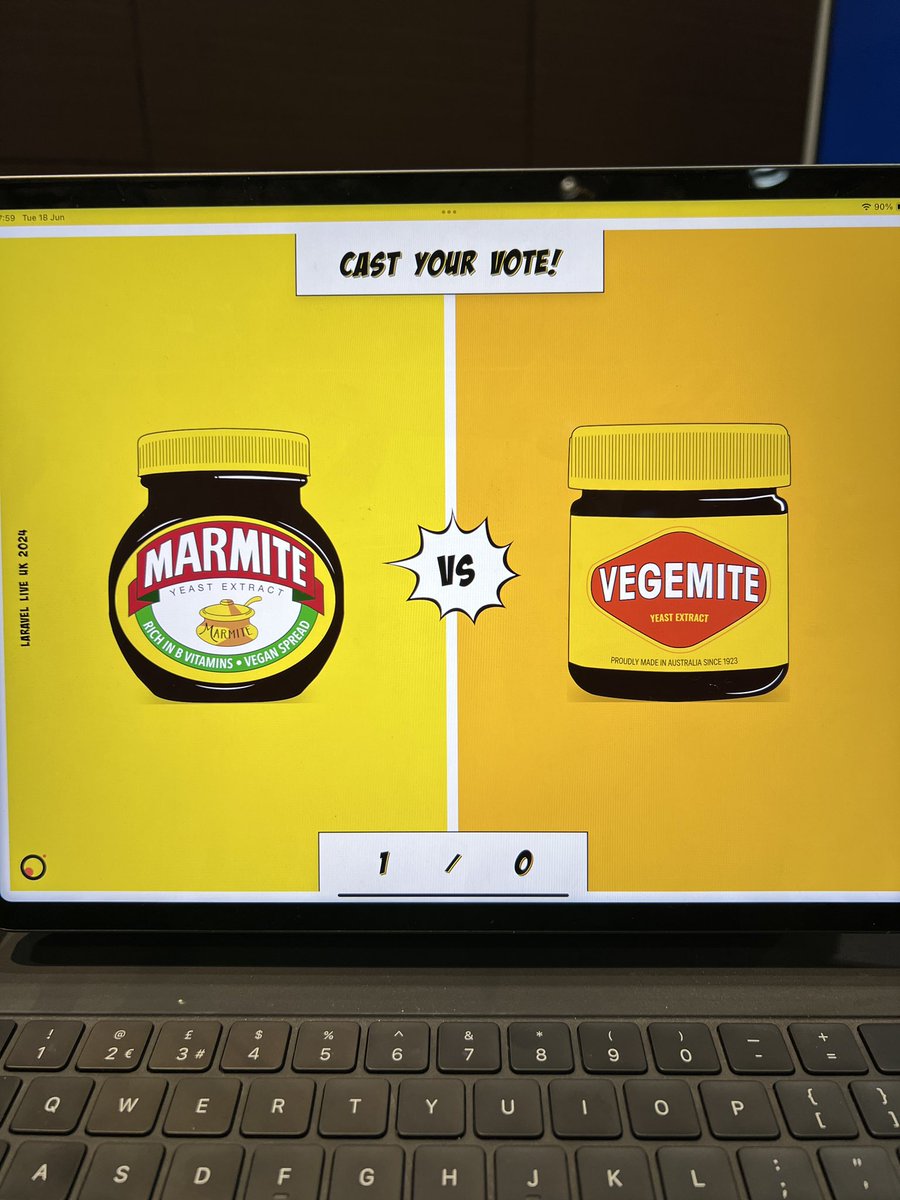
It’s time for @LaravelLiveUK ! Don’t forget to come by and say hello to the @jumptwenty4 team! Cast your vote on the really important topic! #marmite or #vegemite

1
3
9
3,238
Stuart Langridge retweeted
18 Jun 2024
The #marmite and #vegemite beef is real! Great slide by @Caneco if you’re at the @LaravelLiveUK event today then come and cast your vote at the @jumptwenty4 stand.
2
2
6
2,929
21 Aug 2023
A #WebPrivacy tip.
Most web pages use third-party stuff somehow; web fonts, images, videos, JavaScript. It can be useful (and eye-opening for you, the page developer) to see what these things actually do. Do you know about Content-Security-Policy-Report-Only? #stuartwriting 1/6
1
4
5
2,789
21 Aug 2023
Most of the time, the way you use the sites you build isn't the way that your actual users do. What CSPRO does for you is give you quiet feedback on what your users are experiencing: if your pages load loads of extra JS and pass back user info, you'll know. #stuartwriting 5/6
1
1
3
1,179
21 Aug 2023
Take a look at Learn Privacy at web.dev/learn/privacy/third-… for how to set up CSPRO on your sites so you can help protect your users' privacy. And if you like that and want me to write things for you, get in touch! #stuartwriting 6/6
3
2
1,026
18 Aug 2023
A #WebPrivacy tip.
When you embed a resource from somewhere else on your website -- a video, a tweet, an image, whatever -- you're also aiding the source of that info to track your users around the internet. It's your job to help avoid that. #stuartwriting 1/4
2
2
807
18 Aug 2023
You can make the "facade" look as much like the actual embedded thing as you want. Most sites that you might want to embed from -- YouTube, TikTok, Twitter -- support oEmbed so you can fetch a machine-readable version of the embedded thing #stuartwriting 3/4
1
1
591
18 Aug 2023
To know more about the facade pattern and other ways of using third party stuff without compromising your users' privacy as much, check out Learn Privacy at web.dev/learn/privacy/third-… And if you like that and want me to write things for you, get in touch! #stuartwriting 4/4
1
1
512
16 Aug 2023
A #WebPrivacy tip.
Fingerprinting is the act of trying to covertly identify a user or distinguish one user from another by reading stuff about their setup. Web sites and web browsers can do this, and your job as a developer is to protect your users from it. #stuartwriting 1/5
2
2
545
16 Aug 2023
In practice, most developers and most businesses have no need to fingerprint users. If you make people sign in then they identify themselves to you with consent, and in a way they can unilaterally opt out of at any time they choose. This protects their privacy. #stuartwriting 4/5
1
1
373
16 Aug 2023
To learn more about fingerprinting, why it's bad for user privacy, and what you can do as a developer, check out Learn Privacy at buff.ly/3sf0DfL. And if you like that and want me to write things for you, get in touch! #stuartwriting 5/5
1
1
352
14 Aug 2023
A #WebPrivacy tip.
Since the beginning, web browsers have sent a description of themselves with every page: the User-Agent. For nearly as long web devs have been begged to not use the UA to change stuff per browser, and for all that time devs did it anyway #stuartwriting 1/4
1
621
14 Aug 2023
However, the user agent is now mostly frozen in all modern browsers. You can still, normally, get a version number, and which browser you're in, but that's basically all. This protects people's privacy, because it's none of your business which browser I use.
#stuartwriting 3/4
1
337
14 Aug 2023
To get all the detail of how modern browsers use the user agent, check out Learn Privacy at web.dev/learn/privacy/finger….
And if you like that and want me to write things for you, get in touch! #stuartwriting 4/4
330