
The Most Accurate Solana Wallet Analyzer! 50k wallets at once, autoscan!
Joined April 2024
- Tweets 621
- Following 5
- Followers 1,940
- Likes 425
378 Photos and videos



May 7
Full Wallet History
By default, SolSqueezer analyzes the latest 1,000 wallet transactions.
For most checks, that’s enough.
But some wallets have been trading for a long time.
And if you want to evaluate long-term consistency, the latest 1,000 transactions may not be enough.
That’s why Whale users can now enable Full Wallet History in settings.
When enabled, SolSqueezer analyzes the full available trading history of a wallet.
This is useful when you want to find wallets that stayed profitable across a longer trading history, not only in their latest activity.
More history.
Better context.
Available now for Whale users in settings.
102
May 2
If you have to manually restart your wallet search every day, you don’t have discovery.
You have a routine.
Manual screening is useful.
But if you are serious about wallet discovery, the next problem appears quickly:
New wallets show up constantly.
You can miss them while sleeping.
You can miss them while checking another token.
You can miss them because your watchlist is already too large.
That’s why we built Personal Autoscan.
Instead of manually opening the product every time, you define what kind of wallets you want to find.
Then Autoscan keeps scanning and sends you reports when wallets match your criteria.
The goal is not more alerts.
The goal is fewer, better alerts.
For users who already have a screening logic, Autoscan turns it into a continuous discovery system.
Manual screening = Trader workflow.
Continuous wallet discovery = Whale workflow.
If you already know what kind of wallets you want, Autoscan is probably the upgrade that matters.
1
1
67
May 1
🔍 Token Analytics vs Token Trades: When To Use Which.
We have two ways to dig into a token. They look similar at first glance, but they answer different questions.
Token Analytics - token/<address> in the bot.
The question it answers: who holds it and who historically made money on it?
You get the token's metadata (creator, deploy date, ATH, price changes from 15min to 24h), top-10 holder concentration, dev holdings, rug flag - plus an Excel with three sheets: top traders (with unrealized PnL), earliest buyers (first ones in, with their realized unrealized profit), and current holders (% of supply).
After the report, you can launch a batch scan on top traders, top holders, earliest snipers, or all found wallets - one click each.
Free: 20 reports/month. Starter: 50. Trader & Whale: unlimited.
Token Trades - t/<address> in the bot.
The question it answers: who's actively trading it right now and walking away with profit?
It pulls the full recent trade history, aggregates by wallet, and gives you an Excel with each trader's realized PnL in SOL and %, sorted top-down. You can set a minimum PnL filter to cut the list further.
Then one button: batch scan all qualifying traders.
Trader: 150/month. Whale: 500/month. Not available on Free/Starter.
When to use which:
🟣New token, you don't know it yet → Token Analytics. Get the structural picture (holders, snipers, dev behavior).
🟣You know the token, you want to find profitable wallets to copy → Token Trades. Skip the metadata, get straight to actively profitable traders.
Most workflows use both. Token Analytics for reconnaissance, Token Trades for extraction.
1
1
63
Apr 29
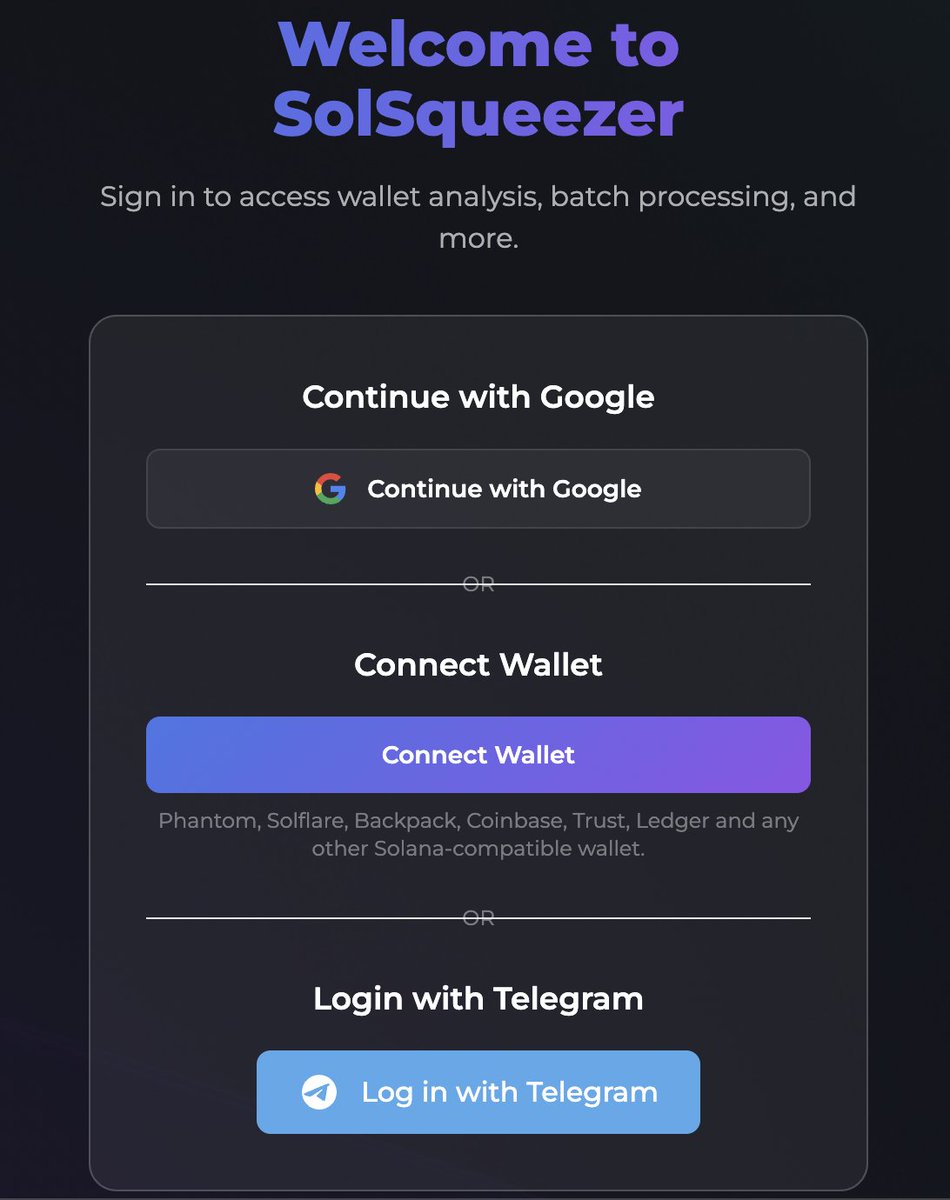
Telegram is no longer required to use SolSqueezer.
You can now log in with Google, a Solana wallet, or Telegram.
Use the web app directly with Google or your wallet. Telegram still works for bot notifications.
1
1
62
Apr 15
We only have 15 places left in the waitlist. You'll have the best rates and an OG status in the community👀
Hurry up! Beta soon!
Apr 10

📍Introducing Delta-Neutral Funding Rate Arbitrage Vault
Join the waitlist 👇
1
76
Apr 10
🟣Just in: Atomic Position Execution
When opening an arbitrage position, both legs (long short) must succeed or both fail.
If one exchange fills but the other doesn't - the first is instantly rolled back. This eliminates single-leg exposure risk.
Apr 10
📍Introducing Delta-Neutral Funding Rate Arbitrage Vault
Join the waitlist 👇
1
64
Apr 10
📍Introducing Delta-Neutral Funding Rate Arbitrage Vault
Join the waitlist 👇
1
1
2
343
Apr 7
Proud to introduce our page on @Surgexyz_, the new go-to platform for future unicorns
early.surge.xyz/discovery/so…
2
320
Apr 2
Introducing Squeezer Delta-Neutral Funding Rate Arbitrage Vault
Join the waitlist 👇
youtu.be/rL6A20_JpHo
1
1
3
273
Mar 27
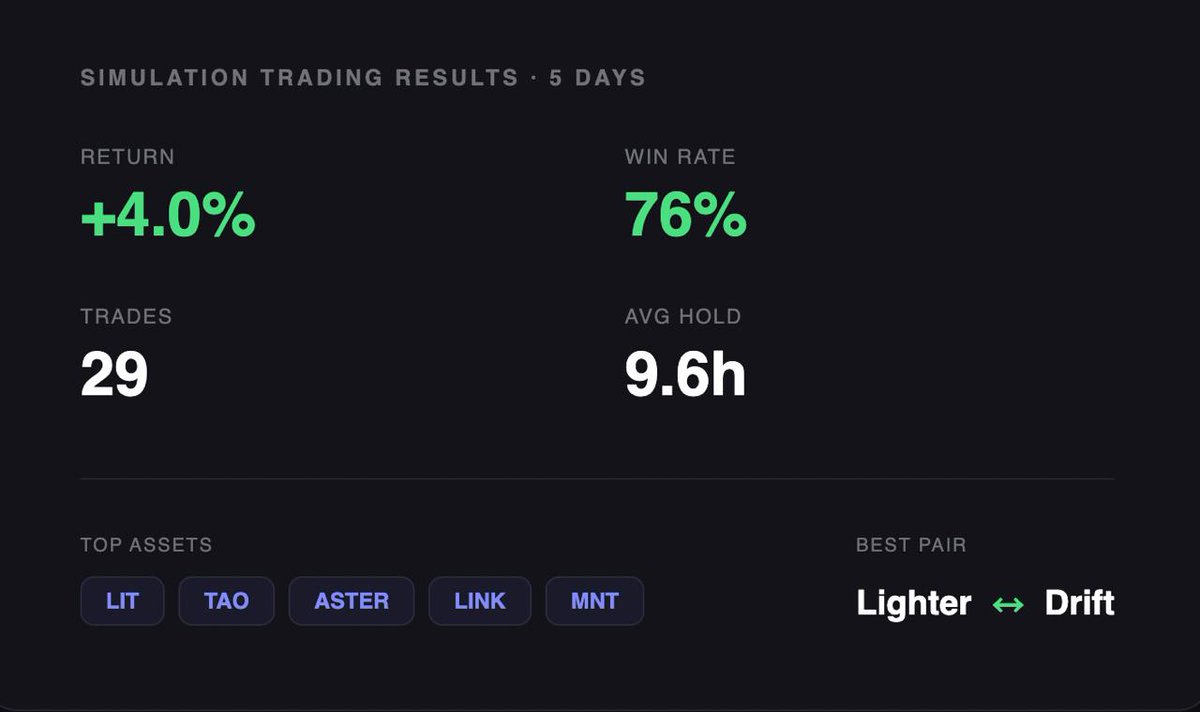
💲Yield Update
Over the last 5 days:
▫️29 trades, 76% win rate
▫️Top assets: $LIT, $TAO, $ASTER, $LINK, $MNT
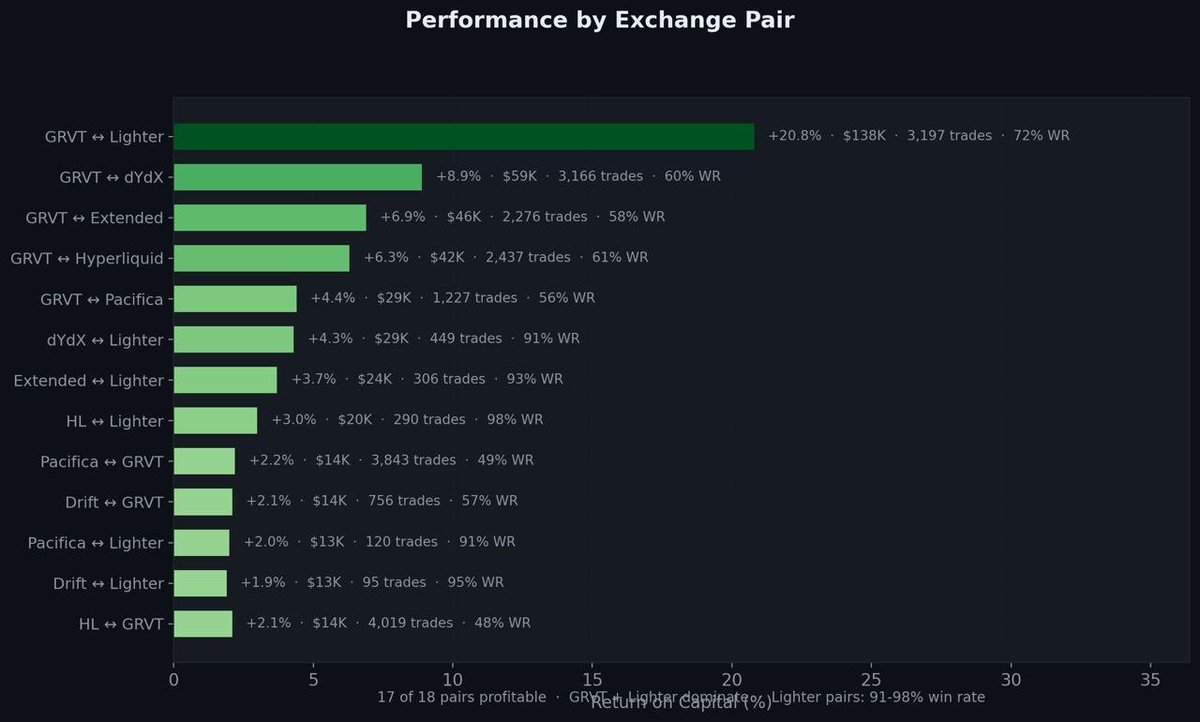
▫️Best performing exchange pair: @Lighter_xyz ↔ @DriftProtocol
4.0% return in 5 days
2
426
Mar 23
🟣Just In: We've built "Leg Risk Protection"
Safeguard against partial execution of arbitrage positions. Both legs are executed in parallel with a timeout on the second leg.
If one side fails to fill, the first is automatically closed, preventing directional exposure!
128
Mar 20
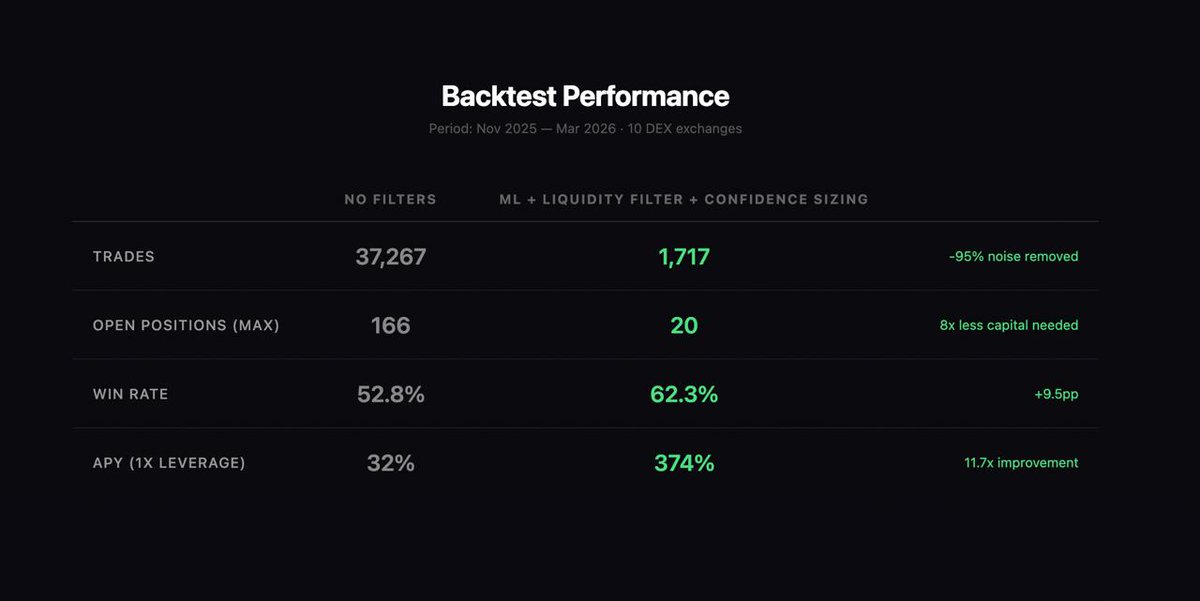
💲Yield Update: Non-leveraged APY (1x) is 374%
After adding ML liquidity filter adaptive sizing:
37,267 → 1,717 trades
166 → 20 max positions
Win rate: 52.8% → 62.3%
APY (1x): 32% → 374%
Filtering the noise, focusing on real yield!
Do you want to try it?
1
121
Mar 18
🟣Just In: We've built an ML pipeline for evaluating trading opportunities.
Our XGBoost model analyzes 19 parameters of each trade and decides whether to enter or skip.
IAutomatic retraining on new data to adapt to changing market conditions!
1
1
76
Mar 17
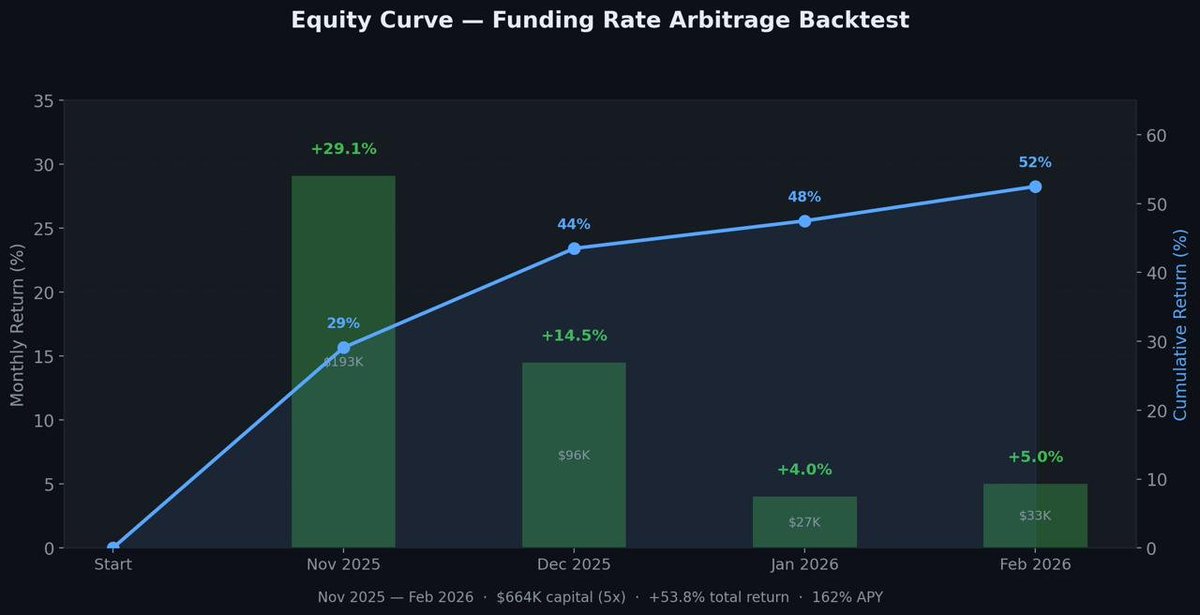
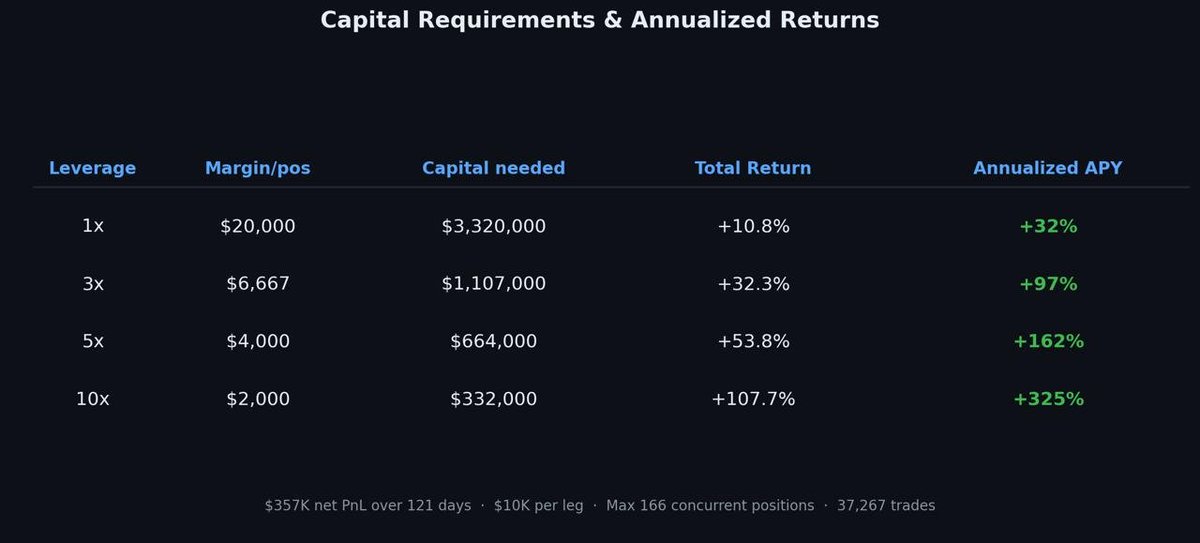
We had nine DEXes under surveillance, more than a thousand potential setups every day, thirty-seven thousand two hundred sixty-seven trades over one hundred twenty-one days, about three hundred eight trades a day, eighty-nine positions running at once with a peak of one hundred sixty-six, execution speeds under two seconds, four straight profitable months, a fifty-two point eight percent win rate, seventy-four dollars and sixty-seven cents on the average win, sixty-three dollars and nineteen cents on the average loss, and a maximum drawdown of minus three point seven percent at five-times leverage.
Not that we needed all that just to run the strategy. But once you get locked into a serious trading dataset, the tendency is to push it as far as you can.
130
Mar 13
🟣 Just In: Liquidation Protection Engine is on
We implemented a protection mechanism that monitors margin ratio in real time and automatically reduces or closes positions when they approach liquidation.
Now the system reacts before the market eats your position alive.
1
81