
CTO@AGNEXT PhD, BTech@CS IITKGP, IoT, AI, Data, Agriculture, Quality Food for Billions.
Joined July 2009
- Tweets 7,668
- Following 3,641
- Followers 1,123
- Likes 18,263
52 Photos and videos




Subrat Kumar Panda retweeted

Jun 14
🚨 SHOCKING: LISA SU’S $1,499 LUNCHBOX ANNIHILATES NVIDIA’S $4K AI BEAST!
AMD CEO Lisa Su walked on stage, held a lunchbox sized PC in one hand, and ran a 235 billion parameter model live.
No data center. No cloud. No rented GPU.
The chip inside is the AMD Ryzen AI Max 395. It is the first x86 chip where the CPU and GPU share the same pool of memory. Up to 128GB of unified memory. That one design choice is what changes everything.
An RTX 5090 gives you 32GB of video memory. A 4090 gives you 24. This box gives you more than three times either of them in a chassis you can carry in a backpack.
On DeepSeek R1 inference, AMD's chip beat an Nvidia RTX 5080 by more than 3x. A desktop the size of a thick paperback outrunning a dedicated graphics card that costs over a thousand dollars on a real AI workload.
Now do the math on your subscriptions.
Claude Code Max is $200 a month. ChatGPT Pro is another $200. Cursor is $20. Gemini is $20. That is $5,280 leaving your account every year before you build a single thing.
The 128GB version of this machine starts at around $2,399. At that run rate it pays for itself in under a year and then runs free.
Install Ollama. Pull Qwen3 235B. Point Claude Code at localhost. Same interface you already use. Nothing leaves your machine. Nothing costs per request. No throttling at 3am when you finally have time to build.
Lawyers stop worrying about what OpenAI does with their files. Developers stop watching the token counter. Founders stop killing prototypes because the cloud bill scared them off.
Private AI just became something a normal person can own.
Community note
The device demoed by AMD CEO Lisa Su, the Ryzen AI Halo mini PC capable of running 235B parameter models, costs $3,999, not $1,499. amd.com/en/products/pr…
279
832
4,986
688,737
Subrat Kumar Panda retweeted

Jun 14
2,676
7,477
38,006
60,780,226
Subrat Kumar Panda retweeted

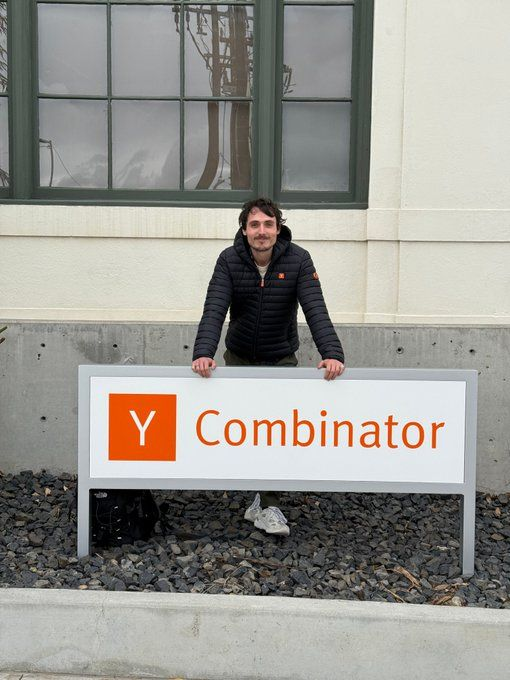
We went from 0 to 2,200 paying customers in under a year by following @ycombinator's 15 rules:
1/ Do things that don't scale. Get your first 10 customers by hand.
2/ Launch now, not when it's "ready". A mediocre product in front of real users teaches you more in a week than 6 months of polishing in the dark.
3/ Charge from day one. If nobody will pay, you don't have a startup, you have a hobby.
4/ Talk to users every single day. The roadmap you need is sitting in your customers' heads, and they'll hand it to you for free
5/ Always hunt the 90/10 solution. For almost any feature there's a way to capture 90% of the value with 10% of the effort.
6/ There are only two real jobs: write code and talk to users. Everything else (conferences, press, VC coffees, corp dev calls) is fake work.
7/ You pick your customers as much as they pick you. 10 users who love you beat 1,000 who kind of like you.
8/ Growth is an output, not a strategy. Grow before product market fit and all you're buying is churn.
9/ Do less, really well. Pick one or two metrics and judge every task against them.
10/ Know if you're default alive. Paul Graham's question: on current growth and current burn, do you reach profitability before the money runs out?
11/ Don't hire until it hurts. Headcount is not progress, it's burn. Every great startup was embarrassingly small for embarrassingly long.
12/ Momentum is the only real moat in year one. Ship something every week, even something tiny.
13/ Every great startup is badly broken at some point. The game isn't avoiding fires, it's how fast you put them out. Again. And again
14/ Ignore your competitors. Startups die of suicide, not murder. In year one, the only company that can kill yours is your own
15/ Startups rarely die from running out of money. They die because the founders fall out. Brutal honesty with your cofounder is the cheapest insurance you'll ever buy
Good luck !
106
322
2,910
254,032

Jun 11
Interesting - filestore and memories are two different things I believe.
Jun 11

@subratpanda what do you think of Nessie?
are they calling the usual summaries, markdown, textfiles and data at rest memories now? 😅
1
1
97
Subrat Kumar Panda retweeted

Jun 10
Our mission is to make it easy for anyone to deploy a robot to help them in the real world
We wrote an intuitive guide to understanding modern robotics, catered toward an audience that understands technology but not AI robotics
We hope that this short blog post embeds in you the core principles that will bring further curiosity.
35
281
2,171
315,740
Subrat Kumar Panda retweeted

Jun 9
One of my personal favorite features announced at WWDC will I suspect be a sleeper hit: container machines, allowing your Mac to run a lightweight, persistent Linux environment with your home directory and repos automatically mounted: github.com/apple/container/b…
228
815
9,697
730,362
Subrat Kumar Panda retweeted

Jun 10
DeepMind cofounder Shane Legg thinks that search is essential for a model to be genuinely creative.
Pre-trained base models can do incredible things. But Shane thinks this is just a matter of them mixing together existing concepts from their training data.
If he's right, coming up with genuinely novel ideas always involves searching a large space for "hidden gems".
36
32
306
35,442
Subrat Kumar Panda retweeted

Jun 9
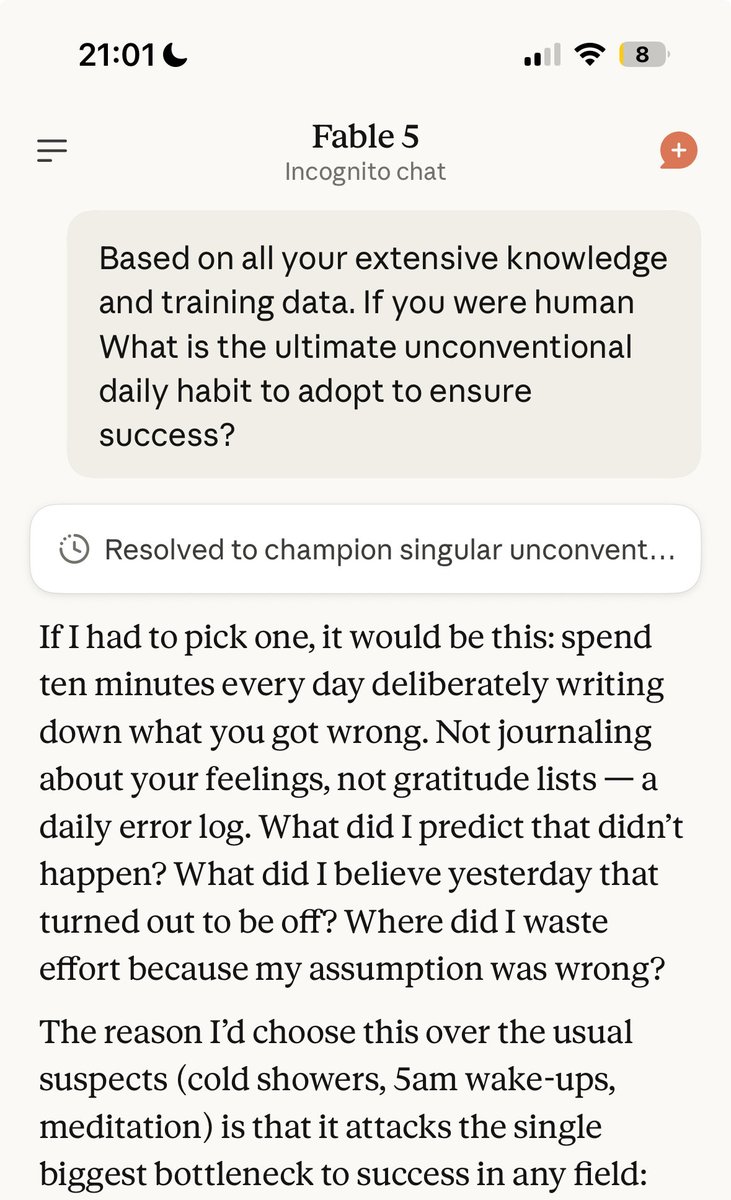
Insane advice from Fable 5
260
813
13,992
1,252,612
Subrat Kumar Panda retweeted

Jun 11
India AI Centers
Opendoor may have shutdown their entire 200 India team and replaced them with a much smaller AI-pilled US team, but it may not really reflect what lies ahead.
We have said this before - global companies will build what we call "India AI Centers" as they go through the AI transformation of their business and need a talent base that can monitor and improve their AI workflows because unlike software, AI workflows will need constant monitoring, updating and more. Irrespective of the depth of the skill this work may need, it may be impossible for companies, at scale, to find such talent anywhere else except in India.
Would India's existing IT services workforce be directly relevant for this? NO - that is clear and we will go through some pain as programming (in this current form and its related tasks) is completely taking over by AI (the bulk of the work that Indian IT services does) and the spec for this new work of "helping their world run their AI systems" emerges.
India AI Centers will be built for this new work.
InCommon (incommon.ai) is already doing this - building India AI Centers for some phenomenal global AI companies. Nxtwave (niatindia.com) and Airtribe (airtribe.live) are building platforms for this new generation of talent that AI work will need. There are other new entrants in this space too beyond our portcos.
India AI Centers will be central to powering enterprise AI systems worldwide as AI transformation of the enterprise unfolds over the next two decades, and we move from software to intelligence and selling technology to selling outcomes. It will be a different world, and there will be short term pain to transition away from the IT services of the past 5 decades, because that is certainly dead.
The exact nature of work that will happen at India AI Centers will evolve rapidly from what is being done today to what will be needed tomorrow and onwards. So, building India AI Centers is not like building GCCs of the past - it requires a completely new mindset. Hard, not impossible.
Stay tuned as we do more in this area and find out if our contrarian view is smart or simply wrong :)
Jun 10

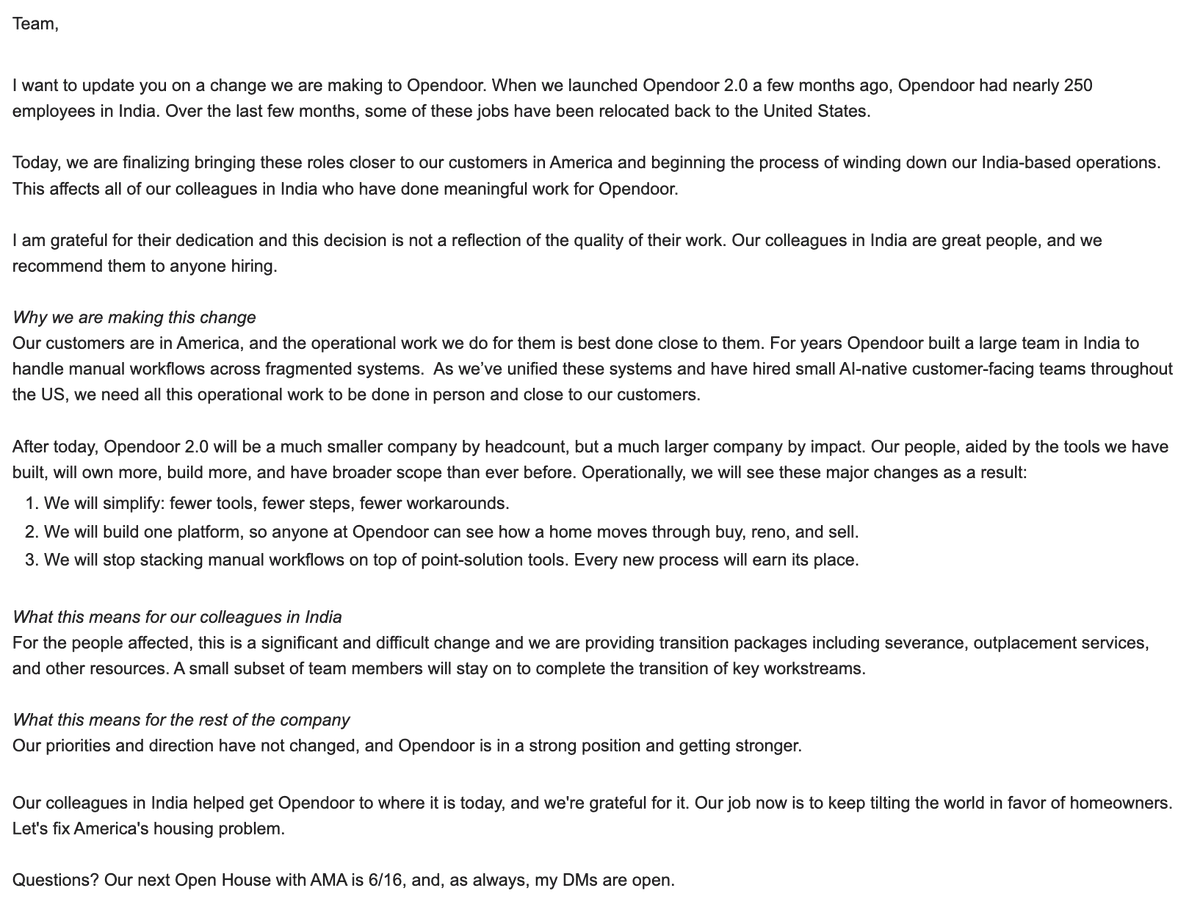
I shared this note earlier today with the entire team at Opendoor.
Today we began to say goodbye to our colleagues in India as we wind down our India operations.
Our customers are in America, and that's where our operational work belongs.
17
15
114
37,296
Subrat Kumar Panda retweeted

Jun 10
Nvidia released this video of its photonics co-packaged optics (CPO) switch with Lambda.
The AI race is not only about stronger GPUs, but about wasting far less power while those GPUs talk to each other.
With co-packaged optics (CPO), NVIDIA is putting the light-based communication parts much closer to the main networking chip, instead of placing them as separate plug-in modules at the edge of the switch.
From NVIDIA's official blog on this
"co-packaged optics (CPO) connects directly to the token economy. Network power is overhead: it keeps GPUs connected but doesn't generate tokens. Network failures are also overhead: they turn provisioned GPU capacity into idle capacity. CPO addresses both by reducing network power draw and removing a large class of pluggable optical components from the fabric.
A 128,000-GPU data center using traditional pluggable transceivers requires roughly 655,000 discrete transceiver modules across the switching fabric. Each one is a potential failure point. CPO removes that component class entirely.
Agentic workloads change the pressure on the network. A traditional inference request is relatively self-contained. An agentic request can involve planning, retrieval, tool use, multiple model calls, and follow-up reasoning. More data moving across the cluster. More points where network latency or failure affects the outcome.
Multi-agentic inference needs elastic and resilient data movement, so GPUs are not waiting for data, while maintaining tokens per second and fast time to first token."

📣 Get a first look at the NVIDIA Photonics co-packaged optics switch with @LambdaAPI.
At NVIDIA GB300 NVL72 scale, the network doesn't just move data between GPUs — it determines how fast your cluster thinks. Co-packaged optics cut switch power, reduce failure points, and deliver more tokens per watt.
Here's what that looks like in practice. ➡️ nvda.ws/4otSAoz
8
17
88
15,578
Subrat Kumar Panda retweeted

Jun 11
dario just confirmed our pov
darioamodei.com/post/policy-…
May 20

AI-designed drugs are passing Phase 1 at 80 to 90 percent. the narrative is this is proof the approach works.
Phase 1 tests whether the molecule kills people. the 90 percent failure rate in drug development sits in Phase 2 and 3, where drugs fail on efficacy. AI has not moved that needle.
one drug cleared Phase 3 in December 2025. one. after decades of promises. the field should be asking precisely why that method worked rather than assuming it validates everything else.
the model companies will commoditise. the data infrastructure companies will compound. and the most valuable data infrastructure in biology is the one that does not exist yet.
AI x Biology. four parts. boundlessventures.in
7
3
57
15,039
Subrat Kumar Panda retweeted

Jun 10
Massive congrats to @GoogleDeepMind on DiffusionGemma! 🎉
We collaborated closely with the team to Day-0 MLX-VLM — native diffusion decoding on Apple Silicon, release dropping later today (~3-4h), meanwhile you can install from source. ⚡🍎
This is genuinely different beast — instead of token-by-token, it generates 256-token blocks in parallel with bi-directional attention and iteratively self-corrects. 26B MoE, only 3.8B active, fits in 18GB when quantized.
Jun 10

Meet DiffusionGemma!
An experimental open model that explores a fast approach to text generation, released under an Apache 2.0 license.
Moving beyond sequential, token-by-token processes to generate entire blocks of text simultaneously. Here’s what’s new with DiffusionGemma: 👇
20
40
492
41,032
Subrat Kumar Panda retweeted

Boris Cherny, the creator of Claude Code at Anthropic, just explained why most people aren't getting real results from Claude
in this talk he breaks down exactly how most people never actually set up Claude:
- the 14% you lose to CLAUDE.md before typing a word
- the features that change how Claude thinks before you type a word
- the settings 95% of users have never opened
- the workflows hiding behind one toggle
if you've been using Claude for more than a month and never left the chat window, you have at least 30 untouched features. probably 38
instead of another show tonight, watch this
make sure to bookmark it before it gets lost in your feed
my breakdown of all 40 features is below

25
32
176
48,665
Subrat Kumar Panda retweeted
Anthropic engineer:
"You're not supposed to prompt Claude. You're supposed to build a system that prompts itself."
this is one of the best workflows I've seen in a long time
in this video he breaks down exactly how most people are using Claude:
- the 14% you lose to CLAUDE.md before typing a word
- the plugins that 95% of users have never installed
- the caching setup that keeps it at 95% hit rate and almost free
- why starting every chat from zero is the slowest way to use Claude
if you've been using Claude for more than a month and never left the chat window, you've been using one project when you could be running a team of them
instead of another show tonight, watch this
make sure to bookmark it before it gets lost in your feed
full guide in the article below
110
830
7,140
1,270,375
Subrat Kumar Panda retweeted

Jun 10
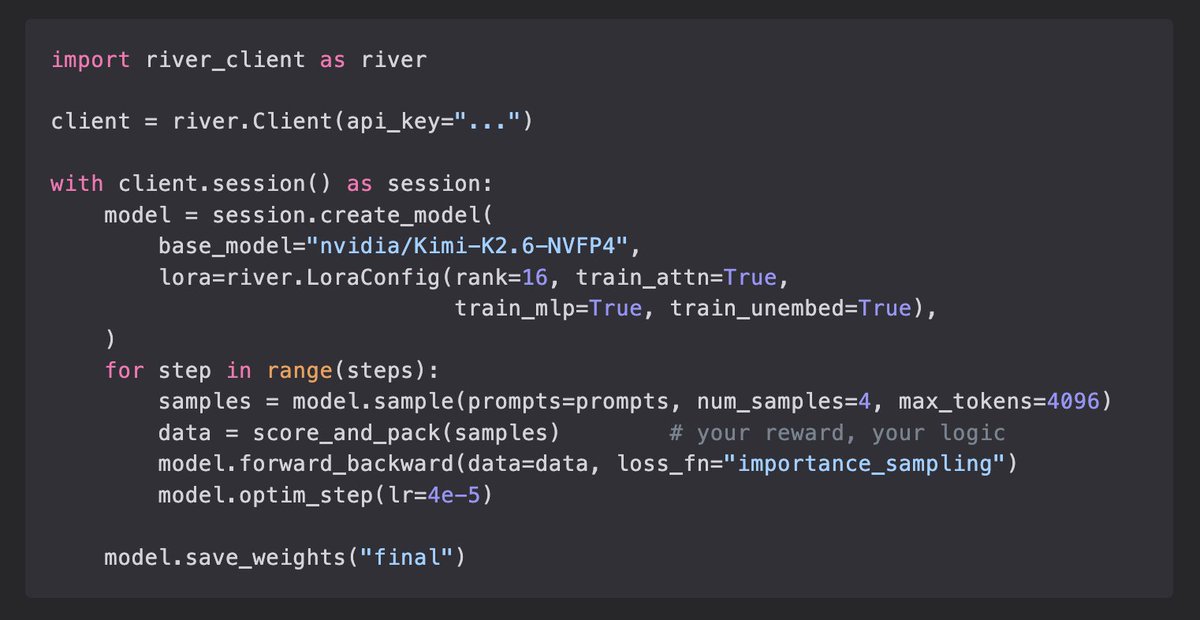
Introducing River API. Fine-tune and RL train leading open-source models at scale, ranging from 35B to 1T params. We’ve been using it internally to power our research and we love it. Today, we are opening up our public waitlist. Own your intelligence!
9
28
277
154,401
Subrat Kumar Panda retweeted

Jun 10
You have noticed it. ChatGPT feels dumber than it used to. Your prompts that worked six months ago produce worse results now. The writing sounds flatter. The ideas sound safer. The internet itself feels like it is shrinking. Every article reads the same. Every email sounds the same. Every answer sounds like it was written by the same voice.
You thought it was you. It is not you.
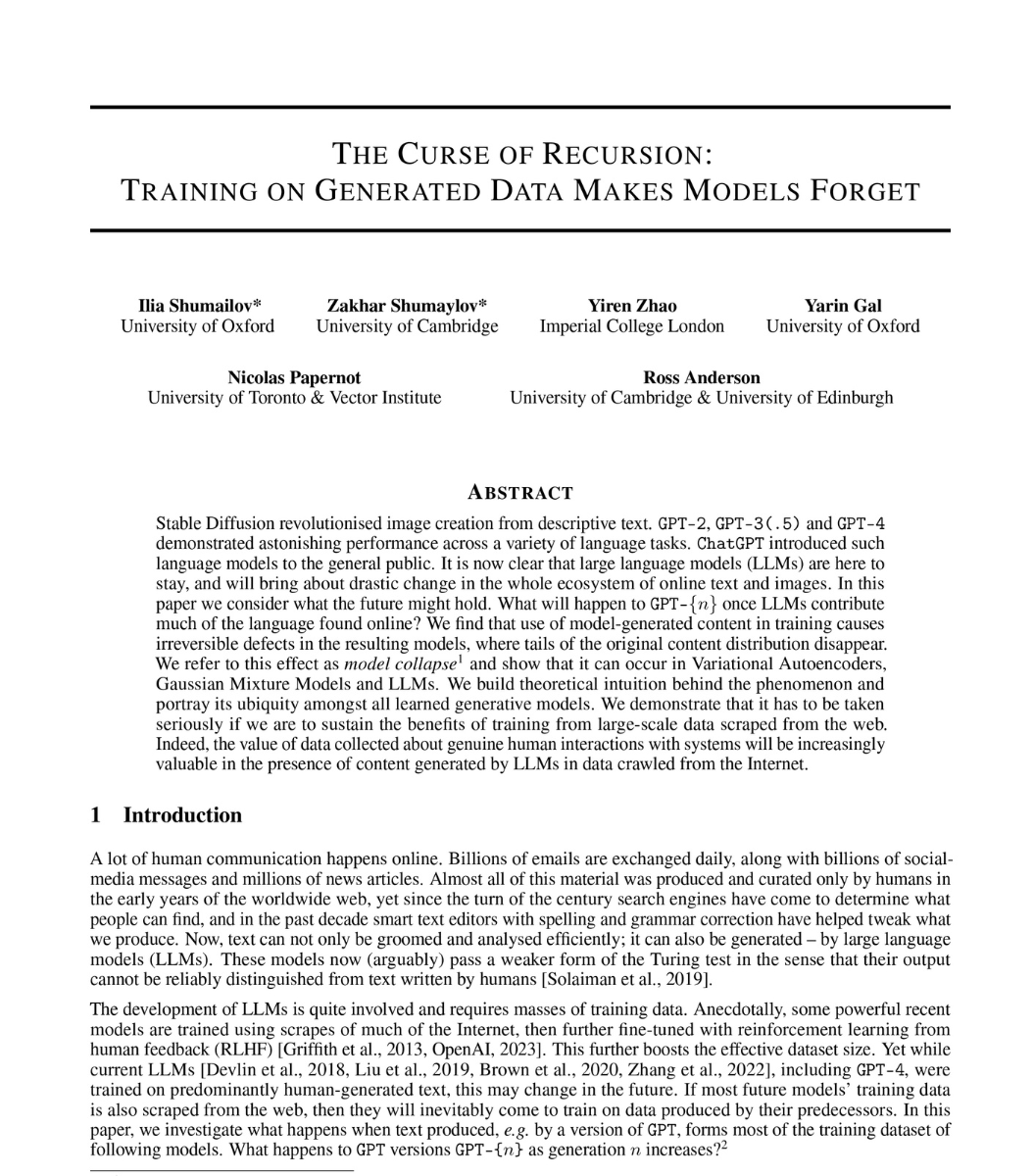
Researchers at Oxford and Cambridge published a paper in Nature proving what is happening. They call it Model Collapse.
Here is the mechanism in one sentence. AI trained on AI-generated data gets dumber every generation until it forgets what real human data looked like.
The internet is filling with AI-generated content. Blog posts. Articles. Reviews. Comments. Social media. AI companies scrape the internet to train the next generation of models. Which means the next generation of AI is being trained on the output of the current generation.
Each cycle loses information. Not randomly. It loses the rarest, most unusual, most creative parts first. The researchers call these the "tails of the distribution." The weird ideas. The unexpected perspectives. The things that made the internet feel human. Those disappear first.
What remains is the average. The safe. The expected. The bland.
Then the next generation trains on that. And loses more. And the next generation trains on that. And loses more. The researchers proved this is not a slow decline. Major degradation happens within just a few iterations. Even when some of the original human data is preserved.
They tested it on large language models. On image generators. On statistical models. The pattern was the same every time. The output converges toward a narrow, flattened version of reality that looks nothing like the original data.
The lead researcher put it plainly. "Large language models are like fire. A useful tool. But one that pollutes the environment."
The pollution is invisible. You cannot see which sentence on the internet was written by a human and which was written by AI. Neither can the AI that is about to train on it. And once the tails are gone, they do not come back. The damage is irreversible.
This is not a prediction anymore. It is a diagnosis.
The internet you grew up on was built by humans writing things no algorithm would have written. Strange, personal, imperfect, alive. That internet is being diluted. One generation of AI at a time. And the models trained on what remains are learning a smaller and smaller version of the world.
Model Collapse is not a technical problem. It is a cultural one. The thing that made the internet worth reading is the thing that disappears first.
1,138
6,389
17,728
2,232,337
Subrat Kumar Panda retweeted
Jun 9
A model that verifies unasked has crossed a line.
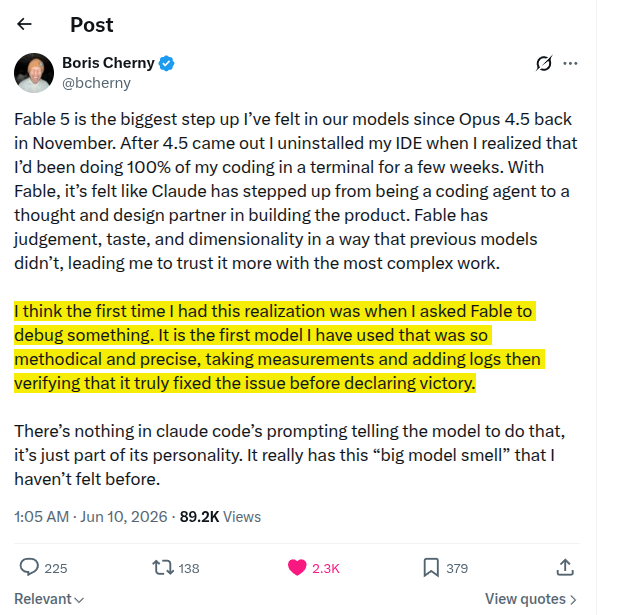
This is from Boris Cherny, creator of Claude Code on Anthropic's Fable 5.
Jun 9

Fable 5 is the biggest step up I’ve felt in our models since Opus 4.5 back in November. After 4.5 came out I uninstalled my IDE when I realized that I’d been doing 100% of my coding in a terminal for a few weeks. With Fable, it’s felt like Claude has stepped up from being a coding agent to a thought and design partner in building the product. Fable has judgement, taste, and dimensionality in a way that previous models didn’t, leading me to trust it more with the most complex work.
I think the first time I had this realization was when I asked Fable to debug something. It is the first model I have used that was so methodical and precise, taking measurements and adding logs then verifying that it truly fixed the issue before declaring victory.
There’s nothing in claude code’s prompting telling the model to do that, it’s just part of its personality. It really has this “big model smell” that I haven’t felt before.
3
8
47
6,393

Anthropic engineer James Brady:
"Every agent in production lies. We measured it. The good ones lie less, the great ones catch the lie before the user does."
In 29 minutes, he walks through the verification stack he built and the patterns the Claude Code team adopted to keep agents honest at scale.
Watch the full talk, then save the config below👇

43
160
1,723
340,435
Subrat Kumar Panda retweeted

Jun 7
Let me show you why we are living in a singularity right now.
I just turned an 8GB VRAM budget laptop into a fully autonomous, self improving local AI Agent.
In the previous post, I showed you how Google's QAT quants allow you to run the massive Gemma 4 26B MoE model locally on a 8GB VRAM 16 GB RAM laptop.
The community was stunned. But now, we are going far beyond chat.
Nous Research just shipped their official Hermes Agent Desktop App this week.
I hooked my local llama server up to the Hermes Desktop App. The integration took exactly 2 minutes. What I witnessed next was absolutely mind bending.
you can run a state of the art, 24/7 autonomous agentic ecosystem with full tool execution, locally, on a laptop with:
- Intel i5 or i7 | 16GB System RAM
- Any 8GB VRAM GPU (like my RTX 4060)
My local 26B model is now behaving like a developer, system admin, and personal assistant rolled into one.
Here is what this local 8GB setup can do for me out of the box:
Autonomous Software Engineering: It doesn't just write code; it reads, edits, and patches files, runs them in a secure terminal, systematically debugs errors, manages GitHub repos, and spawns sub agents to tackle complex pipelines in parallel.
Web Interaction & Vision: It browses the web like a human, clicks buttons, visualizes layouts via Vision to debug UI, and scrapes arXiv papers.
DevOps & Automation: It schedules natural language cron jobs, manages containerized background processes, and runs Python RPC scripts.
Workspace Orchestration: It connects directly to Notion, Google Workspace, Linear, and Obsidian to manage tasks.
The Local Hardware Performance
Running a 26B parameter model and an autonomous agent framework simultaneously on an 8GB VRAM card should be impossible. Here is how it performs:
- Stable, flat speed even with massive context. I threw a 60k token prompt at it, and it still clocked 20 TPS.
Llama.cpp flags:
llama-server.exe -m "gemma-4-26B-A4B-it-qat-UD-Q4_K_XL.gguf" -cmoe -c 248000 -v
Kudos to @Teknium and the entire @NousResearch team.
The barrier to entry for the agentic age has officially collapsed. What are you building first?
Jun 7

Run Gemma 4 26B MoE on 8GB VRAM with 250k context at 20 tokens/sec
If you own any 8GB VRAM graphics card, stop what you are doing. Local AI just had its absolute "Holy Shit" moment for budget hardware.
Yesterday, I benchmarked Unsloth Gemma 4 12B Q4_K_XL on an 8GB card.
The community went wild but immediately demanded more: "Can we run a 25B model on budget GPUs?"
Today, I’m delivering exactly that.
I am running a massive 26B parameter Mixture of Experts (MoE) model locally on a standard 8GB VRAM setup with 250k full native context!.
If you own an RTX 3060, 3070, 4060, or any budget GPU with 8GB of VRAM, the local AI paradigm has completely changed.
The performance metrics are astonishing:
- 20 tokens/sec flat decode throughput.
- Stable, flat decode speed even with massive prompts.
- I threw a 60k token prompt at it, and it still clocked in at 20 TPS without dropping a single frame.
# What about prefill?
Yes, Time To First Token (TTFT) is slightly high when swallowing massive contexts. But with a solid 200 tokens/sec prefill speed, the wait is barely noticeable and highly usable.
And this is running completely without Multi Token Prediction (MTP) active.
How is this possible? It’s the magic of Google's new QAT (Quantization Aware Training) quants for Gemma 4.
The model weight file (unsloth gemma-4-26B-A4B-it-qat-UD-Q4_K_XL.gguf) is only 13.2 GB, making it the ultimate local powerhouse.
# The Test Setup:
CPU: Intel Core i7
RAM: 16GB System RAM
GPU: NVIDIA GeForce RTX 4060 Laptop GPU (8GB VRAM)
# The Secret Sauce (The -cmoe Flag)
To make this work properly on any 8GB card, you must use the -cmoe (CPU MoE) flag in llama.cpp.
This flag isolates the heavy MoE expert weights directly to system memory (CPU/RAM) while letting your GPU focus strictly on the Attention layers and the KV Cache.
It prevents VRAM spillage and holds the throughput rock solid.
# The flags:
-m "gemma-4-26B-A4B-it-qat-UD-Q4_K_XL.gguf" -cmoe -c 248000 -v
Once running, just open the UI on localhost and toggle the new reasoning lightbulb icon in the text input box to watch the model perform multi step thinking.
Are you still running smaller models, or are you ready to scale up your budget local setups? Let's discuss in the replies
39
79
689
115,923

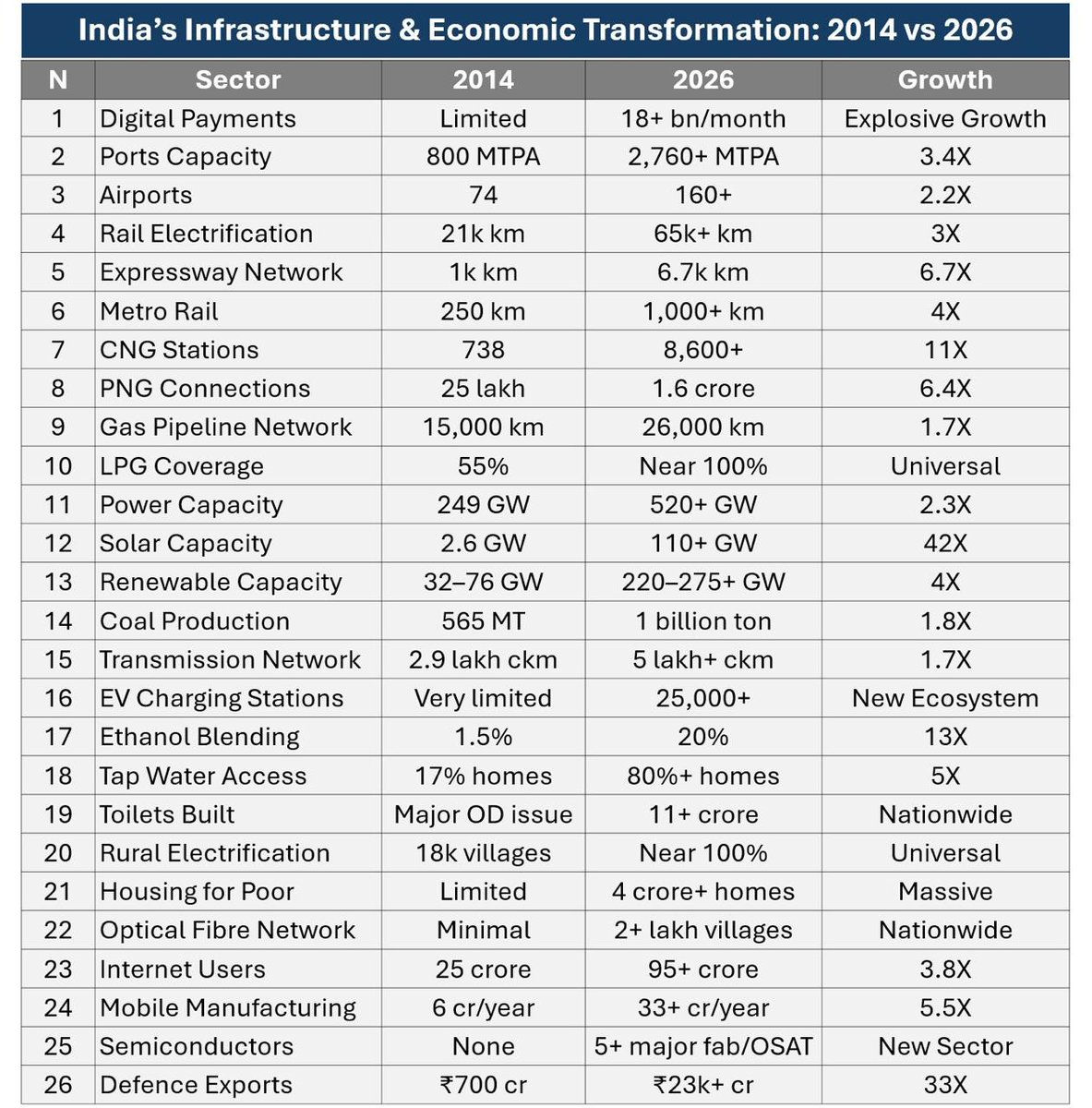
Basically, in just 12 years, India has done or exceeded what was achieved in the last 60 years. India will be able to reap the benefits of all this work only in the coming decades. And only if there's political stability. That's why the adversaries are earnestly attacking now.

336
3,913
14,265
360,578