
EVP, Office Product Group at Microsoft | Reimagining work with Microsoft 365 Copilot across Word, Excel, PowerPoint, Outlook, ClipChamp OneNote
Joined June 2009
- Tweets 40
- Following 112
- Followers 921
- Likes 696
7 Photos and videos



Jun 3
I’m biased but agree :)

32
3,517
Jun 3
The suite of MAI models will start rolling out to Word, Excel, PowerPoint & Outlook soon alongside the other foundation models. Giving customers more choices between capabilities, performance and efficiency for the job that need to be done. (@mustafasuleyman - Great job MAI team)
microsoft.ai/news/building-a…
3
23
128
10,038
Jun 1
Copilot in Excel can pull trusted data from LSEG and Moody’s—including market data, credit ratings, and research—directly into your workbooks. This is the first set of trusted data providers we’re bringing into Excel via MCP, with more coming soon.
Learn more: techcommunity.microsoft.com/…
2
9
69
13,931
May 29
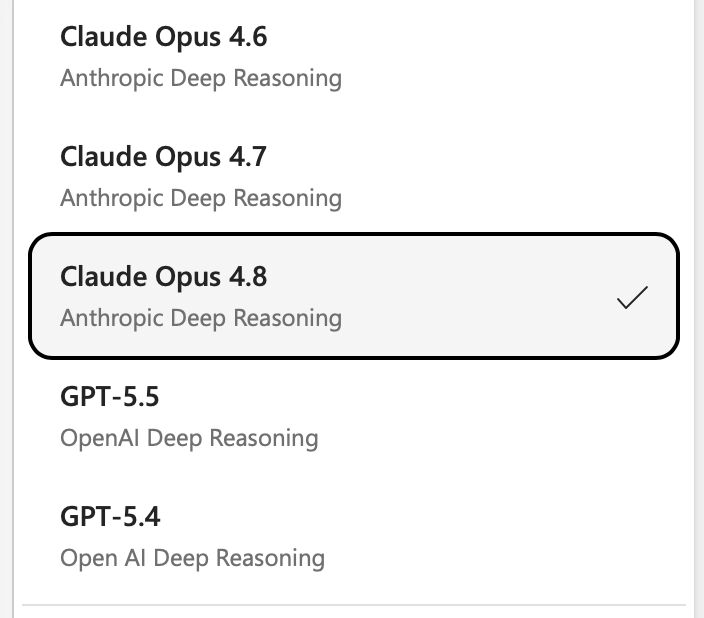
Microsoft PowerPoint has enabled Claude Opus 4.8, on the very same day it became available. We are committed to bringing the best and latest models directly to our customers.
2
25
273
14,535
May 28
Cleaner, Faster, and in the Flow of your Work. See how the new Copilot design shows up across our Microsoft 365 Apps.
microsoft.com/en-us/microsof…
8
64
6,896
May 26
Over the next month, we are rolling out new updates to Copilot Notebooks that help you bring work context from Teams meetings, emails and webpages into your notebook so you can make sense of complex projects and topics information. You’ll also be able to create new grounded outputs like Excel spreadsheets and Infographics straight out of your notebook.
techcommunity.microsoft.com/…
7
26
137
26,833
May 21
Copilot in Outlook is part of my daily routine, it's hard to recall how managed my inbox without it.
7
11
66
11,867
May 13
A common plea from customers is for “one cohesive system that works across apps and workflows”. We have more work ahead but the path is clear.
Read more about our plan for a simplified system: microsoft.design/articles/a-…
17
1,076
Apr 16
Word now works like a coworker in your document just like Excel CoPilot.
Apr 14

New in Word: Copilot now tracks changes, leaves comments, and more, working more like a coworker right inside your document, grounded in all your enterprise context with Work IQ.
7
455
29 Sep 2025
Introducing Agent Mode across Microsoft365 Office, starting with Word,
Excel, and Microsoft365Copilot app. Vibe with these three new experiences
today!
microsoft.com/en-us/microsof…
#Microsoft365 #Copilot #AgentMode
3
1
4
1,620
29 Sep 2025
3) Office Agent Mode
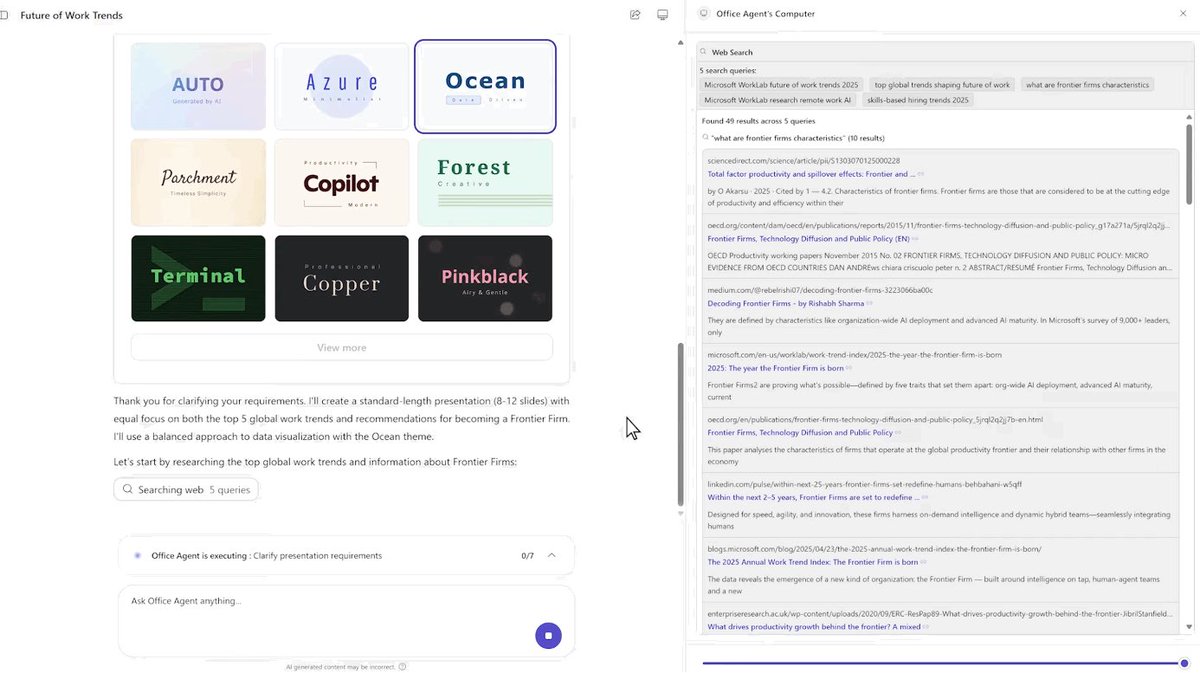
The new chat first way to build Office artifacts like Word documents and PowerPoint decks. Start by telling Copilot app what you need, answer some clarifying questions regarding key focuses, style and length. Copilot will created a polished output.
1
162
29 Sep 2025
2) Agent Mode in Word
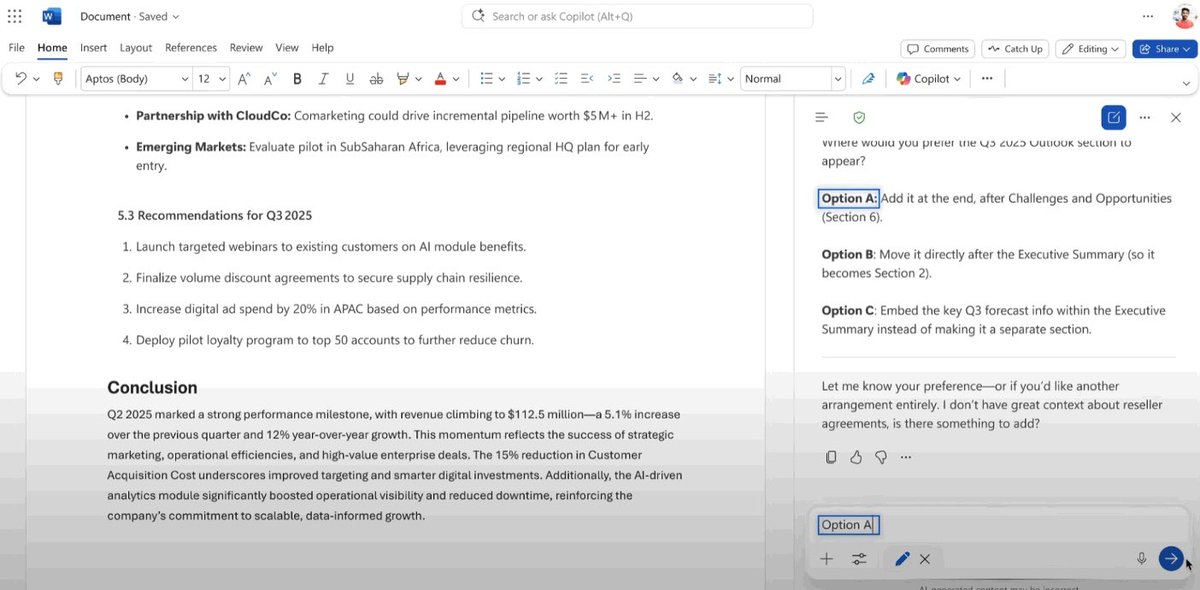
Agent Mode in Word turns document creation into interactive vibe writing. Tell Agent Mode what you need and watch as it uses your grounded content to make relevant recommendations and offers suggestions that best fit your style.
1
123
29 Sep 2025
1) Agent Mode in Excel
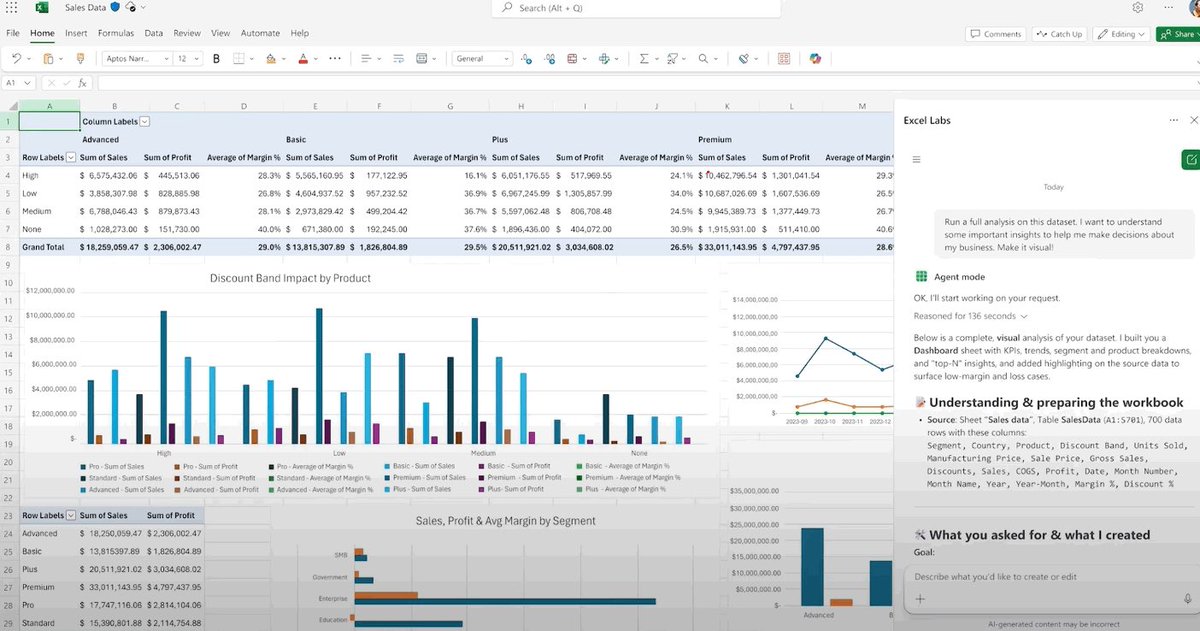
Agent Mode in Excel, allows you to build Excel Objects, like table structures, formula syntax or pivot tables and allows you to directly manipulate the data/formulas in the grid.
1
119
16 Sep 2024
It’s been just 18 months since we launched Microsoft 365 Copilot, and thanks to the incredible feedback from our customers, we're taking it to the next level. Today, we unveiled what's coming next:
Learn more: lnkd.in/gzaAR3wK
#Microsoft365 #Copilot #AI #WaveTwo
2
276
18 May 2023
Thank you Fortune for hosting me at the AI discussion this afternoon at the Fortune MPW Next Gen. It was great to see the enthusiasm and excitement for the work we are doing with Copilot!
2
13
749
2 May 2023
Fun talking about Copilot at #M365conf23 with the most fabulous @jeffteper Thank you @jeffteper for the new moniker :)
4
7
90
5,775