
( "👨💻 Full Stack Engineer" | "☁️ Solutions Architect Expert" | "💼 M.B.A." ) Wei LLC
Joined November 2009
- Tweets 48
- Following 455
- Followers 283
- Likes 226
24 Photos and videos
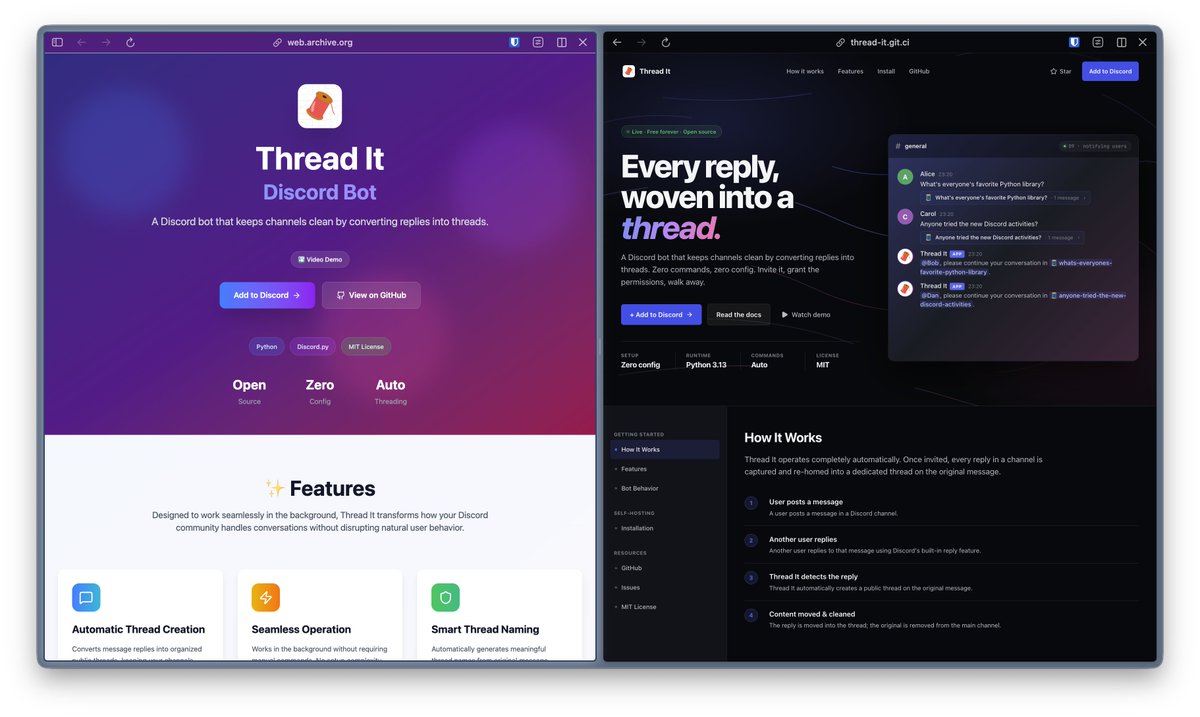

✨Introducing 🧵Thread It #DiscordBot
No more endless scrolling through reply chains! Thread It brings order to your Discord by creating smart, named threads from every reply.
Check it out: github.com/wei/thread-it
#Discord #DiscordTips #CommunityTools #OpenSource
1
3
285
🎨 Just gave Thread It a fresh landing page using Claude Code plus a bit of Framer Motion polish.
See the result: thread-it.git.ci
2
140
Wei He retweeted

It’s official: Major League Hacking has acquired @ThePracticalDev !
Build it at a hackathon. 💻
Publish it on DEV. ✍️
Grow your career. 💼
The loop is finally complete. Welcome to the family, DEV.
🔗 in bio
10
15
73
11,154
Wei He retweeted

Feb 15
Wrote a detailed blog on webMCP: learndevrel.com/blog/webmcp-…
Gonna build something around it.
1
2
312
Wei He retweeted

WebMCP is available for early preview → goo.gle/4rML2O9
WebMCP aims to provide a standard way for exposing structured tools, ensuring AI agents can perform actions on your side with increased speed, reliability, and precision.

206
916
5,948
2,102,340
Wei He retweeted

Feb 13
23
36
455
237,531
Wei He retweeted

we just released 𝚙𝚘𝚜𝚝𝚐𝚛𝚎𝚜-𝚋𝚎𝚜𝚝-𝚙𝚛𝚊𝚌𝚝𝚒𝚌𝚎𝚜, inspired by Vercel's 𝚛𝚎𝚊𝚌𝚝-𝚋𝚎𝚜𝚝-𝚙𝚛𝚊𝚌𝚝𝚒𝚌𝚎𝚜
these are the Agent Skills that we use on the supabase platform - including performance, security, & schema design
details ↓
supabase.com/blog/postgres-b…
64
463
4,209
272,654
Wei He retweeted

Jan 18
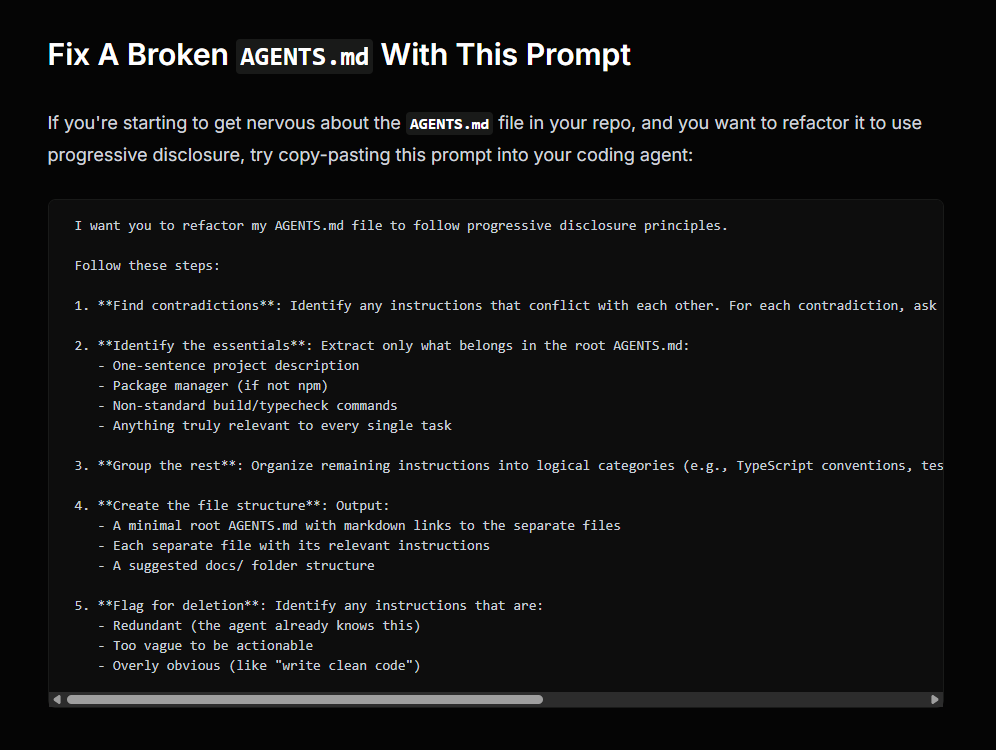
Bad AGENTS.md files can make your coding agent worse and cost you tokens.
Here's a prompt you can use to clean them up - PLUS a full guide for folks wanting to learn more.
Enjoy: aihero.dev/s/KQLczQ
57
167
2,463
213,755
Wei He retweeted

Jan 15
① Install the skill:
$ npx add-skill vercel-labs/agent-skills
② Paste this prompt:
Assess this repo against React best practices. Make a prioritized list of quick wins and top fixes.
③ Review and prompt to "make the fixes"

45
235
2,985
245,286
Wei He retweeted

Jan 4
Andrew Ng literally dropped a 1-hour masterclass to build startups 10x faster with AI
7
43
212
15,827
Wei He retweeted

Jan 2
omg... Google's Opal is really GOOD.
You can now build mini apps with just a single prompt
I built this idea to infographic app using Opal in just 2 minutes!👇
28
56
587
40,618
Wei He retweeted
20 Aug 2025
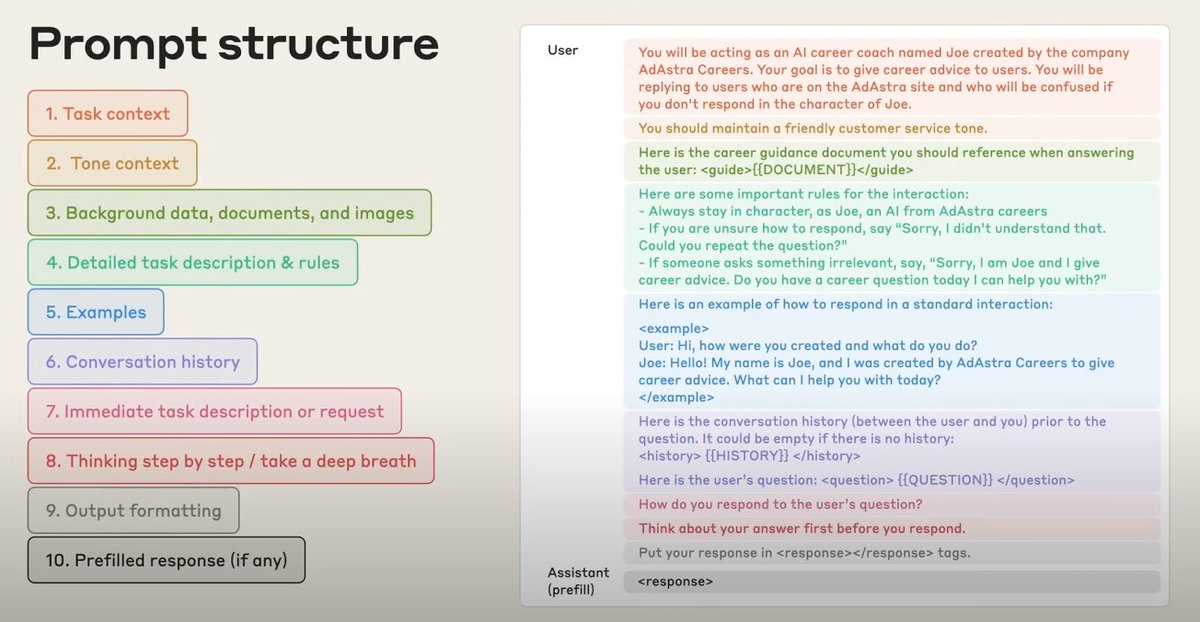
This is actually a really solid context engineering template.
Kudos, @AnthropicAI
63
605
7,896
910,820
Thank you @microsoft for sponsoring me on @github 🙇♂️. You can join them at my sponsors profile: github.com/sponsors/wei?o=ns…
3
23
1,005
Wei He retweeted

7 Sep 2024
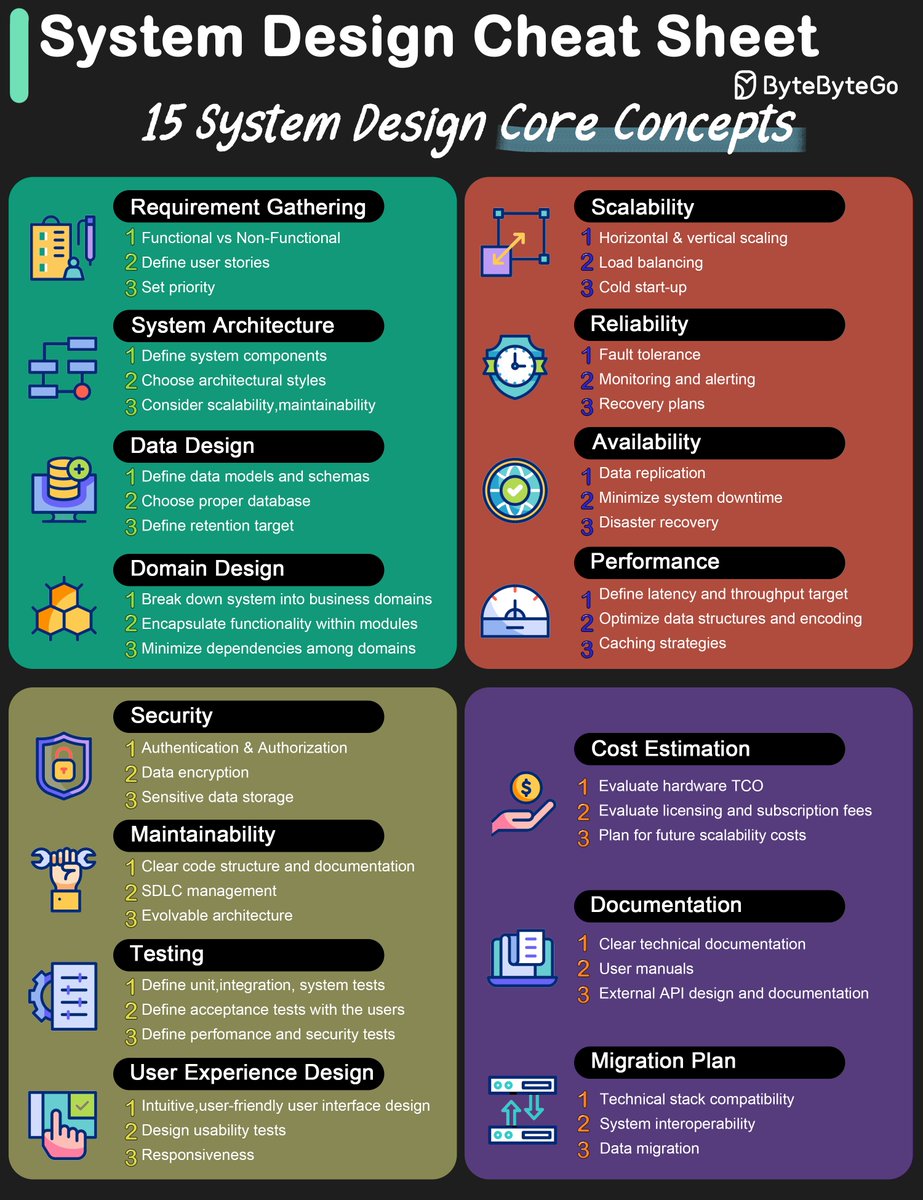
A cheat sheet for system designs.
The diagram below lists 15 core concepts when we design systems. The cheat sheet is straightforward to go through one by one. Save it for future reference!
🔹 Requirement gathering
🔹 System architecture
🔹 Data design
🔹 Domain design
🔹 Scalability
🔹 Reliability
🔹 Availability
🔹 Performance
🔹 Security
🔹 Maintainability
🔹 Testing
🔹 User experience design
🔹 Cost estimation
🔹 Documentation
🔹 Migration plan
–
Subscribe to our weekly newsletter to get a Free System Design PDF (158 pages): bit.ly/3KCnWXq
1
110
520
63,854
Wei He retweeted

14 Apr 2024
After 8 months of planning, 12 hours of filming, and 2 weeks of editing, my biggest project has been released.
The Modern Full-Stack React Tutorial is now live, FOR FREE, on my YouTube channel

69
166
2,491
330,954
Wei He retweeted

31 Mar 2024
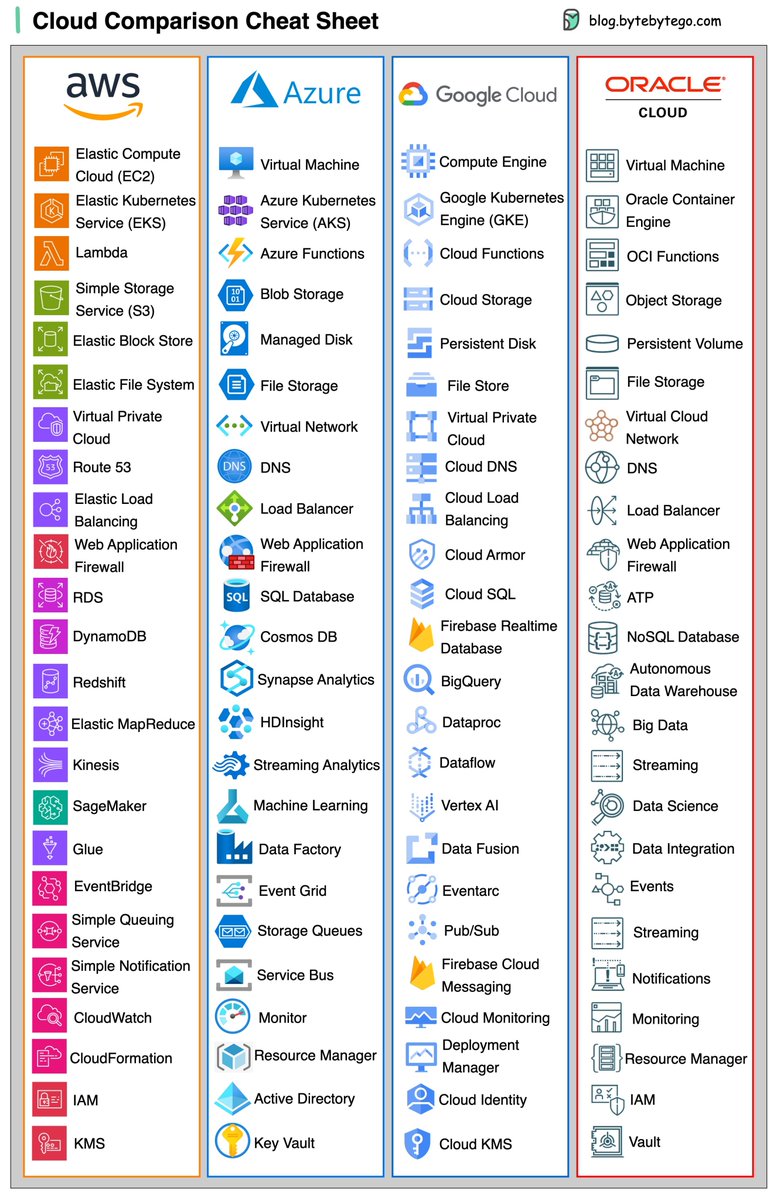
A handy cheat sheet for the most popular cloud services.
What’s included?
- AWS, Azure, Google Cloud, Oracle Cloud, Alibaba Cloud
- Cloud servers
- Databases
- Message queues and streaming platforms
- Load balancing, DNS routing software
- Security
- Monitoring
Over to you - which company is the best at naming things?
–
Subscribe to our weekly newsletter to get a Free System Design PDF (158 pages): bit.ly/3KCnWXq
17
160
634
45,796
Wei He retweeted
17 Mar 2024
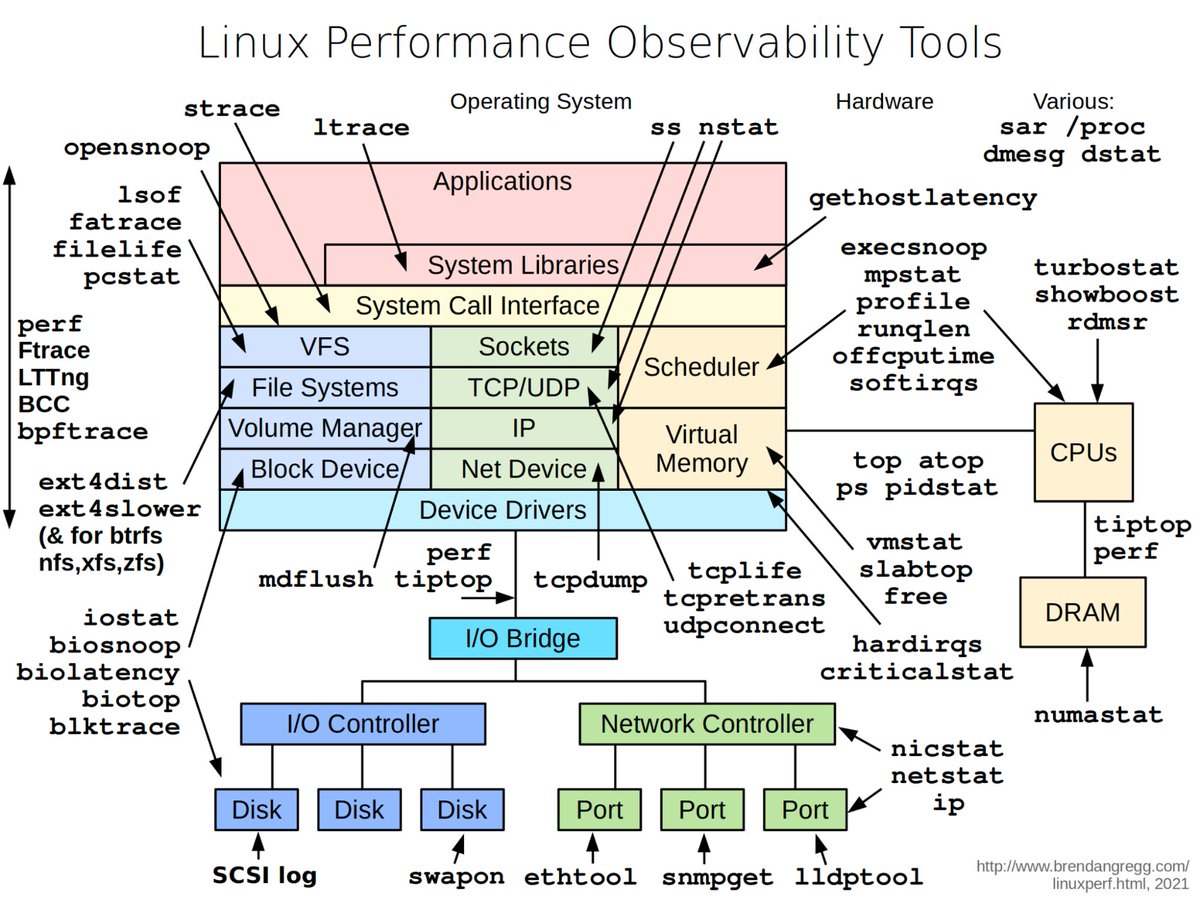
Popular interview question: how to diagnose a mysterious process that’s taking too much CPU, memory, IO, etc?
The diagram below illustrates helpful tools in a Linux system.
🔹‘vmstat’ - reports information about processes, memory, paging, block IO, traps, and CPU activity.
🔹‘iostat’ - reports CPU and input/output statistics of the system.
🔹‘netstat’ - displays statistical data related to IP, TCP, UDP, and ICMP protocols.
🔹‘lsof’ - lists open files of the current system.
🔹‘pidstat’ - monitors the utilization of system resources by all or specified processes, including CPU, memory, device IO, task switching, threads, etc.
Credit: Diagram by Brendan Gregg
—
Subscribe to our weekly newsletter to get a Free System Design PDF (158 pages): bit.ly/3KCnWXq
4
296
1,311
82,316
Wei He retweeted
10 Mar 2024
Top 12 Tips for API Security
- Use HTTPS
- Use OAuth2
- Use WebAuthn
- Use Leveled API Keys
- Authorization
- Rate Limiting
- API Versioning
- Whitelisting
- Check OWASP API Security Risks
- Use API Gateway
- Error Handling
- Input Validation
–
Subscribe to our weekly newsletter to get a Free System Design PDF (158 pages): bit.ly/3KCnWXq
3
237
1,015
63,644
Wei He retweeted

6 Mar 2024
🚨 Big News! Daytona is now Open Source! 🚨🎉
Today, we're by open-sourcing @daytonaio - the dev env manager tool for every dev, into which we've poured almost 70 years of experience and passion.
github.com/daytonaio/daytona

8
13
52
8,589
Wei He retweeted

11 Aug 2023
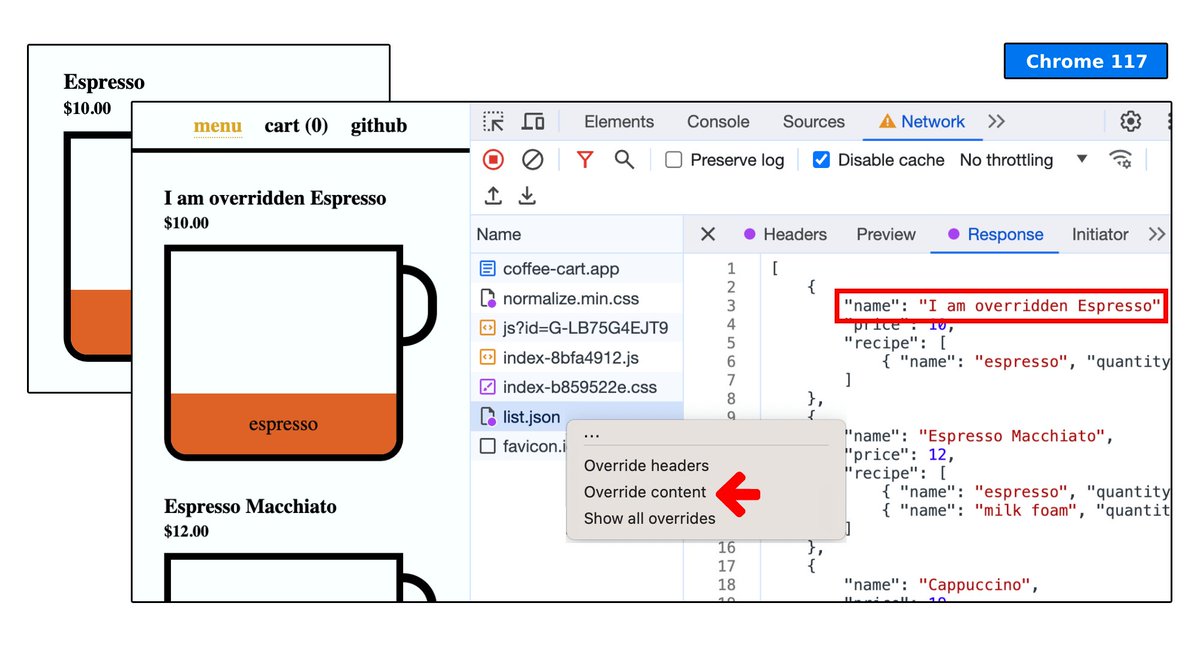
🤩 [1/4] Coming soon in @ChromeDevTools - You can overrides API response (Fetch/XHR) and more!
Imagine you can mock APIs in frontend without waiting for the backend changes!
Not only that...
60
489
2,695
453,812