
Joined March 2016
- Tweets 7,334
- Following 175
- Followers 157
- Likes 15,338
2,208 Photos and videos

















Jun 12
BENNETT - Vois sur ton chemin - DJ Holanda MONTAGEM CORAL Remix youtu.be/_62fkEv8Kio?si=YkhV…
1
68
ob·so·les·cence retweeted

Jun 12
roothide Dopamine 2.4.9.25 released:
github.com/roothide/Dopamine…
8
24
92
9,040
ob·so·les·cence retweeted
Jun 12
Bootstrap 2.2.1 released:
github.com/roothide/Bootstra…
3
19
108
11,818
ob·so·les·cence retweeted

Jun 3
Some good news for those of you who want to block updates.
Apple has decided to be nice and share a refreshed tvOS 26 beta profile - one that now expires on May 20th, 2027 (just under 1 year from today)
You can get the new profile at f.itsnebula.net/noota-26.mob… (same url as before)
2
17
117
13,679
ob·so·les·cence retweeted

May 31
8
18
84
328,679
ob·so·les·cence retweeted

May 31
🎮 PS5 Rules for Success
Before asking for help, please make sure you’ve read and followed the guidance below.
1. Use a Single Mounting Method
Always use only one mounting solution at a time.
Examples include:
Voidshell
ShadowMount Plus
Dump Installer
etaHEN ItemzFlow
Mixing multiple mounting methods can lead to conflicts, crashes, duplicate shortcuts, or games failing to launch.
Note: Dump Installer can generally be used alongside etaHEN.
⸻
2. Use the Latest kstuff
Using an up-to-date version of kstuff is recommended.
Use either the latest Echo Stretch kstuff Lite release or Drakmor’s 1.1 Stable release. Drakmor’s 1.1 Stable should only be used on firmware 10.01 or below, while Echo Stretch kstuff Lite can be used on firmwares up to 12.xx.
If you are experiencing issues, test different kstuff versions before reporting problems.
⸻
3. Use an SSD for Best Results
For the best compatibility and loading performance:
✅ Use an SSD in a USB enclosure
✅ Connect it to a SuperSpeed USB port:
Rear USB ports
Front USB-C port
⚠️ Internal storage is generally not recommended for mounted content.
⸻
4. Configure kstuff Pause Correctly
Do not set your kstuff pause delay too the kstuffshort.
The pause delay should generally be set to at least 45–60 seconds.
Some games require additional time to finish loading resources. If kstuff resumes too early, the game may crash during startup or shortly afterwards.
If you experience crashes, increase the pause delay and test again.
⸻
5. Check Firmware Compatibility
Games must be compatible with your firmware.
Examples:
Firmware 4.xx → Game must support 4.xx or have a backport.
Firmware 5.xx → Games requiring 6.xx will need a backport.
If a game requires a newer firmware than your console supports, you must:
Obtain an existing backport, or
Create one yourself (advanced users)
Many popular titles already have backports available within the community.
⸻
6. Switching from ItemzFlow to Other Mounting Methods
If you previously mounted games using etaHEN ItemzFlow and want to switch to ShadowMount Plus, Voidshell, or another mounting solution:
Open ItemzFlow.
Locate previously mounted games.
Remove all created shortcuts.
Reboot if necessary.
Mount again using your new preferred method.
Failing to remove old shortcuts can cause launch issues and conflicts.
⸻
Before Asking for Help
Please verify:
✅ You are using only one mounting method.
✅ Your game is compatible with your firmware.
✅ You are using a suitable kstuff version.
✅ Your kstuff pause delay is not too short.
✅ You are using an external SSD connected to a SuperSpeed USB port.
✅ You removed old ItemzFlow shortcuts if switching mounting methods.
⸻
Community Etiquette
❌ Do not post the same question across multiple channels.
❌ Do not repeatedly bump your question.
✅ Ask once and wait for a response.
✅ Provide useful information such as:
Firmware version
Mounting method used
kstuff version
Storage device used
Exact error or crash behaviour
This helps experienced users and moderators diagnose problems much faster.
10
22
168
9,353

ob·so·les·cence retweeted

May 25
ps5hen at 5.XX with working ps5/ps4 games no kernel panic and npt walk implemented so no please wait before loading game etawen release no idea gotta clean it up and make agnostic 1.xx-6.02
streamable.com/td9u33
15
16
146
14,463

ob·so·les·cence retweeted

New Ps5 linux kernel 7.08 just released
github.com/ps5-linux/ps5-lin…
3
10
99
6,414
May 18
Starting to get ready for Linux on my PS5.
- 1TB M2 SSD in USB-C enclosure
- USB-A dongle wireless keyboard-mouse
- USB-A dongle wireless Bluetooth 4.0 adapter
183
May 18
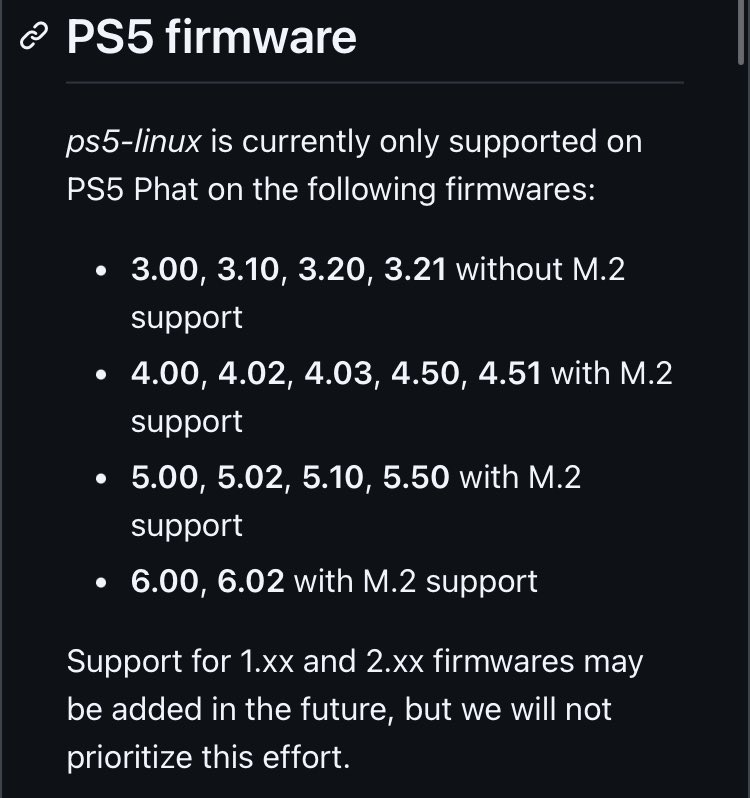
PS5 Linux team just added support for 5.00, 5.02, and 5.10 support overnight 👀
github.com/ps5-linux/ps5-lin…
2
3
561
ob·so·les·cence retweeted

May 17
We now also have a working driver for the internal marvell wlan chip: github.com/ps5-linux/ps5-lin…
4
24
340
15,106