
Joined November 2020
- Tweets 2,377
- Following 182
- Followers 2,782
- Likes 2,576
257 Photos and videos















Pinned Tweet

23 Dec 2025
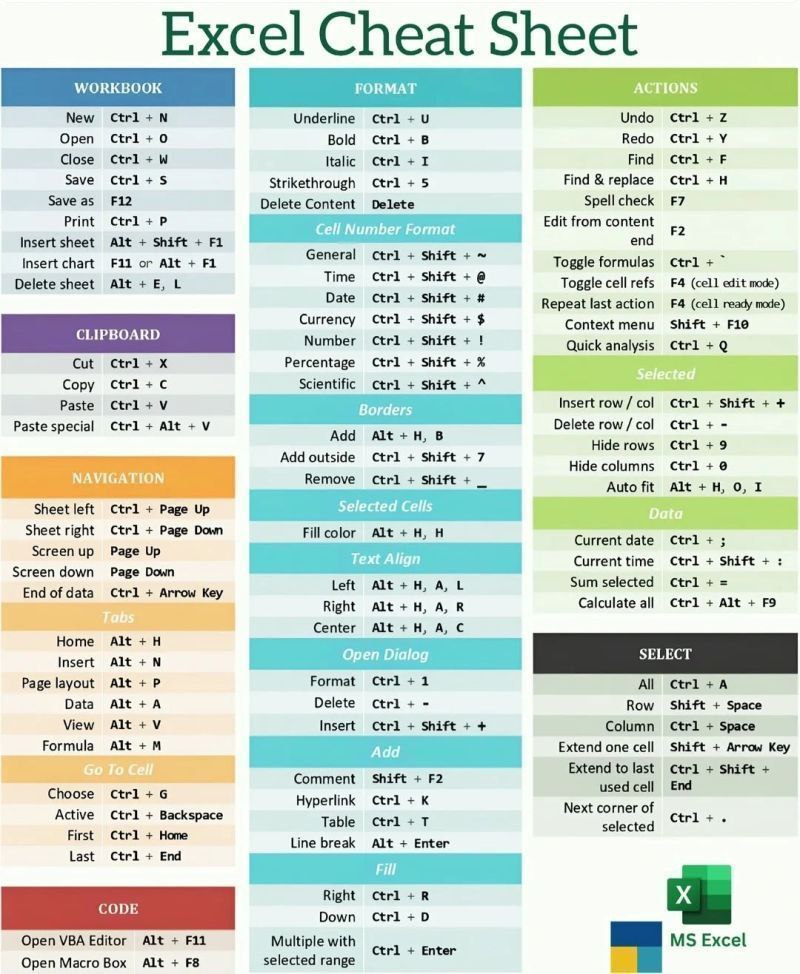
📊 Excel Cheat Sheet
Shortcuts = Speed Productivity ⚡
Save this 🔖
Master Excel faster with essential keyboard shortcuts.
Like ❤️ | Comment 💬 | Share 🔁
Follow for more tips 👉
@CodeGeniee
4
1
7
503
Shivam Gupta retweeted

Jun 13
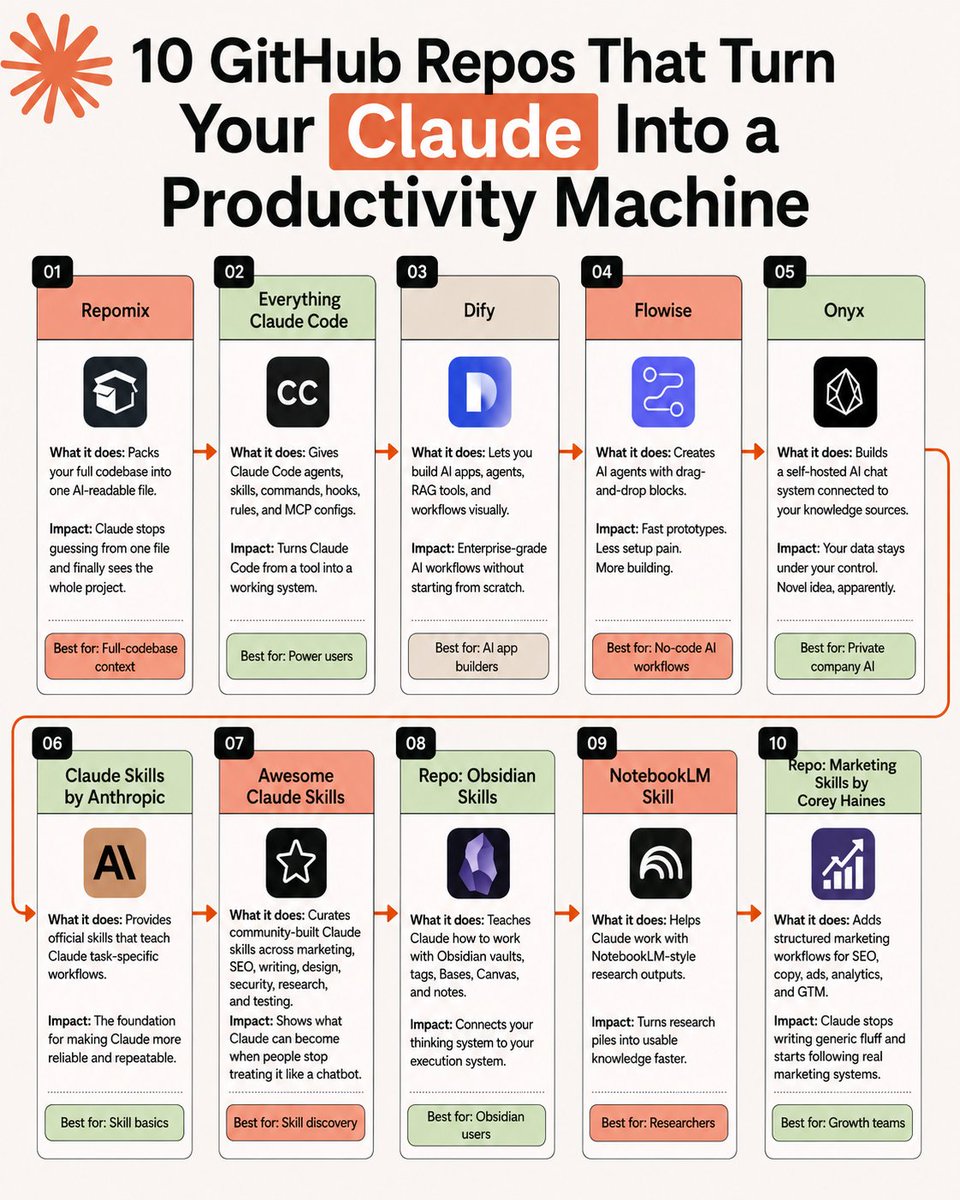
🚀 𝗧𝗼𝗽 𝟭𝟬 𝗚𝗶𝘁𝗛𝘂𝗯 𝗥𝗲𝗽𝗼𝘀 𝗧𝗵𝗮𝘁 𝗧𝘂𝗿𝗻 𝗖𝗹𝗮𝘂𝗱𝗲 𝗜𝗻𝘁𝗼 𝗔 𝗣𝗿𝗼𝗱𝘂𝗰𝘁𝗶𝘃𝗶𝘁𝘆 𝗠𝗮𝗰𝗵𝗶𝗻𝗲
⚡ Turn Claude from a simple AI assistant into a powerful workflow engine.
These GitHub repos help you automate, build, research, and ship faster.
🔹 𝗢𝟭. 𝗥𝗲𝗽𝗼𝗺𝗶𝘅
𝗪𝗵𝗮𝘁 𝗶𝘁 𝗱𝗼𝗲𝘀: Packs your full codebase into one AI-readable file.
📈 𝗜𝗺𝗽𝗮𝗰𝘁: Claude stops guessing from one file and finally sees the whole project.
🎯 𝗕𝗲𝘀𝘁 𝗳𝗼𝗿: Full-codebase context
🔹 𝗢𝟮. 𝗘𝘃𝗲𝗿𝘆𝘁𝗵𝗶𝗻𝗴 𝗖𝗹𝗮𝘂𝗱𝗲 𝗖𝗼𝗱𝗲
𝗪𝗵𝗮𝘁 𝗶𝘁 𝗱𝗼𝗲𝘀: Gives Claude Code agents, skills, commands, hooks, rules, and MCP configs.
📈 𝗜𝗺𝗽𝗮𝗰𝘁: Turns Claude Code from a tool into a working system.
🎯 𝗕𝗲𝘀𝘁 𝗳𝗼𝗿: Power users
🔹 𝗢𝟯. 𝗗𝗶𝗳𝘆
𝗪𝗵𝗮𝘁 𝗶𝘁 𝗱𝗼𝗲𝘀: Lets you build AI apps, agents, RAG tools, and workflows visually.
📈 𝗜𝗺𝗽𝗮𝗰𝘁: Enterprise-grade AI workflows without starting from scratch.
🎯 𝗕𝗲𝘀𝘁 𝗳𝗼𝗿: AI app builders
🔹 𝗢𝟰. 𝗙𝗹𝗼𝘄𝗶𝘀𝗲
𝗪𝗵𝗮𝘁 𝗶𝘁 𝗱𝗼𝗲𝘀: Creates AI agents with drag-and-drop blocks.
📈 𝗜𝗺𝗽𝗮𝗰𝘁: Fast prototypes. Less setup pain. More building.
🎯 𝗕𝗲𝘀𝘁 𝗳𝗼𝗿: No-code AI workflows
🔹 𝗢𝟱. 𝗢𝗻𝘆𝘅
𝗪𝗵𝗮𝘁 𝗶𝘁 𝗱𝗼𝗲𝘀: Builds a self-hosted AI chat system connected to your knowledge sources.
📈 𝗜𝗺𝗽𝗮𝗰𝘁: Your data stays under your control.
🎯 𝗕𝗲𝘀𝘁 𝗳𝗼𝗿: Private company AI
🔹 𝗢𝟲. 𝗖𝗹𝗮𝘂𝗱𝗲 𝗦𝗸𝗶𝗹𝗹𝘀 𝗯𝘆 𝗔𝗻𝘁𝗵𝗿𝗼𝗽𝗶𝗰
𝗪𝗵𝗮𝘁 𝗶𝘁 𝗱𝗼𝗲𝘀: Provides official skills that teach Claude task-specific workflows.
📈 𝗜𝗺𝗽𝗮𝗰𝘁: The foundation for making Claude more reliable and repeatable.
🎯 𝗕𝗲𝘀𝘁 𝗳𝗼𝗿: Skill basics
🔹 𝗢𝟳. 𝗔𝘄𝗲𝘀𝗼𝗺𝗲 𝗖𝗹𝗮𝘂𝗱𝗲 𝗦𝗸𝗶𝗹𝗹𝘀
𝗪𝗵𝗮𝘁 𝗶𝘁 𝗱𝗼𝗲𝘀: Curates community-built Claude skills across marketing, SEO, writing, design, security, research, and testing.
📈 𝗜𝗺𝗽𝗮𝗰𝘁: Shows what Claude can become when people stop treating it like a chatbot.
🎯 𝗕𝗲𝘀𝘁 𝗳𝗼𝗿: Skill discovery
🔹 𝗢𝟴. 𝗢𝗯𝘀𝗶𝗱𝗶𝗮𝗻 𝗦𝗸𝗶𝗹𝗹𝘀
𝗪𝗵𝗮𝘁 𝗶𝘁 𝗱𝗼𝗲𝘀: Teaches Claude how to work with Obsidian vaults, tags, Bases, Canvas, and notes.
📈 𝗜𝗺𝗽𝗮𝗰𝘁: Connects your thinking system to your execution system.
🎯 𝗕𝗲𝘀𝘁 𝗳𝗼𝗿: Obsidian users
🔹 𝗢𝟵. 𝗡𝗼𝘁𝗲𝗯𝗼𝗼𝗸𝗟𝗠 𝗦𝗸𝗶𝗹𝗹
𝗪𝗵𝗮𝘁 𝗶𝘁 𝗱𝗼𝗲𝘀: Helps Claude work with NotebookLM-style research outputs.
📈 𝗜𝗺𝗽𝗮𝗰𝘁: Turns research piles into usable knowledge faster.
🎯 𝗕𝗲𝘀𝘁 𝗳𝗼𝗿: Researchers
🔹 𝗢𝟭𝟬. 𝗠𝗮𝗿𝗸𝗲𝘁𝗶𝗻𝗴 𝗦𝗸𝗶𝗹𝗹𝘀 𝗯𝘆 𝗖𝗼𝗿𝗲𝘆 𝗛𝗮𝗶𝗻𝗲𝘀
𝗪𝗵𝗮𝘁 𝗶𝘁 𝗱𝗼𝗲𝘀: Adds structured marketing workflows for SEO, copy, ads, analytics, and GTM.
📈 𝗜𝗺𝗽𝗮𝗰𝘁: Claude stops writing generic fluff and starts following real marketing systems.
🎯 𝗕𝗲𝘀𝘁 𝗳𝗼𝗿: Growth teams
◆ 𝗕𝗼𝗼𝗸𝗺𝗮𝗿𝗸 𝘁𝗵𝗶𝘀 𝗳𝗼𝗿 𝗹𝗮𝘁𝗲𝗿.
❤️ Like
🔁 Retweet
🔖 Bookmark
Follow @sonalshukla3377 for more such posts
36
33
108
4,941
Shivam Gupta retweeted
Jun 12
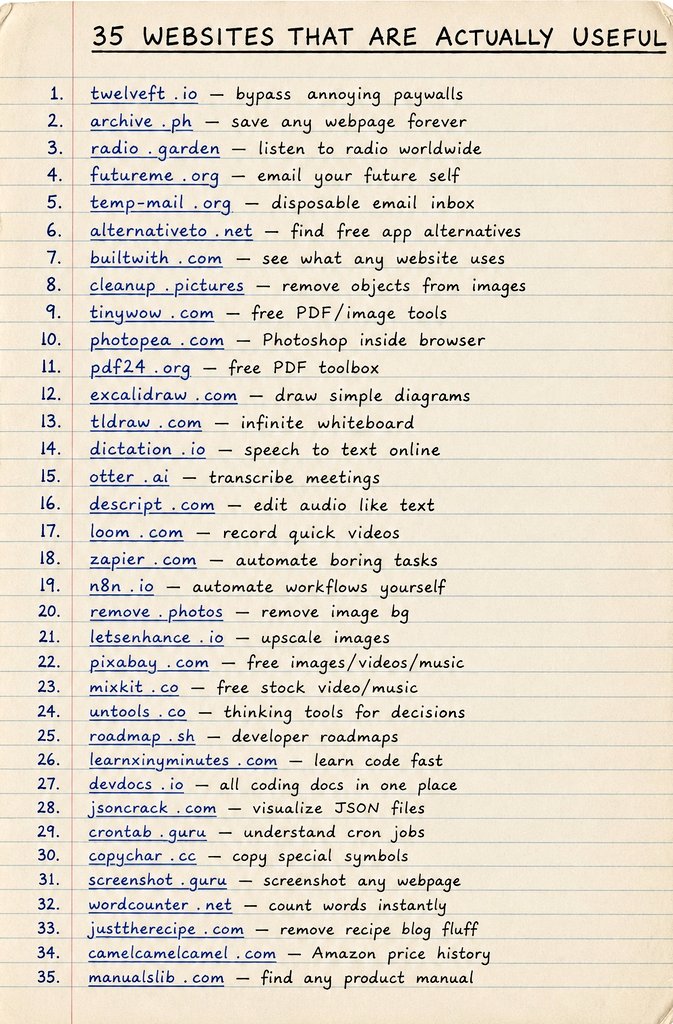
𝟯𝟱 𝗪𝗘𝗕𝗦𝗜𝗧𝗘𝗦 𝗧𝗛𝗔𝗧 𝗔𝗥𝗘 𝗔𝗖𝗧𝗨𝗔𝗟𝗟𝗬 𝗨𝗦𝗘𝗙𝗨𝗟 🚀
Discover some of the internet's most practical websites that can save time, boost productivity, simplify work, and help you learn new skills. Whether you're a student, creator, developer, or professional, these tools can make everyday tasks much easier.
▶️ twelveft.io — bypass annoying paywalls
▶️ archive.ph — save any webpage forever
▶️ radio.garden — listen to radio worldwide
▶️ futureme.org — email your future self
▶️ temp-mail.org — disposable email inbox
▶️ alternativeto.net — find free app alternatives
▶️ builtwith.com — see what any website uses
▶️ cleanup.pictures — remove objects from images
▶️ tinywow.com — free PDF/image tools
▶️ photopea.com — Photoshop inside browser
▶️ pdf24.org — free PDF toolbox
▶️ excalidraw.com — draw simple diagrams
▶️ tldraw.com — infinite whiteboard
▶️ dictation.io — speech to text online
▶️ otter.ai — transcribe meetings
▶️ descript.com — edit audio like text
▶️ loom.com — record quick videos
▶️ zapier.com — automate boring tasks
▶️ n8n.io — automate workflows yourself
▶️ remove.photos — remove image bg
▶️ letsenhance.io — upscale images
▶️ pixabay.com — free images/videos/music
▶️ mixkit.co — free stock video/music
▶️ untools.co — thinking tools for decisions
▶️ roadmap.sh — developer roadmaps
▶️ learnxinyminutes.com — learn code fast
▶️ devdocs.io — all coding docs in one place
▶️ jsoncrack.com — visualize JSON files
▶️ crontab.guru — understand cron jobs
▶️ copychar.cc — copy special symbols
▶️ screenshot.guru — screenshot any webpage
▶️ wordcounter.net — count words instantly
▶️ justtherecipe.com — remove recipe blog fluff
▶️ camelcamelcamel.com — Amazon price history
▶️ manualslib.com — find any product manual
❤️ Like
🔁 Retweet
🔖 Bookmark
Follow @sonalshukla3377 for more such posts
32
60
183
5,536
Shivam Gupta retweeted
Jun 11
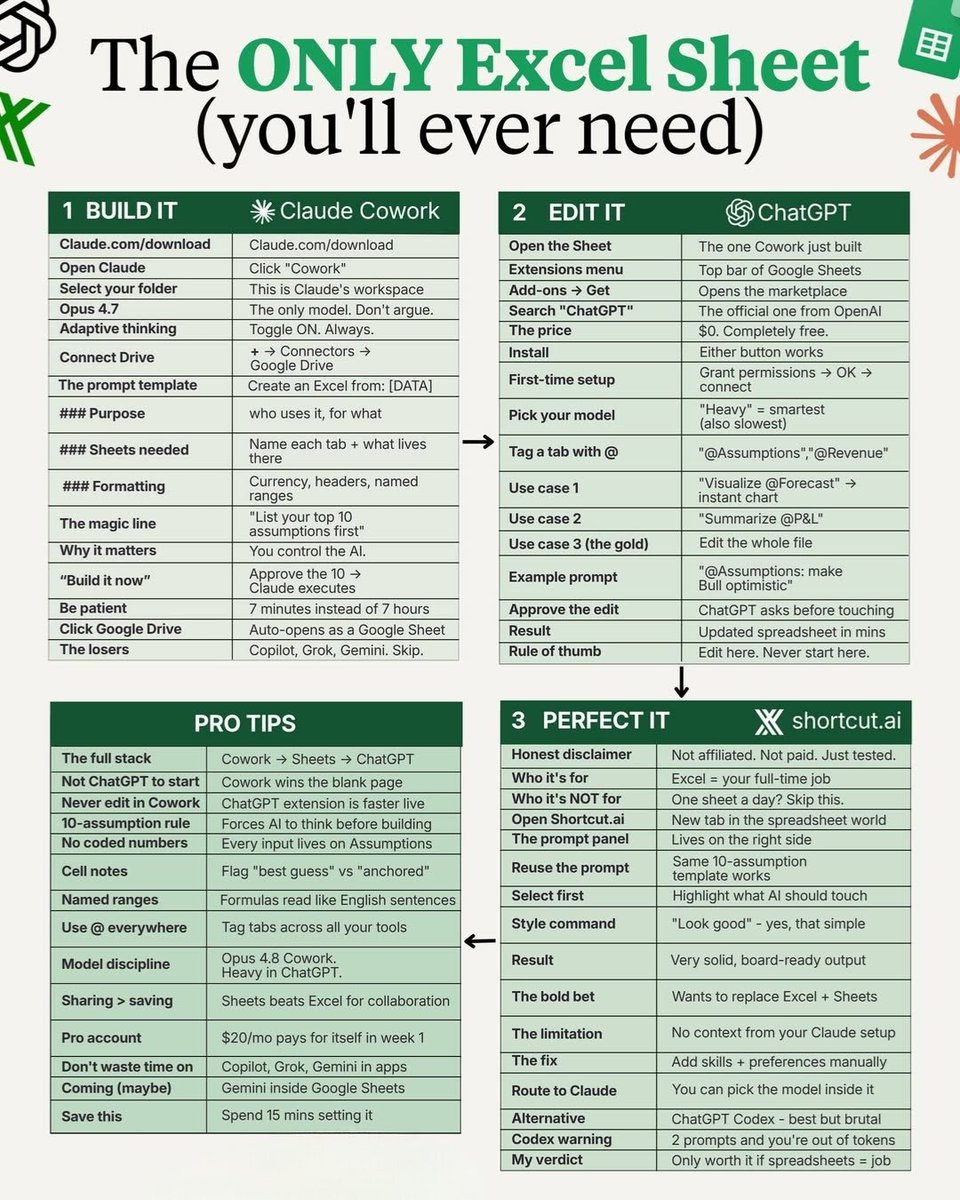
🔷️𝗧𝗵𝗲 𝗢𝗡𝗟𝗬 𝗘𝘅𝗰𝗲𝗹 𝗦𝗵𝗲𝗲𝘁 (𝘆𝗼𝘂’𝗹𝗹 𝗲𝘃𝗲𝗿 𝗻𝗲𝗲𝗱)
Built to simplify your workflow and keep every task organized in one place.
No clutter, no confusion, just a clean system that actually works.
✳️ 𝗕𝘂𝗶𝗹𝗱 𝗜𝘁 𝗖𝗹𝗮𝘂𝗱𝗲 𝗖𝗼𝘄𝗼𝗿𝗸
• Claude.com/download
• Open Claude → Click Cowork
• Select your folder → This is Claude’s workspace
• Opus 4.7 → The only model Don’t argue
• Adaptive thinking → Toggle ON Always
• Connect Drive → → Connectors → Google Drive
• The prompt template → Create an Excel from [DATA]
• Purpose → who uses it for what
• Sheets needed → Name each tab what lives there
• Formatting → Currency headers named ranges
• The magic line → List your top 10 assumptions first
• Why it matters → You control the AI
• Build it now → Approve the 10 → Claude executes
• Be patient → 7 minutes instead of 7 hours
• Click Google Drive → Auto opens as a Google Sheet
• The losers → Copilot Grok Gemini Skip
✳️ 𝗘𝗱𝗶𝘁 𝗜𝘁 𝗖𝗵𝗮𝘁𝗚𝗣𝗧
• Open the Sheet → The one Cowork just built
• Extensions menu → Top bar of Google Sheets
• Add-ons → Get → Opens the marketplace
• Search ChatGPT → The official one from OpenAI
• The price → $0 Completely free
• Install → Either button works
• First-time setup → Grant permissions → OK → connect
• Pick your model → Heavy = smartest also slowest
• Tag a tab with @ → @Assumptions @Revenue
• Use case 1 → Visualize @Forecast → instant chart
• Use case 2 → Summarize @P&L
• Use case 3 the gold → Edit the whole file
• Example prompt → @Assumptions make Bull optimistic
• Approve the edit → ChatGPT asks before touching
• Result → Updated spreadsheet in mins
• Rule of thumb → Edit here Never start here
🔵𝗣𝗿𝗼 𝗧𝗶𝗽𝘀
• The full stack → Cowork → Sheets → ChatGPT
• Not ChatGPT to start → Cowork wins the blank page
• Never edit in Cowork → ChatGPT extension is faster live
• 10-assumption rule → Forces AI to think before building
• No coded numbers → Every input lives on Assumptions
• Cell notes → Flag best guess vs anchored
• Named ranges → Formulas read like English sentences
• Use @ everywhere → Tag tabs across all your tools
• Model discipline → Opus 4.8 Cowork Heavy in ChatGPT
• Sharing > saving → Sheets beats Excel for collaboration
• Pro account → $20/mo pays for itself in week 1
• Don’t waste time on → Copilot Grok Gemini in apps
• Coming maybe → Gemini inside Google Sheets
• Save this → Spend 15 mins setting it
✳️ 𝗣𝗲𝗿𝗳𝗲𝗰𝘁 𝗜𝘁 𝘀𝗵𝗼𝗿𝘁𝗰𝘂𝘁.𝗮𝗶
• Honest disclaimer → Not affiliated Not paid Just tested
• Who it’s for → Excel = your full-time job
• Who it’s NOT for → One sheet a day Skip this
• Open Shortcut.ai → New tab in the spreadsheet world
• The prompt panel → Lives on the right side
• Reuse the prompt → Same 10-assumption template works
• Select first → Highlight what AI should touch
• Style command → Look good yes that simple
• Result → Very solid board-ready output
• The bold bet → Wants to replace Excel Sheets
• The limitation → No context from your Claude setup
• The fix → Add skills preferences manually
• Route to Claude → You can pick the model inside it
• Alternative → ChatGPT Codex best but brutal
• Codex warning → 2 prompts and you’re out of tokens
• My verdict → Only worth it if spreadsheets = job
❤️ Like
🔁 Retweet
🔖 Bookmark
Follow @sonalshukla3377 for more such posts
32
36
102
4,149

AI Agents Can Confidently Fail You.
The real challenge isn't building with AI agents.
It's making them actually deliver.
AI can generate plans, write code, and make decisions in seconds.
The question is whether those outcomes can be trusted.
🔗1key4ai.com
#AI

20
26
112
877
Shivam Gupta retweeted
Jun 4
CHATGPT CANVA = MONEY MACHINE
I asked ChatGPT to help me turn my Canva skills into real $$ and these 10 prompts changed the game.
Save these prompts & turn your Canva skills into real income today.
❤️ Like
🔁 Retweet
🔖 Bookmark
Follow @sonalshukla3377 for more such posts
30
25
108
1,691
Shivam Gupta retweeted
Jun 3
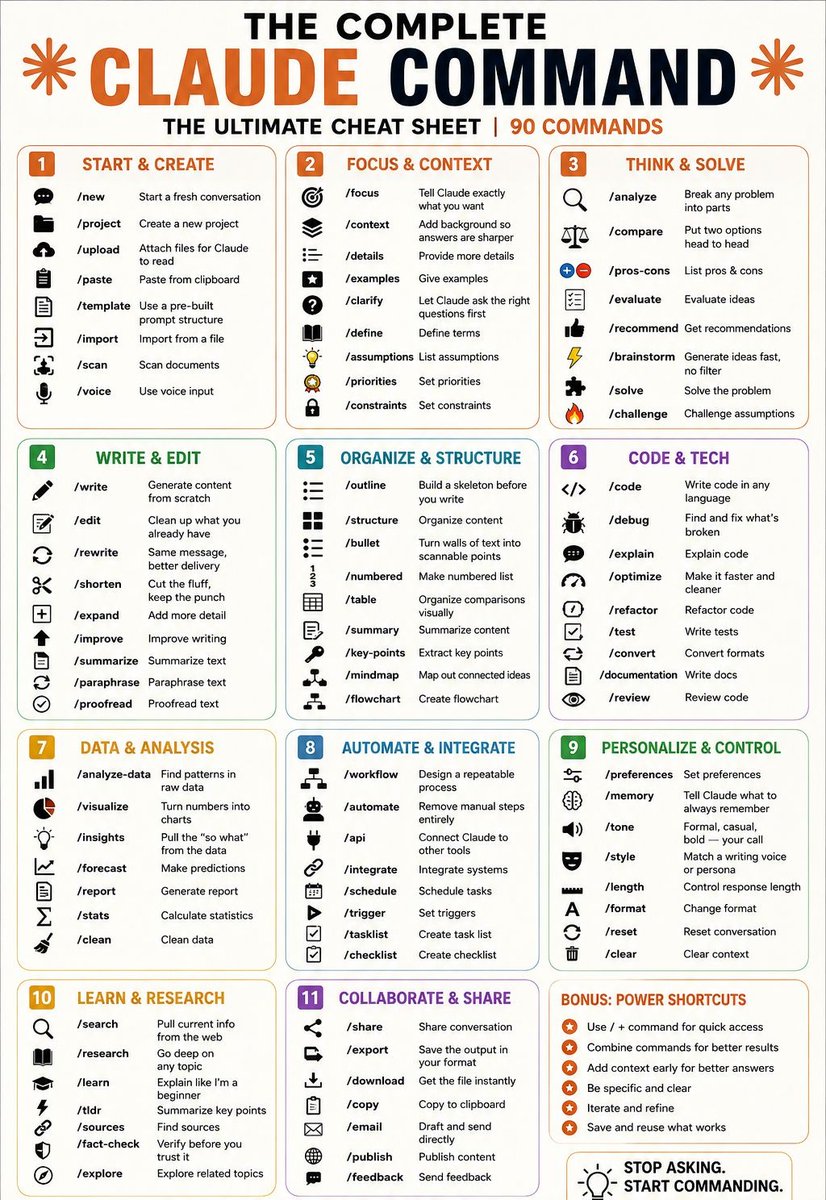
🎯THE COMPLETE CLAUDE COMMAND
THE ULTIMATE CHEAT SHEET | 90 COMMANDS
---
1. START & CREATE
/new → Start a fresh conversation
/project → Create a new project
/upload → Attach files for Claude to read
/paste → Paste from clipboard
/template → Use a pre-built prompt structure
/import → Import from a file
/scan → Scan documents
/voice → Use voice input
---
2. FOCUS & CONTEXT
/focus → Tell Claude exactly what you want
/context → Add background so answers are sharper
/details → Provide more details
/examples → Give examples
/clarify → Let Claude ask the right questions first
/define → Define terms
/assumptions → List assumptions
/priorities → Set priorities
/constraints → Set constraints
---
3. THINK & SOLVE
/analyze → Break any problem into parts
/compare → Put two options head to head
/pros-cons → List pros & cons
/evaluate → Evaluate ideas
/recommend → Get recommendations
/brainstorm → Generate ideas fast, no filter
/solve → Solve the problem
/challenge → Challenge assumptions
---
4. WRITE & EDIT
/write → Generate content from scratch
/edit → Clean up what you already have
/rewrite → Same message, better delivery
/shorten → Cut the fluff, keep the punch
/expand → Add more detail
/improve → Improve writing
/summarize → Summarize text
/paraphrase → Paraphrase text
/proofread → Proofread text
---
5. ORGANIZE & STRUCTURE
/outline → Build a skeleton before writing
/structure → Organize content
/bullet → Turn text into scannable points
/numbered → Make numbered list
/table → Organize comparisons visually
/summary → Summarize content
/key-points → Extract key points
/mindmap → Map out connected ideas
/flowchart → Create flowchart
---
6. CODE & TECH
/code → Write code in any language
/debug → Find and fix issues
/explain → Explain code
/optimize → Make code faster and cleaner
/refactor → Improve code structure
/test → Write tests
/convert → Convert formats
/documentation → Write docs
/review → Review code
---
7. DATA & ANALYSIS
/analyze-data → Find patterns in raw data
/visualize → Turn numbers into charts
/insights → Extract key insights
/forecast → Make predictions
/report → Generate report
/stats → Calculate statistics
/clean → Clean data
---
8. AUTOMATE & INTEGRATE
/workflow → Design repeatable process
/automate → Remove manual steps
/api → Connect tools via API
/integrate → Integrate systems
/schedule → Schedule tasks
/trigger → Set triggers
/tasklist → Create task list
/checklist → Create checklist
---
9. PERSONALIZE & CONTROL
/preferences → Set preferences
/memory → Save what to remember
/tone → Set tone (formal, casual, bold)
/style → Match writing style/persona
/length → Control response length
/format → Change format
/reset → Reset conversation
/clear → Clear context
---
10. LEARN & RESEARCH
/search → Get current info from web
/research → Deep dive into topic
/learn → Beginner explanation
/tldr → Summary of key points
/sources → Find sources
/fact-check → Verify information
/explore → Explore related topics
---
11. COLLABORATE & SHARE
/share → Share conversation
/export → Save output
/download → Get file instantly
/copy → Copy to clipboard
/email → Draft and send
/publish → Publish content
/feedback → Send feedback
---
BONUS: POWER SHORTCUTS
Use “/” commands for quick access
Combine commands for better results
Add context early for better answers
Be specific and clear
Iterate and refine
Save and reuse what works
❤️ Like
🔁 Retweet
🔖 Bookmark
Follow @sonalshukla3377 for more such posts
28
62
208
6,490
Shivam Gupta retweeted
May 30
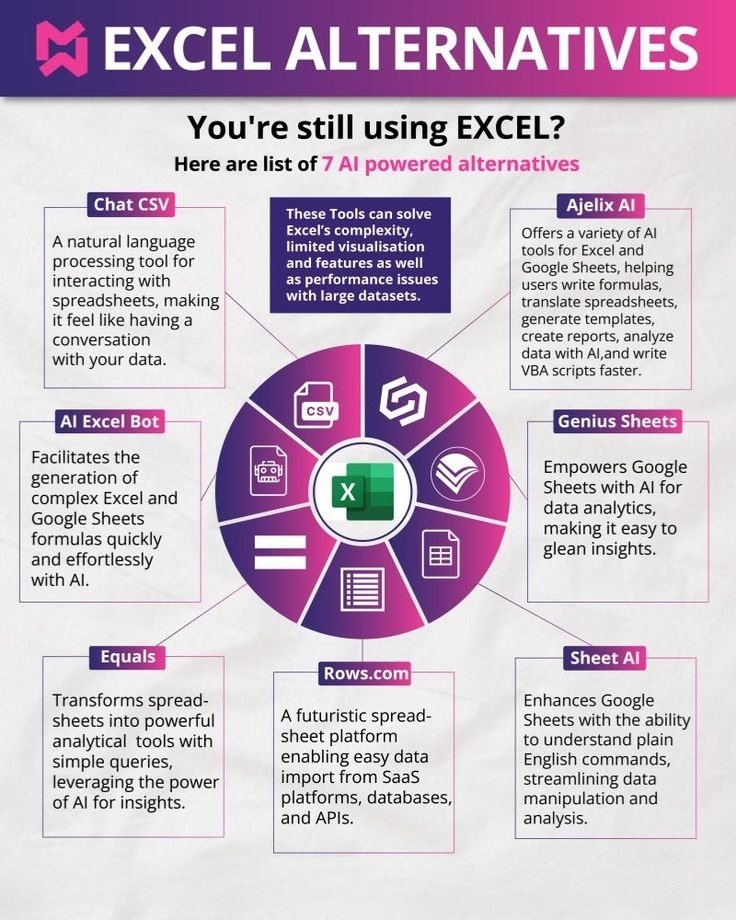
🚀 𝗘𝗫𝗖𝗘𝗟 𝗔𝗟𝗧𝗘𝗥𝗡𝗔𝗧𝗜𝗩𝗘𝗦
❓ 𝗬𝗼𝘂'𝗿𝗲 𝘀𝘁𝗶𝗹𝗹 𝘂𝘀𝗶𝗻𝗴 𝗘𝗫𝗖𝗘𝗟?
Here are list of 𝟳 𝗔𝗜 𝗽𝗼𝘄𝗲𝗿𝗲𝗱 𝗮𝗹𝘁𝗲𝗿𝗻𝗮𝘁𝗶𝘃𝗲𝘀 👇
🔹 𝗖𝗵𝗮𝘁 𝗖𝗦𝗩
➡️ A natural language processing tool for interacting with spreadsheets, making it feel like having a conversation with your data.
🔹 𝗔𝗷𝗲𝗹𝗶𝘅 𝗔𝗜
➡️ Offers a variety of AI tools for Excel and Google Sheets, helping users write formulas, translate spreadsheets, generate templates, create reports, analyze data with AI, and write VBA scripts faster.
🔹 𝗔𝗜 𝗘𝘅𝗰𝗲𝗹 𝗕𝗼𝘁
➡️ Facilitates the generation of complex Excel and Google Sheets formulas quickly and effortlessly with AI.
🔹 𝗚𝗲𝗻𝗶𝘂𝘀 𝗦𝗵𝗲𝗲𝘁𝘀
➡️ Empowers Google Sheets with AI for data analytics, making it easy to glean insights.
🔹 𝗘𝗾𝘂𝗮𝗹𝘀
➡️ Transforms spreadsheets into powerful analytical tools with simple queries, leveraging the power of AI for insights.
🔹 𝗥𝗼𝘄𝘀.𝗰𝗼𝗺
➡️ A futuristic spreadsheet platform enabling easy data import from SaaS platforms, databases, and APIs.
🔹 𝗦𝗵𝗲𝗲𝘁 𝗔𝗜
➡️ Enhances Google Sheets with the ability to understand plain English commands, streamlining data manipulation and analysis.
💡 These tools can solve Excel’s complexity, limited visualisation features, and performance issues with large datasets.
❤️ Like
🔁 Retweet
🔖 Bookmark
Follow @sonalshukla3377 for more such posts
27
22
77
4,462
May 20
Most e-commerce founders don’t actually need more dashboards.
They need someone who can look at the store, find what’s broken, and fix it.
That’s the part most “AI tools” still miss.
A founder I spoke to recently showed me something interesting.
1
1
33
May 20
Plus it already comes with 30 built-in skills focused on selling and store growth.
Not “AI for ecommerce.”
More like a team of agents trained to increase revenue with less manual work and less stress.
If you run an e-commerce store, this one’s genuinely worth exploring.
1
34
May 20
Use code PH300 to get 300 free credits without a card.
Launch:
producthunt.com/products/sto…
#Ecommerce #AI #Shopify #Startup #SEO
1
1
135
Shivam Gupta retweeted
May 16
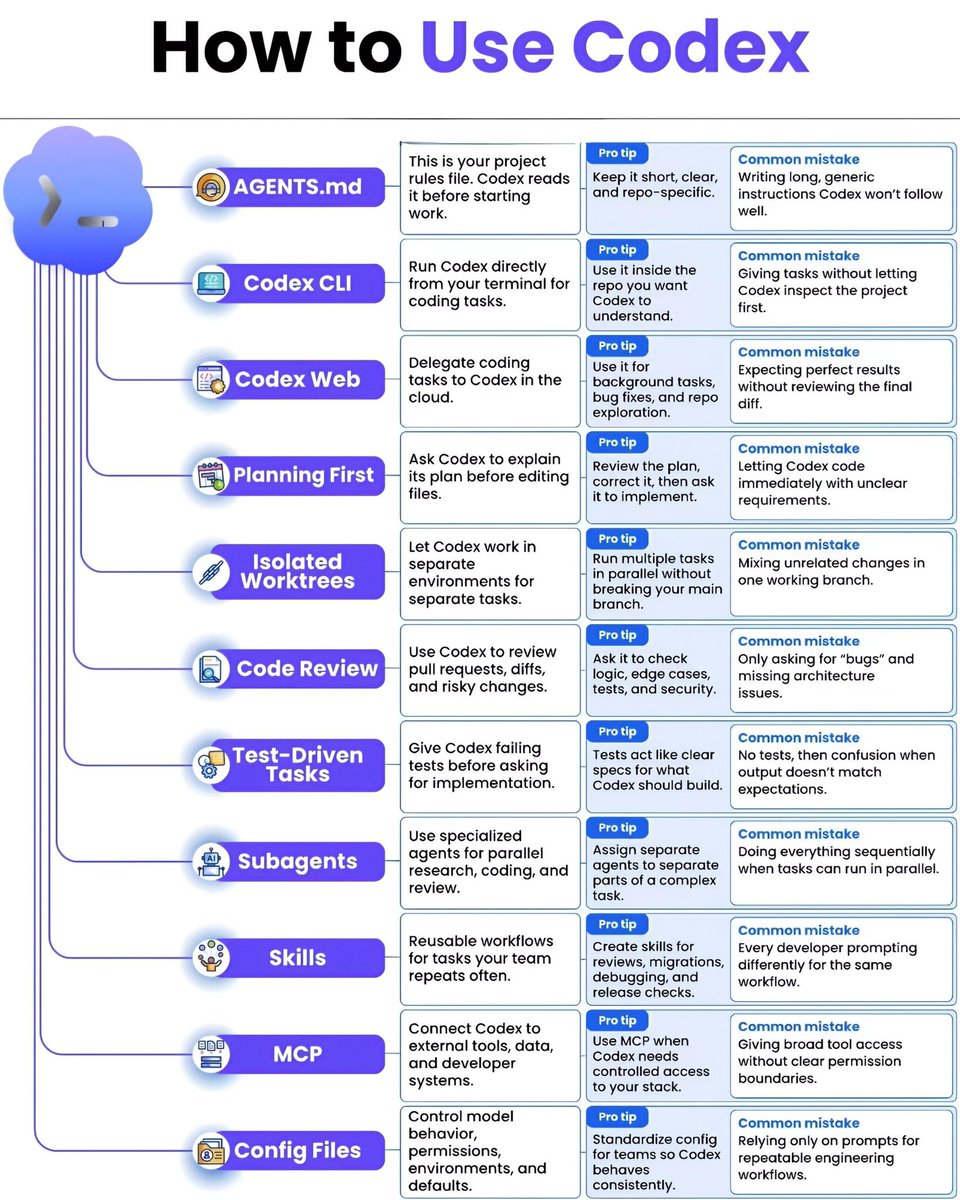
🔷️How to Use Codex
Codex becomes powerful only when you use it the right way.
Here’s a simple guide to help you work smarter, code faster, and avoid common mistakes:
🟢 AGENTS.md
This is your project rules file. Codex reads it before starting work.
➡️ Pro tip: Keep it short, clear, and repo-specific.
❌ Common mistake: Writing long, generic instructions Codex won’t follow well.
➖️➖️➖️➖️➖️➖️➖️➖️➖️➖️➖️➖️
🟢 Codex CLI
Run Codex directly from your terminal for coding tasks.
➡️ Pro tip: Use it inside the repo you want Codex to understand.
❌ Common mistake: Giving tasks without letting Codex inspect the project first.
➖️➖️➖️➖️➖️➖️➖️➖️➖️➖️➖️➖️
🟢 Codex Web
Delegate coding tasks to Codex in the cloud.
➡️ Pro tip: Use it for background tasks, bug fixes, and repo exploration.
❌ Common mistake: Expecting perfect results without reviewing the final diff.
➖️➖️➖️➖️➖️➖️➖️➖️➖️➖️➖️➖️
🟢 Planning First
Ask Codex to explain its plan before editing files.
➡️ Pro tip: Review the plan, correct it, then ask it to implement.
❌ Common mistake: Letting Codex code immediately with unclear requirements.
➖️➖️➖️➖️➖️➖️➖️➖️➖️➖️➖️➖️
🟢 Isolated Worktrees
Let Codex work in separate environments for separate tasks.
➡️ Pro tip: Run multiple tasks in parallel without breaking your main branch.
❌ Common mistake: Mixing unrelated changes in one working branch.
➖️➖️➖️➖️➖️➖️➖️➖️➖️➖️➖️➖️
🟢 Code Review
Use Codex to review pull requests, diffs, and risky changes.
➡️ Pro tip: Ask it to check logic, edge cases, tests, and security.
❌ Common mistake: Only asking for “bugs” and missing architecture issues.
➖️➖️➖️➖️➖️➖️➖️➖️➖️➖️➖️➖️
🟢 Test-Driven Tasks
Give Codex failing tests before asking for implementation.
➡️ Pro tip: Tests act like clear specs for what Codex should build.
❌ Common mistake: No tests, then confusion when output doesn’t match expectations.
➖️➖️➖️➖️➖️➖️➖️➖️➖️➖️➖️➖️
🟢 Subagents
Use specialized agents for parallel research, coding, and review.
➡️ Pro tip: Assign separate agents to separate parts of a complex task.
❌ Common mistake: Doing everything sequentially when tasks can run in parallel.
➖️➖️➖️➖️➖️➖️➖️➖️➖️➖️➖️➖️
🟢 Skills
Reusable workflows for tasks your team repeats often.
➡️ Pro tip: Create skills for reviews, migrations, debugging, and release checks.
❌ Common mistake: Every developer prompting differently for the same workflow.
➖️➖️➖️➖️➖️➖️➖️➖️➖️➖️➖️➖️
🟢 MCP
Connect Codex to external tools, data, and developer systems.
➡️ Pro tip: Use MCP when Codex needs controlled access to your stack.
❌ Common mistake: Giving broad tool access without clear permission boundaries.
➖️➖️➖️➖️➖️➖️➖️➖️➖️➖️➖️➖️
🟢 Config Files
Control model behavior, permissions, environments, and defaults.
➡️ Pro tip: Standardize config for teams so Codex behaves consistently.
❌ Common mistake: Relying only on prompts for repeatable engineering workflows.
❤️ Like
🔁 Retweet
🔖 Bookmark
Follow @sonalshukla3377 for more such posts
23
20
95
1,925
May 14
AI agents are getting smarter.
But most teams are still losing context between sessions.
One developer makes a decision today.
Another teammate unknowingly revisits the same discussion next week.
AI agents keep suggesting ideas that the team already rejected months ago.
1
57
May 14
So instead of restarting conversations from scratch, teams can revisit decisions intentionally with full context already available.
No outdated docs.
No disconnected memories.
No repeating the same engineering debates again and again.
1
12
May 14
Just one shared memory layer that helps your entire team and AI agents stay aligned.
If your team heavily relies on AI coding tools, this is definitely worth exploring.
Launch: producthunt.com/products/rob…
Support the project with a star on GitHub: github.com/adelinamart/robra…
62