
Principal Security Services Product Mgr | Security Services Portfolio @DellTech | #security #workforce #transformation #microsoft #IR | Tweets = mine | he/him
Joined October 2008
- Tweets 216
- Following 1,331
- Followers 521
- Likes 272
17 Photos and videos








Kevin Callanan retweeted

26 Jun 2024
Imagine being able to identify dozens of vulnerabilities within your Active Directory environment that if left unchecked could be abused by threat actors....PingCastle helps solve this problem. It's not a silver bullet but it's free. Why NOT use it?!
12
27
199
22,170
Kevin Callanan retweeted

16 May 2024
I am so excited to see this announced!
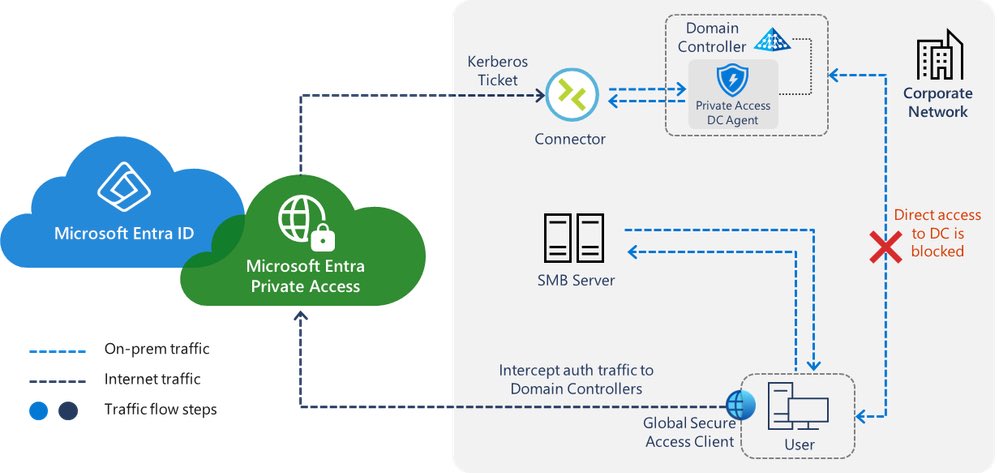
This solution brings Conditional Access to Kerberos authentication, which means we can now put MFA and other controls in place when accessing file shares, printers, SQL, Remote Desktop, PowerShell remoting, etc
This is going to be huge :)
16 May 2024

On-prem MFA with Microsoft Entra Private Access is coming. Read more about it in the official announcement.
techcommunity.microsoft.com/…
23
96
518
84,945
Kevin Callanan retweeted

25 Apr 2024
Today we announced that new multi-tenant organization capabilities within Microsoft 365 are now generally available #Microsoft365 #MTO
techcommunity.microsoft.com/…
3
40
108
78,671

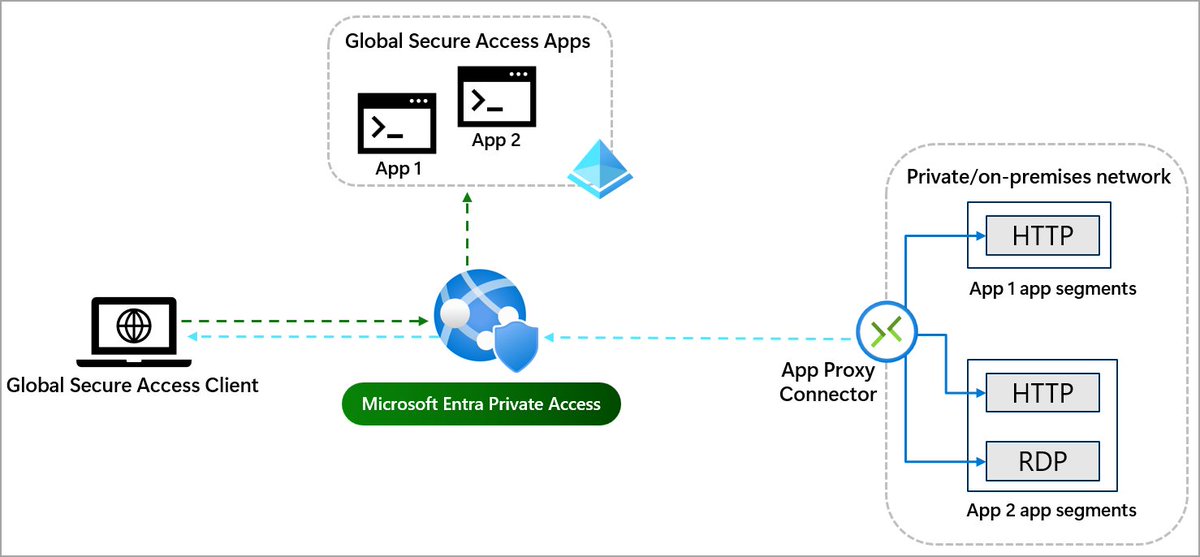
The Microsoft Entra Application Proxy Connector is updated to v1.5.3829.0 with a few improvements.
📛It is also rebranded as the Microsoft Entra Private Network Connector to emphasize its use in Microsoft Entra Private Access.
🔖See release notes FMI!
learn.microsoft.com/en-us/en…
4
21
79
12,050
Kevin Callanan retweeted

19 Feb 2024
Protecting #Microsoft Active Directory tier zero assets the modern way. #security techcommunity.microsoft.com/…
2
43
163
20,903
Kevin Callanan retweeted

17 Jan 2024
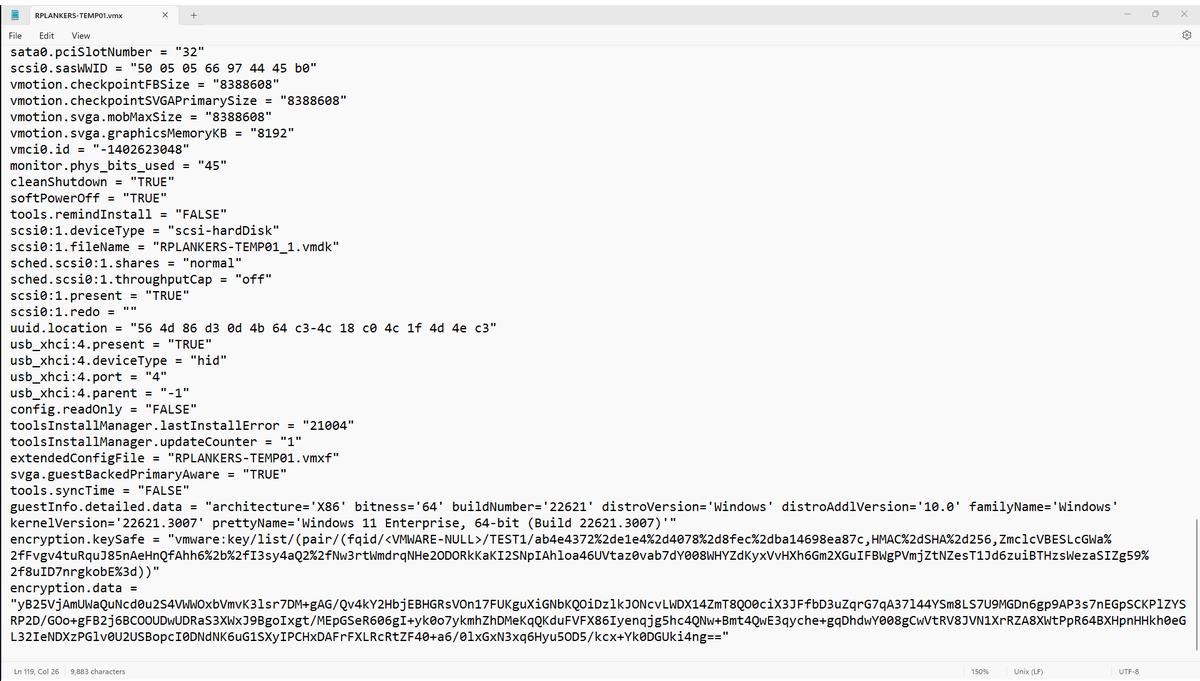
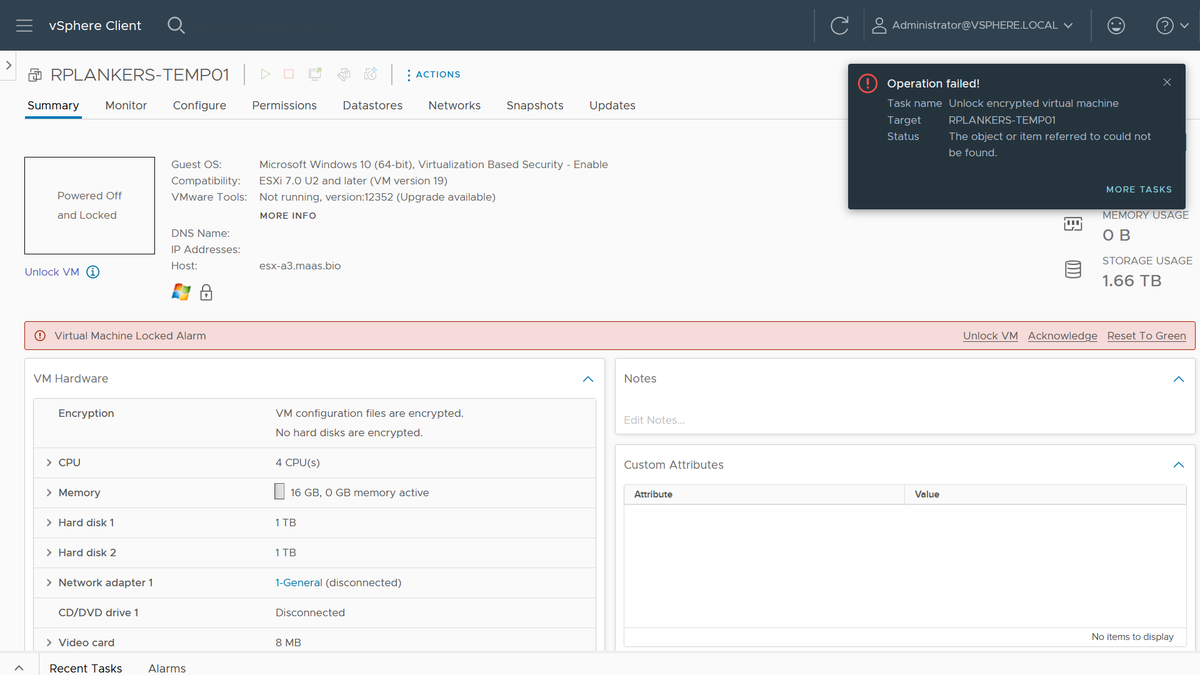
In case you were ever wondering about recoverability of encrypted @VMwarevSphere VMs if the KMS is missing, well, I just did that to myself. And not intentionally, either. Good old fashioned lack of discipline when it came to default key providers.
I have a few VMs that I care about that have vTPMs, which means they're using VM Encryption. I had a few extra key providers I was testing with, which I cleaned up yesterday. Turns out some of those VMs were using those key providers and were now "invalid" after a cluster restart for patching.
Here's how I fixed it:
1. Look in the .vmx file for the VM, under encryption.keySafe. It'll have a reference to the key provider name. Mine started with "vmware:key/list/(pair/(fqid/<VMWARE-NULL>/TEST1/" so I know the key provider I need to restore is TEST1.
2. Look through all my backup Native Key Provider keys to find test1.p12. Didn't have one, so it was probably my external KMS. Which, as I think about it, makes sense. I didn't notice the problem yesterday because the hosts have the keys from a standard key provider cached in memory. However, I also patched and rebooted all the hosts, so when they came up they could not retrieve the key again, hence the "invalid VM" designation.
ESXi caches the keys like that because vCenter is a dependency for access to the KMS, and if an HA event occurs it's possible that vCenter is down. If the keys are cached in memory in every host in the cluster then those hosts can restart all affected VMs. No problem. However, it does mask a screwup like mine. Could have been weeks or months before I figured out what I'd done, so people have to use discipline and keep backups when they're deleting stuff.
3. Anyhow, I'd deleted that KMS VM in my cleanup spree. Dammit. Restore from backup.
4. Re-add the KMS as a standard key provider. Had to recreate the auth certs on the KMS but no biggie. Biggest problem is that Chrome is now opinionated about TLS certs on the KMS. Used Firefox, which was cool with it if I was.
5. Click "Unlock" on the VM... done. Powered on.
But wait, there's more!
6. I made my desired Native Key Provider the default key provider again.
7. I rekeyed the VM (right click, VM Policies, Re-encrypt) to the default key provider. I did this while the VM was running, no problem (it just re-encrypts the data encryption key).
8. Deleted the key provider and KMS... again.
Things I didn't plan on doing this morning, but it'd been a while since I did anything like this, and it's good to know that the recovery I tell people is possible works. As long as you have the backups!
4
13
22
3,639
Kevin Callanan retweeted

22 Dec 2023
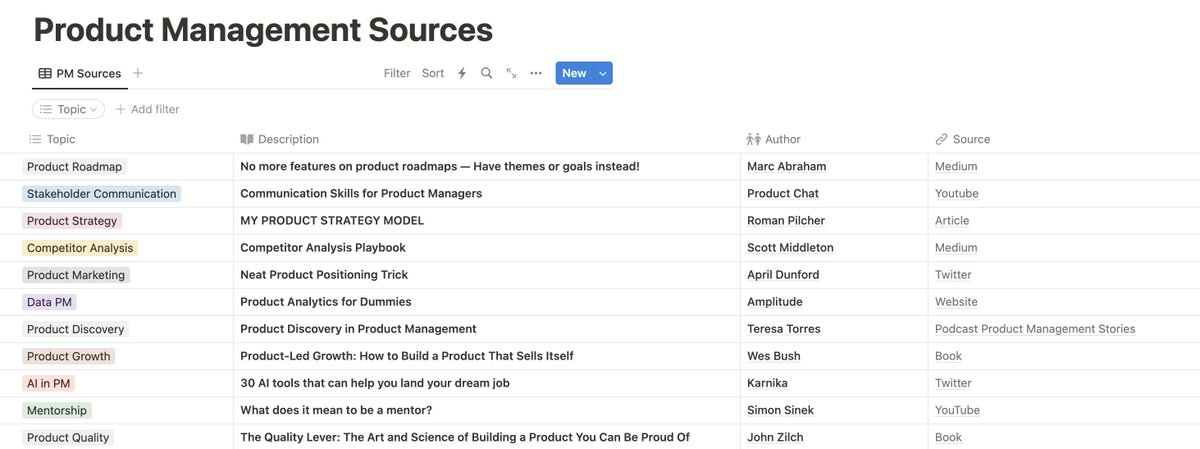
FREE access to my 275 Product Management Sources!
Books, Videos, Articles, Podcasts, Templates, Tweets.
All about Product Roadmaps, Discovery, Strategy and a lot more.
Get access today!
Like Retweet Reply "Sources"
(Follow so I can send the link)
231
179
311
38,862

21 Dec 2023
The @CISAgov has released its finalized M365 Secure Configuration Baseline. You can download the guidance and read about the updated SCuBAGear Tool in the published alert: cisa.gov/news-events/alerts/…
1
41
Kevin Callanan retweeted

16 Dec 2023
A vulnerability in the way Google implements OAuth was disclosed publicly today and is still not fixed.
It can let employees retain indefinite access to applications like Slack and Zoom after they're offboarded.
Let's dig in:
13
278
1,437
288,295
Kevin Callanan retweeted

14 Dec 2023
Any folks out there have connections with Microsoft Support, more specifically Exchange Support? We have a major issue with a Customer and have not been able to get an engineer to contact us for at least 72 hours. Please RT for visibility. @MicrosoftHelps @MSFTExchange
Thanks!
10
20
20
12,712
20 Nov 2023
Heading to NYC for Thanksgiving. Needed to change our outbound flight on @AmericanAir and was told it would be $1200 pp to keep our return flight on Sunday even if we simply canceled the flight out. Already paid $1800. How is it legal? Sticking with @united and @SouthwestAir
1
2
494
Kevin Callanan retweeted

27 Oct 2023
CISA Announces New Release of Logging Made Easy
A free and open log management and monitoring solution to help target rich/resource poor organizations leverage key data to more effectively detect and mitigate intrusions.
cisa.gov/news-events/news/ci…
3
73
206
30,420
Kevin Callanan retweeted

7 Oct 2023
Congrats @rvtools / Rob with the acquisition by Dell! Thanks for your years of hard work, I hope you made a lot of money on this acquisition as your tool has been extremely valuable to the community! robware.net/rvtools/about/
5
24
163
14,494
Kevin Callanan retweeted

20 Sep 2023
Microsoft 365 Defender demonstrates 100 percent protection coverage in the 2023 MITRE Engenuity ATT&CK Evaluations: Enterprise microsoft.com/en-us/security…
#MicrosoftDefender #Security #MicrosoftSecurity #Cybersecurity #M365D
31
99
11,078
Kevin Callanan retweeted

14 Sep 2023
If you are currently studying a bachelor's and interested in incident response, data science and/or digital forensics, then we have internships open this coming US summer - jobs.careers.microsoft.com/g…
1
9
20
4,240