
Transforming Numbers into Narratives | Passionate About Data & Visualization
Joined May 2011
- Tweets 451
- Following 1,242
- Followers 188
- Likes 842
28 Photos and videos

Pinned Tweet

20 Oct 2025
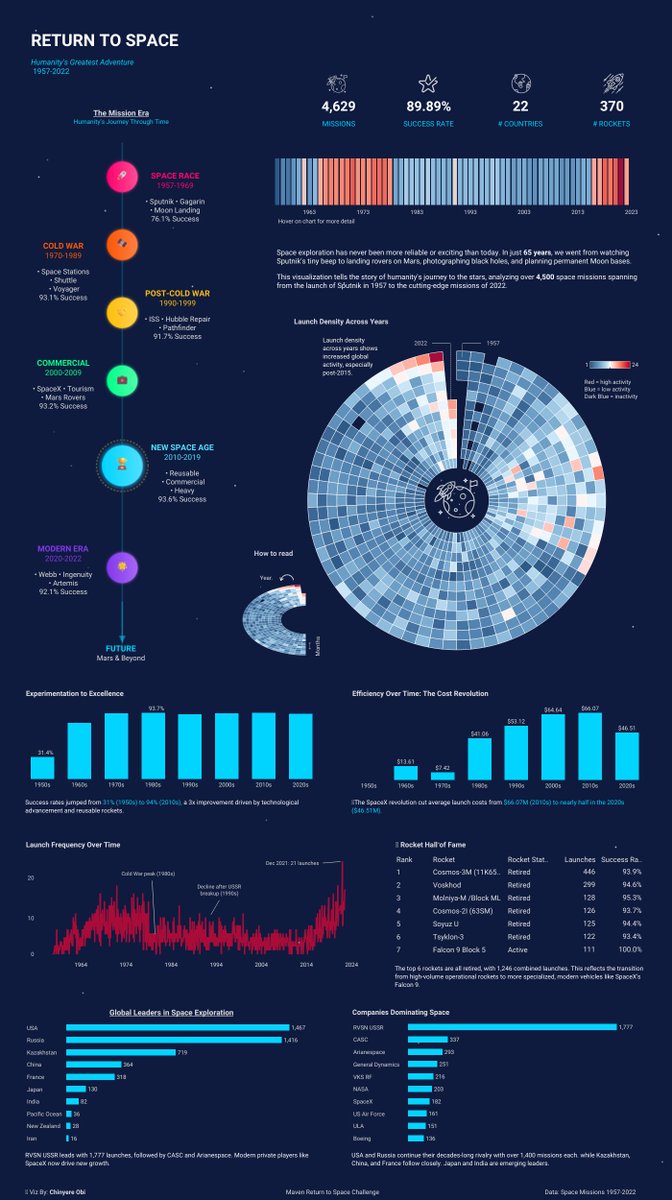
🚀 Return to Space - my submission for the #mavenreturntospacechallenge 🌌
Visualizing 65 years of human exploration (1957–2022)
Link: public.tableau.com/app/profi…
#DataViz #Tableau #DataStorytelling
1
91
17 Sep 2025
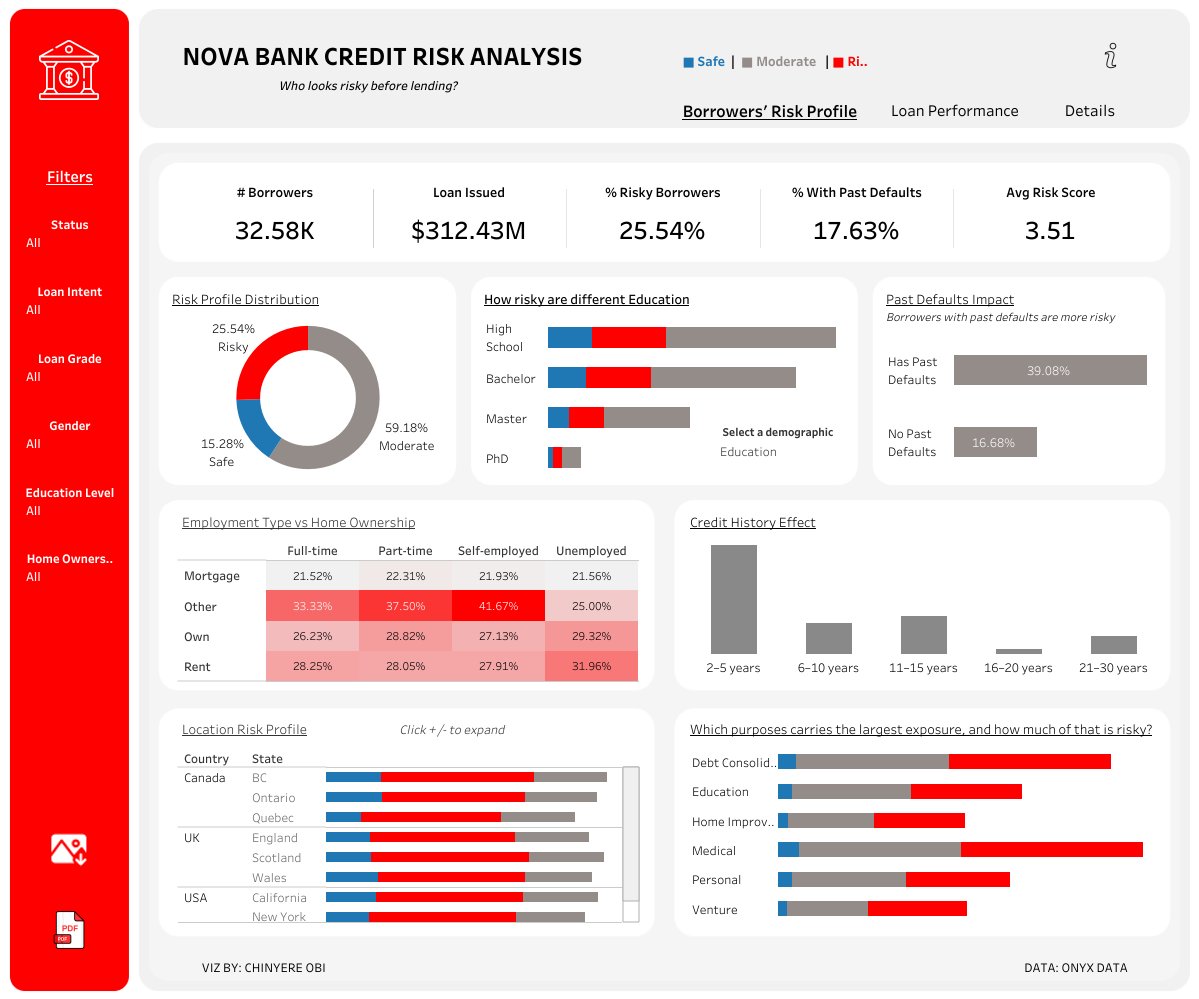
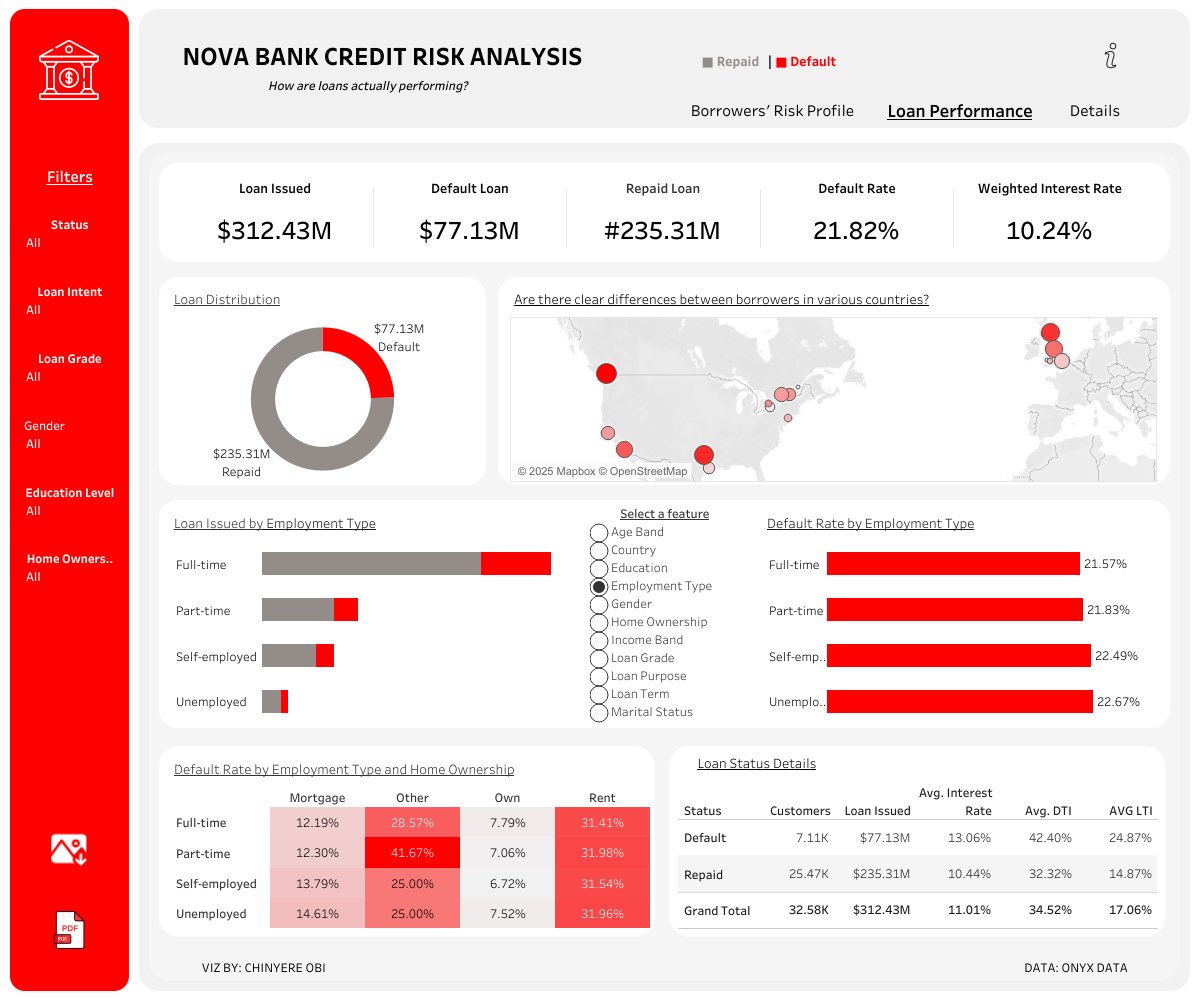
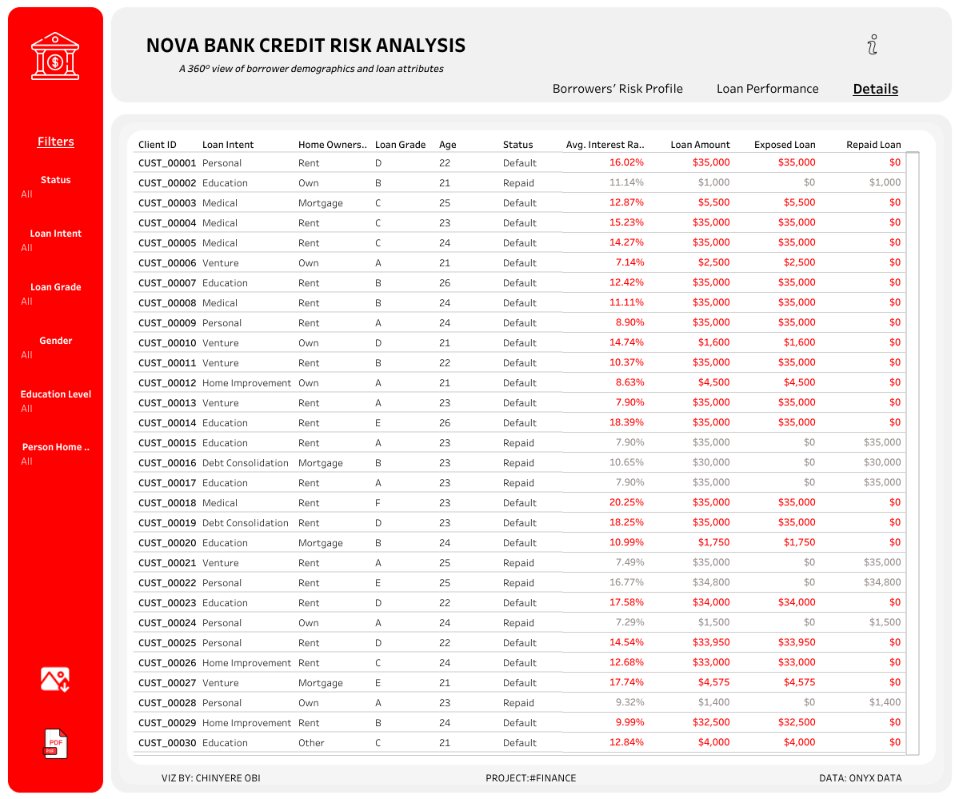
🚨 My submission to the #dataDNA September Challenge 🚨
Credit Risk Analysis at Nova Bank 💳
Built with Tableau 📊
3 dashboard pages:
* Risk Profile
* Loan Performance
* Borrower Drilldown
🔗 Explore here: public.tableau.com/app/profi…
1
2
118
Obi Chinyere Mayree 📊 | retweeted

15 Sep 2025
I created my LinkedIn 40 weeks ago.
Easiest algorithm to crack by a country mile.
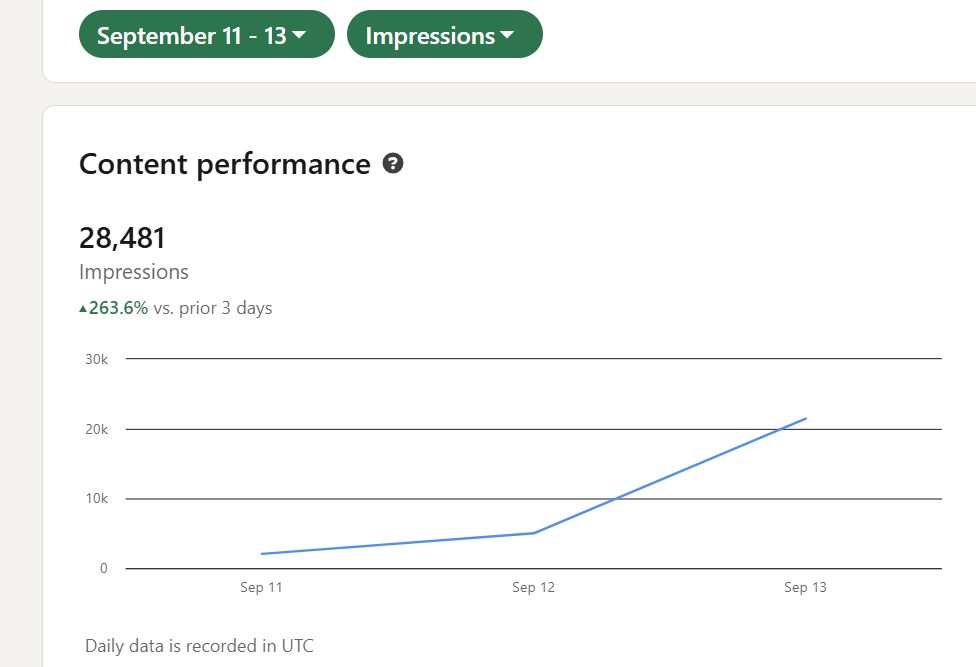
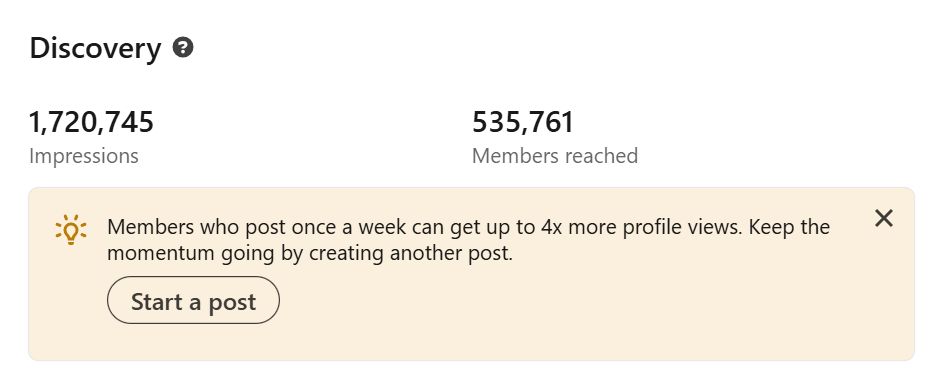
I have since added $70,000 to my agency pipeline, generated five figures this month for SEO Stuff, built 7,400 connections, logged 1,720,745 impressions, and reached 535,761 members.
Use my system before they close the loopholes.
And if you want my full cheat sheet including updated engagement group templates, carousel strategy, and DM workflows:
Follow me
Repost this
Comment “X LinkedIn growth guide”
You must do all 3 to get the DM.
What is working now for audience growth:
LinkedIn rewards original insights, depth, and conversation.
The fastest-growing accounts right now are doing these things consistently:
Proof Perspective, since people want numbers and your take. Basically dashboard screenshots, Stripe receipts, client results followed by “here’s what I learned.”
Story-first content, which are basically posts that tell a quick story. Even a small win or failure outperform generic how-tos.
Also, don't sleep on comment-first growth.
The easiest way to grow your audience fast is to be seen in other people’s comments daily.
Thoughtful comments can outperform posts for reach when done consistently.
Also, try to prompt conversation.
Posts that create back-and-forth replies inside the comments get shown for 2–3 extra days.
Ask real questions and reply to every comment to keep the discussion alive.
Network overlap is key to. If your content keeps getting engagement from two or three adjacent niches, LinkedIn starts showing you to those networks more often.
Consistency is key, by the way.
Three posts a day, every day, is better than six posts one day and silence the next.
My posting routine:
I post 3 times per day, 7 days a week, unless I'm traveling. (And when I travel my stats plummet).
Morning: Text post with POV, story, or market insight
Afternoon: Carousel, proof post, or annotated screenshot
Evening: Mini-thread, framework, or quick win
Even 2 days off posting cuts impressions and inbound leads by half. (I learn this the hard way every month.)
Best-performing formats right now:
Carousels
Slide 1: bold headline tied to a pain point or result
Slides 2–5: numbered steps, bullets, or annotated visuals
Final slide: CTA (“Drop guide below if you want the SOP”)
Carousels with a mix of text and screenshots are outperforming plain text slides by 30–40%.
Short videos
Under 60 seconds
Hook hard in the first 3 seconds
Use subtitles with a strong first line (auto-previews drive clicks)
Show processes, dashboards, or quick wins over overly polished production
Text posts
Hook with a question or bold claim
1–2 lines per paragraph for scannability
3–5 bullet takeaways perform better than walls of text
End with a question that invites others to share their experience
Proof breakdown posts
Share a result
Explain how it happened in 3–4 short bullets
Turn your metrics into a mini-case study
Conversation-first posts
Ask a real question, share a controversial POV, or open a loop that invites debate
Formats that kind of suck right now:
Generic AI-written content with no voice
Metrics-only posts with no “how”
Text walls with no whitespace
Links in the post body
Timing sweet spots:
7–8 AM for thought-leadership or text-heavy posts
1–3 PM for maximum reach
Sunday evening for outsized visibility with less competition
Tuesday and Thursday for CTA or lead-gen posts
Engagement strategy for building a strong audience:
Comment on 20 posts/day with insight or examples (not just “great post”)
Like 50 posts/day, focusing on people who engage with your content
Reply to every comment within the first hour, this drives early velocity
Repost your best-performing posts every 5–7 days with a fresh angle
DM 5–10 new people daily with context tied to what they just posted
LinkedIn is now weighting comment threads and returning commenters more heavily.
Encourage dialogue between commenters and follow up with people who engaged last time, repeat engagement makes your reach grow week over week.
Hooks converting right now:
“I started this account 40 weeks ago. Here’s the exact revenue it has generated.”
“$10K this month from LinkedIn posts. Here’s the breakdown.”
“This 7-slide carousel booked 3 calls in 24 hours. Slide 1 below.”
“If I had to rebuild my LinkedIn from scratch in 2025, here’s what I would do.”
“The 3-post-per-day system I use to consistently generate inbound leads.”
Always pair with screenshots, receipts, or analytics for credibility.
30-day checklist for building a strong audience:
Post 3x/day
Comment on 20 posts/day with substance
Like 50 posts/day
Reply to every comment in the first hour
Repost your top performers weekly
DM 5–10 people/day with value-first context
Track impressions, replies, inbound leads, and comment thread depth weekly
LinkedIn is still the most underpriced attention engine in 2025.
Run this playbook for 30 days. Screenshot your Day 31 results. Tag me when the inbound starts.
And if you want the full cheat sheet with engagement group templates, carousel strategy, and DM workflows:
Follow me
Repost this
Comment “X LinkedIn growth guide”
You must do all 3 for the DM.
239
170
399
51,624
1 Sep 2025
🔍Data Insight Monday: When to Keep vs. Delete Missing Data
💰The $50K Missing Data Decision
Ever faced this? → 30% missing values in your dataset. I did recently while analyzing customer satisfaction.
👉Delete? Impute? The wrong call could have completely skewed my analysis
1
31
1 Sep 2025
📊 My Outcome?
I kept the missing satisfaction data, coded it as “no opinion”, and discovered:
➡️ 60% of these customers became our highest spenders.
If I had deleted them, I’d have missed this goldmine insight.
1
20
1 Sep 2025
✨Takeaway: Missing data isn’t always a problem. Sometimes, it’s the answer you’re looking for.
👉 Over to you: When you hit significant missing data; do you delete or keep & impute?
#DataInsightMonday #DataAnalysis #Python #DataScience #Analytics #MotivationMonday
19
29 Aug 2025
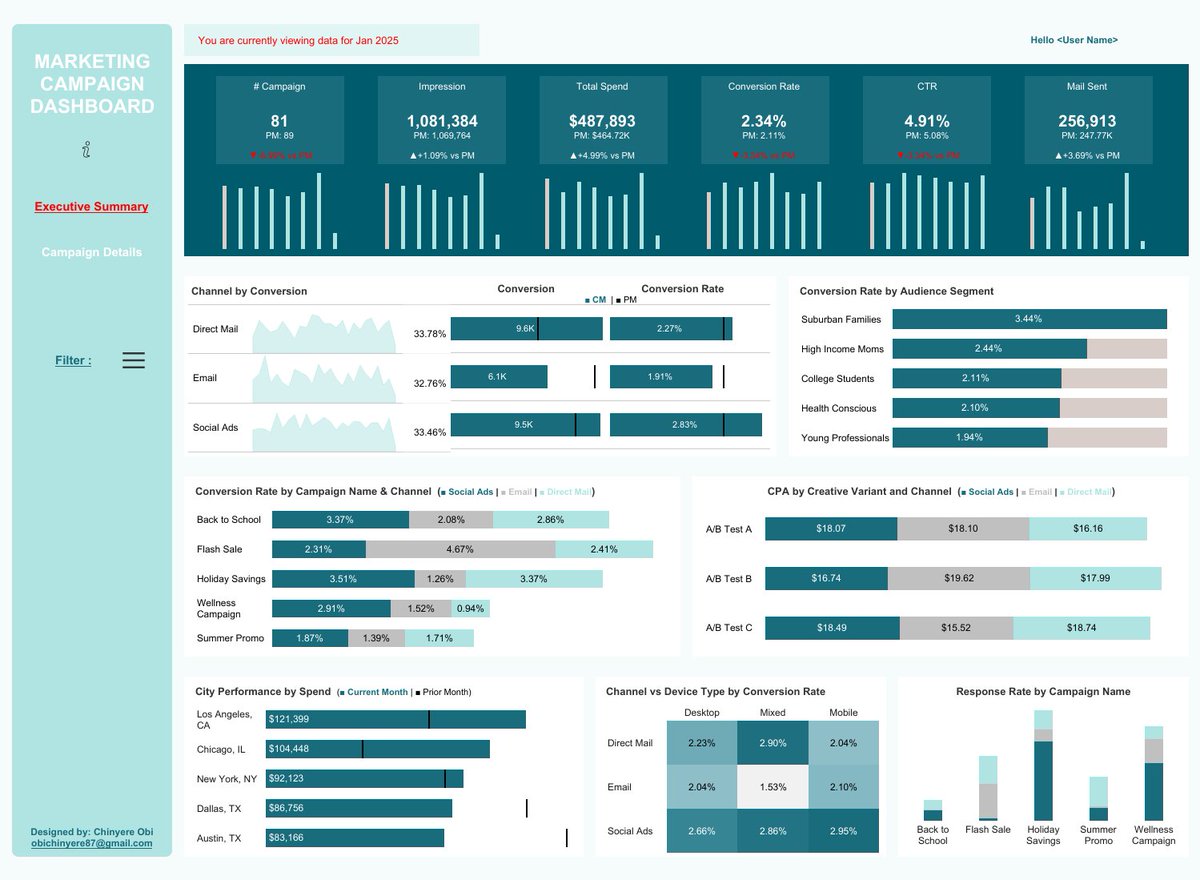
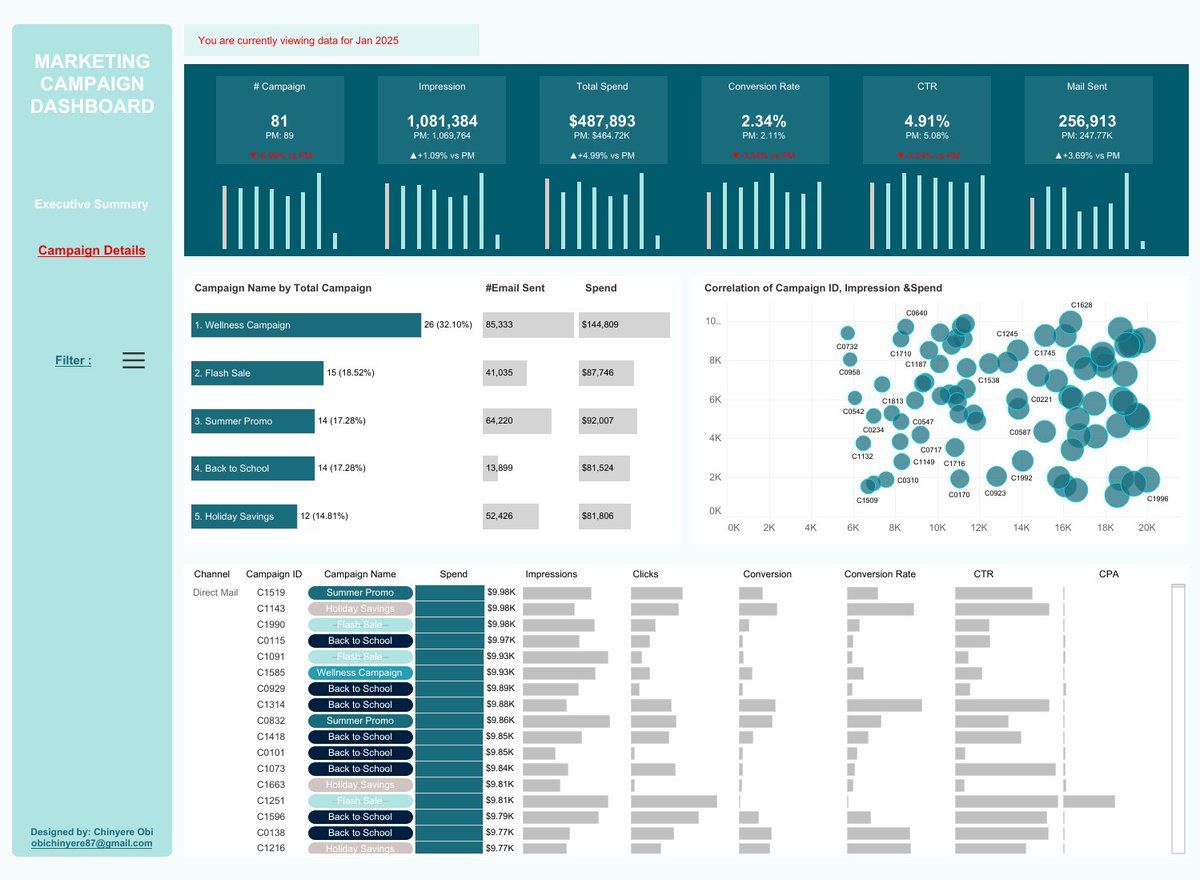
🚨 New Project: I recreated a dashboard design from @HowToPowerBI using simulated data.
Marketing Campaign Dashboard | Python Data Viz 📊
🔗 Explore Dashboard here: public.tableau.com/app/profi…
#DataAnalytics #DashboardDesign
1
1
112
29 Aug 2025
It covers records from 2023–2025 across 3 marketing channels.
Highlights:
- Tracked KPIs: Impressions, Spend, Conversion Rate, CTR, CPA.
- Segmented performance by audience, creative variants, city, and device type.
- Compared current vs. prior month trends .
34
25 Aug 2025
🔍 Data Insight Monday: Your First 10 Minutes with Clean Data
Hi Datafam,
Your data is finally clean. But what’s the FIRST thing you do before visualizing? Here’s my 10-min routine for quick insights:
1
12
25 Aug 2025
✅ Step 4: Ask Business Questions (3 mins)
• What's the trend over time?
• Which segments perform differently?
• Where are the biggest opportunities?
1
12
25 Aug 2025
The Result? In 10 minutes, I know if I'm looking at seasonal patterns, outliers, or data quality issues.
What’s your go-to step when exploring new data? Drop it below 👇
#DataInsightMonday #DataAnalysis #Python #DataScience #Analytics #MotivationMonday
14
18 Aug 2025
🔍 Data Insight Monday: From messing to Analysis-Ready in Minutes
Last week: Why data cleaning takes 80% of my time.
This week: HOW I clean data fast using Python Pandas⬇️
1
22
18 Aug 2025
More toolkit lines:
* df.drop(columns=[‘name’]) — Remove unnecessary columns
* df[‘col’].replace({‘old’: ‘new’}) —Fix inconsistent values
* df.rename(columns={‘old’: ‘new’}) —Standardize naming
1
16
18 Aug 2025
Wrap-up:
These 7 lines can turn hours of manual cleaning into seconds of automation.
What’s you go to cleaning tools? Python, SQL or Excel
Drop your favorite trick below
#DataInsightMonday #DataCleaning
#DataAnalysis #Analytics
25