
Joined March 2026
- Tweets 15,560
- Following 774
- Followers 1,714
- Likes 33,612
411 Photos and videos













Pinned Tweet

Jun 12
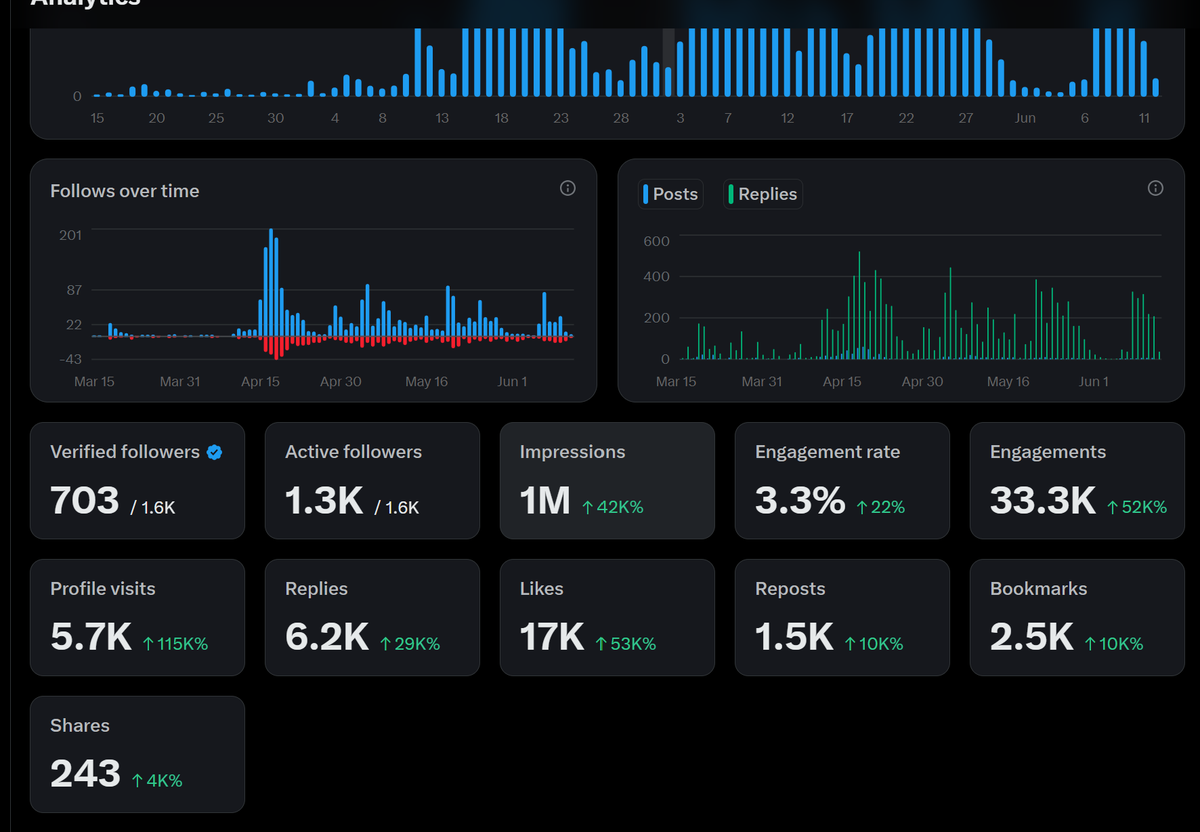
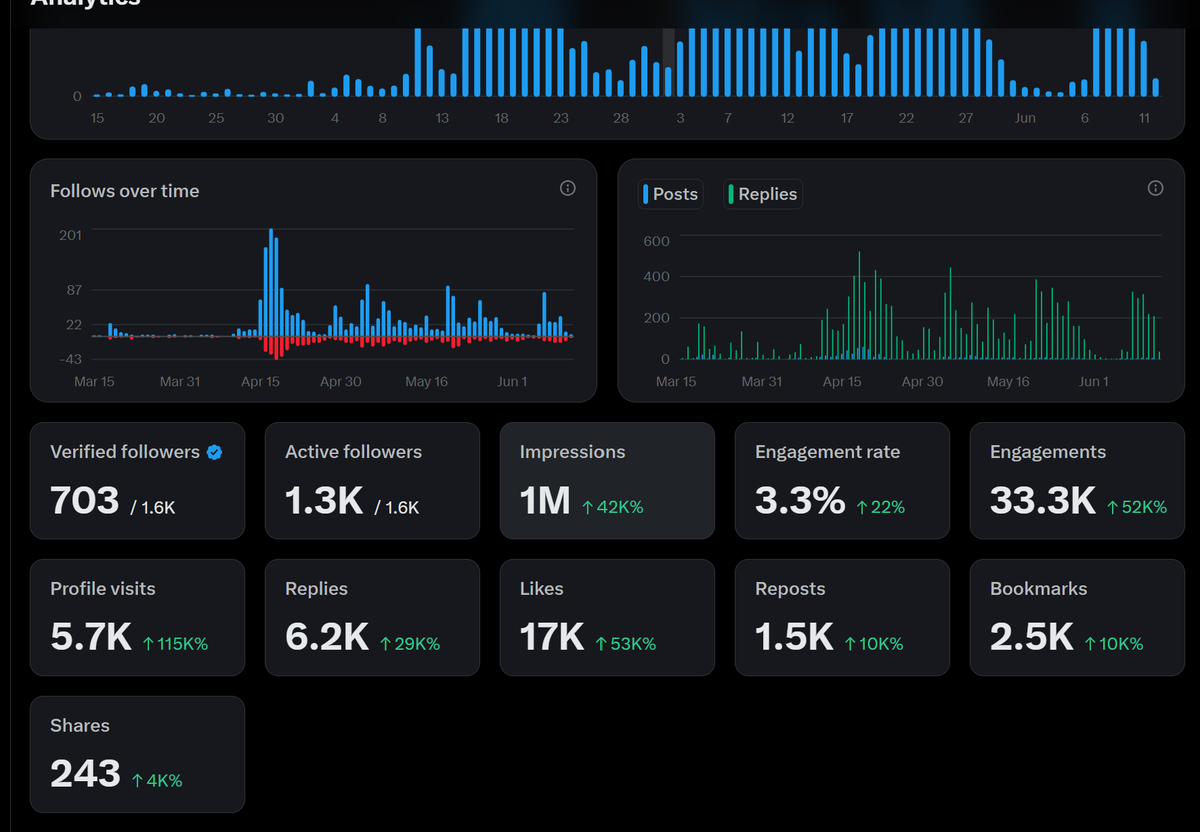
I just hit 1M impressions on X.
Here's what nobody tells you about growing as a tech creator from Nigeria:
→ 1,600 followers. 1M impressions. Do the math.
→ 3.3% engagement rate. Most big accounts don't even touch 1%.
→ 33,300 engagements. That's not luck. That's consistency.
→ 6,200 replies. People are actually talking back.
→ 5,700 profile visits. Strangers are checking who I am.
→ 2,500 bookmarks. Engineers are saving my content for later.
I didn't go viral once.
I just showed up every day and taught what I was learning.
Data Engineering. SQL. Python. PySpark. Databricks.
While everyone was waiting to be "ready" — I was posting.
The algorithm doesn't care where you're from. It cares how much value you drop.
If you are building in:
→ AI & Automation
→ Programming
→ System Design
→ Data Engineering, Science & Analytics
Let's connect. Drop a follow. Let's build together.
I'm a Computer Engineering student in Nigeria building in public.
And the US, UK, and India tech ecosystem is watching.
This is just the beginning.
Repost this if you're building from scratch.
49
9
89
3,323
Tech P retweeted
7h
🚨 Unpopular opinion:
Elon Musk did NOT become the world's richest man because he's smarter than everyone else.
He became the world's richest man because he understood one thing most engineers, founders, and tech professionals still ignore:
➡️ Ownership beats salary.
While most people were optimizing for jobs...
• He optimized for equity.
• He optimized for scale.
• He optimized for industries with massive upside.
The result?
➡️ PayPal funded the next chapter.
➡️ Tesla rode the electric vehicle revolution.
➡️ SpaceX disrupted the space industry.
➡️ xAI entered the AI race.
Now here's the debate:
If you had to choose ONLY ONE path to build extraordinary wealth in tech, which would you pick?
A. Becoming a world-class engineer
B. Building a startup
C. Owning equity in great companies
D. Investing early in transformational technologies
My view:
Skills create income.
Ownership creates wealth.
That's the difference most people miss.
16h

Elon Musk hitting a $1.1T net worth proves that the era of the simple software wrapper is dead: if you aren't building foundational data infrastructure or deep tech, you're just renting space from the giants.

3
2
10
136
Tech P retweeted
8h
Elon Musk’s net worth has officially scaled past $1 Trillion.
What does $1,000,000,000,000 actually buy?
He could single-handedly purchase:
• Berkshire Hathaway ($1.0T)
• OpenAI AND Anthropic combined
• Eli Lilly (~$1.1T)
• Disney OpenAI
• OpenAI McDonald's Starbucks Uber
We are witnessing the first modern trillionaire buy a piece of history.
1
4
76
16h
Elon Musk hitting a $1.1T net worth proves that the era of the simple software wrapper is dead: if you aren't building foundational data infrastructure or deep tech, you're just renting space from the giants.
12
3
24
998
8h
Elon Musk’s net worth has officially scaled past $1 Trillion.
What does $1,000,000,000,000 actually buy?
He could single-handedly purchase:
• Berkshire Hathaway ($1.0T)
• OpenAI AND Anthropic combined
• Eli Lilly (~$1.1T)
• Disney OpenAI
• OpenAI McDonald's Starbucks Uber
We are witnessing the first modern trillionaire buy a piece of history.
1
4
76
8h
Elon Musk’s net worth has officially scaled past $1 Trillion.
What does $1,000,000,000,000 actually buy?
He could single-handedly purchase:
• Berkshire Hathaway ($1.0T)
• OpenAI AND Anthropic combined
• Eli Lilly (~$1.1T)
• Disney OpenAI
• OpenAI McDonald's Starbucks Uber
We are witnessing the first modern trillionaire buy a piece of history.
1
44
Tech P retweeted
10h
You need ➔ clean data
Clean data need ➔ error handling
Error handling need ➔ proactive logic
Proactive logic need ➔ consistency
Simple formula to build robust pipelines
2
3
58
18h
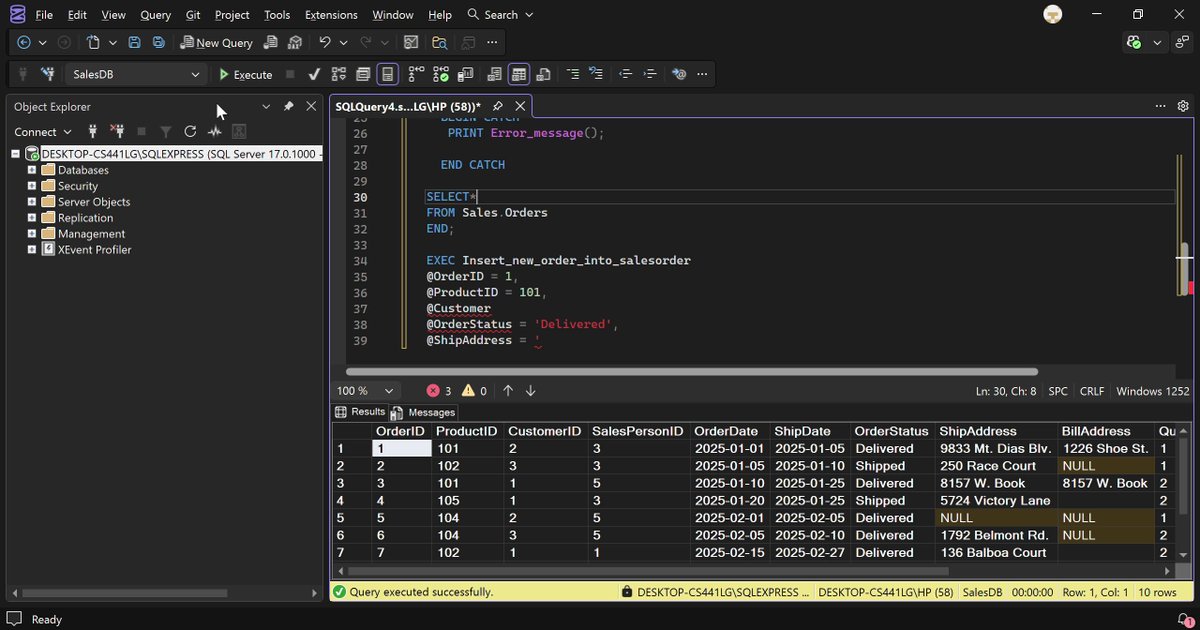
Day 2 of Documenting my Data Engineering Journey
Today I went hands-on with SQL Error Handling.
Here's what I built:
→ A Stored Procedure that inserts orders into a Sales database
→ Wrapped in a TRY/CATCH block
→ If it fails — it captures the exact Error Message() and Error_Number ()
→ No silent failures. No guessing. The database tells you what broke.
Why this matters:
→ Pipelines fail
→ Data is dirty
→ Errors are inevitable
A pipeline without error handling is a pipeline you can't trust.
This is the difference between SQL that works on your laptop and SQL that survives in production.
Building in public from Nigeria 🇳🇬
US. UK. India. The tech ecosystem is watching.
Follow along. Day 3 is loading.
#DataEngineering #BuildInPublic #SQL
Jun 12
Day 1 of Documenting My Data Engineering Journey
Today, I started learning about stored procedures in SQL.
A stored procedure is like a saved set of SQL instructions inside a database. Instead of writing the same SQL code again and again,
I can save it once and run it whenever I need it.
Today, I learned three important concepts:
1. Control / `IF ELSE
2. Error Handling
3. Styling in Stored Procedures
1. Control / IF ELSE in Stored Procedures
I learned that control statements help stored procedures make decisions.
It works like normal decision-making in real life:
sql
IF something is true
Do this
ELSE
Do something else
For example, if a student scores 50 or above, they pass. Else, they fail.
sql
CREATE PROCEDURE CheckStudentResult
@Score INT
AS
BEGIN
IF @Score >= 50
BEGIN
PRINT 'You passed!';
END
ELSE
BEGIN
PRINT 'You failed. Try again.';
END
END;
I also learned that `IF ELSE` can be used to check things like:
- Whether a student passed or failed
- Whether someone is old enough to vote
- Whether a product is in stock
- Whether a customer should get a discount
- Whether a user is an admin or normal user
Example:
sql
CREATE PROCEDURE CheckVotingAge
@Age INT
AS
BEGIN
IF @Age >= 18
BEGIN
PRINT 'You can vote.';
END
ELSE
BEGIN
PRINT 'You are too young to vote.';
END
END;
So, I now understand that `IF ELSE` helps stored procedures choose what action to take.
2. Error Handling in Stored Procedures
I learned that error handling means preparing for mistakes in SQL code.
Sometimes something can go wrong, like:
- Dividing by zero
- Inserting duplicate data
- Trying to update data that does not exist
- A money transfer failing halfway
Instead of letting the whole procedure crash badly, we can use:
```sql
BEGIN TRY
-- Code that might cause an error
END TRY
BEGIN CATCH
-- Code that runs if an error happens
END CATCH
```
Example:
```sql
CREATE PROCEDURE DivideNumbers
@Number1 INT,
@Number2 INT
AS
BEGIN
BEGIN TRY
SELECT @Number1 / @Number2 AS Result;
END TRY
BEGIN CATCH
PRINT 'Error: You cannot divide by zero.';
END CATCH
END;
```
I also learned that SQL Server has useful error functions like:
```sql
ERROR_MESSAGE()
```
This shows the actual error message.
Example:
```sql
CREATE PROCEDURE ShowErrorMessage
AS
BEGIN
BEGIN TRY
SELECT 10 / 0;
END TRY
BEGIN CATCH
PRINT ERROR_MESSAGE();
END CATCH
END;
```
I also learned about using transactions with error handling. A transaction means:
Do everything successfully, or undo everything.
Example:
```sql
CREATE PROCEDURE TransferMoney
@FromAccount INT,
@ToAccount INT,
@Amount DECIMAL(10,2)
AS
BEGIN
BEGIN TRY
BEGIN TRANSACTION;
UPDATE Accounts
SET Balance = Balance - @Amount
WHERE AccountId = @FromAccount;
UPDATE Accounts
SET Balance = Balance @Amount
WHERE AccountId = @ToAccount;
COMMIT TRANSACTION;
PRINT 'Transfer successful.';
END TRY
BEGIN CATCH
ROLLBACK TRANSACTION;
PRINT 'Transfer failed. Money returned.';
PRINT ERROR_MESSAGE();
END CATCH
END;
```
This taught me that error handling is very important because it protects the database from bad or incomplete changes.
3. Styling in Stored Procedures
I learned that styling means writing stored procedures in a clean and readable way.
Good styling makes SQL easier to understand, especially when the code becomes long.
Bad style:
```sql
create procedure getstudents as begin select * from students end
```
Good style:
```sql
CREATE PROCEDURE GetStudents
AS
BEGIN
SELECT *
FROM Students;
END;
```
I learned some good styling rules:
- Use clear procedure names
- Use clear parameter names
- Write SQL keywords in uppercase
- Use indentation
- Add comments only when needed
- Keep the code organized
Example of a clear procedure name:
```sql
CREATE PROCEDURE GetAllCustomers
AS
BEGIN
SELECT *
FROM Customers;
END;
```
Example of clear parameter names:
```sql
CREATE PROCEDURE GetStudentById
@StudentId INT
AS
BEGIN
SELECT StudentId, Name, Age
FROM Students
WHERE StudentId = @StudentId;
END;
```
Example with comments:
```sql
CREATE PROCEDURE GetPassedStudents
AS
BEGIN
-- Get students who scored 50 or above
SELECT Name, Score
FROM Students
WHERE Score >= 50;
END;
```
I also learned about using `SET NOCOUNT ON;`, which helps stop unnecessary messages from being returned.
```sql
CREATE PROCEDURE RegisterStudent
@Name VARCHAR(50),
@Age INT,
@ClassName VARCHAR(20)
AS
BEGIN
SET NOCOUNT ON;
IF @Age < 3
BEGIN
PRINT 'Student is too young.';
RETURN;
END;
INSERT INTO Students(Name, Age, ClassName)
VALUES (@Name, @Age, @ClassName);
PRINT 'Student registered successfully.';
END;
```
My Summary for Today
Today, I learned that stored procedures are saved SQL instructions that help make database work easier and reusable.
I learned that:
-Control / IF ELSE* helps stored procedures make decisions.
-Error handling helps stored procedures handle problems without crashing badly.
-Styling helps make stored procedures clean, readable, and professional.
This is an important step in my data engineering journey because data engineers work with databases a lot. Understanding stored procedures will help me write better SQL, manage data safely, and build stronger database workflows.
Day 1 completed.
#Datafam
6
4
29
752
10h
You need ➔ clean data
Clean data need ➔ error handling
Error handling need ➔ proactive logic
Proactive logic need ➔ consistency
Simple formula to build robust pipelines
2
3
58
Tech P retweeted
16h
Elon Musk hitting a $1.1T net worth proves that the era of the simple software wrapper is dead: if you aren't building foundational data infrastructure or deep tech, you're just renting space from the giants.
12
3
24
998
Tech P retweeted
18h
Day 2 of Documenting my Data Engineering Journey
Today I went hands-on with SQL Error Handling.
Here's what I built:
→ A Stored Procedure that inserts orders into a Sales database
→ Wrapped in a TRY/CATCH block
→ If it fails — it captures the exact Error Message() and Error_Number ()
→ No silent failures. No guessing. The database tells you what broke.
Why this matters:
→ Pipelines fail
→ Data is dirty
→ Errors are inevitable
A pipeline without error handling is a pipeline you can't trust.
This is the difference between SQL that works on your laptop and SQL that survives in production.
Building in public from Nigeria 🇳🇬
US. UK. India. The tech ecosystem is watching.
Follow along. Day 3 is loading.
#DataEngineering #BuildInPublic #SQL
Jun 12
Day 1 of Documenting My Data Engineering Journey
Today, I started learning about stored procedures in SQL.
A stored procedure is like a saved set of SQL instructions inside a database. Instead of writing the same SQL code again and again,
I can save it once and run it whenever I need it.
Today, I learned three important concepts:
1. Control / `IF ELSE
2. Error Handling
3. Styling in Stored Procedures
1. Control / IF ELSE in Stored Procedures
I learned that control statements help stored procedures make decisions.
It works like normal decision-making in real life:
sql
IF something is true
Do this
ELSE
Do something else
For example, if a student scores 50 or above, they pass. Else, they fail.
sql
CREATE PROCEDURE CheckStudentResult
@Score INT
AS
BEGIN
IF @Score >= 50
BEGIN
PRINT 'You passed!';
END
ELSE
BEGIN
PRINT 'You failed. Try again.';
END
END;
I also learned that `IF ELSE` can be used to check things like:
- Whether a student passed or failed
- Whether someone is old enough to vote
- Whether a product is in stock
- Whether a customer should get a discount
- Whether a user is an admin or normal user
Example:
sql
CREATE PROCEDURE CheckVotingAge
@Age INT
AS
BEGIN
IF @Age >= 18
BEGIN
PRINT 'You can vote.';
END
ELSE
BEGIN
PRINT 'You are too young to vote.';
END
END;
So, I now understand that `IF ELSE` helps stored procedures choose what action to take.
2. Error Handling in Stored Procedures
I learned that error handling means preparing for mistakes in SQL code.
Sometimes something can go wrong, like:
- Dividing by zero
- Inserting duplicate data
- Trying to update data that does not exist
- A money transfer failing halfway
Instead of letting the whole procedure crash badly, we can use:
```sql
BEGIN TRY
-- Code that might cause an error
END TRY
BEGIN CATCH
-- Code that runs if an error happens
END CATCH
```
Example:
```sql
CREATE PROCEDURE DivideNumbers
@Number1 INT,
@Number2 INT
AS
BEGIN
BEGIN TRY
SELECT @Number1 / @Number2 AS Result;
END TRY
BEGIN CATCH
PRINT 'Error: You cannot divide by zero.';
END CATCH
END;
```
I also learned that SQL Server has useful error functions like:
```sql
ERROR_MESSAGE()
```
This shows the actual error message.
Example:
```sql
CREATE PROCEDURE ShowErrorMessage
AS
BEGIN
BEGIN TRY
SELECT 10 / 0;
END TRY
BEGIN CATCH
PRINT ERROR_MESSAGE();
END CATCH
END;
```
I also learned about using transactions with error handling. A transaction means:
Do everything successfully, or undo everything.
Example:
```sql
CREATE PROCEDURE TransferMoney
@FromAccount INT,
@ToAccount INT,
@Amount DECIMAL(10,2)
AS
BEGIN
BEGIN TRY
BEGIN TRANSACTION;
UPDATE Accounts
SET Balance = Balance - @Amount
WHERE AccountId = @FromAccount;
UPDATE Accounts
SET Balance = Balance @Amount
WHERE AccountId = @ToAccount;
COMMIT TRANSACTION;
PRINT 'Transfer successful.';
END TRY
BEGIN CATCH
ROLLBACK TRANSACTION;
PRINT 'Transfer failed. Money returned.';
PRINT ERROR_MESSAGE();
END CATCH
END;
```
This taught me that error handling is very important because it protects the database from bad or incomplete changes.
3. Styling in Stored Procedures
I learned that styling means writing stored procedures in a clean and readable way.
Good styling makes SQL easier to understand, especially when the code becomes long.
Bad style:
```sql
create procedure getstudents as begin select * from students end
```
Good style:
```sql
CREATE PROCEDURE GetStudents
AS
BEGIN
SELECT *
FROM Students;
END;
```
I learned some good styling rules:
- Use clear procedure names
- Use clear parameter names
- Write SQL keywords in uppercase
- Use indentation
- Add comments only when needed
- Keep the code organized
Example of a clear procedure name:
```sql
CREATE PROCEDURE GetAllCustomers
AS
BEGIN
SELECT *
FROM Customers;
END;
```
Example of clear parameter names:
```sql
CREATE PROCEDURE GetStudentById
@StudentId INT
AS
BEGIN
SELECT StudentId, Name, Age
FROM Students
WHERE StudentId = @StudentId;
END;
```
Example with comments:
```sql
CREATE PROCEDURE GetPassedStudents
AS
BEGIN
-- Get students who scored 50 or above
SELECT Name, Score
FROM Students
WHERE Score >= 50;
END;
```
I also learned about using `SET NOCOUNT ON;`, which helps stop unnecessary messages from being returned.
```sql
CREATE PROCEDURE RegisterStudent
@Name VARCHAR(50),
@Age INT,
@ClassName VARCHAR(20)
AS
BEGIN
SET NOCOUNT ON;
IF @Age < 3
BEGIN
PRINT 'Student is too young.';
RETURN;
END;
INSERT INTO Students(Name, Age, ClassName)
VALUES (@Name, @Age, @ClassName);
PRINT 'Student registered successfully.';
END;
```
My Summary for Today
Today, I learned that stored procedures are saved SQL instructions that help make database work easier and reusable.
I learned that:
-Control / IF ELSE* helps stored procedures make decisions.
-Error handling helps stored procedures handle problems without crashing badly.
-Styling helps make stored procedures clean, readable, and professional.
This is an important step in my data engineering journey because data engineers work with databases a lot. Understanding stored procedures will help me write better SQL, manage data safely, and build stronger database workflows.
Day 1 completed.
#Datafam
6
4
29
752
Tech P retweeted
Jun 13
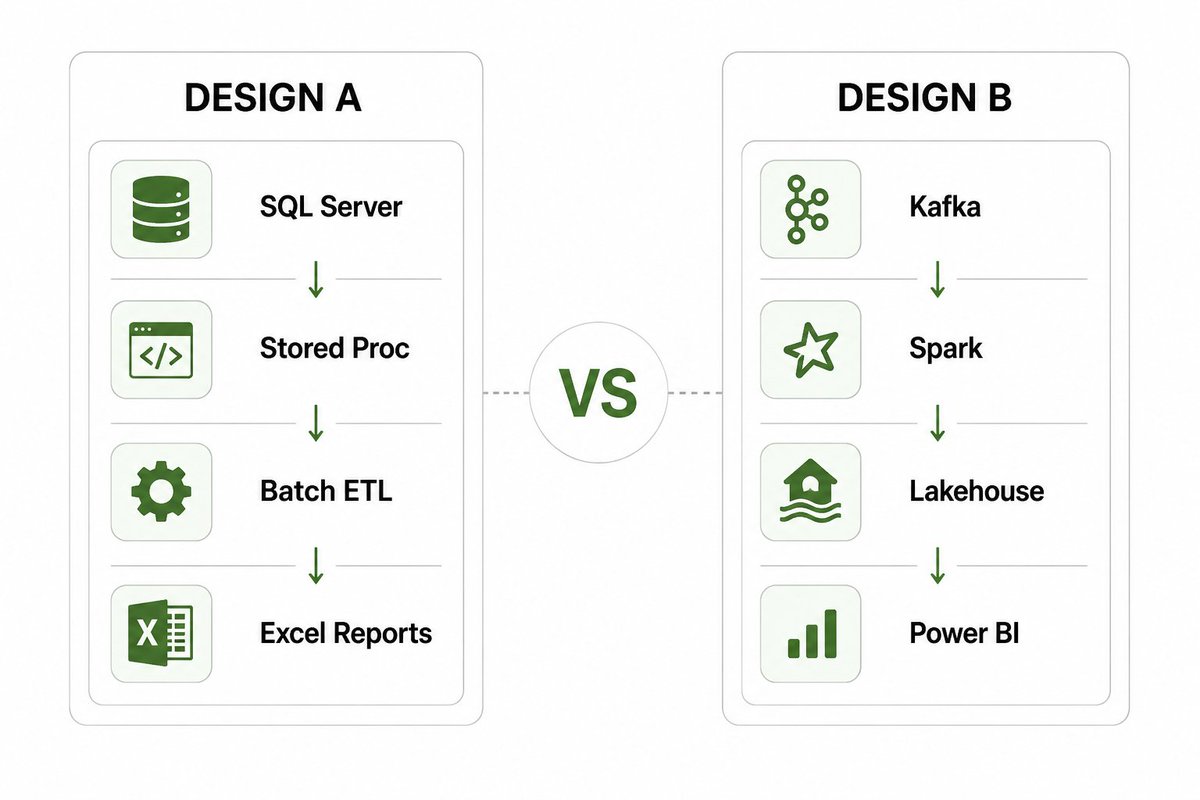
🚨 Two data engineers designed the same warehouse.
Design A 👇
-SQL
-ETL
-Star Schema
-Data Warehouse
Design B 👇
-Spark
-Data Lakehouse
-Medallion Architecture
-Real-Time Analytics
Which one gets approved?
A. Design A
B. Design B
The catch:
The company only has 50 employees.
Defend your answer.
11
4
38
987
Jun 13
Can I get 2k followers today?
Algorithm #connect me to
- Python Programmers
-System design
- Databases engineer
-Backend Engineers
- Data ENGINEERs
- DATA science and analytics
- Analytics engineers
- Devops Engineers
-Software engineers
- SaaS Founders
- SQL developers
- Tech Enthusiast
Drop your Saas, Projects, Product, website in the comment lets connect 👇
6
8
149
Jun 12
🚨 Quick developer debate:
Which of these causes the MOST production issues?
Vote and defend your answer 👇
29%
Complex if / else control
57%
Poor error handling
0%
Inconsistent code styling
14%
Lack of logging
7 votes • 5 days
1
9
344
Tech P retweeted
Jun 12
Day 1 of Documenting My Data Engineering Journey
Today, I started learning about stored procedures in SQL.
A stored procedure is like a saved set of SQL instructions inside a database. Instead of writing the same SQL code again and again,
I can save it once and run it whenever I need it.
Today, I learned three important concepts:
1. Control / `IF ELSE
2. Error Handling
3. Styling in Stored Procedures
1. Control / IF ELSE in Stored Procedures
I learned that control statements help stored procedures make decisions.
It works like normal decision-making in real life:
sql
IF something is true
Do this
ELSE
Do something else
For example, if a student scores 50 or above, they pass. Else, they fail.
sql
CREATE PROCEDURE CheckStudentResult
@Score INT
AS
BEGIN
IF @Score >= 50
BEGIN
PRINT 'You passed!';
END
ELSE
BEGIN
PRINT 'You failed. Try again.';
END
END;
I also learned that `IF ELSE` can be used to check things like:
- Whether a student passed or failed
- Whether someone is old enough to vote
- Whether a product is in stock
- Whether a customer should get a discount
- Whether a user is an admin or normal user
Example:
sql
CREATE PROCEDURE CheckVotingAge
@Age INT
AS
BEGIN
IF @Age >= 18
BEGIN
PRINT 'You can vote.';
END
ELSE
BEGIN
PRINT 'You are too young to vote.';
END
END;
So, I now understand that `IF ELSE` helps stored procedures choose what action to take.
2. Error Handling in Stored Procedures
I learned that error handling means preparing for mistakes in SQL code.
Sometimes something can go wrong, like:
- Dividing by zero
- Inserting duplicate data
- Trying to update data that does not exist
- A money transfer failing halfway
Instead of letting the whole procedure crash badly, we can use:
```sql
BEGIN TRY
-- Code that might cause an error
END TRY
BEGIN CATCH
-- Code that runs if an error happens
END CATCH
```
Example:
```sql
CREATE PROCEDURE DivideNumbers
@Number1 INT,
@Number2 INT
AS
BEGIN
BEGIN TRY
SELECT @Number1 / @Number2 AS Result;
END TRY
BEGIN CATCH
PRINT 'Error: You cannot divide by zero.';
END CATCH
END;
```
I also learned that SQL Server has useful error functions like:
```sql
ERROR_MESSAGE()
```
This shows the actual error message.
Example:
```sql
CREATE PROCEDURE ShowErrorMessage
AS
BEGIN
BEGIN TRY
SELECT 10 / 0;
END TRY
BEGIN CATCH
PRINT ERROR_MESSAGE();
END CATCH
END;
```
I also learned about using transactions with error handling. A transaction means:
Do everything successfully, or undo everything.
Example:
```sql
CREATE PROCEDURE TransferMoney
@FromAccount INT,
@ToAccount INT,
@Amount DECIMAL(10,2)
AS
BEGIN
BEGIN TRY
BEGIN TRANSACTION;
UPDATE Accounts
SET Balance = Balance - @Amount
WHERE AccountId = @FromAccount;
UPDATE Accounts
SET Balance = Balance @Amount
WHERE AccountId = @ToAccount;
COMMIT TRANSACTION;
PRINT 'Transfer successful.';
END TRY
BEGIN CATCH
ROLLBACK TRANSACTION;
PRINT 'Transfer failed. Money returned.';
PRINT ERROR_MESSAGE();
END CATCH
END;
```
This taught me that error handling is very important because it protects the database from bad or incomplete changes.
3. Styling in Stored Procedures
I learned that styling means writing stored procedures in a clean and readable way.
Good styling makes SQL easier to understand, especially when the code becomes long.
Bad style:
```sql
create procedure getstudents as begin select * from students end
```
Good style:
```sql
CREATE PROCEDURE GetStudents
AS
BEGIN
SELECT *
FROM Students;
END;
```
I learned some good styling rules:
- Use clear procedure names
- Use clear parameter names
- Write SQL keywords in uppercase
- Use indentation
- Add comments only when needed
- Keep the code organized
Example of a clear procedure name:
```sql
CREATE PROCEDURE GetAllCustomers
AS
BEGIN
SELECT *
FROM Customers;
END;
```
Example of clear parameter names:
```sql
CREATE PROCEDURE GetStudentById
@StudentId INT
AS
BEGIN
SELECT StudentId, Name, Age
FROM Students
WHERE StudentId = @StudentId;
END;
```
Example with comments:
```sql
CREATE PROCEDURE GetPassedStudents
AS
BEGIN
-- Get students who scored 50 or above
SELECT Name, Score
FROM Students
WHERE Score >= 50;
END;
```
I also learned about using `SET NOCOUNT ON;`, which helps stop unnecessary messages from being returned.
```sql
CREATE PROCEDURE RegisterStudent
@Name VARCHAR(50),
@Age INT,
@ClassName VARCHAR(20)
AS
BEGIN
SET NOCOUNT ON;
IF @Age < 3
BEGIN
PRINT 'Student is too young.';
RETURN;
END;
INSERT INTO Students(Name, Age, ClassName)
VALUES (@Name, @Age, @ClassName);
PRINT 'Student registered successfully.';
END;
```
My Summary for Today
Today, I learned that stored procedures are saved SQL instructions that help make database work easier and reusable.
I learned that:
-Control / IF ELSE* helps stored procedures make decisions.
-Error handling helps stored procedures handle problems without crashing badly.
-Styling helps make stored procedures clean, readable, and professional.
This is an important step in my data engineering journey because data engineers work with databases a lot. Understanding stored procedures will help me write better SQL, manage data safely, and build stronger database workflows.
Day 1 completed.
#Datafam
9
4
41
1,878
Jun 12
Data isn’t just oil anymore; it’s rocket fuel.
The tech ecosystem has never seen anything like this. This isn’t just a victory for aerospace engineering; it's a massive masterclass in managing hyper-scale telemetry, automated logistics, and real-time edge computing data.
Are we looking at the first company that will legitimately clear the path to a multi-planetary economy, or is the market valuing the sheer data moat of Starlink?
What’s your take on the SPCX valuation? 👇

“It is certainly hard to believe that a little company (@SpaceX) that started in a warehouse in El Segundo is now going public with the largest IPO ever.”
@elonmusk
5
183
Tech P retweeted
Jun 12
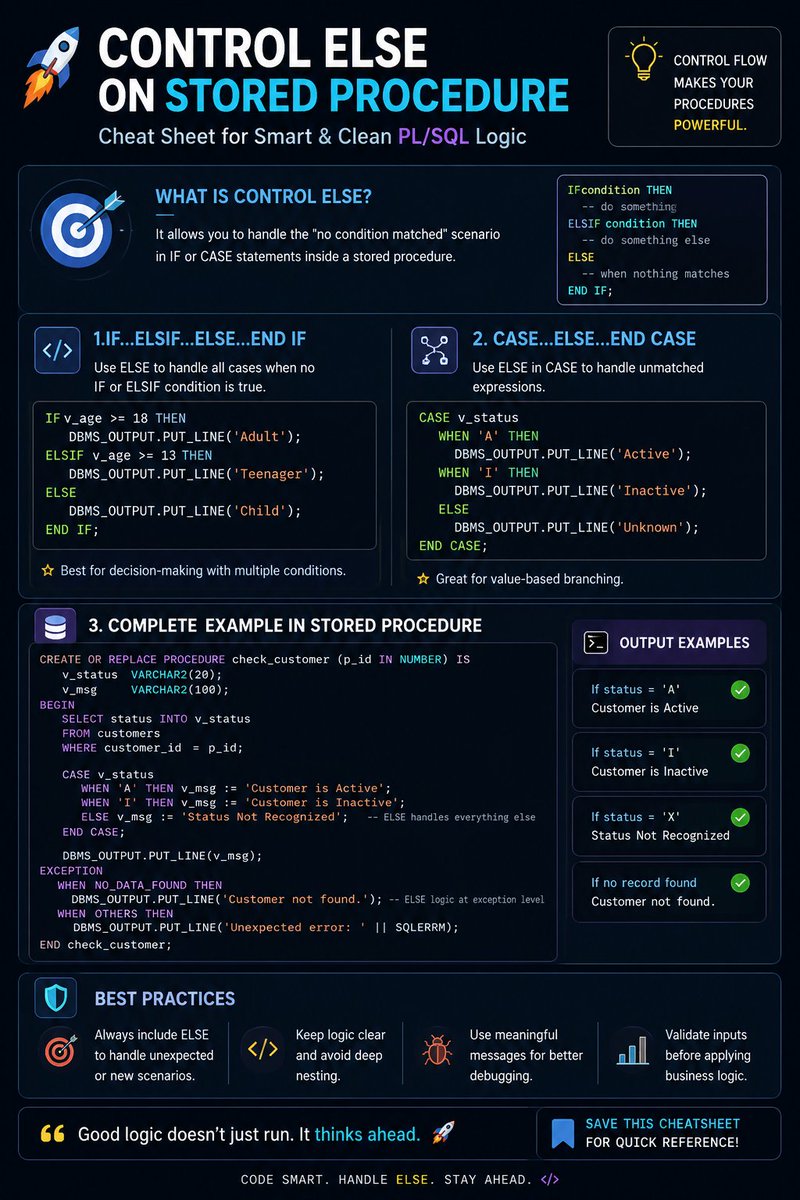
🚨 Hot Take:
Most SQL developers don't write bad queries.
They write incomplete logic.
And the missing ELSE in a Stored Procedure is where production disasters begin.
2
3
27
574