
Joined April 2019
- Tweets 58
- Following 128
- Followers 4
- Likes 239
7 Photos and videos



Needed to use CSS subgrid. Found it confusing. Custom "lights-on" language helped:
- grid aligns its children
- subgrid aligns sibling grids, inside a grid, with each other
- aligning subgrids give rise to aligned subgrid, inside a grid
Subgrid syncs parent grid’s items’ grids.
26

21 Apr 2020
Dear @W3C,
CSS lacks margin|padding(-horizontal|vertical) properties.
.container {
..
margin-vertical: X;
..
}
is a perfectly obvious shorthand for the common, verbose:
.container {
..
margin-top: X;
margin-bottom: X;
..
}
Thank you! 🤓
1
Apr 17
Found out recently the properties were available (since 2020/21):
.container {
..
margin-block: Y; /* y1 y2; if -start & -end differ */
margin-inline: X; /* x1 x2; */
..
padding-block: Y; /* y1 y2; */
padding-inline: X; /* x1 x2; */
..
}
92
1 Nov 2025
Accidentally discovered that, on OS X, it's possible to drag a window (e.g. Chrome tab running localhost) into a full screen already occupied by another application (e.g. VS Code) for a full screen view of both. No need to navigate between two spaces. Neat.
131
29 Oct 2025
Sometimes I find refactoring and tidying things up more rewarding and satisfying than coding. No kidding.
120
5 Oct 2025
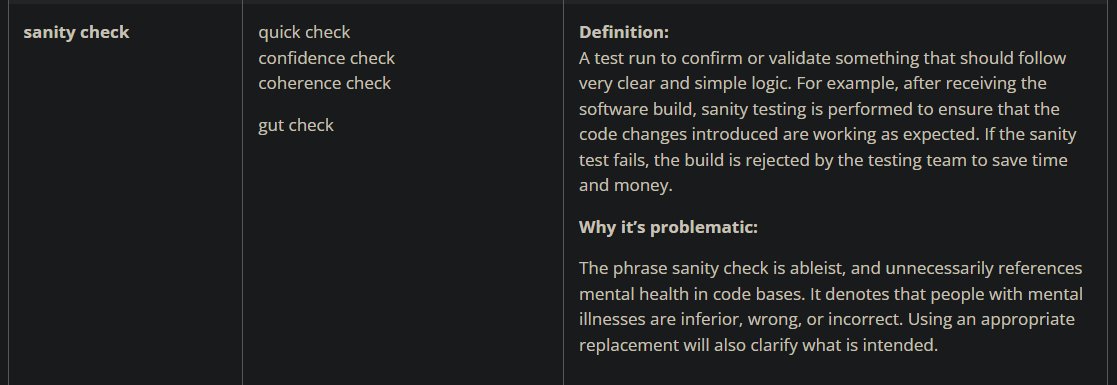
Sanity check:
Is this 👇 for real? 😳😂

110
17 Sep 2025
Some VS Code dark themes dim .gitignore files to unreadable levels in the Explorer.
Fix it in your settings.json:
`"workbench.colorCustomizations": {
"gitDecoration.ignoredResourceForeground": "#68717b"
}`
57
3 Feb 2022
TIL a sweet VS Code customization:
Active editor (tab) can automatically maximize itself. That's right! Here's how:
1) Shift CMD P to run Command Palette
2) type "max" to see & select "View: Maximize Editor Group"
That's it. Enjoy
#vscode
1
3 Jun 2021
A weekend on a tiny, forested, rocky island. Campfire, chitchat, stars, beers .. a buddy mentions in passing @HardcoreHistory
Back at home, curious, I look it up & start listening
Discovery: I never consumed anything actually *riveting* until this
dancarlin.com/hardcore-histo…
12 Nov 2020
regardless of familiarity with, interest in (history, character of) CSS, you will enjoy seeing this vid
might be the only mesmerizingly mellifluously lucid presentation on a topic I've ever experienced :)
@MiriSuzanne
thx @KevinJPowell for the link
youtu.be/aHUtMbJw8iA
1
16 Sep 2020
VS Code keeps getting better & better. Really impressed. So helpful. Clean. Joy to use.
14 Jul 2020
incorrigibly unexcited about css transforms?
me too
js animations with GSAP are a ton of fun
greensock.com/gsap/
thanks, Green Sock!
1
1
7 Jul 2020
it's quite satisfying to return to your own old code (complex, interdependent validations) & understand it right away & squish a bug there in a few moments
because the code (names of variables & methods) reads like a short story
especially if this was intended
love it, really
1 May 2020
playing with top, right, bottom & left values of absolutely positioned .child nested inside absolutely positioned .parent
while
playing with top, right, bottom & left values of the .parent ..
20 Apr 2020
.foo
.bar
.baz
&
.foo { .. display: flex; .. }
.bar { .. position: relative; .. }
.baz { .. display: flex; .. position: absolute; .. }
do not play nice together
a flex baz anchored to bar inside a flex foo does not flex its children as expected
Ex. nested nav menus
1