Joined July 2022
- Tweets 1,728
- Following 92
- Followers 5,337
- Likes 3,778
353 Photos and videos

Pinned Tweet

People think learning AI takes months.
It's really just a couple of hours.
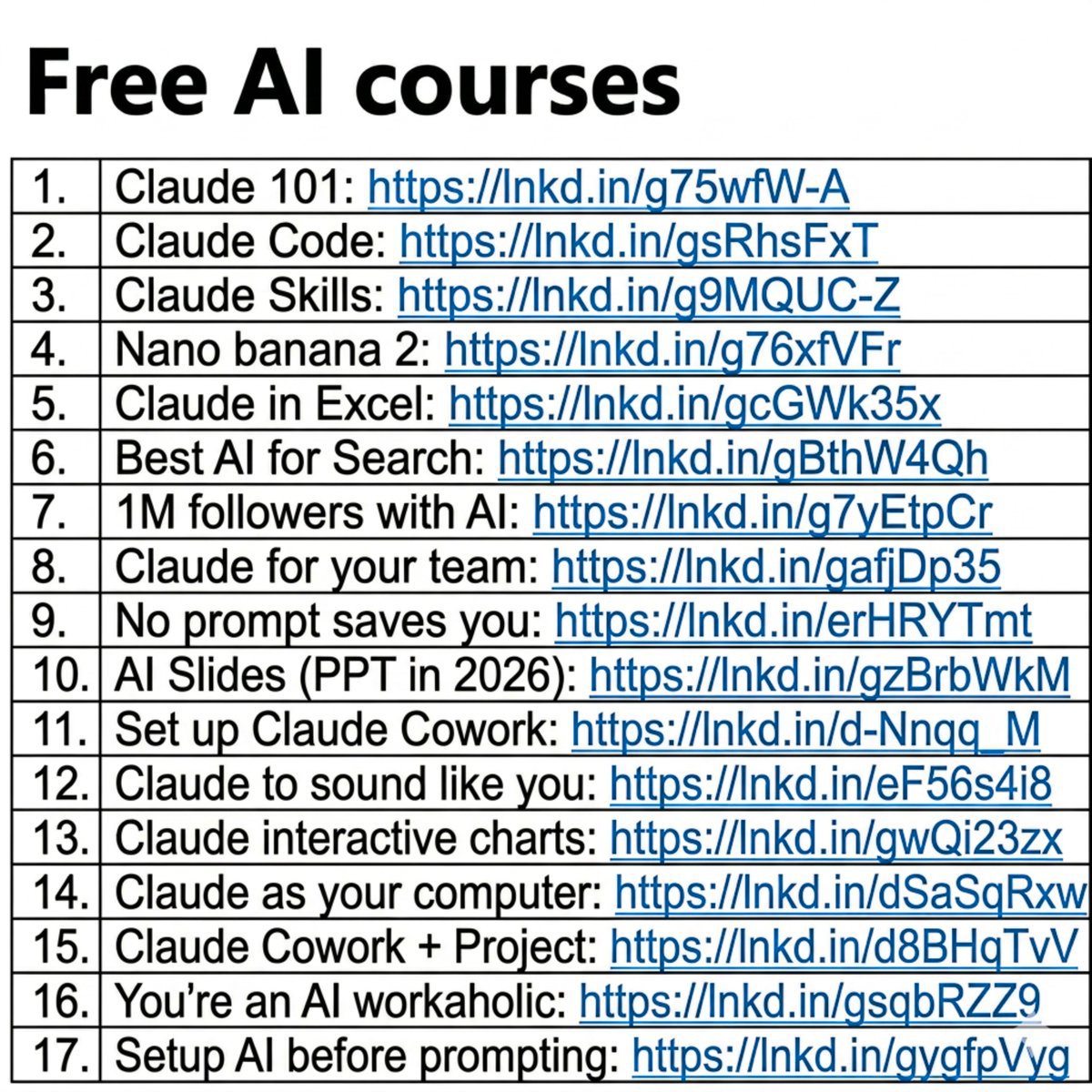
And I wrote 17 free guides to start right away:
Claude 101: ruben.substack.com/p/claude
Claude Code: ruben.substack.com/p/claude-…
Claude Skills: ruben.substack.com/p/claude-…
Nano banana 2: ruben.substack.com/p/banana-…
Claude in Excel: ruben.substack.com/p/ai-coul……
Best AI for Search: ruben.substack.com/p/grok-42…
1M followers with AI: ruben.substack.com/p/1000000
Claude for your team: ruben.substack.com/p/claude-……
No prompt saves you: ruben.substack.com/p/magic
AI Slides (PPT in 2026): ruben.substack.com/p/powerpo…
Set up Claude Cowork: ruben.substack.com/p/claude-……
Claude to sound like you: ruben.substack.com/p/i-am-ju……
Claude interactive charts: ruben.substack.com/p/claude-…
Claude as your computer: ruben.substack.com/p/claude-……
Claude Cowork Project: ruben.substack.com/p/claude-……
You're an AI workaholic: ruben.substack.com/p/ai-holi…
Setup AI before prompting: ruben.substack.com/p/how-to-……
___
1. Save this list for later (three dots, top right).
2. Share it with a friend by ♻️ reposting this image.
8
121
412
32,653
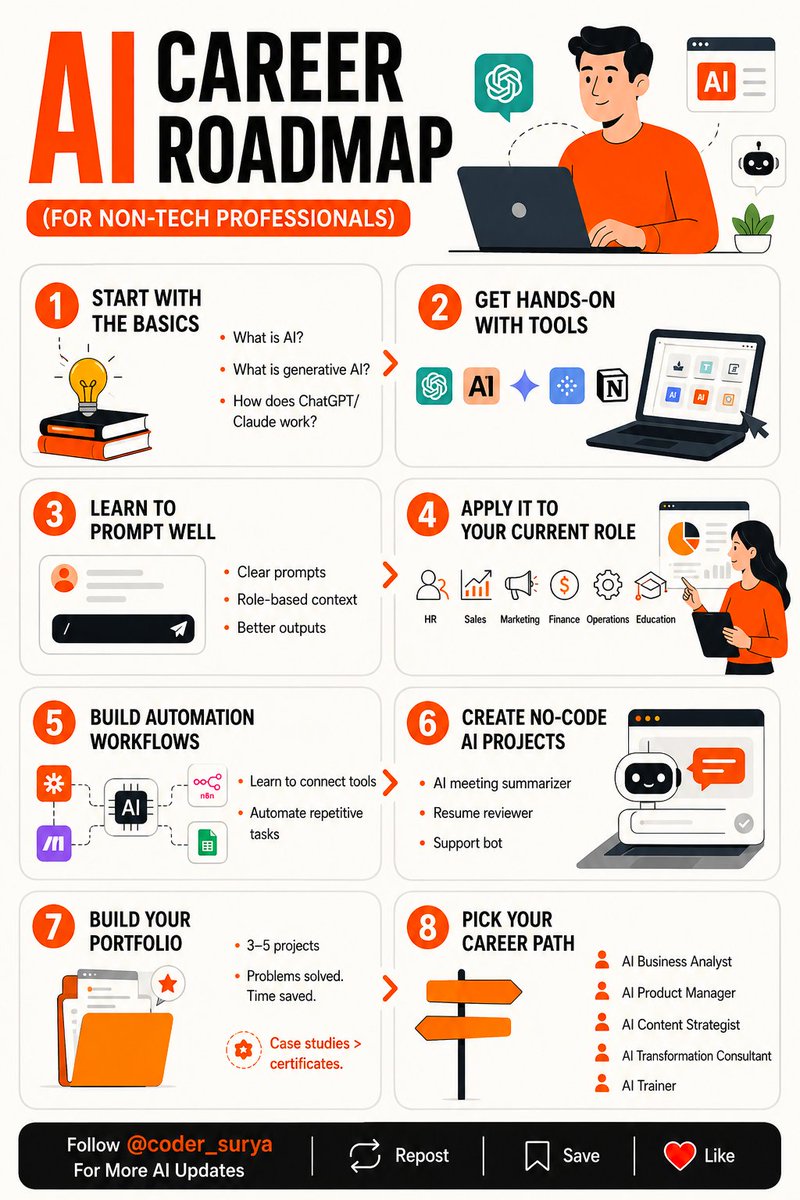
AI Career Roadmap (For Non-Tech Professionals)
__________
You don't need a tech background to break into AI.
You need a plan.
Most non-tech professionals think AI is not for them.
They're wrong.
Here's a step by step roadmap (with bonus courses): 👇
🎯 STEP 1 — START WITH THE BASICS
→ What is AI?
→ What is generative AI?
→ How does ChatGPT/Claude work?
Don't skip this. Foundation first.
Free course: lnkd.in/gWpgsHQZ
🎯 STEP 2 — GET HANDS-ON WITH TOOLS
Start with: ChatGPT. Claude. Gemini. Perplexity. Notion AI.
You learn tools by using them,
not by reading about them.
Free course: lnkd.in/gHsQzxEv
🎯 STEP 3 — LEARN TO PROMPT WELL
Prompting is the entry point for everyone.
→ Clear prompts
→ Role-based context
→ Better outputs
This skill alone will separate you from 80% of the field.
Free course: lnkd.in/gkxDtEPx
🎯 STEP 4 — APPLY IT TO YOUR CURRENT ROLE
→ HR. Sales. Marketing. Finance. Operations. Education.
Every industry has AI use cases.
Start with yours.
🎯 STEP 5 — BUILD AUTOMATION WORKFLOWS
Tools: Zapier. Make. n8n. Google Sheets AI.
→ Learn to connect tools
→ Automate repetitive tasks
This is where your leverage multiplies.
Free course: lnkd.in/gW5q2pnp
🎯 STEP 6 — CREATE NO-CODE AI PROJECTS
→ AI meeting summarizer
→ Resume reviewer
→ Support bot.
Small projects. Real results.
No engineering required.
Free course: lnkd.in/gcHVkZK2
🎯 STEP 7 — BUILD YOUR PORTFOLIO
→ 3–5 projects
→ Problems solved. Time saved.
Remember: Case studies > certificates.
🎯 STEP 8 — PICK YOUR CAREER PATH
→ AI Business Analyst
→ AI Product Manager
→ AI Content Strategist
→ AI Transformation Consultant
→ AI Trainer
There are more roles than most people realize.
The AI job market isn't waiting for developers.
It's waiting for people who understand the work..
and know how to apply AI to it.
That's you.
If you start now.
- Follow @coder_surya
- Save the post.
- Repost to your network.
- Join AI Community: tinyurl.com/mvsz79eu
.....................
10
7
41
259
Most people only search for jobs on LinkedIn.
That’s a huge mistake!
There are dozens of better platforms that can help you land high-paying remote jobs.
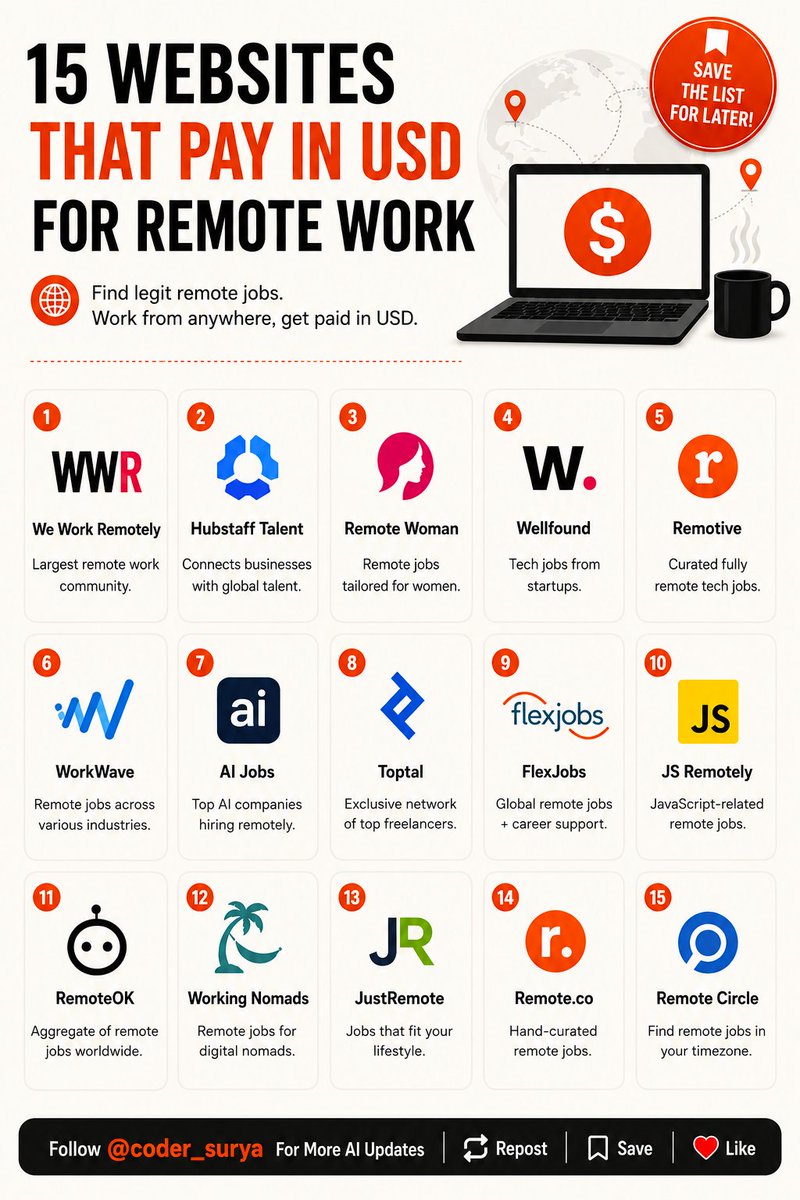
Here are 15 websites that pay in USD for remote work:
[💡 Save the list for later]
1. We Work Remotely
- Largest remote work community with 4.5M visitors
- Offers a wide range of remote job opportunities
- Link: weworkremotely.com
2. Hubstaff Talent
- Free resource for companies looking for remote talent
- Connects businesses with freelancers and agencies worldwide
- Link: hubstafftalent.net
3. Remote Woman
- Remote job board tailored for women
- Promotes flexibility and career growth
- Link: remotewoman.com/
4. Wellfound
- Connects job seekers with startups
- 130K tech jobs from 27K companies
- Link: wellfound.com/
5. Remotive
- Curates active, fully remote tech jobs
- Trusted by top global tech companies
- Link: remotive.io/
6. WorkWave
- Remote job listings for various industries
- Known for flexible work opportunities
- Link: workwave.com/
7. AI Jobs
- Focuses on AI-related remote job listings
- Features top 1% of AI companies
- Link: theaijobboard.com
8. Toptal
- Exclusive network for top freelancers
- Covers software development, design, finance & more
- Link: toptal.com/
9. FlexJobs
- Find remote jobs globally or near you
- Offers career coaching and resume help
- Link: flexjobs.com/
10. JS Remotely
- Specializes in JavaScript-related remote jobs
- Includes React, Vue, Node.js, and Angular roles
- Link: jsremotely.com/
11. RemoteOK
- Aggregates remote jobs from across industries
- Allows filtering jobs by category and salary
- Link: remoteok.com/
12. Working Nomads
- Remote jobs tailored for digital nomads
- Handpicks opportunities across industries
- Link: workingnomads.co/jobs
13. JustRemote
- Jobs that fit your lifestyle
- Offers fully and partially remote options
- Link: justremote.co/
14. Remote.co
- Hand-curated list of remote jobs
- Features 146 remote-first companies
- Link: remote.co/
15. Remote Circle
- Helps find remote jobs in your timezone
- Covers a variety of industries and roles
- Link: remotecircle.com/
- Follow @coder_surya
- Save the post.
- Repost to your network.
- Join AI Community: tinyurl.com/mvsz79eu
...............
10
22
72
875
Suryakant Chaurasiya retweeted
Might get deleted: 500 Mega Tech Book Collection
mega.nz/folder/AD1TjIRb#2JFH…
Bookmark it
1
2
10
1,940
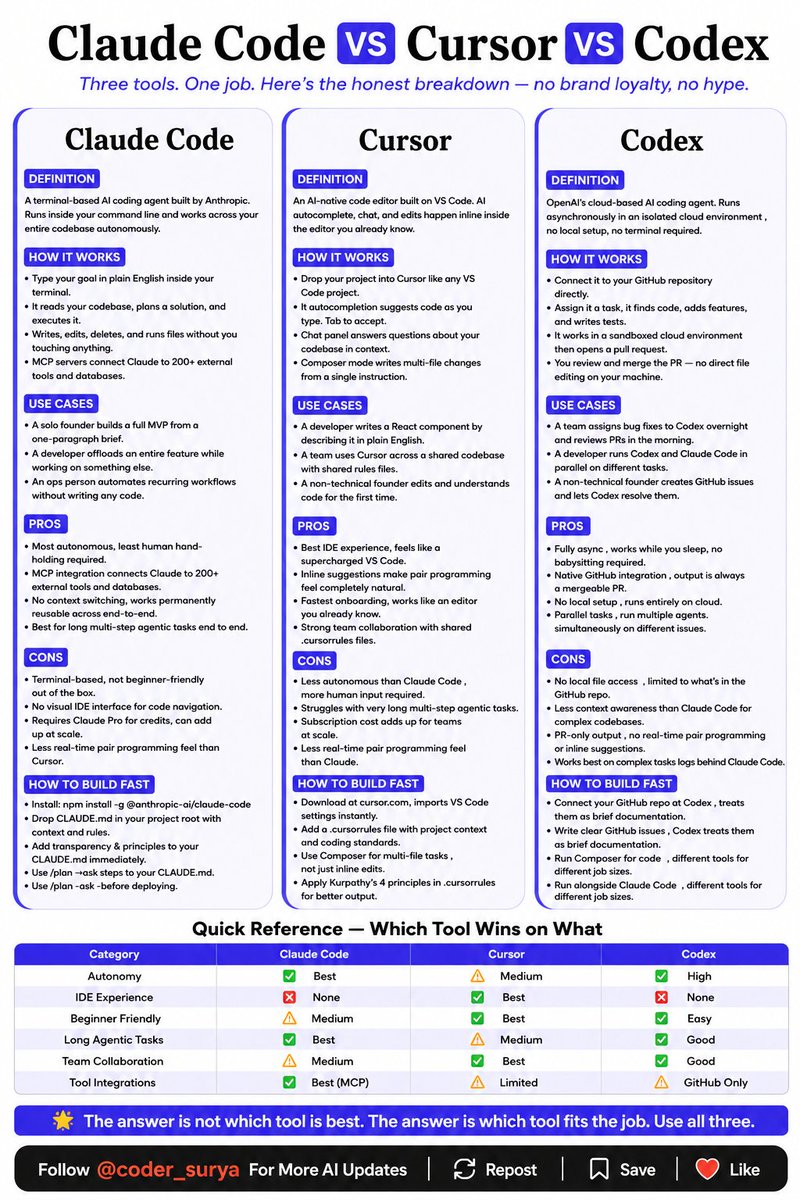
Claude Code vs Cursor vs Codex
Claude Code vs Cursor vs Codex is the wrong question.
The right question is which one fits your exact workflow today.
Here is the honest breakdown with zero brand loyalty and zero hype:
☑️ 1. Claude Code
→ Terminal-based AI coding agent built by Anthropic.
→ It reads the codebase, plans a solution, and executes it.
→ Writes, edits, deletes, and runs files without you touching a single thing.
↳ MCP servers connect Claude to 200 external tools and databases.
Best for:
→ Solo founders building a full MVP from a one-paragraph brief.
→ Developers delegating an entire feature while working on something else.
→ Ops people automating recurring workflows without writing any code.
✦ Pros: Best for long, multi-step agentic tasks.
✦ Cons: Terminal-based, not beginner-friendly. No visual IDE.
☑️ 2. Cursor
→ AI-native code editor built on VS Code.
→ Autocomplete suggests code as you type.
→ Composer mode makes multi-file changes from a single plain English.
↳ Works like an editor you already know from day one.
Best for:
→ Developers writing React components by describing them in plain English.
→ Teams working across a shared codebase with shared rules files.
→ Non-technical founders editing and understanding code for the first time.
✦ Pros: Best IDE experience. Natural pair programming feel.
✦ Cons: Struggles with very long agentic tasks.
☑️ 3. Codex
→ OpenAI's cloud-based AI coding agent.
→ Works in a sandboxed cloud environment and then opens a pull request.
↳ Parallel tasks. Run multiple agents simultaneously on different issues.
Best for:
→ Teams assigning bug fixes overnight and reviewing PRs in the morning.
→ Developers running Codex and Claude Code in parallel on different tasks.
→ Non-technical founders creating GitHub issues and letting Codex resolve them.
✦ Pros: Fully async, no babysitting. Native GitHub integration.
✦ Cons: Less context awareness than Claude Code for complex codebases.
☑️ Quick Reference — Which Tool Wins on What
→ Autonomy: Claude Code wins. Cursor medium. Codex high.
→ IDE Experience: Cursor wins. Claude Code and Codex have none.
→ Beginner Friendly: Cursor and Codex win. Claude Code is medium.
→ Long Agentic Tasks: Claude Code wins. Codex good. Cursor medium.
→ Team Collaboration: Cursor wins. Codex good. Claude Code medium.
→ Tool Integrations: Claude Code wins with MCP. Codex GitHub only. Cursor limited.
The answer is not which tool is the best.
The answer is which tool fits the job.
- Follow @coder_surya for more.
- Save the post.
- Repost to your network.
- Join AI Community: tinyurl.com/mvsz79eu
----------------------------
14
15
56
1,053
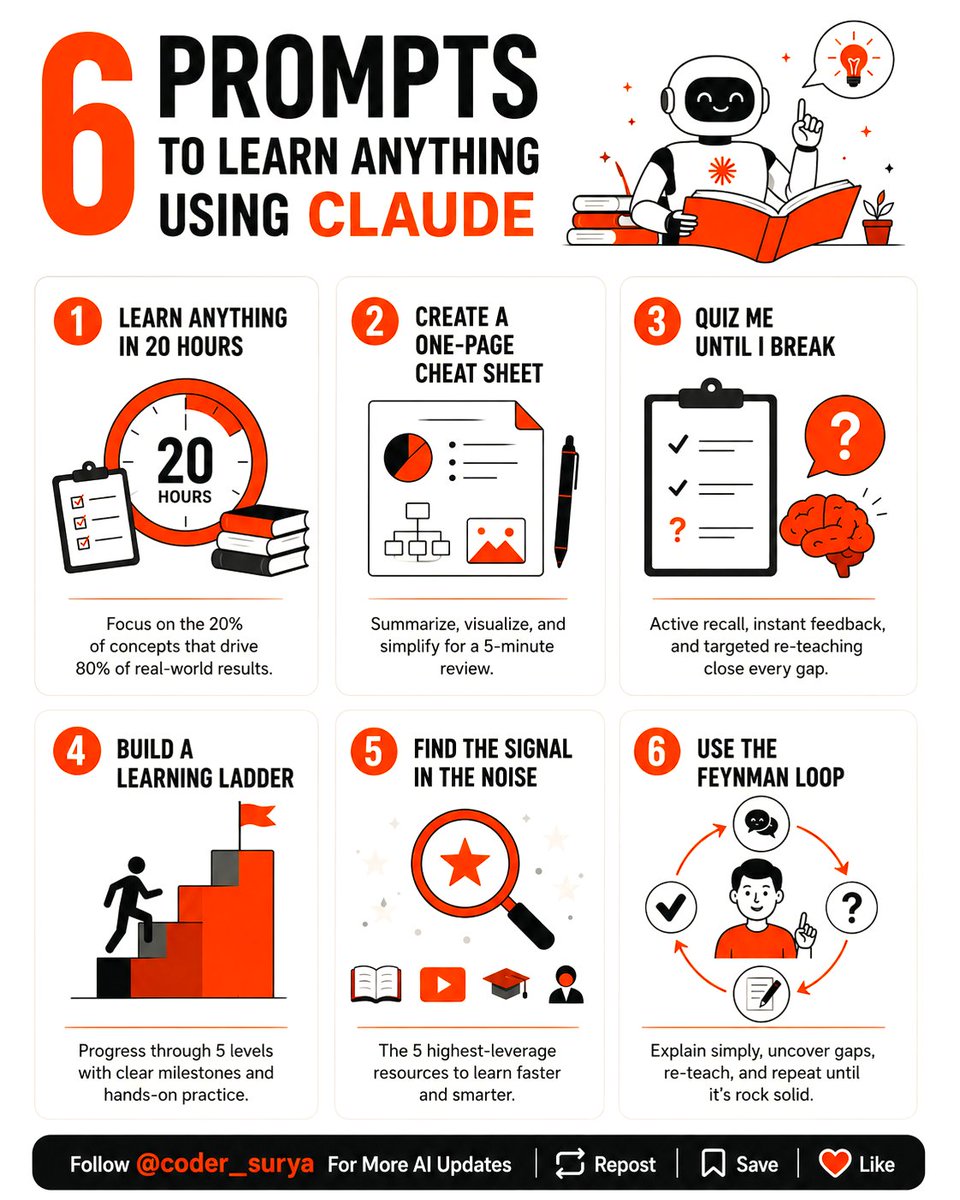
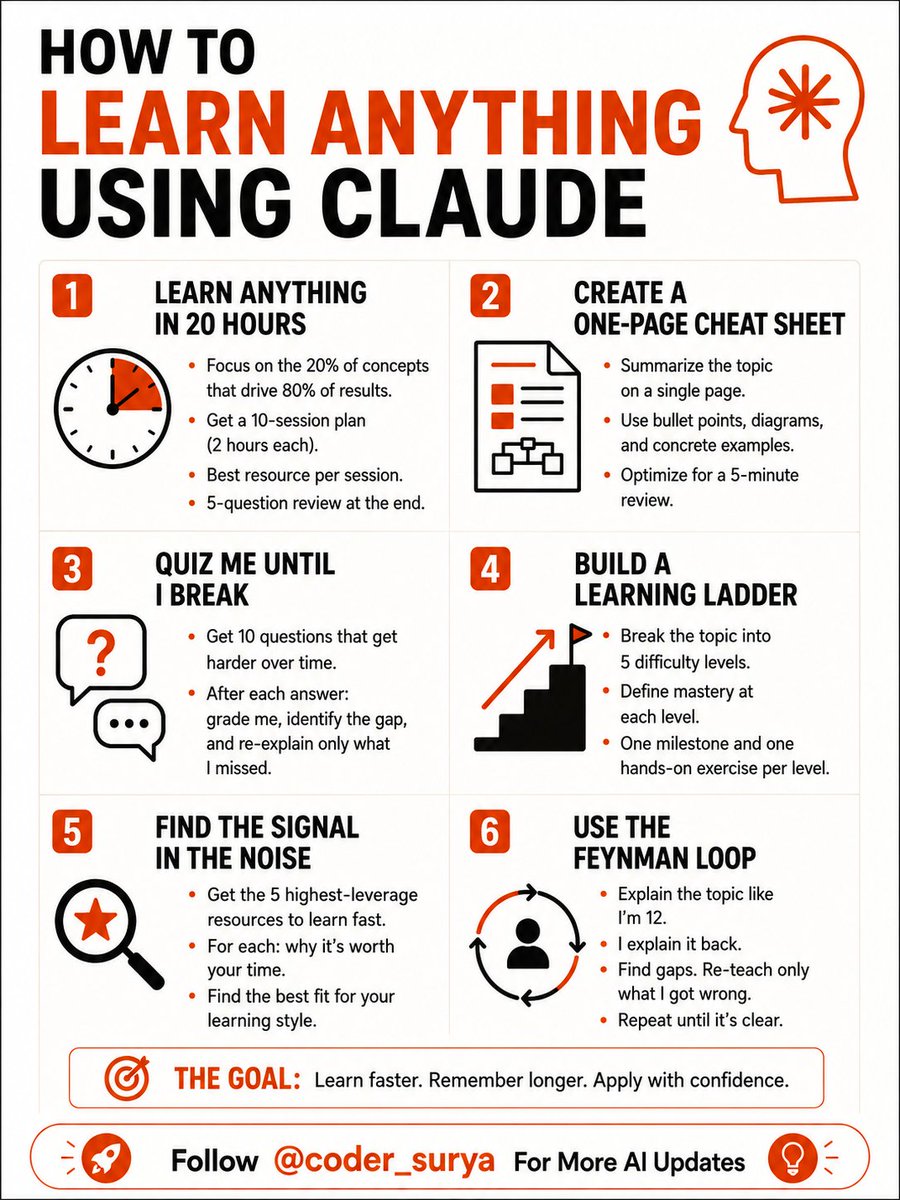
6 PROMPTS TO LEARN ANYTHING USING CLAUDE
Most people use Claude to get answers.
The smart ones use it to build understanding.
Big difference.
One makes you dependent.
The other makes you dangerous.
Here are 6 Claude prompts that turn any topic into mastery👇
🎯 LEARN ANYTHING IN 20 HOURS
"I need to learn [topic] in 20 hours. Identify the 20% of concepts that drive 80% of real-world results. Build me a 10-session plan — 2 hours each — with the best resource for each session and a 5-question review at the end."
→ Most subjects have 3–4 ideas that unlock everything else.
→ Finding those early saves you weeks of wandering.
🎯 CREATE A ONE-PAGE CHEAT SHEET
"Summarize [topic] on a single page. Use bullet points, labeled diagrams, and concrete examples. Optimize it for a 5-minute review the night before I need to use it."
→ Your brain remembers structure better than sentences.
→ Give it a map, not a wall of text.
🎯 QUIZ ME UNTIL I BREAK
"I just studied [topic]. Give me 10 progressively harder questions — start easy, end expert-level. After each answer: grade me, identify the gap, and re-explain only what I missed."
→ Passive reading feels like learning.
→ Active retrieval actually is.
🎯 BUILD A LEARNING LADDER
"Break [topic] into 5 difficulty levels. Define what mastery looks like at each level. Give me one milestone and one hands-on exercise per level — from complete beginner to confident practitioner."
→ Most people skip levels and wonder why nothing sticks.
→ The ladder fixes that.
🎯 FIND THE SIGNAL IN THE NOISE
"List the 5 highest-leverage resources for learning [topic] fast — books, videos, courses, or people. For each: explain what makes it worth my time and what type of learner it's best for."
→ There are 1,000 ways to learn anything.
→ Most of them are a waste.
🎯 USE THE FEYNMAN LOOP
"Explain [topic] to me like I'm 12. Then ask me to explain it back in my own words. Find every gap in my explanation. Re-teach only what I got wrong. Repeat until my explanation is clean."
→ If you can't explain it simply, you don't know it yet.
→ This prompt exposes that — fast.
This isn't a list of prompts.
It's a learning operating system.
Use it today.
___
- Follow @coder_surya For More AI Updates.
- Save the post.
- Repost to your network.
- Join AI Community: tinyurl.com/mvsz79eu
9
26
100
1,546
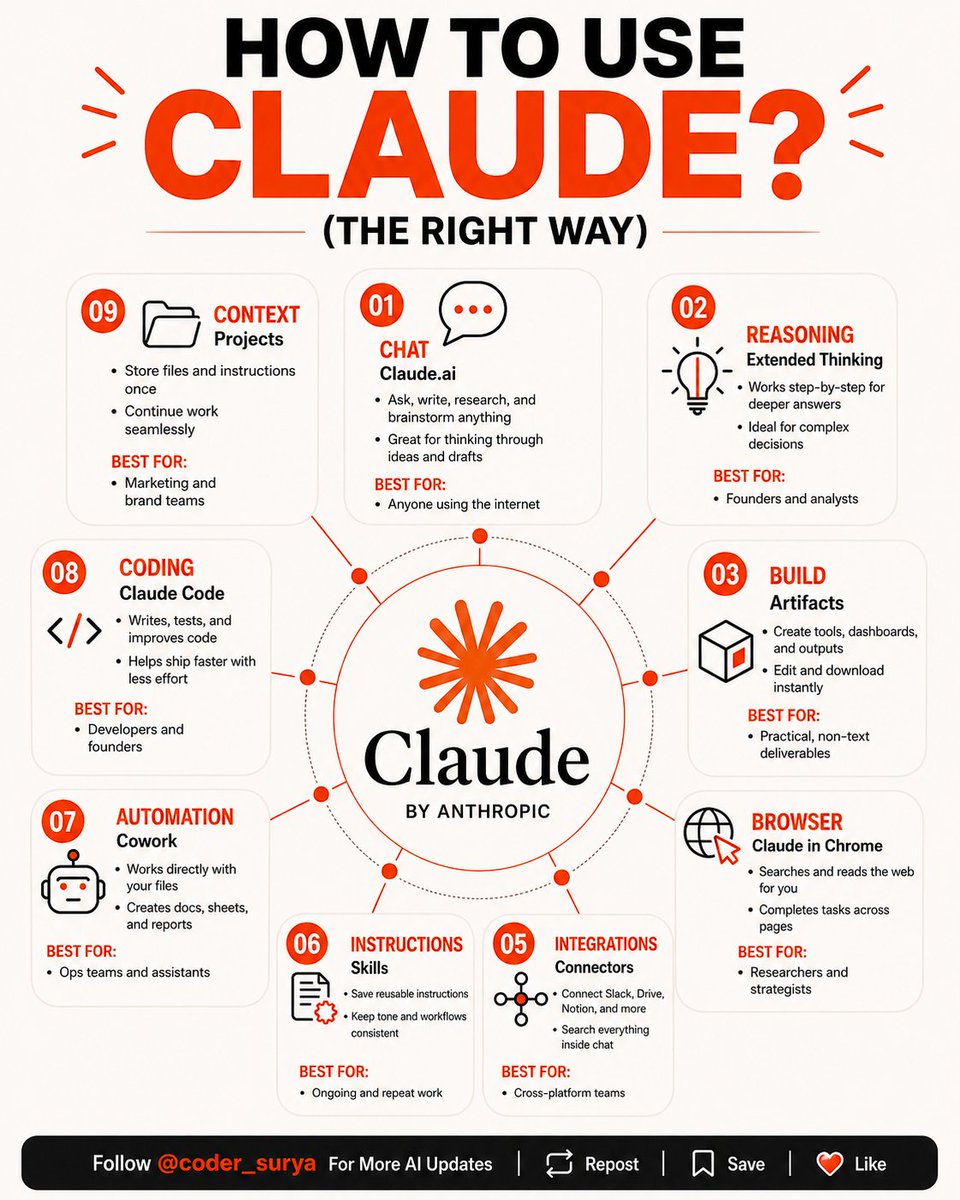
You've been using 20% of Claude.
Not because you're lazy.
Because nobody showed you the other 80%.
Here's the full breakdown — matched by use case:
📌 THINKING THROUGH A DECISION?
Use Extended Thinking.
It reasons step-by-step before it answers.
Built for founders, analysts, and anyone where getting it wrong is expensive.
Guide:
→ Open Claude
→ Toggle on Extended Thinking before your next prompt
📌 WANT CLAUDE TO REMEMBER HOW YOU WORK?
Use Projects.
Files, instructions, context — stored permanently.
No more re-explaining yourself every session.
Guide:
→ Open Claude
→ Projects → New Project
→ Add files custom instructions
📌 RUNNING OPS ACROSS TOOLS?
Use Connectors Cowork.
Connectors links your stack.
Cowork works inside your actual files.
Guide:
→ Open Claude → Settings → Connectors
→ Connect your tools
→ Download Cowork
📌 DOING RESEARCH ACROSS MULTIPLE SITES?
Use Claude in Chrome.
It browses, reads, and acts across pages — for you.
Researchers and strategists, this one's yours.
Guide:
→ Chrome Web Store
→ Install Claude extension
→ Open sidebar while browsing
📌 NEED AN ACTUAL OUTPUT, NOT JUST TEXT?
Use Artifacts.
Dashboards, tools, calculators — built and downloadable.
The deliverable is the point.
Guide:
→ Open Claude
→ Ask it to "build" or "create" anything
→ Opens as an Artifact
📌 BUILDING SOMETHING THAT NEEDS TO SHIP?
Use Claude Code.
It writes, tests, and improves the code.
Less back-and-forth. More working software.
Guide:
→ Terminal
→ `npm install -g @ anthropic-ai/claude-code`
→ Run `claude`
Same AI. Completely different outcomes.
The people who treat Claude as one tool
will always produce one-tool results.
The people who treat it as a system
are already operating at a different level.
__
- Follow @coder_surya For More Updates!
- Save the post.
- Repost to your network.
- Join AI Community: tinyurl.com/mvsz79eu
21
34
117
2,118
𝐓𝐨𝐩 𝟏𝟓 𝐑𝐞𝐦𝐨𝐭𝐞/𝐎𝐧𝐬𝐢𝐭𝐞 𝐎𝐩𝐩𝐨𝐫𝐭𝐮𝐧𝐢𝐭𝐲 𝐖𝐢𝐭𝐡 𝐮𝐩𝐭𝐨 𝟔𝟔𝐋𝐏𝐀
Company: Tata Technologies
Position: Grade Engineer
Experience: Freshers/Experience
CTC- up to 18 LPA to 48 LPA. (expected)
Location: Pune District, Maharashtra, IN
𝗔𝗽𝗽𝗹𝘆 𝗡𝗼𝘄 : lnkd.in/giqpswxk
Doceree is hiring for AI Engineer
CTC: Rs 15 - 24 LPA
Location: Noida, (Work From Home)
Deadline: Tomorrow Before 3 Pm
Apply Now: lnkd.in/gc7qAbMg
Company: SciSpace
Position: Senior Gen Ai Engineer
Experience: Freshers/Experience
CTC- 25LPA - 45LPA
Location: Bengaluru, IN
𝗔𝗽𝗽𝗹𝘆 𝗡𝗼𝘄 : artha.link/@nxthiring/jobs/s…
Software Engineer at ValueMomentum
Hyderabad, Telangana, IN
Apply here
artha.link/@nxthiring/jobs/s…
Company name: People Tech Group
Role: Aws Full Stack Sde (mid/junior Level)
CTC: upto 15 LPA to 48 LPA ( Expired )
Apply Link: artha.link/@nxthiring/jobs/a…
Procter & Gamble is Hiring Pc&is/automation Engineer
Experience: Freshers/Experience
CTC: upto 16LPA - 50LPA (expected)
Location: Hyderabad
Apply Link: artha.link/@nxthiring/jobs/p…
Experion Technologies Hiring Artificial Intelligence Engineer
Salary: 66 LPA
Location: Bengaluru
Apply Link: artha.link/@nxthiring/jobs/a…
Align Technology Hiring Software Engineer
Graduation Year: 2023 / 2024 / 2025
Salary: 16 LPA
Location: Pune
Apply Link: artha.link/@nxthiring/jobs/s…
Company: Navi
Position: Software Engineer
Experience: Freshers/Experience
Location: Bangalore Urban, Karnataka, IN
Apply Now: lnkd.in/g73DaCRy
Rubrik Application Security Intern
Bengaluru, Karnataka, IN
Apply now- artha.link/@nxthiring/jobs/a…
SOLO NETWORK Junior Developer Intern
Panaji, Goa, IN
Apply now- artha.link/@nxthiring/jobs/j…
JPMorgan Chase & Co.
Software Engineer I
Mumbai, Maharashtra, IN
Apply now - artha.link/@nxthiring/jobs/s…
Radical Technologies
Software Developers
Pune, Maharashtra, IN
Apply now - artha.link/@nxthiring/jobs/s…
EVERSANA
Associate/ Intern- Fullstack Developer
Bengaluru, Karnataka, IN
Apply now - artha.link/@nxthiring/jobs/a…
DHL Software Engineer
Hyderabad, Telangana
Apply now- artha.link/@nxthiring/jobs/s…
-. Follow @coder_surya
-. Save the post.
-. Repost to your network.
- Join AI Community: tinyurl.com/mvsz79eu
____________________________
2
3
13
492
Suryakant Chaurasiya retweeted

Jun 13
#Perplexity has reportedly raised $500M at a massive $14B valuation.
The AI search challenger is rapidly scaling and intensifying the race against Google & OpenAI.
AI Search is becoming one of the most competitive sectors in tech right now. 🔥
#Perplexity #AI #StartupNews

3
4
41
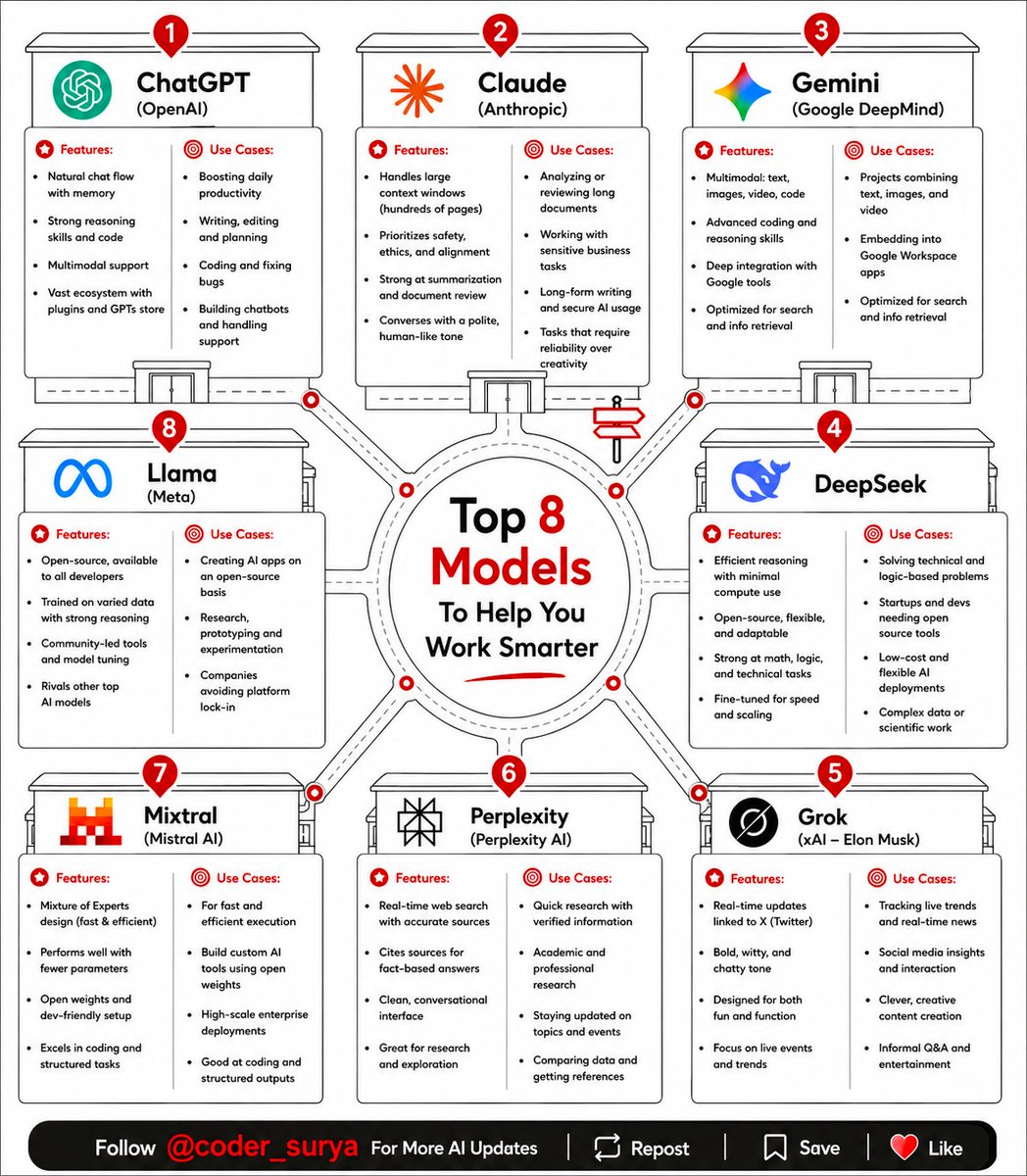
Everyone keeps asking: "What's the best AI model?"
And every time I hear that question, I know we're starting in the wrong place.
Because asking for the best AI model is like asking:
"What's the best employee?"
For what?
Sales? Finance Design? Operations?
The answer changes depending on the job.
Yet most people still try to use one AI model for everything.
Then they wonder why the results feel average.
Well here are the 8 models I see power users relying on in 2026 and exactly where each one shines:
1. ChatGPT
This is still my default starting point.
Need to brainstorm?
Build a strategy?
Write content?
Think through a business problem?
Turn a messy idea into a clear plan?
ChatGPT is usually where I start.
It's become the closest thing we have to an AI operating system.
2. Claude
Claude is the person you call when details matter.
Large reports.
Research papers.
Complex documents.
Long-form analysis.
If I need something reviewed carefully instead of quickly, Claude usually gets the assignment.
3. Gemini
Gemini becomes incredibly useful when your work lives across multiple formats.
Documents.
Images.
Videos.
Google Workspace.
Research.
Search.
It's less about a single task and more about connecting information across an ecosystem.
4. DeepSeek
This one earned a reputation for a reason.
Math.
Logic.
Coding.
Technical problem solving.
When the task requires structured reasoning instead of creative thinking, DeepSeek often punches far above its weight.
5. Grok
Grok feels like the person who never leaves the internet.
News.
Trends.
Real-time conversations.
Social sentiment.
If something is happening right now, Grok is often one of the fastest ways to understand what people are actually talking about.
6. Perplexity
This is where many people make a mistake.
They think Perplexity is another chatbot.
It isn't.
I use it more like a research analyst.
Need sources?
Need citations?
Need to verify information quickly?
Perplexity is often my first stop before I even open another model.
7. Llama
Llama is for builders.
- The people who want control.
- The people who don't want to be locked into a single platform.
- The people building custom systems and products.
You probably won't use Llama like ChatGPT.
But if you're building AI infrastructure, it deserves your attention.
8. Mixtral
The underrated workhorse.
Fast. Efficient. Reliable.
Especially useful when teams need performance without spending a fortune on compute.
The real shift isn’t “which AI is best.”
It’s: “which AI should do this task?”
Because AI isn’t one super tool anymore.
It’s a workforce.
And the advantage goes to whoever knows how to manage it.
-. Follow @coder_surya
-. Save the post.
-. Repost to your network.
- Join AI Community: tinyurl.com/mvsz79eu
____________________________
11
30
115
1,447
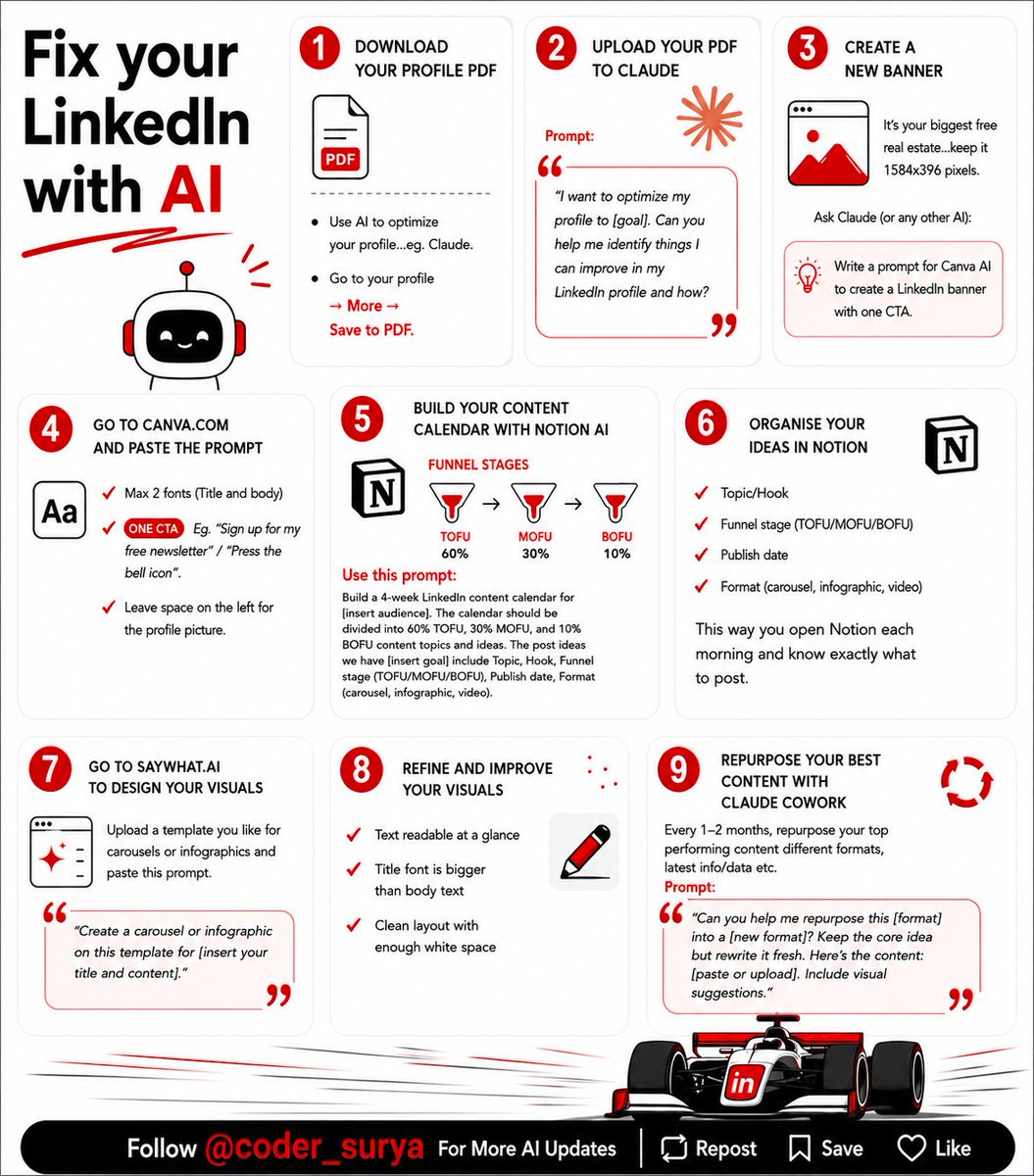
Everyone's talking about AI writing LinkedIn posts.
Meanwhile I'm using it to fix all the stuff around the posts.
Which, honestly, is where most people are losing opportunities.
People are obsessed with posting more.
Post every day.
Post carousels.
Post videos.
Post polls.
Post until your thumbs need workers' comp.
Meanwhile their profile is over there quietly fumbling the bag.
Well, You can create brilliant content.
But if someone clicks your profile and gets confused...
They're out.
A while back, I realized something.
AI is ridiculously good at spotting stuff we're completely blind to.
So now, before changing anything on a LinkedIn profile, I do this:
1️⃣ Download the profile as a PDF
2️⃣ Upload it to Claude (or any AI)
3️⃣ Ask:
"𝘞𝘩𝘢𝘵 𝘸𝘰𝘶𝘭𝘥 𝘴𝘵𝘰𝘱 𝘴𝘰𝘮𝘦𝘰𝘯𝘦 𝘧𝘳𝘰𝘮 𝘧𝘰𝘭𝘭𝘰𝘸𝘪𝘯𝘨, 𝘵𝘳𝘶𝘴𝘵𝘪𝘯𝘨, 𝘰𝘳 𝘩𝘪𝘳𝘪𝘯𝘨 𝘵𝘩𝘪𝘴 𝘱𝘦𝘳𝘴𝘰𝘯?"
The feedback is usually ruthless.
And surprisingly accurate.
Then it gets better.
Instead of staring at a blank Canva page wondering what banner to create...
→ AI can write the entire banner brief.
Instead of guessing what to post next month...
→ AI can build a full content calendar based on your audience and goals.
Instead of keeping random content ideas in 17 different notes apps...
You can organise everything in Notion by funnel stage:
→ TOFU (awareness)
→ MOFU (consideration)
→ BOFU (conversion)
And when a post performs well?
Don't create from scratch again.
Repurpose it.
Turn one post into:
• A carousel
• An infographic
• A video
• A newsletter
• Multiple short posts
Most people use AI like Google.
The smarter move is using it like a strategist.
Or honestly...
A really smart coworker who never sleeps.
The goal isn't to replace your thinking.
The goal is to stop wasting your brainpower on stuff AI can knock out in 30 seconds.
That's exactly how I've been using it to optimize profiles, plan content, and build systems that save me a ridiculous amount of time.
Because posting more isn't always the answer.
Sometimes the answer is fixing the stuff people see after they click.
-. Follow @coder_surya
-. Save the post.
-. Repost to your network.
- Join AI Community: tinyurl.com/mvsz79eu
____________________________
7
23
65
636
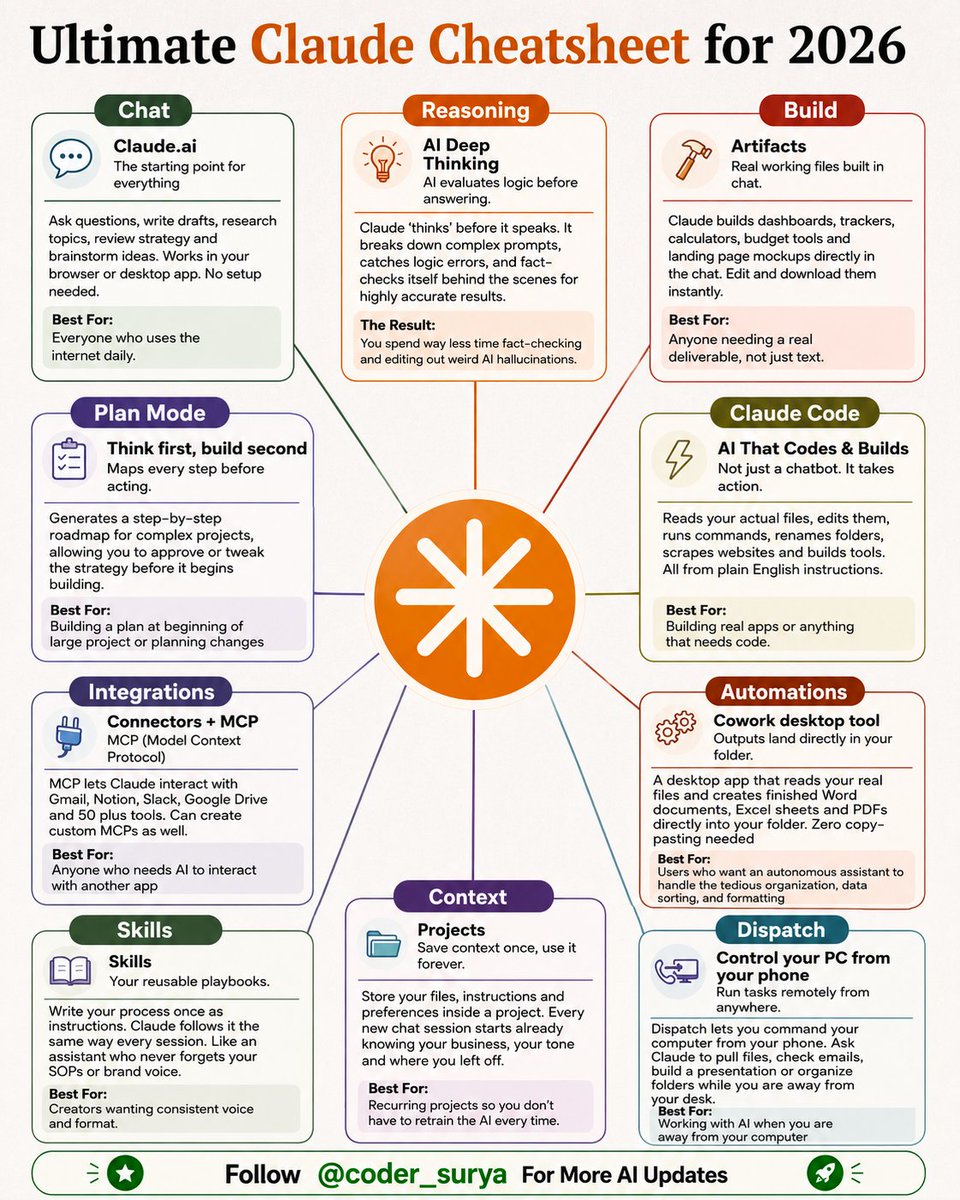
Claude can build apps, control your PC, and automate your files.
Most people are still just using it to answer questions.
Here's the full breakdown of what it can actually do:
1. Claude.ai (Chat)
↳ The starting point for everything. Ask questions, write drafts, research topics. Works in your browser or desktop. No setup needed.
2. AI Deep Thinking (Reasoning)
↳ Claude thinks before it speaks. Breaks down complex prompts, catches logic errors, and fact-checks itself behind the scenes. Way fewer hallucinations.
3. Artifacts (Build)
↳ Real working files built inside the chat. Dashboards, trackers, calculators, landing page mockups. Edit and download instantly.
4. Plan Mode
↳ Think first, build second. Maps every step before acting. You approve the strategy before it starts building.
5. Claude Code
↳ Not just a chatbot. It takes action. Reads your actual files, edits them, runs code & commands, renames folders. All from plain English.
6. Connectors MCP (Integrations)
↳ Connects Claude to Gmail, Notion, Slack, Google Drive, and 50 tools or build your own custom connections. No code needed.
7. Cowork (Automations)
↳ A desktop app that reads your real files and creates finished Word docs, Excel sheets, and PDFs directly into your folder. Zero copy-pasting.
8. Skills
↳ Write your process once as instructions. Claude follows it the same way every session. Like an assistant who never forgets your SOPs or brand voice.
9. Projects (Context)
↳ Store your files, instructions, and preferences once. Every new chat starts already knowing your business, your tone, and where you left off.
10. Dispatch
↳ Control your PC from your phone. Pull files, check emails, build a presentation, all while away from your desk.
Most people stop at number 1.
The ones getting the most out of Claude are using all 10.
- Follow @coder_surya
- Save the post.
- Repost to your network.
- Join AI Community: tinyurl.com/mvsz79eu
____________________________
16
53
165
3,583
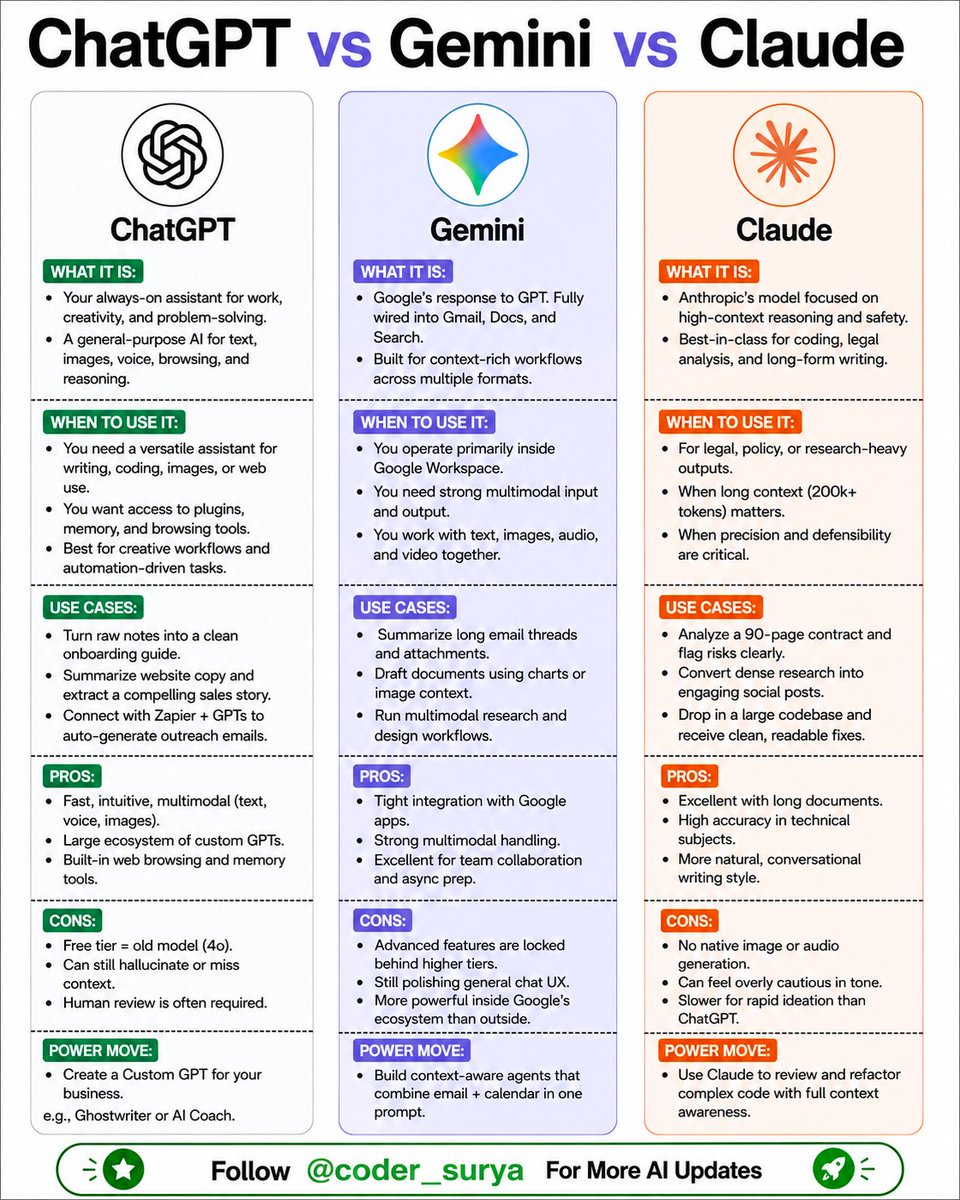
Gemini vs Claude vs ChatGPT
Awesome visual - good excuse to share my experience using these three over the past year!
𝐂𝐥𝐚𝐮𝐝𝐞 - It often feels like the colleague who actually reads the whole document before replying, which is always appreciated.
When I paste a long doc or a complicated brief, Claude tends to stay thoughtful, structured, and careful.
Many developers also say it’s especially strong for reasoning, code review, and working through complex context.
*We also put together two free courses on GenAI Academy for anyone who wants to get more practical with Claude:
𝐂𝐡𝐚𝐭𝐆𝐏𝐓 - Still the most versatile everyday assistant for me.
Writing, quick analysis, brainstorming, generating images, small coding tasks, it’s usually the fastest place to start.
And… I was very attached to the 4o version when it was around.
But now I've gotten used to the newer models, and it’s actually becoming an even better assistant for me.
𝐆𝐞𝐦𝐢𝐧𝐢 is interesting for a different reason.
If your work already lives inside Gmail, Docs, Drive, or Sheets, it can feel surprisingly natural, because the AI is basically sitting inside the tools you’re already using.
But I also remind myself that it’s becoming less and less important which model we pick - they’re all quite capable now.
What matters more is how we work with them, and how we integrate them into our workflow.
- Follow @coder_surya
- Save the post.
- Repost to your network.
- Join AI Community: tinyurl.com/mvsz79eu
____________________________
7
32
99
1,895
Suryakant Chaurasiya retweeted
Jun 12
🔐 OpenAI launches Lockdown Mode.
As AI agents gain access to more sensitive information, protecting them from prompt injection attacks is becoming critical.
The future belongs to AI that is not only smart—but secure.
#OpenAI #ArtificialIntelligence #AISecurity #Technology

4
4
5
155
Might get deleted: 500 Mega Tech Book Collection
mega.nz/folder/AD1TjIRb#2JFH…
Bookmark it
1
2
10
1,940
Redrob AI is hiring
Role: Software Developers and Interns from this hackathon:
Graduation Year: 2023 / 2024 / 2025 / 2026 / 2027 / 2028 / 2029
Stipend: 1L per month
Salary: 36 LPA
Register Now: hack2skill.com/event/india_r…
Do share with your Friends & Juniors too
2
477
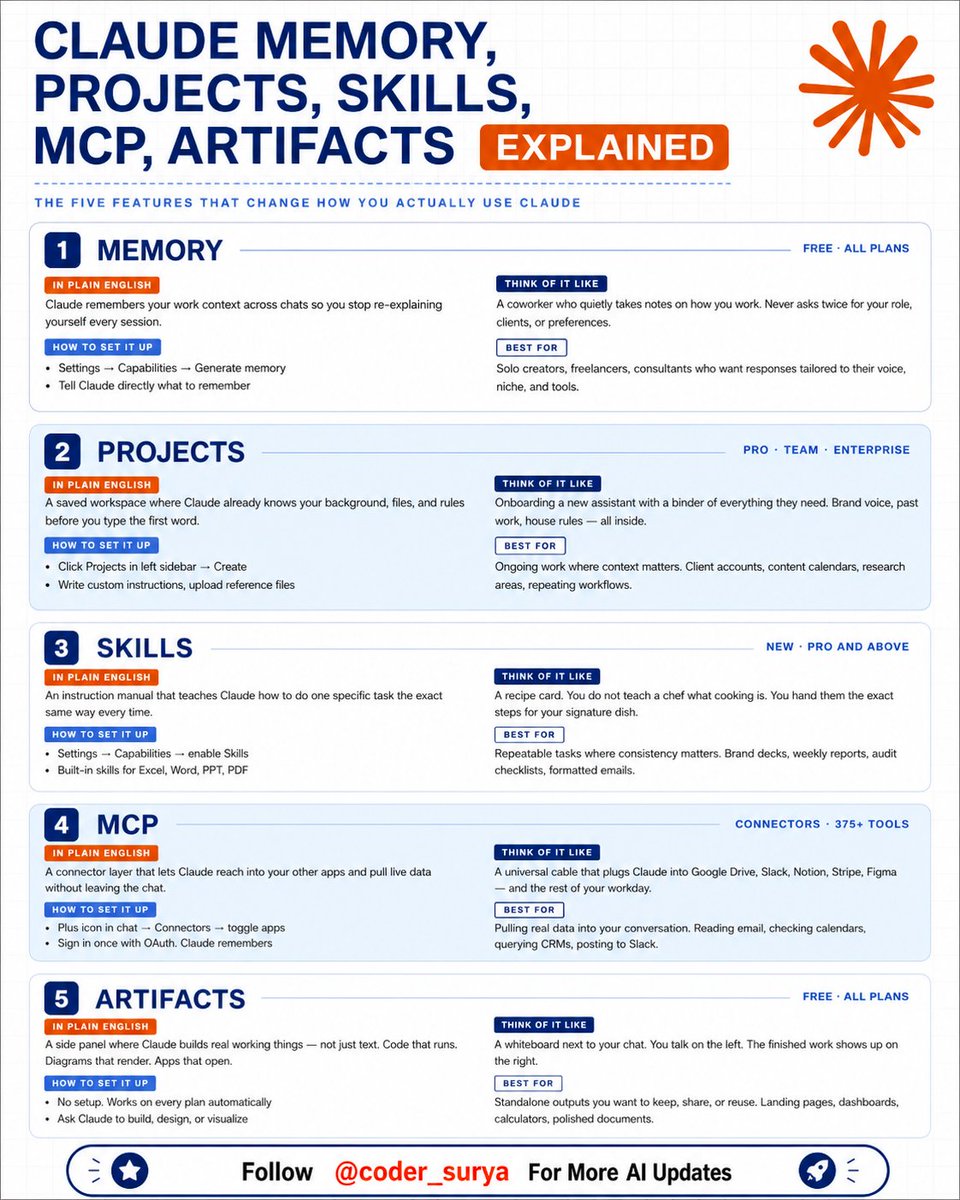
I use 5 Claude features that most people
have never opened once.
They change how the entire tool works.
Here is what each one does (save this):
𝟭. 𝗠𝗲𝗺𝗼𝗿𝘆 (Free, all plans)
↳ Claude remembers your work context across chats
↳ Settings > Capabilities > Generate memory
↳ You stop re-explaining yourself every session
↳ Think of it like a coworker who never asks twice
𝟮. 𝗣𝗿𝗼𝗷𝗲𝗰𝘁𝘀 (Pro, Team, Enterprise)
↳ A saved workspace with your files and rules
↳ Claude already knows your context before you type
↳ Click Projects in the sidebar > Create
↳ Upload instructions, examples, reference files
↳ Best for: client accounts, content calendars
𝟯. 𝗦𝗸𝗶𝗹𝗹𝘀 (Pro and above)
↳ An instruction manual for one specific task
↳ Claude follows it the exact same way every time
↳ Think of it like handing a chef a recipe card
↳ Best for: weekly reports, audits, formatted emails
𝟰. 𝗠𝗖𝗣 (375 connectors)
↳ Claude reaches into your other apps live
↳ Google Drive, Slack, Notion, Stripe, Figma
↳ Plus icon in chat > Connectors > toggle apps
↳ Sign in once. Claude remembers.
𝟱. 𝗔𝗿𝘁𝗶𝗳𝗮𝗰𝘁𝘀 (Free, all plans)
↳ Claude builds real working things next to the chat
↳ Code that runs. Diagrams that render. Apps that open.
↳ No setup needed. Just ask it to build something.
↳ Best for: dashboards, calculators, landing pages
Memory stops the re-explaining.
Projects hold your context.
Skills lock your process.
MCP connects your tools.
Artifacts build the output.
5 features. Most people use zero.
Which feature did you not know existed?
- Follow @coder_surya
- Save the post.
- Repost to your network.
- Join AI Community: tinyurl.com/mvsz79eu
____________________________
12
42
125
1,758
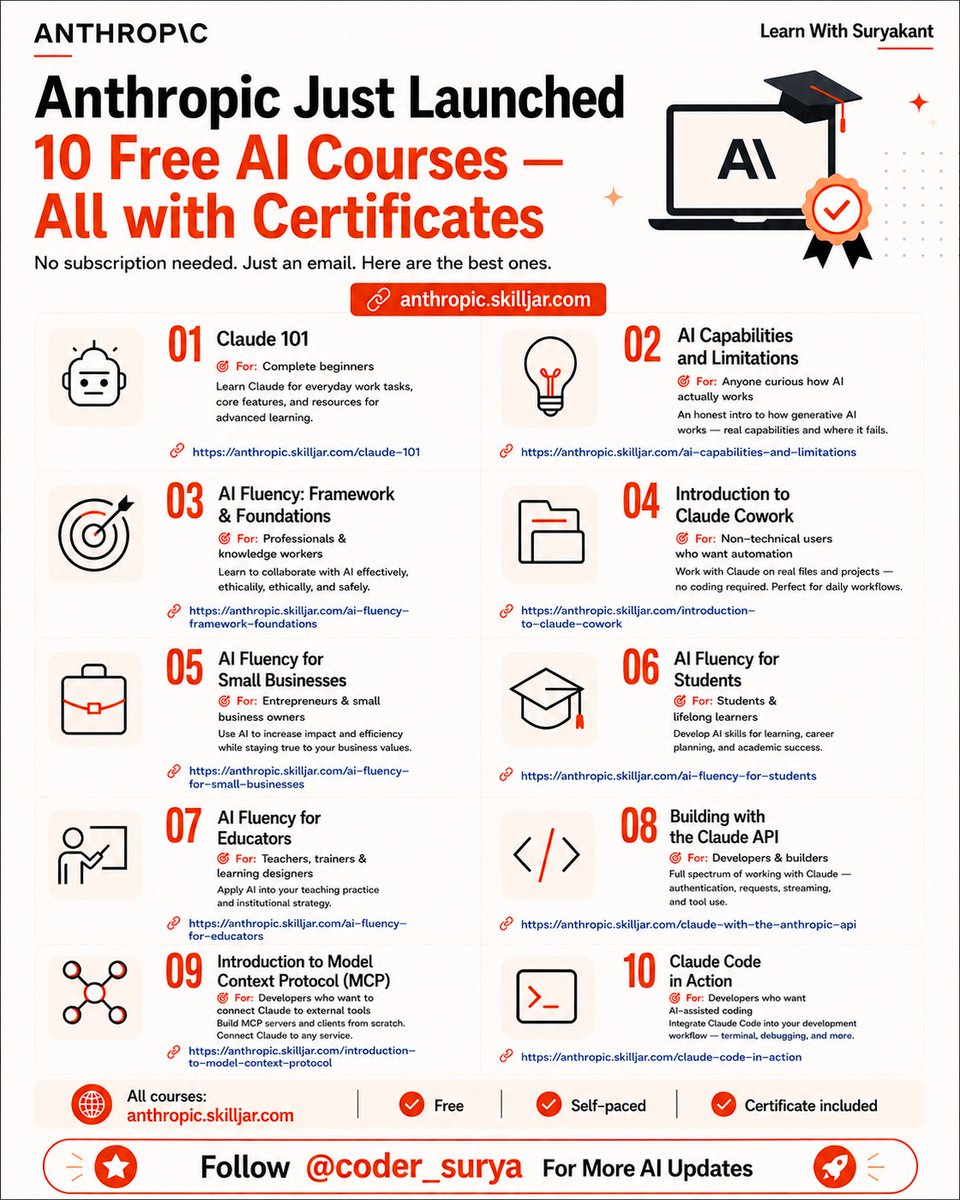
10 Free AI Courses With Certificates
Anthropic has quietly released 10 free AI courses designed for beginners, professionals, educators, students, and developers.
Access all courses:
lnkd.in/gey832JS
──── ୨୧ ────
Before we dive in, quick invite
👉 GrowWithAI.Guide
I share practical AI playbooks, prompts & frameworks to help you grow your audience and income — with clarity, not noise.
──── ୨୧ ────
Here’s what’s available:
✦ Claude 101
lnkd.in/gkh_tzDF
✦ AI Capabilities and Limitations
lnkd.in/gWvWQkGp
✦ AI Fluency: Framework & Foundations
lnkd.in/gNgVGSpb
✦ Introduction to Claude Cowork
lnkd.in/gHi7iFbv
✦ AI Fluency for Small Businesses
lnkd.in/gyPBzTZR
✦ AI Fluency for Students
lnkd.in/gUSBb6fs
✦ AI Fluency for Educators
lnkd.in/gQ8mYXK2
✦ Building with the Claude API
lnkd.in/gt8haDKC
✦ Introduction to Model Context Protocol (MCP)
lnkd.in/gPRWxXAJ
✦ Claude Code in Action
lnkd.in/gcf2_KRN
Why this matters:
✦ Free access to structured AI education
✦ Learn at your own pace
✦ Earn certificates for completed courses
✦ Covers everything from AI fundamentals to APIs and MCP
✦ Useful for beginners and advanced users alike
Most people consume AI content.
Very few build a systematic understanding of it.
These courses help close that gap.
Which course are you starting with first?
- Follow @coder_surya
- Save the post.
- Repost to your network.
- Join AI Community: tinyurl.com/mvsz79eu
____________________________
17
67
201
4,202
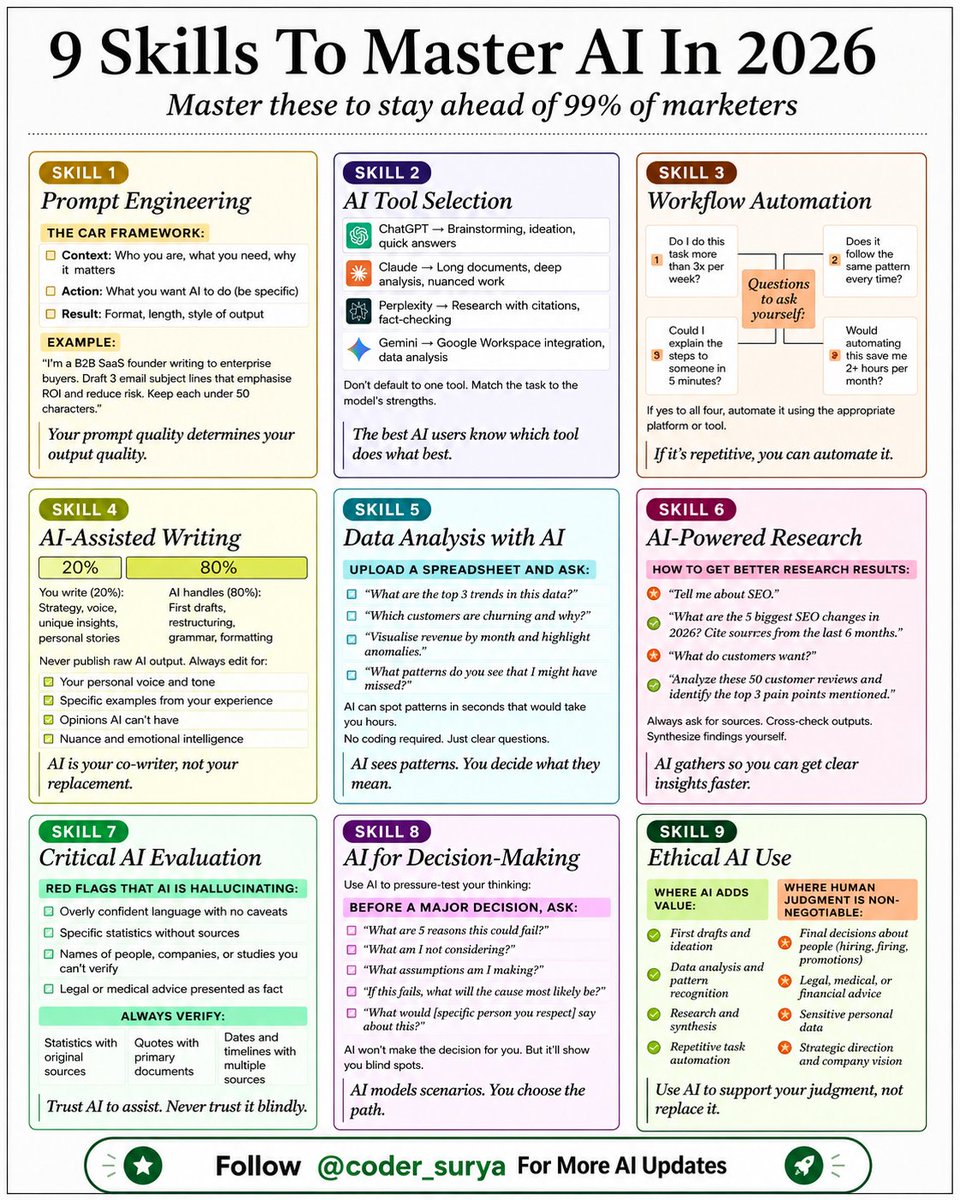
Everyone wants better results from AI.
These 9 skills are where they come from:
New AI tools come and go every week.
These skills will still matter five years from now.
Master these first:
1. Prompt Engineering
Your prompt quality determines your output quality.
Use the CAR framework:
→ Context (who you are, what you need)
→ Action (what you want AI to do)
→ Result (format, length, style)
2. AI Tool Selection
➡️ ChatGPT for brainstorming.
➡️ Claude for deep work.
➡️ Perplexity for research.
Match the task to the model's strengths.
3. Workflow Automation Ask yourself:
→ Do I do this 3x per week?
→ Does it follow the same pattern?
→ Could I explain it in 5 minutes?
→ Would automating save 2 hours per month?
If yes to all four, automate it with the proper tool.
4. AI-Assisted Writing
The 80/20 rule:
AI handles (80%): First drafts, restructuring, grammar
You write (20%): Strategy, voice, unique insights Never publish raw AI output.
Always edit for your voice.
5. Data Analysis with AI
Upload a spreadsheet and ask:
"What are the top 3 trends in this data?"
"Which customers are churning and why?"
"What patterns do you see that I might have missed?"
No coding required. Just asking clear questions.
6. AI-Powered Research Ask:
"What are the 5 biggest SEO changes in 2026? Cite sources from the last 6 months."
AI gathers, but you have to synthesise.
7. Critical AI Evaluation Red flags AI is hallucinating:
→ Overly confident language with no caveats
→ Specific statistics without sources
→ Names you can't verify Trust AI to assist, but not blindly.
8. AI for Decision-Making Before a major decision, ask AI:
"What are 5 reasons this could fail?"
"What am I not considering?"
"What assumptions am I making?"
AI models scenarios so you can choose the path.
9. Ethical AI Use Where AI adds value:
✅ First drafts and ideation
✅ Data analysis
✅ Research and synthesis
Where human judgment is non-negotiable:
🚫 Final decisions about people
🚫 Legal, medical, or financial advice
🚫 Strategic direction AI is incredibly powerful and has infinite potential.
I know that from working with it daily over the last couple of years.
But even still, I always come back to these 9 skills.
You can't expect to automate half your business right away.
Learn these first and then start building on them.
What's the one AI skill you're struggling with most?
Comment down below.
1. Follow @coder_surya
2. Save the post.
3. Repost to your network.
4. Join AI Community: tinyurl.com/mvsz79eu
____________________________
10
33
101
1,230
Suryakant Chaurasiya retweeted
6 PROMPTS TO LEARN ANYTHING USING CLAUDE
Most people use Claude to get answers.
The smart ones use it to build understanding.
Big difference.
One makes you dependent.
The other makes you dangerous.
Here are 6 Claude prompts that turn any topic into mastery👇
🎯 LEARN ANYTHING IN 20 HOURS
"I need to learn [topic] in 20 hours. Identify the 20% of concepts that drive 80% of real-world results. Build me a 10-session plan — 2 hours each — with the best resource for each session and a 5-question review at the end."
→ Most subjects have 3–4 ideas that unlock everything else.
→ Finding those early saves you weeks of wandering.
🎯 CREATE A ONE-PAGE CHEAT SHEET
"Summarize [topic] on a single page. Use bullet points, labeled diagrams, and concrete examples. Optimize it for a 5-minute review the night before I need to use it."
→ Your brain remembers structure better than sentences.
→ Give it a map, not a wall of text.
🎯 QUIZ ME UNTIL I BREAK
"I just studied [topic]. Give me 10 progressively harder questions — start easy, end expert-level. After each answer: grade me, identify the gap, and re-explain only what I missed."
→ Passive reading feels like learning.
→ Active retrieval actually is.
🎯 BUILD A LEARNING LADDER
"Break [topic] into 5 difficulty levels. Define what mastery looks like at each level. Give me one milestone and one hands-on exercise per level — from complete beginner to confident practitioner."
→ Most people skip levels and wonder why nothing sticks.
→ The ladder fixes that.
🎯 FIND THE SIGNAL IN THE NOISE
"List the 5 highest-leverage resources for learning [topic] fast — books, videos, courses, or people. For each: explain what makes it worth my time and what type of learner it's best for."
→ There are 1,000 ways to learn anything.
→ Most of them are a waste.
🎯 USE THE FEYNMAN LOOP
"Explain [topic] to me like I'm 12. Then ask me to explain it back in my own words. Find every gap in my explanation. Re-teach only what I got wrong. Repeat until my explanation is clean."
→ If you can't explain it simply, you don't know it yet.
→ This prompt exposes that — fast.
This isn't a list of prompts.
It's a learning operating system.
Use it today.
___
1. Follow @coder_surya
2. Save the post.
3. Repost to your network.
4. Join AI Community: tinyurl.com/mvsz79eu
____________________________
11
93
320
8,576