ASF Member, @ApacheGroovy PMC member, The Definitive #ANTLR4 Reference(CN) reviewer, The Definitive Guide to #Grails translator, etc.
Joined May 2008
- Tweets 3,854
- Following 93
- Followers 583
- Likes 8,463
70 Photos and videos



Pinned Tweet

16 Jan 2021
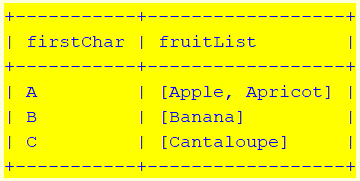
#GINQ of #groovylang 4.0.0 supports inner/left/right/full/cross join(on), group by(having), order by, limit, nested GINQ, window functions, etc.
Here is the latest version of user guide:
bit.ly/3nJYUaA
More examples could be found at:
bit.ly/3suJivd
1
8
22
Daniel Sun retweeted

May 4
To celebrate some recent Apache releases (@Apache MINA & @ApacheCommons RNG) & the imminent pre-release of Groovy 6, let's create a stock ticker hub combining MINA's high-performance, high-scalability networking & Groovy's new async features:
groovy.apache.org/blog/groov…
#groovylang
3
7
282
Daniel Sun retweeted

Micronaut 5 ships with @ApacheGroovy 5 support.
micronaut.io/2026/04/28/micr… #groovylang #micronaut #micronaut5

9
28
1,608
Daniel Sun retweeted
Mar 27
A proposed enhancement, targeted for @ApacheGroovy version 6, adds native async/await as a language-level feature.
𝘼𝙨𝙮𝙣𝙘𝙝𝙧𝙤𝙣𝙤𝙪𝙨 𝙘𝙤𝙙𝙚 𝙞𝙣 𝙖 𝙨𝙚𝙦𝙪𝙚𝙣𝙩𝙞𝙖𝙡, 𝙧𝙚𝙖𝙙𝙖𝙗𝙡𝙚 𝙨𝙩𝙮𝙡𝙚.
Read more about it & provide feedback:
groovy.apache.org/blog/groov…
5
16
1,144
Mar 8
#groovylang 6 will support async/await if the PR is accepted:
github.com/apache/groovy/pul…
4
194
30 Dec 2025
2
4
310
Daniel Sun retweeted

11 Dec 2025
Spock 2.4 has been released 🖖
After three years and seven milestones, Spock 2.4 lands just in time for the holidays, packed with new testing goodies. 🎁
Curious? See here: spockframework.org/spock/doc…
What’s your favorite addition?
#groovylang
2
9
17
3,256
Daniel Sun retweeted

14 Oct 2025
Quick Linux Tip🐧
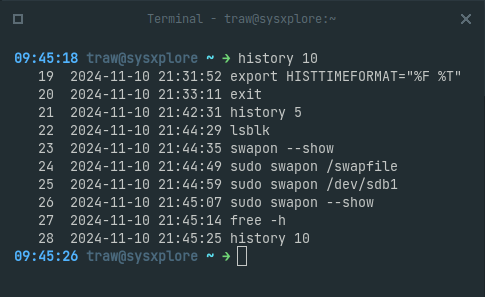
You can enable timestamps in your bash command history to see when you ran previous commands. This can be useful for tracing what you were working on and when.
To add timestamps to your history, just set the HISTTIMEFORMAT environment variable like so:
$ export HISTTIMEFORMAT="%F %T "
Now when you view your history or grep through it, you'll see a timestamp next to each command indicating when it was run:
$ history | tail -n 5
Or to save a couple of keystrokes:
$ history 5
The format "%F %T" shows the date and time, but you can customize it to your liking.
Note: This does not put historical timestamps on commands you executed before setting HISTTIMEFORMAT and also this only works in bash.
5
69
479
23,605
Daniel Sun retweeted
14 Oct 2025
Exploring AI with Groovy™ using Ollama4j, LangChain4J, Spring AI, & Embabel:
groovy.apache.org/blog/groov…
@therealdanvega @springrod @langchain4j @ApacheGroovy @ollama #groovylang #ai #embabel #springai #holidaytips

ALT Bulcock Beach at Sunset looking towards Pumicestone Passage
5
11
1,272
Daniel Sun retweeted
21 Sep 2025
Updated slides for my talk on why to use @ApacheGroovy in 2025:
speakerdeck.com/paulk/groovy…
#groovylang #communityovercode @TheASF
14
21
2,033
Daniel Sun retweeted

13 Sep 2025
4
3
283
Daniel Sun retweeted

14 Sep 2025
Geb 8.0.0 is out! This is our first release as a sub project of @ApacheGroovy at the @apachesoftware Foundation.
We're really excited and looking forward to what's ahead. Thanks to the community for all the support.
lists.apache.org/thread/4bpv…
1
10
16
1,196
Daniel Sun retweeted

10 Sep 2025
Just like Java devs are now AI devs, Groovy developers have access to powerful AI tools too! 🚀
Built a simple OpenAI chat client in Groovy, then showed how Spring AI makes it production-ready. Speaking about this at Community Over Code this week @ApacheCon
Watch: youtu.be/rQwm9--DMIA
1
7
34
3,136
Daniel Sun retweeted
24 Aug 2025
Version 5.0.0 of @ApacheGroovy is available for download with 600 fixes and improvements since Groovy 4! Thanks to all involved! We are excited to bring you the best version yet to run Groovy on JDKs 11-25! groovy.apache.org/download.h… groovy-lang.org/releasenotes… #groovylang @TheASF

ALT Groovy logo
6
23
63
4,274
Daniel Sun retweeted

24 Jun 2025
Advanced performance analysis with async-profiler by Andrei Pangin
youtu.be/u7-S-Hn-7Do?si=DC8S…
@Devoxx @AndreiPangin #async
11
45
2,711
Daniel Sun retweeted

6 Jun 2025
A type witness after the 'new' keyword is an actually valid Java construct.
This and more in the latest video.
1
6
112
5,930
Daniel Sun retweeted

30 May 2025
TIL: Since #Java 9, AtomicBoolean has a setPlain() method for "plain write access", which effectively lets you use an AtomicBoolean as a simple, mutable boolean holder in lambda expressions without feeling so bad about having done so. 😎
2
3
16
961
Daniel Sun retweeted
28 May 2025
Flow scoping in Java.
Pattern matching for instanceof brought this new concept to the language.
3
12
97
8,444
Daniel Sun retweeted

26 May 2025
Ever wonder how Java debuggers work behind the scenes? 🤔
In our latest article, we dive into the relationship between source code, bytecode, and the debugger – plus we share a few handy tricks along the way!
Check it out👇
blog.jetbrains.com/idea/2025…
16
58
6,209
Daniel Sun retweeted

21 May 2025
Exploring deeper Java reflection: accessing private fields, invoking hidden methods and leveraging MethodHandles for safer introspection. #DEVCommunity #Java
dev.to/milad-sadeghi/working…
7
47
1,367