
Ceo & Co-founder of riceandbeansstudios.com, AR, VR lover, Video Game, Computer Graphic
Joined July 2011
- Tweets 2,206
- Following 317
- Followers 92
- Likes 2,617
368 Photos and videos










Jun 12
When they see you start something they'll tell you DON'T DO IT!, when they see you doing it they'll try to tell you HOW TO DO IT!, and when you succeed they'll tell you that THEY ALWAYS BELIEVED IN YOU. This is the best example and congratulation @elonmusk

12
Jun 11
Well today is the WorldCup 26 and at the same time the NBA Final are active. Which one bring more fans around the world (Onsite and online)?
3
Jun 11
Destroy yours legs and thank me tomorrow

9
Jun 10
The last definition of a master class, will see what happen in the next days
Jun 10

No creo que volvamos a ver una atajada como esta. Gracias, Mostri 🦸♂️
9
Danny Chavez retweeted

May 27
30 minutes of video.
Robot learns the task.
Open-source, end-to-end.
An open-source framework for training robot policies from only 30 minutes of human egocentric videos captured via Meta Aria glasses:
Achieving zero-shot transfer to robots without any robot data collection.
The method relies on Interaction-Centric Tokens that encode hand-object spatial relationships invariant to embodiment and viewpoint, supplemented by auxiliary objectives like object motion prediction and latent consistency to extract richer supervision signals from the same data.
HumanEgo demonstrates strong cross-embodiment, cross-environment performance on bimanual tasks, outperforming baselines like ACT and teleop data while being trainable on a single RTX 4090 GPU.
Thanks for sharing, @TX_Leo_Wang.
📌 Website: humanego-ai.github.io
Paper: arxiv.org/pdf/2605.24934
Code: github.com/TX-Leo/HumanEgo
Video: youtu.be/pdL46diijuY
——-
Weekly robotics and AI insights.
Subscribe free: 22astronauts.com
5
43
298
16,886
Danny Chavez retweeted

Weekly Robotics 361:
🤖 DIY Disney's inspired BD-X droid,
🤖 state estimation in contact-rich scenarios (very cool!),
🤖 reverse engineering Unitree Go2 motors,
🤖🤖 ROS 2 Lyrical released,
... and more!
weeklyrobotics.com/weekly-ro…
#robotics #ros
1
3
31
2,605
Danny Chavez retweeted
May 26
If you want to get into training robots badly:
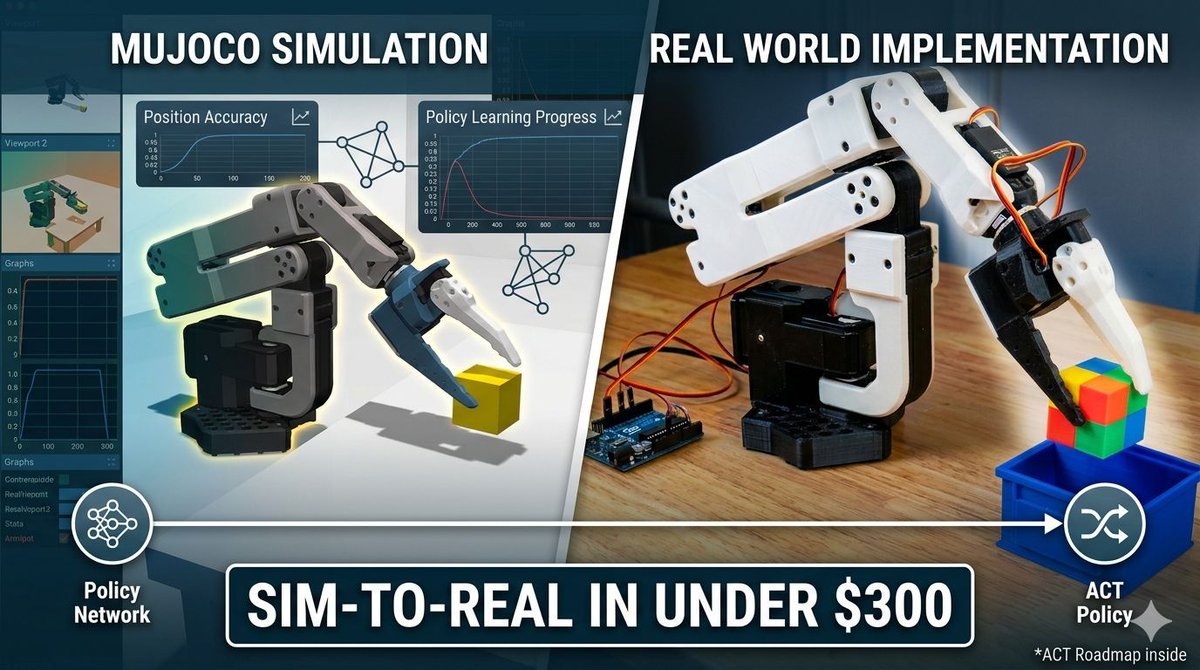
You can start training real robots at home for under $300...
Thread 👇 (with links)
Here’s the exact low-barrier roadmap the community is using right now to go from zero to running ACT policies on a real arm in weeks.
Thread 👇
1/ Simulation First (Zero Cost)
Start in MuJoCo... honestly: the gold-standard physics engine used by DeepMind and every serious robotics lab.
Train policies, test behaviors, and iterate insanely fast before touching hardware.
→ Official site: mujoco.org/
→ GitHub (install in minutes): github.com/google-deepmind/m…
Pro tip: MuJoCo runs perfectly on a normal laptop.
2/ Grab the $200-300 Hardware Everyone’s Using
The SO-101 (also called SO-ARM101): the official open-source arm designed by Hugging Face’s LeRobot team.
3D-printed, easy to assemble, and built specifically for LeRobot ACT training.
Buy options:
→ WowRobo DIY/Assembled Kit (~$199): shop.wowrobo.com/products/so…
→ Full Hugging Face SO-101 docs parts list: huggingface.co/docs/lerobot/…
(Yes, real people are training on this exact arm for a few hundred bucks.)
3/ Install LeRobot Train ACT Policies
LeRobot is Hugging Face’s open-source robotics library (PyTorch-native).
It ships state-of-the-art policies like ACT (Action Chunking Transformers); perfect for precise manipulation tasks.
→ Main repo (star it): github.com/huggingface/lerob…
→ ACT policy guide training examples: huggingface.co/docs/lerobot/…
One-command training examples are in the repo. You’ll be running policies the same day.
4/ Add Multimodal LLMs for Spatial Intelligence
Hook up a cheap webcam multimodal LLM (like LLaVA, Qwen-VL, or even Claude-3.5) to:
• Understand your workspace in real time
• Select the right ACT policy based on what it sees
• Give natural-language commands
Exactly what @KuphDev is doing in his livestreams (color-sorting ducks with SO-101 LeRobot multimodal vision).
This is the “spatially aware” leap everyone’s excited about.
5/ Sim2Real Transfer (The Magic Step)
Train in MuJoCo → fine-tune on the real SO-101.
LeRobot makes domain randomization and sim-to-real dead simple.
Start with basic pick-and-place, then level up to multi-step tasks.
6/ Next-Level Moves (Once You’re Hooked)
• Add a second arm for bimanual tasks
• Train with human demos (teleoperate the leader arm)
• Scale to mobile bases or even low-cost humanoids later
Total starter cost: simulation = free SO-101 ≈ $200-300 webcam laptop you already own.
The barrier is gone.
Hardware access was the only thing stopping most people... now it’s solved.
Who’s actually starting their robot journey this week?
Drop 🔥 if you’re in (or building right now).
Photo: Google Gemini
——-
Weekly robotics and AI insights.
Subscribe free: 22astronauts.com
6
42
272
18,470
Danny Chavez retweeted

May 25
¿Cómo se llama en tu país un grupo de ratas? 🐀

13,829
345
2,439
1,604,273
May 22
Buen ejemplo para el mundo
May 21

🇧🇷 En Brasil, una madre de 43 años, apuñaló, cortó el pene y luego mató a un hombre que abusó sexualmente de su hija de 11 años.
Tras casi 1 año de estar detenida fue absuelta de manera unánime por legítima defensa de su hija ⚠️🚨
¿Estás de acuerdo? 🙋🏻♀️
3
Danny Chavez retweeted

May 16
How Drake froze the CN Tower using 75 projectors worth over $15 million
(Via: CBC News)
156
439
10,239
397,883
May 16
If the AP & Swatch at the end is not a limited edition make not sense to me rush to the store to get one. My peace not need to be altered
30
May 15
This is the way
May 15

UPDATE: Police are now removing chairs from the AP x Swatch line in NYC 😳⌚️


6
May 13
I was really hoping to buy a Swatch & AP next weekend, assuming I'd be able to wear it on my wrist. But now that I see it's going to be a pocket watch, I'm having second thoughts...
121
May 9
In a modern era with a lots of technology why all the UFO videos have a poor/bad/low quality...make not sense at all

The Department of War has released the first round of files connected to unidentified aerial phenomena, and conspiracy theorists are sure to have a field day with the docs.
34

Danny Chavez retweeted

May 1
Paciencia y genética: la fórmula de Quico Fernández para producir un jamón de bellota en Salta que compite con los grandes de España. 🌳🍖
70 años de árboles y 40 años de selección de raza para llegar a un nivel de altísima calidad internacional. Si están por Salta, pasen por Cerdo Negro y comprueben cómo un productor argentino se puso a la par de los mejores del mundo. Podemos decir que es un Jamón Argentino Tipo Ibérico.
11
176
726
34,304
Danny Chavez retweeted

Apr 23
Effective back exercises to reduce back fat.. Build a defined back at home.
17
957
6,190
514,118
Apr 16
Sometimes people just want attention...

9
Danny Chavez retweeted

Apr 15
Blender Beginner VS👊 Professional

2
26
227
33,263