
An organization that offers Cyber Security news & services, Information Security training, threat and vulnerability Assessment, web-app development.© 2019-2026.
Joined December 2019
- Tweets 1,622
- Following 0
- Followers 277
- Likes 338
343 Photos and videos






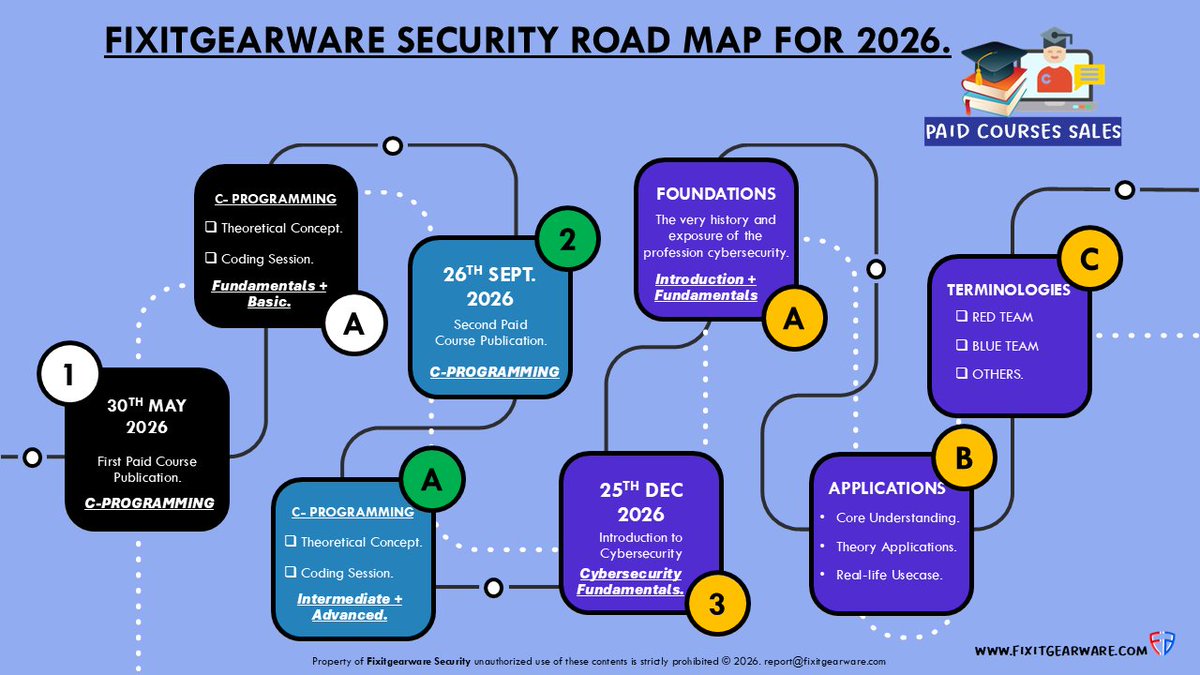
Pinned Tweet

OUR JOURNEY FOR 2026:
- The goal is to bring knowledge in a different form, from what is familiar.
- With great insight on terminologies, its theoretical and practical applications.
- You don't just learn from our courses, but also infused with knowledge on how to connect the dots.
#FixitgearwareSecurity #RoadMap2026
1
1
381
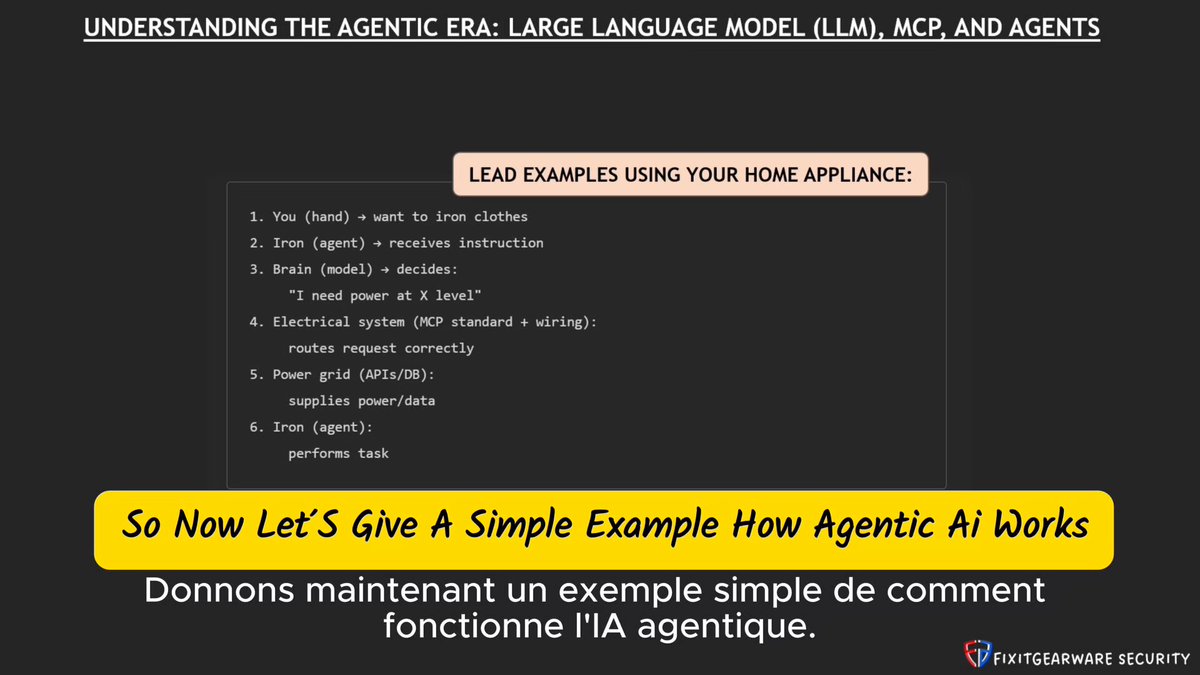
The Agentic Era Explained: Every LLM, MCP & AI Agent You Need to Know (2026 Edition):
1. In the content published, we discussed about the concept of LLMs, MCP, and AI Agents, how they work in synergy to yield prompt results.
2. More details explaining Run Models, Fine-Tune Models, Small-LLM, and Frontier Models.
3. Why caution should be deeply exercised when cloning agents built by community developers... and more.
YouTube-Link:
youtu.be/8GmoQaWpFCg
#AI #LLM #MCP #AIAgents #Cybersecurity #FixitGearwareSecurity #GPT #Claude #Grok
20
The most disappointing feeling, is that these companies make billions in revenue, but will never blink to do the wrong.
tomshardware.com/tech-indust…
1
26
Introduction to Ai & Agents video drops. 09:00 a.m Sunday Morning US time. 😎.
Next week Sunday, Introduction to C-programming paid course drops. 🫶🏻 See ya! ✌️
1
1
16
Agents are the new core tool in cybersecurity. The art of cloning random agentic repos should be one avoidable practise to not only prevent system compromise, but also avoiding persistency on your infrastructure & priv* escalation.
The need for more caution is that with AI, phishing doesn’t come to you anymore through emails or sms; now you go to phishing through cloning published agents and browser based plugins promising and providing quick task solutions, even from trusted sources.
This week, let’s talk about Agentic Ai & understanding its underlying architecture e.g MCP Servers.
#FixitgearwareSecurity #Ai #Cybersecurity
20
The Fundamentals are necessary. Count Down 😎.
#FixitgearwareSecurity #Cybersecurity
17
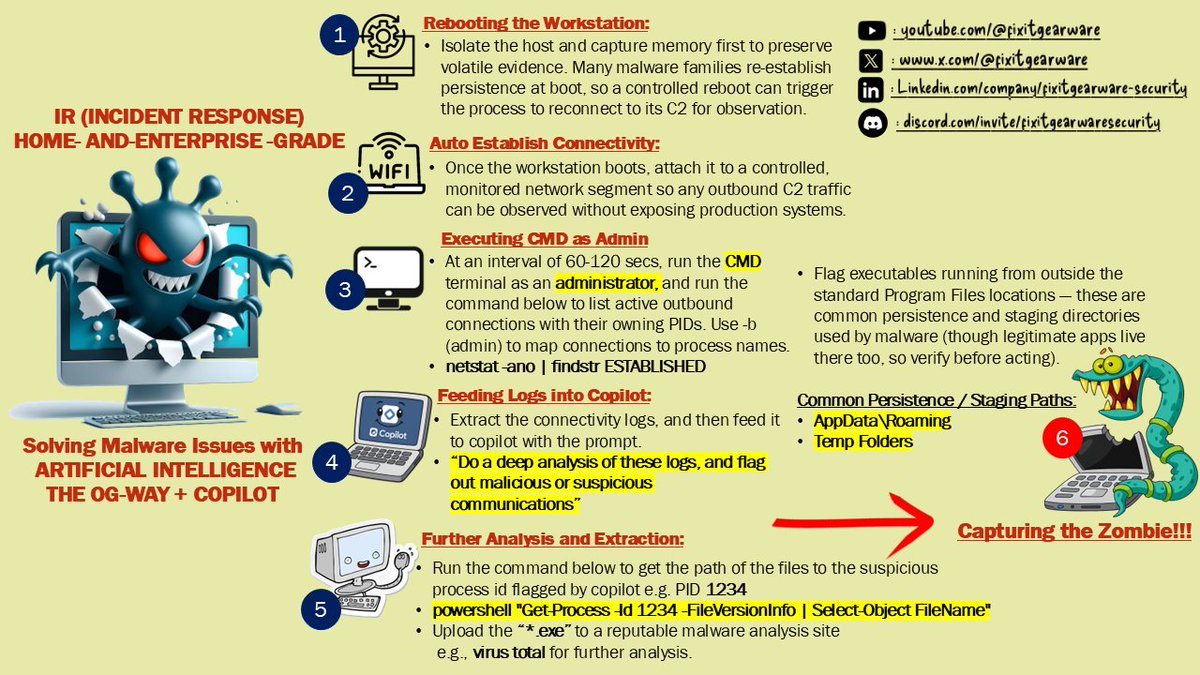
A Practical Incident Response Model for Home and Enterprise Environments Using AI-Assisted Tools:
A strong understanding of operating systems, native utilities, and basic automation can help security teams manage incident response more effectively without depending entirely on expensive enterprise platforms.
For home labs, small teams, and cost-conscious organizations, this approach can reduce tool overhead while still supporting structured evidence collection, centralized logging, and effective investigation workflows.
The workflow below presents a practical model for carrying out incident response activities across both home and enterprise environments, using professional discipline, native system capabilities, and AI-assisted analysis where appropriate.
1. Build a collector script:
When supporting organizations that cannot justify the cost of full enterprise tooling, it is important to rely on disciplined collection methods and a well-designed workflow.
A collector script should gather the system data needed for investigation while remaining dependable, repeatable, and easy to deploy.
- Schedule the script to run at defined intervals across the organization’s workstations using an appropriate task scheduling method.
- Collect relevant artefacts such as running services, DNS cache entries, network connections, event identifiers, recent processes, and autorun data in the background.
- Use a format and deployment method that supports reliability, authentication, and manageable error handling within your environment.
- In enterprise environments, distribute the collection mechanism through centralized administration tools such as Group Policy or identity and device management platforms.
2. Write output to hostname-based, time-stamped files:
Collected logs should be written to time-stamped files so investigators can track activity over time and review anomalies more efficiently.
Separating records by host also improves traceability during analysis.
Each file should reflect the originating host and collection time. Apply permissions carefully so systems can write logs without giving broad read access, and so incident response personnel can review the evidence without risking accidental modification.
- Restrict read access to the incident response team or other specifically authorized groups.
- Use permissions that reduce the risk of evidence tampering or unauthorized modification.
- Store logs in a separate folder for each hostname or workstation rather than combining all systems into one generic location.
3. Centralize logs on a secured file share
Use a centralized and authenticated file share to collect and store logs from multiple systems. This creates a specific location for evidence preservation, review, and downstream processing during investigations.
4. Analyze logs with Elasticsearch and Kibana:
Once collected, logs can be forwarded to Elasticsearch for correlation, filtering, and pattern analysis, with Kibana providing a practical interface for visualization and investigation. This stage helps analysts identify anomalies, trace suspicious activity, and support incident response decisions more efficiently.
To Install Elasticsearch Kibana Watch:
youtu.be/FQ6gMYciSYs?si=Cr4e…
Follow Fixitgearware Security for trusted cybersec. tips, updates, and hands on experience insight.
#FixitgearwareSecurity #IncidentResponse #SOCAnalyst101
3
56
Hello family, sorry we didn't miss out. And we have lots of goodies from both events, conferences, and more to share.
Please permit us, to extend the publication of
"The Introduction to C-programming" paid course to
21-June-2026.
We care about teaching, and publishing substandard contents is not our forte. Be rest assured, that the wait will be worth it, and the cost as well.
Our courses is not only grounding you on the fundamentals, but more on technical concept "We will explain in due time. Best Kept secret.😇😎" .
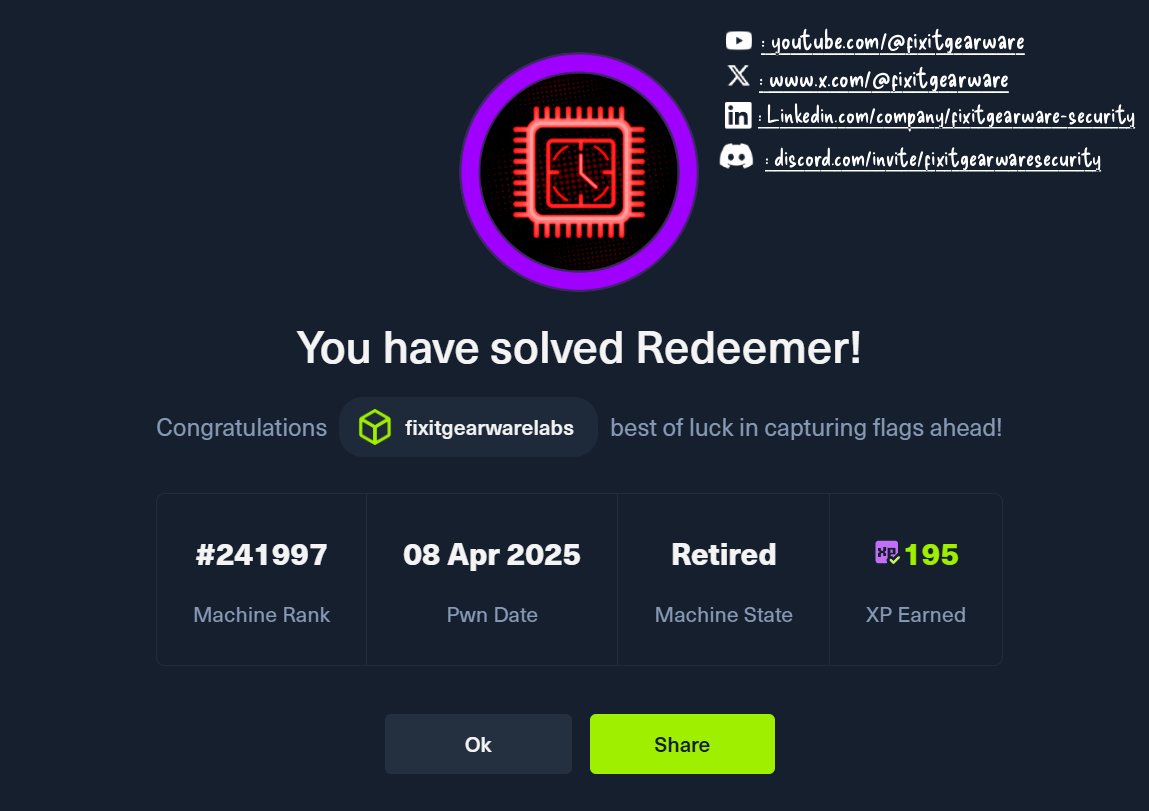
In the mean time, our LAB Publication is back.
1. Pawning The @hackthebox_eu Redeemer here:
fixitgearware.com/cybsec-new…
1
1
41
Thanks for showing so much Love and Loyalty. Let's talk about Artificial Intelligence on the 14th-June-2026 (US-Time).
On our official YouTube Channel.
YouTube:
youtube.com/@fixitgearware
#FixitgearwareSecurity #Cybersecurity
1
43
Breaking News:
@Meta @instagram & @WhatsApp roles out premium subscription.
In its new post, user’s are now required to pay to use advanced features.
According to sources:
“Pricing structure is as follows: Instagram Plus and Facebook Plus cost US$3.99 per month, while WhatsApp Plus costs US$2.99 per month”
Well seems social media has become one big booming and lucrative franchise, with advanced features being tied to a dollar fee, while your data and contents belongs to the platform for free. 😎
#FixitgearwareSecurity #Cybersecurity
1
83
Early era of desktop computers needed this, desktop CPU got burnt without it, and was a necessity for pentium based machine’s.
But now? disappeared.
What happened, whose idea was it, and why did we need this then but not now ?
#FixitgearwareSecurity #ComputerFunFacts
1
25
Still on our best Security Hygiene and Practises, always:
1. Audit Software packages and plugins before installing them.
2. OSINT should be not only be a process to be taken seriously before using an author package, but also your primary GoTo, before using any authored packages or Plugins.
Read more below 👇:

1/ We are sharing additional details regarding our investigation into unauthorized access to GitHub's internal repositories.
Yesterday we detected and contained a compromise of an employee device involving a poisoned VS Code extension. We removed the malicious extension version, isolated the endpoint, and began incident response immediately.
1
1
54
We have always been warning ⛔️, it is your duty to implement practises that keeps you safe from Threat Actors:

Few Week(s) ago, we talked about the dangers of supply chain attack with the advent of Ai, and why code auditing has moved from just trusting the developer or publisher, to a more sophisticated demand of packages and dependencies auditing which these Ai Agents require.
Well! Well!! Well!!! If @github has this to say, brace up fellas, we are not only cooked, but also completely burnt 🥵.
29
Few Week(s) ago, we talked about the dangers of supply chain attack with the advent of Ai, and why code auditing has moved from just trusting the developer or publisher, to a more sophisticated demand of packages and dependencies auditing which these Ai Agents require.
Well! Well!! Well!!! If @github has this to say, brace up fellas, we are not only cooked, but also completely burnt 🥵.
We are investigating unauthorized access to GitHub’s internal repositories. While we currently have no evidence of impact to customer information stored outside of GitHub’s internal repositories (such as our customers’ enterprises, organizations, and repositories), we are closely monitoring our infrastructure for follow-on activity.
1
1
76
Take a read, and don’t just clone agents locally on your machines, do a deep auditing of what these agents do and required packages.
A more complex advice ?
1. Continually Audit these agents to see if there has been security weaknesses reported.
2. Do a deep background check of these agent developers, and study if any of their social trail, has rogue tendencies.
Agents MCP are the new PyPi-packages kind of attack surfaces, dealing with multiple vulnerability exposure all at a go.
Tracing the anomaly is the new complex task in forensics.
Cybersecurity investigators will have to not only deal with the infestation of malware’s, but also:
1. What prompt was injected leading to exploitation.
2. Supply chain risk, and specific package which enabled the prompt to go through.
3. What sort of permission the agent MCP server had/has prior/post exploitation.
4. Local/cloud credentials that was exploited.
A.I just made cybersecurity, one of the on demand jobs for the next 2-decades or should we say, as long as A.I is in use.
Blue teaming / SOC / Forensics, is the new El-Dorado.
#Cybersecurity #ArtificialIntelligence #FixitgearwareSecurity
1
41
The recent rise of unengaging cybersecurity content(s) and poor-quality information(s) underscores the need for strong foundational cybersecurity education.
Timelines are increasingly filled with recycled ideas and vague claims that lack substance. AI should help make cybersecurity more engaging, but much of the content instead leans toward entertainment.
Although we are hesitant to agree with Anthropic @claudeai co-founder Dario Amodei, the trend is difficult to ignore: many junior-level roles may disappear within the next few years, leaving senior professionals and experts in greater demand.
A quick look at current timelines and recent YouTube content reveals a strong focus on bug bounties and AI-driven hacking content, without fully exploring the depth of the profession cybersecurity.
This deep concern and fear that we feel will widen even more, the lack of skillsets in the industry. Hence, a reason why we are intending to gradually integrate Ai contents on our official YouTube channel starting the second week of June, upon dropping our C-programming course, by the end of this month.
In addition to these contents, adopting Ai, we also intend to enhance our paid Cybersecurity course and training schedule for this year, to have a touch of Ai on our introductory training and knowledge with regards to the profession.
It will be worth it. 😎
IMPORTANT:
See Pinned post, for our Timeline for the year 2026.
#FixitgearwareSecurity #Cybersecurity #Ai #ArtificialIntelligence
1
1
49
Checkout various Community Groups here:
io.google/2026/community
1
1
42