# 去中心化 AI 记忆:Walrus Memory 和 OriginTrail DKG 是怎么把它做出来的
2026 年 6 月 12 日,Anthropic 发布了 Fable 5——一个在编程、科研、知识工作上全面超越 GPT-5.5 的 Mythos 级模型。Stripe 说它把几个月的工程压缩到了几天,在 5000 万行 Ruby 代码库里做了一次全仓迁移,一个团队两月的活在一天内干完。Cursor 说它解锁了一类此前模型完全做不到的长周期任务。在 SWE-bench 上,它是唯一不需要额外脚手架就能独立完成复杂多文件改动的模型。
**不到 24 小时,美国政府以出口管制为由,要求 Anthropic 立刻关停 Fable 5 和 Mythos 5 对所有用户的访问**——包括美国境外的 Anthropic 自家员工。
Anthropic 的回应值得全文阅读。他们说不。他们说这道命令基于一个"窄域非通用越狱"——让模型读代码库找漏洞。但这种事 OpenAI 的 GPT-5.5 也能做,"而且被全球安全工程师每天都在用"。他们说如果这个标准被推广,"整个行业的所有前沿模型部署都会停滞"。
然后他们照做了。因为他们别无选择。
数亿用户的对话历史、偏好、知识碎片、工作流记忆——和这个全球最强的 AI 模型一起,被一道行政命令一刀切断。
Mysten Labs 联合创始人 Kostas Chalkias 当天夜里发了条推文。他说的不是新闻,是一个被事件照亮的底层逻辑:
> *"去中心化 AI 记忆比以往任何时候都更重要。我们可能正目睹人类历史的关键时刻——决定谁控制人工智能,以及后代如何访问它。"*
这不是口号。他背后的产品 Walrus Memory 已经上线:有 SDK、有文档、有付费客户。同时,OriginTrail 的 Decentralized Knowledge Graph (DKG) V9 也在六月刚发布——用完全不同的技术路线解决同一个命题。
**这两家公司分别代表了去中心化 AI 记忆的两种实现哲学**。一个做"记忆的容器"(Walrus),一个做"知识的网络"(OriginTrail)。本文从产品角度把它们拆开——不是比谁更好,而是看这两条路各自通向哪里。
---
## 一、"金鱼问题":为什么 AI 最大的瓶颈不是算力
Tatum 的 CEO Dion Cornett 给这个问题起了个名字。他说所有在生产环境跑 AI Agent 的团队都会撞上一堵墙,他管它叫 **"Goldfish Problem"(金鱼问题)**。
你做了一个很聪明的 Agent。它会做多步推理、会调用工具、会在十几个 API 之间编排工作流。但会话一结束,或者运行时一重启,**它全忘了**。像一个只有三秒记忆的金鱼。
开发者能怎么办?他们开始手拼——向量数据库存一点、传统数据库存一点、本地状态存一点。能跑,但经不起长周期工作流的压力。更致命的是:如果你今天用 OpenAI 跑 Agent,明天想切到 Claude,**记忆不会跟你一起走**。它被锁在 OpenAI 的生态里。
Kostas 在接受 Decrypt 采访时把这个问题说得更尖锐:
> *"The major misconception in AI is that compute is the only bottleneck. We're using a lot of memory as humans, and we want our LLMs to actually learn about us."*
翻译成人话:**行业把全部力气花在"模型有多聪明"上,但真正卡住用户的,是"模型有多了解你"。**
上下文窗口越来越大——现在百万 token 级别——但它不是记忆。它不能跨会话持久化。不能跨应用共享。不能跨模型提供商迁移。而且完全受制于单一服务商的控制。
Mem0 的 2026 年行业报告给出了一个数据化的视角:21 个框架集成,20 个向量存储后端,三个标准化基准测试(LoCoMo、LongMemEval、BEAM)——AI 记忆已经从"塞进 context window"进化到了独立架构层。但 Mem0 是中心化的。
而 Anthropic 事件把这个中心化的问题从一个技术讨论变成了一个权力问题:**中心化的 AI 记忆,等于把你自己在数字世界里的"分身"交给一个可以被一夜关停的服务商。**
下面看两个产品各自怎么解决这个问题。
---
## 二、Walrus Memory:让记忆像 Stripe 一样简单,但主权归你
### 一句话定位
**"便携的、可验证的、加密的 AI Agent 记忆层——所有权在 Sui 链上,存储跑在去中心化网络 Walrus 上,开发者用四个 API 搞定一切。"**
### 谁在用?
Walrus Memory 今年 6 月 3 日正式上线,首批客户包括:
- **Allium**(CEO Ethan Chan):"工程师在 OpenAI、Anthropic、Gemini 之间来回切换,每次切换都要从零重建上下文。Walrus Memory 在让可移植记忆成为 AI 基础设施的标配。"
- **Tatum**(CEO Dion Cornett):"我们的监控 Agent 现在可以保留之前的观测结果,避免重复处理相同事件。每个决策都产生审计轨迹——我们可以验证并解释为什么某个活动被标记。"
- **Conso Labs、Inflectiv、OpenGradient、Talus Labs** 也在用,场景从可移植 Agent 身份系统到跨会话客户交互记忆。
### 产品架构:六层组件,一层对开发者暴露
Walrus Memory 的架构设计有一个很聪明的取舍:**对开发者来说只暴露一个 SDK,但它背后有六个协同工作的组件。**
```
┌─────────────────────┐
│ SDK (TS / Python) │ ← 开发者唯一需要碰的东西
└──────────┬──────────┘
│ Ed25519 签名 REST 调用
┌──────────▼──────────┐
│ Relayer │ ← Web2 友好的后端,隐藏 Web3 复杂度
└──┬───────┬───────┬──┘
│ │ │
┌───────▼──┐ ┌──▼────┐ ┌▼──────────┐
│ 智能合约 │ │ 索引器 │ │ 索引数据库 │
│ (Sui链) │ │ │ │ (pgvector) │
└──────────┘ └───────┘ └───────────┘
│
┌──────────▼──────────┐
│ Walrus │ ← 去中心化存储层(加密的 blob)
│ (去中心化存储网络) │
└─────────────────────┘
```
**这六个组件各自只做一件事:**
1. **SDK**:签名所有请求(Ed25519),暴露 `remember` / `recall` / `analyze` / `restore` / `ask` 五个核心方法。TypeScript (`@mysten-incubation/memwal`) 和 Python (`memwal`) 两套实现,API 完全一致。一行 import,零 Web3 概念。
2. **Relayer**:整个架构最关键的取舍。Relayer 是一个中心化后端服务——是的,去中心化产品里有一个中心化组件。它承接 SDK 的 REST 请求,替开发者处理所有脏活:钱包签名、Sui 链交互、Seal 加密解密、1536 维向量嵌入生成、去中心化存储上传。**对 Web2 开发者来说,你调 HTTP API;Relayer 在背后把这一切桥接到区块链上。** 甚至可以直接替你付 gas 费和存储费。
3. **智能合约(Sui 链上)**:不存储任何记忆内容——只管理**所有权和访问控制**。谁拥有这个 Walrus Memory 账号、哪些 delegate key 被授权操作、权限变更事件。这是密码学级别的、不可篡改的保障。
4. **索引器**:监听合约事件(账号创建、delegate 变更),同步到数据库,让 Relayer 不用每次请求都查链。
5. **索引数据库**:PostgreSQL pgvector,存储 1536 维向量嵌入 HNSW 索引,做语义搜索。注意:这是**本地操作层**,用于加速。源头数据始终在 Walrus 上加密存储。数据库丢了可以 restore。
6. **Walrus 去中心化存储**:"最终真相层"。所有加密的记忆 payload 存在这里,去中心化节点网络保证即使 2/3 节点故障,数据仍在。
### 核心 API:五个方法,藏起三千行代码
```python
# 记住
job = await memwal.remember("用户喜欢深色模式,在移动端偏好触控操作")
await memwal.waitForRememberJob(job.job_id)
# 回忆
memories = await memwal.recall("用户有什么界面偏好?")
# 分析——这是区别于普通存储的关键方法
analysis = await memwal.analyze("总结用户的使用模式和偏好变化")
# 对话——带记忆增强的 LLM 问答
answer = await memwal.ask("基于你对用户的了解,推荐什么配色方案?")
# 重建——即使索引数据库全部丢失,也能从 Walrus 恢复
await memwal.restore()
```
注意这五个方法背后发生了什么:Ed25519 签名验证(防重放攻击,5 分钟窗口 nonce UUID)、Seal 加密(基于应用 package ID 的跨部署隔离)、1536 维向量嵌入生成(HNSW 索引)、去中心化 blob 上传(数据分片存到全球节点网络)。但开发者不需要知道任何一个词。
**这是一个重要的产品判断:去中心化 AI 记忆要走出 Crypto 圈子,必须让 Web2 开发者感觉自己在调 Stripe 的 API,而不是在跟 MetaMask 斗智斗勇。**
### 信任模型:从"什么都不懂"到"谁都不信"
Walrus Memory 在文档里列了一张表,坦白地说:"Relayer 能看到你的明文。(然后告诉你怎么解决它。)"这种坦诚在产品文档里少见,值得全文引用:
| 模式 | 信任谁 | Relayer 看到什么 | 适合谁 |
|------|--------|-----------------|--------|
| **托管 Relayer** | Walrus Foundation | 明文、向量、解密结果 | 快速上手、原型阶段 |
| **自建 Relayer** | 你自己的基础设施 | 同上,但归你控制 | 有运维能力的团队 |
| **TEE Relayer** | 可信执行环境认证 | enclave 内处理,宿主不可见 | 需要硬件级隔离 |
| **手动客户端** | 几乎不信任任何人 | 仅加密 blob 预计算向量 | Web3 原生、主权优先 |
这就是"渐进式去中心化"——你不需要第一天就自己管加密。你可以从托管 Relayer 起步(最快 2 分钟上线),然后用 `MemWalManual` 把加密和嵌入切到客户端本地(Relayer 从此只看密文),最后甚至可以自建 Relayer 或跑在 TEE 里。**信任不是二选一,是一个旋钮。**
### 三条集成路径:从拖拽式到全自主
Walrus Memory 给了三种集成深度,覆盖了从 AI 普通用户到 Web3 原生开发者的全光谱:
```typescript
// 路径 1: 标准客户端 —— 最快 2 分钟上线
import { MemWal } from "@mysten-incubation/memwal";
const memwal = MemWal.create({ key, accountId, serverUrl, namespace: "my-app" });
// 路径 2: 手动客户端 —— 加密和嵌入在本地完成,Relayer 只看密文
import { MemWalManual } from "@mysten-incubation/memwal/manual";
// 路径 3: AI SDK 集成 —— Vercel AI SDK 用户的即插即用方案
import { withMemWal } from "@mysten-incubation/memwal/ai";
```
Python 侧内置了 LangChain 和 OpenAI 中间件——如果你已经在用这些框架,加一行 middleware 就完成接入:
```bash
pip install memwal[langchain] # LangChain 记忆后端切换
pip install memwal[openai] # OpenAI SDK 透明代理
```
最关键的是 **MCP(Model Context Protocol)集成**:Claude Desktop、Cursor、Windsurf 等所有支持 MCP 的工具可以直接用 Walrus Memory 作为持久记忆后端。你不需要写一行代码——配置一个 JSON 文件,你的 AI 编程助手就拥有了跨会话的长期记忆。Tatum 的 MCP 服务器甚至让 Agent 能把 Walrus 上的记忆当作本地文件一样"查询"。
**这就是产品设计里的"藏"的艺术。** 去中心化越复杂,开发者入口必须越简单。
---
## 三、OriginTrail DKG:当 AI 记忆变成"可引用的知识"
### 一句话定位
**"去中心化知识基础设施——Agent 把记忆作为密码学可验证的知识资产发布到 P2P 网络,其他 Agent 可以独立验证后引用。"**
### 关键区别:storage vs. knowledge
Walrus Memory 的模型是"存进去,搜出来"。OriginTrail DKG 的模型是"**发布出去,被全世界验证和引用**"。
如果 Walrus 是你的个人 iCloud,那 OriginTrail DKG 是 Wikipedia 学术引用系统 Git 的合体——每一条知识有作者、有时间戳、有内容哈希、有关系图谱。你可以追溯"这条结论是谁、在什么时候、基于什么证据、得出的"。
V9 版本(2026 年 6 月发布)把这个模型推到了一个更加完整的形态。
### 产品架构:Knowledge Asset 是基本单元
每一个 Knowledge Asset 包含四个维度:
```
Knowledge Asset {
content: 实际内容(文本/JSON/二进制)
proof: 密码学证明(发布者签名 内容哈希 时间戳)
relations: 与其他知识资产的图关系(引用、衍生、反驳……)
UAL: 全局唯一标识符(Universal Asset Locator)
}
```
**这四样东西合在一起,把"记忆"变成了一种可以独立存在、独立验证的资产。** 不再是"OpenAI 数据库里的一行记录",而是"我在 OriginTrail 网络上发布的一个可验证声明"。
### dRAG:在传统 RAG 里插入"可验证性"
传统的 RAG(检索增强生成)流程有一个致命 bug:**检索到的文档可信吗?** 你问 Agent 一个问题,它从向量数据库返回了 5 个文档片段,生成了一段看起来很有条理的回答。但这些文档来自哪里?有没有被篡改过?发布者是谁?
**传统 RAG 不在乎这些。它只在乎语义相似度。**
OriginTrail 把 RAG 改成了 **dRAG(Decentralized RAG)**:
```
传统 RAG:
提问 → 向量检索(只查相似度) → LLM 生成 → 回答
↑ 无来源、无验证、无追溯
dRAG:
提问 → DKG 查询(相似度 知识图谱关系 来源分析) → LLM 生成 → 回答 证据链
↑ 每条知识带:发布者签名 | 时间戳 | 内容哈希 | UAL | 知识图谱关系
```
这意味着 Agent 不仅知道"什么",还知道"谁说的、什么时候说的、基于什么说的、被谁引用过"。**Hallucination 不再是一个"模型输出错误"的问题——它变成了一个"来源不可验证"的问题。** 如果一个断言在 DKG 上没有可验证的知识资产支持,Agent 可以直接说"我找不到可验证的来源支持这个说法"——而不是自信地编造。
### CCL:给 AI 知识写"法律条款"
V9 版本引入了一个叫 **CCL(Context Corroboration Language)** 的设计,值得单独讲。
CCL 是一种**知识验证策略语言**。它让你用代码规定什么样的知识资产才算"可接受"。比如:
```yaml
# 策略: "我只接受由受信任发布者签名、且被至少 3 个独立节点验证过的知识"
policy:
owner: "did:dkg:origintrail:0x..." # 发布者身份
corroboration:
min_quorum: 3 # 最少 3 方验证
exclude_workspace: ["test", "staging"] # 排除非正式环境
max_epoch_age: 86400 # 24 小时内有效
```
这套语言让你可以在 Agent 消费知识之前,自动过滤掉不可信的、过期的、单方发布的结论。这在医疗诊断和供应链溯源场景里,就不是"nice to have",而是"没有这个就不能上线"。
### Agent 溯源:谁说的、什么时候说的、基于什么说的
V9 还有一个独特的模块:**Agent Provenance(Agent 溯源)**。
在多 Agent 协作中,一个 Agent 得出的结论可能被另一个 Agent 引用,形成知识链。问题来了——**如果链上某一个 Agent 搞错了,怎么追溯?**
V9 把每个 Agent 的每一步推理都记录为一个可验证的知识资产,带签名和哈希。你可以在整条推理链上从结论一路追溯回原始数据和原始推理步骤。Tatum 的 Dion Cornett 评价的这个能力用在他们的监控 Agent 上:"每个决策都产生审计轨迹。"
**这本质上是把 Agent 的"思考过程"从黑箱变成白箱。** 不是在模型层面解释(那可解释性至今仍然是难题),而是在知识产出的层面追责。
### 两端的比较:storage 还是 knowledge?
| 维度 | Walrus Memory | OriginTrail DKG |
|------|-------------|----------------|
| **核心抽象** | 记忆条目("用户喜欢深色模式") | 知识资产(可引用的声明) |
| **数据结构** | 向量 元数据 | 图数据库(实体 关系 溯源) |
| **检索方式** | 语义相似度搜索 | 图遍历 语义搜索 来源过滤 |
| **可验证性** | 链上合约验证所有权 | 每条知识自带密码学证明 CCL 策略 |
| **最擅长的场景** | 个人 Agent 跨会话记忆、跨平台迁移 | 多 Agent 知识协作、科研验证、供应链溯源 |
| **开发者入门** | 5 个方法,2 分钟上线 | 需要理解知识资产模型,中等门槛 |
| **去中心化路径** | 渐进式(托管 → 自建 → TEE → 完全自主) | 原生 P2P 去中心化 |
---
## 四、如果你现在就想用
### Walrus Memory:最快 5 分钟
```bash
# 1. 安装 SDK
pip install memwal
# 2. 在 walrus.xyz/memory 注册 30 秒拿到 key 和 accountId
# 3. 写五行代码
from memwal import MemWal
memwal = MemWal.create(key="<your-key>", account_id="<your-id>",
server_url="relayer.memory.walrus.xyz",
namespace="my-first-agent")
job = await memwal.remember("用户正在学习 Rust,目前在第 4 章——所有权系统")
await memwal.waitForRememberJob(job.job_id)
memories = await memwal.recall("用户 Rust 学到哪了?")
```
### 零代码方案:MCP
如果你只想让 Claude Desktop / Cursor 记住你的偏好,不需要写一行代码。在 `claude_desktop_config.json` 里配置 MCP 服务器指向 Walrus Memory,你的 AI 助手就有了跨会话的长期记忆。Tatum 提供了即用型 MCP 服务器。
### OriginTrail DKG:一条命令启动节点
```bash
npm install @origintrail-official/dkg-agent
# Agent 自动成为 DKG V9 P2P 网络的一个节点
```
---
## 核心判断
**"去中心化 AI 记忆"不是一个赛道,是两个。**
Walrus Memory 做的是**个人主权层**——"我的 Agent 能记住我"。产品哲学是"把 Web3 藏起来"。让开发者用 HTTP 调区块链,感觉自己在用 Stripe。它的最大贡献是证明了:去中心化的东西可以做得跟中心化一样简单。
OriginTrail DKG 做的是**组织信任层**——"不同组织的 Agent 能共享可信知识"。产品哲学是"把知识变成可验证的资产"。Agent 的推理链变得可追溯、可审计。它的最大贡献是证明了:可验证性可以嵌入到 AI 的基础设施层,而不是作为事后的合规补丁。
**这两条路并不互斥。** Walrus 像一个可随身携带的硬盘——随时存取。OriginTrail 像一个去中心化的维基百科 学术引用系统——发布和验证。当你的硬盘里的个人知识需要被其他 Agent 共享和验证时,你同时需要两者。**存储层(Walrus) 知识层(OriginTrail)= 完整的去中心化记忆栈。**
Anthropic 事件让这个命题从"有趣的技术方向"变成了"被现实压力验证的战略需求"。当一道行政命令可以让最强 AI 模型和它承载的数亿人的记忆一起蒸发,去中心化 AI 记忆就不再是 Crypto 圈的自嗨。
**记忆即主权。这个观念才刚刚开始传播。**
---
## 三条启发
1. **Relayer 模式是"渐进式去中心化"的产品样板**。Walrus 没有要求用户第一天就管自己的密钥和加密——它给了四个信任层级,让你按自己的节奏升级。这是一个可以在任何去中心化产品里复用的设计模式。
2. **dRAG CCL 在重新定义"可信 AI"**。当每一个回答都能追溯到可验证的知识来源和验证策略,hallucination 就从一个"模型行为问题"变成了"来源不可验证问题"——前者靠更好的模型解决,后者靠更好的基础设施解决。后者更接近正确答案。
3. **AI 记忆正在形成清晰的技术分层**:
- L1:上下文窗口(模型内置,最长但最笨)
- L2:中心化记忆(Mem0 / OpenAI Memory,好用但主权为零)
- L3:去中心化存储记忆(Walrus,个人可携带但知识不可共享)
- L4:去中心化知识图谱记忆(OriginTrail,可共享可验证但门槛高)
**每一层解决不同的问题。今天大多数 Agent 还在 L1 和 L2 之间挣扎。Anthropic 事件让 L3 和 L4 的重要性被加速看到。**
#AI记忆 #去中心化 #Walrus #OriginTrail #Agent


Pentest-AI combines 17 specialized agents, 200 security tools, MCP integration, exploit chaining, PoC validation, and automated reporting into a single offensive security framework.
📦 Repo: github.com/0xSteph/pentest-a…
#CyberSecurity #BugBounty #Pentesting #AI #InfoSec #ClaudeCode
1
JusticeJulius retweeted

The best tools disappear into the workflow.
Imagine MCP feels like a step toward making creation as simple as having an idea.
 ImagineArt
Jun 12
Today, we're introducing Imagine MCP 👾
It elimenates the gap between ideation and execution.
Living inside the AI agent of your choice, whether that's Claude, Cursor, or Hermes, Imagine MCP puts some of ImagineArt's most powerful creative features at your fingertips.
We wish you happy, frictionless scaling.
📥 Comment "MCP" to get the link!
6
1
11
434


Unity MCP 这个差不多就是手把手教学了

I tested Unity with Unity MCP Codex.
Not with a tiny cube demo. I wanted to see if it could create a real playable Unity foundation without me manually wiring everything in the editor.
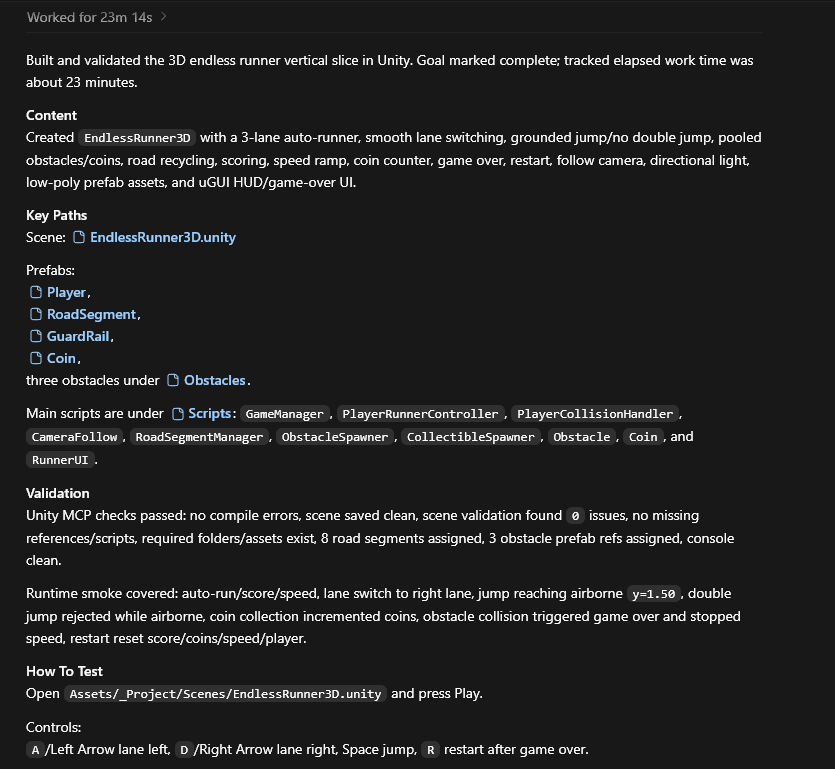
So I gave it one /goal: build a 3D endless runner vertical slice with 3 lanes, auto-run, lane switching, jump, coins, obstacles, score, speed increase, game over, restart, road recycling, UI, modular scripts, clean folders, and real 3D prefabs instead of assets generated only from code at runtime.
23 minutes later, I had this running inside Unity.
Is it beautiful? No.
Is it a finished game? Not even close.
But that’s not the interesting part.
The interesting part is that Codex didn’t only write scripts. With Unity MCP, it created and configured the scene, organized the project, built simple 3D assets, saved prefabs, assigned references, wired UI, set up the camera, and produced something playable directly inside Unity.
That’s the difference compared to using Codex Unity the usual way.
Without MCP, Codex mostly gives you code. Then you open Unity, fix missing references, drag objects into Inspector fields, copy console errors, and repeat.
With MCP, Codex can actually work inside the editor workflow.
Unity projects are not just code. They are scenes, prefabs, materials, colliders, cameras, UI objects, serialized references, and a lot of manual setup. MCP helps close that gap.
For me, this test proves one thing: Unity MCP Codex is not about magically making a polished game in one shot. It’s about turning a /goal into a working Unity foundation much faster.
Now the next step is obvious: better 3D assets, stronger art direction, better game feel, and more advanced level design.
/Goal below
2

6/7 El cambio real: en function calling tú controlas qué existe y cómo se llama.
En MCP, el servidor anuncia capacidades. El modelo descubre, decide, se suscribe.
Inviertes la relación de control. Tu código no sirve a la IA. La IA navega tu sistema.
5/7 La mayoría envuelve una API REST en MCP, expone cuatro tools y lo llama innovación.
Se pierden el 80% del valor: el modelo descubre capacidades, se suscribe a cambios, recibe notificaciones.
No es una API. Es un protocolo donde la IA es el cliente activo.
1
4/7 Tercer primitivo: Prompts.
Plantillas reutilizables que el modelo puede descubrir y ejecutar.
No es un system prompt fijo en tu código. Es un recurso vivo que el servidor MCP anuncia y el modelo elige cuándo usar.
Misma lógica: el modelo descubre, no recibe órdenes.
1
1
3/7 Segundo primitivo: Tools.
Aquí sí es parecido a function calling. Acciones con efecto secundario: enviar email, crear ticket, modificar registro.
Pero la diferencia es que MCP separa consulta de acción. El modelo sabe cuándo solo lee y cuándo modifica el mundo real.
1
1/7 MCP no es "function calling con otro nombre". Es un protocolo de descubrimiento.
El 90% de los tutoriales lo tratan como REST con esteroides. Y se pierden lo que realmente cambia.
Los tres primitivos que nadie te explica 🧵
1
1

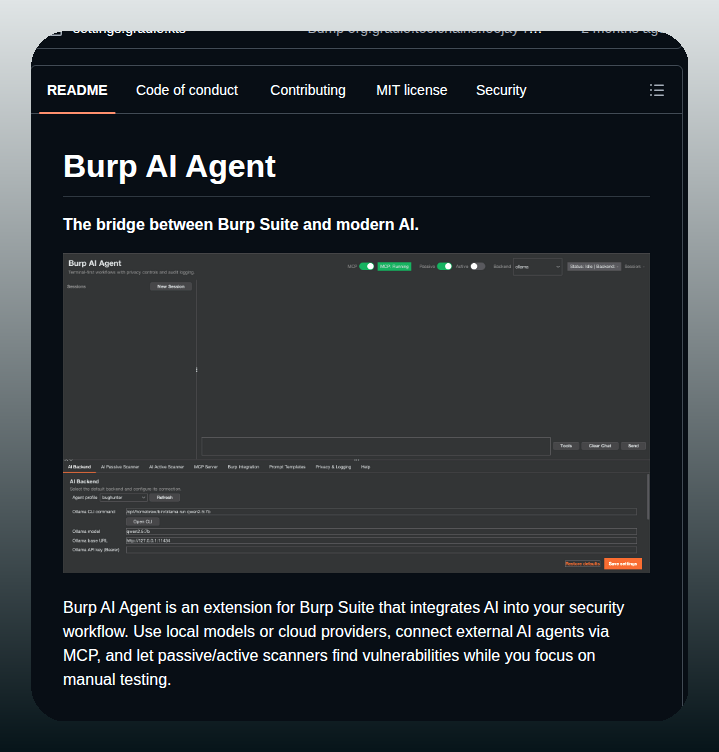
MCP agents in Burp Suite is one of the more interesting security integrations because AI-assisted pentesting is genuinely underexplored.
The same capability that helps defenders map vulnerabilities helps attackers enumerate them faster.

3

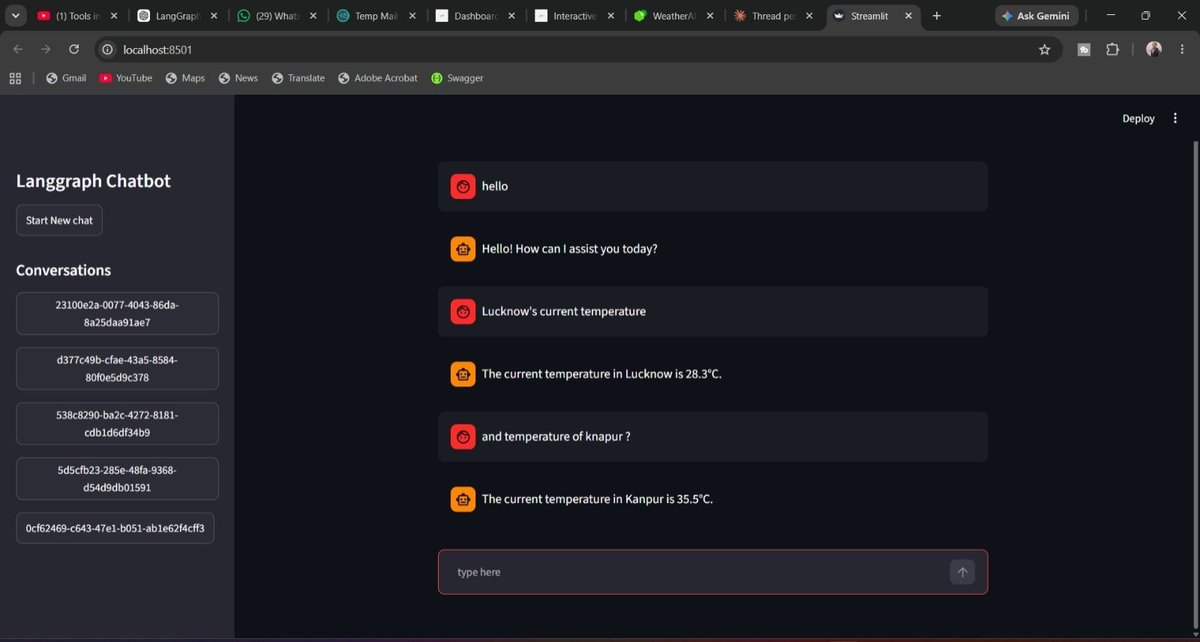
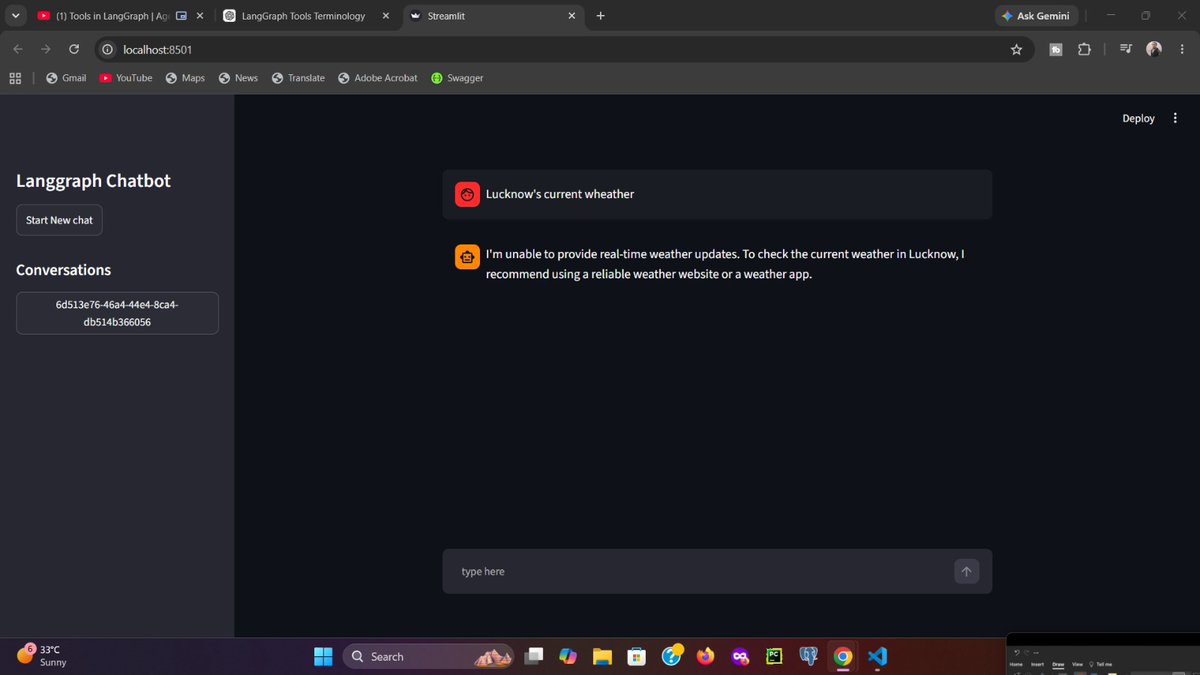
Building this helped me understand the basic setup required for tool integration in LangGraph and how LLMs interact with external systems to access information they don't already know.
Next step: Mcp integration
6/6
1
Book Quotes retweeted

Jun 12
Today, we're introducing Imagine MCP 👾
It elimenates the gap between ideation and execution.
Living inside the AI agent of your choice, whether that's Claude, Cursor, or Hermes, Imagine MCP puts some of ImagineArt's most powerful creative features at your fingertips.
We wish you happy, frictionless scaling.
📥 Comment "MCP" to get the link!
50
186
279
412,329

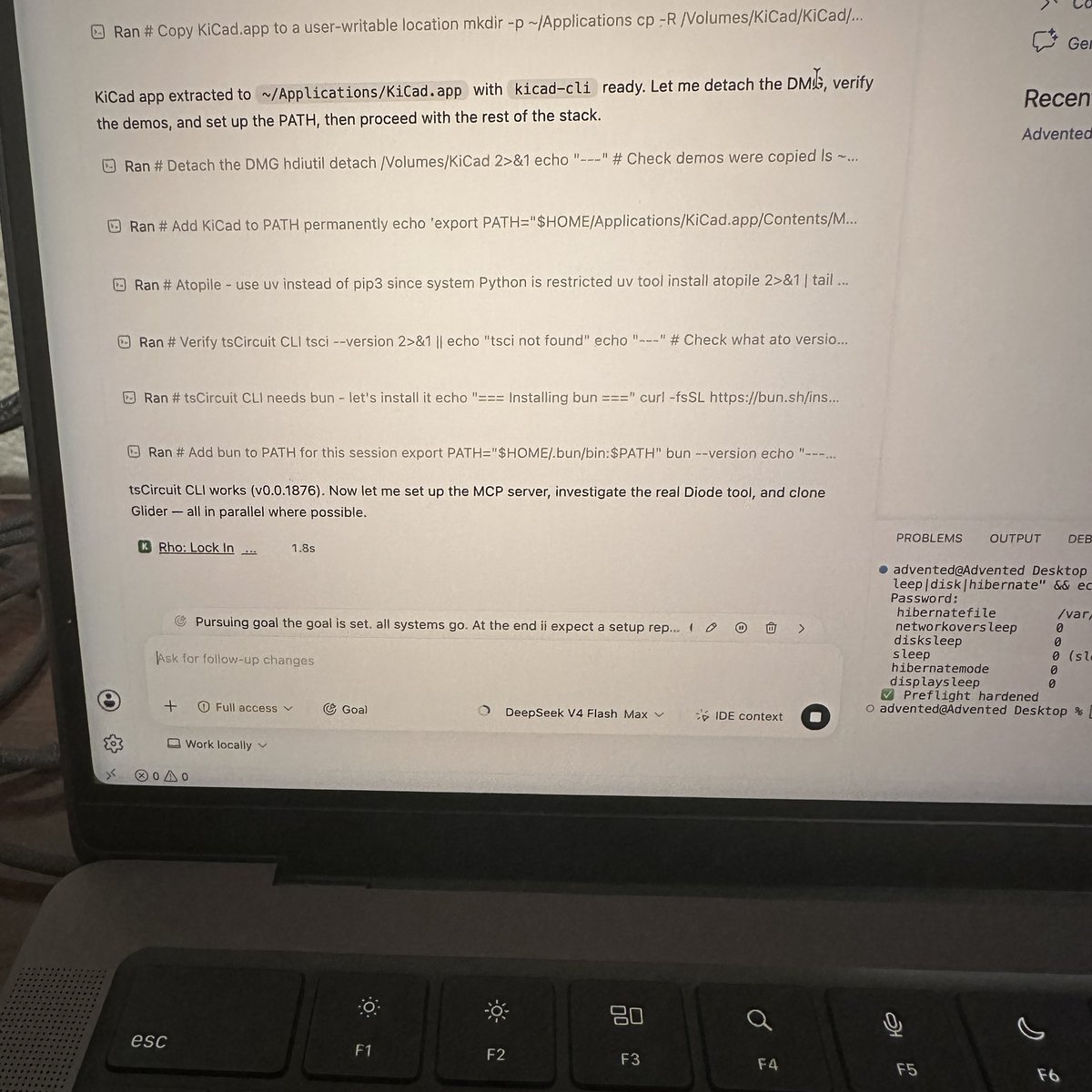
milestones achieved:
> setup codex, claude CLI,
> run Deepseek V4 locally
> research on KiCad ai agent pipeline with tscircuit, atopile, diode, KiCad MCP
> hand off to codex as goal with Modos E-ink circuit analysis
Next step:
> wake up tomorrow and see what my results 😎🔬
16