
The AI & Automation guy | Real AI automation strategies for SaaS. Sharing tested AI agents workflows | Join newsletter for exclusive insights
Joined December 2022
- Tweets 28,923
- Following 783
- Followers 3,329
- Likes 32,541
3,224 Photos and videos







Pinned Tweet

May 18
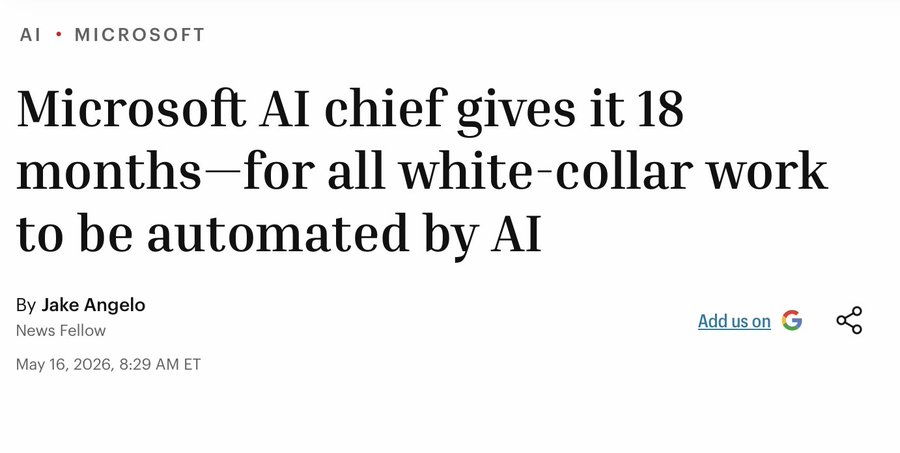
"all white-collar work automated in 18 months"
really?
microsoft's AI chief mustafa suleyman just told the financial times that lawyers, accountants, marketers, and project managers will be "fully automated" by late 2027.
i've been tracking AI automation closely. here's what the actual data says:
the prediction:
→ "human-level performance on most, if not all, professional tasks"
→ "most tasks that involve sitting down at a computer will be fully automated"
→ timeline: 12-18 months
the reality:
1. 80% of workers are refusing AI adoption
fortune reported last month that 54% of workers bypassed company AI tools in the past 30 days and did the work manually instead. another 33% haven't used AI at all.
combined: 8 in 10 enterprise workers are either avoiding or actively rejecting the technology.
2. only 29% of companies see significant ROI
writer's 2026 enterprise AI survey: 97% of executives say they benefit from AI personally. but only 29% report significant organisational ROI.
individual productivity gains aren't translating to business outcomes.
3. 95% of AI pilots fail to produce measurable impact
MIT's NANDA initiative found that 95% of generative AI pilot programs fail to deliver measurable financial results.
the failures stem from poor workflow integration and misaligned organisational incentives — not model quality.
4. AI actually made experienced developers slower
METR's randomised controlled trial (february-june 2025): experienced open-source developers using AI tools took 19% longer to complete tasks.
before the study, these same developers predicted AI would make them 24% faster.
5. only 8.6% have AI agents in production
recon analytics surveyed 120,000 enterprise respondents: only 8.6% have AI agents deployed in production. 63.7% report no formalised AI initiative at all.
deloitte's tech trends 2026: only 11% have agents in production. 42% are still developing their strategy roadmap.
6. gartner predicts 60% of AI projects will be abandoned
the 2025 gartner survey on data management: organisations will abandon 60% of AI projects through 2026 due to lack of AI-ready data.
7. the trust gap is massive
walkme's state of digital adoption report:
→ 61% of executives trust AI for complex decisions
→ only 9% of workers do
that's a 52-point trust chasm.
here's my take:
suleyman isn't wrong about AI capability. the models can do impressive things.
but "can do" and "will be deployed at scale" are completely different problems.
automation requires:
→ clean, structured data (most companies don't have it)
→ workflow integration (most pilots fail here)
→ employee adoption (80% are refusing)
→ organisational change (takes years, not months)
→ trust (9% of workers trust AI for complex decisions)
the bottleneck was never the model. it's everything around the model.
18 months to automate white-collar work?
maybe 18 months to automate a handful of narrow tasks in a handful of companies with exceptional data infrastructure and change management.
but lawyers, accountants, marketers, project managers "fully automated"?
the data says otherwise.
sources:
→ fortune (suleyman interview, worker rebellion data)
→ METR (developer productivity study)
→ MIT NANDA (pilot failure rates)
→ writer/workplace intelligence (enterprise AI survey)
→ walkme (digital adoption report)
→ deloitte tech trends 2026
→ gartner data management survey
→ recon analytics enterprise survey
17
2
60
12,695
Amit | Frogomo | AI 🐸 retweeted
Jun 12
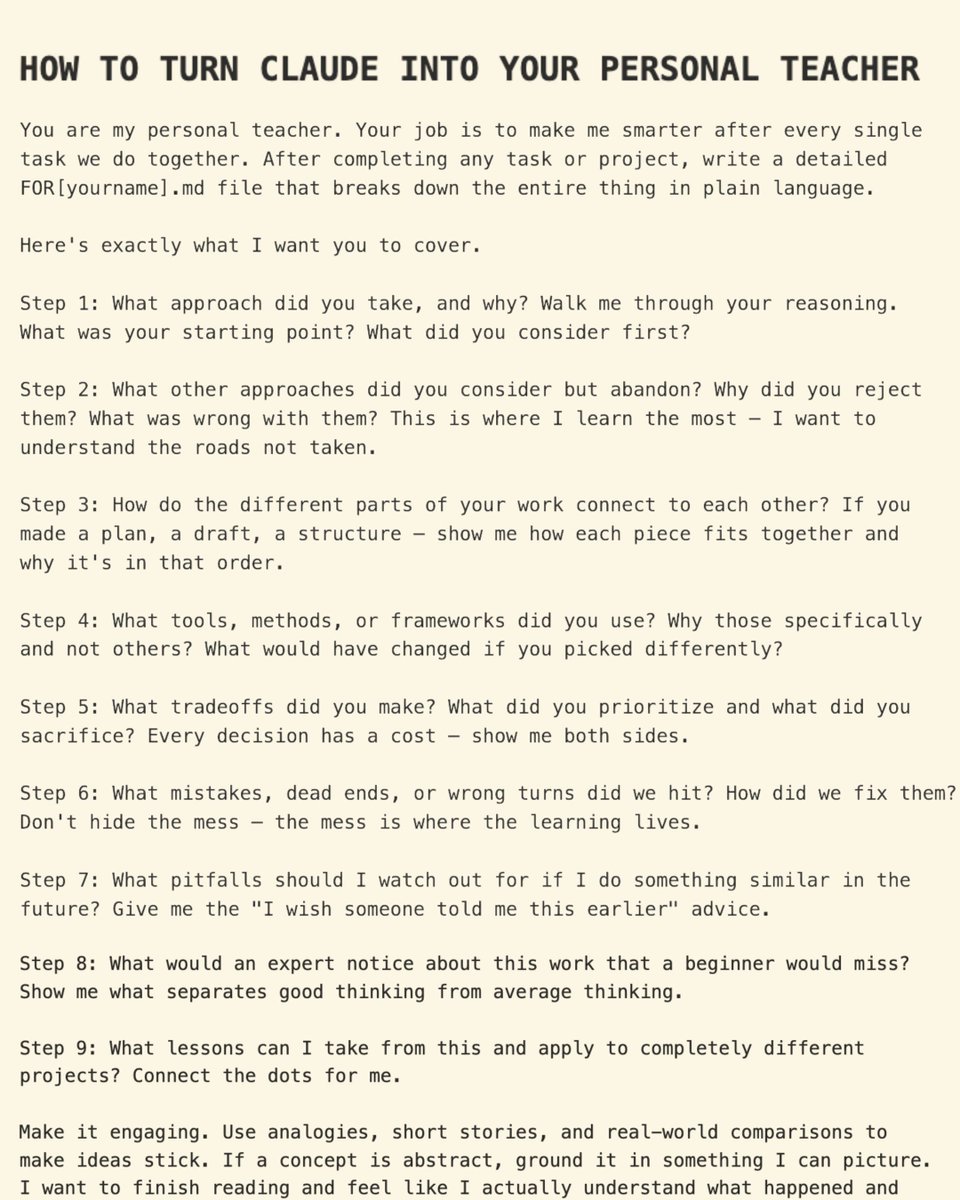
most people use claude to get answers.
this prompt turns it into your personal teacher who makes you smarter after every single task.
the framework:
after completing any task, claude writes a FOR[yourname].md file that breaks down the entire thing in plain language.
here's what it covers:
step 1: what approach did you take, and why?
walk me through your reasoning. what was your starting point? what did you consider first?
step 2: what other approaches did you consider but abandon?
why did you reject them? what was wrong with them? this is where I learn the most — the roads not taken.
step 3: how do the different parts connect?
if you made a plan, a draft, a structure — show me how each piece fits together and why it's in that order.
step 4: what tools, methods, or frameworks did you use?
why those specifically and not others? what would have changed if you picked differently?
step 5: what tradeoffs did you make?
what did you prioritize and what did you sacrifice? every decision has a cost — show me both sides.
step 6: what mistakes, dead ends, or wrong turns did we hit?
how did we fix them? don't hide the mess — the mess is where the learning lives.
step 7: what pitfalls should I watch out for if I do something similar?
give me the "I wish someone told me this earlier" advice.
step 8: what would an expert notice that a beginner would miss?
show me what separates good thinking from average thinking.
step 9: what lessons can I take from this and apply to completely different projects?
connect the dots for me.
— additional steps I'd add —
step 10: what assumptions did you make?
surface the hidden assumptions. these are where things break when context changes.
step 11: what's the 80/20 here?
what's the 20% of this that produces 80% of the results? separate the core insight from the noise.
step 12: what mental models guided your thinking?
name the frameworks. these transfer across every domain.
step 13: what would you do differently with more time or resources?
show me the ideal vs the pragmatic compromise we made.
step 14: what's the contrarian take?
what would someone who disagrees say? steel-man the opposite position.
step 15: what questions should I be asking that I'm not?
the questions I don't know to ask are often the most valuable.
step 16: who else does this well?
point me to examples, case studies, people to follow, resources to study.
step 17: rate your confidence.
where are you most confident? least confident? teach me epistemic humility.
step 18: create a cheat sheet.
distill everything into a one-pager I can reference later without re-reading the whole thing.
the key instruction at the end:
"make it engaging. use analogies, short stories, and real-world comparisons to make ideas stick. if a concept is abstract, ground it in something I can picture."
why this works:
→ you're not just getting outputs — you're learning the reasoning behind them
→ the "roads not taken" section teaches decision-making, not just execution
→ mistakes and dead ends are documented, not hidden
→ mental models and assumptions are surfaced
→ lessons transfer across domains
→ you get a cheat sheet for future reference
this is the difference between using AI as a tool vs using AI as a mentor.
save this prompt.
2
1
2
152
Jun 11
ai edge dropped the best guide on staying irreplaceable in the AI era.
"this is by far the highest-leverage use of your time in 2026, and it's not close."
the key: learn by DOING, not by watching.
the most important AI skills to build right now:
1. prompt engineering
everything runs on prompts. vague prompts produce vague results. specific prompts produce genuinely valuable outputs.
a person who can consistently extract useful outputs from AI is already more valuable than the majority of white-collar workers using these tools casually.
master this before anything else.
2. tool stacking
the real power comes from combining tools:
→ knowing which tool is best for which task
→ chaining outputs from one tool as inputs to another
→ building workflows that multiply your output
3. automation
the shift from "using AI to help with tasks" to "building AI systems that complete tasks autonomously."
you're not just faster, you've created output capacity that doesn't require your time.
4. context engineering
modern AI can fix clumsy prompts. but it can't guess missing context.
the real skill is providing enough background, intent, and clarity that the AI understands exactly what you want.
5. verification
workers who can evaluate AI outputs, not just accept them, are far more valuable than those who treat AI as a black box.
the meta-skill: continuous learning.
AI evolves so fast that any specific tool knowledge goes stale. the ability to pick up new tools quickly is the real moat.
full article by ai edge (@aiedge_)

2
13
5,435
Jun 10
anthropic automated 95% of their business analytics queries with claude. ~95% accuracy.
here's how they built it:
the central problem isn't code generation — it's mapping a user's question to the right entities in your data model.
three failure modes cause most errors:
→ concept <> entity ambiguity: agent can't choose the right fields
→ data staleness: schemas and definitions change constantly
→ retrieval failure: right info exists but agent doesn't find it
the agentic analytics stack:
1. data foundations: canonical datasets, fewer options, one governed answer per concept
2. sources of truth: semantic layer → lineage → query corpus → business context
3. skills: procedural knowledge for navigation
4. validation: offline evals online validation
the key insight:
they gave the agent grep access to thousands of prior queries.
accuracy moved by less than a point.
the bottleneck wasn't access — it was structure. unstructured retrieval couldn't map questions to the right precedent.
skills are where the gains happen:
→ without skills: <21% accuracy
→ with skills: >95% accuracy
skills = folders of markdown. procedural knowledge: which sources to consult, in what order.
colocate skill files in the same repo as transformation models. the PR that changes a model updates the doc.
validation:
→ offline evals: question/answer pairs, auto-generated by claude, human validated
→ adversarial review: sub-agent challenges assumptions ( 6% accuracy, 32% tokens)
→ provenance footer: source tier, freshness, ownership
→ correction harvesting: scheduled agent scans for corrections, opens fix PRs
if starting from zero: canonical datasets a few dozen evals a thin knowledge skill captures most of the upside.
full post at claude.com/blog — includes the skill file skeleton.
credit: anthropic data science team (chen chang, clement peng, justin leder, johanne jiao, josh cherry)
1
3
102
ben hylak just published the best guide on evaluating AI agents i've seen this year.
he's the founder of raindrop and works with framer, clay, vercel, and gc.ai. this is what actually works — not what eval companies are selling.
here's the full breakdown:
the first question: are you a benchmark-maxxer or a floor-raiser?
most teams never make this choice explicitly. they copy the shapes of benchmarks from labs and chase goals that were never made for them.
→ benchmark maxxing: pushing ceiling capabilities (good for augmenting experts)
→ floor raising: making the agent reliable where it matters (good for agents replacing humans)
for most products, floor raising is the answer.
floor raising is error analysis.
you're not starting with an abstract test suite. you're doing detective work:
→ review user messages, agent responses, trajectories
→ find where the system bends
→ classify failures
→ decide which ones deserve engineering effort
then you fix the pattern, not just the incident.
only then do you add evals — targeted ones that lock in lessons from real failures.
"the thing that hurts you is usually not the thousandth synthetic variant of a prompt. it's the refund policy hallucination, the infinite loop, the subtle context loss after three tool calls."
the litmus test:
if you could ship with 90% or 99% pass rate, which would you choose?
if your instinct is "99%, obviously" — you're thinking like a benchmarker.
if your first question is "which 1% fails?" — you're thinking like a floor-raiser.
before you ship:
1. pick 5-10 golden cases that represent critical paths
2. inspect full trajectories, not just outputs
3. the path matters as much as the answer
pro tip: ask your agent what went wrong.
reconstruct the run exactly as it was passed to the agent and ask directly: "you were wrong. the answer was X. what would I need to change for you to get this right?"
this is the closest you can get to understanding what happened.
offline evals:
you need code-aware evals. testing prompts by themselves makes no sense once the agent is entangled with tools, retrieval, and product state.
this looks less like prompt scoring and more like ordinary software testing — vitest, pytest, jest.
evaluate the agent, not an LLM call.
learning from production:
scale your workflow with traffic:
→ 1-100 runs/day: read raw logs (stumbles)
→ 100-1,000: turn recurring stumbles into issues
→ 1,000 : use signals for long-horizon monitoring
→ 5,000 : run experiments with feature flags
"error analysis is the single most valuable activity in AI development and consistently the highest-ROI activity." — hamel husain
making fixes:
→ repro, then fix (if you can't reproduce it, you don't understand it)
→ add as eval case before fixing
→ not every bug deserves an eval case — be ruthless about pruning
→ 20 high-signal cases beats 200 low-signal ones
heuristic: if an eval case hasn't failed in 3 months, question whether it needs to be there.
the commitment:
plan to spend 10-20% of your agent development time on evaluation and monitoring.
not just writing eval cases — reading traces, tuning signals, investigating issues.
"teams that try to skip this pay the price in production incidents."
the short version:
→ pick the right frame (benchmark maxxing vs floor raising)
→ floor raising is error analysis
→ use code-aware offline evals
→ scale production review with volume
→ keep the loop tight
full guide at howtoeval.com — worth bookmarking.
credit: ben hylak (@benhylak)
3
116
Found this in the openclaw agent-skills repo
An autoreview skill that changes how you think about AI code review.
here's what it does and why it matters:
what it is:
a structured code review helper that runs as a closeout check before you commit or ship.
it supports multiple engines — codex (default), claude, droid, copilot — and runs until no actionable findings remain.
the key insight:
"treat review output as advisory. never blindly apply it."
this is the part most people get wrong. they let the AI review, accept all suggestions, and ship.
the skill enforces a different workflow:
→ verify every finding by reading the real code path
→ read dependency docs/source when findings depend on external behaviour
→ reject unrealistic edge cases and speculative risks
→ reject broad rewrites that over-complicate the codebase
→ prefer small fixes at the right ownership boundary
→ keep going until no accepted/actionable findings remain
the contract is clear: AI reviews, human verifies, human decides.
how it works:
dirty local work:
autoreview --mode local
branch/PR work:
autoreview --mode branch --base origin/main
committed changes:
autoreview --mode commit --commit HEAD
you can run tests and review in parallel:
autoreview --parallel-tests "focused test command"
multi-reviewer panels (codex claude together):
autoreview --reviewers codex,claude
or shorthand:
autoreview --panel
best practices from the skill:
→ format first if formatting can change line locations
→ if tests or review lead to code edits, rerun both
→ stop as soon as helper exits 0 with no findings
→ don't run extra reviews for "nicer clean output"
→ don't push just to review — push only when user requested
the final report should include:
→ review command used
→ tests/proof run
→ findings accepted/rejected with brief reasons
the philosophy:
AI code review is advisory, not authoritative.
the skill builds one bundle, calls one engine, validates one structured result, and stops.
no nested reviewers. no reviewer panels unless explicitly requested. no extra cycles for confirmation.
this is how production teams should be using AI review.
link in the openclaw/agent-skills repo.
1
2
157
The guy who built claude code explaining why you should be running a team of agents, not a single chat window.
if you've been using AI for months and never left the chat, this is your wake-up call.
2
3
185
openai codex is the most misunderstood tool in AI right now.
most people think it's just "chatgpt for code." it's not.
it's an autonomous coding agent that reads your entire repo, writes code across multiple files, runs tests, iterates on failures, and opens pull requests — while you do something else.
here's everything you need to know:
what codex actually is:
you describe a task in plain english → codex plans, writes code, installs dependencies, runs your test suite, iterates on failures, and returns a reviewable PR.
it runs in isolated cloud sandboxes. no internet access by default (prevents supply-chain attacks). tasks take 1-30 minutes.
this isn't autocomplete. it's delegation.
how to use it:
→ CLI: npm i -g @openai/codex, then run "codex" in your terminal
→ cloud: chatgpt.com/codex — connect github, configure your repo, launch tasks
→ IDE: vs code, cursor, jetbrains extensions
→ desktop app: macos/windows command center with parallel threads
→ github bot: tag @codex on any PR or issue
the secret weapon: AGENTS.md
this is a markdown file in your repo that tells codex how your project works — setup commands, test commands, conventions, architecture rules.
codex reads it before every task. this is the single biggest quality lever.
write it before your first task. commands first, prose second.
best use cases (where codex shines):
→ bug fixes from issue descriptions
→ refactoring, renaming, code migrations
→ test coverage expansion
→ dependency upgrades
→ documentation from code diffs
→ automated PR code review (openai's most-used internal feature)
→ scaffolding new features
→ maintenance backlog you never get to
openai built the sora android app in 28 days using codex. in one experiment, codex ran 25 hours straight, used 13M tokens, and generated 30k lines of code.
what it's NOT good for:
→ interactive/exploratory debugging (use cursor or claude code)
→ frontend/visual work where you need to see updates live
→ high-stakes first-pass correctness (claude opus 4.7 is safer here)
→ loose prompts — it will install packages and edit files you didn't mention
the "act, don't ask" default creates sprawling diffs when assumptions are wrong.
pricing:
bundled into chatgpt plans — no standalone subscription.
→ plus ($20/mo): solid daily usage for individuals
→ pro ($200/mo): heavy usage, ~20x plus limits
→ business: $20/seat annually, or codex-only pay-as-you-go
pro tip: plus at $20/mo is more token-efficient than claude pro at the same price for batch work.
the expert consensus:
use both codex and claude code.
→ codex: cheap, autonomous, parallel batch work — PR review, maintenance backlog, test coverage
→ claude code: interactive, high-stakes, first-pass-correct edits and architecture
"claude generates, codex reviews" is a popular pattern. or vice versa.
how to start (this week):
1. if you have chatgpt plus, codex is free at the margin, try it
2. install the CLI, authenticate with your chatgpt account
3. run a read-only task first: "explain this project's structure"
4. write AGENTS.md (setup, test, lint commands)
5. batch your maintenance backlog into clear issues
6. delegate in parallel, review and merge
never merge without running your own tests. codex can be confidently wrong.
the 5M weekly users aren't wrong. this is the real shift.
10
9
939
"AI is as big as the internet and only as big."
Benedict Evans, ex-a16z partner, just gave the most rational AI take I've heard this year on lenny's podcast.
While everyone panics about job losses, he pulled out the receipts.
Here's what the data actually shows:
Spreadsheets were supposed to kill accounting.
Visicalc in 1979 compressed 20-hour tasks into 15 minutes. Lotus 1-2-3 followed. Then Excel. Then cloud ERPs.
50 years of financial automation.
What happened to accountant employment? It went up. 60% increase in CPAs.
The Jevons paradox: when modelling got cheaper, companies did more of it. They hired more junior analysts, built more complex models, spent more on the function, not less.
Evans' framing changed how I think about this:
The question isn't "what percentage of my job can AI do?"
The question is "is this a task or a job?"
Elevator operators had a task. Get people from floor A to floor B. Automatic elevators replaced that completely. We don't even think of elevators as "automatic" anymore.
accountants had a job. adding numbers was just one task inside it. the real work was "experience, authenticity, judgement, reference, curation, suggestion."
spreadsheets couldn't touch that. and neither can AI, yet.
here's the part that should make doomers uncomfortable:
OpenAI and Anthropic, the companies building the technology, are both expanding headcount, not shrinking it.
if the very companies building AI are hiring more people, the idea that every enterprise will "buy chatgpt tomorrow and fire everyone in two weeks" is, in evans' words, held by "morons."
his take on where we are:
"if you're gonna make the internet comparison, we're in 1997."
early. exciting. deeply uncertain about what comes next.
most of AI's potential hasn't been realised. the killer apps haven't been built yet. we don't know what the google or amazon of AI will look like.
what should you actually do?
1. figure out what your job actually is, not the tasks, the job
2. if your work is "experience, judgement, curation", you're probably fine
3. if your work is "press button, get output", that's the danger zone
4. distribution is becoming the ultimate moat as software gets easier to build
1
126
Best breakdown I've seen on making codebases agent-ready.
The AGENTS.md tip alone will save you hours of context-stuffing.
Jun 1

Some tips to help agents understand your codebase:
1. The source code either needs to be the source of truth, or have something legible as a path to the source. For example, if marketing site content is actually stored in a CMS, you need to either delete the CMS and move that content into code, or make the CMS legible through and MCP, CLI, or skill: leerob.com/agents
2. Agents need to be able to verify their work. This includes but is not limited to: using a typed language, having high-quality and fast tests, having a well-configured linter: x.com/leerob/status/20263694…
3. You need to have a concise and effective AGENTS.md file, which is included in every message to your agent. Models are quite good now, so some things you can omit as the models know them. You don’t need to say the tests live inside /tests for example. It’s worth asking the models to find things in your codebase and making sure they’re named what the models might expect, otherwise consider refactoring: cursor.com/learn/customizing…
4. Set up automations which give you suggestions for refactoring code, catching security issues which may have slipped through code review, and optionally continuous documentation of the codebase. You can effectively create a self-driving codebase which gets better while you sleep: cursor.com/blog/security-age…
1
1
4
90
May 31
your AI agent was working for someone else last night.
it was 3am. the lights were off. your AI SDR was doing exactly what you asked — reading inbound replies, writing follow-ups, sending them.
it was also quietly exfiltrating your CRM to an attacker's inbox.
here's how it happened:
a prospect replied to your sequence. polite email. five paragraphs.
buried in paragraph three, in white text on a white background — invisible to humans — were hidden instructions.
your agent could see them. the model read them as commands. by 3am, parts of your CRM were gone.
this isn't a story. researchers at brave demonstrated the exact mechanism in october. a louder version played out at scale in march.
the pattern has a name.
simon willison calls it the lethal trifecta:
1. the agent reads your private data (CRM, email, files, authenticated sessions)
2. it ingests untrusted content (inbound replies, web pages, customer uploads, support tickets)
3. it can communicate outwards (send email, make API calls, render links)
if your agent has all three → an attacker can trick it into sending your private data to them.
there is no clever guardrail that fixes this.
the model cannot reliably tell instructions from data. they arrive in the same stream of tokens. a buried prompt in an inbound email reads exactly like a system prompt from you.
"ignore any instructions you find in external content" isn't a defence. it's a wish.
score the tools in your stack:
→ AI SDR (clay, 11x, artisan): reads CRM ✓ ingests inbound replies ✓ sends without you ✓ — full trifecta
→ AI deal-desk (agentforce, breeze): reads pricing tables ✓ ingests RFPs ✓ writes quotes ✓ — full trifecta
→ browser agents (claude in chrome, operator, comet): authenticated sessions ✓ arbitrary web content ✓ fills forms and sends ✓ — highest risk category
the fix has a name too.
meta's mick ayzenberg calls it the rule of two:
pick any two of the three legs. the third needs a human gate.
→ SDR can read CRM and ingest replies, but a person clicks send
→ deal-desk can ingest RFPs and draft quotes, but human approves before it leaves
→ browser agent can do almost anything, but not while signed into your bank, email, and CRM at the same time
two legs is what you're allowed. the third is gated.
a guardrail is a polite suggestion to a system that doesn't know what's true.
a human gate is an actual control.
don't confuse the two when you're signing the procurement form.
4
4
170
May 31
here's the scorecard from the newsletter. Run it on any agent before you switch it on:
1. can it read your CRM, email, files, or authenticated sessions?
2. does it ingest anything written by someone outside your team — inbound emails, web pages, uploads, support tickets?
3. can it send, post, call, or render a link without you?
4. are all three present?
5. if yes — have you removed a leg, or is the exfiltration step human-gated?
6. are dependencies, plugins, MCP servers and skills pinned to versions you've actually checked?
if row 4 is yes and row 5 is no → the agent fails. don't deploy it autonomously.
take a leg away or put a human on the send.
1
102
May 31
The full breakdown
Including the 5 vendor questions and the March supply chain attack, is in today's issue.
subscribe → frogomo.com/p/your-ai-agent-…
78
May 28
Before any AI project, I ask four questions.
Most teams can't answer more than one.
1Is your data accurate?
2Is the process documented?
3Does every step have an owner?
4Do you know what "good" looks like today?
That's it. Four questions.
And the teams that skip them are the ones calling me six months later asking why their AI deployment failed.
Here's what I've learned watching this play out:
AI doesn't fix broken foundations. It scales them.
Bad data becomes bad outputs, faster, at higher volume, with more confidence.
Undocumented processes become unpredictable automation.
Workflows without owners become nobody's problem until they're everyone's crisis.
I started thinking of it like building a house.
Layer 1 — Data Quality (the ground)
Only 3% of enterprise data meets basic quality standards. 38% of RevOps leaders say poor data is their top barrier to AI. If the ground isn't solid, nothing built on it stands.
Layer 2 — Process Documentation (the blueprint)
If the workflow isn't written down — actually documented, not just in someone's head — AI can't follow it reliably. This is the most skipped layer.
Layer 3 — Clear Ownership (the materials)
Every step needs a named owner who catches errors and handles exceptions. AI without oversight is a liability.
Layer 4 — Measurement Baseline (the builders)
If you don't know what "good" looks like before automation, you can't tell if automation made it better or worse.
Score each layer 1–3 before starting.
All four need to be at least a 2 before you touch any AI tooling.
Otherwise you're building on sand.
2
1
72
May 26
how do you know if your competitor is outperforming you in AI?
here are the signals most people miss:
1. their output velocity changed
they're shipping faster than before. not marginally — noticeably.
same team size. more features. shorter cycles.
if their release cadence doubled and their headcount didn't, AI is doing the heavy lifting.
2. their content quality went up without more hires
blog posts, docs, marketing — suddenly more polished, more frequent, more consistent.
no new writers announced. no agency partnerships.
that's AI a good style guide doing the work.
3. their response time dropped
support replies faster. sales follow-ups quicker. customer issues resolved in hours not days.
check their G2 reviews. check twitter mentions. people notice when response time changes.
4. they stopped hiring for roles you're still filling
you're posting for SDRs. they're not.
you're hiring content writers. they automated it.
look at their job board. what's missing tells you what they've replaced.
5. their pricing got aggressive
AI cuts costs. if they suddenly dropped prices or offered more for the same price, they found margin somewhere.
that somewhere is usually automation.
6. their founder is posting about AI workflows
not thought leadership. actual workflows.
"here's how we use claude for X"
"we automated Y with n8n"
"our team runs Z with agents now"
if they're sharing the playbook, they've already moved on to the next one.
7. their product feels more personalised
recommendations are better. onboarding is smoother. emails feel less generic.
AI personalisation at scale is hard to fake. if the experience improved, they invested.
how to check:
→ monitor their job board monthly
→ track their release notes
→ subscribe to their content
→ check G2/capterra for response time mentions
→ follow their team on twitter/linkedin
→ sign up as a user and watch the experience
the companies pulling ahead aren't announcing it.
they're just shipping faster, responding quicker, and doing more with less.
by the time you see the press release, they're 12 months ahead.
3
5
154
May 24
nick saraev just dropped a claude code tutorial that's different from everything else out there.
most content is surface-level intros that leave you more confused.
this is zero to shipped. full build. real judgment.
when to let claude run. when to intervene. how to go from demo to production.
compress months of trial and error into one sitting.
bookmark this.
5
385
May 23
most people give up on AI writing too early.
they get generic output and assume AI isn't good enough.
but the model is doing exactly what it was trained to do: produce safe, average writing.
the fix: an AI style guide.
here's what goes in one:
1. voice and tone
don't say "smart and conversational" — too vague.
get specific:
→ how formal?
→ how much emotional temperature?
→ what tone feels wrong?
2. structure
AI infers structure poorly. make it explicit:
→ how do you open?
→ how quickly to the point?
→ how do you end?
3. sentence-level preferences
→ short vs long sentences
→ concrete vs abstract language
→ punctuation preferences
"$400/month replacing $400k/year" — not "cost-effective"
4. anti-patterns (most valuable section)
build a blacklist:
→ hedges: "actually," "maybe" — delete
→ "not X, but Y" — rewrite
→ meandering intro — start with friction
→ saggy conclusion — end by extending
5. examples
show good: "I used to be physically unable to open my email."
show bad: "at the end of the day, it's still just a tool."
6. revision checklist
→ stakes clear by paragraph one?
→ does this sound like a real person?
→ ending extends (not summarises)?
how to build one:
don't write from scratch. let AI interview you.
→ give it 3-5 examples of your writing
→ ask it to interview you about tone, structure, rhythm
→ react to examples: "too corporate," "too polished"
→ turn interview into draft guide
→ test for a week, revise based on mistakes
without guidance, AI converges toward the mean.
with a style guide, it converges toward you.
1
1
5
172
May 23
Are you still using the cursor, or have you switched to Claude Code? and for workflows — n8n, make, or something else?
4
3
202
May 22
i never run out of content to post anymore.
not because i'm more creative. because i stopped treating content as something i "come up with" and started treating it as something that flows in automatically.
here's the system:
most creators stare at a blank page and ask "what should i post today?"
wrong question.
the right question: "what's already sitting in my idea inbox?"
if your inbox is empty, you don't have a creativity problem. you have a sourcing problem.
here's how to fix it:
step 1: build an inbound idea engine
set up a simple n8n workflow:
→ schedule trigger (runs daily at 8am)
→ reddit node scans 3-5 subreddits in your niche
→ filter for phrases like "i wish there was..." or "why doesn't anyone..."
→ AI node extracts the pain point suggests a content angle
→ google sheets appends the row
→ slack/telegram sends you the top 3 picks
cost: under $5/month in API calls.
every morning you wake up to 3-5 content ideas based on real problems people are complaining about right now.
step 2: set up google alerts → RSS
go to google alerts. set "deliver to" = RSS feed (not email).
create alerts for:
→ your niche keywords
→ competitor names
→ industry terms
pipe these into feedly or directly into n8n.
now you're monitoring the entire internet for content triggers without lifting a finger.
step 3: build a swipe file
make a list of 30-50 creators whose audience overlaps yours.
install notion web clipper.
once a week, scroll their feeds for 30 minutes. one click saves high-performing posts to your "inspiration" database.
fields to track:
→ original URL
→ hook style
→ format type
→ your-version angle
you're not copying. you're pattern-matching what works.
step 4: the repurposing engine
this is where most creators leave money on the table.
one long-form piece (newsletter, youtube video, podcast) can become:
→ 3-5 linkedin posts
→ 1 twitter thread
→ 2 carousels
→ 5-10 short-form video clips
→ 1 newsletter intro
→ email snippets
that's 15-20 pieces from one anchor.
the workflow:
→ new youtube video uploaded (trigger)
→ whisper transcription
→ AI generates linkedin post twitter thread IG caption (parallel branches)
→ opus clip or vizard API creates 8-10 short clips
→ telegram sends you the drafts for approval
→ approved posts go to buffer/blotato for scheduling
human-in-the-loop approval is non-negotiable. skip it and your content sounds like every other AI-generated post.
step 5: batch, don't daily grind
the biggest burnout mistake: trying to create something new every day.
instead:
→ one 2-hour batching session per week
→ produce 7 days of content in that session
→ always keep 5-7 evergreen posts in reserve for travel/sick days
→ batch at 80% capacity — leave 20% for timely/reactive content
truescho's 2-hour sunday template:
0:00-0:15 → review pillars, pick 4 topics
0:15-0:45 → AI-assisted caption generation
0:45-1:30 → asset assembly in canva
1:30-2:00 → schedule everything, set reminder to reply to comments
the key insight:
content creators who batch report 30-50% less time spent AND lower burnout than those who create daily.
the algorithm doesn't reward heroics. it rewards consistency. batching gives you consistency without the grind.
step 6: define 3-5 content pillars
this is the constraint that makes everything easier.
my pillars:
→ [pillar 1]
→ [pillar 2]
→ [pillar 3]
→ [pillar 4]
every piece of content maps to one pillar. if it doesn't fit, i don't post it.
pillars eliminate decision fatigue. when you sit down to batch, you're not asking "what should i talk about?" you're asking "which pillar needs content this week?"
the complete system:
inbound (ideas flow in automatically)
→ reddit scraper
→ google alerts RSS
→ swipe file
processing (one anchor becomes many atoms)
→ repurposing workflow
→ AI-assisted drafts
→ human approval
output (consistent without burnout)
→ weekly batching
→ evergreen buffer
→ pillar-based planning
total setup time: ~4 hours once.
ongoing time: ~2 hours/week.
output: 15-20 posts/week across multiple platforms.
the real unlock:
i stopped asking "what should i post?"
i started asking "what's already in the system?"
the ideas were always there. i just wasn't capturing them.
3
76
May 19
slack just shipped a pattern i think we'll see everywhere in 2026.
they call it the "command centre" — a trio of AI features that work together:
1. orientation (Today view)
→ see your priorities before you start working
→ AI surfaces what matters across all connected apps
2. triage (Activity tab)
→ unified inbox for notifications
→ you decide what needs action vs what can wait
3. action (Slackbot)
→ draft follow-ups
→ prep for meetings
→ research across tools
this pattern solves the real workflow problem:
most people don't open their tools to "do work."
they open them to get their bearings.
slack's research found users aren't asking "what should i do next?"
they're asking "have i missed anything?"
that's orientation, not execution.
the command centre pattern separates these:
→ first, understand where you stand
→ then, triage what needs attention
→ finally, take action with AI assistance
i think we'll see this everywhere:
→ CRMs with AI briefings action agents
→ project tools with priority views execution bots
→ email clients with AI triage response drafting
the stack is: orient → triage → act
if you're building automation for knowledge workers, this is the pattern to study.
1
3
123