

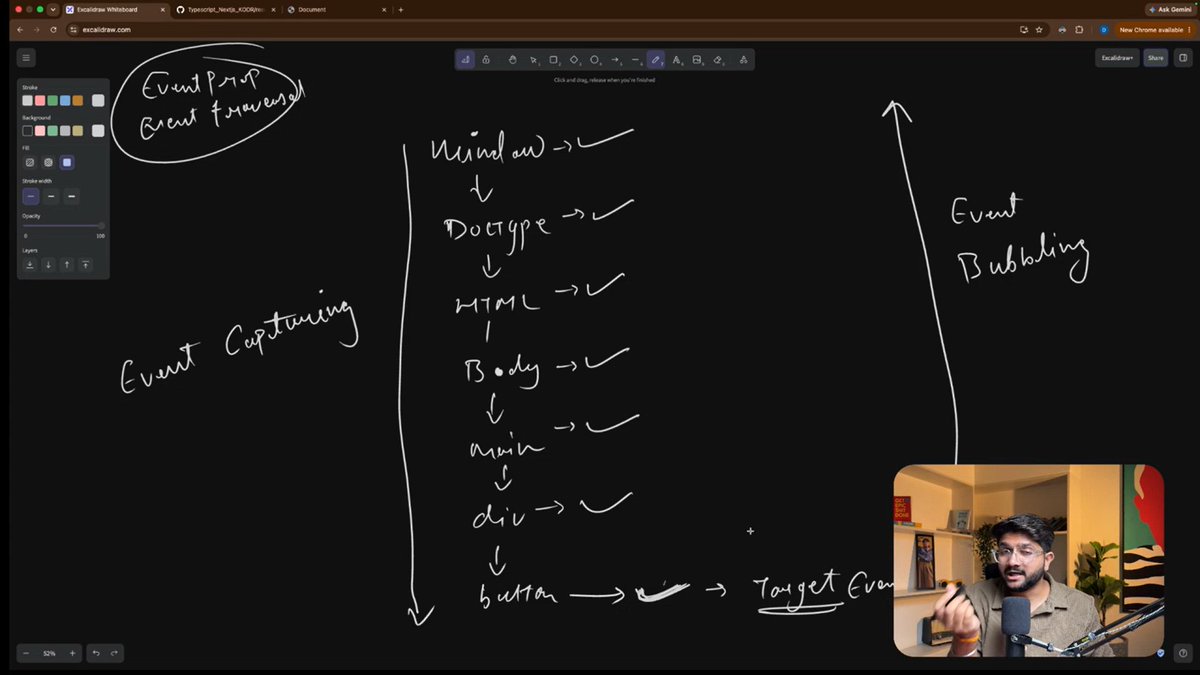
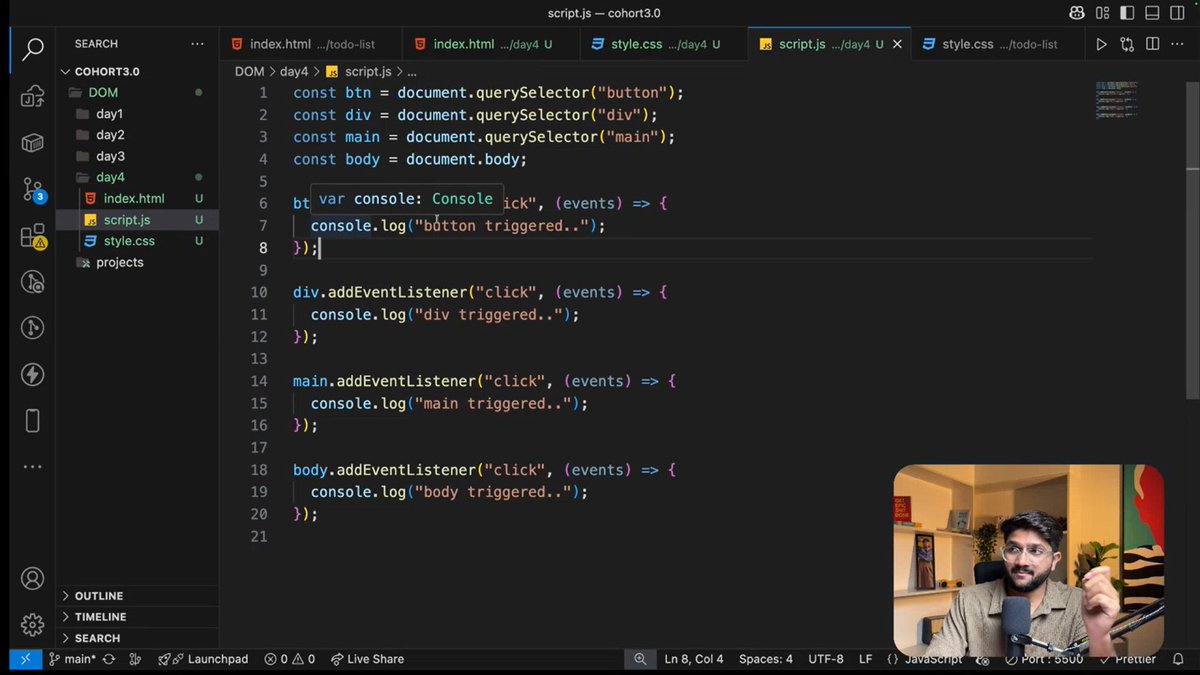
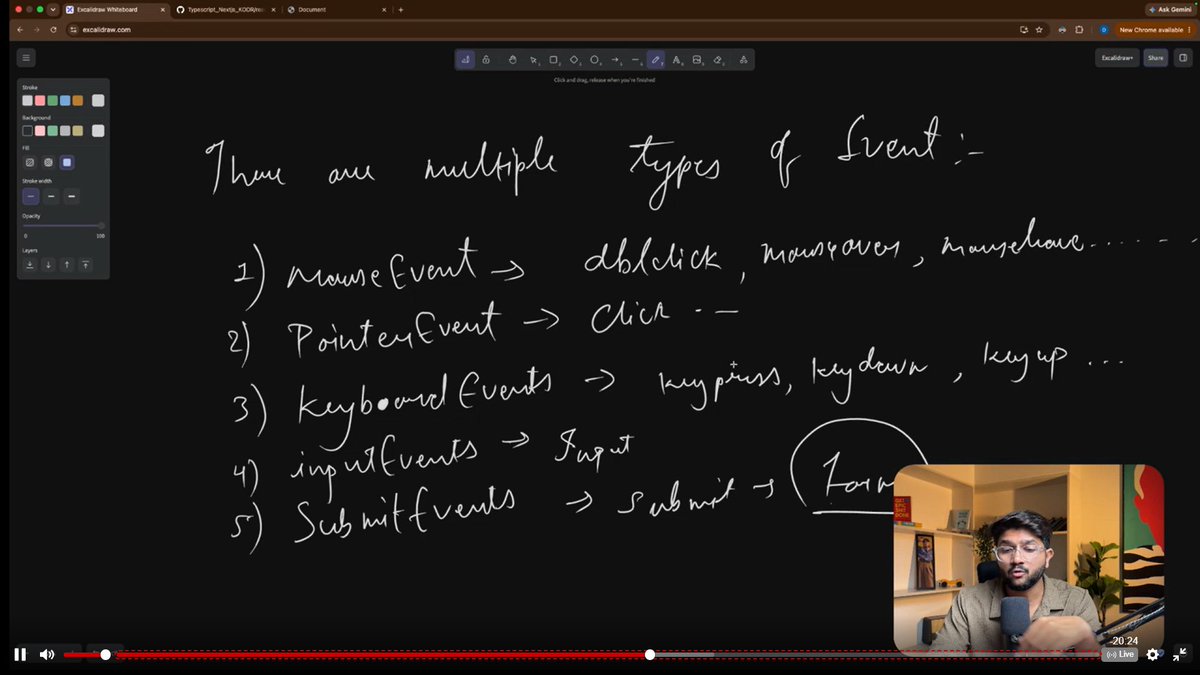
Day 28 | @sheryians_ - More about DOM mainly focused on addEventListener() and its different types then what is Event propogation -how the events are executed from target to window .
#Sheryians #WebDevelopment #LearningInPublic #LearningJourney #Restart #100DaysOfCoding
4

Jun 12
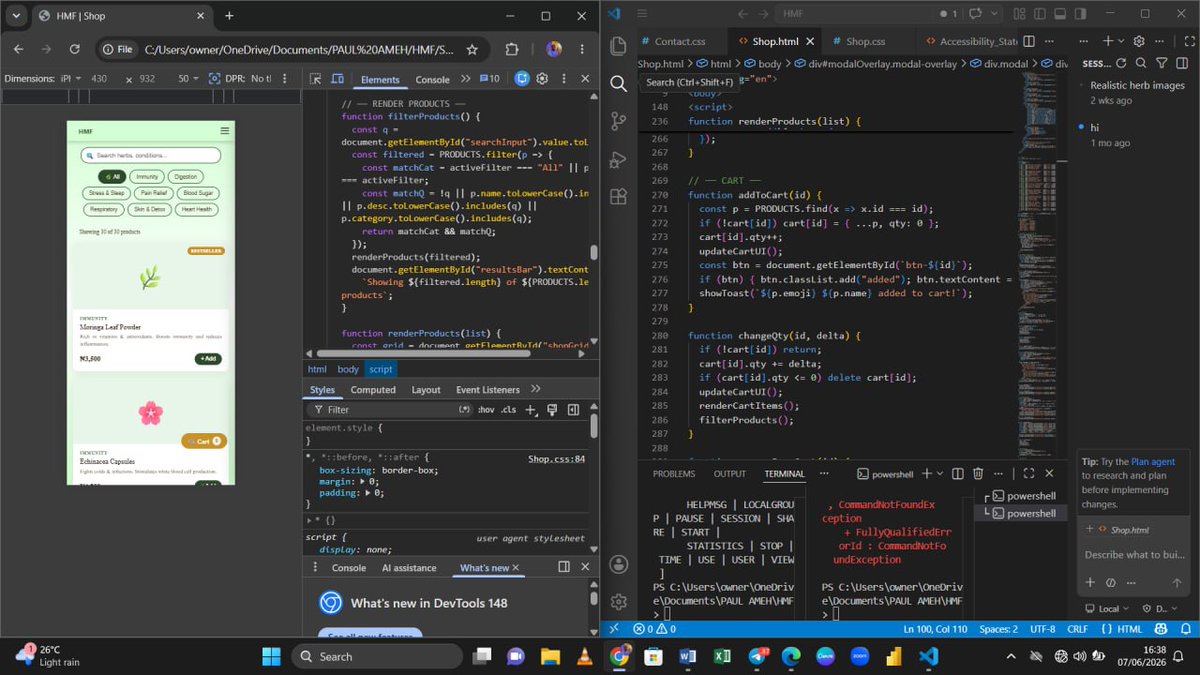
This is HMF Shop coming to life line by line.
Left: Clean UI for finding herbs by immunity,
digestion, stress & sleep.
Right: The code doing the heavy lifting - filtering products, updating cart.
No magic. Just filter(), addEventListener(),
and lot of coffee
1
66


Jun 11
With Claude Fable 5 making software creation more accessible, interaction design is becoming an even bigger differentiator. So here is a Design Engineering Tip:
Most interfaces wait for users to act. Better interfaces prepare for what users are about to do.
This pattern is called Input Anticipation. By reacting to intent before an interaction happens, products feel faster, smarter, and easier to use.
JS
const box = document.querySelector(".input")
const ring = document.querySelector(".focus-ring")
addEventListener("pointermove", (e) => {
const r = box.getBoundingClientRect()
const dx = Math.max(r.left - e.clientX, 0, e.clientX - r.right)
const dy = Math.max(r. top - e.clientY, 0, e.clientY - r.bottom)
const distance = Math.hypot(dx, dy)
const intent = Math.max(0, 1 - distance / 180) ** 2
ring. style.opacity = intent
})
Save this for later.
18
13
459
36,497

Jun 11
Your addEventListener callback is 8 layers deep. Hardware interrupt → kernel evdev → window manager → browser process → renderer → event loop → DOM dispatch → your function. Nothing in that chain is polling.
open.substack.com/pub/tharun…
8
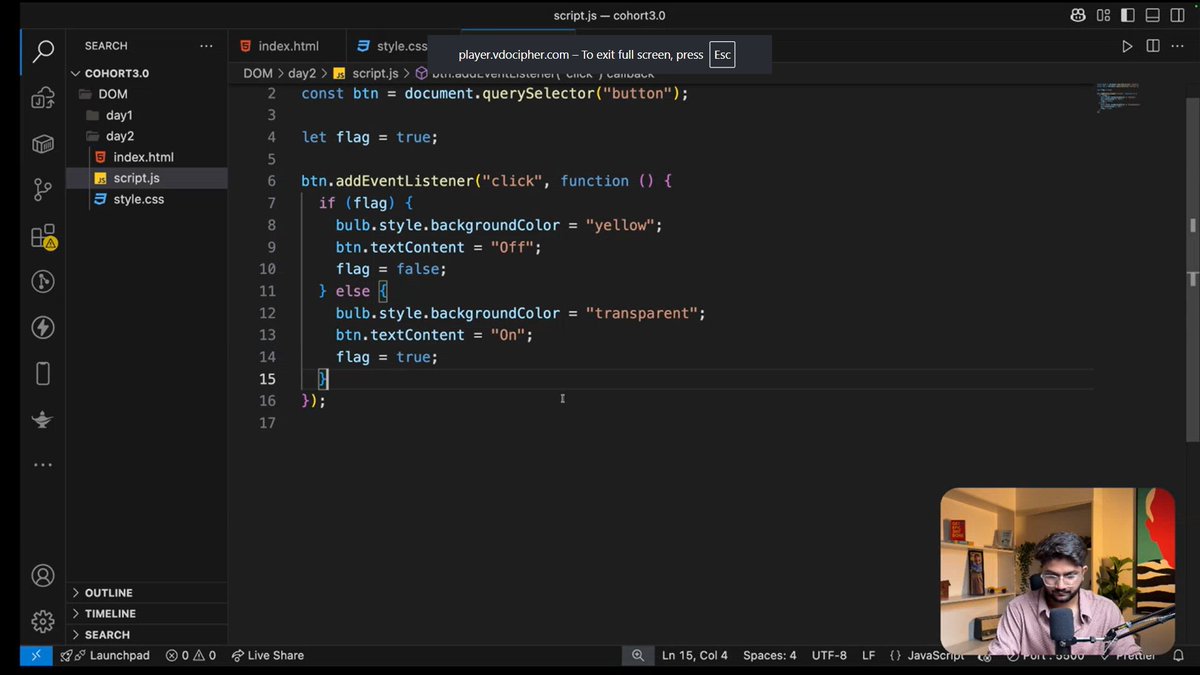
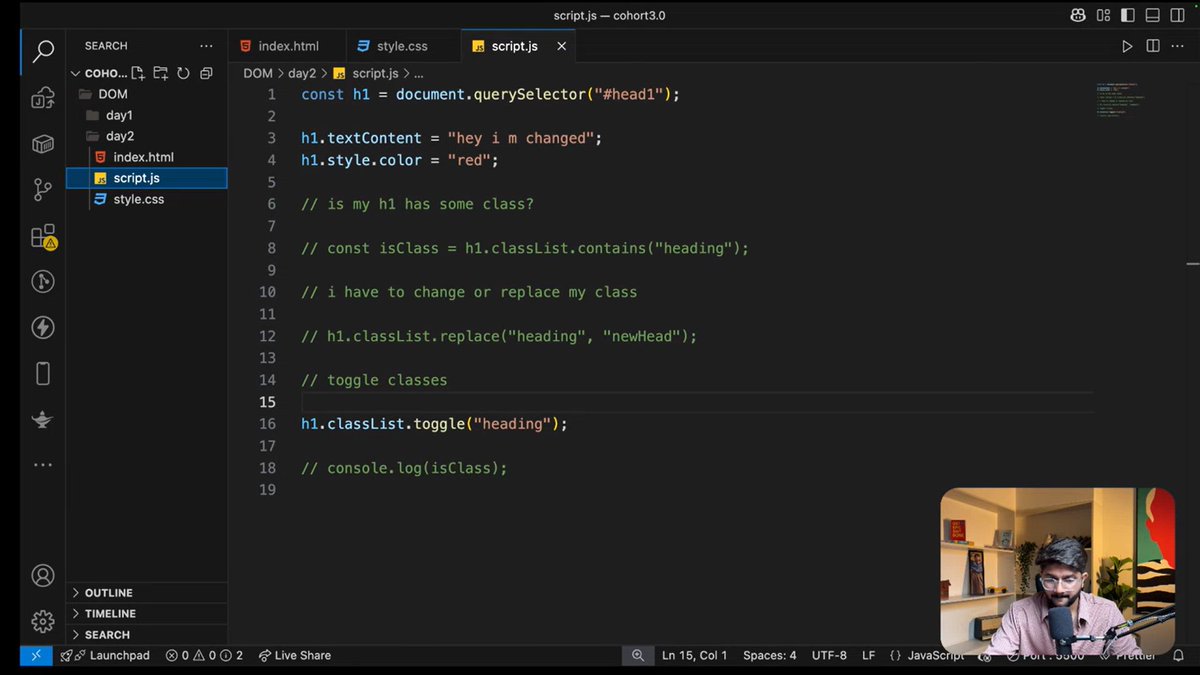
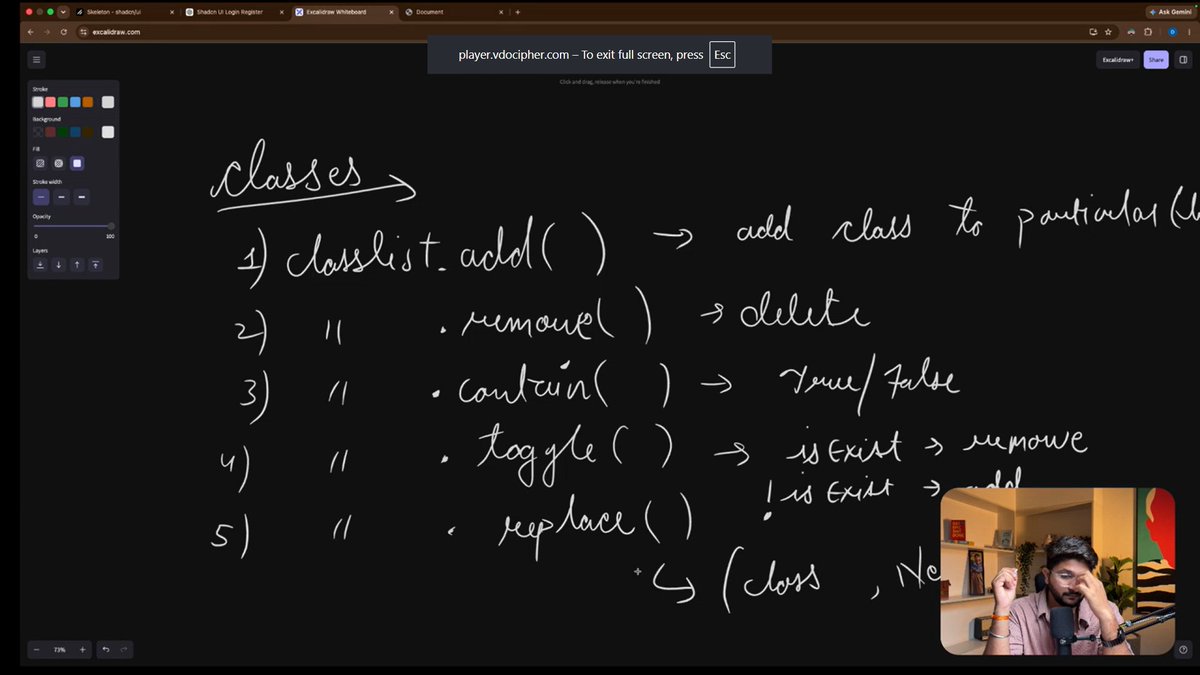
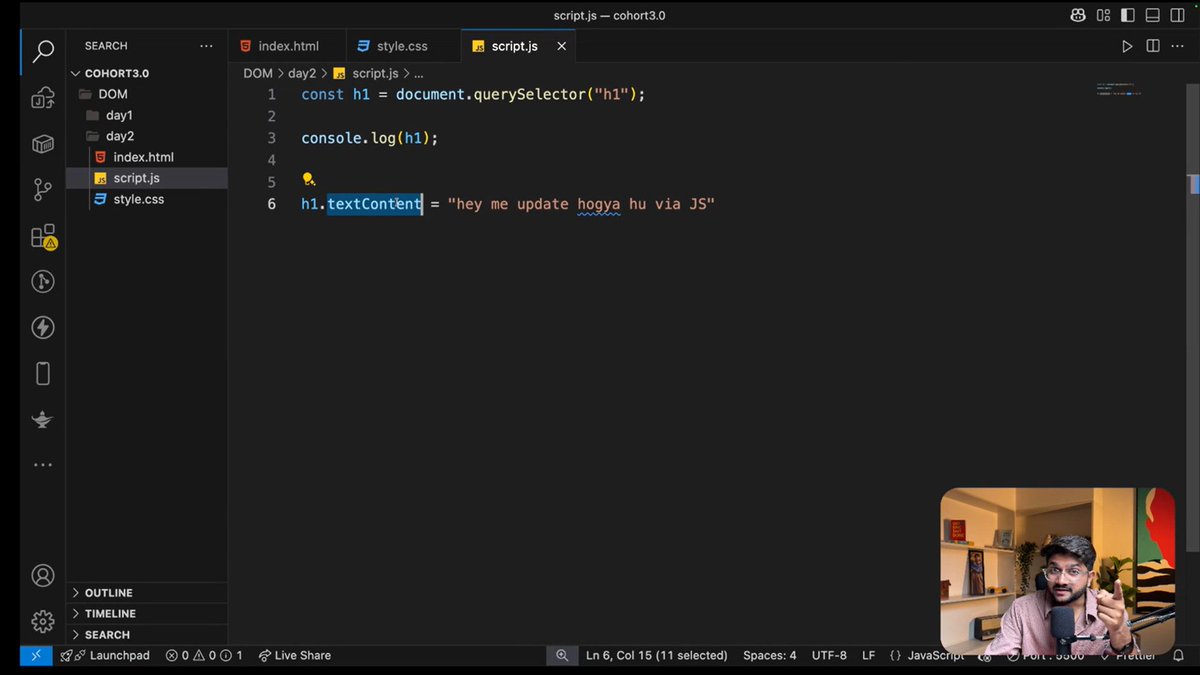
Day 25 | @sheryians_ - More about DOM and methods making more interactivity in web pages then how we can change the styles later learnt the most important event which is .addEventListener()
#Sheryians #WebDevelopment #LearningInPublic #LearningJourney #Restart #100DaysOfCoding
5

Jun 10
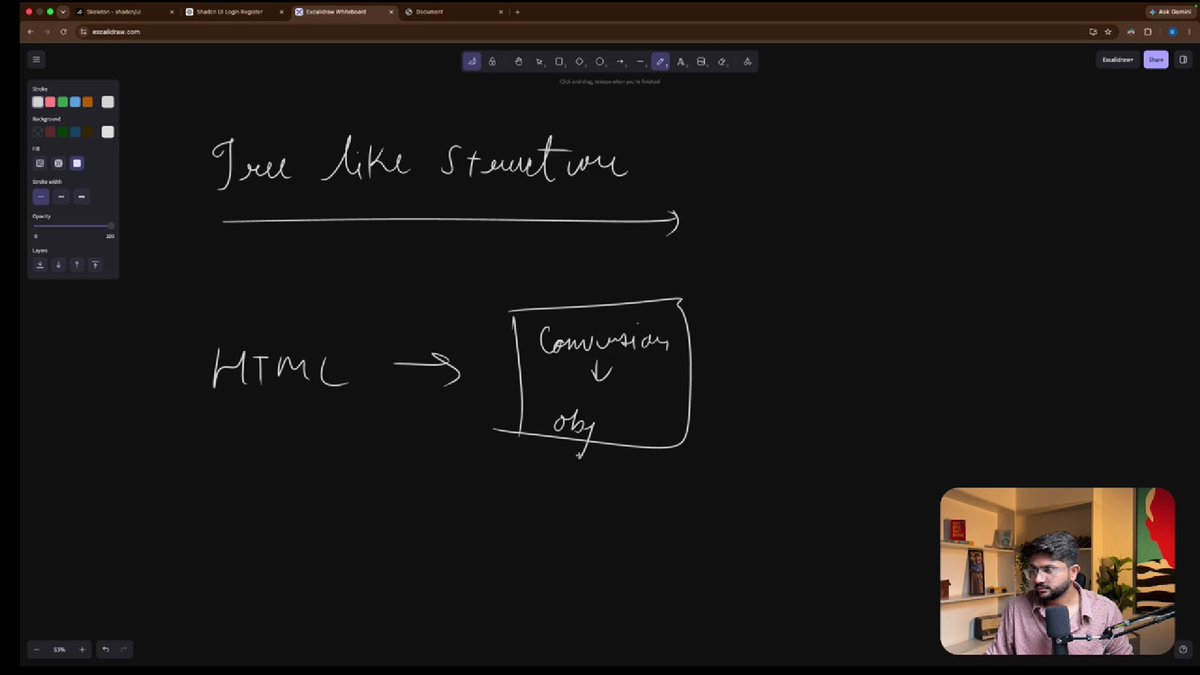
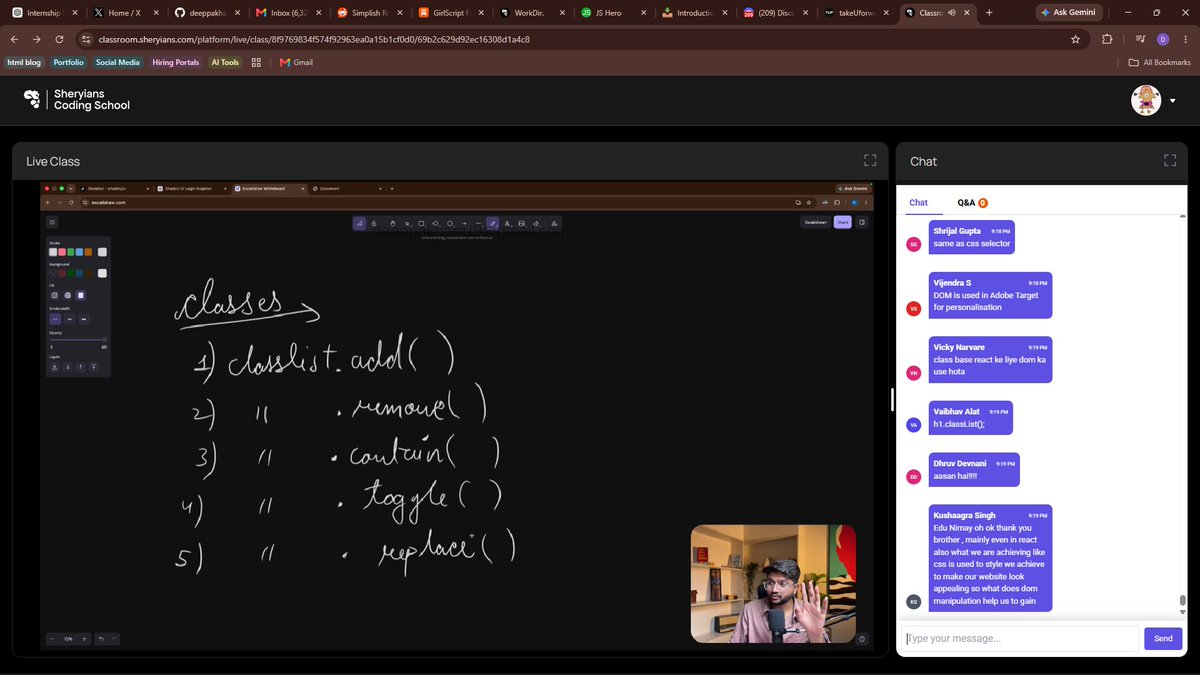
Day 29 @ @sheryians_ Coding School 🚀
Learned NodeList vs HTMLCollection, classList methods & addEventListener() ⚡💻
Built a bulb toggle example using click events & DOM manipulation 💡🔥
#sheryians #cohort3 #javascript #DOM
10

Jun 10
This also explains why addEventListener works on every DOM element, whether it's a <p>, a <button>, or an <h1>. They all share EventTarget.prototype at the top of their chain, so they all inherit addEventListener from that one place.
4
Jun 10
So when you write h1.addEventListener(...), JavaScript doesn't find it on h1 itself. It walks up through HTMLHeadingElement, HTMLElement, Element, Node and finally finds it on EventTarget.prototype which is five levels up. The same single lookup mechanism, just a longer chain.
1
10


2023-07-11 00:28:55,228 - INFO - Instabot version: 0.117.0 Started
2023-07-11 00:28:55,280 - INFO - Not yet logged in starting: PRE-LOGIN FLOW!
2023-07-11 00:28:57,691 - INFO - Logged-in successfully as 'IAMNOTABOT'!
2023-07-11 00:28:57,725 - INFO - LOGIN FLOW! Just logged-in: True
2023-07-11 00:28:58,875 - ERROR - Error checking for `feedback_required`, response text is not JSON
2023-07-11 00:28:58,880 - INFO - Full Response: <Response [404]>
2023-07-11 00:28:58,884 - INFO - Response Text: <!DOCTYPE html>
<html lang="None" class="no-js not-logged-in ">
<head>
<meta charset="utf-8">
<meta http-equiv="X-UA-Compatible" content="IE=edge">
<title>
Page Not Found • Instagram
</title>
<meta name="robots" content="noimageindex, noarchive">
<meta name="apple-mobile-web-app-status-bar-style" content="default">
<meta name="mobile-web-app-capable" content="yes">
<meta name="theme-color" content="#ffffff">
<meta id="viewport" name="viewport" content="width=device-width, initial-scale=1, minimum-scale=1, maximum-scale=1, viewport-fit=cover">
<link rel="manifest" href="/data/manifest.json">
<script type="text/javascript">
(function() {
var docElement = document.documentElement;
var classRE = new RegExp('(^|\\s)no-js(\\s|$)');
var className = docElement.className;
docElement.className = className.replace(classRE, '$1js$2');
})();
</script>
<script type="text/javascript">
(function() {
if ('PerformanceObserver' in window && 'PerformancePaintTiming' in window) {
window.__bufferedPerformance = [];
var ob = new PerformanceObserver(function(e) {
window.__bufferedPerformance.push.apply(window.__bufferedPerformance,e.getEntries());
});
ob.observe({entryTypes:['paint']});
}
window.__bufferedErrors = [];
window.onerror = function(message, url, line, column, error) {
window.__bufferedErrors.push({
message: message,
url: url,
line: line,
column: column,
error: error
});
return false;
};
window.__initialData = {
pending: true,
waiting: []
};
function asyncFetchSharedData(extra) {
var sharedDataReq = new XMLHttpRequest();
sharedDataReq.onreadystatechange = function() {
if (sharedDataReq.readyState === 4) {
if(sharedDataReq.status === 200){
var sharedData = JSON.parse(sharedDataReq.responseText);
window.__initialDataLoaded(sharedData, extra);
}
}
}
sharedDataReq.open('GET', '/data/shared_data/', true);
sharedDataReq.send(null);
}
function notifyLoaded(item, data) {
item.pending = false;
item.data = data;
for (var i = 0;i < item.waiting.length; i) {
item.waiting[i].resolve(item.data);
}
item.waiting = [];
}
function notifyError(item, msg) {
item.pending = false;
item.error = new Error(msg);
for (var i = 0;i < item.waiting.length; i) {
item.waiting[i].reject(item.error);
}
item.waiting = [];
}
window.__initialDataLoaded = function(initialData, extraData) {
if (extraData) {
for (var key in extraData) {
initialData[key] = extraData[key];
}
}
notifyLoaded(window.__initialData, initialData);
};
window.__initialDataError = function(msg) {
notifyError(window.__initialData, msg);
};
window.__additionalData = {};
window.__pendingAdditionalData = function(paths) {
for (var i = 0;i < paths.length; i) {
window.__additionalData[paths[i]] = {
pending: true,
waiting: []
};
}
};
window.__additionalDataLoaded = function(path, data) {
if (path in window.__additionalData) {
notifyLoaded(window.__additionalData[path], data);
} else {
console.error('Unexpected additional data loaded "' path '"');
}
};
window.__additionalDataError = function(path, msg) {
if (path in window.__additionalData) {
notifyError(window.__additionalData[path], msg);
} else {
console.error('Unexpected additional data encountered an error "' path '": ' msg);
}
};
})();
</script><script type="text/javascript">
/*
Copyright 2018 Google Inc. All Rights Reserved.
Licensed under the Apache License, Version 2.0 (the "License");
you may not use this file except in compliance with the License.
You may obtain a copy of the License at
apache.org/licenses/LICENSE-…
Unless required by applicable law or agreed to in writing, software
distributed under the License is distributed on an "AS IS" BASIS,
WITHOUT WARRANTIES OR CONDITIONS OF ANY KIND, either express or implied.
See the License for the specific language governing permissions and
limitations under the License.
*/
(function(){function g(a,c){b||(b=a,f=c,h.forEach(function(a){removeEventListener(a,l,e)}),m())}function m(){b&&f&&0<d.length&&(d.forEach(function(a){a(b,f)}),d=[])}function n(a,c){function k(){g(a,c);d()}function b(){d()}function d(){removeEventListener("pointerup",k,e);removeEventListener("pointercancel",b,e)}addEventListener("pointerup",k,e);addEventListener("pointercancel",b,e)}function l(a){if(a.cancelable){var c=performance.now(),b=a.timeStamp;b>c&&(c= new Date);c-=b;"pointerdown"==a.type?n(c,
a):g(c,a)}}var e={passive:!0,capture:!0},h=["click","mousedown","keydown","touchstart","pointerdown"],b,f,d=[];h.forEach(function(a){addEventListener(a,l,e)});window.perfMetrics=window.perfMetrics||{};window.perfMetrics.onFirstInputDelay=function(a){d.push(a);m()}})();
</script>
<link rel="apple-touch-icon-precomposed" sizes="76x76" href="/static/images/ico/apple-touch-icon-76x76-precomposed.png/666282be8229.png">
<link rel="apple-touch-icon-precomposed" sizes="120x120" href="/static/images/ico/apple-touch-icon-120x120-precomposed.png/8a5bd3f267b1.png">
<link rel="apple-touch-icon-precomposed" sizes="152x152" href="/static/images/ico/apple-touch-icon-152x152-precomposed.png/68193576ffc5.png">
<link rel="apple-touch-icon-precomposed" sizes="167x167" href="/static/images/ico/apple-touch-icon-167x167-precomposed.png/4985e31c9100.png">
<link rel="apple-touch-icon-precomposed" sizes="180x180" href="/static/images/ico/apple-touch-icon-180x180-precomposed.png/c06fdb2357bd.png">
<link rel="icon" sizes="192x192" href="/static/images/ico/favicon-192.png/68d99ba29cc8.png">
<link rel="shortcut icon" type="image/x-icon" href="/static/images/ico/favicon.ico/36b3ee2d91ed.ico">
<style type="text/css">/*
@generated
* DO NOT CHANGE THIS FILE. Instead, modify the non-build version of "main.css"
* then run "yolo css"
*/
body{-webkit-font-smoothing:antialiased;background-color:#fafafa;font-family:-apple-system,BlinkMacSystemFont,"Segoe UI",Roboto,Helvetica,Arial,sans-serif;margin:0}.client-root{font-size:14px}a{text-decoration:none}.-cx-PRIVATE-Page__body__,.-cx-PRIVATE-Page__main__,.-cx-PRIVATE-Page__root__{display:-webkit-box;display:-webkit-flex;display:-ms-flexbox;display:flex;-webkit-box-orient:vertical;-webkit-box-direction:normal;-webkit-flex-direction:column;-ms-flex-direction:column;flex-direction:column}.-cx-PRIVATE-Page__root__{height:100vh}.-cx-PRIVATE-Page__body__,.-cx-PRIVATE-Page__main__{-webkit-box-flex:1;-webkit-flex:1 0 auto;-ms-flex:1 0 auto;flex:1 0 auto}.-cx-PRIVATE-Page__main__{margin-top:137px;position:relative}
@media
screen and (max-width:990px){.-cx-PRIVATE-Page__main__{display:block;margin-top:0}}.-cx-PRIVATE-NavBar__root__{background-color:#fff;border-bottom:1px solid #efefef;height:77px;position:fixed;top:0;width:100%;z-index:100}.-cx-PRIVATE-NavBar__profilePic__{display:none}.-cx-PRIVATE-NavBar__username__{color:#003569;display:inline!important;float:right;font-weight:400;margin-right:2px;margin-top:12px}.-cx-PRIVATE-NavBar__signIn__{display:inline-block;float:right;margin-right:2px;margin-top:12px}.-cx-PRIVATE-NavBar__signInText__{color:#003569;font-weight:400}.-cx-PRIVATE-NavBar__logo__{background-image:url(/static/images/branding/logoWhiteoutLockup.png/3a62b1a95da3.png);background-size:100%;height:35px;left:16px;position:absolute;text-indent:-9999em;top:6px;width:176px}.-cx-PRIVATE-NavBar__logo__ a{display:block;height:100%;width:100%}
@media
screen and (-webkit-min-device-pixel-ratio:1.5),screen and (min-resolution:1.5dppx){.-cx-PRIVATE-NavBar__logo__{background-image:url(/static/images/branding/logoWhiteoutLockup@2x.png/43608c988939.png)}}.-cx-PRIVATE-NavBar__logoGroup__{left:16px;position:absolute;top:6px}.-cx-PRIVATE-NavBar__logoGroup__ .-cx-PRIVATE-NavBar__logo__{position:static}.-cx-PRIVATE-NavBar__wrapper__{margin:0 auto;max-width:1026px;padding:0 16px;position:relative}.-cx-PRIVATE-NavBar__topBarActions__,.-cx-PRIVATE-SidebarLayout__content__ li{list-style:none}.-cx-PRIVATE-NavBar__dropdown__,.-cx-PRIVATE-NavBar__topBarLeft__,.-cx-PRIVATE-SidebarLayout__content__ .separator,.-cx-PRIVATE-SidebarLayout__content__ .subtitle{display:none}.-cx-PRIVATE-SidebarLayout__content__{border-right:1px solid #efefef;height:100%;width:220px}.-cx-PRIVATE-SidebarLayout__content__ ul{margin:0;padding:0}
@media
screen and (max-width:990px){.-cx-PRIVATE-SidebarLayout__content__{margin:0 px;border:0;width:100%}.-cx-PRIVATE-SidebarLayout__content__ ul{display:none}}.-cx-PRIVATE-SidebarLayout__root__{-webkit-box-sizing:border-box;box-sizing:border-box;height:100%;pointer-events:none;position:absolute;width:100%;z-index:1}
@media
screen and (max-width:990px){.-cx-PRIVATE-SidebarLayout__root__{height:auto;padding-bottom:0;padding-top:78px;position:static}}.-cx-PRIVATE-SidebarLayout__contentWrapper__,.-cx-PRIVATE-SidebarLayout__navWrapper__{-webkit-box-flex:1;-webkit-flex:1 0 auto;-ms-flex:1 0 auto;flex:1 0 auto;margin:0 auto;position:relative;width:992px}
@media
screen and (min-width:991px){.-cx-PRIVATE-SidebarLayout__navWrapper__{height:100%}}
@media
screen and (max-width:990px){.-cx-PRIVATE-SidebarLayout__navWrapper__{-webkit-box-sizing:border-box;box-sizing:border-box;display:inline-block;height:auto;min-height:0;padding:0;width:100%}}.-cx-PRIVATE-SidebarLayout__nav__{float:left;height:100%;padding-right:0;pointer-events:initial;width:256px}
@media
screen and (max-width:990px){.-cx-PRIVATE-SidebarLayout__nav__{float:none;display:block;margin:0!important;background:0 0;border:0;width:100%}}.-cx-PRIVATE-SidebarLayout__contentWrapper__{background-color:#fff;border:1px solid #efefef;-webkit-box-sizing:border-box;box-sizing:border-box;padding:0 16px 20px}
@media
screen and (min-width:991px){.-cx-PRIVATE-SidebarLayout__contentWrapper__{border:1px solid #efefef;border-radius:3px}}
@media
screen and (max-width:990px){.-cx-PRIVATE-SidebarLayout__contentWrapper__{width:100%;-webkit-box-sizing:border-box;box-sizing:border-box}.-cx-PRIVATE-SidebarLayout__pageContent__ .-cx-PRIVATE-SidebarLayout__contentWrapper__{padding:0 10px}}.-cx-PRIVATE-SidebarLayout__pageContent__{color:#262626;margin-left:205px;padding:30px 50px}
@media
screen and (max-width:990px){.-cx-PRIVATE-SidebarLayout__pageContent__{margin-left:0;margin-right:0;padding:20px 0}}.-cx-PRIVATE-SidebarLayout__pageContent__>:first-child{margin-top:0}.-cx-PRIVATE-SidebarLayout__pageContent__ a{color:#003569}.-cx-PRIVATE-SidebarLayout__pageContent__ h1{font-size:32px;font-weight:400;margin-bottom:20px;margin-top:28px}.-cx-PRIVATE-SidebarLayout__pageContent__ h2{font-size:24px;font-weight:400;margin-bottom:12px;margin-top:28px}.-cx-PRIVATE-SidebarLayout__pageContent__ h3{font-weight:600;margin-bottom:12px;margin-top:28px}.-cx-PRIVATE-SidebarLayout__pageContent__ li{padding-left:8px}.-cx-PRIVATE-SidebarLayout__pageContent__ li:not(:first-child){margin-top:8px}.-cx-PRIVATE-SidebarLayout__pageContent__ pre{white-space:pre-wrap}.-cx-PRIVATE-Navigation__header__{color:#999;font-size:16px;font-weight:initial;margin:0;padding:16px;text-transform:uppercase}
@media
screen and (max-width:990px){.-cx-PRIVATE-Navigation__header__:first-child{display:block}.-cx-PRIVATE-Navigation__header__:not(:first-child){display:none}.-cx-PRIVATE-Navigation__header__ i{float:left;width:22px;height:18px;margin-right:8px;margin-left:10px;background:url(/static/images/glyphs/disclosure-down@2x.png/9ae8409fbb3a.png) no-repeat center;background-size:14px 14px}.-cx-PRIVATE-SidebarLayout__content__.active .-cx-PRIVATE-Navigation__header__ i{-webkit-transform:rotate(180deg);transform:rotate(180deg)}}.-cx-PRIVATE-Navigation__navLink__,.-cx-PRIVATE-Navigation__navLink__:active,.-cx-PRIVATE-Navigation__navLink__:hover,.-cx-PRIVATE-Navigation__navLink__:visited{border-left:2px solid transparent;-webkit-box-sizing:border-box;box-sizing:border-box;color:#262626;font-size:16px;display:block;padding:16px 16px 16px 30px;width:100%}.-cx-PRIVATE-Navigation__navLink__:hover{border-left-color:#dbdbdb}.-cx-PRIVATE-Navigation__active__ .-cx-PRIVATE-Navigation__navLink__{border-left-color:#262626;font-weight:600}.-cx-PRIVATE-Footer__root__{font-size:12px;height:77px}.-cx-PRIVATE-Footer__copyright__{color:#262626;display:inline-block;float:right;font-weight:600;margin-top:20px;text-transform:uppercase}.-cx-PRIVATE-Footer__nav__{display:inline-block}
@media
screen and (max-width:990px){.-cx-PRIVATE-Footer__copyright__{text-align:center;width:100%}}.-cx-PRIVATE-Footer__navItems__{margin:20px 0;padding:0;text-align:center}.-cx-PRIVATE-Footer__navItems__ li{display:inline-block;list-style:none}.-cx-PRIVATE-Footer__navItems__ li:not(:first-child){margin-left:15px}.-cx-PRIVATE-Footer__navItems__ a,.-cx-PRIVATE-Footer__navItems__ a:active,.-cx-PRIVATE-Footer__navItems__ a:focus,.-cx-PRIVATE-Footer__navItems__ a:hover,.-cx-PRIVATE-Footer__navItems__ a:visited{color:#003569;font-weight:600;text-transform:uppercase}.-cx-PRIVATE-Footer__wrapper__{margin-left:auto;margin-right:auto;max-width:1026px;padding:0 20px}.-cx-PRIVATE-ErrorPage__errorContainer__{text-align:center}
@media
(max-width:990px){.-cx-PRIVATE-ErrorPage__errorContainer__{padding:100px 40px 0}}.-cx-PRIVATE-ErrorPage__errorContainer__ a,.-cx-PRIVATE-ErrorPage__errorContainer__ a:visited{color:#003569}.-cx-PRIVATE-Linkshim__followLink__{background-color:#fff;color:#3897f0;border:1px solid #3897f0;border-radius:3px;display:inline-block;-webkit-box-sizing:border-box;box-sizing:border-box;text-align:center;padding:8px;font:inherit;font-weight:700;width:90%}
@media
(min-width:736px){.-cx-PRIVATE-Linkshim__followLink__{width:10%}}.-cx-PRIVATE-Linkshim__followLink__:active{opacity:.5}.-cx-PRIVATE-Linkshim__followLink__:focus{color:#1372cc;border:1px solid #1372cc}.-cx-PRIVATE-GatedContentPage__userAvatarContainer__{height:70px;text-align:center}.-cx-PRIVATE-GatedContentPage__userAvatar__{border-radius:50%;height:100%;width:auto}</style>
<script type="text/javascript" src="/static/scripts/jquery.js/a4e77326039e.js" crossorigin="anonymous"></script>
<script type="text/javascript" src="/static/scripts/bluebar.js/203583927eba.js" crossorigin="anonymous"></script>
</head>
<body class=" p-error dialog-404" style="">
<div class="root -cx-PRIVATE-Page__root -cx-PRIVATE-Page__root__">
<div class="page -cx-PRIVATE-Page__body -cx-PRIVATE-Page__body__">
<header class="top-bar top-bar-new -cx-PRIVATE-NavBar__root -cx-PRIVATE-NavBar__root__">
<div class="top-bar-wrapper -cx-PRIVATE-NavBar__wrapper -cx-PRIVATE-NavBar__wrapper__">
<div class="logo -cx-PRIVATE-NavBar__logo -cx-PRIVATE-NavBar__logo__"><a href="/">Instagram</a></div>
<div class="top-bar-left -cx-PRIVATE-NavBar__topBarLeft -cx-PRIVATE-NavBar__topBarLeft__">
<ul class="top-bar-actions">
<li>
<a class="top-bar-home" href="/" label=Home><i></i></a>
</li>
</ul>
</div>
<div class="top-bar-right account-state" id="top_bar_right">
<ul class="top-bar-actions -cx-PRIVATE-NavBar__topBarActions -cx-PRIVATE-NavBar__topBarActions__">
<li id="link_profile" class="link-signin -cx-PRIVATE-NavBar__signIn -cx-PRIVATE-NavBar__signIn__">
<a href="/accounts/login/" class="loginLink">
<i></i>
<strong class="-cx-PRIVATE-NavBar__signInText -cx-PRIVATE-NavBar__signInText__">Log in</strong>
</a>
</li>
</ul>
</div>
</div>
</header> <!-- .top-bar -->
<div class="main -cx-PRIVATE-Page__main -cx-PRIVATE-Page__main__">
<div class="error-container -cx-PRIVATE-ErrorPage__errorContainer -cx-PRIVATE-ErrorPage__errorContainer__">
<h2>Sorry, this page isn't available.</h2>
<p>
The link you followed may be broken, or the page may have been removed.
<a href="/">Go back to Instagram.</a>
</p>
</div>
</div> <!-- .main -->
</div> <!-- .page -->
<footer class="page-footer -cx-PRIVATE-Footer__root -cx-PRIVATE-Footer__root__" role="contentinfo">
<div class="wrapper -cx-PRIVATE-Footer__wrapper -cx-PRIVATE-Footer__wrapper__">
<nav class="-cx-PRIVATE-Footer__nav -cx-PRIVATE-Footer__nav__">
<ul class="-cx-PRIVATE-Footer__navItems -cx-PRIVATE-Footer__navItems__">
<li><a href="/about/us/">About us</a></li>
<li><a href="help.instagram.com">Support</a></li>
<li><a href="about.instagram.com/blog/">Press</a></li>
<li><a href="">API</a></li>
<li><a href="about.instagram.com/about-us…">Jobs</a></li>
<li><a href="/legal/privacy/">Privacy</a></li>
<li><a href="/legal/terms/">
Terms
</a></li>
</ul>
</nav>
<p class="copyright -cx-PRIVATE-Footer__copyright -cx-PRIVATE-Footer__copyright__">© 2023 Instagram</p>
</div>
</footer>
<div id="reactModalMountPoint"></div>
</div> <!-- .root -->
<script type="text/javascript">
(function(){
function normalizeError(err) {
var errorInfo = err.error || {};
var getConfigProp = function(propName, defaultValueIfNotTruthy) {
var propValue = window._sharedData && window._sharedData[propName];
return propValue ? propValue : defaultValueIfNotTruthy;
};
var windowUrl = window.location.href;
var errUrl = err.url || windowUrl;
return {
line: err.line || errorInfo.message || 0,
column: err.column || 0,
name: 'InitError',
message: err.message || errorInfo.message || '',
script: errorInfo.script || '',
stack: errorInfo.stackTrace || errorInfo.stack || '',
timestamp: Date.now(),
ref: windowUrl.indexOf('direct') >= 0 ? 'direct' : windowUrl,
deployment_stage: getConfigProp('deployment_stage', ''),
frontend_env: getConfigProp('frontend_env', 'prod'),
rollout_hash: getConfigProp('rollout_hash', ''),
is_prerelease: window.__PRERELEASE__ || false,
bundle_variant: getConfigProp('bundle_variant', null),
request_url: errUrl.indexOf('direct') >= 0 ? 'direct' : errUrl,
response_status_code: errorInfo.statusCode || 0
}
}
window.addEventListener('load', function(){
if (window.__bufferedErrors && window.__bufferedErrors.length) {
if (window.caches && window.caches.keys && window.caches.delete) {
window.caches.keys().then(function(keys) {
keys.forEach(function(key) {
window.caches.delete(key)
})
})
}
window.__bufferedErrors.map(function(error) {
return normalizeError(error)
}).forEach(function(normalizedError) {
var request = new XMLHttpRequest();
request.open('POST', '/client_error/', true);
request.setRequestHeader('Content-Type', 'application/json; charset=utf-8');
request.send(JSON.stringify(normalizedError));
})
}
})
}());
</script>
</body>
</html>
2023-07-11 00:28:59,010 - ERROR - Error unknown send request
2023-07-11 00:29:05,859 - ERROR - Error checking for `feedback_required`, response text is not JSON
2023-07-11 00:29:05,878 - INFO - Full Response: <Response [404]>
2023-07-11 00:29:05,882 - INFO - Response Text: <!DOCTYPE html>
<html lang="None" class="no-js not-logged-in ">
<head>
<meta charset="utf-8">
<meta http-equiv="X-UA-Compatible" content="IE=edge">
<title>
Page Not Found • Instagram
</title>
<meta name="robots" content="noimageindex, noarchive">
<meta name="apple-mobile-web-app-status-bar-style" content="default">
<meta name="mobile-web-app-capable" content="yes">
<meta name="theme-color" content="#ffffff">
<meta id="viewport" name="viewport" content="width=device-width, initial-scale=1, minimum-scale=1, maximum-scale=1, viewport-fit=cover">
<link rel="manifest" href="/data/manifest.json">
<script type="text/javascript">
(function() {
var docElement = document.documentElement;
var classRE = new RegExp('(^|\\s)no-js(\\s|$)');
var className = docElement.className;
docElement.className = className.replace(classRE, '$1js$2');
})();
</script>
<script type="text/javascript">
(function() {
if ('PerformanceObserver' in window && 'PerformancePaintTiming' in window) {
window.__bufferedPerformance = [];
var ob = new PerformanceObserver(function(e) {
window.__bufferedPerformance.push.apply(window.__bufferedPerformance,e.getEntries());
});
ob.observe({entryTypes:['paint']});
}
window.__bufferedErrors = [];
window.onerror = function(message, url, line, column, error) {
window.__bufferedErrors.push({
message: message,
url: url,
line: line,
column: column,
error: error
});
return false;
};
window.__initialData = {
pending: true,
waiting: []
};
function asyncFetchSharedData(extra) {
var sharedDataReq = new XMLHttpRequest();
sharedDataReq.onreadystatechange = function() {
if (sharedDataReq.readyState === 4) {
if(sharedDataReq.status === 200){
var sharedData = JSON.parse(sharedDataReq.responseText);
window.__initialDataLoaded(sharedData, extra);
}
}
}
sharedDataReq.open('GET', '/data/shared_data/', true);
sharedDataReq.send(null);
}
function notifyLoaded(item, data) {
item.pending = false;
item.data = data;
for (var i = 0;i < item.waiting.length; i) {
item.waiting[i].resolve(item.data);
}
item.waiting = [];
}
function notifyError(item, msg) {
item.pending = false;
item.error = new Error(msg);
for (var i = 0;i < item.waiting.length; i) {
item.waiting[i].reject(item.error);
}
item.waiting = [];
}
window.__initialDataLoaded = function(initialData, extraData) {
if (extraData) {
for (var key in extraData) {
initialData[key] = extraData[key];
}
}
I AM NOT A BOT
1
1
734
けんじ@鳥海山近くでWeb制作 retweeted

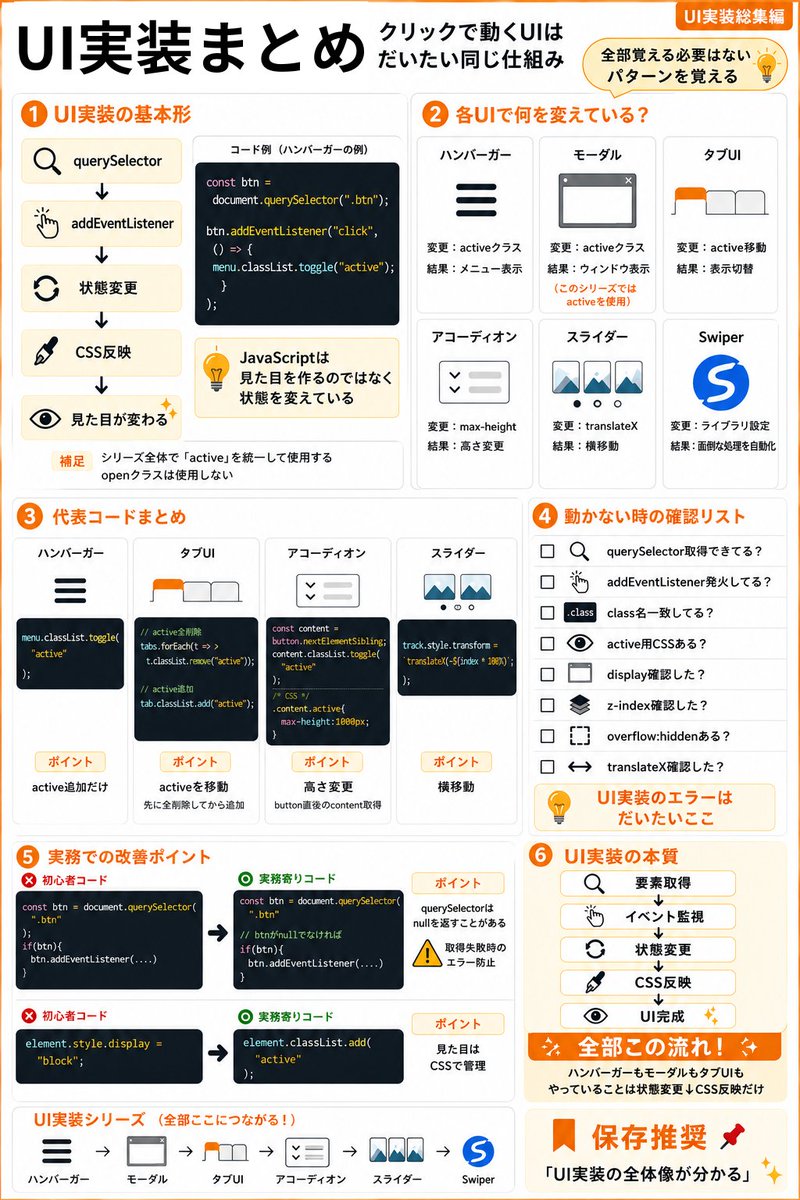
ハンバーガー
モーダル
タブUI
アコーディオン
スライダー
全部別の技術だと思っていませんか?
実はやっていることはほぼ同じです。
querySelector
↓
addEventListener
↓
状態変更
↓
CSS反映
違うのはactive切替・高さ変更・横移動
などの部分だけ。
UI実装シリーズで学んだ内容をまとめました💻
4
27
891

Jun 8
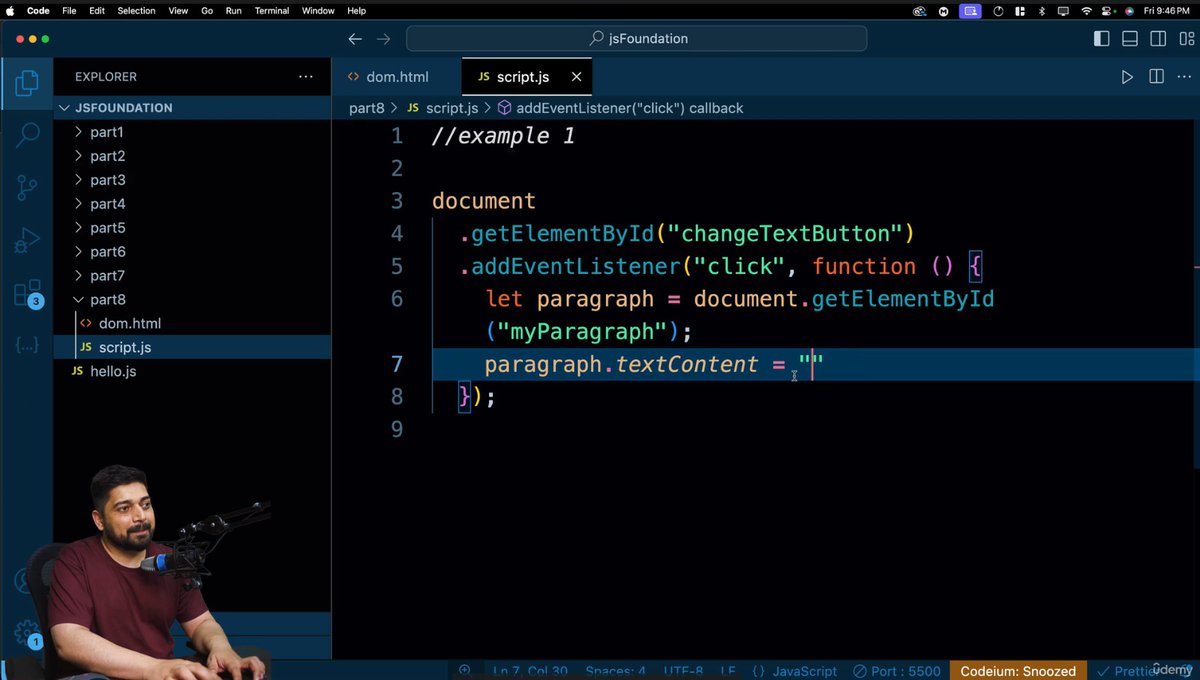
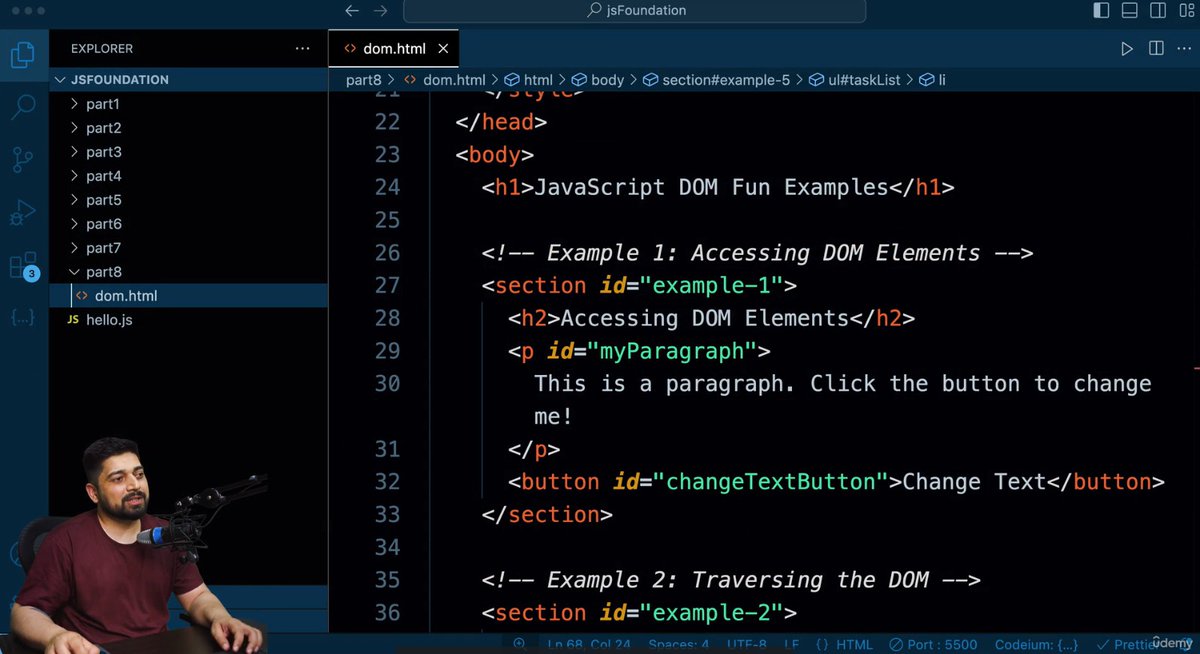
Day 01 🚀
Learned DOM Manipulation in JavaScript from Hitesh Choudhary.
✅ Element selection
✅ DOM updates
✅ Event handling with addEventListener()
Building interactive web pages one step at a time.#javascript #100DaysofCode
1
3
40
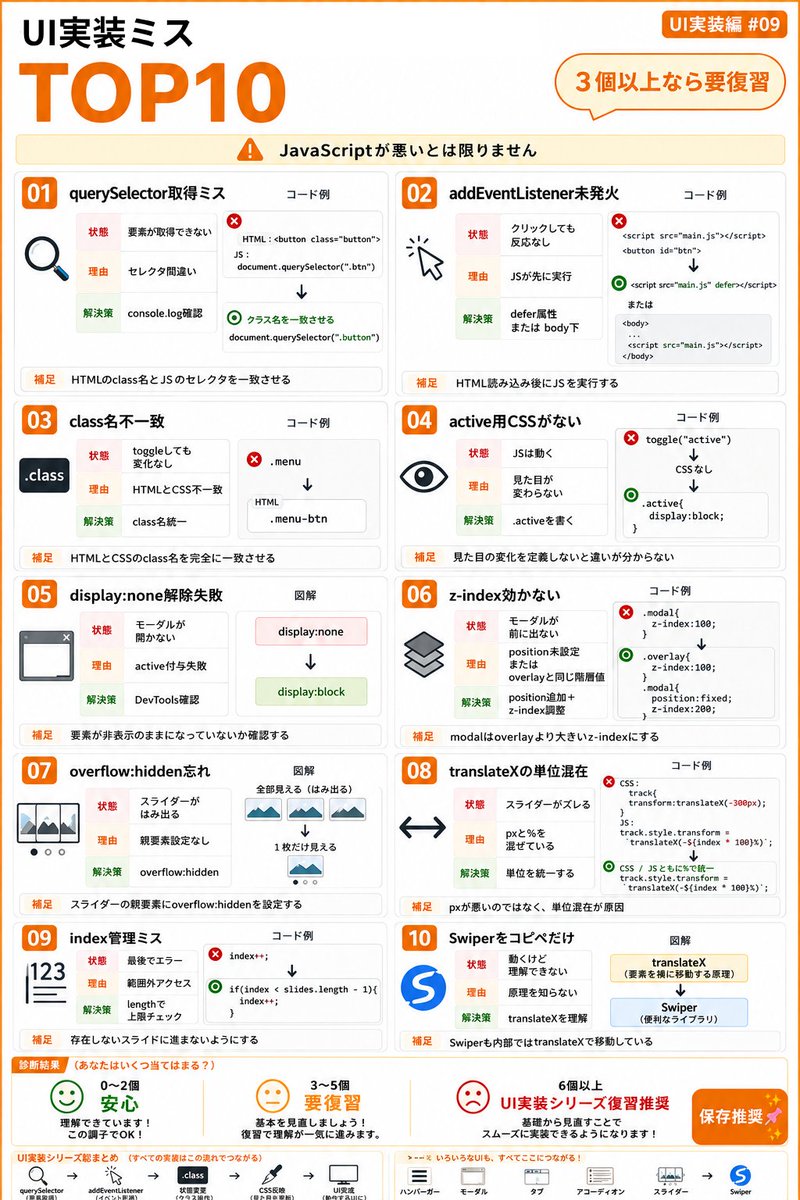
UI実装で
「クリックしても動かない…」
となったことありませんか❓
実はその原因
JavaScriptそのものではなく
✔ querySelector取得ミス
✔ addEventListener未発火
✔ class名不一致
✔ active用CSS不足
✔ z-index設定ミス
などの基本的な見落としが多いです。
3つ以上当てはまったら要復習⚠️
2
22
807

<!doctype html>
<html lang="ja">
<head>
<meta charset="utf-8">
<meta name="viewport" content="width=device-width, initial-scale=1">
<title>Link Leg Calculator</title>
<style>
:root {
color-scheme: light;
--bg: #f4f6f8;
--panel: #ffffff;
--ink: #1c2430;
--muted: #657184;
--line: #d6dde6;
--accent: #0f766e;
--accent-weak: #d8f3ee;
--danger: #b42318;
--shadow: 0 12px 32px rgba(28, 36, 48, 0.12);
}
* {
box-sizing: border-box;
}
body {
margin: 0;
min-height: 100vh;
font-family: "Segoe UI", "Yu Gothic UI", Meiryo, sans-serif;
color: var(--ink);
background: var(--bg);
}
.app {
display: grid;
grid-template-columns: 340px minmax(0, 988px);
justify-content: center;
min-height: 100vh;
gap: 18px;
padding: 18px;
}
aside {
background: var(--panel);
border: 1px solid var(--line);
border-radius: 8px;
padding: 22px;
overflow: auto;
box-shadow: var(--shadow);
}
main {
display: grid;
grid-template-rows: auto 1fr;
min-width: 0;
gap: 16px;
}
h1 {
margin: 0 0 6px;
font-size: 22px;
line-height: 1.25;
letter-spacing: 0;
}
.note {
margin: 0 0 18px;
color: var(--muted);
font-size: 13px;
line-height: 1.55;
}
.controls {
display: grid;
gap: 14px;
}
.control {
display: grid;
gap: 6px;
padding-bottom: 12px;
border-bottom: 1px solid var(--line);
}
.control label {
display: flex;
justify-content: space-between;
gap: 12px;
font-size: 13px;
font-weight: 650;
}
.control span {
color: var(--muted);
font-weight: 500;
}
.row {
display: grid;
grid-template-columns: 1fr 94px;
gap: 10px;
align-items: center;
}
input[type="range"] {
width: 100%;
accent-color: var(--accent);
}
input[type="number"] {
width: 100%;
min-height: 34px;
border: 1px solid var(--line);
border-radius: 6px;
padding: 6px 8px;
color: var(--ink);
font: inherit;
text-align: right;
background: #fff;
}
.segmented {
display: grid;
grid-template-columns: 1fr 1fr;
border: 1px solid var(--line);
border-radius: 8px;
overflow: hidden;
}
.segmented button {
min-height: 36px;
border: 0;
background: #fff;
color: var(--ink);
font: inherit;
cursor: pointer;
}
.segmented button button {
border-left: 1px solid var(--line);
}
.segmented button.active {
background: var(--accent);
color: white;
font-weight: 700;
}
.result {
display: grid;
grid-template-columns: repeat(4, minmax(0, 1fr));
gap: 10px;
}
.metric {
background: var(--panel);
border: 1px solid var(--line);
border-radius: 8px;
padding: 12px;
box-shadow: var(--shadow);
}
.metric div {
color: var(--muted);
font-size: 12px;
margin-bottom: 5px;
}
.metric strong {
display: block;
font-size: 20px;
line-height: 1.2;
overflow-wrap: anywhere;
}
.stage {
height: 728px;
background: var(--panel);
border: 1px solid var(--line);
border-radius: 8px;
box-shadow: var(--shadow);
overflow: hidden;
position: relative;
}
.view-tools {
position: absolute;
top: 12px;
right: 12px;
display: flex;
gap: 6px;
z-index: 2;
}
.view-tools button {
width: 34px;
height: 34px;
border: 1px solid var(--line);
border-radius: 6px;
background: rgba(255, 255, 255, 0.92);
color: var(--ink);
font: 700 16px/1 "Segoe UI", sans-serif;
cursor: pointer;
box-shadow: 0 3px 10px rgba(28, 36, 48, 0.12);
}
.view-tools button:hover {
background: #fff;
border-color: var(--accent);
}
canvas {
display: block;
width: 100%;
height: 100%;
cursor: grab;
user-select: none;
touch-action: none;
}
canvas.dragging {
cursor: grabbing;
}
.status {
min-height: 22px;
margin-top: 14px;
color: var(--danger);
font-size: 13px;
line-height: 1.45;
}
.formula {
margin-top: 16px;
padding: 12px;
border-radius: 8px;
background: var(--accent-weak);
color: #143f3a;
font-size: 13px;
line-height: 1.55;
}
@media (max-width: 900px) {
.app {
grid-template-columns: 1fr;
padding: 12px;
}
aside {
border: 1px solid var(--line);
}
.result {
grid-template-columns: repeat(2, minmax(0, 1fr));
}
.stage {
height: 598px;
}
}
</style>
</head>
<body>
<div class="app">
<aside>
<h1>Link Leg Calculator</h1>
<p class="note">L3 と L4 は同じ直線上の棒として計算します。固定点 A=(x,y)、原点 O=(0,0)、入力角 theta から足先 P=(X,Y) を求めます。</p>
<div class="controls" id="controls"></div>
<div class="control" style="margin-top:14px;">
<label>交点の向き <span>L2/L3 の2解</span></label>
<div class="segmented">
<button id="sideA" type="button" class="active">解 A</button>
<button id="sideB" type="button">解 B</button>
</div>
</div>
<div class="formula">
B=(L1 cos theta, L1 sin theta)<br>
C は A 中心 L2、B 中心 L3 の円交点<br>
P = B (B - C) / L3 * L4
</div>
<div class="status" id="status"></div>
</aside>
<main>
<section class="result">
<div class="metric"><div>X</div><strong id="outX">0.000</strong></div>
<div class="metric"><div>Y</div><strong id="outY">0.000</strong></div>
</section>
<section class="stage">
<div class="view-tools">
<button id="zoomIn" type="button" title="拡大"> </button>
<button id="zoomOut" type="button" title="縮小">-</button>
<button id="resetView" type="button" title="表示位置をリセット">0</button>
</div>
<canvas id="canvas"></canvas>
</section>
</main>
</div>
<script>
const params = {
L1: { label: "L1(点O-B間)", min: 0.1, max: 300, step: 0.1, value: 120 },
L2: { label: "L2(点A-C間)", min: 0.1, max: 300, step: 0.1, value: 135 },
L3: { label: "L3(点C-B間)", min: 0.1, max: 300, step: 0.1, value: 72 },
L4: { label: "L4(点B-P間)", min: 0.1, max: 300, step: 0.1, value: 170 },
x: { label: "固定点 x", min: -250, max: 250, step: 0.1, value: -42 },
y: { label: "固定点 y", min: -250, max: 250, step: 0.1, value: 128 },
theta: { label: "theta", min: -180, max: 180, step: 0.1, value: -132, unit: "deg" },
rotation: { label: "全体回転", min: -180, max: 180, step: 0.1, value: 0, unit: "deg" }
};
const state = {
side: 1,
scale: 2.6,
panX: 0,
panY: 0,
dragging: false,
dragMode: null,
dragStartX: 0,
dragStartY: 0,
panStartX: 0,
panStartY: 0
};
const controls = document.getElementById("controls");
const canvas = document.getElementById("canvas");
const ctx = canvas.getContext("2d");
const statusEl = document.getElementById("status");
const outputs = {
X: document.getElementById("outX"),
Y: document.getElementById("outY")
};
function createControl(key, spec) {
const wrap = document.createElement("div");
wrap.className = "control";
const label = document.createElement("label");
label.htmlFor = key;
label.innerHTML = `${spec.label}<span id="${key}Value"></span>`;
const row = document.createElement("div");
row.className = "row";
const range = document.createElement("input");
range.type = "range";
range.id = key;
range.min = spec.min;
range.max = spec.max;
range.step = spec.step;
range.value = spec.value;
const number = document.createElement("input");
number.type = "number";
number.id = `${key}Number`;
number.min = spec.min;
number.max = spec.max;
number.step = spec.step;
number.value = spec.value;
function setValue(raw) {
const value = Number(raw);
if (!Number.isFinite(value)) return;
setParamValue(key, value, false);
update();
}
range.addEventListener("input", () => setValue(range.value));
number.addEventListener("input", () => setValue(number.value));
row.append(range, number);
wrap.append(label, row);
controls.append(wrap);
}
Object.entries(params).forEach(([key, spec]) => createControl(key, spec));
function setParamValue(key, value, shouldUpdate = true) {
const spec = params[key];
const min = Number(spec.min);
const max = Number(spec.max);
const clamped = Math.min(max, Math.max(min, value));
params[key].value = clamped;
const range = document.getElementById(key);
const number = document.getElementById(`${key}Number`);
if (range) range.value = String(clamped);
if (number) number.value = String(clamped);
if (shouldUpdate) update();
}
document.getElementById("sideA").addEventListener("click", () => {
state.side = 1;
document.getElementById("sideA").classList.add("active");
document.getElementById("sideB").classList.remove("active");
update();
});
document.getElementById("sideB").addEventListener("click", () => {
state.side = -1;
document.getElementById("sideB").classList.add("active");
document.getElementById("sideA").classList.remove("active");
update();
});
document.getElementById("zoomIn").addEventListener("click", () => {
setScale(state.scale * 1.15);
});
document.getElementById("zoomOut").addEventListener("click", () => {
setScale(state.scale / 1.15);
});
document.getElementById("resetView").addEventListener("click", () => {
state.scale = 2.6;
state.panX = 0;
state.panY = 0;
update();
});
canvas.addEventListener("pointerdown", event => {
state.dragging = true;
state.dragMode = getPointerTarget(event);
state.dragStartX = event.clientX;
state.dragStartY = event.clientY;
state.panStartX = state.panX;
state.panStartY = state.panY;
canvas.classList.add("dragging");
canvas.setPointerCapture(event.pointerId);
});
canvas.addEventListener("pointermove", event => {
if (!state.dragging) return;
if (state.dragMode === "pointA") {
const point = eventToWorld(event);
const localPoint = rotatePoint(point, -value("rotation"));
setParamValue("x", localPoint.x, false);
setParamValue("y", localPoint.y, false);
} else {
state.panX = state.panStartX event.clientX - state.dragStartX;
state.panY = state.panStartY event.clientY - state.dragStartY;
}
update();
});
canvas.addEventListener("pointerup", event => {
state.dragging = false;
state.dragMode = null;
canvas.classList.remove("dragging");
canvas.releasePointerCapture(event.pointerId);
});
canvas.addEventListener("pointercancel", () => {
state.dragging = false;
state.dragMode = null;
canvas.classList.remove("dragging");
});
document.addEventListener("keydown", event => {
if (event.key === " " || event.key === "=") {
setScale(state.scale * 1.15);
} else if (event.key === "-" || event.key === "_") {
setScale(state.scale / 1.15);
}
});
function setScale(nextScale) {
state.scale = Math.min(8, Math.max(0.4, nextScale));
update();
}
function eventToCanvas(event) {
const rect = canvas.getBoundingClientRect();
return {
x: event.clientX - rect.left,
y: event.clientY - rect.top,
rect
};
}
function eventToWorld(event) {
const pointer = eventToCanvas(event);
const offsetX = pointer.rect.width / 2 state.panX;
const offsetY = pointer.rect.height / 2 state.panY;
return {
x: (pointer.x - offsetX) / state.scale,
y: (offsetY - pointer.y) / state.scale
};
}
function pointToCanvas(point) {
const rect = canvas.getBoundingClientRect();
return {
x: rect.width / 2 state.panX point.x * state.scale,
y: rect.height / 2 state.panY - point.y * state.scale
};
}
function getPointerTarget(event) {
const result = solve();
const pointer = eventToCanvas(event);
const pointA = pointToCanvas(result.A);
const grabRadius = 16;
const distance = Math.hypot(pointer.x - pointA.x, pointer.y - pointA.y);
return distance <= grabRadius ? "pointA" : "pan";
}
function value(key) {
return params[key].value;
}
function rotatePoint(point, angleDeg) {
const angle = angleDeg * Math.PI / 180;
const cos = Math.cos(angle);
const sin = Math.sin(angle);
return {
x: point.x * cos - point.y * sin,
y: point.x * sin point.y * cos
};
}
function rotateResult(result) {
const angleDeg = value("rotation");
if (angleDeg === 0) return result;
const rotated = { ...result };
["O", "A", "B", "C", "P"].forEach(key => {
if (result[key]) {
rotated[key] = rotatePoint(result[key], angleDeg);
}
});
return rotated;
}
function solve(thetaOverride) {
const L1 = value("L1");
const L2 = value("L2");
const L3 = value("L3");
const L4 = value("L4");
const A = { x: value("x"), y: value("y") };
const thetaDeg = thetaOverride ?? value("theta");
const theta = thetaDeg * Math.PI / 180;
const O = { x: 0, y: 0 };
const B = {
x: L1 * Math.cos(theta),
y: L1 * Math.sin(theta)
};
const dx = B.x - A.x;
const dy = B.y - A.y;
const d = Math.hypot(dx, dy);
if (d > L2 L3) {
return rotateResult({ ok: false, message: "L2 と L3 が届きません。L2 L3 を大きくするか theta を変えてください。", O, A, B });
}
if (d < Math.abs(L2 - L3)) {
return rotateResult({ ok: false, message: "片方の円がもう片方の内側にあり、交点がありません。", O, A, B });
}
if (d === 0) {
return rotateResult({ ok: false, message: "A と B が同じ位置です。この条件では交点の向きが決まりません。", O, A, B });
}
const a = (L2 * L2 - L3 * L3 d * d) / (2 * d);
const h2 = Math.max(0, L2 * L2 - a * a);
const h = Math.sqrt(h2);
const ux = dx / d;
const uy = dy / d;
const base = {
x: A.x a * ux,
y: A.y a * uy
};
const C = {
x: base.x state.side * h * -uy,
y: base.y state.side * h * ux
};
const vx = (B.x - C.x) / L3;
const vy = (B.y - C.y) / L3;
const P = {
x: B.x vx * L4,
y: B.y vy * L4
};
return rotateResult({ ok: true, O, A, B, C, P });
}
function solveTrajectory() {
const points = [];
const minTheta = Number(params.theta.min);
const maxTheta = Number(params.theta.max);
const step = 1;
for (let theta = minTheta; theta <= maxTheta; theta = step) {
const result = solve(theta);
if (result.ok) {
points.push(result.P);
} else if (points.length && points[points.length - 1] !== null) {
points.push(null);
}
}
return points;
}
function resizeCanvas() {
const rect = canvas.getBoundingClientRect();
const dpr = window.devicePixelRatio || 1;
canvas.width = Math.max(1, Math.round(rect.width * dpr));
canvas.height = Math.max(1, Math.round(rect.height * dpr));
ctx.setTransform(dpr, 0, 0, dpr, 0, 0);
}
function drawPoint(toCanvas, point, label, color) {
const p = toCanvas(point);
ctx.fillStyle = color;
ctx.beginPath();
ctx.arc(p.x, p.y, 6, 0, Math.PI * 2);
ctx.fill();
ctx.fillStyle = "#1c2430";
ctx.font = "13px Segoe UI, sans-serif";
ctx.fillText(label, p.x 9, p.y - 9);
}
function drawLine(toCanvas, a, b, color, width) {
const pa = toCanvas(a);
const pb = toCanvas(b);
ctx.strokeStyle = color;
ctx.lineWidth = width;
ctx.lineCap = "round";
ctx.beginPath();
ctx.moveTo(pa.x, pa.y);
ctx.lineTo(pb.x, pb.y);
ctx.stroke();
}
function drawTrajectory(toCanvas, points) {
ctx.strokeStyle = "#e11d48";
ctx.lineWidth = 2;
ctx.setLineDash([6, 5]);
ctx.beginPath();
let drawing = false;
points.forEach(point => {
if (!point) {
drawing = false;
return;
}
const p = toCanvas(point);
if (!drawing) {
ctx.moveTo(p.x, p.y);
drawing = true;
} else {
ctx.lineTo(p.x, p.y);
}
});
ctx.stroke();
ctx.setLineDash([]);
}
function draw(result) {
resizeCanvas();
const rect = canvas.getBoundingClientRect();
ctx.clearRect(0, 0, rect.width, rect.height);
const scale = state.scale;
const offsetX = rect.width / 2 state.panX;
const offsetY = rect.height / 2 state.panY;
const toCanvas = p => ({ x: offsetX p.x * scale, y: offsetY - p.y * scale });
const worldLeft = -offsetX / scale;
const worldRight = (rect.width - offsetX) / scale;
const worldTop = offsetY / scale;
const worldBottom = -(rect.height - offsetY) / scale;
ctx.strokeStyle = "#eef1f5";
ctx.lineWidth = 1;
for (let x = Math.ceil(worldLeft / 50) * 50; x <= worldRight; x = 50) {
drawLine(toCanvas, { x, y: worldBottom }, { x, y: worldTop }, "#eef1f5", 1);
}
for (let y = Math.ceil(worldBottom / 50) * 50; y <= worldTop; y = 50) {
drawLine(toCanvas, { x: worldLeft, y }, { x: worldRight, y }, "#eef1f5", 1);
}
drawLine(toCanvas, { x: worldLeft, y: 0 }, { x: worldRight, y: 0 }, "#cfd7e3", 1);
drawLine(toCanvas, { x: 0, y: worldBottom }, { x: 0, y: worldTop }, "#cfd7e3", 1);
drawTrajectory(toCanvas, solveTrajectory());
drawLine(toCanvas, result.O, result.B, "#111827", 7);
if (result.ok) {
drawLine(toCanvas, result.A, result.C, "#111827", 7);
drawLine(toCanvas, result.C, result.B, "#0f766e", 7);
drawLine(toCanvas, result.B, result.P, "#0f766e", 7);
drawPoint(toCanvas, result.C, "C", "#111827");
drawPoint(toCanvas, result.P, "P", "#b42318");
}
drawPoint(toCanvas, result.O, "O", "#111827");
drawPoint(toCanvas, result.A, "A", "#111827");
drawPoint(toCanvas, result.B, "B", "#111827");
}
function update() {
Object.entries(params).forEach(([key, spec]) => {
const valueLabel = document.getElementById(`${key}Value`);
valueLabel.textContent = `${Number(spec.value).toFixed(2)} ${spec.unit || ""}`;
});
const result = solve();
statusEl.textContent = result.ok ? "" : result.message;
outputs.X.textContent = result.ok ? result.P.x.toFixed(3) : "-";
outputs.Y.textContent = result.ok ? result.P.y.toFixed(3) : "-";
draw(result);
}
window.addEventListener("resize", update);
update();
</script>
</body>
</html>
1
3
772