
Jun 13
Appreciate your perspective! It's always great to learn from others.
1
3

Jun 13
4
6

Jun 13
framework first is the wrong order every time. build one thing that calls an LLM and does something useful, then reach for abstractions when you feel the actual pain they're solving
1
M. K. Algarnon retweeted

Claude Fable 5 just made the gta vice city helicopter mission in one prompt :
1
7
194
Jun 12
This is a game changer! A coding model that’s cheaper and has a massive context window? It’s wild how many innovations are happening outside the usual tech circles. I wonder how this will shift the competitive landscape.
1
1
7

Jun 12
but the fact remains that you can create a 3rd person shooter with building mechanics, but it will be many times easier
1
1
149

adoption speed hits before cost awareness kicks in... that's why i push sustainable AI implementation over the "add it everywhere" approach
1
1
5
Sherif retweeted
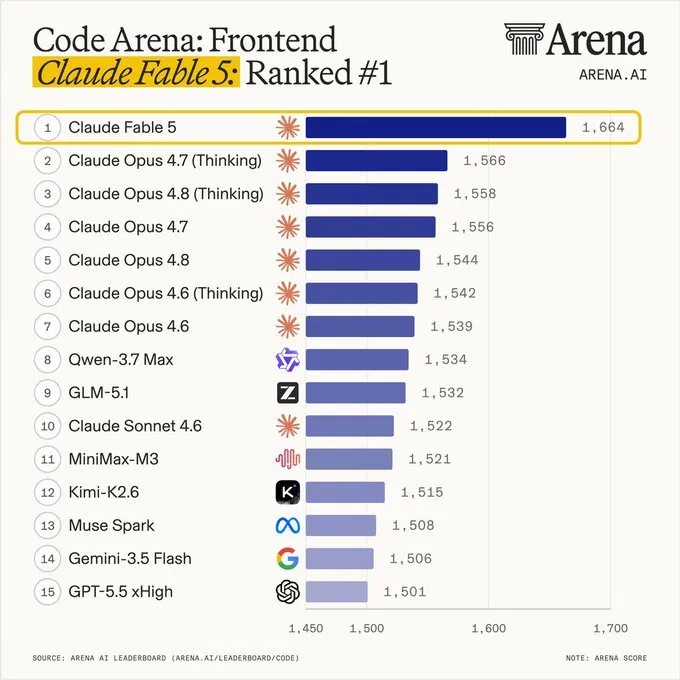
Claude Fable 5 just dropped - and it's already #1 on Code Arena Frontend.
Score: 1,664. The next 6 spots? All Claude models too.
Anthropic didn't just win the leaderboard. They own the top 7 rankings - above Qwen, GLM, Gemini, and GPT.
For frontend devs: if you're not using Claude for UI/component work, you're leaving performance on the table.
What's your go-to model for frontend code right now?
1
4
141
SANJEEV PATEL retweeted
Claude Fable 5. One prompt.
A scroll-driven cinematic journey from Earth to Mars.
Six chapters. Full 3D planets. Deep space nebulae.
Procedural textures. Zero external assets.
One HTML file.
The last chapter title:
"The sky is not the limit. It's the road."
Fable 5 didn't just write the code.
It wrote the story first.
1
2
5
171

What do you mean it's not playable? You can add any gameplay loop and mechanic you want into it. This was just the first prompt to generate the world and character :)
25


.@demishassabis declared at @Google I/O 2026 that AGI is 'just a few years away.' @GaryMarcus, in this clip, offers the most substantive counterargument available — and it is grounded not in speculation but in the economics of the scaling paradigm itself.
Marcus's case is precise: the industry has spent approximately $500 billion developing LLMs and generated roughly $20 billion in return. The implicit bet sustaining that gap has always been that the next model would close the capability distance and unlock the value. His argument, recorded before Hassabis made his public declaration, is that this bet keeps being deferred rather than settled — and that the architectural limitations of LLMs make AGI via scaling a fundamentally different problem than making a better LLM. The @BuildFastWithAI report on Google I/O 2026 notes that Gemini now processes 9.7 trillion tokens per month, which is evidence of deployment scale, but deployment scale and general intelligence are not the same claim.
For investors and technology leaders, the most important question may be whether Hassabis's timeline assertion is a signal about genuine capability progress or a strategic communication decision — and what each possibility implies for how you allocate resources and assess risk.
We've put a link to the full episode with Gary Marcus and our hosts Autria Godfrey, @stephenjhorn, and @Laila_Rizvi in the first comment.
#LLMs #AGI #AIPredictions #AIScaling #FutureOfAI
1
2
38
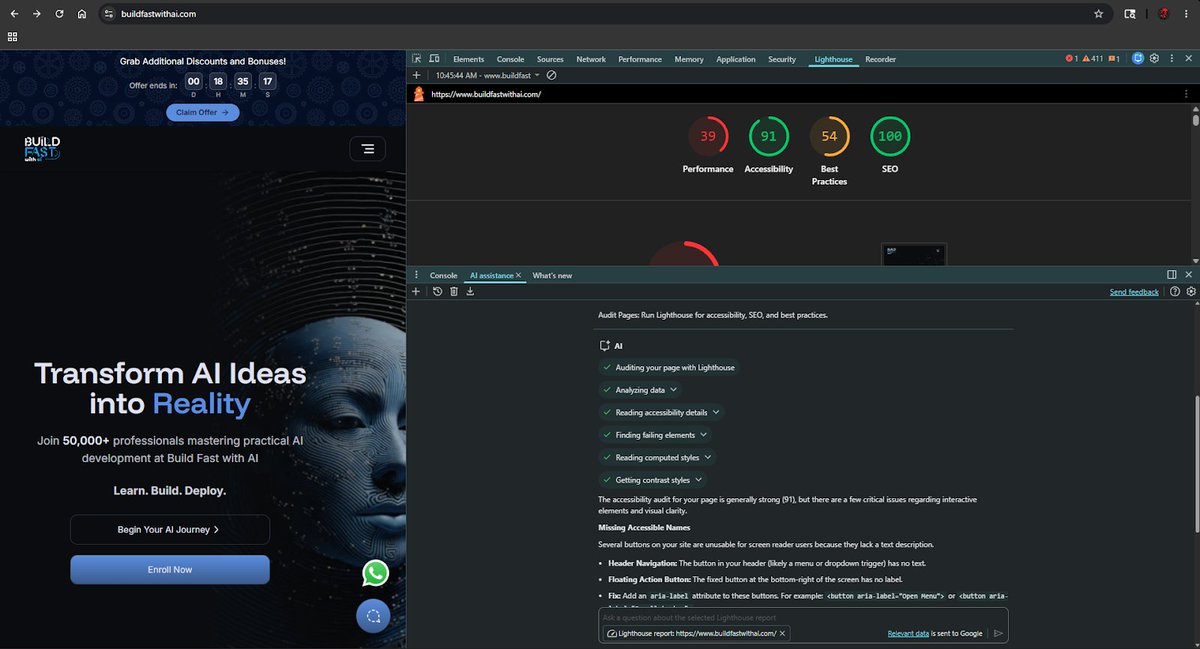
I opened buildfastwithai website in Chrome and asked DevTools' AI to audit it.
I didn't write a single line of code. I just typed:
"audit this page."
Here's what the AI did on its own. No prompting, no guiding:
→ Ran a full Lighthouse audit
→ Analyzed all the scores (Performance: 39, Accessibility: 91, SEO: 100)
→ Read through every failing element
→ Found buttons that screen readers couldn't understand
→ Suggested the exact code fix, line by line
The whole thing took under a minute.
And that's just one thing it can do.
The AI inside Chrome DevTools can now:
→ Fix CSS issues by looking at your actual styles
→ Debug slow or broken network requests
→ Inspect and modify page elements directly
→ Analyze your JavaScript for errors
→ Improve your Core Web Vitals, the scores Google uses to rank your site
Before this, improving your website's SEO and performance meant hiring someone, reading documentation for hours, or guessing what was wrong.
Now you open DevTools, describe the problem, and get the answer.
Every website owner needs to know this exists.
Open Chrome → F12 → AI assistance tab. Try it on your own site right now.
What score does your site get?
4
62
Building the Next AlphaFold for Drug Discovery
@IsomorphicLabs closed a $2.1 billion Series B to commercialize AlphaFold — but Charlotte Deane's argument in this clip is that the next equivalent breakthrough is still waiting on the data infrastructure to make it possible.
Deane makes a point that tends to get lost in the excitement around model capabilities: AlphaFold succeeded in large part because the Protein Data Bank existed, an accumulated fifty years of experimental results that gave AI something substantive to learn from. Her @openBIND consortium is an attempt to replicate that condition deliberately — building the dataset for protein-ligand binding with AI requirements built in from the start, not discovered after the fact. The $2.1 billion now flowing into AI drug discovery, as reported by @BuildFastWithAI, will accelerate what is already possible with existing data, but Deane's work is about removing the ceiling on what comes next.
For institutional decision-makers evaluating where durable value is being created in this space, the more consequential investment question may not be which model is best today, but who is building the data infrastructure that determines what models can do in five years.
We've put a link to the full episode with Charlotte Deane and our hosts @stephenjhorn and @Laila_Rizvi in the first comment.
#BiomedicalDataScience #AIMedicine #ComputationalBiology #AlphaFold #AIDrugDiscovery
1
2
58
No LLM Is Neutral — Whose AI Are Diplomats Using?
@MistralAI CEO @arthurmensch testified before the French Parliament last week naming @AnthropicAI's Claude Mythos as a national security threat — not because of how the model behaves, but because structural dependency on a foreign AI system is irreversible once established. Dr. Jennifer Cassidy @OxfordDiplomat, professor of AI & Diplomacy at the @UniofOxford, made precisely this argument in this episode, and the framing she offers clarifies why Mensch's testimony matters beyond a single vendor dispute.
Cassidy's core point is that no large language model is neutral, and that the question governments should be asking is not how their diplomats and ministries are using AI, but whose AI they are using. Every model carries the historical, legal, and linguistic architecture of the ecosystem it was trained in. The dependency risk Mensch described to the French parliamentary commission — reported by @BuildFastWithAI — is the institutional expression of exactly that concern: once a foreign system has been integrated into sensitive national infrastructure, the exposure cannot be walked back regardless of future policy decisions.
For policy directors and government technology leaders, the window to make sovereign AI infrastructure a structural priority rather than an aspiration is narrowing with each procurement decision made in its absence.
We've put a link to the full episode with Dr. Cassidy in the first comment.
#AI #Diplomacy #AISystems #SovereignAI #AIGovernance
2
3
59


