
20 Feb 2025
I secretly just want to be a vibe coder, but the rabbit holes I dig are too deep.
(this is also by far my longest tweet ever)
For example, I'm trying to build a @medusajs based MCP server (@AnthropicAI's protocol) that enables an AI that uses workflows to take actions on behalf of an admin. But just take a look at how much they've built. It's pretty mind blowing. 🤯
This document lists all workflows available in the @medusajs/core-flows package.
Each workflow represents a specific business operation in the Medusa e-commerce system.
## Api Key
- Create Api Keys
- Delete Api Keys
- Link Sales Channels To Publishable Key
- Revoke Api Keys
- Update Api Keys
- Validate Sales Channel Exists
## Auth
- Generate Reset Password Token
- Set Auth App Metadata
## Cart
- Add Shipping Method To Cart
- Add To Cart
- Complete Cart
- Confirm Inventory
- Confirm Variant Inventory
- Create Carts
- Create Line Item Adjustments
- Create Line Items
- Create Payment Collection
- Create Payment Collection For Cart
- Create Shipping Method Adjustments
- Fields
- Find One Or Any Region
- Find Or Create Customer
- Find Sales Channel
- Get Actions To Compute From Promotions
- Get Line Item Actions
- Get Promotion Codes To Apply
- Get Variant Price Sets
- Get Variants
- List Shipping Options For Cart
- List Shipping Options For Cart With Pricing
- Prepare Adjustments From Promotion Actions
- Prepare Confirm Inventory Input
- Prepare Line Item Data
- Refresh Cart Items
- Refresh Cart Shipping Methods
- Refresh Payment Collection
- Remove Line Item Adjustments
- Remove Shipping Method Adjustments
- Remove Shipping Method From Cart
- Reserve Inventory
- Retrieve Cart
- Set Tax Lines For Items
- Transfer Cart Customer
- Update Cart
- Update Cart Promotions
- Update Carts
- Update Line Item In Cart
- Update Line Items
- Update Shipping Methods
- Update Tax Lines
- Validate Cart
- Validate Cart Payments
- Validate Cart Shipping Options
- Validate Line Item Prices
- Validate Sales Channel
- Validate Shipping Methods Data
- Validate Shipping Options Price
- Validate Variant Prices
## Common
- Batch Links
- Create Entities
- Create Links
- Create Remote Links
- Delete Entities
- Dismiss Links
- Dismiss Remote Links
- Emit Event
- Release Event
- Remove Remote Links
- Update Links
- Update Remote Links
- Use Query Graph
- Use Remote Query
- Validate Presence Of
## Customer Group
- Create Customer Groups
- Delete Customer Group Customers
- Delete Customer Groups
- Link Customer Groups Customer
- Link Customers Customer Group
- Update Customer Groups
## Customer
- Create Addresses
- Create Customer Account
- Create Customers
- Delete Addresses
- Delete Customers
- Maybe Unset Default Billing Addresses
- Maybe Unset Default Shipping Addresses
- Remove Customer Account
- Unset Address For Create
- Unset Address For Update
- Update Addresses
- Update Customers
- Validate Customer Account Creation
## Defaults
- Create Default Store
- Create Defaults
## File
- Delete Files
- Upload Files
## Fulfillment
- Add Shipping Options Prices
- Batch Shipping Option Rules
- Calculate Shipping Options Prices
- Cancel Fulfillment
- Create Fulfillment
- Create Fulfillment Set
- Create Return Fulfillment
- Create Service Zones
- Create Shipment
- Create Shipping Option Rules
- Create Shipping Options
- Create Shipping Profiles
- Delete Fulfillment Sets
- Delete Service Zones
- Delete Shipping Option Rules
- Delete Shipping Options
- Mark Fulfillment As Delivered
- Set Shipping Options Price Sets
- Set Shipping Options Prices
- Update Fulfillment
- Update Service Zones
- Update Shipping Option Rules
- Update Shipping Options
- Update Shipping Profiles
- Upsert Shipping Options
- Validate Fulfillment Providers
- Validate Shipment
- Validate Shipping Option Prices
## Inventory
- Adjust Inventory Levels
- Attach Inventory Items
- Batch Inventory Item Levels
- Bulk Create Delete Levels
- Create Inventory Items
- Create Inventory Levels
- Delete Inventory Items
- Delete Inventory Levels
- Update Inventory Items
- Update Inventory Levels
- Validate Inventory Items
- Validate Inventory Locations
- Validate Singular Inventory Items For Tags
## Invite
- Accept Invite
- Create Invites
- Delete Invites
- Refresh Invite Tokens
- Validate Token
## Line Item
- Delete Line Items
- List Line Items
- Update Line Items
## Notification
- Notify On Failure
- Send Notifications
## Order
- Accept Order Transfer
- Add Line Items
- Add Order Transaction
- Aggregate Status
- Archive Orders
- Begin Order Claim
- Begin Order Edit
- Begin Order Exchange
- Begin Receive Return
- Begin Return
- Cancel Begin Order Claim
- Cancel Begin Order Edit
- Cancel Begin Order Exchange
- Cancel Claim
- Cancel Exchange
- Cancel Fulfillment
- Cancel Order
- Cancel Order Change
- Cancel Order Fulfillment
- Cancel Order Transfer
- Cancel Orders
- Cancel Receive Return
- Cancel Request Return
- Cancel Return
- Claim Add New Item
- Claim Item
- Claim Request Item Return
- Complete Orders
- Confirm Claim Request
- Confirm Exchange Request
- Confirm Order Changes
- Confirm Order Edit Request
- Confirm Receive Return Request
- Confirm Return Request
- Create Claim Items From Actions
- Create Claim Shipping Method
- Create Claims
- Create Complete Return
- Create Exchange
- Create Exchange Items From Actions
- Create Exchange Shipping Method
- Create Fulfillment
- Create Line Items
- Create Or Update Order Payment Collection
- Create Order
- Create Order Change
- Create Order Change Actions
- Create Order Edit Shipping Method
- Create Order Payment Collection
- Create Order Refund Credit Lines
- Create Order Shipping Methods
- Create Orders
- Create Return Items From Actions
- Create Return Shipping Method
- Create Returns
- Create Shipment
- Decline Order Change
- Decline Order Transfer
- Delete Claims
- Delete Exchanges
- Delete Line Items
- Delete Order Change
- Delete Order Change Actions
- Delete Order Changes
- Delete Order Payment Collection
- Delete Order Shipping Methods
- Delete Returns
- Dismiss Item Return Request
- Exchange Add New Item
- Exchange Request Item Return
- Fields
- Get Order Detail
- Get Orders List
- Mark Order Fulfillment As Delivered
- Mark Payment Collection As Paid
- Order Edit Add New Item
- Order Edit Update Item Quantity
- Order Validation
- Prepare Shipping Method
- Preview Order Change
- Receive Complete Return
- Receive Item Return Request
- Receive Return
- Refund Captured Payments
- Register Delivery
- Register Fulfillment
- Register Order Changes
- Register Shipment
- Remove Claim Add Item Action
- Remove Claim Item Action
- Remove Claim Shipping Method
- Remove Exchange Item Action
- Remove Exchange Shipping Method
- Remove Item Receive Return Action
- Remove Item Return Action
- Remove Order Edit Item Action
- Remove Order Edit Shipping Method
- Remove Return Shipping Method
- Request Item Return
- Request Order Edit
- Request Order Transfer
- Set Tax Lines For Items
- Update Claim Add Item
- Update Claim Item
- Update Claim Shipping Method
- Update Exchange Add Item
- Update Exchange Shipping Method
- Update Order
- Update Order Change Actions
- Update Order Changes
- Update Order Claims
- Update Order Edit Add Item
- Update Order Edit Item Quantity
- Update Order Edit Shipping Method
- Update Order Exchanges
- Update Orders
- Update Receive Item Return Request
- Update Request Item Return
- Update Return
- Update Return Items
- Update Return Shipping Method
- Update Returns
- Update Shipping Methods
- Update Tax Lines
- Validate Return Reason
## Payment Collection
- Create Payment Session
- Create Refund Reasons
- Delete Payment Sessions
- Delete Refund Reasons
- Update Payment Collection
- Update Refund Reasons
- Validate Deleted Payment Sessions
## Payment
- Authorize Payment Session
- Cancel Payment
- Capture Payment
- Process Payment
- Refund Payment
- Refund Payments
## Price List
- Batch Price List Prices
- Create Price List Prices
- Create Price Lists
- Delete Price Lists
- Get Existing Price Lists Price Ids
- Remove Price List Prices
- Update Price List Prices
- Update Price Lists
- Validate Price Lists
- Validate Variant Price Links
## Pricing
- Create Price Preferences
- Create Price Sets
- Delete Price Preferences
- Update Price Preferences
- Update Price Preferences As Array
- Update Price Sets
## Product Category
- Create Product Categories
- Delete Product Categories
- Update Product Categories
## Product
- Batch Link Products Collection
- Batch Link Products In Category
- Batch Product Variants
- Batch Products
- Batch Products In Category
- Create Collections
- Create Product Options
- Create Product Tags
- Create Product Types
- Create Product Variants
- Create Products
- Create Variant Pricing Link
- Csvtojson
- Delete Collections
- Delete Product Options
- Delete Product Tags
- Delete Product Types
- Delete Product Variants
- Delete Products
- Export Products
- Generate Product Csv
- Get All Products
- Get Products
- Get Variant Availability
- Get Variant Pricing Link
- Group Products For Batch
- Import Products
- Jsontocsv
- Normalize For Export
- Normalize For Import
- Normalize V1 Import
- Parse Product Csv
- Update Collections
- Update Product Options
- Update Product Tags
- Update Product Types
- Update Product Variants
- Update Products
- Upsert Variant Prices
- Wait Confirmation Product Import
## Promotion
- Add Campaign Promotions
- Add Or Remove Campaign Promotions
- Add Rules To Promotions
- Batch Promotion Rules
- Create Campaigns
- Create Promotion Rules
- Create Promotions
- Delete Campaigns
- Delete Promotion Rules
- Delete Promotion Rules Workflow
- Delete Promotions
- Register Usage
- Remove Campaign Promotions
- Remove Rules From Promotions
- Update Campaigns
- Update Promotion Rules
- Update Promotions
- Update Promotions Status
## Region
- Create Regions
- Delete Regions
- Set Regions Payment Providers
- Update Regions
## Reservation
- Create Reservations
- Delete Reservations
- Delete Reservations By Line Items
- Update Reservations
## Return Reason
- Create Return Reasons
- Delete Return Reasons
- Update Return Reasons
## Sales Channel
- Associate Locations With Channels
- Associate Products With Channels
- Can Delete Sales Channels
- Create Default Sales Channel
- Create Sales Channels
- Delete Sales Channels
- Detach Locations From Channels
- Detach Products From Sales Channels
- Link Products To Sales Channel
- Update Sales Channels
## Shipping Options
- List Shipping Options For Context
## Shipping Profile
- Delete Shipping Profile
## Stock Location
- Associate Locations With Fulfillment Sets
- Create Location Fulfillment Set
- Create Stock Locations
- Delete Stock Locations
- Link Sales Channels To Stock Location
- Update Stock Locations
- Upsert Stock Location Addresses
## Store
- Create Stores
- Delete Stores
- Update Stores
## Tax
- Create Tax Rate Rules
- Create Tax Rates
- Create Tax Regions
- Delete Tax Rate Rules
- Delete Tax Rates
- Delete Tax Regions
- Get Item Tax Lines
- List Tax Rate Ids
- List Tax Rate Rule Ids
- Set Tax Rate Rules
- Update Tax Rates
- Update Tax Regions
## User
- Create User Account
- Create Users
- Delete Users
- Remove User Account
- Update Users
2
90

15 Mar 2024
📊Transform CSV to JSON effortlessly with this #NodeJS script!
🚀Convert your data seamlessly using csv-parser and fs modules. Check out the repo for easy installation and usage instructions! #CSVtoJSON #DataConversion #buildinpublic #Json
GitHub Repo :
github.com/webdev-mohdamir/n…
2
115
14 Mar 2024
🚀 Excited to share a Node.js script I created that converts CSV files to JSON effortlessly!
📊 Check it out on GitHub and simplify your data conversion tasks today:
GitHub Repo Link: github.com/webdev-mohdamir/n…
#NodeJS #CSVtoJSON #DataConversion #github #connect #buildinpublic
1
4
184

30 Mar 2023
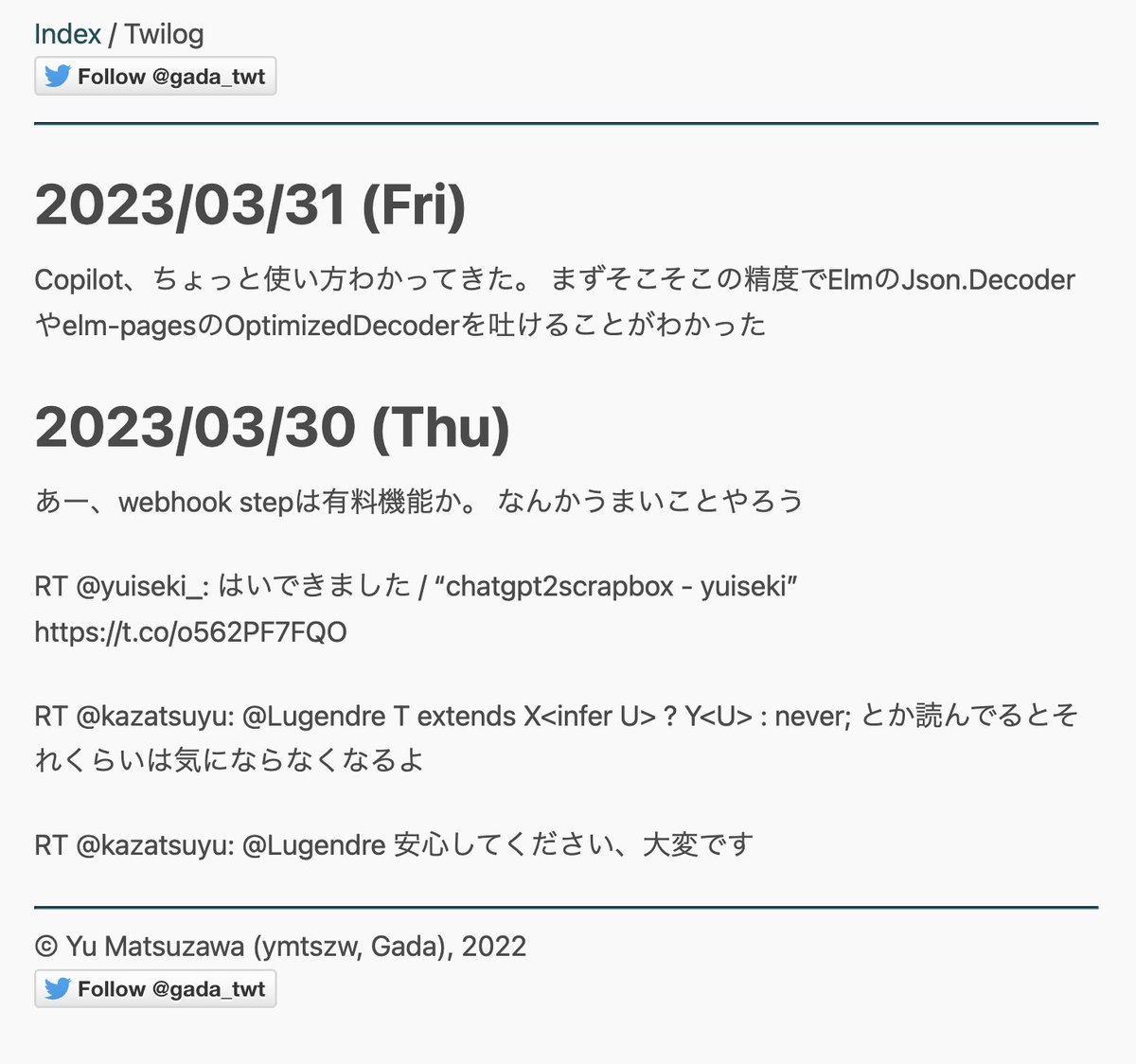
続きはまた週末にでもやろう
・Zapierで継続的にデータをGoogleSSに積む
・GoogleSS公式の公開URL機能でCSV吐く
・curl → node-csvtojsonでサイトビルド前にデータを手元に静的JSON化する雑ビルドパイプライン用意
・elm-pages v2なのでDataSource.FileでJSON読んでHTMLに吐く
までできた
2
600

20 Jan 2023
Assim, bibliotecas úteis para processar dados em alta escala, como por exemplo a lib csvtojson, podemos convertê-las e usar uma única sintaxe, tanto para front quanto para backend
/5
1
2
367

9 May 2022
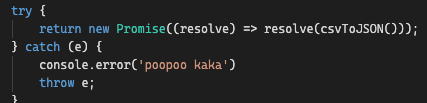
Ahh okay, the picture in my head for this sugar is a newly created Promise like in the screenshot below. So when I see this, it's clear to me that the error inside csvToJSON would not be caught. We need the await to halt execution and resolve the promise before it can be caught.
2


31 Mar 2021
Day 35:
- Today I learned about the CSVTOJSON and papaparse node modules .
- Read about the node-fetch modules and fs.readdir () method.
#100DaysOfProductEngineering at Servify
6

10 Feb 2021
Today I was able to easily convert a #csv file to #json using the #npmjs package #csvtojson
This is huge for me in being able to extract data & manipulate it to render to my website. I feel so close to where I need to be 🙏
#100DaysOfCode #KeepGoing 💪
npmjs.com/package/csvtojson
2
5

28 Nov 2020
Me han propuesto desarrollar un proyecto @nodejs que haga ingesta de datos desde CSV, los transforme a JSON y almacene en una NoSQL local. Trabajaré con el módulo "CSVTOJSON" con Streams y "PouchDB" como DB. #NodeJS #JavaScript
npmjs.com/package/csvtojson
npmjs.com/package/pouchdb
1
7

12 Oct 2020
Transforming #csv to #json
const { promises: fs } = require('fs')
const csv = require("csvtojson")
const parse = async() => {
const data = await csv().fromFile(csvFile)
fs.writeFile(jsonFile, JSON.stringify(data))
return
}
#100DaysOfCode #code #CodeNewbie #womenintech
1
1

12 Sep 2020
#MachineLearning for #JavaScript Devs in 10 Minutes
medium.com/javascript-in-pla…
#AI #DataScience #Analytics #Python #Anaconda #JupyterNotebook #NodeJS #NaturalJS #csvtojson #Accuracy
4
3

10 Aug 2020
D3D20 #100DaysOfCode
I'm just going to do this easy thing really fast.
...
An hour and a half later.
csvtojson wound up not working at all, but papaparse did.

ALT Cute cat is cute
2
8
2

6 Apr 2020
react-papaparse v3.0.2 has been released! ( The fastest in-browser CSV parser for React ) ( 33.9 kB )
#reactjs #react #javascript #csvparser #csvreader #csvtojson #jsontocsv #frontend #webdev #frontenddevelopment #reactpapaparse #papaparse #DEVcommunity
react-papaparse.github.io
4
2
16 Mar 2020
react-papaparse v3.0.0 has been released! ( The fastest in-browser CSV parser for React. )
#reactjs #react #javascript #csvparser #csvreader #csvtojson #jsontocsv #frontend #webdev #frontenddevelopment #reactpapaparse #papaparse #DEVcommunity
react-papaparse.github.io
5
3

Day89
npmパッケージのcsvtojsonを使って、ネスト構造のJSON変換できた。weekly downloadsが多いものからチェックするように心がけたい。過去に書いてしばらく使ってなかった関数が、開発途中の仕様変更でエラーになってた。あと、Herokuデプロイの流れ3回目だから流石に慣れてきた。
#100DaysOfCode
2

12 Jun 2019
Yo cuando necesito datos de un excel lo exporto a csv y después uso un paquete llamado csvtojson que va feten. Todavia no he probado pero con lambdas si haces que se guarde el archivo en un bucket se pueden automatizar muchos procesos.
4
