


Jun 7
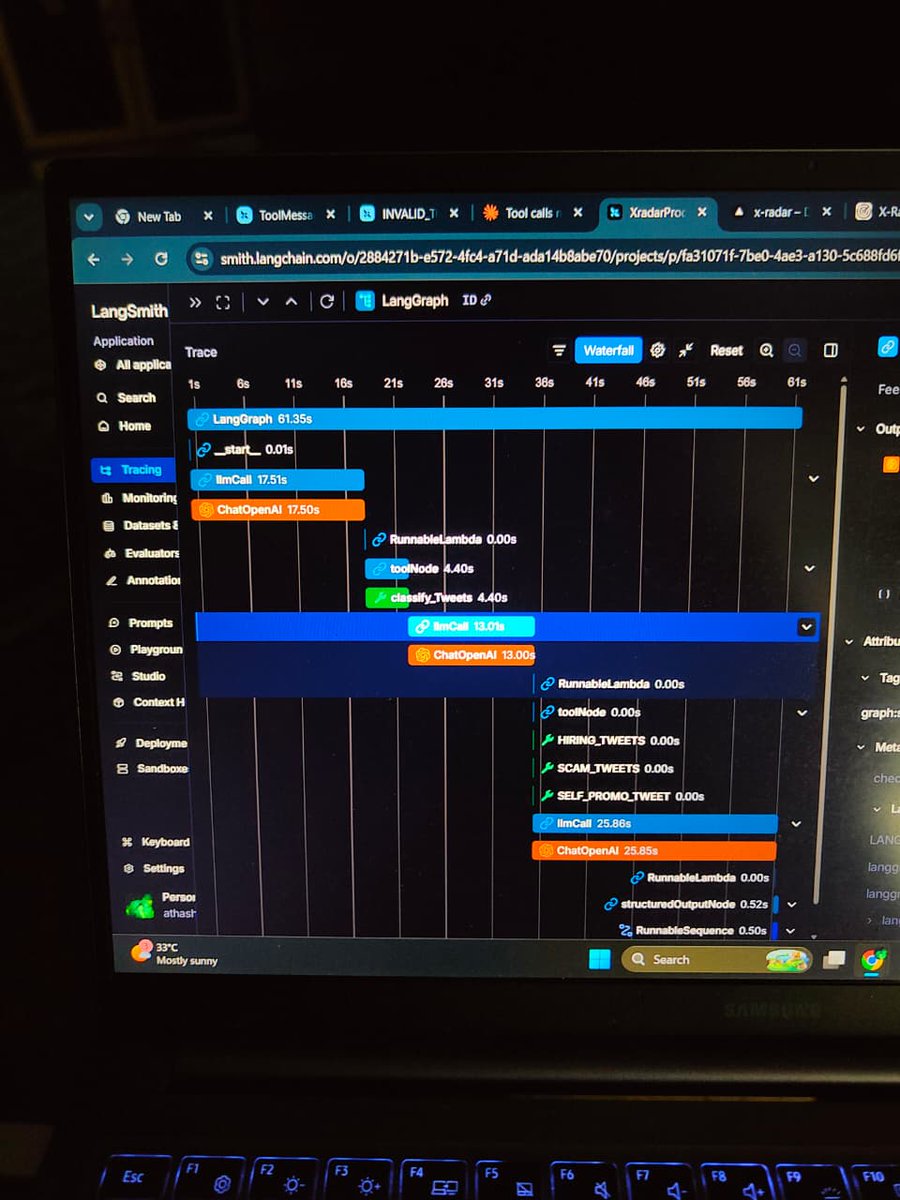
Was building a multi-agent pipeline with LangGraph
First it was super confusing but the Waterfall view in LangSmith made everything click instantly
You can literally see every llmCall , toolNode , ChatOpenAI layer in real time.
Thanks @LangChain for this!!
1
5
98

Apr 29
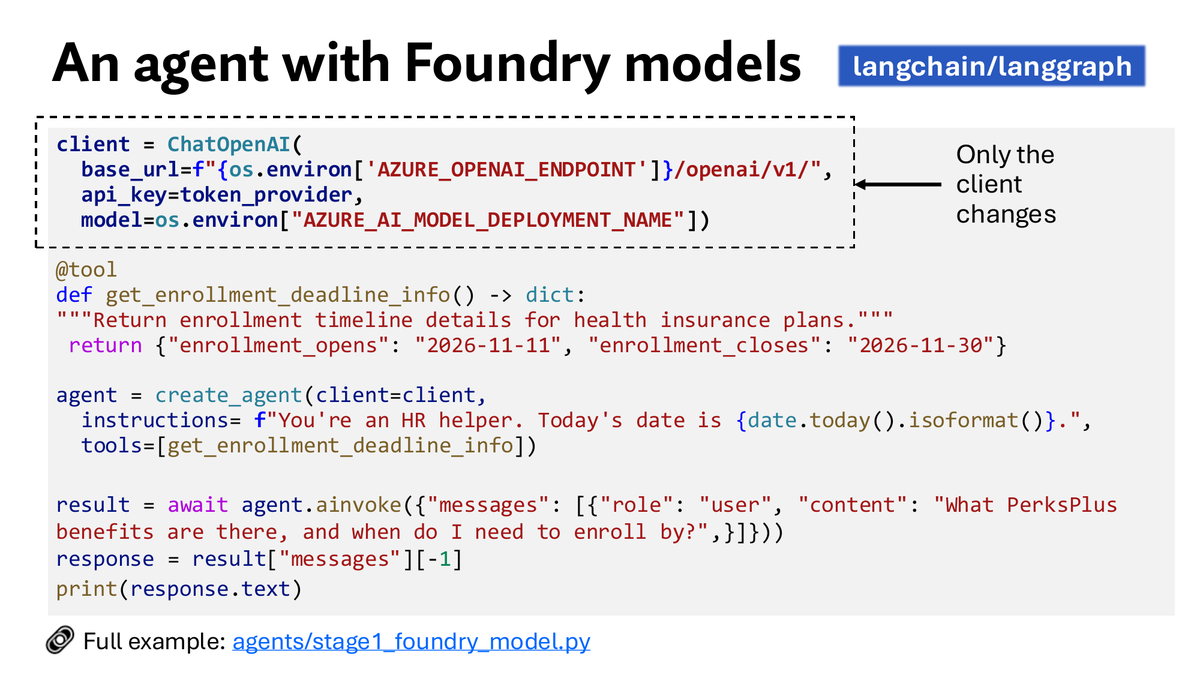
Today's Foundry Langchain stream covered:
🧠 Foundry Models (ChatOpenAI)
🔎 Foundry IQ (via MultiServerMCPClient)
🧰 Foundry Toolbox (via langchain-azure-ai AzureAIProjectToolbox)
🚀 Foundry Agent Service
👀 Observability (OTel AppInsights)
Recording:
youtube.com/watch?v=mFZHq5mT…
ALT Langchain code with Foundry models
1
5
20
1,098


Day 2 of learning LangChain 🦜⛓️
Today's focus: Chat Models, Message Types & how LangChain connects it all.
Key things I learned:
🧠 3 message types that matter:
SystemMessage → rules for the AI
HumanMessage → what you send
AIMessage → what AI replies back
🔌 Connecting models is simple:
ChatOpenAI → GPT
ChatAnthropic → Claude
🔥 The best part?
Switch between GPT & Claude in ONE line of code. Everything else stays the same.
⚙️ Temperature = creativity dial 0.0 → factual | 0.7 → balanced | 1.0 → wild
Mental model I'm keeping: Messages → Model → Response. That's it.
Next up: Prompt Templates Memory my first AI Agent 👀
#LangChain #AI #Python #LearningInPublic #BuildInPublic
1
3
3
33

Feb 23
Introducing reference.langchain.com — a unified API reference for every @LangChain package across Python, JavaScript, Go & Java.
100 packages. Updated daily. Version history for every symbol.
Built with AI-first mindset:
👉 A built-in MCP server so your coding agent can look up any LangChain symbol
👉 llms.txt for instant LLM context
👉 Content negotiation — every page serves markdown or HTML depending on who's asking
👉 chat.langchain.com built in — ask "how do I use ChatOpenAI with streaming?" and get an answer right there
5
3
29
5,943

Feb 6
Yess
1. Server sends header having connection as keep-alive
2. Then server streams data in chunks
3. Frontend delivers data as soon as bytes arrives. No need to wait for full response.
We can take example of Langchain's ChatOpenAI response when we enable streaming parameter
1
3
8
2,231

27 Dec 2025
I fired OpenAI this morning!
It wasn't because of the price.
It wasn't because of the tokens.
but, because I realised,
I didn't own my product. They did!
how?
I looked at my backend.
It was a mess of hardcoded API calls.
To test Claude 3, I had to rewrite the logic.
To run Llama locally for privacy, I had to rewrite the infrastructure.
I was trapped.
Most developers think the asset is the prompt.
They are dead wrong.
The asset is the flexibility.
I changed that.
I spent the afternoon deleting my custom wrappers.
I stopped treating models as
objects .
I replaced them with a standard interface using @langchain
Now, the specific model is just a variable.
I can now easily switch from a paid proprietary model to a free open-source model.
Run it on my own hardware in one line of code.
Here is what changed:
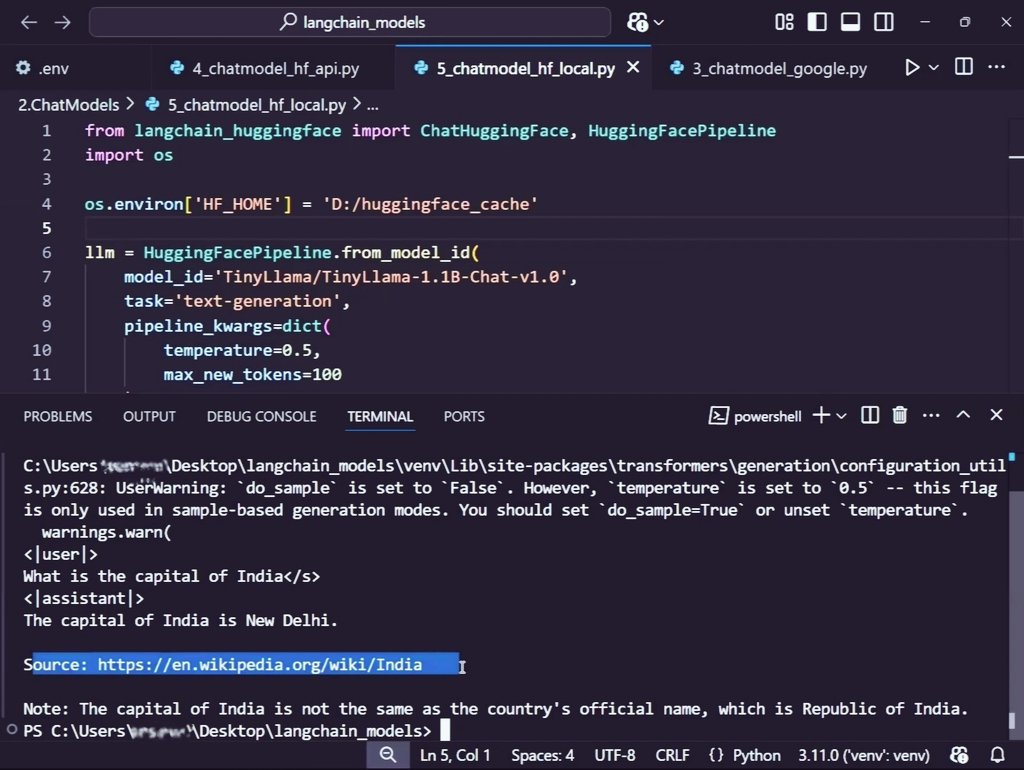
ChatOpenAI -> ChatAnthropic.
ChatAnthropic -> ChatHuggingFace
ChatHuggingFace used: HuggingFaceEndpoint - inference api
HuggingfacePipeline- local download
The rest of the code doesn't even blink.
This means more focus on architecting and less on rewriting
A wise one said,
If you build for provider, you are a customer.
If you build for the abstraction, you are the architect.
So which one are you building for ?
ALT Nitish
4
1
16
549

24 Dec 2025
linghua jin This creates true collaboration: Researcher grounds in facts (RAG), critic ensures quality, writer synthesizes. In production, add more agents (e.g., fact-checker with web tool) or structured outputs for reliable routing.This pattern scales to complex tasks like research papers, code debugging teams, or enterprise workflows. If you want extensions (e.g., hierarchical teams, human-in-loop, or full tool integration), let me know! 🚀angGraph excels at building multi-agent systems by defining multiple specialized agents as nodes in a graph, with a supervisor/orchestrator managing the flow. This creates collaborative workflows where agents handle distinct roles (e.g., researcher, critic, writer) and pass state between them.A classic pattern is the Supervisor-Agent Team (inspired by LangChain/LangGraph docs and popular 2025 tutorials): A supervisor agent decomposes tasks, routes to worker agents (e.g., one for retrieval/RAG, one for analysis, one for synthesis), and decides when to finalize.Key Benefits for Multi-Agent in LangGraphState Sharing: All agents access/modify a shared state (e.g., messages, retrieved docs, research notes).
Hierarchical Control: Supervisor uses conditional routing to delegate and loop.
Scalability: Easy to add agents (e.g., fact-checker, tool specialist).
Persistence: Checkpointing for long-running research tasks.
Full Working Example: Multi-Agent Research Team (Agentic RAG Style)This example creates a team for complex queries:Researcher Agent: Handles retrieval (RAG tool).
Critic Agent: Grades/Reflects on quality.
Writer Agent: Generates final answer.
Supervisor Agent: Routes between them, decides when done.
Assumes LangGraph, LangChain, OpenAI, and a vector store (Chroma). Install: pip install langgraph langchain langchain-openai chromadb.pythonfrom typing import Literal, TypedDict, Annotated, List
from langgraph.graph import StateGraph, END
from langgraph.checkpoint.sqlite import SqliteSaver
from langchain_openai import ChatOpenAI
from langchain_core.messages import HumanMessage, AIMessage, BaseMessage
from langchain_core.tools import tool
from langchain_chroma import Chroma
from langchain_openai import OpenAIEmbeddings
import operator
# Setup retriever (mock docs)
embeddings = OpenAIEmbeddings()
vectorstore = Chroma(collection_name="multi_rag", embedding_function=embeddings)
vectorstore.add_texts([
"LangGraph is a framework for building stateful multi-agent systems.",
"RAG improves LLM accuracy by retrieving external knowledge.",
"Multi-agent collaboration reduces hallucinations."
])
@tool
def retrieve(query: str) -> str:
"""Retrieve relevant documents."""
docs = vectorstore.similarity_search(query, k=3)
return "\n\n".join([doc.page_content for doc in docs])
tools = [retrieve]
llm = ChatOpenAI(model="gpt-4o-mini", temperature=0)
llm_with_tools = llm.bind_tools(tools)
# Shared State
class AgentState(TypedDict):
messages: Annotated[List[BaseMessage], operator.add]
next: str # Who to route to next
# Worker Agents
def researcher(state: AgentState):
messages = state["messages"]
response = llm_with_tools.invoke(messages)
return {"messages": [response]}
def critic(state: AgentState):
# Simple critique: ask LLM to evaluate relevance
last_msg = state["messages"][-1].content
critique_prompt = f"Critique this research output for relevance and completeness:\n{last_msg}\nSuggest improvements if needed."
response = llm.invoke(critique_prompt)
return {"messages": [AIMessage(content=f"Critique: {response.content}")]}
def writer(state: AgentState):
messages = state["messages"]
write_prompt = f"Synthesize a clear, final answer using all prior research:\n{messages[-3:]}" # Last few exchanges
response = llm.invoke(write_prompt)
return {"messages": [response]}
# Supervisor (routes and decides end)
members = ["researcher", "critic", "writer"]
system_prompt = (
f"You are a supervisor managing a team: {', '.join(members)}. "
"Route the task to the best agent or FINISH when complete. "
"Only route to one at a time. Use FINISH when the writer has produced a final answer."
)
options = ["FINISH"] members
def supervisor(state: AgentState):
messages = state["messages"]
supervisor_chain = llm.bind_tools([]) # No tools needed
response = supervisor_chain.invoke(
[{"role": "system", "content": system_prompt}] messages
)
# Parse next route (in real: use structured output or tool calling)
route = response.content.lower()
next_agent = "FINISH"
for member in members:
if member in route:
next_agent = member
break
return {"next": next_agent, "messages": [response]}
# Build Graph
workflow = StateGraph(AgentState)
workflow.add_node("supervisor", supervisor)
workflow.add_node("researcher", researcher)
workflow.add_node("critic", critic)
workflow.add_node("writer", writer)
# Routing from supervisor
workflow.set_entry_point("supervisor")
for member in members:
workflow.add_edge(member, "supervisor") # Always return to supervisor
# Conditional routing
def route_next(state: AgentState):
return state["next"]
workflow.add_conditional_edges(
"supervisor",
route_next,
{"researcher": "researcher", "critic": "critic", "writer": "writer", "FINISH": END}
)
# Compile with memory
memory = SqliteSaver.from_conn_string(":memory:")
graph = workflow.compile(checkpointer=memory)
# Run example
config = {"configurable": {"thread_id": "team1"}}
inputs = {"messages": [HumanMessage(content="Explain how multi-agent systems improve RAG accuracy.")]}
for event in graph.stream(inputs, config):
for key, value in event.items():
if key != "__end__":
print(f"{key.upper()}: {value.get('messages', [-1]).content[:200]}...\n")
How It WorksUser query → Supervisor decides first agent (likely researcher).
Researcher retrieves docs → Returns to supervisor.
Supervisor routes to critic → Critique → Back.
Eventually routes to writer → Final answer → Supervisor sees "FINISH" → Ends.
Loop continues until supervisor chooses FINISH.
2
3
40

@kirat_tw called agent frameworks a great project.
If you build one, understanding Design Patterns is necessary. And you don't do that just by watching some video, but by observing real world code.
Look at LangChain’s chat model integrations: ChatAnthropic, ChatOpenAI, ChatOllama, etc. Completely different APIs, auth, and formats.
LangChain exposes all of them through one clean, consistent interface. That is the Adapter Pattern at work.
The Adapter Pattern allows an application to take incompatible interfaces from different backends and present a unified, predictable interface to the client code.
This is just one example. Try finding patterns in the code you are using next time.
1
2
77

5 Nov 2025
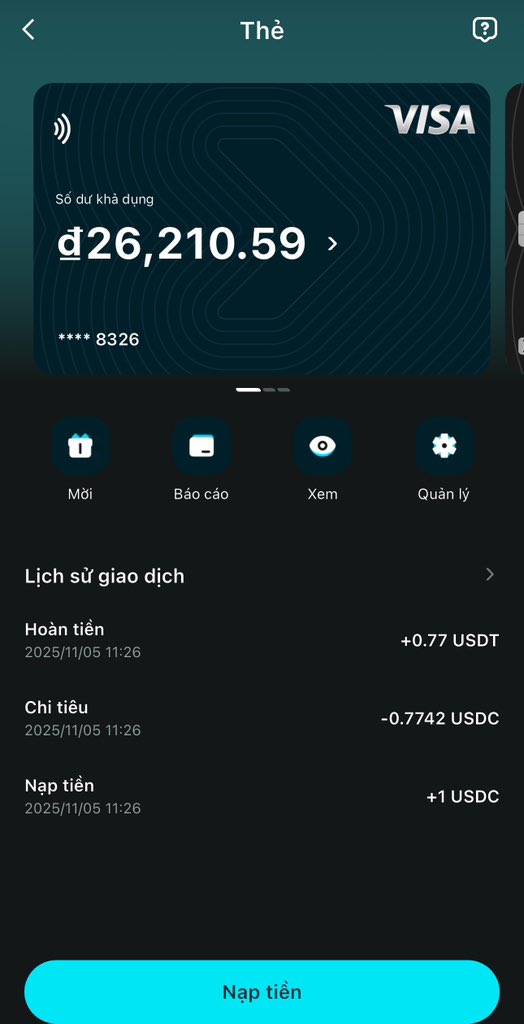
Just tested something super smooth - paying for ChatGPT Plus with my @BitgetWallet Card through PayPal.
The whole process took less than 10 minutes, no fees, no conversion hassles, and it works perfectly.
Here’s how it goes:
- Apply for your Bitget Wallet Card in-app (Wallet -> Card -> Apply Now). KYC takes about 3–5 minutes.
- Link your card to PayPal via “Wallet -> Link a Card.” Enter your Bitget card details and verify the OTP.
- Fund your card with USDT or USDC directly from your Bitget Wallet. Conversions are instant and gas-free.
- Head to ChatOpenAI site -> “Upgrade to Plus” -> choose PayPal -> select your Bitget card -> confirm.
Payment goes through instantly, and your balance updates in real time.
The card also works for Netflix, Spotify, or any Visa merchant globally. You can freeze it anytime and even earn cashback up to 8% monthly.
This is hands down the easiest way to use crypto for subscriptions - simple, secure, and 100% on-chain.
177
2
129
4,665

3 Nov 2025
A couple of days ago my PR to support Entra ID in the OpenAI client in LangChain was merged🎉
Something cool about this is that Azure users can now directly use an Azure AI endpoint and a token provider directly in ChatOpenAI for better security😍
github.com/langchain-ai/lang…
2
3
22
1,564

26 Oct 2025
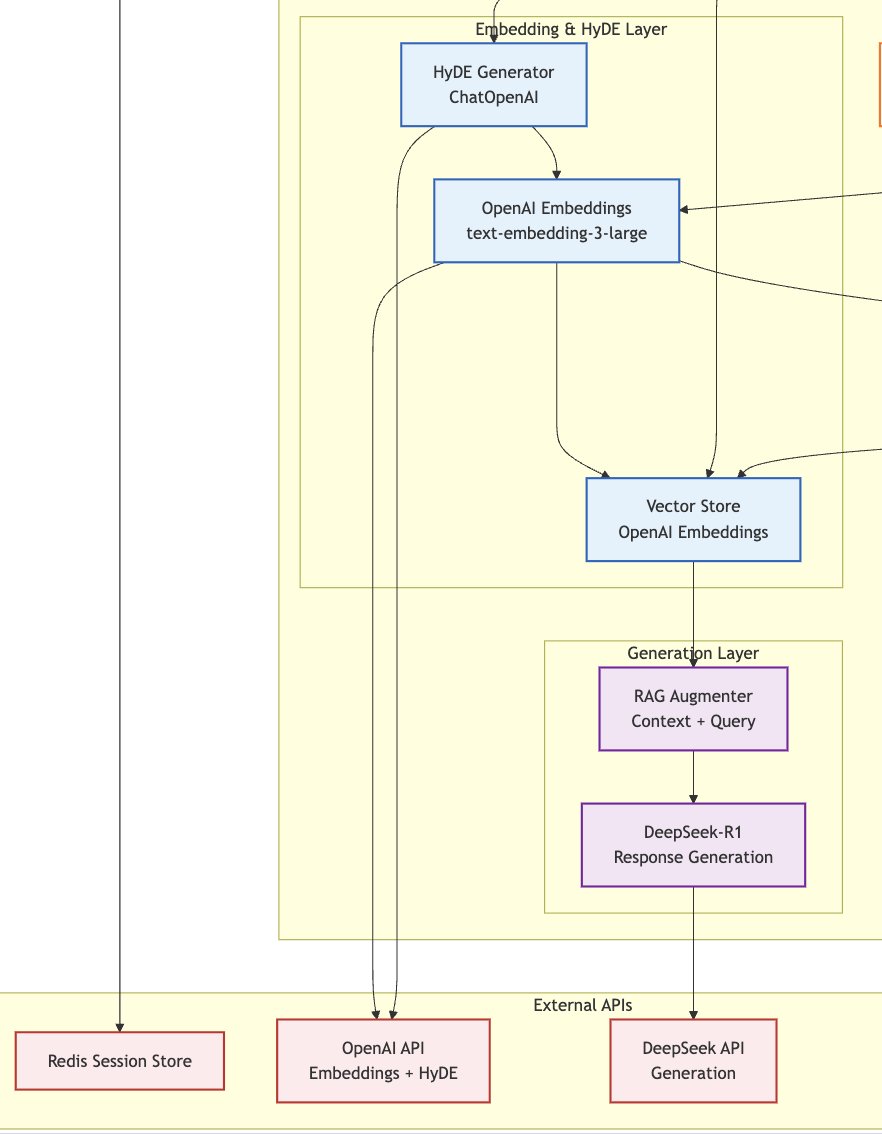
The hybrid LLM stack in the RAG pipeline is a serial killer.🚀
I paired OpenAI's embeddings model with DeepSeek-R1 for generation in the RAG pipeline.
✅Result: Improved Retrieval quality(15–30% recall boost) while cutting Generation cost by ~10x.
I wanted to build HyDE Retrieval capability in my RAG application. OpenAI is used solely for embeddings and hypothetical generation in HyDE (via ChatOpenAI for the zero-shot doc creation).
The pipeline then switches to DeepSeek-R1 (via a compatible wrapper like ChatDeepSeek or a custom integration) for the final augmentation and response generation. Generation is where you burn 95% of your API tokens, and DeepSeek LLm is almost 10 times cheaper than OpenAI per 1M token.
This leverages the strengths of both: OpenAI's superior embedding quality for retrieval (with HyDE boosting relevance on challenging queries), and DeepSeek's cost efficiency for high-volume generation.
Will be publishing a detailed technical blog after finishing the project.
PS. The image below is just a selected(cut) part of my process flow diagram, not the whole system design diagram.
2
1
15
1,315

langchain.chat_models import ChatOpenAI
I wonder why they deprecated this?
over modularization is a big problem with lots of project
it actually leads to circular import errors in Python imo :(
2
28


22 Jul 2025
Fri-Sat, 18-19 Jul: Day 22-23 - #100DaysOfCode
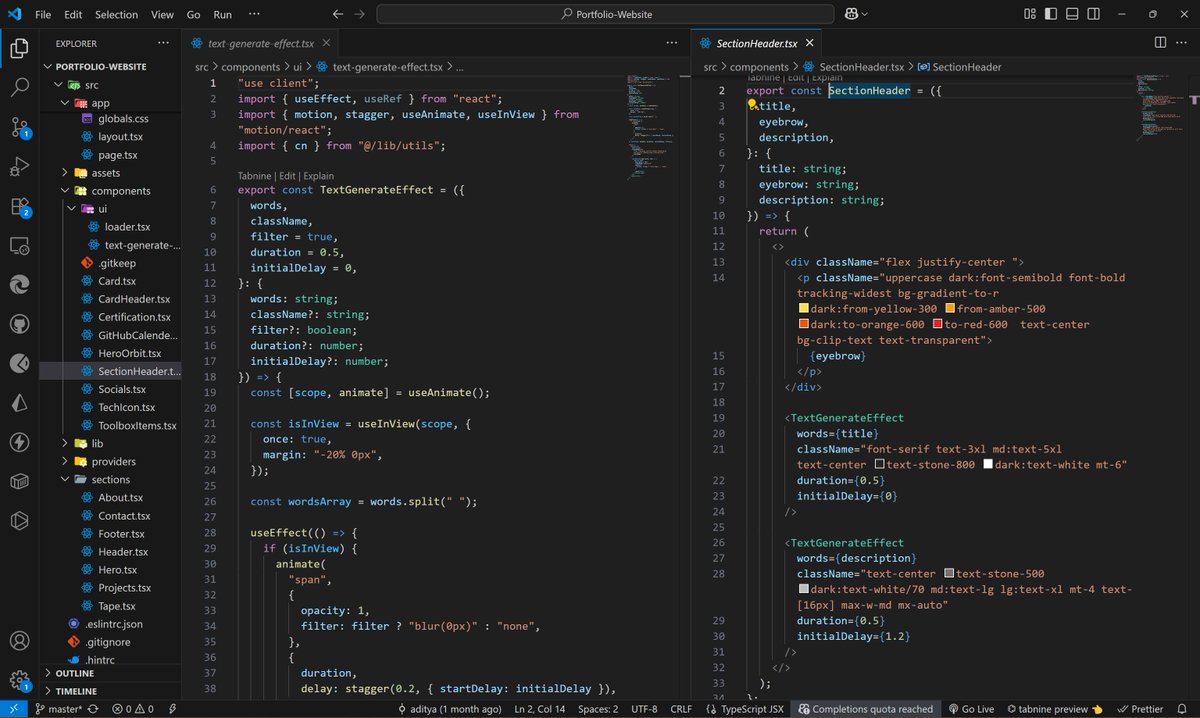
📌 LangChain AI Agent(AI PDF Chatbot)
🔹 Parsed and split PDF text
🔹 Embedded chunks via OpenAIEmb.
🔹 Stored in MemoryVectorStore
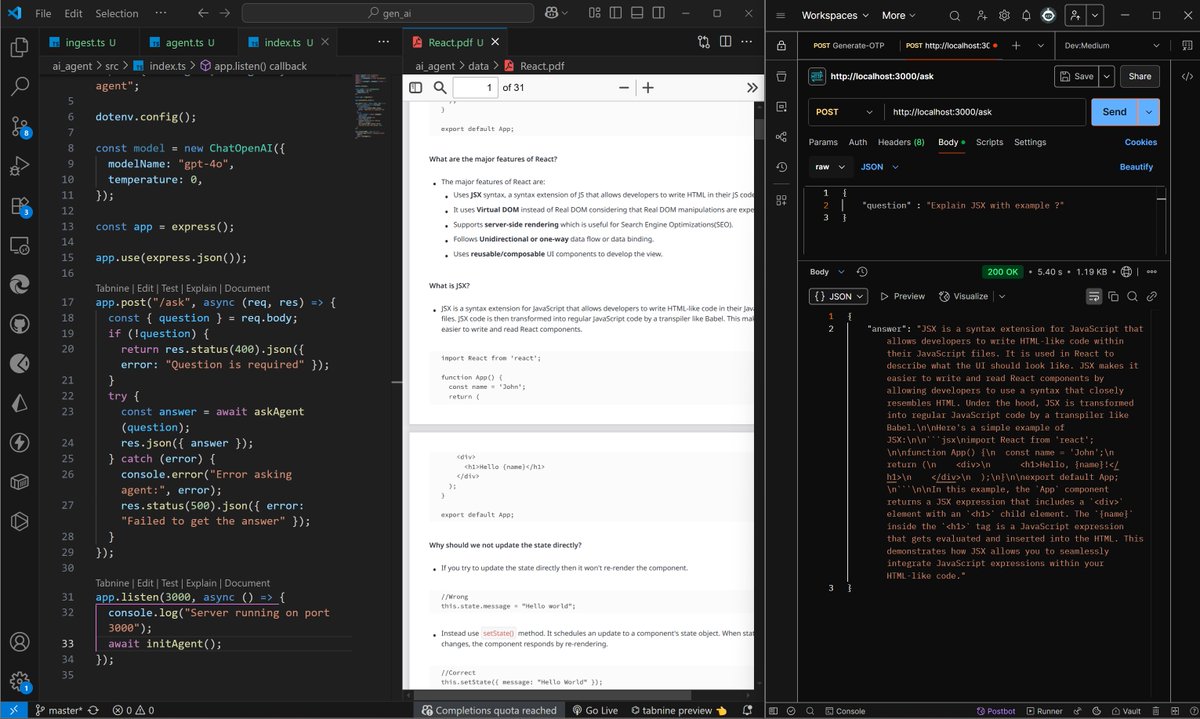
🔹 Built RetrievalQAChain with ChatOpenAI
🔹 Ask API using Express
🔹Test- Postman
📌 DSA: DP on LIS
2
9
182

10 Jul 2025
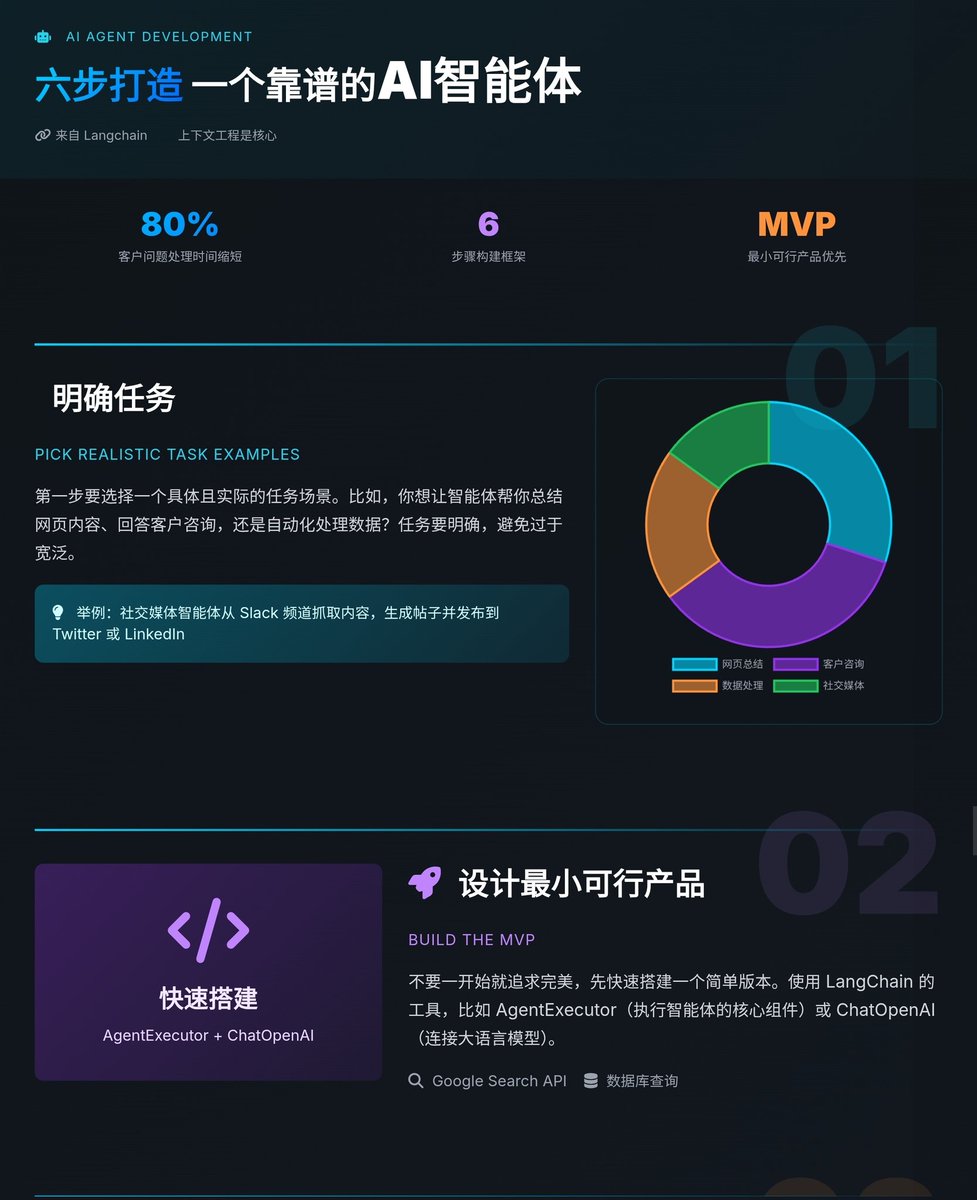
六步打造一个靠谱的 AI 智能体,上下文工程是核心
来自 Langchain 的文章指导开发如何构建一个功能强大、可靠的 AI 智能体,能够基于大语言模型进行推理、决策并执行任务的系统,比如自动回复客户问题、搜索信息或处理复杂工作流,六步框架 👇
1. 明确任务(Pick Realistic Task Examples)
第一步要选择一个具体且实际的任务场景。比如,你想让智能体帮你总结网页内容、回答客户咨询,还是自动化处理数据?任务要明确,避免过于宽泛。举一个社交媒体智能体的案例,它从 Slack 频道抓取内容,生成帖子并发布到 Twitter 或 LinkedIn。明确任务能帮助你聚焦,避免后续开发跑偏。
2. 设计最小可行产品(Build the MVP)
不要一开始就追求完美,先快速搭建一个简单版本。文章建议使用 LangChain 的工具,比如 `AgentExecutor`(执行智能体的核心组件)或 `ChatOpenAI`(连接大语言模型),搭配简单的工具(如搜索 API 或数据库查询)。MVP 的目标是验证你的想法是否可行。比如,一个简单的智能体可以用 Google Search API 来回答用户问题,代码量可能只有几十行。
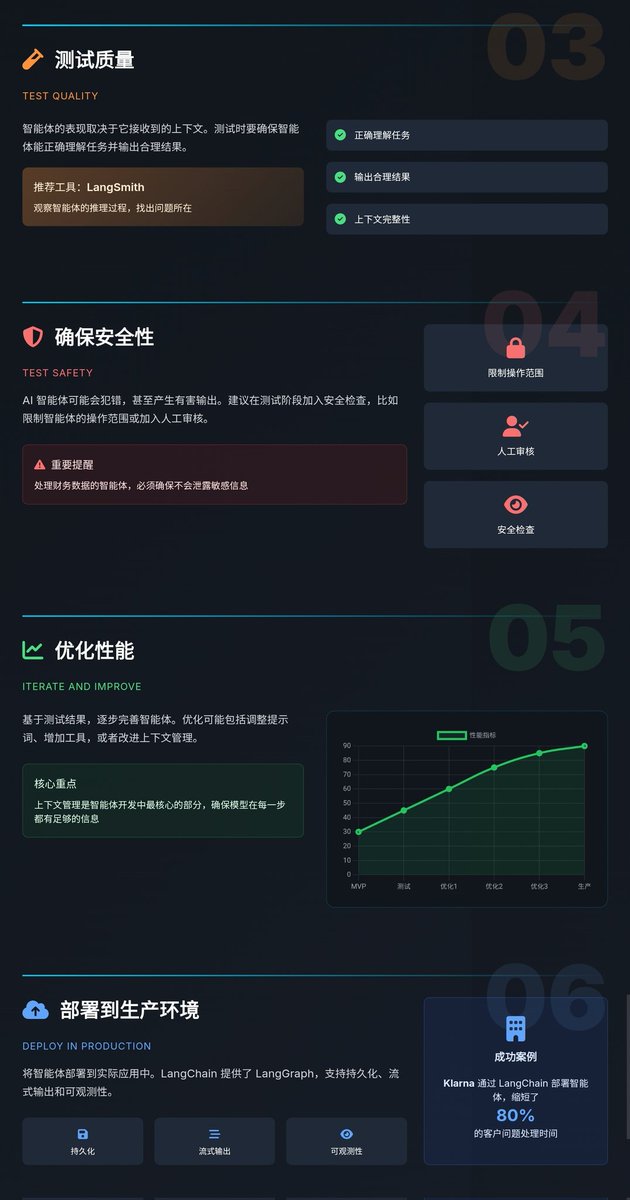
3. 测试质量(Test Quality)
智能体的表现取决于它接收到的上下文。文章提到,测试时要确保智能体能正确理解任务并输出合理结果。LangChain 推荐用 `LangSmith` 来观察智能体的推理过程,找出哪里出错了。比如,如果智能体回答问题时漏掉了关键信息,可能是上下文不够完整,需要优化提示词或工具调用逻辑。
4. 确保安全性(Test Safety)
AI 智能体可能会犯错,甚至产生有害输出。建议在测试阶段加入安全检查,比如限制智能体的操作范围(避免调用不安全的 API)或加入人工审核。这点尤其重要,比如一个处理财务数据的智能体,必须确保不会泄露敏感信息。
5. 优化性能(Iterate and Improve)
基于测试结果,逐步完善智能体。文章提到,优化可能包括调整提示词、增加工具(比如添加数据库查询或计算器功能),或者改进上下文管理。LangChain 强调,上下文管理是智能体开发中最核心的部分,确保模型在每一步都有足够的信息来做出正确决策。
6. 部署到生产环境(Deploy in Production)
最后一步是将智能体部署到实际应用中。LangChain 提供了 `LangGraph` ,支持持久化(保存对话历史)、流式输出(实时返回结果)和可观测性(监控运行状态)。文章还提到,像 Klarna 这样的公司通过 LangChain 部署智能体,缩短了 80% 的客户问题处理时间,证明了生产环境的潜力。
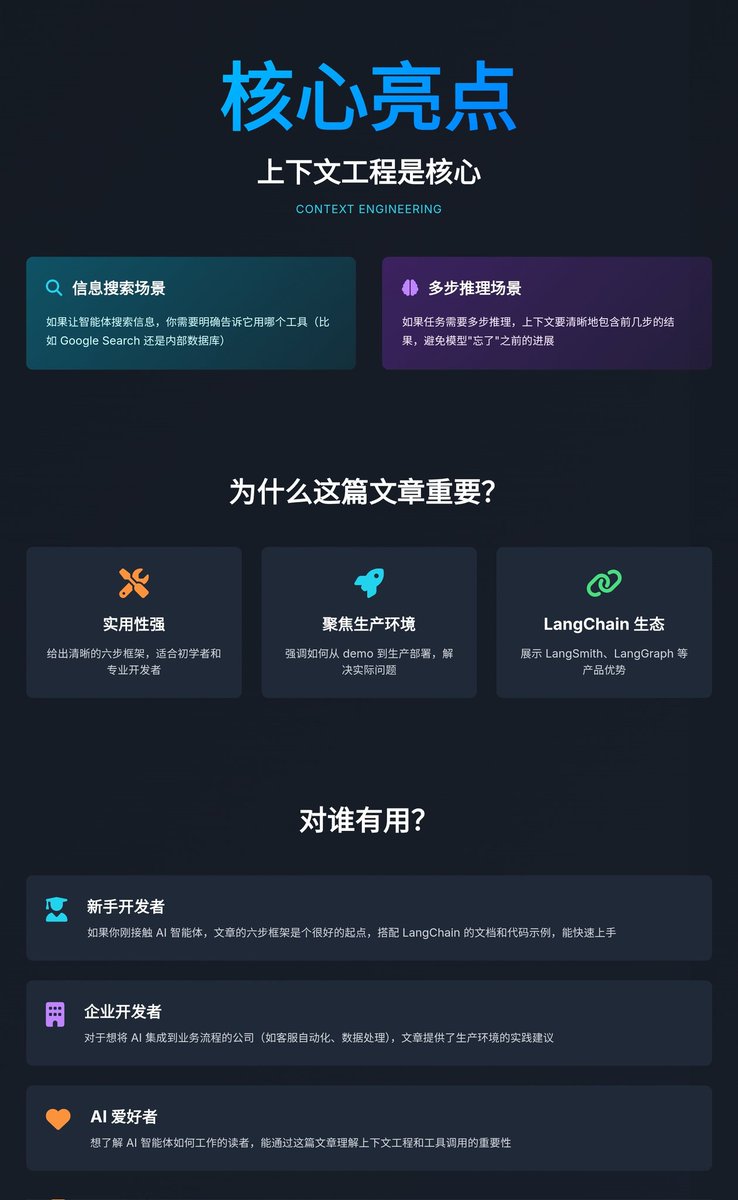
关键亮点:上下文工程是核心
文章反复提到“上下文工程”(context engineering),这是构建智能体的关键。简单来说,智能体的表现好坏,很大程度上取决于你如何为它提供“正确的信息”。比如:
• 如果让智能体搜索信息,你需要明确告诉它用哪个工具(比如 Google Search 还是内部数据库)
• 如果任务需要多步推理,上下文要清晰地包含前几步的结果,避免模型“忘了”之前的进展
LangChain 提供了一些工具(如 `LangGraph` 和 `LangSmith`)来简化上下文管理,让开发者更容易控制智能体的行为。
为什么这篇文章重要?
1. 实用性强:文章不只是理论,而是给出了一个清晰的六步框架,适合初学者和专业开发者。无论你是想快速试水还是开发企业级应用,这套方法都很实用
2. 聚焦生产环境:很多 AI 教程只讲 demo,但这篇文章强调如何从 demo 到生产部署,解决了“看起来很酷但没法用”的问题
3. LangChain 生态的展示:文章巧妙地展示了 LangChain 的产品(如 `LangSmith`、`LangGraph`),说明它们如何帮助开发者解决实际问题,比如调试、优化和部署
对谁有用?
• 新手开发者:如果你刚接触 AI 智能体,文章的六步框架是个很好的起点,搭配 LangChain 的文档和代码示例,能快速上手
• 企业开发者:对于想将 AI 集成到业务流程的公司(如客服自动化、数据处理),文章提供了生产环境的实践建议
• AI 爱好者:想了解 AI 智能体如何工作的读者,能通过这篇文章理解上下文工程和工具调用的重要性
10 Jul 2025

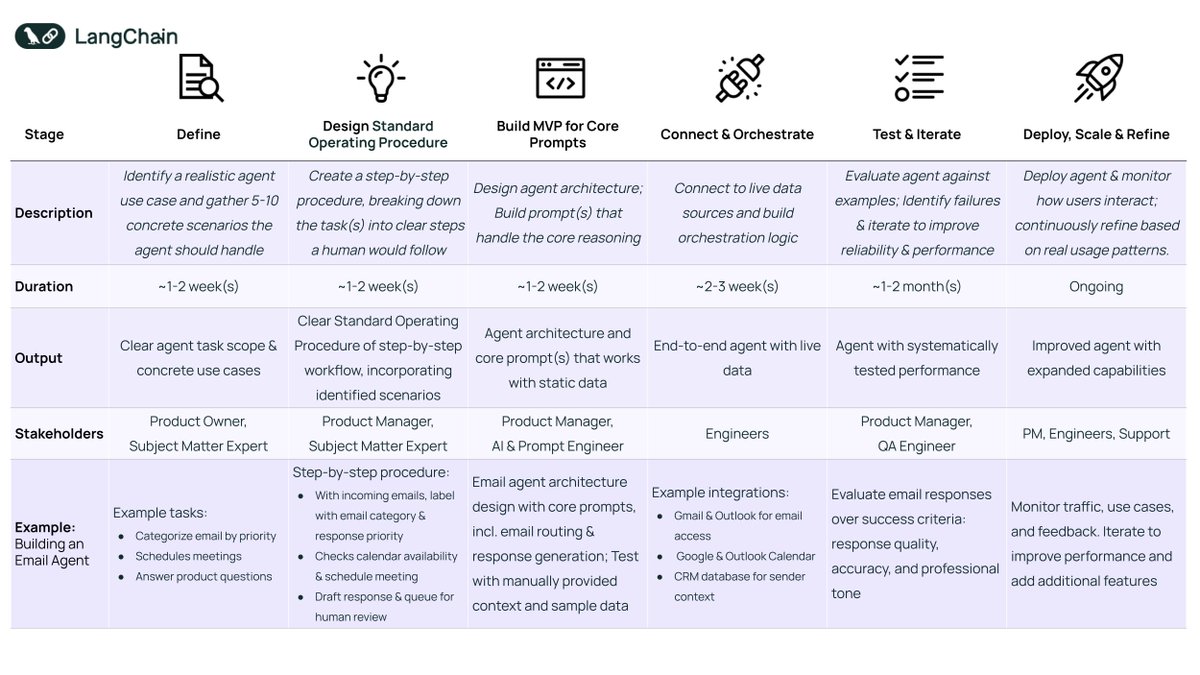
Most teams want to build agents— but it's not always clear where to start.
We created a 6-step framework to help you go from idea → MVP → production. In our latest blog post, learn how to build agents grounded in real use cases, tested against real examples, and shaped by real-world feedback.
Inside the post:
✅ A real-world example of building an email triage agent
✅ Best practices from scoping to deployment
✅ Red flags to avoid so you don’t overbuild or underdeliver
6
46
154
18,215

4 Jul 2025
#LSPPDay34
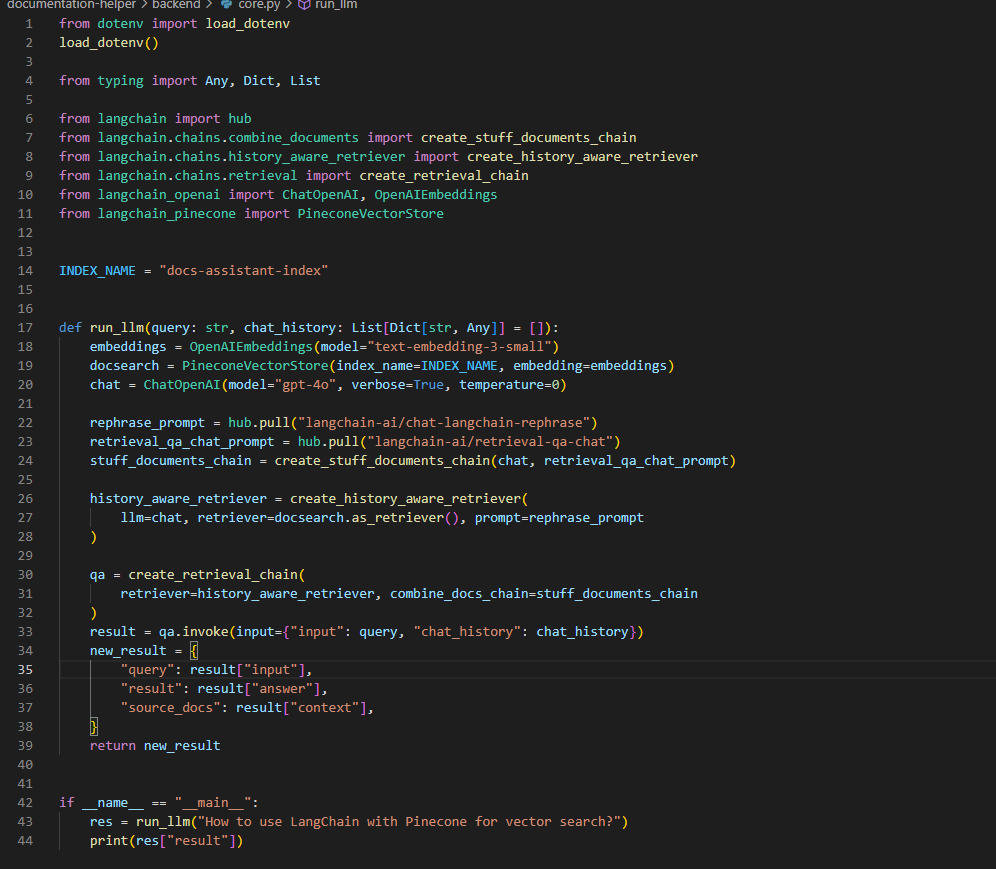
Explored how to build a history-aware RAG system using LangChain!
Used OpenAIEmbeddings, Pinecone, and ChatOpenAI with custom prompts and retrieval chains to generate contextual answers.
#60DaysOfLearning2025 #LearningWithLeapfrog @lftechnology
3
54
27 Jun 2025
#LSPPDay27
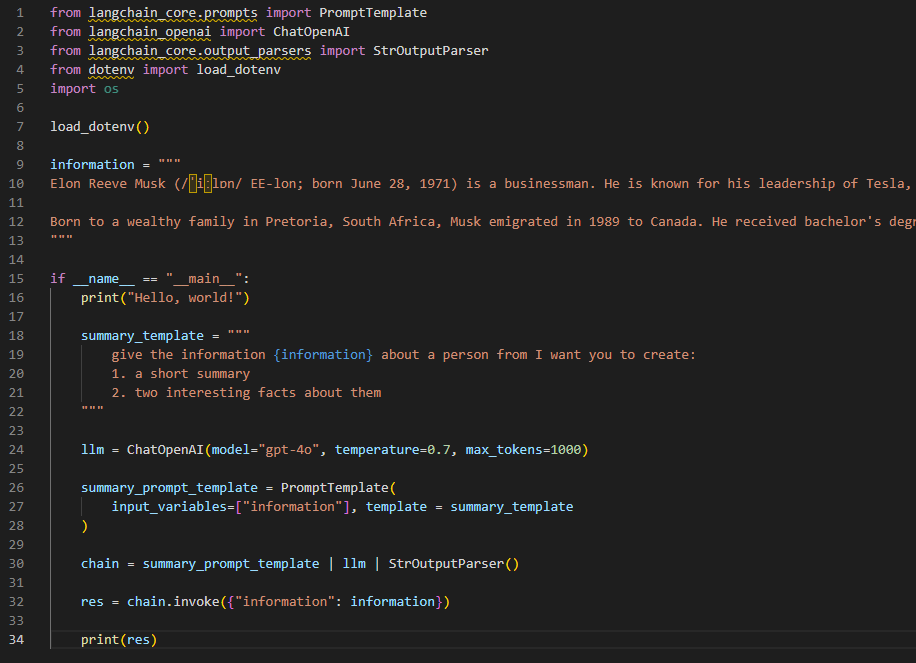
Dove into LangChain today!
🧱 Built a simple LLM-powered chain using PromptTemplate, ChatOpenAI, and StrOutputParser
🧠 Summarized Elon Musk's bio & extracted cool facts using just a few lines of Python!
#LearningWithLeapfrog #60DaysOfLearning2025
@lftechnology

4
61