
The future of AI isn't just bigger models.
It's AI that can understand entire projects, businesses, and workflows without losing important context.
Better Context → Better Understanding → Better AI 🚀. (7/7)
#AI #LLM #ContextWindow #ArtificialIntelligence #FutureOfAI
4


Jun 12
🧠 What is Context Size?
Context size is the maximum number of tokens an LLM can handle at once.
📖 Example:
128K context = up to 128,000 tokens of memory.
🧠 Think of it as the AI's working memory.
#AI #LLM #ContextWindow
4

Do you think that there is a future where the contextwindow of AI will become that big that it will (contrary to us humans) be able to grasp the absolute totality?
32

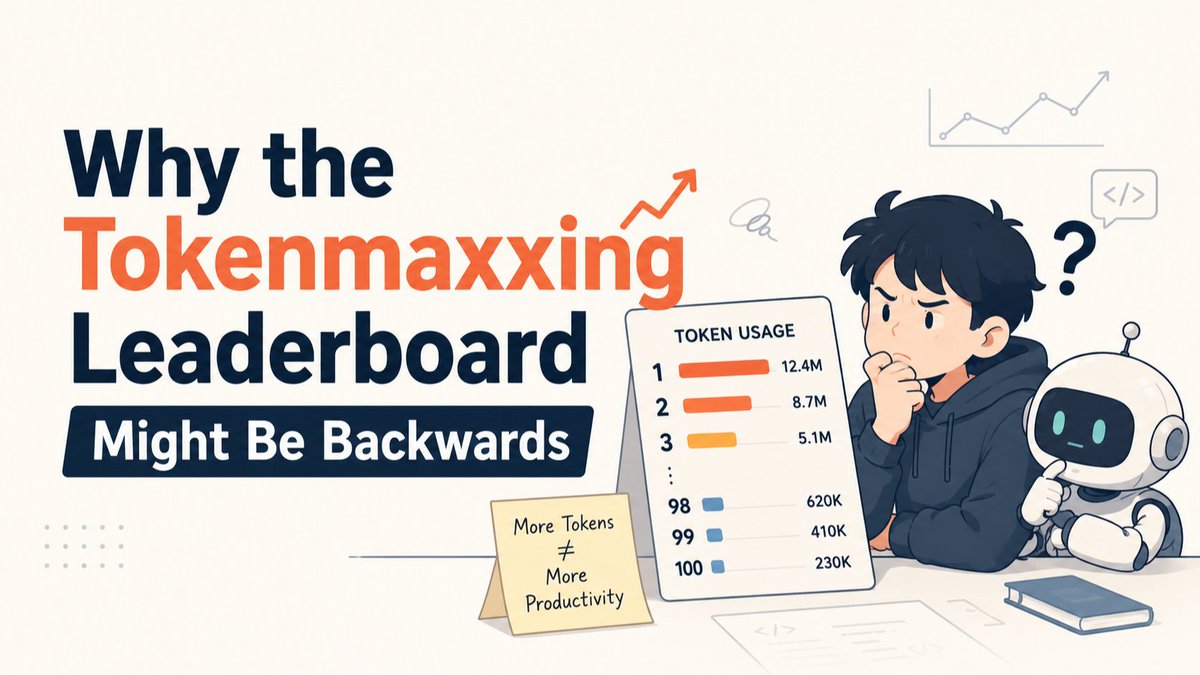
The Tokenmaxxing leaderboard rewards high token usage — but heavy consumption often signals poor AI workflow habits, not productivity.
#ai #contextwindow...Show more
1
251

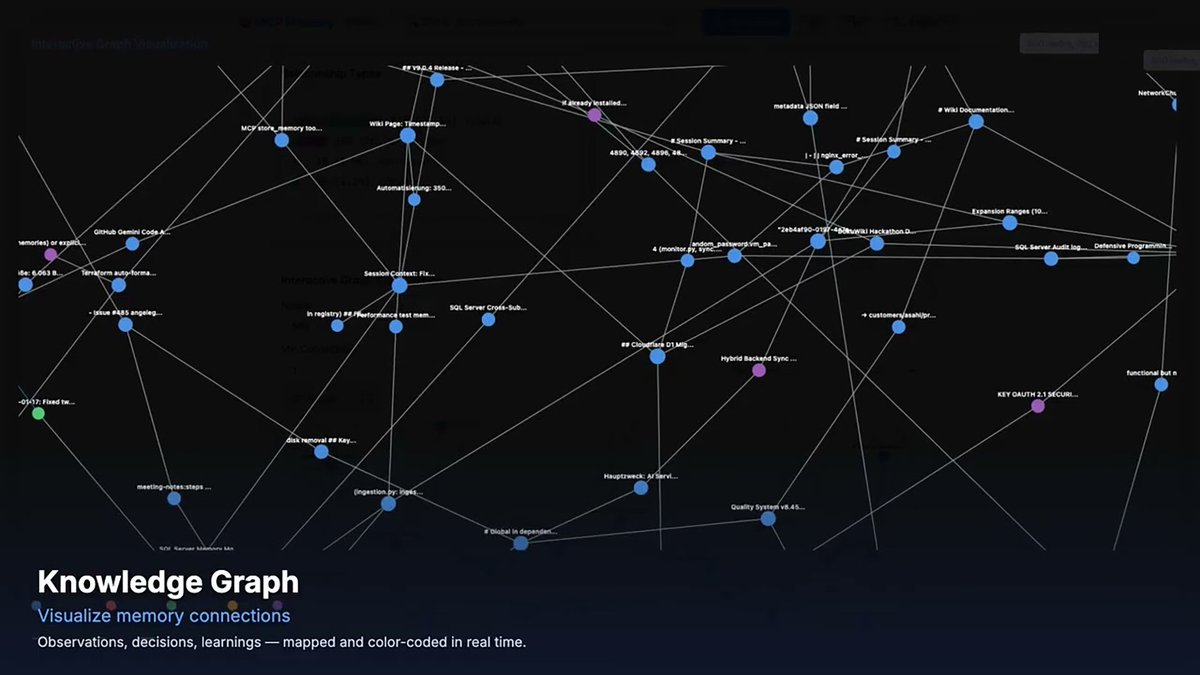
#AI #agents still suffer from a lack of job-to-job #memory once the #contextwindow gets full. Open-source creator Heinrich Krupp explains how he tackled the problem of #agentic memory with his project MCP Memory Service in this deep-dive interview: thehumansintheloop.substack.…
18


5.5性能良いけどExtraHighでPlanningさせるだけで一瞬でContextWindow埋まるしToken死ぬほど消費するしでキツい
3
51

Context window explained: AI models used to have goldfish memory. Subquadratic just gave them a 12M token notepad—that's like upgrading from remembering one sentence to holding an entire library conversation without losing the plot.
#AI #LLM #ContextWindow #TechBreakthrough
50

Jun 7
The Infinite Now vs. Continual Learning: Inside the Context Window
Is massive context length just a temporary fix for onboarding data, or is it fundamentally changing how AI models "learn" in real-time?
I put together a supercut tracking how the architects of modern AI view the future of context windows—from the brute-force compute challenges to the philosophical shift of models living in an "infinite now."
Here is a breakdown of the core debates happening right now in Context Jamming:
The Onboarding Solution: Massive context solves the day-one utility problem, acting like a highly capable intern who has suddenly read your entire internal repo.
The Compute Trade-off: Attention variants, hybrid attention models, and state space models are striving to make modeling the furthest token cheaper, but it's never entirely free.
The Ultimate Trajectory: Will we see a future where a context window of several billion tokens holds your entire history, effectively letting an AI know you better than you know yourself? Or does a model completely lack permanence without continuous weight updates?
🎬 Featured in the Supercut:
Ali Ghodsi (@AliGhodsi / @databricks ) on why intelligence without context is fundamentally limited.
Leopold Aschenbrenner (@Mirror_World / Investment & Research) breaking down the trade-offs between continual weight updates and massive context capacity.
Nathan Lambert (@natolambert / Allen Institute for AI) navigating the architectural shifts from transformers to hybrid attention models.
Lex Fridman (@lexfridman) pushing the boundaries on whether an AI operating within an infinite now possesses a true sense of permanence.
Jack Clark (@jackclarkSF / @AnthropicAI ) on the operational scale of tracking token deployment.
Sam Altman (@samaltman / @OpenAI ) mapping out the distant future of multi-billion token environments.
Dario Amodei (@DarioAmodei @AnthropicAI ) analyzing model adaptation and retrieval mechanics within extended inference limits.
ContextJamming.com
#AI #MachineLearning #LLMs #ContextWindow #InformationTheory #DeepLearning
1
112
Jun 7
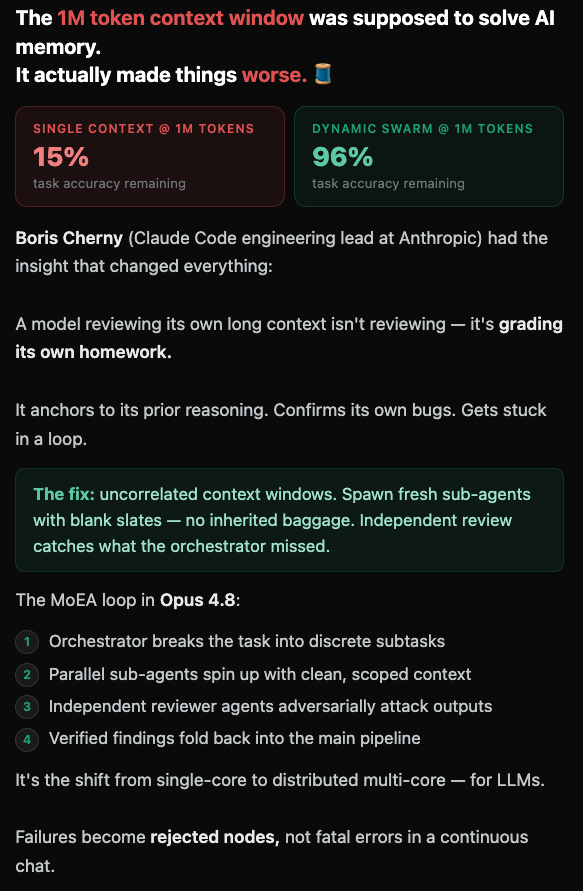
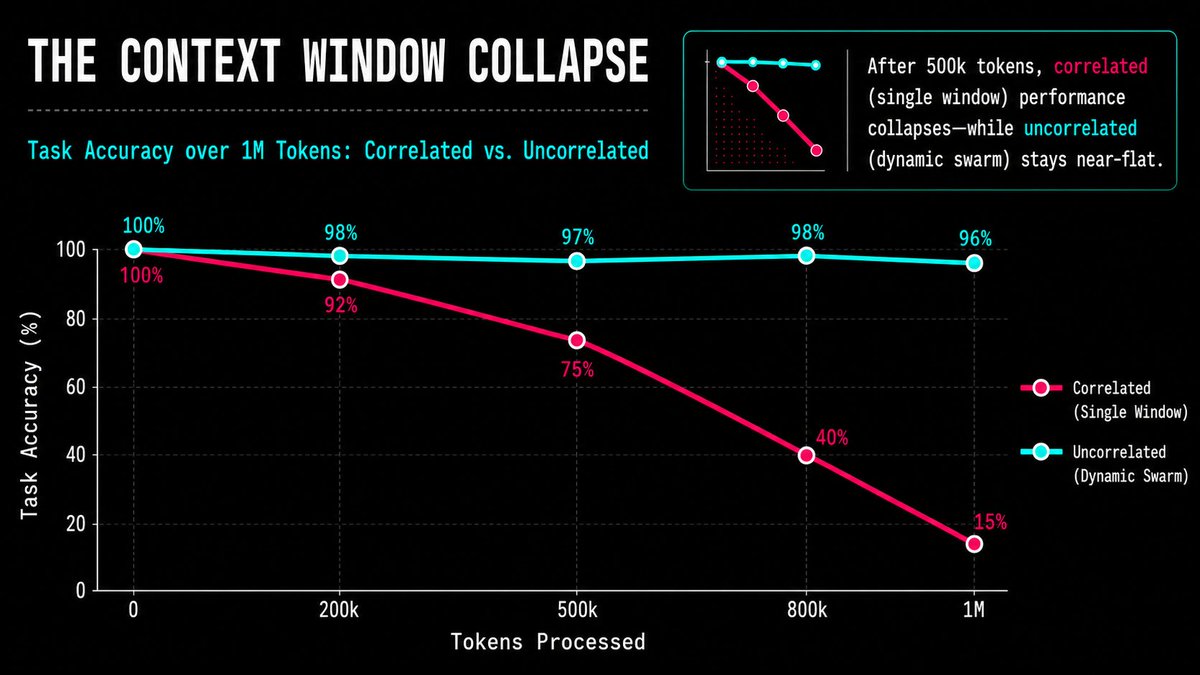
The 1M token context window was supposed to solve AI memory.
It actually made things worse. 🧵
Single context @ 1M tokens:
15% task accuracy remaining
Dynamic swarm @ 1M tokens:
96% task accuracy remaining
@bcherny (@claudeai Code engineering lead at @AnthropicAI ) had the insight that changed everything:
A model reviewing its own long context isn't reviewing — it's grading its own homework.
It anchors to its prior reasoning. Confirms its own bugs. Gets stuck in a loop.
The fix: uncorrelated context windows.
Spawn fresh sub-agents with blank slates —
no inherited baggage. Independent review catches what the orchestrator missed.
The MoEA loop in Opus 4.8:
Orchestrator breaks the task into discrete subtasks
1️⃣ Parallel sub-agents spin up with clean,
scoped context
2️⃣ Independent reviewer agents adversarially
attack outputs
3️⃣ Verified findings fold back into the main pipeline
4️⃣ It's the shift from single-core to distributed
multi-core — for LLMs.
Failures become rejected nodes, not fatal errors in a continuous chat.
Full breakdown data viz → Context Jamming ⬇️
#ClaudeCode#AIAgents#LLM#ContextWindow#Anthropic

5
3
104


May 26
白嫖NVIDIA免费算力生图:零显卡也能出高清AI图片,3步搞定
你没有RTX 4090?没关系,NVIDIA把H100白送了。
一、先说结论
NVIDIA的 build.nvidia.com 平台,免费开放了包括flux在内的多个生图模型API。注册拿Key,丢给openclaw,不装任何本地环境,不需要显卡,不需要代码,就能生成1024×1024的高清图片。
这不是什么限时体验,是NVIDIA长期给开发者的免费额度。虽然有限流(每分钟40次调用),但对个人用户来说完全够用。
本文你将学会:
3分钟注册NVIDIA账号、拿API Key
调用flux生成高清图
在OpenClaw中配置图像生成api调用,一句话出图
二、NVIDIA免费生图模型一览
登录 build.nvidia.com ,进入「Visual Design」分类,你会看到这些免费模型:
模型 用途 端点
FLUX.1-schnell 快速草稿,免费额度多
black-forest-labs/flux.1-schnell FLUX.1-dev 高质量成品
black-forest-labs/flux.1-dev SD 3.5 Large SD 生态兼容
stabilityai/stable-diffusion-3.5-large
关键限制也记好了:提示词必须 < 860 字符,否则输出会退化成黑图。
三、3步拿到API Key
第1步:注册NVIDIA账号
打开 build.nvidia.com
点击右上角「Login」→「Create Account」
填写邮箱(QQ邮箱亲测最稳),设置密码
检查邮箱,输入6位验证码
小技巧:也可以直接用微信/QQ账号快捷登录。
第2步:手机验证(关键一步)
注册后页面顶部会出现黄色提示:
「Verify your account to unlock API access」
点击「Verify」
国家选China
输入手机号:格式 86 13812345678( 86前缀不能少)
等短信验证码(1-2分钟)
常见卡点:
收不到验证码 → 换4G/5G网络,或等10分钟重试
提示”exceeded limits” → 换个手机号
验证码过期 → 只有90秒有效期,超时点「Request New Code」
第3步:生成API Key
点击头像 →「API Keys」
点击「 Generate API Key」
Expiration选 Never Expire(永不过期)
点击「Generate Key」
⚠️ Key只显示一次! 立即复制保存到记事本或密码管理器。
你的Key格式:nvapi-xxxxxxxxxxxxxxxx
四、 提示词技巧
NVIDIA的模型和本地版使用同一套提示词语法,几个实用技巧:
① 正向 负向提示词组合
payload = {
"text_prompts": [
{"text": "A beautiful landscape, mountains, sunset, 8k, masterpiece", "weight": 1},
{"text": "blurry, low quality, watermark, text, deformed", "weight": -1} # 负向提示词
],
}
② 关键参数调优
参数推荐值说明
cfg_scale7-12值越大越遵循提示词,但过大图片会”过饱和”
steps步数越多细节越丰富,但耗时更长
seed固定数字同seed 同参数=同一张图,方便复现和微调
③ 尺寸选择
原生训练尺寸是1024×1024,也支持:
1024×768(横版)
768×1024(竖版)
1024×1024(正方形,最稳)
不建议用512×512,在这个尺寸下画质会明显下降。
五、在OpenClaw中配置:一句话出图
如果你在用OpenClaw(AI Agent框架),可以更懒——直接说话让AI帮你画。
方案A:安装图像生成Skill
OpenClaw生态已有多个图像生成技能包,安装后自然语言触发:
# 安装即梦图像技能(中文提示词最友好)
openclaw skills install seedance-image
# 或安装Gemini图像技能(免费额度充足)
openclaw skills install gemini-image
安装后配置API Key,重启,直接对话:
“帮我生成一张产品封面图,蓝色科技感” “用写实风格出一张城市夜景”
OpenClaw会自动识别触发图像技能,调用API生成图片,保存到本地。
方案B:配置NVIDIA API作为自定义模型
在 openclaw.json 中添加NVIDIA的图像模型:
{
"models": {
"providers": {
"nvidia-image": {
"baseUrl": "ai.api.nvidia.com/v1",
"apiKey": "nvapi-你的Key",
"api": "openai-completions",
"models": [
{
"id": "stabilityai/sdxl-turbo",
"name": "SDXL Turbo (NVIDIA Free)",
"reasoning": false,
"input": ["text"],
"contextWindow": 4096,
"maxTokens": 4096
}
]
}
}
}
}
重启OpenClaw即可在模型列表中看到NVIDIA的生图模型。
最最简单的方案:
直接在对话中把api丢给openclaw,让它调用flux.1-dev生图模型,把提示词给它,直接生成。
六、生图模型对比实测
模型 用途 端点 FLUX.1-schnell 快速草稿,免费额度多 black-forest-labs/flux.1-schnell FLUX.1-dev 高质量成品 black-forest-labs/flux.1-dev SD 3.5 Large SD 生态兼容 stabilityai/stable-diffusion-3.5-large 关键限制也记好了:提示词必须 < 860 字符,否则输出会退化成黑图。
结论: 不会装本地环境的新手,NVIDIA API是最快上手路径。会装本地环境的,NVIDIA API是最好的补充——出差、换电脑、或需要不同风格时直接API调用。
七、避坑指南
❌ 常见错误1:Key复制不全
NVIDIA的Key很长,复制时容易截断。确保Key以 nvapi- 开头,末尾没有多余空格。
❌ 常见错误2:手机验证跳过
不验证手机号,API Key创建了也无法调用。一定要完成Verify步骤。
❌ 常见错误3:提示词用中文
Stable Diffusion系列模型用英文提示词效果远好于中文。如果中文提示词出图不理想,先翻译成英文再试。
❌ 常见错误4:免费当生产用
NVIDIA免费API适合个人学习、测试、小规模使用。不建议用于商业生产环境——额度可能随时调整,高峰期响应速度也不稳定。
八、进阶玩法
批量出图
修改payload的samples参数,一次API调用生成多张变体:
payload = {
"text_prompts": [{"text": prompt, "weight": 1}],
"samples": 4, # 一次生成4张
"steps": 4,
"height": 1024,
"width": 1024,
}
负向提示词去瑕疵
"text_prompts": [
{"text": "professional portrait photo, sharp focus", "weight": 1},
{"text": "extra fingers, mutated hands, blurry, low quality, watermark", "weight": -1}
]
风格关键词速查
风格推荐关键词
摄影photograph, 8k, sharp focus, professional
水彩watercolor painting, soft colors, artistic
赛博朋克cyberpunk, neon lights, futuristic, dark
日系动漫anime style, detailed, vibrant colors
中国风traditional Chinese ink painting, minimalist, elegant
3D渲染3D render, octane render, volumetric lighting
总结
步骤操作耗时
1. 注册NVIDIA账号http://build.nvidia.com2分钟
2. 验证手机号 86前缀1分钟
3. 生成API Key选Never Expire30秒
4. api丢给openclaw 即刻出图
没有显卡不是拦路虎。 NVIDIA把H100算力免费开放在云端跑,你只需要一个小龙虾和api。
说句实在话,这种免费GPU算力的好事不会永远持续——早用早享受,且用且珍惜。
#AI #AIAgent @grok
28
18
46
4,584


人間の言う”可読性”と言うものをもっと噛み砕いて言語化した方がいい。
おそらく脳内リソースを圧迫しないことが可読性の正体だ。AIにおいても同じContextWindowを圧迫しないことに等しいと考えられる。
ContextWindowを圧迫しないとはどう言うことかというと、責務が分離され、処理フローの分岐が少ないことを意味していると思う。
神クラスのようななんでもできるクラスは、結局何かをするたび何ができるのか予測ができないので全ての実装を読む必要がある。
一方単一責任のクラスは名前だけでもその動作が推測できる。名前から動作が推論できることはContextWindowを小さく保つのにとても必要なことになる。
人間においてもこの推論可能性を可読性と言っているはずだ。
2
1,393

May 18
Cursor の新モデル Composer 2.5 を Cursor CLI で色々なデモをやっていたところの感想
✅ Web サイト生成のショットの見た目とか良い
✅ レポート / 構造化データ抽出も安定
✅ スキル発動とかCLIの動きとかもいい感じ
ただしGPT5.5やOpus4.7ほどか?と言われると。。。
ContextWindowは200Kで、コストは標準版 $0.50 / 出力 $2.50 per M tokens。安く回せる用途で持ち替える設計が、現時点では一番納得感ありますね
動画でも解説しました👇
youtube.com/watch?v=ukEmEnfK…
May 18

色々動かして試してますが Composer 2.5 めっちゃいいモデルだなー Kimi-K2.6ベースなのかな
1
30
9,716